reset MAZDA MX5 MIATA 2017 User Guide
[x] Cancel search | Manufacturer: MAZDA, Model Year: 2017, Model line: MX5 MIATA, Model: MAZDA MX5 MIATA 2017Pages: 568, PDF Size: 16.58 MB
Page 137 of 568

4 –23 When Driving
Instrument Cluster and Display Average Fuel EconomyThis mode displays the average fuel
economy by calculating the total fuel
consumption and the total traveled
distance since purchasing the vehicle, re-
connecting the battery after disconnection,
or resetting the data.
The average fuel economy is calculated
and displayed every minute.
To clear the data being displayed, press the
INFO switch for more than 1.5 seconds.
After pressing the INFO switch,
- - - L/100 km (- - - mpg) will be displayed
for about 1 minute before the fuel
economy is recalculated and displayed.
Current Fuel EconomyThis displays the current fuel economy
by calculating the amount of fuel
consumption and the distance traveled.
Current fuel economy will be calculated
and displayed every two seconds.
When you've slowed to about 5 km/h
(3 mph), - - - L/100 km (- - - mpg) will be
displayed. Maintenance Monitor The following maintenance period
notifications can be displayed by turning
the Maintenance Monitor on.
Scheduled Maintenance
Tire Rotation
Oil Change
For the setting method and indications
for the maintenance monitor, refer to the
Maintenance Monitor.
Refer to Maintenance Monitor on page
6-20 .
The maintenance monitor displays the
information when the ignition is switched
ON.
NOTE
This function is inoperable while the
vehicle is being driven.
Message display
When the remaining time or the distance
approaches 0, a message is displayed each
time the ignition is switched ON.
MX-5_8FR4-EA-16J_Edition1.indb 23 2016/08/11 20:28:46
Page 138 of 568

4 –24 When Driving
Instrument Cluster and Display
*Some models.NOTE
If any of the INFO switch is pressed
while a message is displayed, it will no
longer be displayed the next time the
ignition is switched ON.
After the vehicle is serviced and the
remaining time/distance is reset, the
message for the next maintenance
period will be displayed when the
remaining distance or time to the next
maintenance period approaches 0
(displays when engine is started).
If there are multiple messages, they are
displayed according to their order.
If OFF is set for Messages, messages
are not displayed.
Lane Departure Warning System
(LDWS) Display *
Displays the system status.
Refer to Lane Departure Warning on page
4-83 .
Cruise Control Set Vehicle Speed
Display
The vehicle speed preset using the cruise
control is displayed. Compass Display The direction the vehicle is moving is
displayed in one of the eight cardinal
directions while the vehicle is being
driven. Display Direction
N North
S South
E East
W West
NE Northeast
NW Northwest
SE Southeast
SW Southwest
Roof Operation Display Displays the roof operation status.
Refer to Operation Indication on page
3-42 .
MX-5_8FR4-EA-16J_Edition1.indb 24 2016/08/11 20:28:47
Page 144 of 568

4 –30 When Driving
Instrument Cluster and Display
*Some models.Signal Indicator Lights Page
(Green) *
High Beam Control System (HBC) Indicator Light 4-78*
Blind Spot Monitoring (BSM) OFF Indicator Light *1
4-90*
Lane Departure Warning System (LDWS) OFF Indicator
Light *1
4-82
(White/Amber) Cruise Main Indication/Indicator Light 4-101
(Green) Cruise Set Indication/Indicator Light 4-101
*1 The light turns on when the ignition is switched on for an operation check, and turns off a few seconds later or
when the engine is started. If the light does not turn on or remains turned on, have the vehicle inspected at an
Authorized Mazda Dealer.
Wrench Indication/Indicator
Light *
Type A instrument cluster
Perform maintenance in accordance with
the message.
Type B instrument cluster
When the ignition is switched ON, the
wrench indicator light is illuminated and
then turns off after a few seconds.
The wrench indicator light is illuminated
when the preset maintenance period
arrives. Verify the content and perform
maintenance.
Refer to Maintenance Monitor on page
6-20 . Low Engine Coolant Temperature
Indicator Light (Blue)
The light illuminates continuously when
the engine coolant temperature is low and
turns off after the engine is warm.
If the low engine coolant temperature
indicator light remains illuminated after
the engine has been sufficiently warmed
up, the temperature sensor could have
a malfunction. Consult an Authorized
Mazda Dealer.
MX-5_8FR4-EA-16J_Edition1.indb 30 2016/08/11 20:28:49
Page 183 of 568

4 –69 When Driving
Fuel Economy Monitor
*Some models.Fuel Economy Monitor *
For vehicles with type B audio, the Fuel Consumption informatio n is displayed by operating
each icon in the display.
In addition, after completing a trip, the total energy efficiency to date is displayed in the
ending display when the ending display is turned on.
1. Select the icon on the home screen to display the applications screen.
2. Select the “Fuel Economy Monitor”.
3. Operate the commander switch or touch the screen and display the menu.
NOTE
When the menu is displayed by touching the screen, the display is hidden automatically after
6 seconds.
4. Select the icon in the menu and perform the operation. Each ico n operates as follows:Indication on display Control status
Hides the menu display.
Displays the application screen.
Resets the fuel economy data.
Displays the following setting screen.
Ending display on/off switching
On/off switching for function which synchronizes
reset fuel economy data to trip meter (Trip A)
MX-5_8FR4-EA-16J_Edition1.indb 69 2016/08/11 20:28:59
Page 184 of 568

4 –70 When Driving
Fuel Economy Monitor Fuel Consumption DisplayInformation regarding the fuel economy is displayed. Indication on display Control status
Displays the fuel economy for the past 60 minutes.
Displays the fuel economy every minute for the
past 1 to 10 minutes.
Displays the fuel economy every 10 minutes for the
past 10 to 60 minutes.
Displays the average fuel economy over the past 5
resets and after the current reset.
Calculates the average fuel economy every minute
after vehicle travel begins, and displays it.
NOTE
The fuel economy data can be reset by doing the following operation:
Press the reset switch from the menu screen.
When the function which synchronizes the fuel economy monitor and the trip meter is
on, reset trip A of the trip meter.
Delete the average fuel economy information displayed in the trip computer.
After resetting the fuel economy data, “-- -” is displayed while the average fuel economy
is calculated.
Ending Screen DisplayIf the ending display on the fuel economy monitor is on when the ignition is switched from
ON to OFF, the information regarding the fuel economy is displayed.
MX-5_8FR4-EA-16J_Edition1.indb 70 2016/08/11 20:28:59
Page 216 of 568

4 –102 When Driving
Cruise Control NOTE
The cruise control speed setting cannot
be performed under the following
conditions:
(Automatic transmission)
The selector lever is in the P or N
position.
(Manual transmission)
The shift lever is in the neutral
position.
The parking brake is applied.
Release the SET/ or RESUME/
switch at the desired speed, otherwise
the speed will continue increasing while
the RESUME/
switch is pressed and
held, and continue decreasing while the
SET/
switch is pressed and held
(except when the accelerator pedal is
depressed).
On a steep grade, the vehicle may
momentarily slow down while ascending
or speed up while descending.
The cruise control will cancel if the
vehicle speed decreases below 21 km/h
(13 mph) when the cruise control is
activated, such as when climbing a
steep grade.
The cruise control may cancel at about
15 km/h (9 mph) below the preset speed,
such as when climbing a long, steep
grade. The vehicle speed preset using the cruise
control is displayed in the instrument
cluster. Type A Instrument Cluster
Type B Instrument Cluster
MX-5_8FR4-EA-16J_Edition1.indb 102 2016/08/11 20:29:05
Page 217 of 568

4 –103 When Driving
Cruise Control To Increase Cruising SpeedFollow either of these procedures.
To increase speed using cruise control
switch
Press the RESUME/
switch and hold it.
Your vehicle will accelerate. Release the
switch at the desired speed.
Press the RESUME/
switch and release
it immediately to adjust the preset speed.
Multiple operations will increase the
preset speed according to the number of
times it is operated.
Increasing speed with a single
RESUME/
switch operation
Instrument cluster display for vehicle
speed indicated in km/h: 1 km/h (0.6 mph)
Instrument cluster display for vehicle
speed indicated in mph: 1 mph (1.6 km/h)
To increase speed using accelerator
pedal
Depress the accelerator pedal to accelerate
to the desired speed. Press the SET/
switch and release it immediately.
NOTE
Accelerate if you want to speed up
temporarily when the cruise control is on.
Greater speed will not interfere with or
change the set speed. Take your foot off the
accelerator to return to the set speed. To Decrease Cruising Speed Press the SET/ switch and hold it. The
vehicle will gradually slow.
Release the switch at the desired speed.
Press the SET/
switch and release it
immediately to adjust the preset speed.
Multiple operations will decrease the
preset speed according to the number of
times it is operated.
Decreasing speed with a single SET/
switch operation
Instrument cluster display for vehicle
speed indicated in km/h: 1 km/h (0.6 mph)
Instrument cluster display for vehicle
speed indicated in mph: 1 mph (1.6 km/h)
To Resume Cruising Speed at
More Than 25 km/h (16 mph) If some other method besides the OFF/
CANCEL switch was used to cancel
cruising speed (such as applying the brake
pedal) and the system is still activated, the
most recent set speed will automatically
resume when the RESUME/
switch is
pressed.
If vehicle speed is below 25 km/h (16
mph), increase the vehicle speed up to 25
km/h (16 mph) or more and press the
RESUME/
switch.
To Temporarily Cancel
To temporarily cancel the system, use one
of these methods:
Slightly depress the brake pedal.
(Manual transmission)
Depress the clutch pedal.
Press the OFF/CANCEL switch.
MX-5_8FR4-EA-16J_Edition1.indb 103 2016/08/11 20:29:05
Page 247 of 568

5 –25 Interior Features
Audio System
*Some models.NOTE
If not operated for several seconds, the
display returns to the previous display. To
reset bass, treble, fade, and balance, press
the menu button (
) for 2 seconds.
The unit will beep and “CLEAR” will be
displayed.
ALC (Automatic volume adjustment)
The automatic level control (ALC)
changes the audio volume automatically
according to the vehicle speed. The faster
the vehicle speed, the higher the volume
increases. ALC has ALC OFF and ALC
LEVEL 1 to 7 modes. At ALC LEVEL 7,
the amount that the volume can increase
is at the maximum. Select the mode
according to the driving conditions.
BEEP (Audio operation sound)
The setting for the operation sound when
pressing and holding a button can be
changed. The initial setting is ON. Set to
OFF to mute the operation sound.
BT SETUP mode *
Music and other audio such as voice data
recorded on portable audio devices and
mobile phones available on the market
which are equipped with the Bluetooth ®
transmission function can be listened to
via wireless transmission over the vehicle's
speakers. Using the BT SETUP mode,
these devices can be programmed to the
Bluetooth ®
unit or changed (page 5-77 ).
12Hr 24Hr (12 Hr/24 Hr time
adjustment)
Rotating the audio control dial switches
the display between 12 and 24-hour clock
time (page 5-26 ).
MX-5_8FR4-EA-16J_Edition1.indb 25 2016/08/11 20:29:12
Page 248 of 568
5 –26 Interior Features
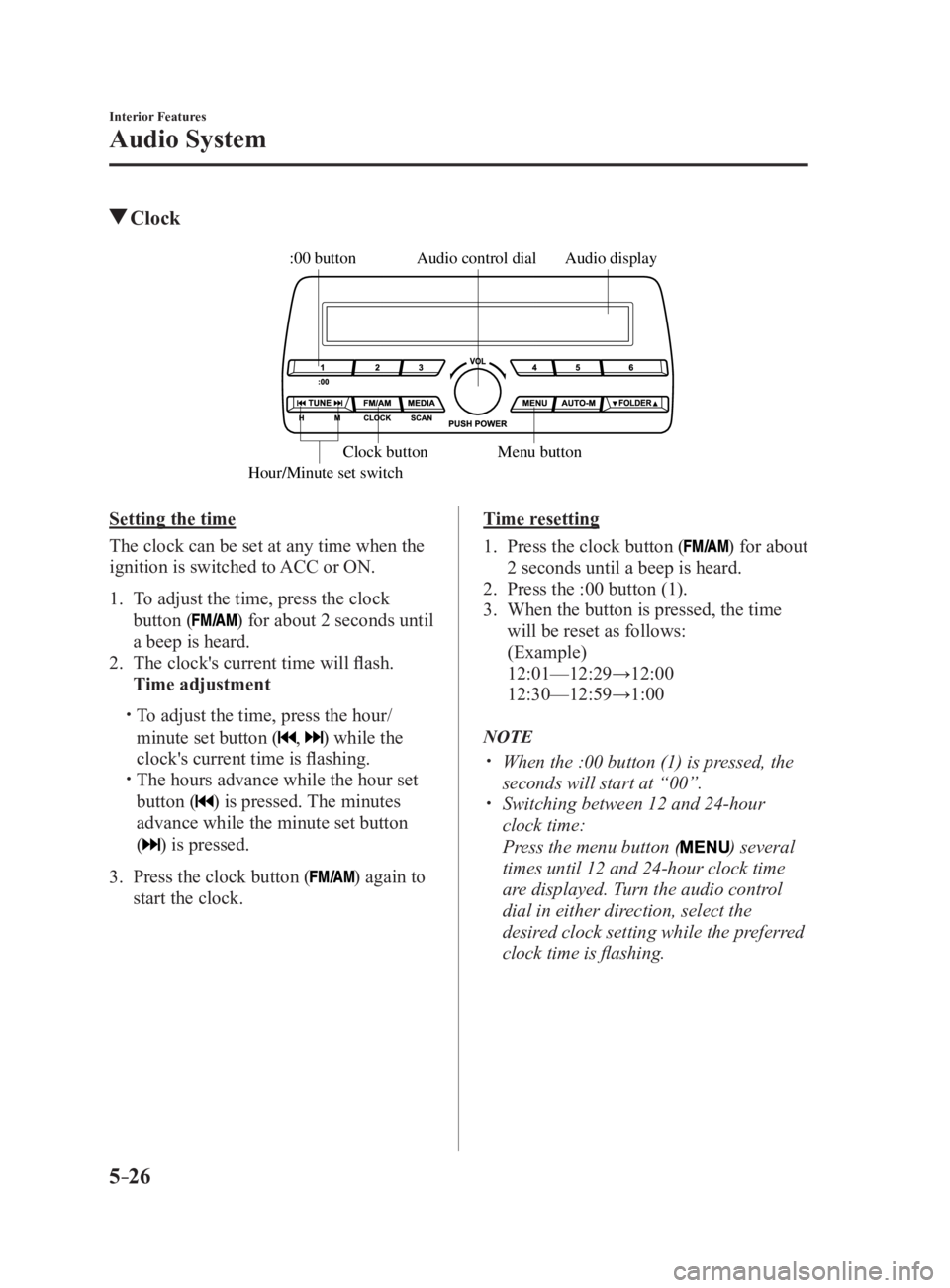
Audio System Clock Audio displayAudio control dial
Hour/Minute set switch :00 button
Menu buttonClock button
Setting the time
The clock can be set at any time when the
ignition is switched to ACC or ON.
1. To adjust the time, press the clock
button ( ) for about 2 seconds until
a beep is heard.
2. The clock's current time will flash.
Time adjustment
To adjust the time, press the hour/
minute set button ( , ) while the
clock's current time is flashing.
The hours advance while the hour set
button ( ) is pressed. The minutes
advance while the minute set button
(
) is pressed.
3. Press the clock button ( ) again to
start the clock. Time resetting
1. Press the clock button ( ) for about
2 seconds until a beep is heard.
2. Press the :00 button (1).
3. When the button is pressed, the time
will be reset as follows:
(Example)
12:01—12:29→12:00
12:30—12:59→1:00
NOTE
When the :00 button (1) is pressed, the
seconds will start at “00”.
Switching between 12 and 24-hour
clock time:
Press the menu button ( ) several
times until 12 and 24-hour clock time
are displayed. Turn the audio control
dial in either direction, select the
desired clock setting while the preferred
clock time is flashing.
MX-5_8FR4-EA-16J_Edition1.indb 26 2016/08/11 20:29:12
Page 250 of 568
5 –28 Interior Features
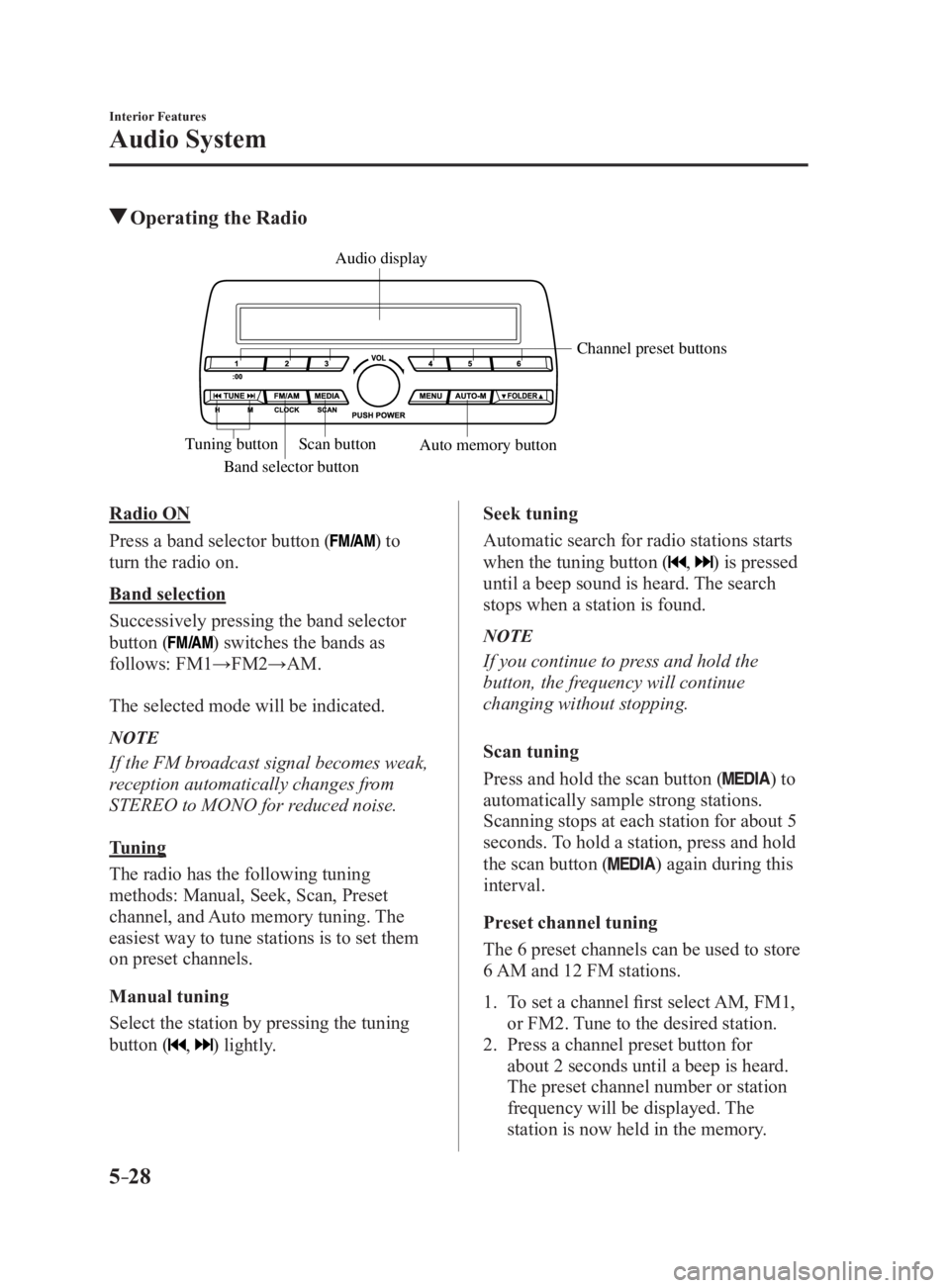
Audio System Operating the Radio
Band selector button Channel preset buttons
Scan button
Auto memory buttonTuning button Audio display
Radio ON
Press a band selector button (
) to
turn the radio on.
Band selection
Successively pressing the band selector
button (
) switches the bands as
follows: FM1→FM2→AM.
The selected mode will be indicated.
NOTE
If the FM broadcast signal becomes weak,
reception automatically changes from
STEREO to MONO for reduced noise.
Tuning
The radio has the following tuning
methods: Manual, Seek, Scan, Preset
channel, and Auto memory tuning. The
easiest way to tune stations is to set them
on preset channels.
Manual tuning
Select the station by pressing the tuning
button (
, ) lightly. Seek tuning
Automatic search for radio stations starts
when the tuning button (
, ) is pressed
until a beep sound is heard. The search
stops when a station is found.
NOTE
If you continue to press and hold the
button, the frequency will continue
changing without stopping.
Scan tuning
Press and hold the scan button (
) to
automatically sample strong stations.
Scanning stops at each station for about 5
seconds. To hold a station, press and hold
the scan button (
) again during this
interval.
Preset channel tuning
The 6 preset channels can be used to store
6 AM and 12 FM stations.
1. To set a channel first select AM, FM1,
or FM2. Tune to the desired station.
2. Press a channel preset button for
about 2 seconds until a beep is heard.
The preset channel number or station
frequency will be displayed. The
station is now held in the memory.
MX-5_8FR4-EA-16J_Edition1.indb 28 2016/08/11 20:29:12