audio MAZDA MX5 MIATA 2017 Workshop Manual
[x] Cancel search | Manufacturer: MAZDA, Model Year: 2017, Model line: MX5 MIATA, Model: MAZDA MX5 MIATA 2017Pages: 568, PDF Size: 16.58 MB
Page 284 of 568

5 –62 Interior Features
Audio System NOTE
The information (artist name, music
name) is displayed only when the USB
device information in the USB device
has information which can be displayed
on the screen.
This unit cannot display some
characters. Characters which cannot be
displayed are indicated by an asterisk
(
).
Display scroll
Only 13 characters can be displayed at one
time. To display the rest of the characters
of a long title, press and hold the text
button (3). The display scrolls the next 13
characters. Press and hold the text button
(3) again after the last 13 characters have
been displayed to return to the beginning
of the title.
NOTE
The number of characters which can be
displayed is restricted.
Error Messages
When the message “CHECK USB” is
displayed, it indicates that there is some
error in the USB device. Verify that the
content recorded in the USB device has
MP3/WMA/AAC files and re-connect
correctly. If the message reappears, have
the unit checked by an Authorized Mazda
Dealer.
MX-5_8FR4-EA-16J_Edition1.indb 62 2016/08/11 20:29:19
Page 286 of 568

5 –64 Interior Features
Audio System How to use iPod mode (Type A)
Media/Scan button List down buttonList up buttonPlay/Pause button
Random button
Repeat button Audio display
Text button
Track down/Reverse button
Track up/Fast-forward button Category down button
Category up button
An iPod may not be compatible depending
on the model or OS version. In this case,
an error message is displayed.
NOTE
The iPod functions on the iPod cannot
be operated while it is connected to the
unit because the unit controls the iPod
functions.
Playback
1. Switch the ignition to ACC or ON.
2. Press the power/volume dial to turn the
audio system on.
3. Press the media button ( ) to
switch to the iPod mode and start
playback.
NOTE
When an iPod is not connected, the
mode does not switch to the iPod mode.
When there is no playable data in the
iPod, “NO CONTENTS” is flashed.
Do not remove the iPod while in the
iPod mode. Otherwise, the data could
be damaged. Pause
To stop playback, press the play/pause
button (4).
Press the button again to resume playback.
Fast-forward/Reverse
Press and hold the fast-forward button (
)
to advance through a track at high speed.
Press and hold the reverse button (
) to
reverse through a track at high speed.
Track search
Press the track up button (
) once to skip
forward to the beginning of the next track.
Press the track down button (
) within a
few seconds (depends on iPod software
version) after playback begins to track
down to the beginning of the previous
track.
Press the track down button (
) after a
few seconds (depends on iPod software
version) have elapsed to start playback
from the beginning of the current track.
Category search
Press the category down button (5) to
select the previous category and press the
category up button (6) to select the next
category.
MX-5_8FR4-EA-16J_Edition1.indb 64 2016/08/11 20:29:19
Page 287 of 568
5 –65 Interior Features
Audio SystemNOTE
The types of categories include Playlist,
Artist, Album, Song, Podcast, Genre,
Composer, and Audio book.
List search
Press the list down button (
) to select the
previous list and press the list up button
(
) to select the next list.
NOTE
When the selected category is Song or
Audio book, there is no list.
Music scan
This function scans the titles in a list
currently being played and plays 10
seconds of each song to aid you in finding
a song you want to listen to.
Press and hold the scan button (
)
during playback to start the scan play
operation (the track number will flash).
Press and hold the scan button (
)
again to cancel scan playback.
NOTE
If the unit is left in scan, normal playback
will resume where scan was selected.
Repeat playback
1. Press the repeat button (1) during
playback to play the current track
repeatedly. “TRACK RPT” is displayed
(
is displayed next to RPT at the
bottom of the display area).
2. Press the button again to cancel the
repeat playback. Random playback
Tracks are randomly selected and played.
Song random
1. Press the random button (2) during
playback to play the tracks in the list
randomly. “SONG RDM” is displayed
(
is displayed next to RDM at the
bottom of the display area).
2. To cancel the random playback, press
the button again after 3 seconds.
Album random
1. Press the random button (2) during
playback, and then press the button
again within 3 seconds to play the
tracks in the iPod randomly. “ALBUM
RDM” is displayed (
is displayed
next to RDM at the bottom of the
display area).
2. Press the button again to cancel the
random playback.
NOTE
The track number being played randomly
is in the order of the iPod shuffle table.
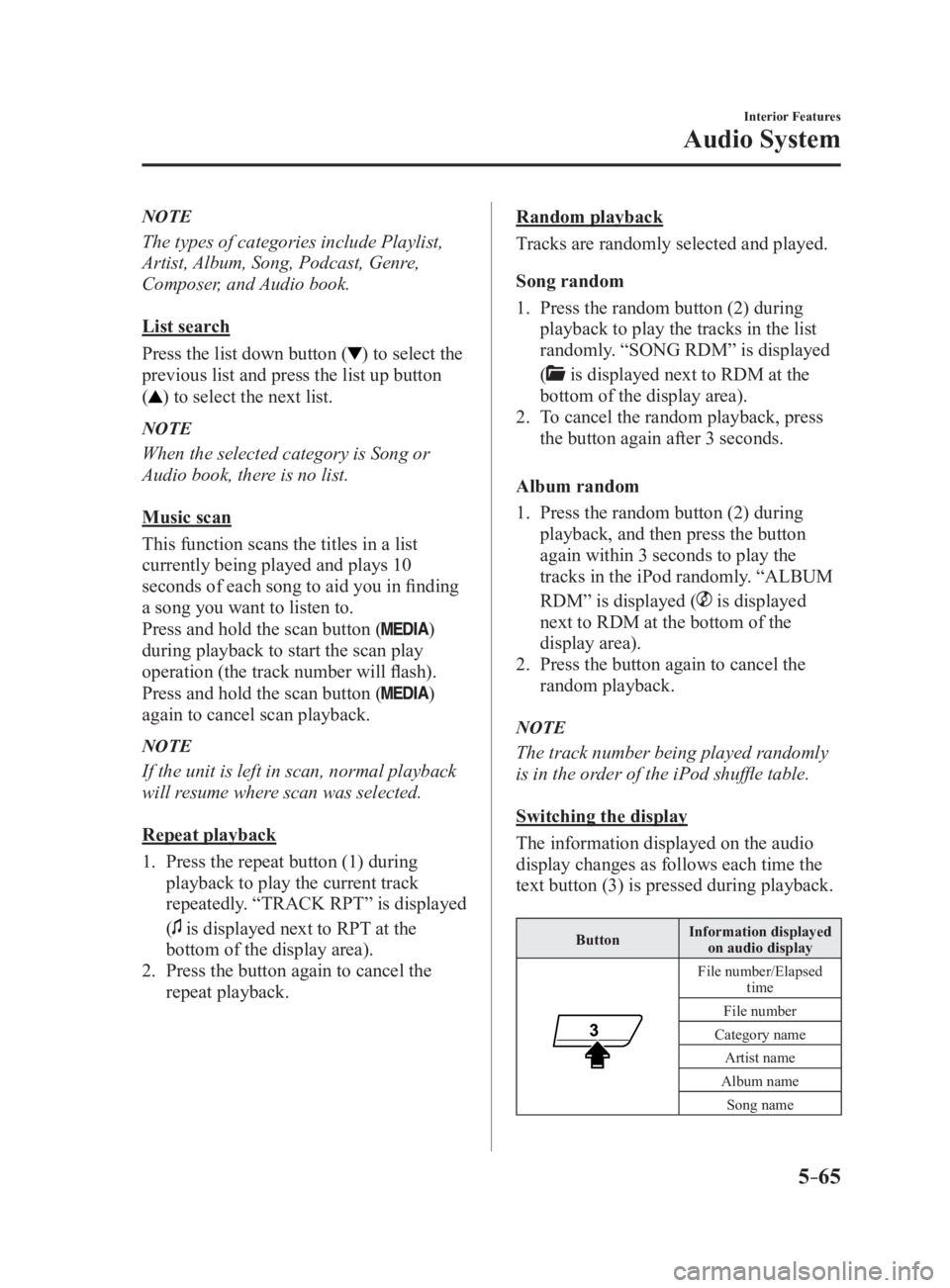
Switching the display
The information displayed on the audio
display changes as follows each time the
text button (3) is pressed during playback. Button Information displayed
on audio display
File number/Elapsed
time
File number
Category name
Artist name
Album name
Song name
MX-5_8FR4-EA-16J_Edition1.indb 65 2016/08/11 20:29:20
Page 288 of 568
5 –66 Interior Features
Audio System NOTE
The information (artist name, music
name) is displayed only when the iPod
has information which can be displayed.
This unit cannot display some
characters. Characters which cannot be
displayed are indicated by an asterisk
(
).
Display scroll
13 characters can be displayed at one
time. To display the rest of the characters
of a long title, press and hold the text
button (3). The display scrolls the next 13
characters. Press and hold the text button
(3) again after the last 13 characters have
been displayed to return to the beginning
of the title.
NOTE
The number of characters which can be
displayed is restricted.
Error Messages
If the message “CHECK iPod” is
displayed, it indicates that there is a
malfunction in the iPod. Verify that the
content recorded in the iPod has playable
files and connect correctly. If the message
reappears, have the unit checked by an
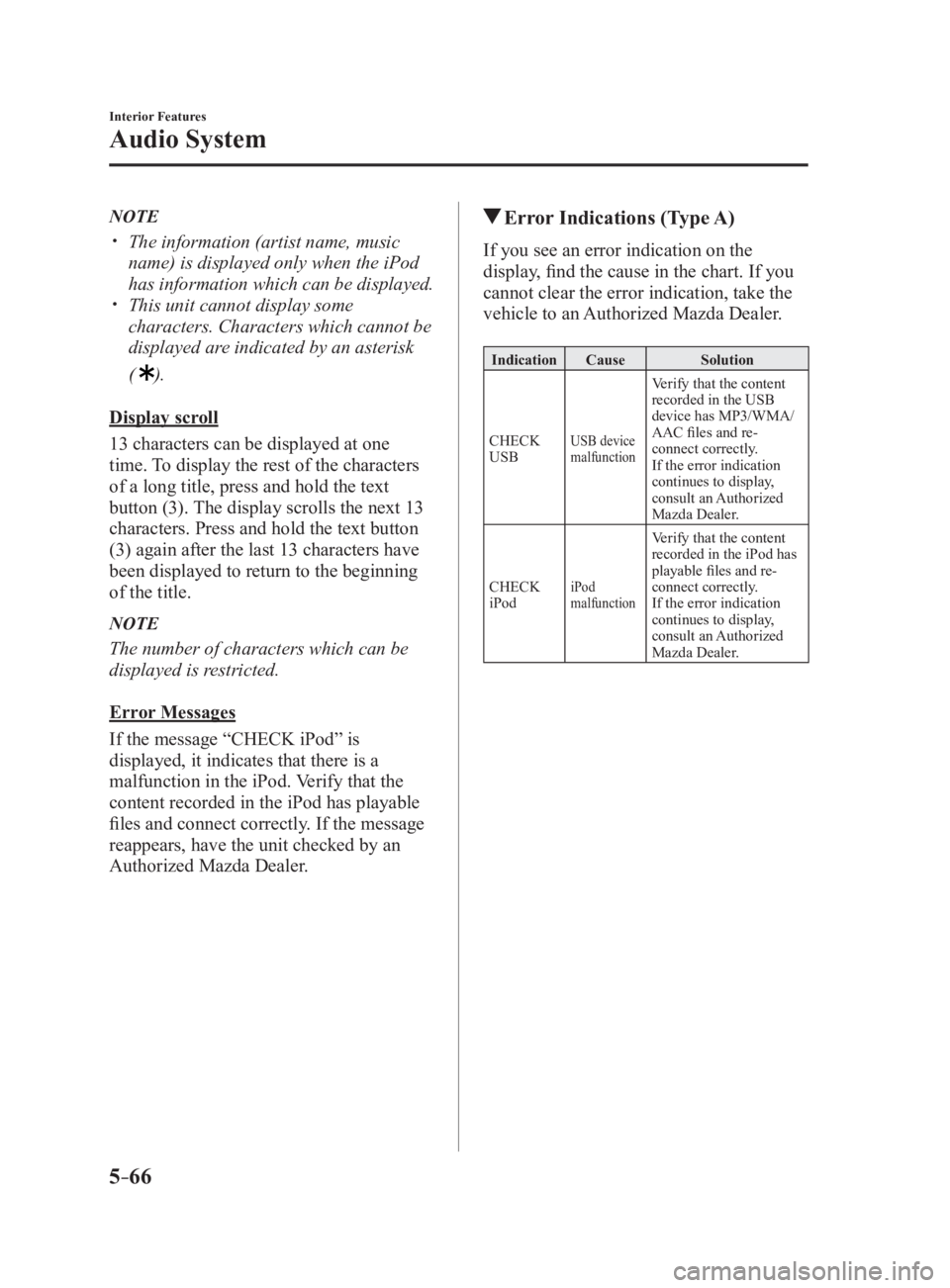
Authorized Mazda Dealer. Error Indications (Type A) If you see an error indication on the
display, find the cause in the chart. If you
cannot clear the error indication, take the
vehicle to an Authorized Mazda Dealer. Indication Cause Solution
CHECK
USB USB device
malfunction Verify that the content
recorded in the USB
device has MP3/WMA/
AAC files and re-
connect correctly.
If the error indication
continues to display,
consult an Authorized
Mazda Dealer.
CHECK
iPod iPod
malfunction Verify that the content
recorded in the iPod has
playable files and re-
connect correctly.
If the error indication
continues to display,
consult an Authorized
Mazda Dealer.
MX-5_8FR4-EA-16J_Edition1.indb 66 2016/08/11 20:29:20
Page 289 of 568
5 –67 Interior Features
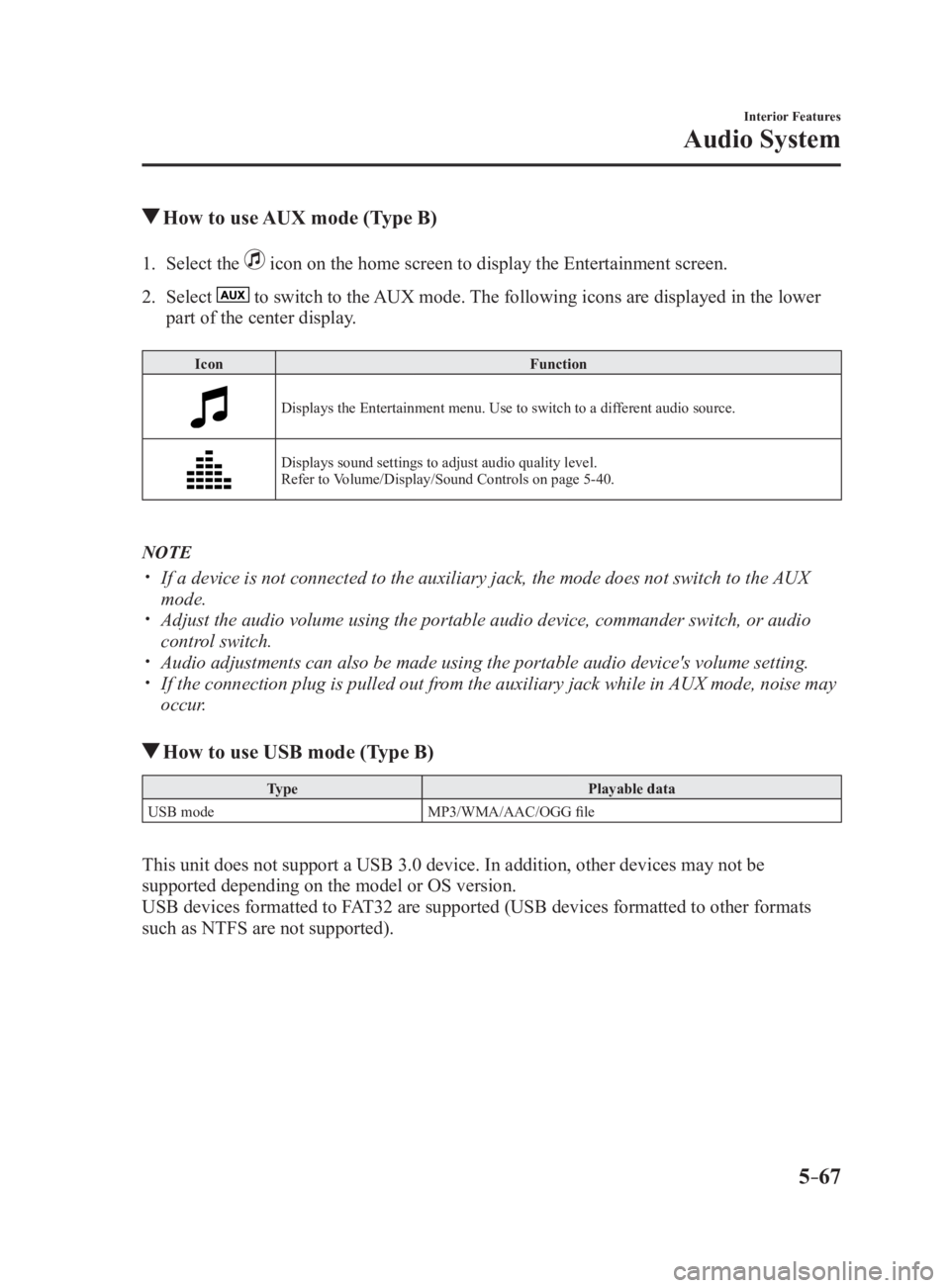
Audio System How to use AUX mode (Type B)1. Select the icon on the home screen to display the Entertainment screen.
2. Select to switch to the AUX mode. The following icons are displayed in the lower
part of the center display. Icon Function
Displays the Entertainment menu. Use to switch to a different audio source.
Displays sound settings to adjust audio quality level.
Refer to Volume/Display/Sound Controls on page 5-40 .
NOTE
If a device is not connected to the auxiliary jack, the mode does not switch to the AUX
mode.
Adjust the audio volume using the portable audio device, commander switch, or audio
control switch.
Audio adjustments can also be made using the portable audio device's volume setting.
If the connection plug is pulled out from the auxiliary jack while in AUX mode, noise may
occur.
How to use USB mode (Type B) Type Playable data
USB mode MP3/WMA/AAC/OGG file
This unit does not support a USB 3.0 device. In addition, other devices may not be
supported depending on the model or OS version.
USB devices formatted to FAT32 are supported (USB devices formatted to other formats
such as NTFS are not supported).
MX-5_8FR4-EA-16J_Edition1.indb 67 2016/08/11 20:29:20
Page 290 of 568
5 –68 Interior Features
Audio System Playback
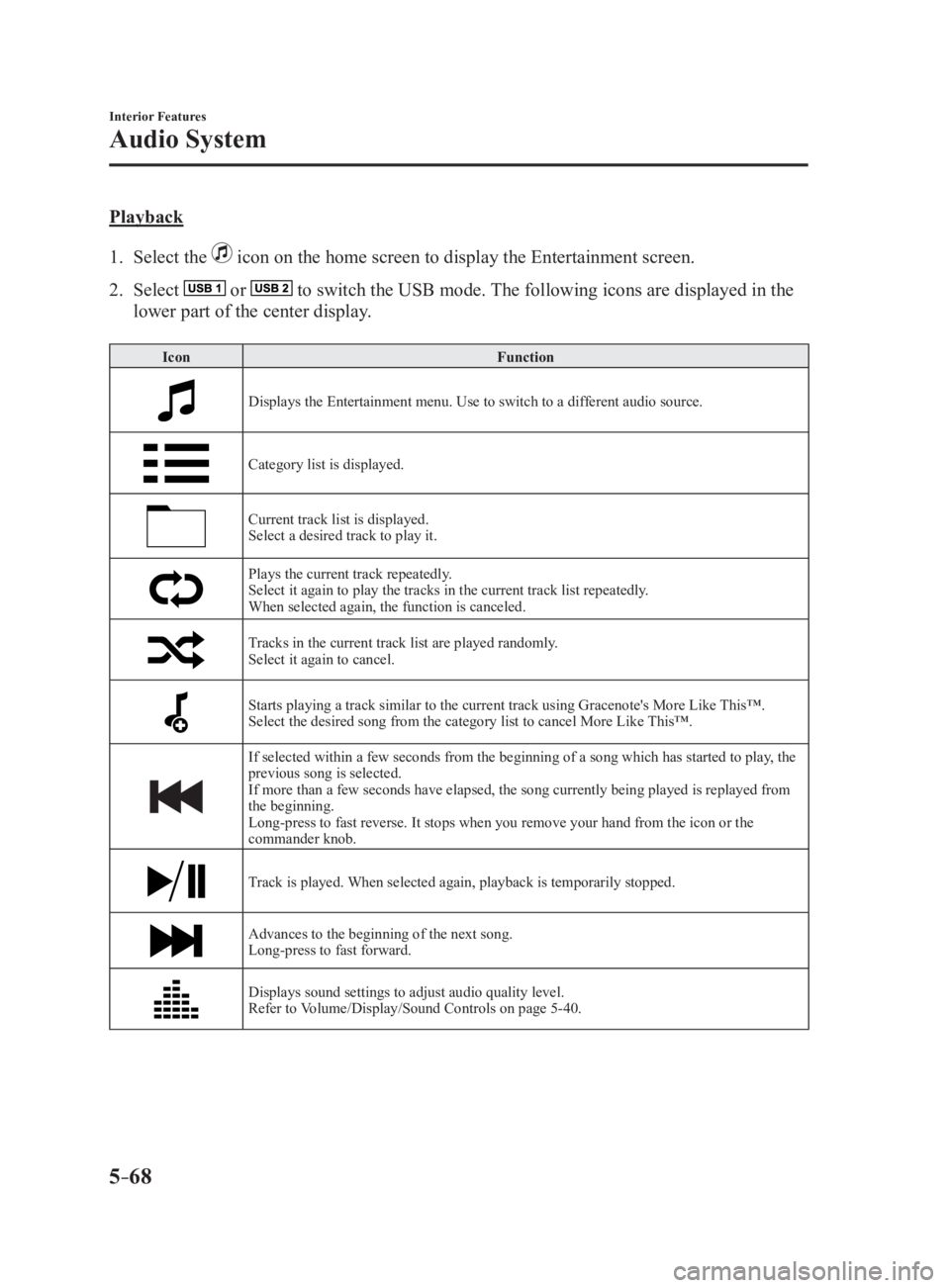
1. Select the icon on the home screen to display the Entertainment screen.
2. Select or to switch the USB mode. The following icons are displayed in the
lower part of the center display. Icon Function
Displays the Entertainment menu. Use to switch to a different audio source.
Category list is displayed.
Current track list is displayed.
Select a desired track to play it.
Plays the current track repeatedly.
Select it again to play the tracks in the current track list repeatedly.
When selected again, the function is canceled.
Tracks in the current track list are played randomly.
Select it again to cancel.
Starts playing a track similar to the current track using Grace note's More Like This™.
Select the desired song from the category list to cancel More L ike This™.
If selected within a few seconds from the beginning of a song which has started to play, the
previous song is selected.
If more than a few seconds have elapsed, the song currently being played is replayed from
the beginning.
Long-press to fast reverse. It stops when you remove your hand from the icon or the
commander knob.
Track is played. When selected again, playback is temporarily stopped.
Advances to the beginning of the next song.
Long-press to fast forward.
Displays sound settings to adjust audio quality level.
Refer to Volume/Display/Sound Controls on page 5-40 .
MX-5_8FR4-EA-16J_Edition1.indb 68 2016/08/11 20:29:20
Page 291 of 568
5 –69 Interior Features
Audio SystemNOTE
If a file name in the USB memory is too long, it could cause ope ration problems such as
not being able to playback the song.
(Recommended: Within 80 characters)
To move to the desired location on the track, move the slider indicating the playback time.
The appearance of the repeat and shuffle icons changes depending on the type of
operation in which the function is used.
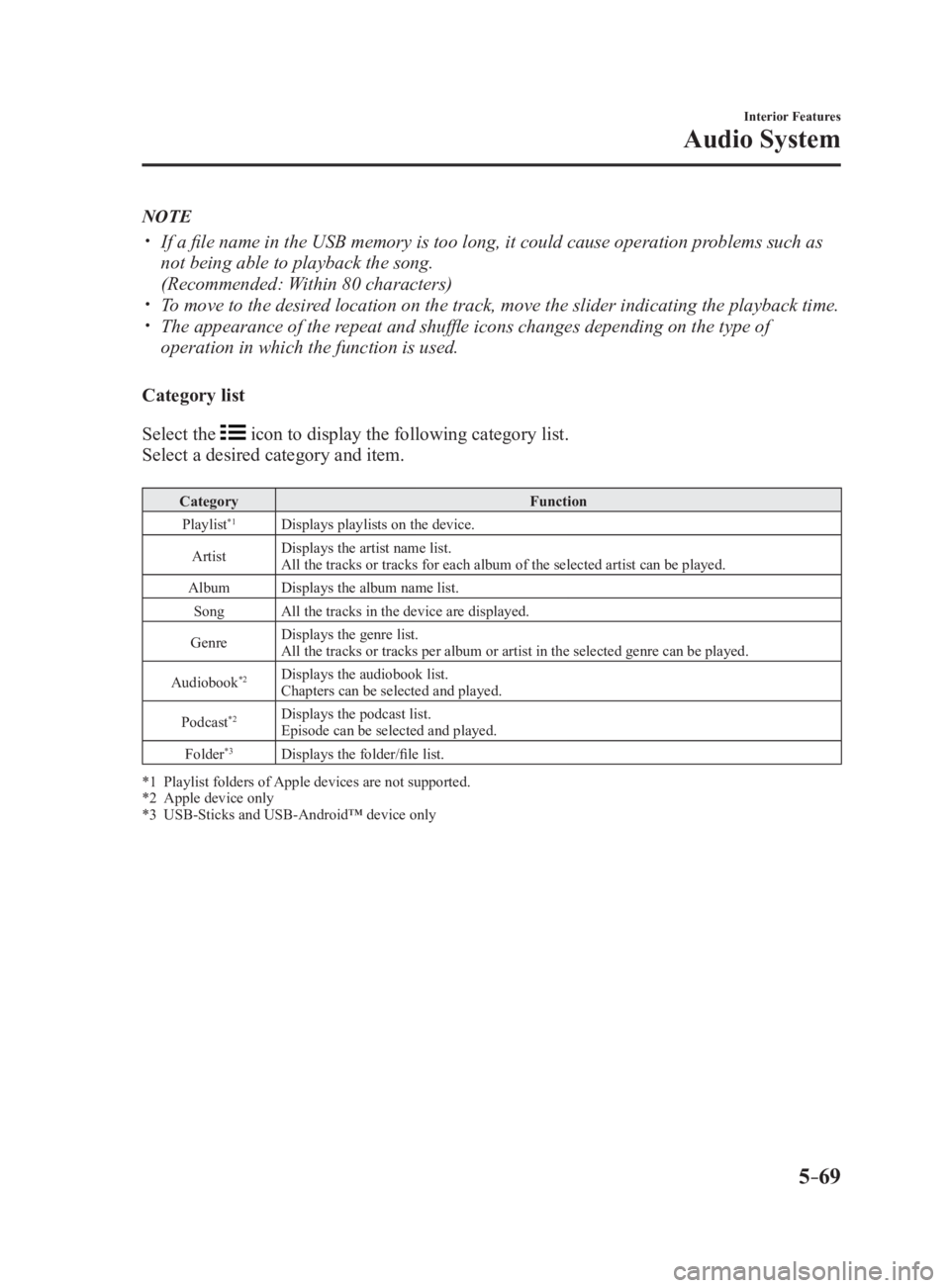
Category list
Select the icon to display the following category list.
Select a desired category and item. Category Function
Playlist *1
Displays playlists on the device.
Artist Displays the artist name list.
All the tracks or tracks for each album of the selected artist can be played.
Album Displays the album name list.
Song All the tracks in the device are displayed.
Genre Displays the genre list.
All the tracks or tracks per album or artist in the selected genre can be played.
Audiobook *2
Displays the audiobook list.
Chapters can be selected and played.
Podcast *2
Displays the podcast list.
Episode can be selected and played.
Folder *3
Displays the folder/file list.
*1 Playlist folders of Apple devices are not supported.
*2 Apple device only
*3 USB-Sticks and USB-Android™ device only
MX-5_8FR4-EA-16J_Edition1.indb 69 2016/08/11 20:29:20
Page 292 of 568
5 –70 Interior Features
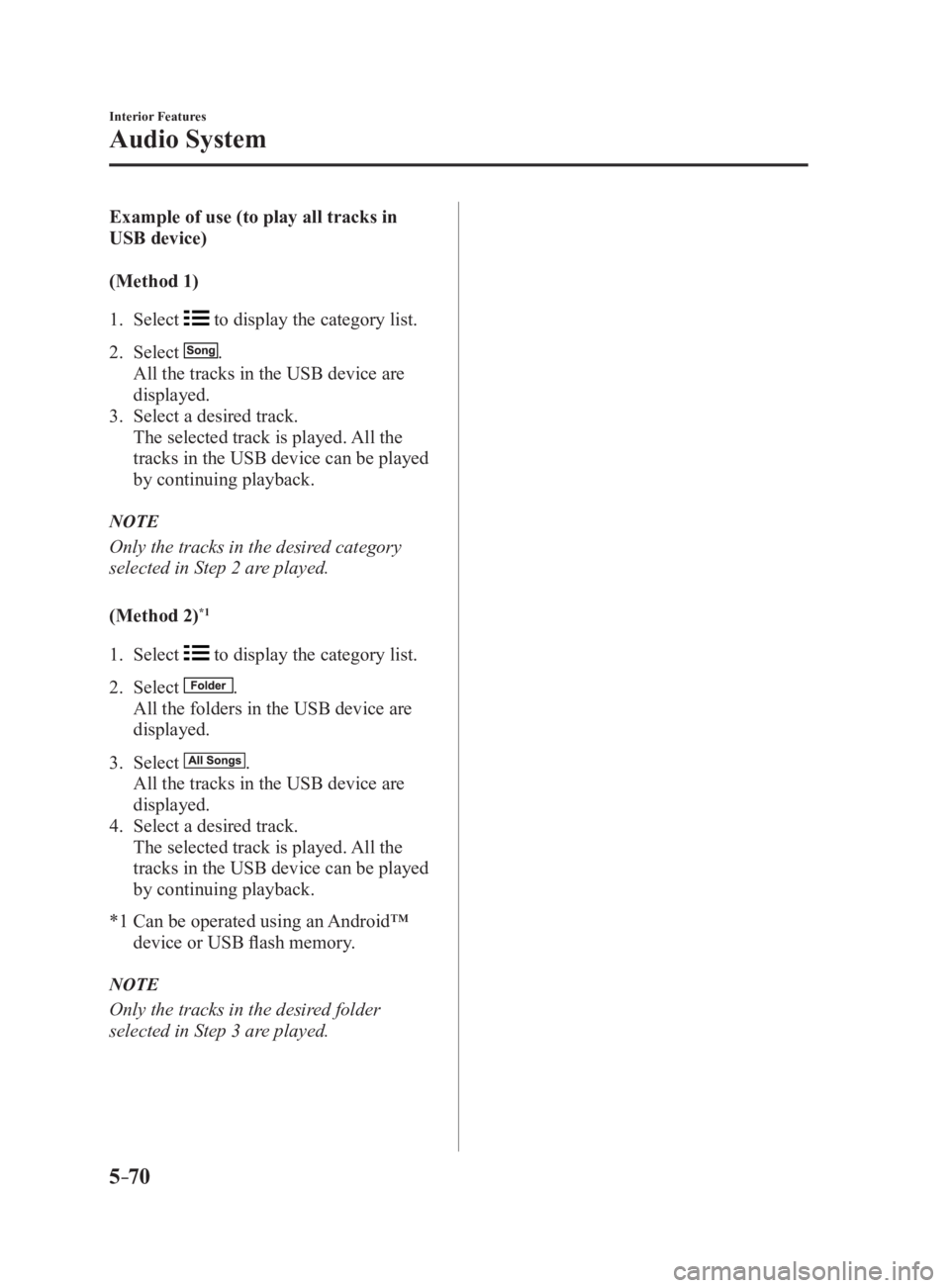
Audio System Example of use (to play all tracks in
USB device)
(Method 1)
1. Select to display the category list.
2. Select .
All the tracks in the USB device are
displayed.
3. Select a desired track.
The selected track is played. All the
tracks in the USB device can be played
by continuing playback.
NOTE
Only the tracks in the desired category
selected in Step 2 are played.
(Method 2) *1
1. Select to display the category list.
2. Select .
All the folders in the USB device are
displayed.
3. Select .
All the tracks in the USB device are
displayed.
4. Select a desired track.
The selected track is played. All the
tracks in the USB device can be played
by continuing playback.
*1 Can be operated using an Android™
device or USB flash memory.
NOTE
Only the tracks in the desired folder
selected in Step 3 are played.
MX-5_8FR4-EA-16J_Edition1.indb 70 2016/08/11 20:29:21
Page 293 of 568
5 –71 Interior Features
Audio System Gracenote Database (Type B)When a USB device is connected to this unit and the audio is pl ayed, the album name,
artist name, genre and title information are automatically displayed if there is a match in
the vehicle's database compilation to the music being played. The information stored in this
device uses database information in the Gracenote music recogni tion service.
CAUTION For information related to the most recent Gracenote database which can be used and
how to install it, go to the Mazda Hands Free Website:
http://www.mazdahandsfree.com
Introduction
Music recognition technology and related data are provided by G racenote ®
. Gracenote is the
industry standard in music recognition technology and related c ontent delivery. For more
information visit www.gracenote.com.
CD and music-related data from Gracenote, Inc., copyright © 200 0 to present Gracenote.
Gracenote Software, copyright © 2000 to present Gracenote. One or more patents owned
by Gracenote apply to this product and service. See the Graceno te website for a non-
exhaustive list of applicable Gracenote patents. Gracenote, CDD B, MusicID, MediaVOCS,
the Gracenote logo and logotype, and the “Powered by Gracenote” logo are either registered
trademarks or trademarks of Gracenote in the United States and/ or other countries.
Gracenote ®
End User License Agreement
This application or device contains software from Gracenote, In c. of Emeryville, California
(“Gracenote”). The software from Gracenote (the “Gracenote Software”) enables this
application to perform disc and/or file identification and obtain music-related information,
including name, artist, track, and title information (“Gracenot e Data”) from online servers
or embedded databases (collectively, “Gracenote Servers”) and to perform other functions.
You may use Gracenote Data only by means of the intended End-User functions of this
application or device.
You agree that you will use Gracenote Data, the Gracenote Software, and Gracenote Servers
for your own personal non-commercial use only. You agree not to assign, copy, transfer or
transmit the Gracenote Software or any Gracenote Data to any th ird party. YOU AGREE
NOT TO USE OR EXPLOIT GRACENOTE DATA, THE GRACENOTE SOFTWARE, OR
GRACENOTE SERVERS, EXCEPT AS EXPRESSLY PERMITTED HEREIN.
MX-5_8FR4-EA-16J_Edition1.indb 71 2016/08/11 20:29:21
Page 294 of 568

5 –72 Interior Features
Audio System You agree that your non-exclusive license to use the Gracenote Data, the Gracenote
Software, and Gracenote Servers will terminate if you violate t hese restrictions. If your
license terminates, you agree to cease any and all use of the G racenote Data, the Gracenote
Software, and Gracenote Servers. Gracenote reserves all rights in Gracenote Data, the
Gracenote Software, and the Gracenote Servers, including all ow nership rights. Under no
circumstances will Gracenote become liable for any payment to y ou for any information
that you provide. You agree that Gracenote, Inc. may enforce its rights under this Agreement
against you directly in its own name.
The Gracenote service uses a unique identifier to track queries for statistical purposes. The
purpose of a randomly assigned numeric identifier is to allow th e Gracenote service to count
queries without knowing anything about who you are. For more in formation, see the web
page for the Gracenote Privacy Policy for the Gracenote service .
The Gracenote Software and each item of Gracenote Data are lice nsed to you “AS IS.”
Gracenote makes no representations or warranties, express or im plied, regarding the
accuracy of any Gracenote Data from in the Gracenote Servers. G racenote reserves the right
to delete data from the Gracenote Servers or to change data cat egories for any cause that
Gracenote deems sufficient. No warranty is made that the Graceno te Software or Gracenote
Servers are error-free or that functioning of Gracenote Software or Gracenote Servers will
be uninterrupted. Gracenote is not obligated to provide you wit h new enhanced or additional
data types or categories that Gracenote may provide in the futu re and is free to discontinue
its services at any time.
GRACENOTE DISCLAIMS ALL WARRANTIES EXPRESS OR IMPLIED,
INCLUDING, BUT NOT LIMITED TO, IMPLIED WARRANTIES OF
MERCHANTABILITY, FITNESS FOR A PARTICULAR PURPOSE, TITLE, AND
NON-INFRINGEMENT. GRACENOTE DOES NOT WARRANT THE RESULTS THAT
WILL BE OBTAINED BY YOUR USE OF THE GRACENOTE SOFTWARE OR ANY
GRACENOTE SERVER. IN NO CASE WILL GRACENOTE BE LIABLE FOR ANY
CONSEQUENTIAL OR INCIDENTAL DAMAGES OR FOR ANY LOST PROFITS OR
LOST REVENUES.
© 2000 to present. Gracenote, Inc.
MX-5_8FR4-EA-16J_Edition1.indb 72 2016/08/11 20:29:21