rear MAZDA MX5 MIATA 2017 Workshop Manual
[x] Cancel search | Manufacturer: MAZDA, Model Year: 2017, Model line: MX5 MIATA, Model: MAZDA MX5 MIATA 2017Pages: 568, PDF Size: 16.58 MB
Page 213 of 568
4 –99 When Driving
i-ACTIVSENSENOTE
The detection ability of the radar sensors (rear) has limitations. In the following cases,
the detection ability may lower and the system may not operate normally.
The rear bumper near the radar sensors (rear) has become deformed.
Snow, ice or mud adheres to the radar sensors (rear) on the rear bumper.
Under bad weather conditions such as rain, snow and fog.
Under the following conditions, the radar sensors (rear) cannot detect target objects or it
may be difficult to detect them.
Stationary objects on a road or a road side such as small, two-wheeled vehicles,
bicycles, pedestrians, animals, and shopping carts.
Vehicle shapes which do not reflect radar waves well such as empty trailers with a low
vehicle height and sports cars.
Vehicles are shipped with the direction of the radar sensors (rear) adjusted for each
vehicle to a loaded vehicle condition so that the radar sensors (rear) detect approaching
vehicles correctly. If the direction of the radar sensors (rear) has deviated for some
reason, have the vehicle inspected at an Authorized Mazda Dealer.
For repairs or replacement of the radar sensors (rear), or bumper repairs, paintwork,
and replacement near the radar sensors, consult an Authorized Mazda Dealer.
Turn off the system while pulling a trailer or while an accessory such as a bicycle carrier
is installed to the rear of the vehicle. Otherwise, the radio waves emitted by the radar will
be blocked causing the system to not operate normally.
The radar sensors are regulated by the relevant radio wave laws of the country in which
the vehicle is driven. If the vehicle is driven abroad, authorization from the country in
which the vehicle is driven may be required.
MX-5_8FR4-EA-16J_Edition1.indb 99 2016/08/11 20:29:04
Page 227 of 568

5 –5 Interior Features
Climate Control System
Manual Type Rear window defogger switchAir intake selector switch Fan control dialTemperature control dial
A/C switch
Rear window defogger switchAir intake selector switchA/C switch Mode selector dial
Fan control dialTemperature control dial Mode selector dialType A
T
ype B
MX-5_8FR4-EA-16J_Edition1.indb 5 2016/08/11 20:29:07
Page 229 of 568

5 –7 Interior Features
Climate Control SystemRear window defogger switch
Press the rear window defogger switch to
defrost the rear window.
Refer to Rear Window Defogger on page
4-55 .
Heating1. Set the mode selector dial to the
position.
2. Set the air intake selector to the outside
air position (indicator light turns off).
3. Set the temperature control dial to the
hot position.
4. Set the fan control dial to the desired
speed.
5. If dehumidified heating is desired, turn
on the air conditioner.
NOTE
If the windshield fogs up easily, set the
mode selector dial to the position.
If cooler air is desired at face level, set
the mode selector dial at the position
and adjust the temperature control dial
to maintain maximum comfort.
The air to the floor is warmer than air
to the face (except when the temperature
control dial is set at the extreme hot or
cold position).
Cooling (With air conditioner)
1. Set the mode selector dial to the
position.
2. Set the temperature control dial to the
cold position.
3. Set the fan control dial to the desired
speed.
4. Turn on the air conditioner by pressing
the A/C switch.
5. After cooling begins, adjust the fan
control dial and temperature control
dial as needed to maintain maximum
comfort. CAUTION If the air conditioner is used while
driving up long hills or in heavy
traffic, monitor the engine coolant
temperature warning light to see if it is
illuminated or flashing (page 4-18 ).
The air conditioner may cause engine
overheating. If the warning light is
illuminated or flashing, turn the air-
conditioning off (page 7-27 ).
NOTE
When maximum cooling is desired,
set the temperature control dial to the
extreme cold position and set the air
intake selector to the recirculated air
position, then turn the fan control dial
fully clockwise.
If warmer air is desired at floor level,
set the mode selector dial at the
position and adjust the temperature
control dial to maintain maximum
comfort.
The air to the floor is warmer than air
to the face (except when the temperature
control dial is set at the extreme hot or
cold position).
Ventilation
1. Set the mode selector dial to the
position.
2. Set the air intake selector to the outside
air position (indicator light turns off).
3. Set the temperature control dial to the
desired position.
4. Set the fan control dial to the desired
speed.
MX-5_8FR4-EA-16J_Edition1.indb 7 2016/08/11 20:29:08
Page 231 of 568

5 –9 Interior Features
Climate Control System
Fully Automatic Type
Rear window defogger switchAir intake selector switch Fan control dialTemperature control dial
A/C switch Rear window defogger switchAir intake selector switchA/C switch
Mode selector dialFan control dialTemperature control dial Mode selector dialType A
T
ype B
MX-5_8FR4-EA-16J_Edition1.indb 9 2016/08/11 20:29:08
Page 233 of 568

5 –11 Interior Features
Climate Control SystemOutside air position (indicator light
turned off)
Outside air is allowed to enter the
cabin. Use this mode for ventilation or
windshield defrosting.
WARNING Do not use the position in cold or
rainy weather:
Using the
position in cold or rainy
weather is dangerous as it will cause
the windows to fog up. Your vision will
be hampered, which could lead to a
serious accident.
Rear window defogger switch
Press the rear window defogger switch to
defrost the rear window.
Refer to Rear Window Defogger on page
4-55 .
Operation of Automatic Air-
Conditioning1. Set the mode selector dial to the AUTO
position.
2. Set the air intake selector to the outside
air position (indicator light turned off).
NOTE
If the recirculated air position is used
for long periods in cold weather or high
humidity, the windshield may fog up more
easily.
3. Set the fan control dial to the AUTO
position.
4. Press the A/C switch to operate the air-
conditioning (turn indicator light on).
5. Set the temperature control dial to the
desired position.
6. To turn off the system, set the fan
control dial to the 0 position. NOTE
Setting the temperature to maximum
hot or cold will not provide the desired
temperature at a faster rate.
When selecting heat, the system will
restrict airflow until it has warmed to
prevent cold air from blowing out of the
vents.
Windshield Defrosting and
Defogging Set the mode selector dial to the
position and turn the fan control dial to the
desired speed.
In this position, the outside air position
is automatically selected, and when the
fan control dial is ON, the air conditioner
automatically turns on. The air conditioner
will directly dehumidify the air to the
front windshield and side windows (page
5-4 ). Airflow amount will be increased.
WARNING Set the temperature control to the hot
or warm position when defogging (
position):
Using the
position with the
temperature control set to the cold
position is dangerous as it will cause
the outside of the windshield to fog up.
Your vision will be hampered, which
could lead to a serious accident.
NOTE
Use the temperature control dial to
increase the air flow temperature and
defog the windshield more quickly.
MX-5_8FR4-EA-16J_Edition1.indb 11 2016/08/11 20:29:09
Page 246 of 568

5 –24 Interior Features
Audio System Power/Volume/Sound Controls
Power/Volume/Audio control dial Menu buttonAudio display
Power ON/OFF
Switch the ignition to ACC or ON. Press
the power/volume dial to turn the audio
system on. Press the power/volume dial
again to turn the audio system off.
Volume adjustment
To adjust the volume, turn the power/
volume dial. Turn the power/volume
dial clockwise to increase volume,
counterclockwise to decrease it.
Audio sound adjustment
1. Press the menu button ( ) to select
the function. The selected function will
be indicated. 2. Turn the audio control dial to adjust the
selected functions as follows: Indication Setting value
Turn
CounterclockwiseTurn
Clockwise
ALC
(Automatic volume
adjustment) Level decrease Level
increase
BASS
(Low pitch sound) Decrease bass Increase
bass
TREB
(Treble sound) Decrease treble Increase
treble
FADE
(Front/back volume
balance) Shift the sound
to the front Shift the
sound to
the rear
BAL
(Left/right volume
balance) Shift the sound
to the left Shift the
sound to
the right
BEEP
(Audio operation
sound) Off On
BT SETUP *
Select mode
12Hr
24Hr
(12 Hr/24 Hr time
adjustment) 12Hr (Flashing) 24Hr
(Flashing)
* Depending on the model, this function may not be
available.
MX-5_8FR4-EA-16J_Edition1.indb 24 2016/08/11 20:29:12
Page 263 of 568

5 –41 Interior Features
Audio SystemAudio sound adjustment
Select the icon on the home screen to
display the Settings screen.
Select the
tab to select the item you
would like to change. Indication Setting value
Bass
(Low pitch sound) Side: Low pitch
enhancement
Side: Low pitch
reduction
Treble
(Treble sound) Side: Treble
enhancement
Side: Treble reduction
Fade
(Front/Rear volume
balance) Front: Front speaker
volume
enhancement
Rear: Rear speaker
volume
enhancement
Balance
(Left/right volume
balance) Right: Right speaker
volume
enhancement
Left: Left speaker
volume
enhancement
ALC *1
(Automatic volume
adjustment) Off—Adjustment at
seven levels
Bose ®
AudioPilot *2
(Automatic volume
adjustment) On/Off
Beep
(Audio operation sound) On/Off
*1 Standard audio
*2 Bose ®
Sound System
ALC (Automatic volume adjustment)
The automatic level control (ALC) is a
feature that automatically adjusts audio
volume and sound quality according to
the vehicle speed. The volume increases
in accordance with the increase in vehicle
speed, and decreases as vehicle speed
decreases. Bose ®
AudioPilot (Automatic volume
adjustment)
When driving, background noise can
interfere with enjoying music.
AudioPilot ® *3
noise compensation
technology continuously adjusts the music
to compensate for background noise and
vehicle speed.
It reacts only to sustained noise sources
and not intermittent ones, such as speed
bumps.
An enhanced DSP algorithm allows faster
and more effective compensation for
unusual situations, such as driving on a
very rough road or at high speeds.
In addition, a system is equipped which
switches the audio to the optimum
acoustics corresponding to the opening
and closing of the soft top/roof.
The acoustic switching function is linked
to the operation of the top lock lever/
retractable fastback switch and audio
playback is muted for about 1 second
while switching.
*3 AudioPilot ®
is a registered trademark of
Bose Corporation.
MX-5_8FR4-EA-16J_Edition1.indb 41 2016/08/11 20:29:15
Page 351 of 568

5 –129 Interior Features
Bluetooth ®
TroubleshootingMazda Bluetooth ®
Hands-Free Customer Service
If you have any problems with Bluetooth ®
, contact our toll-free customer service center.
U.S.A.
Phone: 800-430-0153 (Toll-free)
Web: www.mazdausa.com/mazdaconnect
Canada
Phone: 800-430-0153 (Toll-free)
Web: www.mazdahandsfree.ca
Mexico
Center of Attention to Client (CAC)
Phone: 01-800-01-MAZDA (Toll-free)
Web: www.mazdamexico.com.mx
Bluetooth ®
Device pairing, connection problems Symptom Cause Solution method
Unable to perform pairing — First make sure the device is
compatible with the Bluetooth ®
unit, and then check whether the
Bluetooth ®
function and the Find
Mode/Visible setting *1
on the device
are turned on. If pairing is still
not possible after this, contact an
Authorized Mazda Dealer or Mazda
Bluetooth ®
Hands-Free Customer
Service.
Pairing cannot be performed again The pairing information paired to
the Bluetooth ®
unit or device is not
recognized correctly. Perform pairing using the following
procedure.
Clear “Mazda” stored in the device.
Perform pairing again.
Unable to perform pairing
The Bluetooth ®
function and the
Find Mode/Visible setting *1
on the
device may turn off automatically
after a period of time has elapsed
depending on the device. Check whether the Bluetooth ®
function and the Find Mode/Visible
setting *1
on the device are turned on
and pairing or reconnect.Does not connect automatically
when starting the engine
Automatically connects, but then
disconnects suddenly
Disconnects intermittently The device is in a location in which
radio wave interference can occur
easily, such as in a bag or in a rear
pocket of a pair of pants. Move the device to a location in
which radio wave interference is less
likely to occur.
Does not connect automatically
when starting the engine The pairing information is updated
when the device OS is updated. Perform pairing again.
*1 Setting which detects the existence of a device external to the Bluetooth ®
unit
MX-5_8FR4-EA-16J_Edition1.indb 129 2016/08/11 20:29:34
Page 357 of 568
5 –135 Interior Features
Interior Equipment
Cup HolderWARNING Never use a cup holder to hold hot liquids while the vehicle is moving:
Using a cup holder to hold hot liquids while the vehicle is moving is dangerous. If the
contents spill, you could be scalded.
Do not put anything other than plastic bottles, cups or drink cans in cup holders:
Putting objects other than plastic bottles, cups or drink cans in a cup holder is dangerous.
During sudden braking or maneuvering, occupants could be hit and injured, or objects
could be thrown around the vehicle, causing interference with the driver and the
possibility of an accident. Only use a cup holder for plastic bottles, cups or drink cans.
CAUTION
Do not place plastic bottles without caps in the cup holders. Otherwise, the contents may
spill while the vehicle is being driven.
Do not place excessive weight on the cup holders such as by resting your hands or elbows
on them. Otherwise, the cup holders could be damaged.
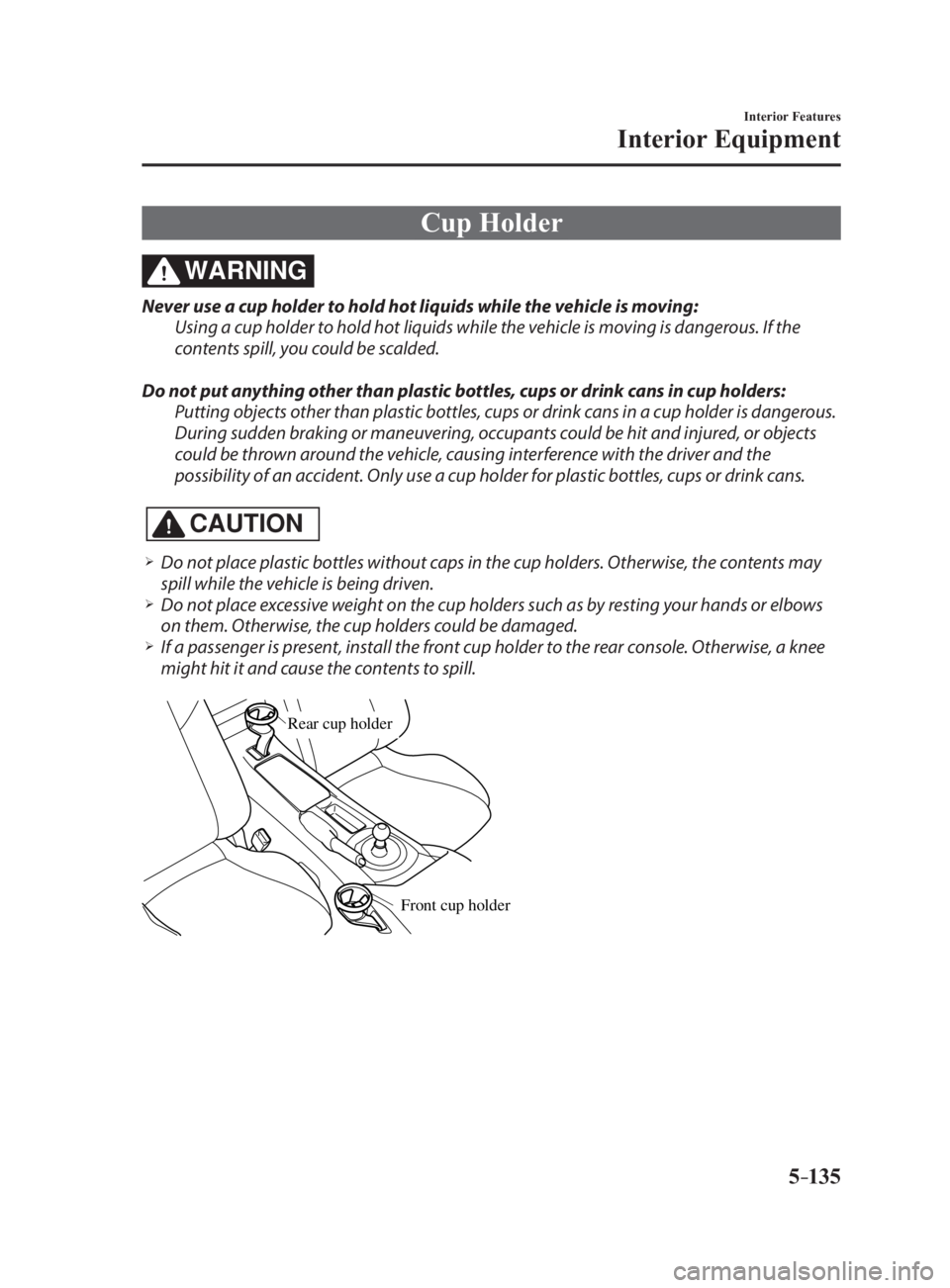
If a passenger is present, install the front cup holder to the rear console. Otherwise, a knee
might hit it and cause the contents to spill.
Front cup holderRear cup holder
MX-5_8FR4-EA-16J_Edition1.indb 135 2016/08/11 20:29:35
Page 359 of 568
5 –137 Interior Features
Interior EquipmentNOTE
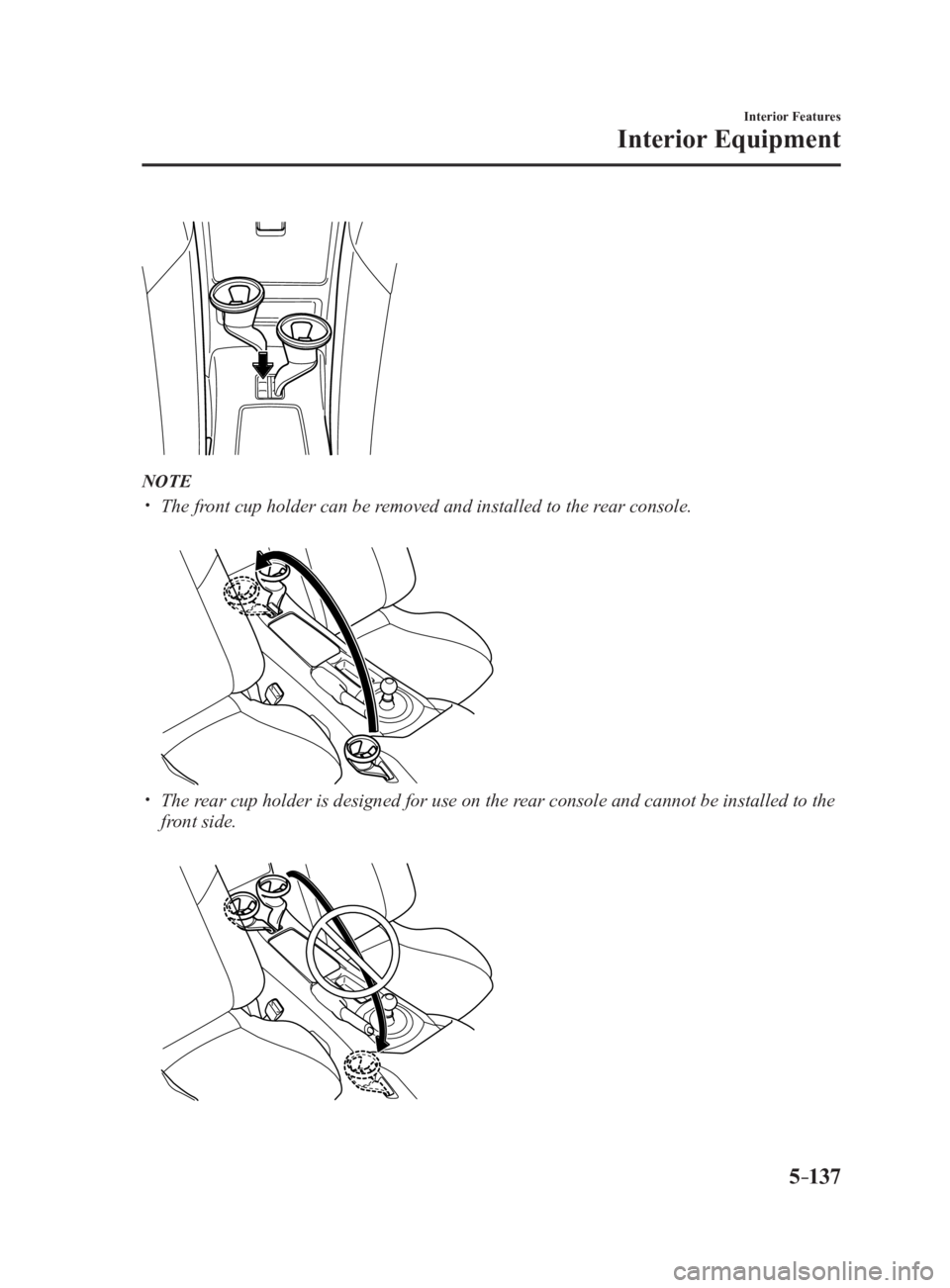
The front cup holder can be removed and installed to the rear console.
The rear cup holder is designed for use on the rear console and cannot be installed to the
front side.
MX-5_8FR4-EA-16J_Edition1.indb 137 2016/08/11 20:29:35