park MAZDA MX5 MIATA 2023 Owner's Guide
[x] Cancel search | Manufacturer: MAZDA, Model Year: 2023, Model line: MX5 MIATA, Model: MAZDA MX5 MIATA 2023Pages: 503, PDF Size: 6.98 MB
Page 180 of 503

If the amount of washer
fluid spray is
insufficient, do not use the washer
switch. If the washer switch continues to
be operated with no washer fluid being
sprayed, it could lead to pump damage.
NOTE
If the windshield wipers are operated
under cold weather conditions or during
snowfall, they could stop due to
accumulated snow on the windshield. If
the windshield wipers stop due to
accumulated snow on the windshield, park
the vehicle in a safe place, turn the wiper
switch off, and then remove the
accumulated snow. If the wiper switch is
turned to another position other than OFF,
the wipers will operate. If the wipers do
not operate even though the wiper switch
is turned to a position other than OFF,
consult an Authorized Mazda Dealer as
soon as possible.
▼ Windshield Wipers
Turn the wipers on by pressing the lever
up or down.
With intermittent wiper
Switch Posi
‐
tion Wiper operation
MIST Operation while pulling up lever
Switch Posi ‐
tion Wiper operation
OFF Stop INT Intermittent LO Low speed
HI High speed
Variable-speed in termittent wipers
Set the lever to the intermittent position
and choose the interval timing by rotating
the ring.
INT ringFast
Slow
With auto-wiper control
Switch Posi ‐
tion Wiper operation
MIST Operation while pulling up lever OFF Stop
AUTO Auto control LO Low speedHI High speed
When Driving
Switches and Controls
4-53
MX-5_8LE7-EA-22K_Edition1_old 2022-8-4 8:12:24
Page 190 of 503

Wear shoes appropriate for driving in
order to avoid your shoe contacting the
brake pedal when depressing the
accelerator pedal.
▼ Parking Brake
CAUTION
Driving with the parking brake on will
cause excessive wear of the brake parts.
NOTE
For parking in snow, refer to Winter
Driving (page 3-50) regarding parking
brake use.
Setting the parking brake
Depress the brake pedal and then firmly
pull the parking brake lever fully upwards
with sufficient force
to hold the vehicle in
a stationary position.
Releasing the parking brake
Depress the brake pedal and pull the
parking brake lever upwards, then press
the release button. While holding the
button, lower the parking brake lever all
the way down to the released position.
Button
▼ Wa r ni ng L i g h t
The warning light turns on when the
system has a malfunction.
Contact an Authorized Mazda Dealer and
Have Vehicle Inspected on page 7-36.
When Driving
Brake
4-63
MX-5_8LE7-EA-22K_Edition1_old
2022-8-4 8:12:24
Page 192 of 503

Hill Launch Assist (HLA)*
HLA is a function which assists the driver
in accelerating from a stop while on a
slope. When the driver releases the brake
pedal and depresses the accelerator pedal
while on a slope, the function prevents the
vehicle from rolling. The braking force is
maintained automatically after the brake
pedal is released on a steep grade.
For vehicles with a manual transmission,
HLA operates on a downward slope when
the shift lever is in the reverse (R)
position, and on an upward slope when the
shift lever is in a position other than the
reverse (R) position.
For vehicles with an automatic
transmission, HLA operates on a
downward slope when the selector lever is
in the reverse (R) position, and on an
upward slope when the selector lever is in
a forward gear.
WA R N I N G
Do not rely completely on HLA:
HLA is an auxiliary device for accelerating
from a stop on a slope. The system only
operates for about 2 seconds and
therefore, relying only on the system, when
accelerating from a stop is dangerous
because the vehicle may move (roll)
unexpectedly and cause an accident.
The vehicle could roll depending on the
vehicle's load or if it is towing something. In
addition, for vehicles with a manual
transmission, the vehicle could still roll
depending on how the clutch pedal or the
accelerator pedal is operated.
Always confirm the safety around the
vehicle before starting to drive the vehicle.
NOTE
HLA does not operate on a gentle slope.
In addition, the gradient of the slope on
which the system will operate changes
depending on the vehicle's load.
HLA does not operate if the parking
brake is applied, the vehicle has not
stopped completely, or the clutch pedal
is released.
While HLA is operating, the brake pedal
may feel stiff and vibrate, however, this
does not indicate a malfunction.
HLA does not operate while the
TCS/DSC indicator li ght is illuminated.
Contact an Authorized Mazda Dealer
and Have Vehicle Inspected on page
7-36.
HLA does not turn off even if the DSC
OFF switch is pressed to turn off the
TCS/DSC.
When Driving
Brake
*Some models.4-65
MX-5_8LE7-EA-22K_Edition1_old 2022-8-4 8:12:24
Page 200 of 503
i-ACTIVSENSE*
i-ACTIVSENSE is a collective term covering a series of advanced safety and driver support
systems which make use of a Forward Sensing Camera (FSC) and radar sensors. These
systems consist of active safety and pre-crash safety systems.
These systems are designed to assist the driver in safer driving by reducing the load on the
driver and helping to avert collisions or reduce their severity. However, because each system
has its limitations, always drive carefull y and do not rely solely on the systems.
▼Active Safety Technology
Active Safety Technology supports safer driving
by helping the driver to recognize potential
hazards and avert accidents.
Driver awareness support systems
Nighttime visibility
Adaptive Front Lighting System (AFS)..................................................................... page 4-75
High Beam Control System (HBC)............................................................................ page 4-76
Left/right side and rear side detection
Lane Departure Warning Syst em (LDWS).................................................................page 4-79
Blind Spot Monitoring (BSM)................................................................................... page 4-85
Road sign recognition
Traffic Sign Recognition System (TSR). ................................................................... page 4-90
Rear obstruction detection when leaving a parking space
Rear Cross Traffic Alert (RCTA)............................................................................... page 4-96
▼ Pre-Crash Safety Technology
Pre-crash safety technology is designed to assi
st the driver in averting collisions or reduce
their severity in situations where they cannot be avoided.
Collision damage reduction in low vehicle speed range
Forward driving
Smart City Brake Support (SCBS)............................................................................. page 4-99
When Driving
i-ACTIVSENSE
*Some models.4-73
MX-5_8LE7-EA-22K_Edition1_old 2022-8-4 8:12:24
Page 214 of 503

When there is a difference in the height between your driving lane and the adjacent
lane.
Directly after the BSM system becomes operable by changing the setting.
If the road width is extremely narrow, vehicles two lanes over may be detected. The
detection area of the radar sensors (rear) is set according to the road width of
expressways.
The BSM warning lights may turn on in reaction to stationary objects on the road or the
roadside such as guardrails, tunnels, sidewalls, and parked vehicles.
Objects such as guardrails and concrete walls
running alongside the vehicle.Places where the width between guardrails or
walls on each side of the vehicle narrows.
The walls at the entrance and exits of tunnels,
turnouts.
A BSM warning light may flash or the warning beep may be activated several times when
making a turn at a city intersection.
Turn off the BSM while pulling a trailer or wh
ile an accessory such as a bicycle carrier is
installed to the rear of the vehicle. Otherwise, the radar’s radio waves will be blocked
causing the system to not operate normally.
In the following cases, it may be difficult to view the illumination/flashing of the BSM
warning lights equipped on the door mirrors.
Snow or ice is adhering to the door mirrors.
The door glass is fogged or covered in snow, frost or dirt.
The system switches to the Rear Cross Traffi c Alert (RCTA) function when the shift lever
(manual transmission) or the selector lever (automatic transmission) is shifted to the
reverse (R) position.
Refer to Rear Cross Traffic Alert (RCTA) on page 4-96.
When Driving
i-ACTIVSENSE
4-87
MX-5_8LE7-EA-22K_Edition1_old 2022-8-4 8:12:24
Page 215 of 503
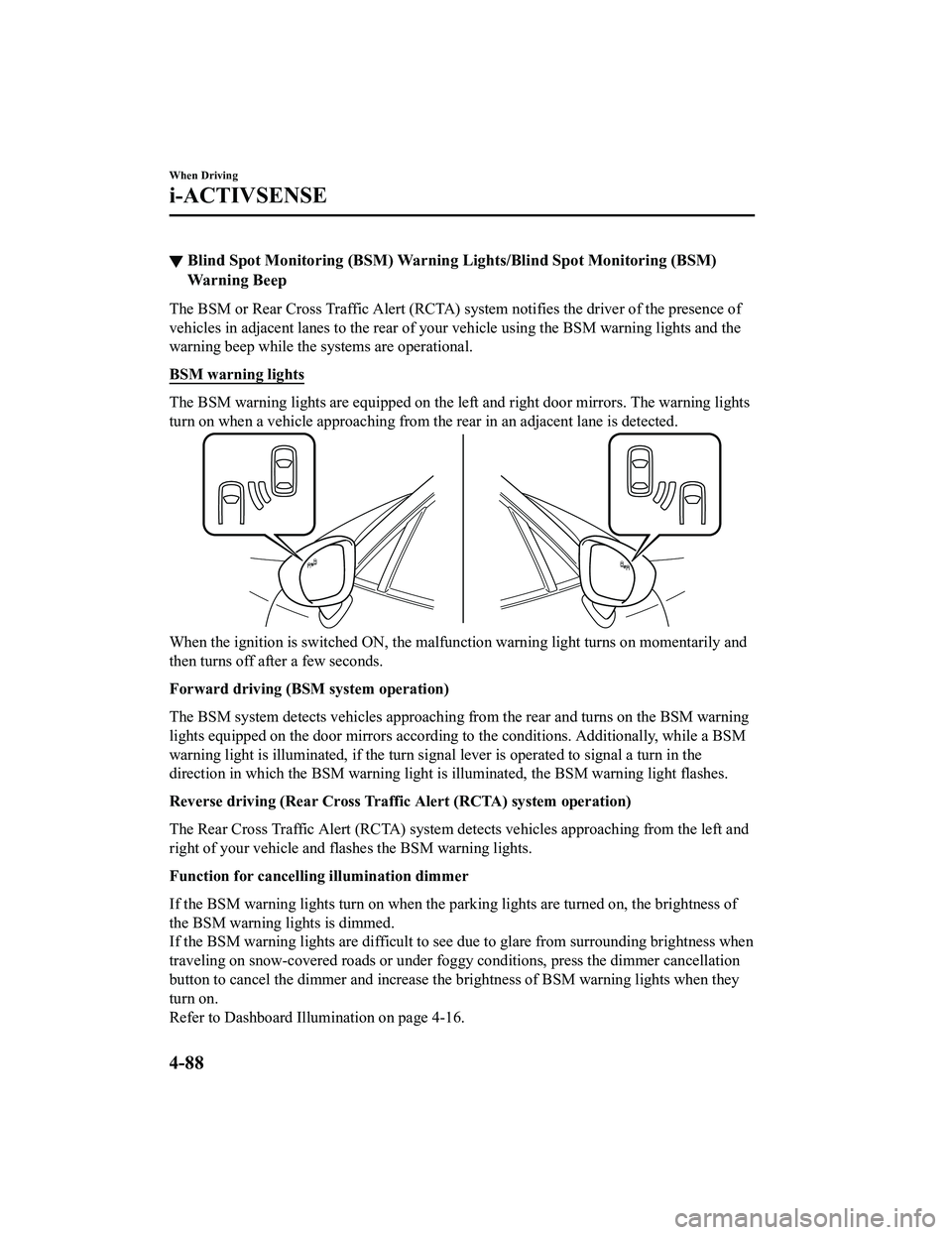
▼Blind Spot Monitoring (BSM) Warning Li
ghts/Blind Spot Monitoring (BSM)
Warning Beep
The BSM or Rear Cross Traffic Alert (RCTA) system notifies the driver of the presence of
vehicles in adjacent lanes to the rear of your vehicle using the BSM warning lights and the
warning beep while the systems are operational.
BSM warning lights
The BSM warning lights are equipped on the left and right door mirrors. The warning lights
turn on when a vehicle approaching from the rear in an adjacent lane is detected.
When the ignition is sw itched ON, the malfunction warning light turns on momentarily and
then turns off after a few seconds.
Forward driving (BSM system operation)
The BSM system detects vehicles approaching from the rear and turns on the BSM warning
lights equipped on the door mirrors according to the conditions. Additionally, while a BSM
warning light is illuminated, if the turn sign al lever is operated to signal a turn in the
direction in which the BSM wa rning light is illuminated, the BSM warning light flashes.
Reverse driving (Rear Cross Traffic Alert (RCTA) system operation)
The Rear Cross Traffic Alert (RCTA) system detects vehicles approaching from the left and
right of your vehicle and flashes the BSM warning lights.
Function for cancelling illumination dimmer
If the BSM warning lights turn on when the parking lights are turned on, the brightness of
the BSM warning lights is dimmed.
If the BSM warning lights are difficult to see due to glare from surrounding brightness when
traveling on snow-covered roads or under foggy conditions, press the dimmer cancellation
button to cancel the dimmer and increase the brightness of BSM warning lights when they
turn on.
Refer to Dashboard Illumination on page 4-16.
When Driving
i-ACTIVSENSE
4-88
MX-5_8LE7-EA-22K_Edition1_old 2022-8-4 8:12:24
Page 223 of 503
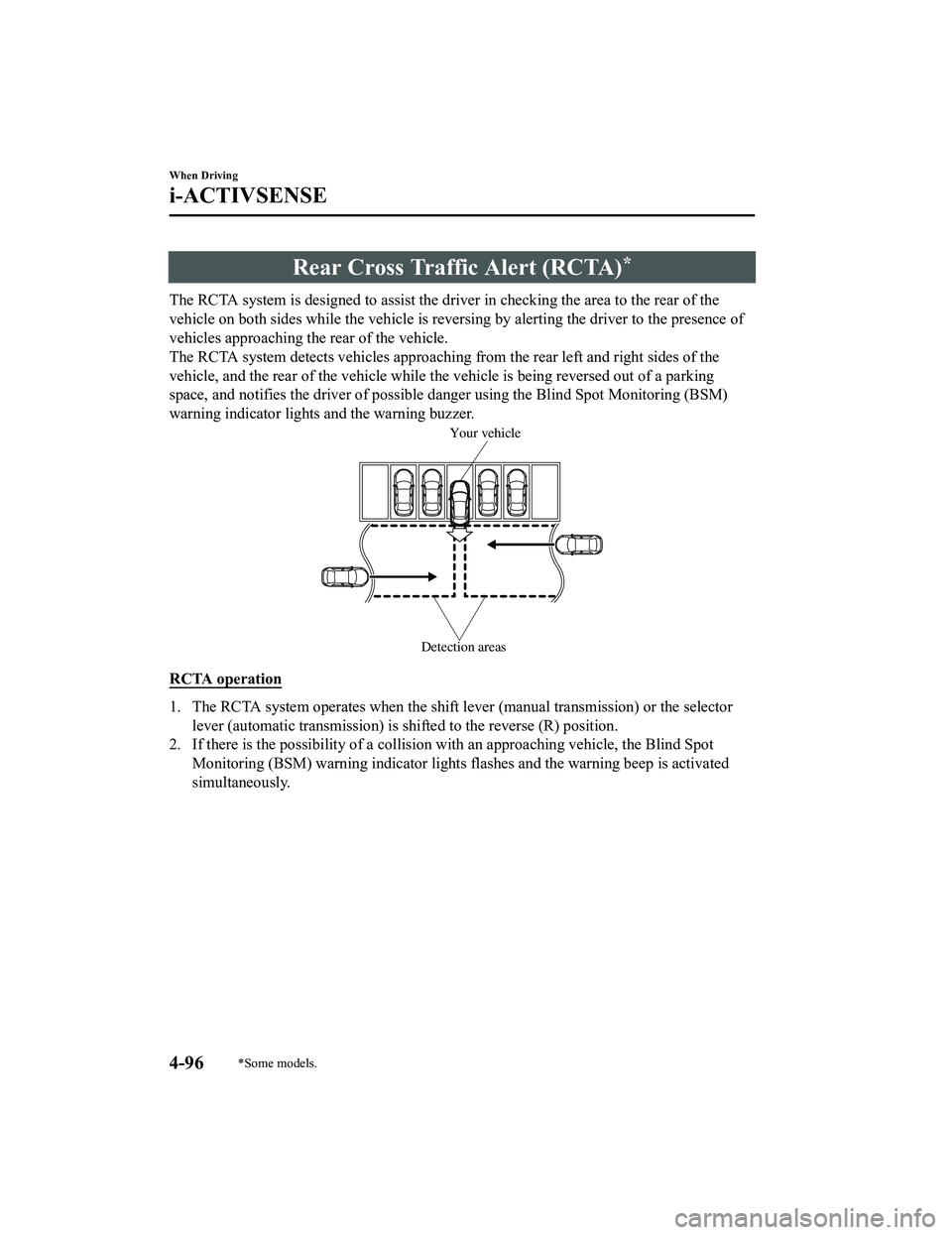
Rear Cross Traffic Alert (RCTA)*
The RCTA system is designed to assist the driver in checking the area to the rear of the
vehicle on both sides while the vehicle is reversing by alerting the driver to the presence of
vehicles approaching th e rear of the vehicle.
The RCTA system detects vehicles approaching from the rear left and right sides of the
vehicle, and the rear of the vehicle while th e vehicle is being reversed out of a parking
space, and notifies the driver of possible danger using the Blind Spot Monitoring (BSM)
warning indicator lights and the warning buzzer.
Detection areas
Your vehicle
RCTA operation
1. The RCTA system operates when the shift lever (manual transmission) or the selector
lever (automatic transmission) is shifted to the reverse (R) position.
2. If there is the possibility of a collision with an approaching vehicle, the Blind Spot
Monitoring (BSM) warning indi cator lights flashes and the warning beep is activated
simultaneously.
When Driving
i-ACTIVSENSE
4-96*Some models.
MX-5_8LE7-EA-22K_Edition1_old 2022-8-4 8:12:24
Page 225 of 503

Under the following conditions, the radar sensors (rear) cannot detect target objects or it
may be difficult to detect them.
The vehicle speed when reversing is about 10 km/h (6.3 mph) or faster.
The radar sensor (rear) detection area is obstructed by a nearby wall or parked vehicle.
(Reverse the vehicle to a position where the radar sensor detection area is no longer
obstructed.)
Your vehicle
A vehicle is approaching directly from the rear of your vehicle.
Your vehicle
The vehicle is parked at an angle.
Your vehicle
Directly after the Blind Spot Monitoring (BSM) system becomes operable using the
personalization feature.
Radio wave interference from a radar sensor equipped on a nearby parked vehicle.
In the following cases, it may be difficult to view the illumination/flashing of the Blind
Spot Monitoring (BSM) warning indicator lights equipped on the door mirrors.
Snow or ice adheres to the door mirrors.
The door glass is fogged or covered in snow, frost or dirt.
Turn off the RCTA system while pulling a trailer or while an accessory such as a bicycle
carrier is installed to the rear of the vehicl e. Otherwise, the radio waves emitted by the
radar will be blocked causing the system to not operate normally.
When Driving
i-ACTIVSENSE
4-98
MX-5_8LE7-EA-22K_Edition1_old 2022-8-4 8:12:24
Page 232 of 503

NOTE
In the following cases, the Forward Sensing Camera (FSC) cannot detect target objects
correctly, and each system may be unable to operate normally.
The height of the vehicle ahead is low.
You drive your vehicle at the same speed as the vehicle ahead.
Headlights are not turned on during the night or when going through a tunnel.
In the following cases, the Forward Sensing Camera (FSC) may not be able to detect
target objects correctly.
Under bad weather condition, such as rain, fog and snow.
The window washer is being used or the windshield wipers are not used when it's
raining.
Ice, fog, snow, frost, rainfall, dirt, or foreign matter such as a plastic bag is stuck on the
windshield.
Trucks with low loading platforms and vehicl es with an extremely low or high profile.
When driving next to walls with no patterning (including fences and longitudinally
striped walls).
The taillights of the vehicle ahead are turned off.
A vehicle is outside the illumi nation range of the headlights.
The vehicle is making a sharp turn, or ascending or descending a steep slope.
Entering or exiting a tunnel.
Heavy luggage is loaded causing the vehicle to tilt.
Strong light is shone at the front of the vehicle (back light or high-beam light from
on-coming vehicles).
There are many light emitters on the vehicle ahead.
When the vehicle ahead is not equipped with taillights or the taillights are turned off at
nighttime.
Elongated luggage or cargo is loaded onto installed roof rails and covers the Forward
Sensing Camera (FSC).
Exhaust gas from the vehicle in front, sand, snow, and water vapor rising from
manholes and grating, and water splashed into the air.
When towing a malfunctioning vehicle.
The vehicle is driven with tires having significantly different wear.
The vehicle is driven on down slopes or bumpy roads.
There are water puddles on the road.
The surroundings are dark such as during the night, early evening, or early morning, or
in a tunnel or indoor parking lot.
The illumination brightness of the headlights is reduced or the headlight illumination is
weakened due to dirt or a deviated optical axis.
The target object enters the blind spot of the Forward Sensing Camera (FSC).
A person or object bursts onto the road from the shoulder or cuts right in front of you.
When Driving
i-ACTIVSENSE
4-105
MX-5_8LE7-EA-22K_Edition1_old 2022-8-4 8:12:24
Page 237 of 503
(Cruise set indication (white)/indicator
light (green))
The cruise set indication (white) is
displayed in the instrument cluster and the
cruise set indicator light (green) turns on
when a cruising speed has been set.
▼ Activation/Deactivation
To activate the system, press the ON
switch. The cruise main indication (white)
turns on.
To deactivate the system, press the OFF/
CANCEL switch.
The cruise main indi
cation (white) turns
off.
WA R N I N G
Always turn off the cruise control system
when it is not in use:
Leaving the cruise control system in an
activation-ready state while the cruise
control is not in use is dangerous as the
cruise control could unexpectedly activate
if the activation button is accidentally
pressed, and result in loss of vehicle control
and an accident.
NOTE
When the ignition is switched OFF, the
system status before it was turned off is
maintained. For exampl e, if the ignition is
switched OFF with the cruise control
system operable, the system will be
operable when the ignition is switched ON
the next time.
▼ To Set Speed
1. Activate the cruise control system by
pressing the ON switch. The cruise
main indication (white) turns on.
2. Accelerate to the desired speed, which
must be more than 25 km/h (16 mph).
3. Type A instrument cluster
Set the cruise control by pressing the
SET/
switch at the desired speed. The
cruise control is set at the moment the
SET/
switch is pressed. Release the
accelerator pedal simultaneously. The
cruise set indication (green) turns on.
Type B instrument cluster
Set the cruise control by pressing the
SET/
switch at the desired speed. The
cruise control is set at the moment the
SET/
switch is pressed. Release the
accelerator pedal simultaneously. The
cruise set indication (white) is
displayed and the cruise set indicator
light (green) turns on.
NOTE
The cruise control speed setting cannot
be performed under the following
conditions:
(Automatic transmission)
The selector lever is in the P or N
position.
(Manual transmission)
The shift lever is in the neutral
position.
The parking brake is applied.
When Driving
Cruise Control
4-110
MX-5_8LE7-EA-22K_Edition1_old 2022-8-4 8:12:24