brake sensor MERCEDES-BENZ A CLASS 2012 User Guide
[x] Cancel search | Manufacturer: MERCEDES-BENZ, Model Year: 2012, Model line: A CLASS, Model: MERCEDES-BENZ A CLASS 2012Pages: 356, PDF Size: 4.96 MB
Page 175 of 356
Shortly before the stored speed is reached, it
appears in the multifunction display.
Permanent SPEEDTRONIC remains active,
even
if variable SPEEDTRONIC is deactivated.
You cannot exceed the stored limit speed,
even if you depress the accelerator pedal
beyond the pressure point (kickdown). DISTRONIC PLUS
Important safety notes G
WARNING
DISTRONIC PLUS does not react to:
R people or animals
R stationary
obstacles on the road, e.g. stop-
ped or parked vehicles
R oncoming and crossing traffic
As a result, DISTRONIC PLUS may neither give
warnings nor intervene in such situations.
There is a risk of an accident.
Always pay careful attention to the traffic sit-
uation and be ready to brake. G
WARNING
DISTRONIC PLUS cannot always clearly iden-
tify other road users and complex traffic sit-
uations.
In such cases, DISTRONIC PLUS may:
R give an unnecessary warning and then
brake the vehicle
R neither give a warning nor intervene
R accelerate unexpectedly
There is a risk of an accident.
Continue to drive carefully and be ready to
brake, in particular when warned to do so by
DISTRONIC PLUS. G
WARNING
DISTRONIC PLUS brakes your vehicle with up
to 40% of the maximum braking force. If this
braking
force is insufficient, DISTRONIC PLUS
warns you visually and audibly. There is a risk
of an accident. In such cases, apply the brakes yourself and
try to take evasive action.
! If
DISTRONIC PLUS or the HOLD function
is activated, the vehicle brakes automati-
cally in certain situations. To prevent dam-
age to the vehicle, deactivate DISTRONIC
PLUS and the HOLD function in the follow-
ing or other similar situations:
R when towing the vehicle
R in the car wash
If you fail to adapt your driving style, DIS-
TRONIC PLUS can neither reduce the risk of
an accident nor override the laws of physics.
DISTRONIC PLUS cannot take road and
weather conditions or traffic conditions into
account. DISTRONIC PLUS is only an aid. You
are responsible for the distance to the vehicle
in front, for vehicle speed, for braking in good
time, and for staying in the lane.
Do not use DISTRONIC PLUS:
R in road and traffic conditions which do not
allow you to maintain a constant speed
(e.g. in heavy traffic or on winding roads).
R on smooth or slippery roads. Braking or
accelerating can cause the drive wheels to
lose traction and the vehicle could then
skid.
R when there is poor visibility, e.g. due to fog,
heavy rain or snow.
DISTRONIC PLUS may not detect narrow
vehicles driving in front, e.g. motorcycles, or
vehicles driving on a different line.
In particular, the detection of obstacles can
be impaired by:
R dirt on the sensors or anything else cover-
ing the sensors
R snow or heavy rain
R interference by other radar sources
R the possibility of strong radar reflections,
for example, in multi-storey car parks
If DISTRONIC PLUS no longer detects a vehi-
cle in front, it may unexpectedly accelerate to
the speed stored. Driving systems
173
Driving and parking Z
Page 176 of 356
This speed can:
R
be too high for a filter lane or a slip road
R be so high in the right lane that you pass
vehicles driving on the left
R be so high in the left lane that you pass
vehicles driving on the right
If
there is a change of drivers, advise the new
driver of the speed stored.
General notes DISTRONIC PLUS regulates the speed and
automatically helps you maintain the dis-
tance to the vehicle detected in front. DIS-
TRONIC PLUS brakes automatically so that
the set speed is not exceeded.
You
must select a lower gear in good time on
long and steep downhill gradients, especially
if the vehicle is laden or towing a trailer. For
this, you need to have selected manual drive
program M(Y page 166). By doing so, you will
make use of the braking effect of the engine.
This relieves the load on the brake system and
prevents the brakes from overheating and
wearing too quickly.
If a slower-moving vehicle is detected in front,
DISTRONIC PLUS brakes your vehicle. It
maintains the preset distance to the vehicle
in front.
If DISTRONIC PLUS detects that there is a risk
of a collision, you will be warned visually and
acoustically. Without your intervention, DIS-
TRONIC PLUS cannot prevent a collision. An
intermittent warning tone will then sound and
the distance warning lamp will light up in the
instrument cluster. Brake immediately to
increase the distance to the vehicle driving in
front, or take evasive action, provided it is
safe to do so.
The radar sensor system is switched off auto-
matically in the vicinity of radio telescope
facilities ( Y page 350).
For DISTRONIC PLUS to assist you when driv-
ing, the radar sensor system must be:
R activated (Y page 223)
R operational i
In some countries you must deactivate
the radar sensor system ( Y page 223).
For
further information about the radar sen-
sor system; see ( Y page 350).
DISTRONIC PLUS is automatically deactiva-
ted if:
R you are driving slower than 25 km/h and
there is no longer a vehicle in front or
R the vehicle ahead has not been detected
If there is no vehicle in front, DISTRONIC
PLUS operates in the same way as cruise
control in the speed range between
30 km/h and 200 km/h. If a vehicle is driving
in front of you, it operates in the speed range
between 0 km/h and 200 km/h.
Do not use DISTRONIC PLUS on roads with
steep gradients.
Cruise control lever With the cruise control lever, you can operate
DISTRONIC PLUS and variable SPEED-
TRONIC.
The LIM indicator lamp on the cruise control
lever
indicates which system you have selec-
ted:
R LIM indicator lamp off: DISTRONIC PLUS
is selected.
R LIM indicator lamp on: variable SPEED-
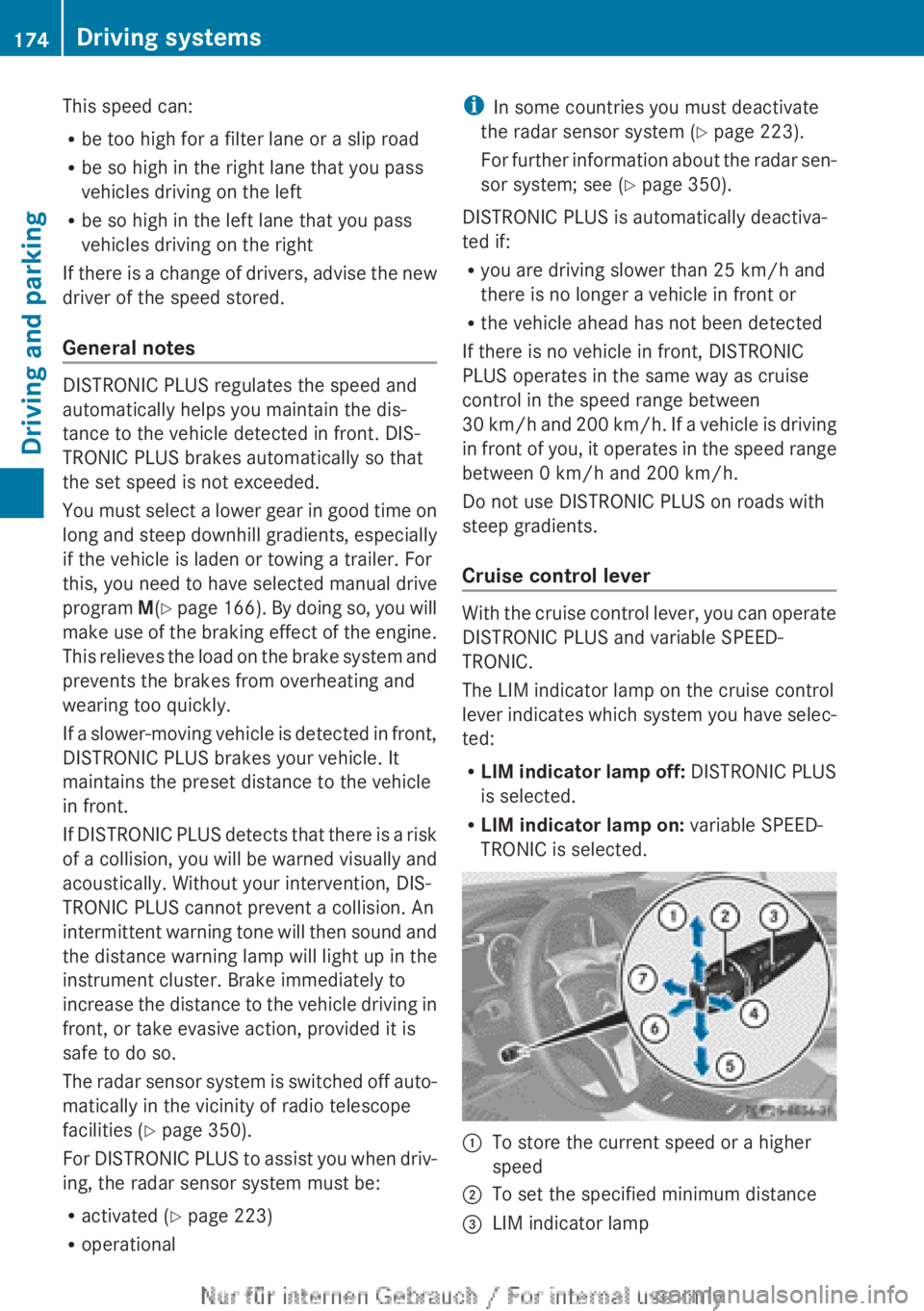
TRONIC is selected. :
To store the current speed or a higher
speed
; To set the specified minimum distance
= LIM indicator lamp174
Driving systems
Driving and parking
Page 180 of 356
DISTRONIC PLUS is automatically deactiva-
ted if:
R
you apply the electric parking brake or if
the vehicle is automatically secured with
the electric parking brake
R you are driving slower than
10 km/h and
there is no longer a vehicle in front, or if the
vehicle in front is no longer detected
R ESP ®
intervenes or you deactivate ESP ®
R the transmission is in the P, R or N position
R you switch off the radar sensor system
R you pull the cruise control lever towards
you in order to pull away and the front-
passenger door or one of the rear doors is
open
R the vehicle is skidding
R you activate Active Parking Assist
If DISTRONIC PLUS is deactivated, you will
hear a warning tone. You will see the DIS‐
TRONIC PLUS off message in the multifunc-
tion display for approximately five seconds.
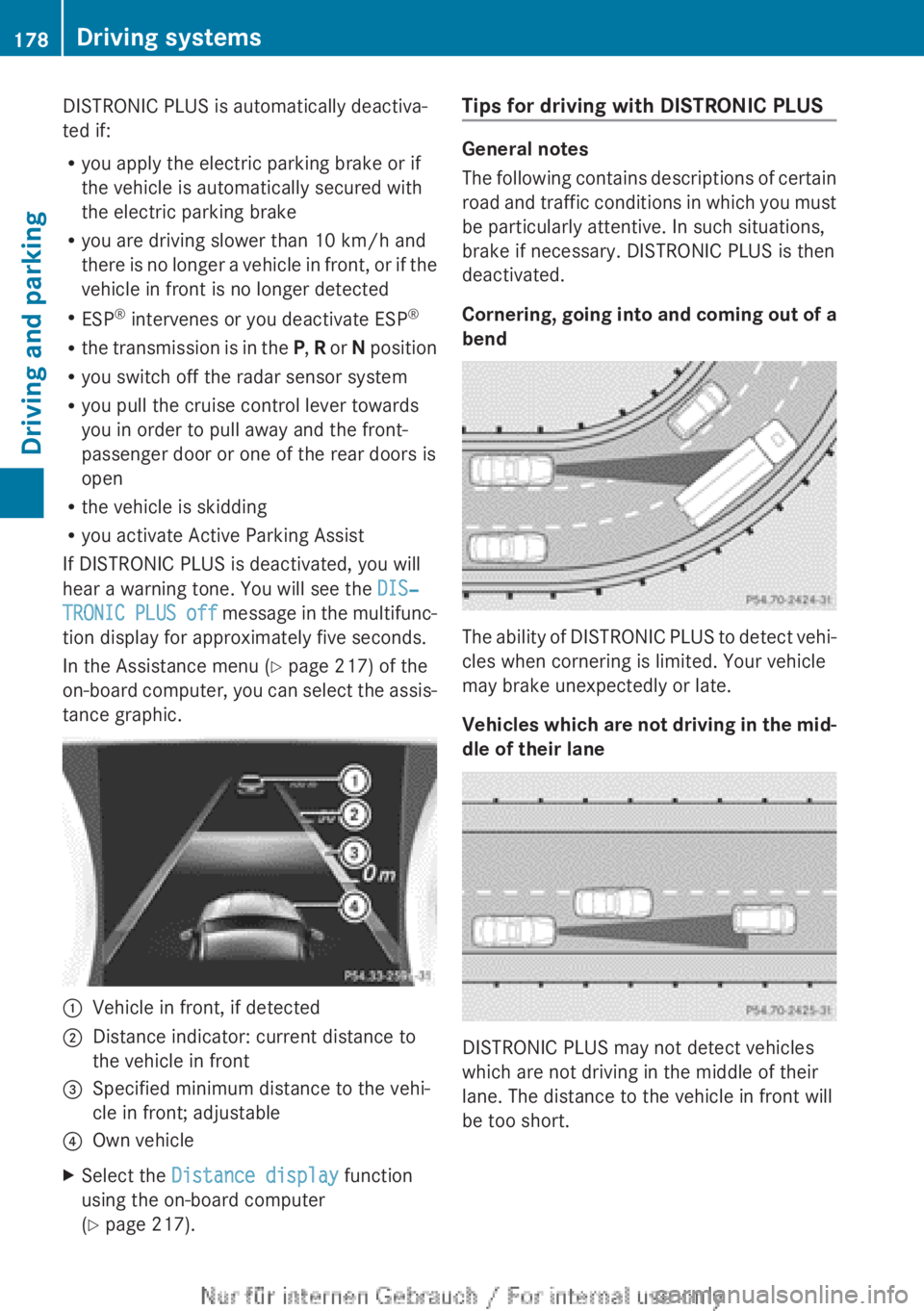
In the Assistance menu (Y page 217) of the
on-board computer, you can select the assis-
tance graphic. :
Vehicle in front, if detected
; Distance indicator: current distance to
the vehicle in front
= Specified minimum distance to the vehi-
cle in front; adjustable
? Own vehicle
X Select the Distance display function
using the on-board computer
(Y page 217). Tips for driving with DISTRONIC PLUS General notes
The
following contains descriptions of certain
road and traffic conditions in which you must
be particularly attentive. In such situations,
brake if necessary. DISTRONIC PLUS is then
deactivated.
Cornering, going into and coming out of a
bend The ability of DISTRONIC PLUS to detect vehi-
cles when cornering is limited. Your vehicle
may brake unexpectedly or late.
Vehicles
which are not driving in the mid-
dle of their lane DISTRONIC PLUS may not detect vehicles
which are not driving in the middle of their
lane. The distance to the vehicle in front will
be too short.178
Driving systems
Driving and parking
Page 184 of 356
i
If you do not depress the accelerator
pedal
within a few seconds, RACE START is
cancelled. The multifunction display shows
the RACE START cancelled message.
X Fully depress the accelerator pedal.
The engine speed is increased.
The RACE START Release brake to
start message appears in the multifunc-
tion display.
i If the brake pedal is not released after a
short while, RACE START is cancelled. The
multifunction display shows the RACE
START cancelled message.
X Take your foot off the brake, but keep the
accelerator pedal depressed.
The vehicle pulls away at maximum accel-
eration.
The RACE
START active message appears
in the multifunction display.
RACE START is deactivated when the vehicle
reaches a speed of approximately
50 km/h.
Drive program S is activated. SPORT handling
mode remains activated.
RACE START is deactivated immediately if
you release the accelerator pedal during
RACE START or if any of the activation condi-
tions are no longer fulfilled. The RACE START
not possible or RACE START cancelled
message appears in the multifunction dis-
play.
i After using it several times in short suc-
cession, RACE START will be unavailable
until a certain distance has been driven. 4MATIC (permanent all-wheel drive)
4MATIC ensures that all four wheels are per-
manently driven. Together with ESP ®
, it
improves the traction of your vehicle when-
ever a drive wheel spins due to insufficient
grip.
If
you fail to adapt your driving style, 4MATIC
can neither reduce the risk of accident nor
override the laws of physics. 4MATIC cannot take account of road, weather and traffic con-
ditions. 4MATIC is only an aid. You are
responsible for the distance to the vehicle in
front, for vehicle speed, for braking in good
time, and for staying in the lane.
If
a drive wheel spins due to insufficient grip:
R when pulling away, only depress the accel-
erator pedal as far as is necessary.
R accelerate less when driving.
! Never tow the vehicle with one axle
raised. This may damage the transfer case.
Damage of this sort is not covered by the
Mercedes-Benz implied warranty. All
wheels must remain either on the ground
or be fully raised. Observe the instructions
for towing the vehicle with all wheels in full
contact with the ground.
i In wintry driving conditions, the maximum
effect of 4MATIC can only be achieved if
you use winter tyres (M+S tyres), with snow
chains if necessary. PARKTRONIC
Important safety notes PARKTRONIC is only an aid. It is not a substi-
tute for your attention to the immediate sur-
roundings. The responsibility for safe
manoeuvring and parking remains with you.
Make
sure that there are no persons, animals
or objects in range while manoeuvring and
parking.
! When parking, pay particular attention to
objects above or below the sensors, such
as flower pots or trailer drawbars. PARK-
TRONIC does not detect such objects when
they are in the immediate vicinity of the
vehicle. You could damage the vehicle or
the objects.
The sensors may not detect snow and
objects which absorb ultrasonic sources.
Ultrasonic sources, such as an automatic
car wash, a lorry's compressed-air brakes 182
Driving systems
Driving and parking
Page 185 of 356
or a pneumatic drill, could cause PARK-
TRONIC to malfunction.
PARKTRONIC
may not function correctly on
uneven terrain.
PARKTRONIC is an electronic parking aid with
ultrasonic sensors. It indicates visually and
audibly the distance between your vehicle
and an object.
PARKTRONIC is activated automatically if
you:
R switch on the ignition
R shift to position D, R or N on vehicles with
automatic transmission
R release the electric parking brake
PARKTRONIC is deactivated at speeds above
18 km/h. It is reactivated at lower speeds.
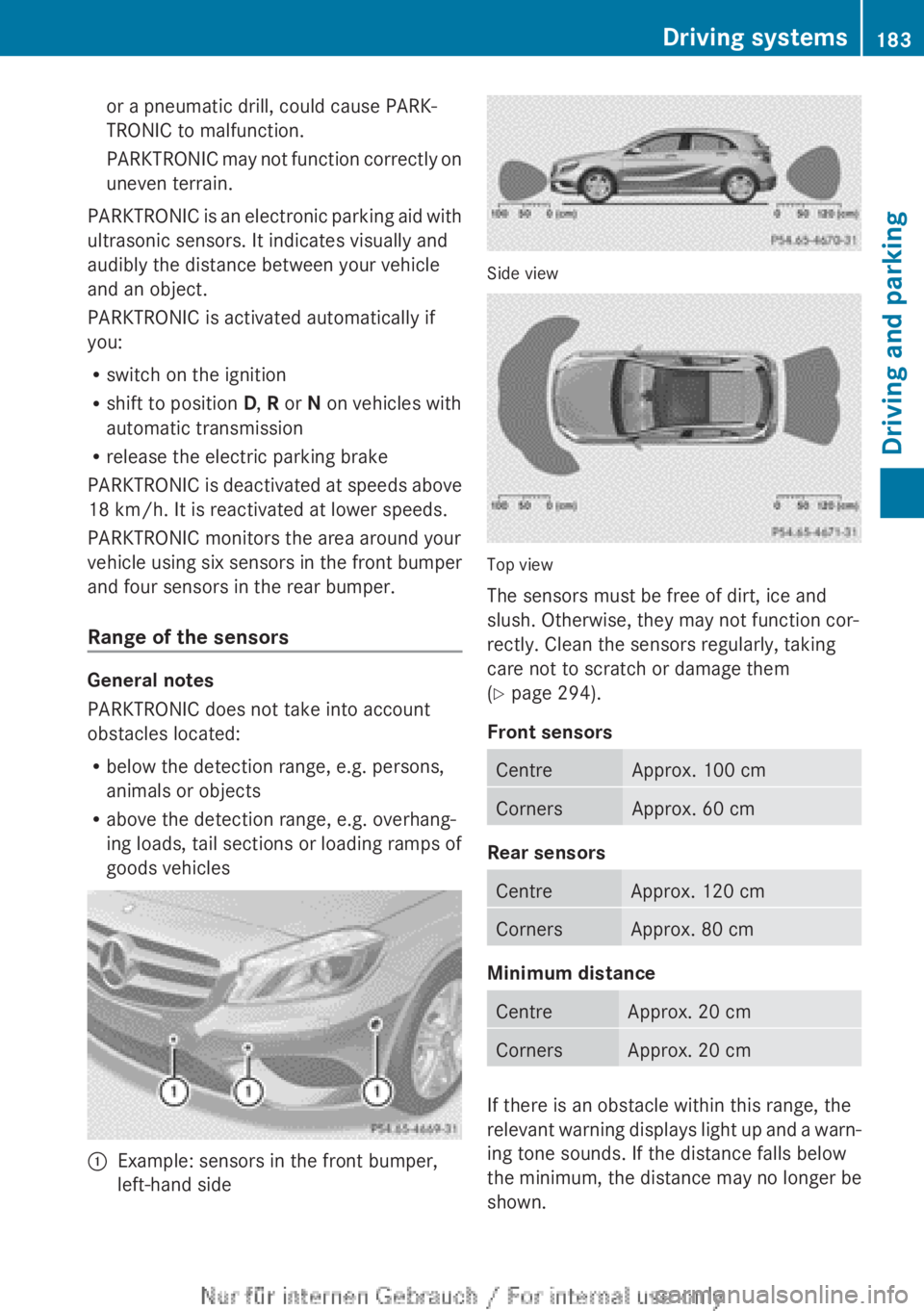
PARKTRONIC monitors the area around your
vehicle using six sensors in the front bumper
and four sensors in the rear bumper.
Range of the sensors General notes
PARKTRONIC does not take into account
obstacles located:
R
below the detection range, e.g. persons,
animals or objects
R above the detection range, e.g. overhang-
ing loads, tail sections or loading ramps of
goods vehicles :
Example: sensors in the front bumper,
left-hand side Side view
Top view
The sensors must be free of dirt, ice and
slush. Otherwise, they may not function cor-
rectly. Clean the sensors regularly, taking
care not to scratch or damage them
(Y page 294).
Front sensors
Centre Approx. 100 cm
Corners Approx. 60 cm
Rear sensors
Centre Approx. 120 cm
Corners Approx. 80 cm
Minimum distance
Centre Approx. 20 cm
Corners Approx. 20 cm
If there is an obstacle within this range, the
relevant
warning displays light up and a warn-
ing tone sounds. If the distance falls below
the minimum, the distance may no longer be
shown. Driving systems
183
Driving and parking Z
Page 239 of 356
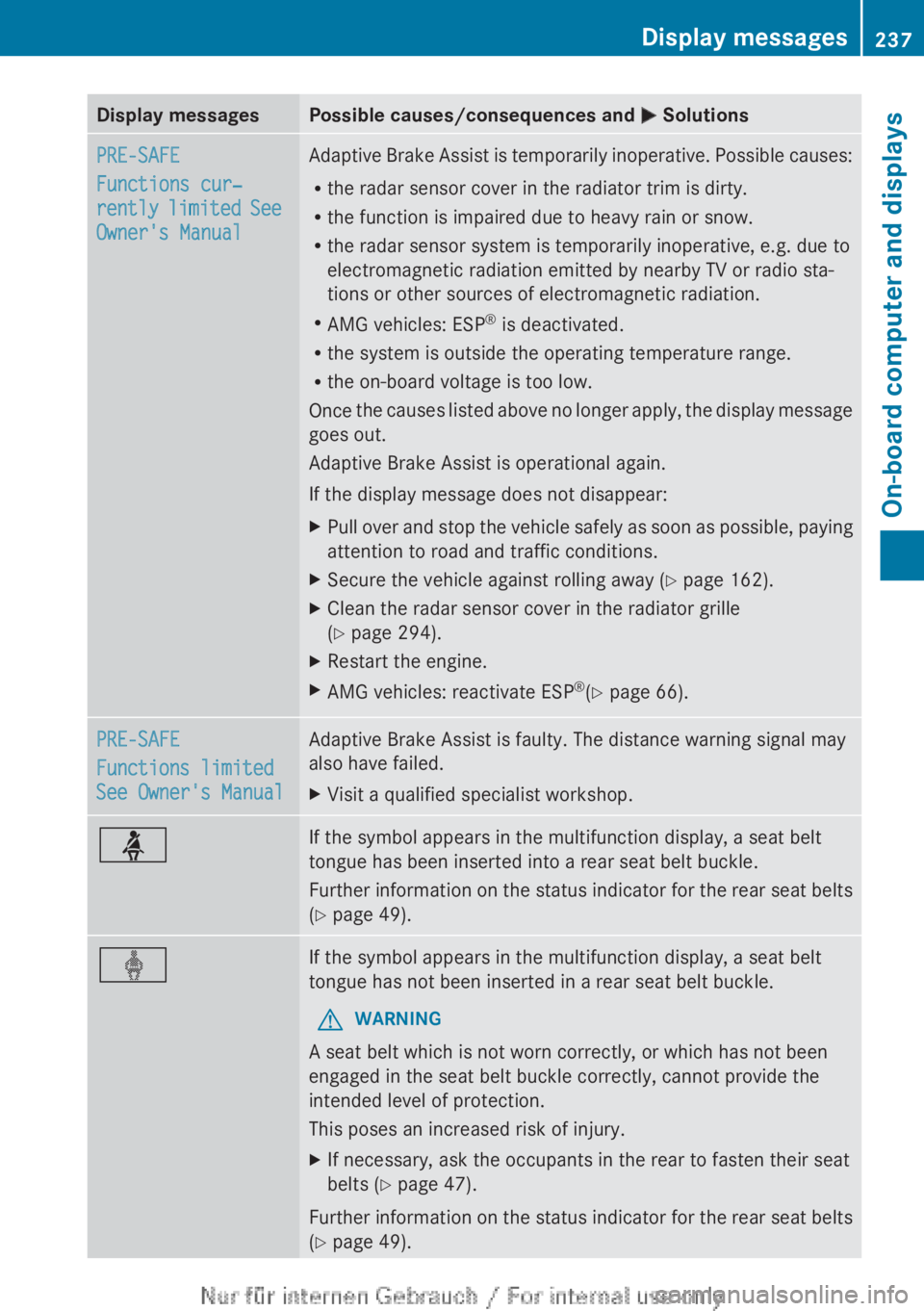
Display messages Possible causes/consequences and
M SolutionsPRE-SAFE
Functions cur‐
rently
limited See
Owner's Manual Adaptive Brake Assist is temporarily inoperative. Possible causes:
R
the radar sensor cover in the radiator trim is dirty.
R the function is impaired due to heavy rain or snow.
R the radar sensor system is temporarily inoperative, e.g. due to
electromagnetic radiation emitted by nearby TV or radio sta-
tions or other sources of electromagnetic radiation.
R AMG vehicles: ESP ®
is deactivated.
R the system is outside the operating temperature range.
R the on-board voltage is too low.
Once
the causes listed above no longer apply, the display message
goes out.
Adaptive Brake Assist is operational again.
If the display message does not disappear:
X Pull over and stop the vehicle safely as soon as possible, paying
attention to road and traffic conditions.
X Secure the vehicle against rolling away ( Y page 162).
X Clean the radar sensor cover in the radiator grille
(Y page 294).
X Restart the engine.
X AMG vehicles: reactivate ESP ®
(Y page 66). PRE-SAFE
Functions limited
See Owner's Manual Adaptive Brake Assist is faulty. The distance warning signal may
also have failed.
X
Visit a qualified specialist workshop. ü If the symbol appears in the multifunction display, a seat belt
tongue has been inserted into a rear seat belt buckle.
Further
information on the status indicator for the rear seat belts
(Y page 49). ý If the symbol appears in the multifunction display, a seat belt
tongue has not been inserted in a rear seat belt buckle.
G WARNING
A seat belt which is not worn correctly, or which has not been
engaged in the seat belt buckle correctly, cannot provide the
intended level of protection.
This poses an increased risk of injury.
X If necessary, ask the occupants in the rear to fasten their seat
belts ( Y page 47).
Further information on the status indicator for the rear seat belts
(Y page 49). Display messages
237
On-board computer and displays Z
Page 248 of 356
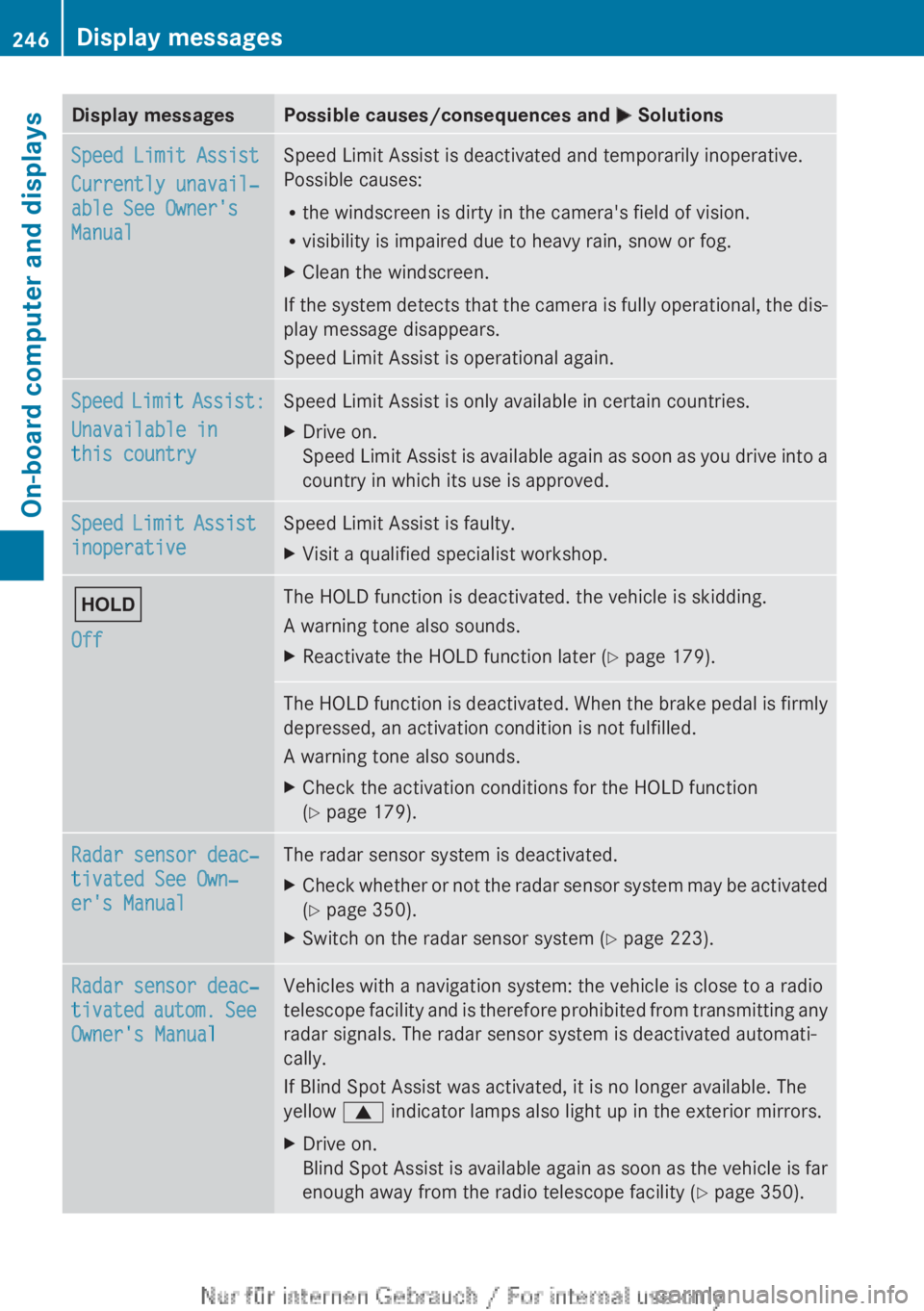
Display messages Possible causes/consequences and
M SolutionsSpeed Limit Assist
Currently unavail‐
able See Owner's
Manual Speed Limit Assist is deactivated and temporarily inoperative.
Possible causes:
R
the windscreen is dirty in the camera's field of vision.
R visibility is impaired due to heavy rain, snow or fog.
X Clean the windscreen.
If the system detects that the camera is fully operational, the dis-
play message disappears.
Speed Limit Assist is operational again. Speed Limit Assist:
Unavailable in
this country Speed Limit Assist is only available in certain countries.
X
Drive on.
Speed
Limit Assist is available again as soon as you drive into a
country in which its use is approved. Speed Limit Assist
inoperative Speed Limit Assist is faulty.
X
Visit a qualified specialist workshop. ë
Off The HOLD function is deactivated. the vehicle is skidding.
A warning tone also sounds.
X
Reactivate the HOLD function later (Y page 179). The HOLD function is deactivated. When the brake pedal is firmly
depressed, an activation condition is not fulfilled.
A warning tone also sounds.
X
Check the activation conditions for the HOLD function
(Y page 179). Radar sensor deac‐
tivated See Own‐
er's Manual The radar sensor system is deactivated.
X
Check whether or not the radar sensor system may be activated
(Y page 350).
X Switch on the radar sensor system (Y page 223). Radar sensor deac‐
tivated
autom. See
Owner's Manual Vehicles with a navigation system: the vehicle is close to a radio
telescope
facility and is therefore prohibited from transmitting any
radar signals. The radar sensor system is deactivated automati-
cally.
If Blind Spot Assist was activated, it is no longer available. The
yellow 9 indicator lamps also light up in the exterior mirrors.
X Drive on.
Blind
Spot Assist is available again as soon as the vehicle is far
enough away from the radio telescope facility ( Y page 350).246
Display messages
On-board computer and displays
Page 352 of 356
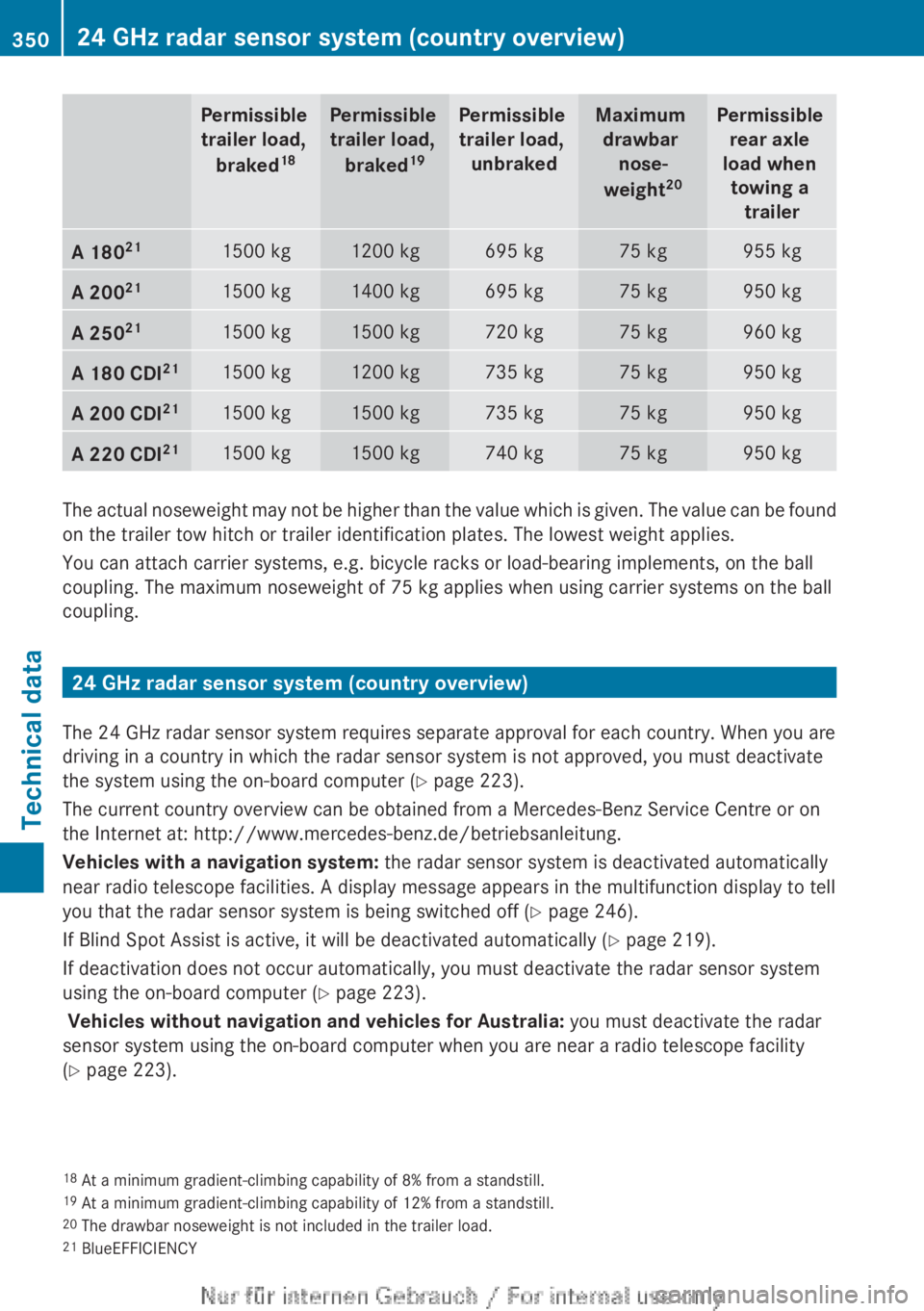
Permissible
trailer load,
braked 18 Permissible
trailer load,
braked 19 Permissible
trailer load, unbraked Maximum
drawbar nose-
weight 20 Permissible
rear axle
load when towing a trailer A 180
21 1500 kg 1200 kg 695 kg 75 kg 955 kg
A 200
21 1500 kg 1400 kg 695 kg 75 kg 950 kg
A 250
21 1500 kg 1500 kg 720 kg 75 kg 960 kg
A 180 CDI
21 1500 kg 1200 kg 735 kg 75 kg 950 kg
A 200 CDI
21 1500 kg 1500 kg 735 kg 75 kg 950 kg
A 220 CDI
21 1500 kg 1500 kg 740 kg 75 kg 950 kg
The actual noseweight may not be higher than the value which is given. The value can be found
on the trailer tow hitch or trailer identification plates. The lowest weight applies.
You can attach carrier systems, e.g. bicycle racks or load-bearing implements, on the ball
coupling. The maximum noseweight of
75 kg applies when using carrier systems on the ball
coupling. 24 GHz radar sensor system (country overview)
The 24 GHz radar sensor system requires separate approval for each country. When you are
driving in a country in which the radar sensor system is not approved, you must deactivate
the system using the on-board computer (Y page 223).
The current country overview can be obtained from a Mercedes-Benz Service Centre or on
the Internet at:
http://www.mercedes-benz.de/betriebsanleitung.
Vehicles with a navigation system: the radar sensor system is deactivated automatically
near radio telescope facilities. A display message appears in the multifunction display to tell
you that the radar sensor system is being switched off ( Y page 246).
If Blind Spot Assist is active, it will be deactivated automatically (Y page 219).
If deactivation does not occur automatically, you must deactivate the radar sensor system
using the on-board computer (Y page 223).
Vehicles without navigation and vehicles for Australia: you must deactivate the radar
sensor system using the on-board computer when you are near a radio telescope facility
(Y page 223).
18 At a minimum gradient-climbing capability of
8% from a standstill.
19 At a minimum gradient-climbing capability of 12% from a standstill.
20 The drawbar noseweight is not included in the trailer load.
21 BlueEFFICIENCY350
24 GHz radar sensor system (country overview)
Technical data