park assist MERCEDES-BENZ A CLASS 2012 User Guide
[x] Cancel search | Manufacturer: MERCEDES-BENZ, Model Year: 2012, Model line: A CLASS, Model: MERCEDES-BENZ A CLASS 2012Pages: 356, PDF Size: 4.96 MB
Page 66 of 356
Adaptive Brake Assist
i
Observe the "Important safety notes" sec-
tion for driving safety systems
(Y page 61). G
WARNING
Adaptive Brake Assist cannot always clearly
identify objects and complex traffic situa-
tions. In these cases, Adaptive Brake Assist
may not intervene. There is a risk of an acci-
dent.
Always
pay careful attention to the traffic sit-
uation and be ready to brake. G
WARNING
Adaptive Brake Assist does not react:
R to people or animals
R to oncoming vehicles
R to crossing traffic
R to stationary obstacles
R when cornering
As a result, Adaptive Brake Assist may not
intervene in all critical conditions. There is a
risk of an accident.
Always
pay careful attention to the traffic sit-
uation and be ready to brake.
Adaptive Brake Assist aids you in braking dur-
ing hazardous situations at speeds above
30 km/h and uses the radar sensor system
to evaluate the traffic situation.
With the help of a sensor system, adaptive
Brake Assist can detect obstacles that are in
the path of your vehicle for an extended
period of time.
Should you approach an obstacle and adap-
tive Brake Assist has detected a risk of colli-
sion, adaptive Brake Assist calculates the
braking force necessary to avoid a collision.
Should you apply the brakes forcefully, adap-
tive Brake Assist will automatically increase
the braking force to a level suitable for the
traffic conditions. X
Keep the brake pedal depressed until the
emergency braking situation is over.
ABS prevents the wheels from locking.
The brakes will work normally again if:
R you release the brake pedal
R there
is no longer any danger of a collision
R no obstacle is detected in front of your
vehicle
Adaptive Brake Assist is then deactivated.
Vehicles with PRE-SAFE ®
: if adaptive Brake
Assist requires particularly high brake pres-
sure, preventative passenger protection
measures (PRE-SAFE ®
) are deployed simul-
taneously.
Up to vehicle speeds of around 250 km/h,
adaptive Brake Assist is capable of reacting
to moving objects that have already been rec-
ognised as such at least once over the period
of observation. Adaptive Brake Assist does
not react to stationary obstacles.
If adaptive Brake Assist is not available due
to a malfunction in the radar sensor system,
the brake system remains available with full
brake boosting effect and BAS.
In particular, the detection of obstacles can
be impaired if there is:
R dirt on the sensors or anything else cover-
ing the sensors
R snow or heavy rain
R interference by other radar sources
R the possibility of strong radar reflections,
for example, in multi-storey car parks
R a narrow vehicle travelling in front, e.g. a
motorcycle
R a vehicle travelling in front on a different
line
Following damage to the front end of the vehi-
cle, have the configuration and operation of
the radar sensor checked at a qualified spe-
cialist workshop. This also applies to colli-
sions at slow speeds where there is no visible
damage to the front of the vehicle. 64
Driving safety systems
Safety
Page 67 of 356
Adaptive brake lamps
If you brake sharply from a speed of more
than
50 km/h or if braking is assisted by BAS
or adaptive Brake Assist, the brake lamps
flash rapidly. In this way, traffic travelling
behind you is warned in an even more notice-
able manner.
If you brake sharply from a speed of more
than 70 km/h to a standstill, the hazard warn-
ing lamps are activated automatically. If the
brakes are applied again, the brake lamps
light up continuously. The hazard warning
lamps switch off automatically if you travel
faster than 10 km/h. You can also switch off
the hazard warning lamps using the hazard
warning switch button (Y page 108).
i Adaptive brake lamps are only available in
certain countries. ESP
®
(Electronic Stability Program)
General notes i
Observe
the "Important safety notes" sec-
tion (Y page 61).
ESP ®
monitors driving stability and traction,
i.e. power transmission between the tyres
and the road surface.
If ESP ®
detects that the vehicle is deviating
from the direction desired by the driver, one
or more wheels are braked to stabilise the
vehicle. The engine output is also modified to
keep the vehicle on the desired course within
physical limits. ESP ®
assists the driver when
pulling away on wet or slippery roads. ESP ®
can also stabilise the vehicle during braking.
ETS/4ETS (Electronic Traction System) i
Observe
the "Important safety notes" sec-
tion (Y page 61).
ETS/4ETS traction control is part of ESP ®
.
ETS brakes the drive wheels individually if
they spin. This enables you to pull away and
accelerate on slippery surfaces, for example if the road surface is slippery on one side. In
addition, more drive torque is transferred to
the wheel or wheels with traction.
ETS remains active when you deactivate
ESP
®
.
Important safety notes G
WARNING
If ESP ®
is malfunctioning, ESP ®
is unable to
stabilise
the vehicle. In addition, other driving
safety systems are switched off. This increa-
ses the risk of skidding and an accident.
Drive on carefully. Have ESP ®
checked at a
qualified specialist workshop.
! When testing the electric parking brake
on a braking dynamometer, switch off the
ignition. Application of the brakes by
ESP ®
may otherwise destroy the brake sys-
tem.
! Vehicles with 4MATIC: switch off the igni-
tion when the electric parking brake is
being tested using a dynamometer.
Application of the brakes by ESP ®
may oth-
erwise destroy the brake system.
! Vehicles with 4MATIC: function or per-
formance tests may only be carried out on
a 2-axle dynamometer. Before operating
the vehicle on such a dynamometer, please
consult a qualified specialist workshop.
You could otherwise damage the drive train
or the brake system.
! Do not tow vehicles with 4MATIC with the
front or rear axle raised.
Vehicles without 4MATIC: when towing your
vehicle with the front axle raised, it is impor-
tant that you observe the notes on
ESP ®
(Y page 312).
Vehicles with 4MATIC: when towing your
vehicle with both axles on the ground, it is
important that you observe the notes on
ESP ®
(Y page 312). Driving safety systems
65
Safety Z
Page 147 of 356
i
The vehicle locks centrally once you have
pulled away. The locking knobs in the doors
drop down.
You can open the doors from the inside at
any time.
You can also deactivate the automatic lock-
ing feature ( Y page 223).
i Upshifts take place at higher engine
speeds after a cold start. This helps the
catalytic converter to reach its operating
temperature more quickly.
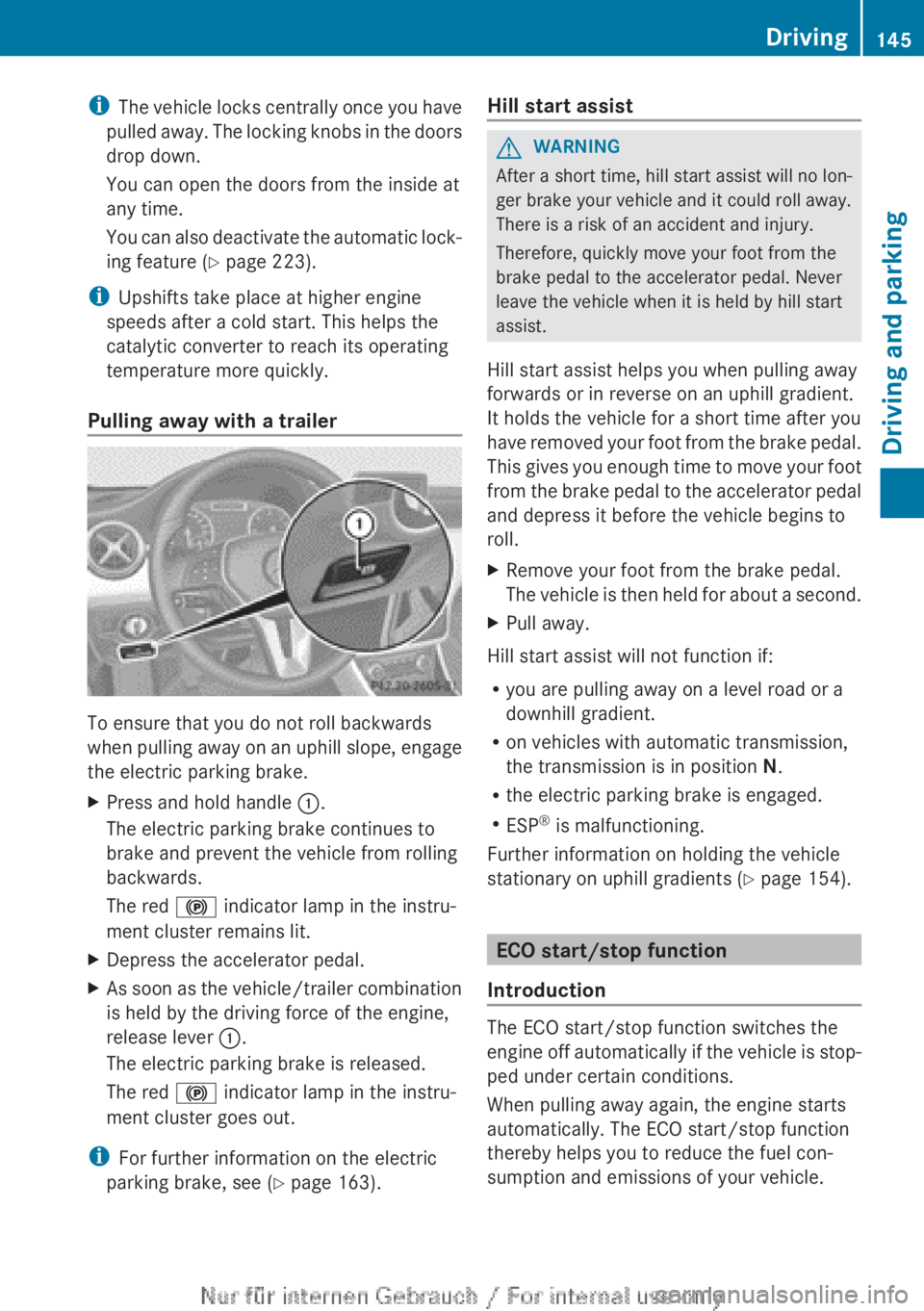
Pulling away with a trailer To ensure that you do not roll backwards
when
pulling away on an uphill slope, engage
the electric parking brake.
X Press and hold handle :.
The electric parking brake continues to
brake and prevent the vehicle from rolling
backwards.
The red ! indicator lamp in the instru-
ment cluster remains lit.
X Depress the accelerator pedal.
X As soon as the vehicle/trailer combination
is held by the driving force of the engine,
release lever :.
The electric parking brake is released.
The red ! indicator lamp in the instru-
ment cluster goes out.
i For further information on the electric
parking brake, see ( Y page 163). Hill start assist G
WARNING
After a short time, hill start assist will no lon-
ger brake your vehicle and it could roll away.
There is a risk of an accident and injury.
Therefore, quickly move your foot from the
brake pedal to the accelerator pedal. Never
leave the vehicle when it is held by hill start
assist.
Hill start assist helps you when pulling away
forwards or in reverse on an uphill gradient.
It holds the vehicle for a short time after you
have
removed your foot from the brake pedal.
This gives you enough time to move your foot
from the brake pedal to the accelerator pedal
and depress it before the vehicle begins to
roll.
X Remove your foot from the brake pedal.
The
vehicle is then held for about a second.
X Pull away.
Hill start assist will not function if:
R you are pulling away on a level road or a
downhill gradient.
R on vehicles with automatic transmission,
the transmission is in position N.
R the electric parking brake is engaged.
R ESP ®
is malfunctioning.
Further information on holding the vehicle
stationary on uphill gradients
(Y page 154). ECO start/stop function
Introduction The ECO start/stop function switches the
engine
off automatically if the vehicle is stop-
ped under certain conditions.
When pulling away again, the engine starts
automatically. The ECO start/stop function
thereby helps you to reduce the fuel con-
sumption and emissions of your vehicle. Driving
145
Driving and parking Z
Page 153 of 356
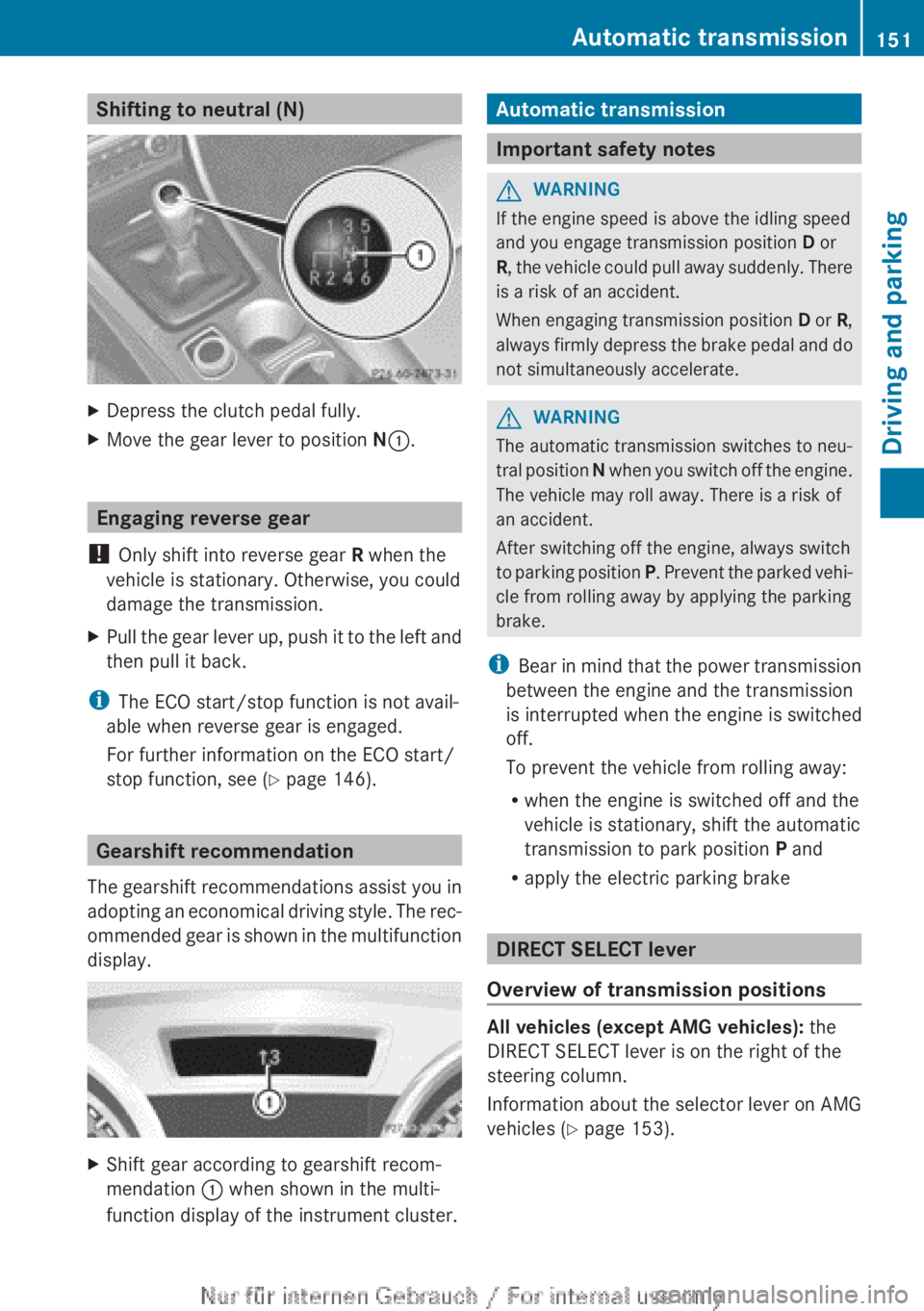
Shifting to neutral (N)
X
Depress the clutch pedal fully.
X Move the gear lever to position N:. Engaging reverse gear
! Only shift into reverse gear R when the
vehicle is stationary. Otherwise, you could
damage the transmission.
X Pull the gear lever up, push it to the left and
then pull it back.
i The ECO start/stop function is not avail-
able when reverse gear is engaged.
For further information on the ECO start/
stop function, see ( Y page 146).Gearshift recommendation
The gearshift recommendations assist you in
adopting an economical driving style. The rec-
ommended gear is shown in the multifunction
display. X
Shift gear according to gearshift recom-
mendation : when shown in the multi-
function display of the instrument cluster. Automatic transmission
Important safety notes
G
WARNING
If the engine speed is above the idling speed
and you engage transmission position D or
R,
the vehicle could pull away suddenly. There
is a risk of an accident.
When engaging transmission position D or R,
always firmly depress the brake pedal and do
not simultaneously accelerate. G
WARNING
The automatic transmission switches to neu-
tral
position N when you switch off the engine.
The vehicle may roll away. There is a risk of
an accident.
After switching off the engine, always switch
to parking position P. Prevent the parked vehi-
cle from rolling away by applying the parking
brake.
i Bear in mind that the power transmission
between the engine and the transmission
is interrupted when the engine is switched
off.
To prevent the vehicle from rolling away:
R when the engine is switched off and the
vehicle is stationary, shift the automatic
transmission to park position P and
R apply the electric parking brake DIRECT SELECT lever
Overview of transmission positions All vehicles (except AMG vehicles):
the
DIRECT SELECT lever is on the right of the
steering column.
Information about the selector lever on AMG
vehicles ( Y page 153). Automatic transmission
151Driving and parking Z
Page 167 of 356
Driving tips
General notes
G
WARNING
If you switch off the ignition while driving,
safety-relevant functions are only available
with
limitations, or not at all. This could affect,
for example, the power steering and the brake
boosting effect. You will require considerably
more effort to steer and brake. There is a risk
of an accident.
Do not switch off the ignition while driving. ECO display
The ECO display provides feedback on how
economical your driving characteristics are.
The ECO display assists you in achieving the
most economical driving style for the selec-
ted settings and prevailing conditions. Con-
sumption can be significantly influenced by
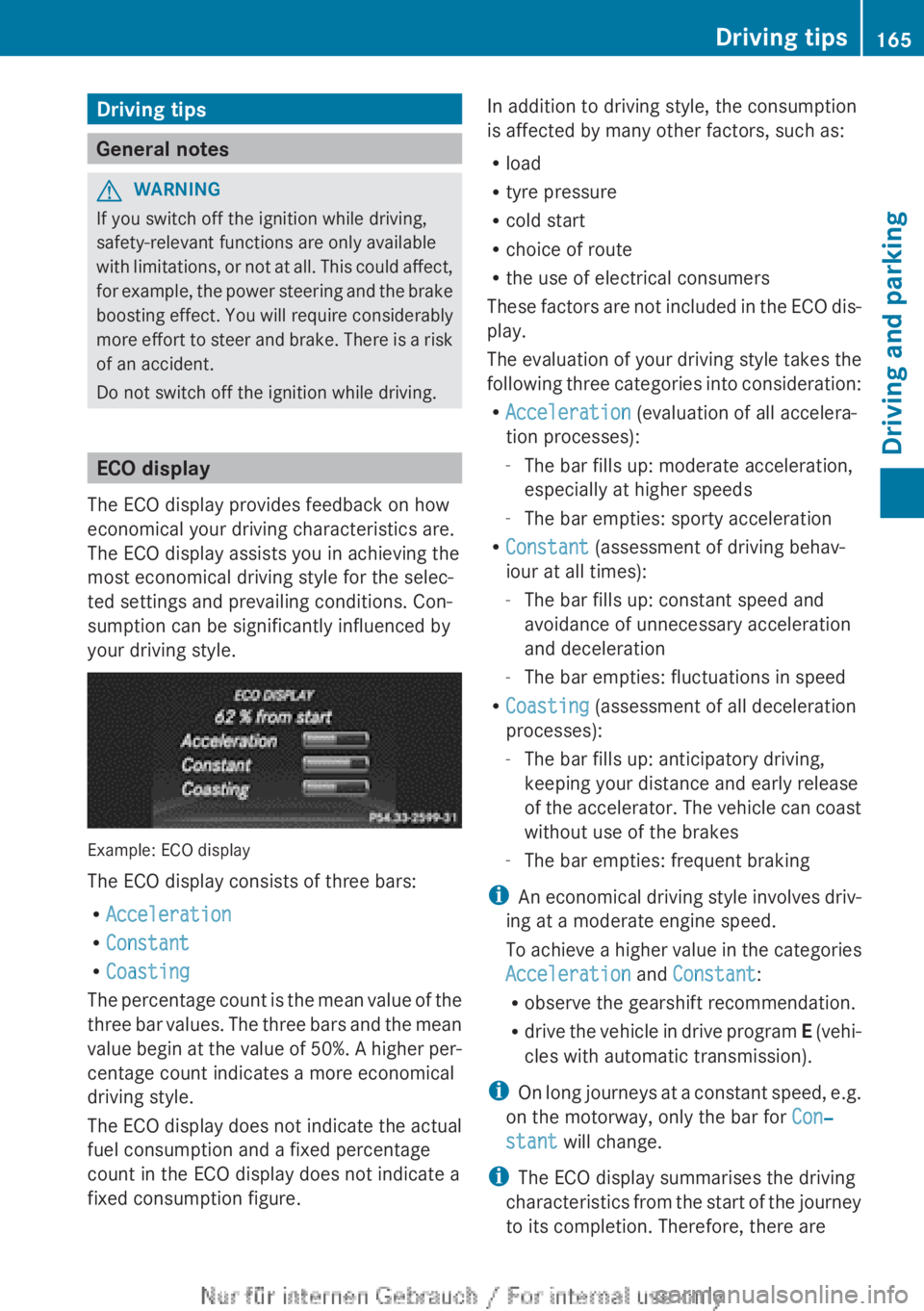
your driving style. Example: ECO display
The ECO display consists of three bars:
R
Acceleration
R Constant
R Coasting
The
percentage count is the mean value of the
three bar values. The three bars and the mean
value begin at the value of 50%. A higher per-
centage count indicates a more economical
driving style.
The ECO display does not indicate the actual
fuel consumption and a fixed percentage
count in the ECO display does not indicate a
fixed consumption figure. In addition to driving style, the consumption
is affected by many other factors, such as:
R
load
R tyre pressure
R cold start
R choice of route
R the use of electrical consumers
These
factors are not included in the ECO dis-
play.
The evaluation of your driving style takes the
following three categories into consideration:
R Acceleration (evaluation of all accelera-
tion processes):
-The bar fills up: moderate acceleration,
especially at higher speeds
- The bar empties: sporty acceleration
R Constant (assessment of driving behav-
iour at all times):
-The bar fills up: constant speed and
avoidance of unnecessary acceleration
and deceleration
- The bar empties: fluctuations in speed
R Coasting (assessment of all deceleration
processes):
-The bar fills up: anticipatory driving,
keeping your distance and early release
of the accelerator. The vehicle can coast
without use of the brakes
- The bar empties: frequent braking
i An economical driving style involves driv-
ing at a moderate engine speed.
To achieve a higher value in the categories
Acceleration and Constant:
R observe the gearshift recommendation.
R drive the vehicle in drive program E (vehi-
cles with automatic transmission).
i On long journeys at a constant speed, e.g.
on the motorway, only the bar for Con‐
stant will change.
i The ECO display summarises the driving
characteristics from the start of the journey
to its completion. Therefore, there are Driving tips
165
Driving and parking Z
Page 176 of 356
This speed can:
R
be too high for a filter lane or a slip road
R be so high in the right lane that you pass
vehicles driving on the left
R be so high in the left lane that you pass
vehicles driving on the right
If
there is a change of drivers, advise the new
driver of the speed stored.
General notes DISTRONIC PLUS regulates the speed and
automatically helps you maintain the dis-
tance to the vehicle detected in front. DIS-
TRONIC PLUS brakes automatically so that
the set speed is not exceeded.
You
must select a lower gear in good time on
long and steep downhill gradients, especially
if the vehicle is laden or towing a trailer. For
this, you need to have selected manual drive
program M(Y page 166). By doing so, you will
make use of the braking effect of the engine.
This relieves the load on the brake system and
prevents the brakes from overheating and
wearing too quickly.
If a slower-moving vehicle is detected in front,
DISTRONIC PLUS brakes your vehicle. It
maintains the preset distance to the vehicle
in front.
If DISTRONIC PLUS detects that there is a risk
of a collision, you will be warned visually and
acoustically. Without your intervention, DIS-
TRONIC PLUS cannot prevent a collision. An
intermittent warning tone will then sound and
the distance warning lamp will light up in the
instrument cluster. Brake immediately to
increase the distance to the vehicle driving in
front, or take evasive action, provided it is
safe to do so.
The radar sensor system is switched off auto-
matically in the vicinity of radio telescope
facilities ( Y page 350).
For DISTRONIC PLUS to assist you when driv-
ing, the radar sensor system must be:
R activated (Y page 223)
R operational i
In some countries you must deactivate
the radar sensor system ( Y page 223).
For
further information about the radar sen-
sor system; see ( Y page 350).
DISTRONIC PLUS is automatically deactiva-
ted if:
R you are driving slower than 25 km/h and
there is no longer a vehicle in front or
R the vehicle ahead has not been detected
If there is no vehicle in front, DISTRONIC
PLUS operates in the same way as cruise
control in the speed range between
30 km/h and 200 km/h. If a vehicle is driving
in front of you, it operates in the speed range
between 0 km/h and 200 km/h.
Do not use DISTRONIC PLUS on roads with
steep gradients.
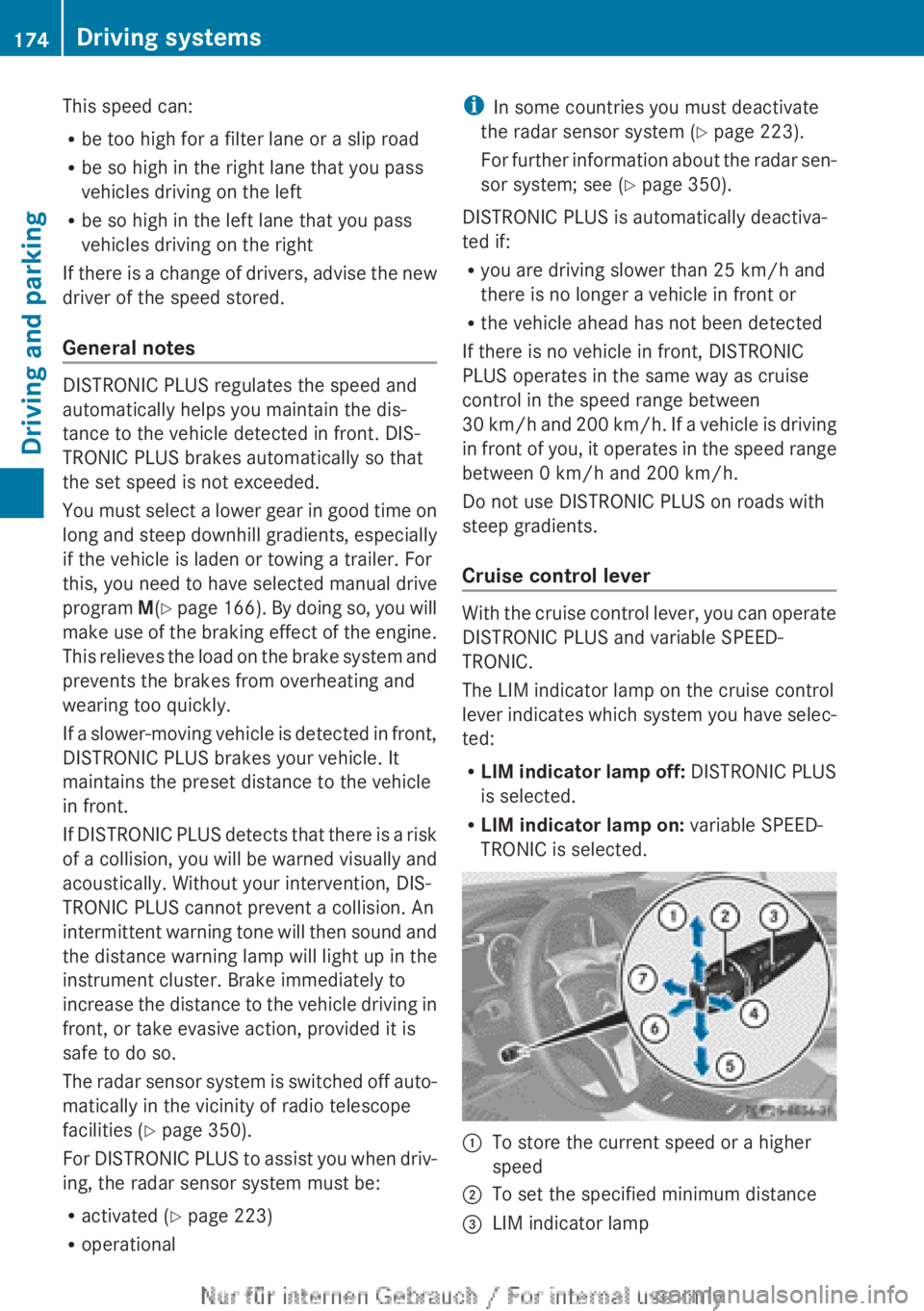
Cruise control lever With the cruise control lever, you can operate
DISTRONIC PLUS and variable SPEED-
TRONIC.
The LIM indicator lamp on the cruise control
lever
indicates which system you have selec-
ted:
R LIM indicator lamp off: DISTRONIC PLUS
is selected.
R LIM indicator lamp on: variable SPEED-
TRONIC is selected. :
To store the current speed or a higher
speed
; To set the specified minimum distance
= LIM indicator lamp174
Driving systems
Driving and parking
Page 177 of 356
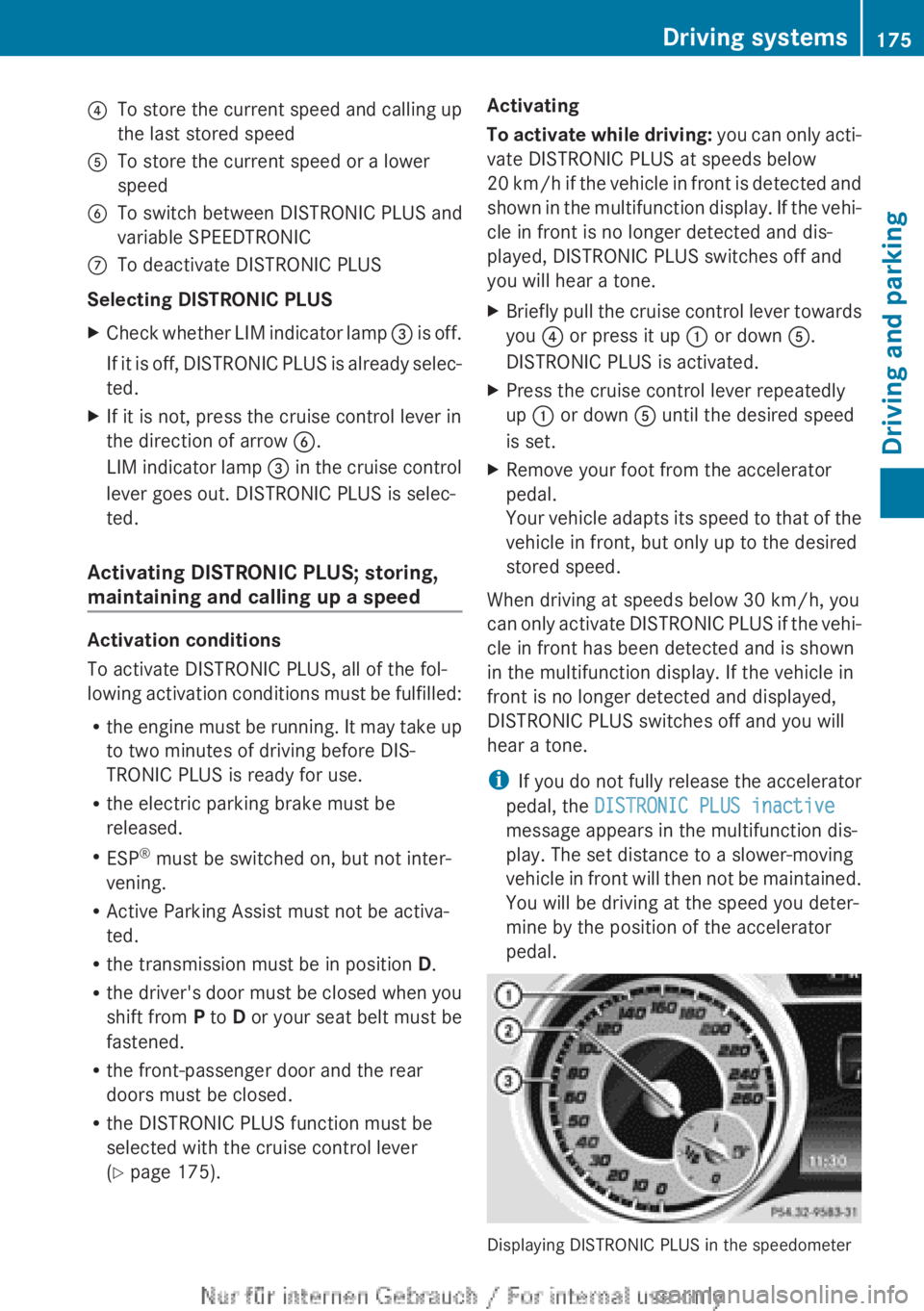
?
To store the current speed and calling up
the last stored speed
A To store the current speed or a lower
speed
B To switch between DISTRONIC PLUS and
variable SPEEDTRONIC
C To deactivate DISTRONIC PLUS
Selecting DISTRONIC PLUS
X Check whether LIM indicator lamp = is off.
If it is off, DISTRONIC PLUS is already selec-
ted.
X If it is not, press the cruise control lever in
the direction of arrow B.
LIM
indicator lamp = in the cruise control
lever goes out. DISTRONIC PLUS is selec-
ted.
Activating DISTRONIC PLUS; storing,
maintaining and calling up a speed Activation conditions
To activate DISTRONIC PLUS, all of the fol-
lowing
activation conditions must be fulfilled:
R the engine must be running. It may take up
to two minutes of driving before DIS-
TRONIC PLUS is ready for use.
R the electric parking brake must be
released.
R ESP ®
must be switched on, but not inter-
vening.
R Active Parking Assist must not be activa-
ted.
R the transmission must be in position D.
R the driver's door must be closed when you
shift from P to D or your seat belt must be
fastened.
R the front-passenger door and the rear
doors must be closed.
R the DISTRONIC PLUS function must be
selected with the cruise control lever
(Y page 175). Activating
To
activate while driving: you can only acti-
vate DISTRONIC PLUS at speeds below
20 km/h if the vehicle in front is detected and
shown in the multifunction display. If the vehi-
cle in front is no longer detected and dis-
played, DISTRONIC PLUS switches off and
you will hear a tone.
X Briefly pull the cruise control lever towards
you ? or press it up : or down A.
DISTRONIC PLUS is activated.
X Press the cruise control lever repeatedly
up : or down A until the desired speed
is set.
X Remove your foot from the accelerator
pedal.
Your
vehicle adapts its speed to that of the
vehicle in front, but only up to the desired
stored speed.
When driving at speeds below 30 km/h, you
can
only activate DISTRONIC PLUS if the vehi-
cle in front has been detected and is shown
in the multifunction display. If the vehicle in
front is no longer detected and displayed,
DISTRONIC PLUS switches off and you will
hear a tone.
i If you do not fully release the accelerator
pedal, the DISTRONIC PLUS inactive
message appears in the multifunction dis-
play. The set distance to a slower-moving
vehicle in front will then not be maintained.
You will be driving at the speed you deter-
mine by the position of the accelerator
pedal. Displaying DISTRONIC PLUS in the speedometer Driving systems
175
Driving and parking Z
Page 178 of 356
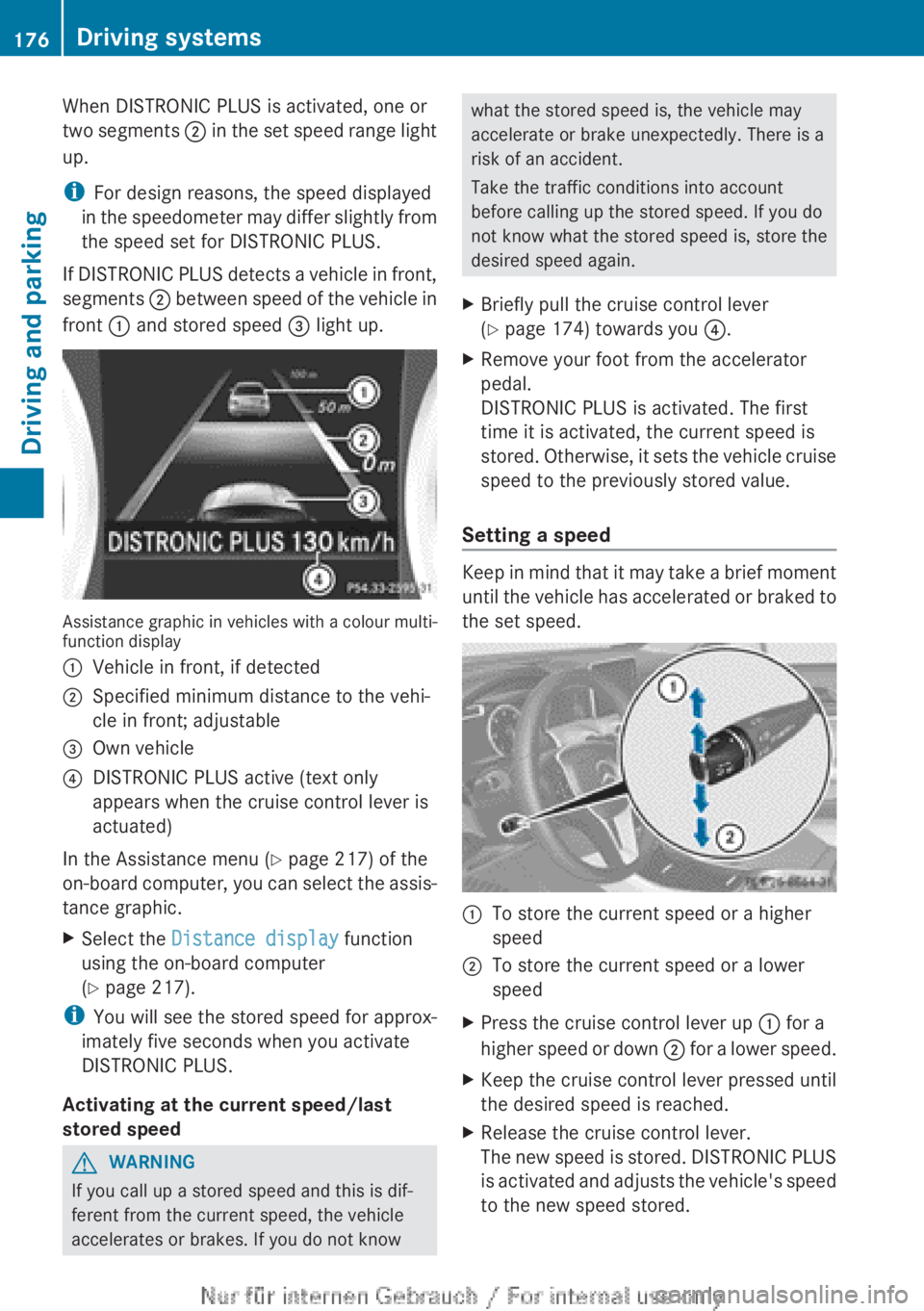
When DISTRONIC PLUS is activated, one or
two
segments ; in the set speed range light
up.
i For design reasons, the speed displayed
in the speedometer may differ slightly from
the speed set for DISTRONIC PLUS.
If DISTRONIC PLUS detects a vehicle in front,
segments ; between speed of the vehicle in
front : and stored speed = light up.Assistance graphic in vehicles with a colour multi-
function display
:
Vehicle in front, if detected
; Specified minimum distance to the vehi-
cle in front; adjustable
= Own vehicle
? DISTRONIC PLUS active (text only
appears when the cruise control lever is
actuated)
In the Assistance menu (Y page 217) of the
on-board
computer, you can select the assis-
tance graphic.
X Select the Distance display function
using the on-board computer
(Y page 217).
i You
will see the stored speed for approx-
imately five seconds when you activate
DISTRONIC PLUS.
Activating at the current speed/last
stored speed G
WARNING
If you call up a stored speed and this is dif-
ferent from the current speed, the vehicle
accelerates or brakes. If you do not know what the stored speed is, the vehicle may
accelerate or brake unexpectedly. There is a
risk of an accident.
Take the traffic conditions into account
before calling up the stored speed. If you do
not know what the stored speed is, store the
desired speed again.
X Briefly pull the cruise control lever
(Y page 174) towards you ?.
X Remove your foot from the accelerator
pedal.
DISTRONIC PLUS is activated. The first
time it is activated, the current speed is
stored.
Otherwise, it sets the vehicle cruise
speed to the previously stored value.
Setting a speed Keep in mind that it may take a brief moment
until
the vehicle has accelerated or braked to
the set speed. :
To store the current speed or a higher
speed
; To store the current speed or a lower
speed
X Press the cruise control lever up : for a
higher
speed or down ; for a lower speed.
X Keep the cruise control lever pressed until
the desired speed is reached.
X Release the cruise control lever.
The
new speed is stored. DISTRONIC PLUS
is activated and adjusts the vehicle's speed
to the new speed stored. 176
Driving systems
Driving and parking
Page 180 of 356
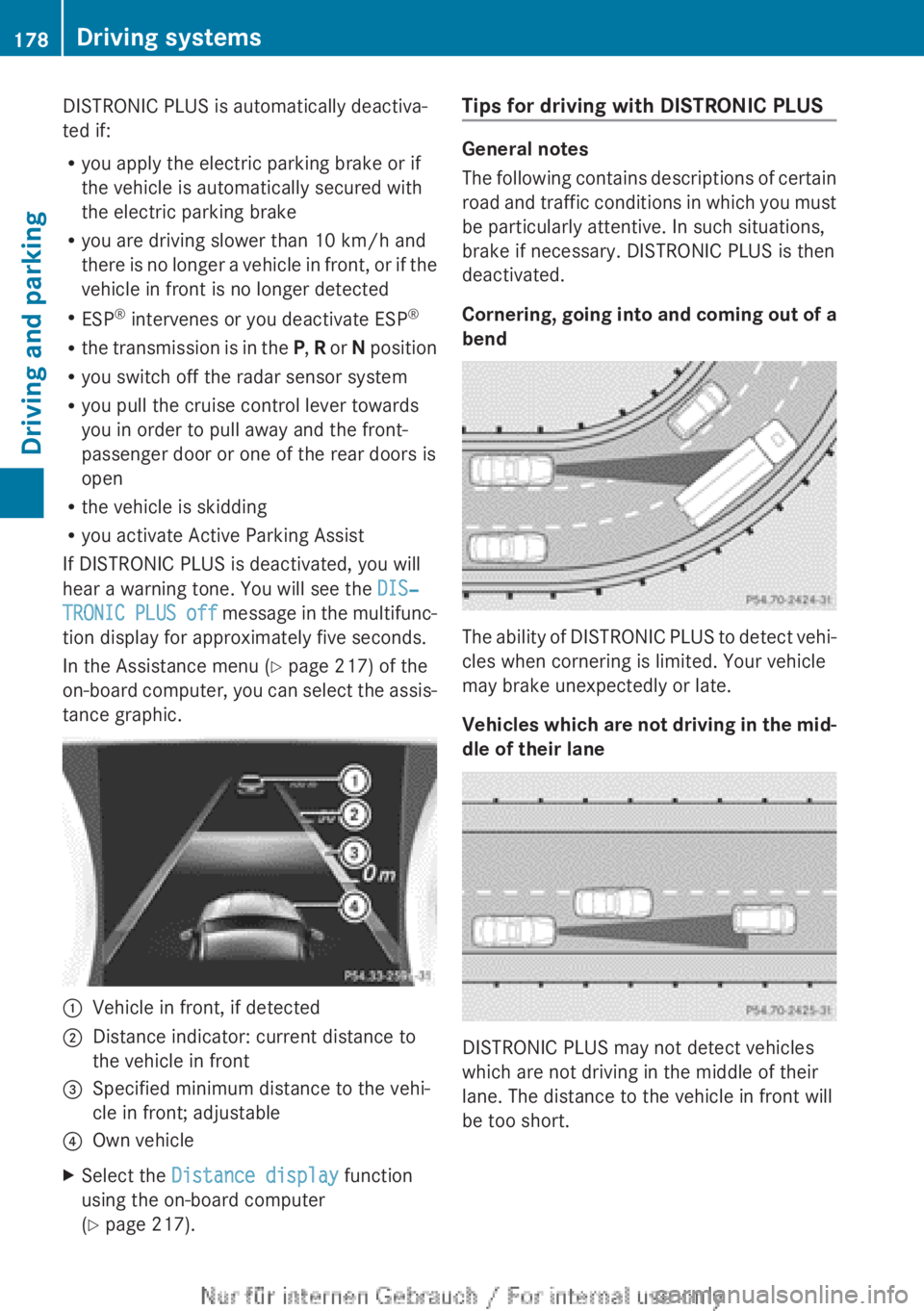
DISTRONIC PLUS is automatically deactiva-
ted if:
R
you apply the electric parking brake or if
the vehicle is automatically secured with
the electric parking brake
R you are driving slower than
10 km/h and
there is no longer a vehicle in front, or if the
vehicle in front is no longer detected
R ESP ®
intervenes or you deactivate ESP ®
R the transmission is in the P, R or N position
R you switch off the radar sensor system
R you pull the cruise control lever towards
you in order to pull away and the front-
passenger door or one of the rear doors is
open
R the vehicle is skidding
R you activate Active Parking Assist
If DISTRONIC PLUS is deactivated, you will
hear a warning tone. You will see the DIS‐
TRONIC PLUS off message in the multifunc-
tion display for approximately five seconds.
In the Assistance menu (Y page 217) of the
on-board computer, you can select the assis-
tance graphic. :
Vehicle in front, if detected
; Distance indicator: current distance to
the vehicle in front
= Specified minimum distance to the vehi-
cle in front; adjustable
? Own vehicle
X Select the Distance display function
using the on-board computer
(Y page 217). Tips for driving with DISTRONIC PLUS General notes
The
following contains descriptions of certain
road and traffic conditions in which you must
be particularly attentive. In such situations,
brake if necessary. DISTRONIC PLUS is then
deactivated.
Cornering, going into and coming out of a
bend The ability of DISTRONIC PLUS to detect vehi-
cles when cornering is limited. Your vehicle
may brake unexpectedly or late.
Vehicles
which are not driving in the mid-
dle of their lane DISTRONIC PLUS may not detect vehicles
which are not driving in the middle of their
lane. The distance to the vehicle in front will
be too short.178
Driving systems
Driving and parking
Page 182 of 356
!
If DISTRONIC PLUS or the HOLD function
is activated, the vehicle brakes automati-
cally in certain situations. To prevent dam-
age to the vehicle, deactivate DISTRONIC
PLUS and the HOLD function in the follow-
ing or other similar situations:
R when towing the vehicle
R in the car wash
Deactivate the HOLD function (Y page 180).
General notes The HOLD function can assist the driver in the
following situations:
R
when pulling away, especially on steep
slopes
R when manoeuvring on steep slopes
R when waiting in traffic
The vehicle is kept stationary without the
driver having to depress the brake pedal.
The
braking effect is cancelled and the HOLD
function is deactivated when you depress the
accelerator pedal to pull away.
Activation conditions You can activate the HOLD function if:
R
the vehicle is stationary
R the
engine is running or if it has been auto-
matically switched off by the ECO start/
stop function
R the driver's door is closed or if your seat
belt is fastened
R the electric parking brake is released
R the transmission is in position D, R or N on
vehicles with automatic transmission
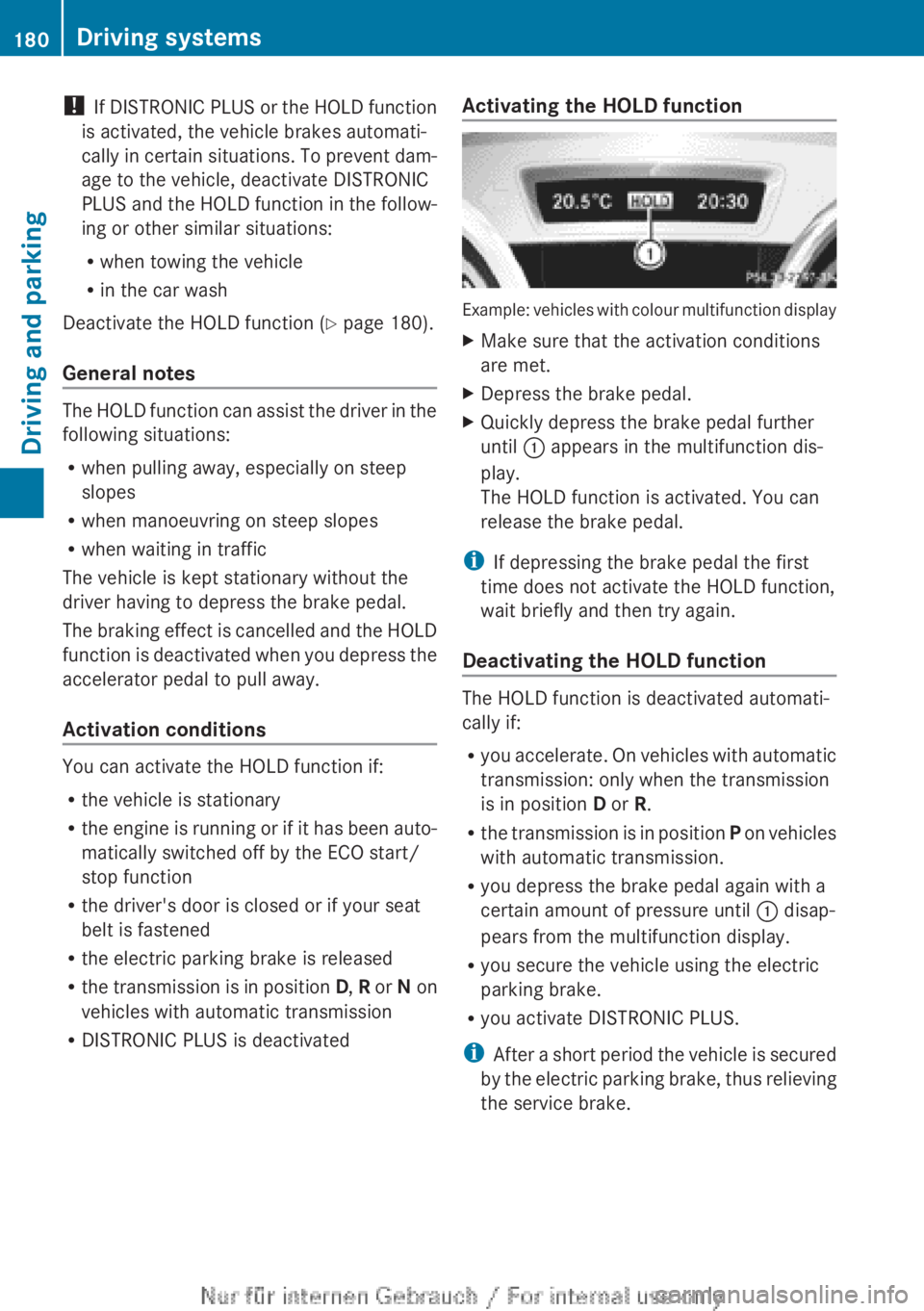
R DISTRONIC PLUS is deactivated Activating the HOLD function Example: vehicles with colour multifunction display
X
Make sure that the activation conditions
are met.
X Depress the brake pedal.
X Quickly depress the brake pedal further
until : appears in the multifunction dis-
play.
The HOLD function is activated. You can
release the brake pedal.
i If depressing the brake pedal the first
time does not activate the HOLD function,
wait briefly and then try again.
Deactivating the HOLD function The HOLD function is deactivated automati-
cally if:
R
you
accelerate. On vehicles with automatic
transmission: only when the transmission
is in position D or R.
R the transmission is in position P on vehicles
with automatic transmission.
R you depress the brake pedal again with a
certain amount of pressure until : disap-
pears from the multifunction display.
R you secure the vehicle using the electric
parking brake.
R you activate DISTRONIC PLUS.
i After a short period the vehicle is secured
by the electric parking brake, thus relieving
the service brake. 180
Driving systems
Driving and parking