reset MERCEDES-BENZ A CLASS 2012 User Guide
[x] Cancel search | Manufacturer: MERCEDES-BENZ, Model Year: 2012, Model line: A CLASS, Model: MERCEDES-BENZ A CLASS 2012Pages: 356, PDF Size: 4.96 MB
Page 91 of 356
Opening and closing
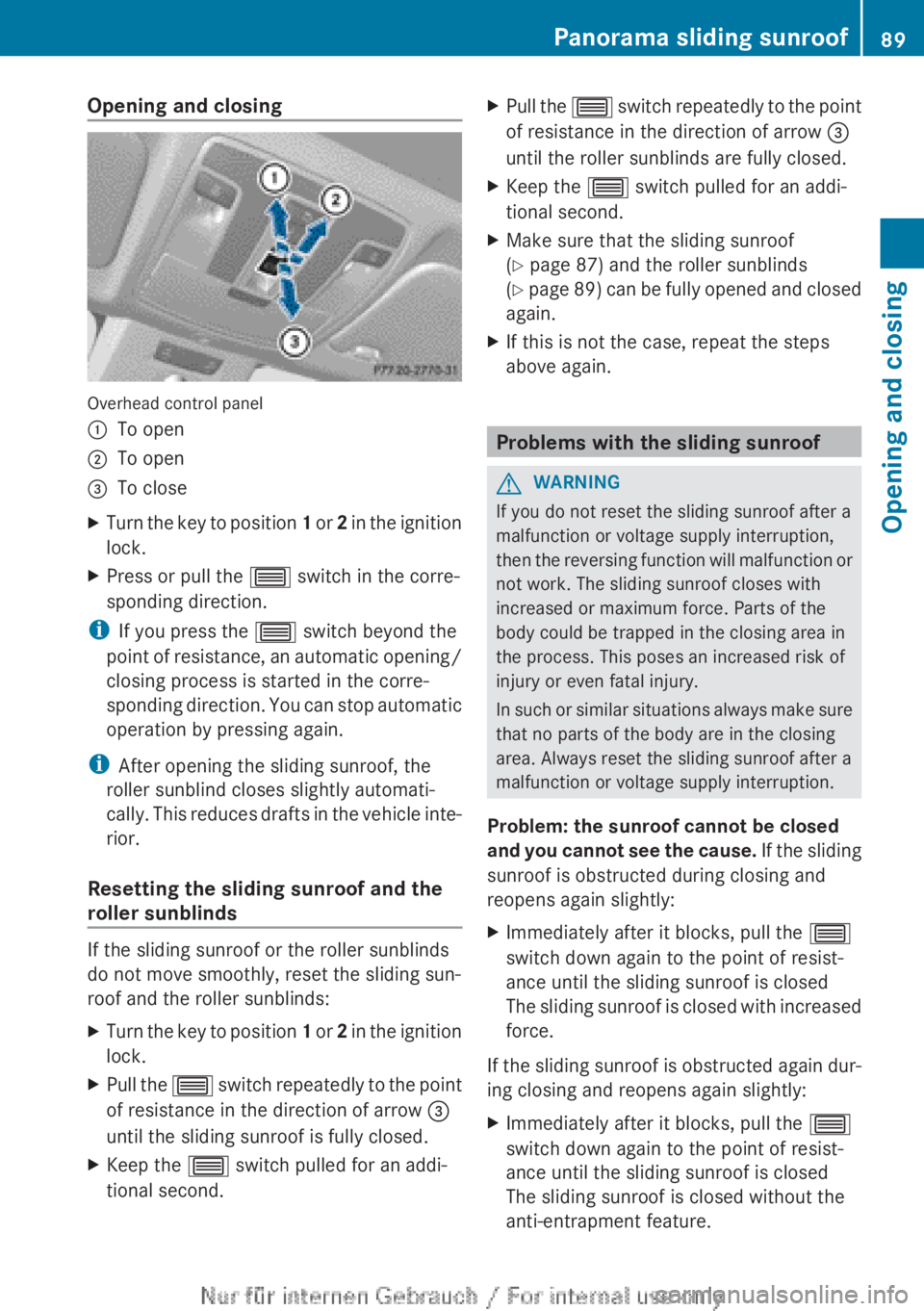
Overhead control panel
:
To open
; To open
= To close
X Turn the key to position 1 or 2 in the ignition
lock.
X Press or pull the 3 switch in the corre-
sponding direction.
i If you press the 3 switch beyond the
point
of resistance, an automatic opening/
closing process is started in the corre-
sponding direction. You can stop automatic
operation by pressing again.
i After opening the sliding sunroof, the
roller sunblind closes slightly automati-
cally. This reduces drafts in the vehicle inte-
rior.
Resetting the sliding sunroof and the
roller sunblinds If the sliding sunroof or the roller sunblinds
do not move smoothly, reset the sliding sun-
roof and the roller sunblinds:
X
Turn the key to position 1
or 2 in the ignition
lock.
X Pull the 3
switch repeatedly to the point
of resistance in the direction of arrow =
until the sliding sunroof is fully closed.
X Keep the 3 switch pulled for an addi-
tional second. X
Pull the 3
switch repeatedly to the point
of resistance in the direction of arrow =
until the roller sunblinds are fully closed.
X Keep the 3 switch pulled for an addi-
tional second.
X Make sure that the sliding sunroof
(Y page 87) and the roller sunblinds
(Y
page 89) can be fully opened and closed
again.
X If this is not the case, repeat the steps
above again. Problems with the sliding sunroof
G
WARNING
If you do not reset the sliding sunroof after a
malfunction or voltage supply interruption,
then
the reversing function will malfunction or
not work. The sliding sunroof closes with
increased or maximum force. Parts of the
body could be trapped in the closing area in
the process. This poses an increased risk of
injury or even fatal injury.
In such or similar situations always make sure
that no parts of the body are in the closing
area. Always reset the sliding sunroof after a
malfunction or voltage supply interruption.
Problem: the sunroof cannot be closed
and you cannot see the cause. If the sliding
sunroof is obstructed during closing and
reopens again slightly:
X Immediately after it blocks, pull the 3
switch down again to the point of resist-
ance until the sliding sunroof is closed
The
sliding sunroof is closed with increased
force.
If the sliding sunroof is obstructed again dur-
ing closing and reopens again slightly:
X Immediately after it blocks, pull the 3
switch down again to the point of resist-
ance until the sliding sunroof is closed
The sliding sunroof is closed without the
anti-entrapment feature. Panorama sliding sunroof
89
Opening and closing Z
Page 101 of 356
Exterior mirrors
Adjusting the exterior mirrors G
WARNING
The exterior mirrors reduce the size of the
image. Objects visible in the mirrors are
closer than they appear. You could misjudge
the distance from road users driving behind
you
when changing lanes, for instance. There
is a risk of an accident.
You should therefore always look over your
shoulder to determine the actual distance
from road users driving behind you. X
Make sure that the key is in position 1 or
2 in the ignition lock.
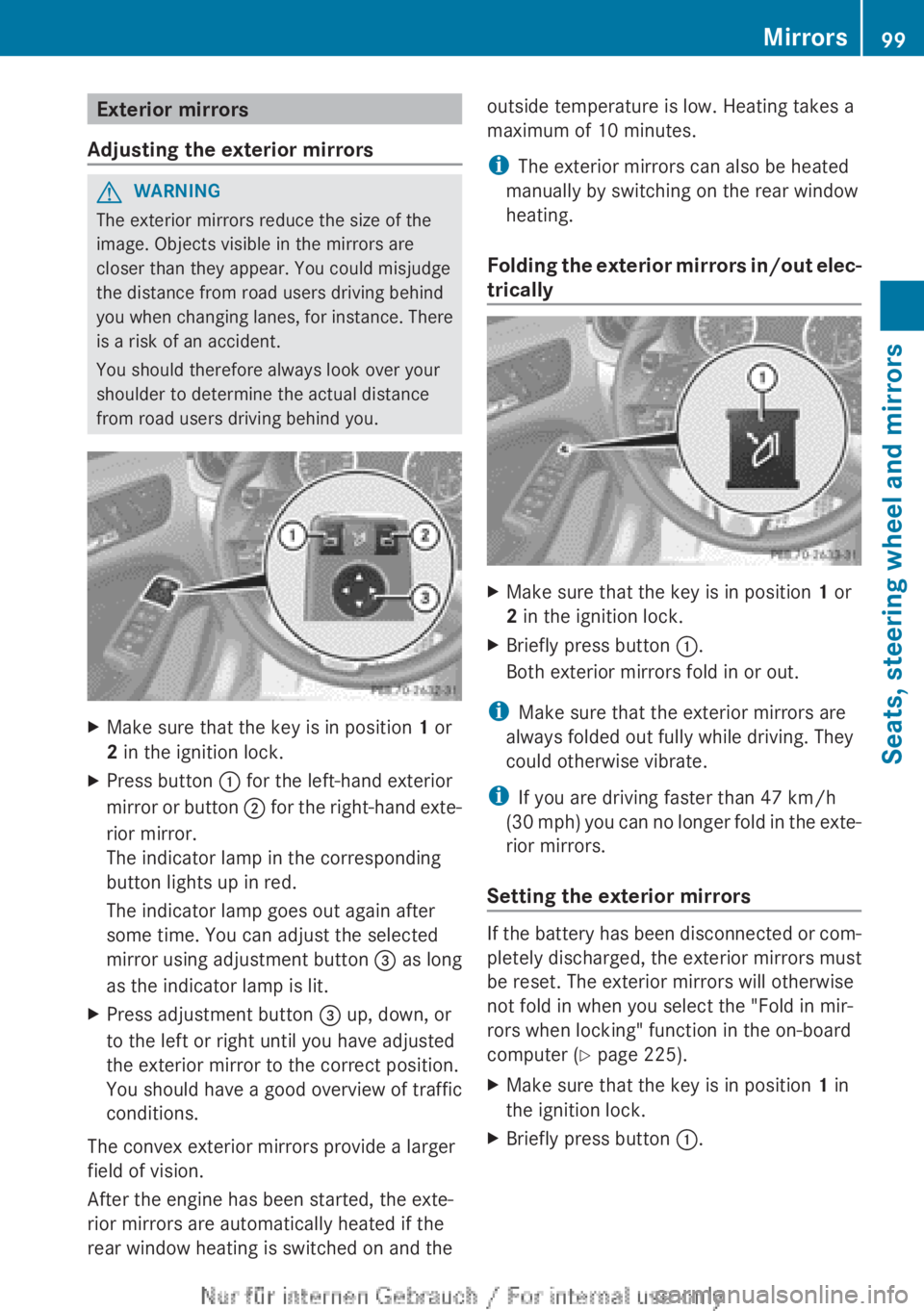
X Press button : for the left-hand exterior
mirror
or button ; for the right-hand exte-
rior mirror.
The indicator lamp in the corresponding
button lights up in red.
The indicator lamp goes out again after
some time. You can adjust the selected
mirror using adjustment button = as long
as the indicator lamp is lit.
X Press adjustment button = up, down, or
to the left or right until you have adjusted
the exterior mirror to the correct position.
You should have a good overview of traffic
conditions.
The convex exterior mirrors provide a larger
field of vision.
After the engine has been started, the exte-
rior mirrors are automatically heated if the
rear window heating is switched on and the outside temperature is low. Heating takes a
maximum of 10 minutes.
i
The exterior mirrors can also be heated
manually by switching on the rear window
heating.
Folding
the exterior mirrors in/out elec-
trically X
Make sure that the key is in position 1 or
2 in the ignition lock.
X Briefly press button :.
Both exterior mirrors fold in or out.
i Make sure that the exterior mirrors are
always folded out fully while driving. They
could otherwise vibrate.
i If you are driving faster than 47 km/h
(30
mph) you can no longer fold in the exte-
rior mirrors.
Setting the exterior mirrors If the battery has been disconnected or com-
pletely discharged, the exterior mirrors must
be reset. The exterior mirrors will otherwise
not fold in when you select the "Fold in mir-
rors when locking" function in the on-board
computer (Y page 225).
X
Make sure that the key is in position 1 in
the ignition lock.
X Briefly press button :. Mirrors
99
Seats, steering wheel and mirrors Z
Page 102 of 356
Folding the exterior mirrors in/out
automatically
If the "Fold in mirrors when locking" function
is activated in the on-board computer
(Y page 225):
R
the
exterior mirrors fold in automatically as
soon as you lock the vehicle from the out-
side.
R the exterior mirrors fold out again automat-
ically as soon as you unlock the vehicle and
then open the driver's or front-passenger
door.
i If the exterior mirrors have been folded in
manually, they do not fold out.
Exterior mirror pushed out of position If an exterior mirror has been pushed out of
position, proceed as follows.
X
Vehicles without electrically folding
exterior
mirrors: move the exterior mirror
into the correct position manually.
X Vehicles with electrically folding exte-
rior mirrors: press and hold the mirror-
folding button
(Y page 99) until you hear a
click and then the mirror engage in posi-
tion.
The mirror housing is engaged again and
you can adjust the exterior mirrors as usual
(Y page 99). Automatic anti-dazzle mirrors
The "Automatic anti-dazzle mirrors" function
is
only available if the vehicle is equipped with
the "Mirror package".
The rear-view mirror and the exterior mirror
on the driver's side automatically go into anti-
dazzle mode if:
R the ignition is switched on and
R incident light from headlamps strikes the
sensor in the rear-view mirror
The mirrors do not go into anti-dazzle mode if
reverse gear is engaged or if the interior light-
ing is switched on. Parking position of the exterior mirror
on the front-passenger side
General notes The "Parking position for the exterior mirror
on the front-passenger side" function is only
available if the vehicle is equipped with the
"Memory package".
Setting
and storing the parking position Using reverse gear
You
can set the front-passenger side exterior
mirror so that you can see the rear wheel on
that side as soon as you engage reverse gear.
You can store this position. X
Make sure that the vehicle is stationary and
that the key is in position 2 in the ignition
lock.
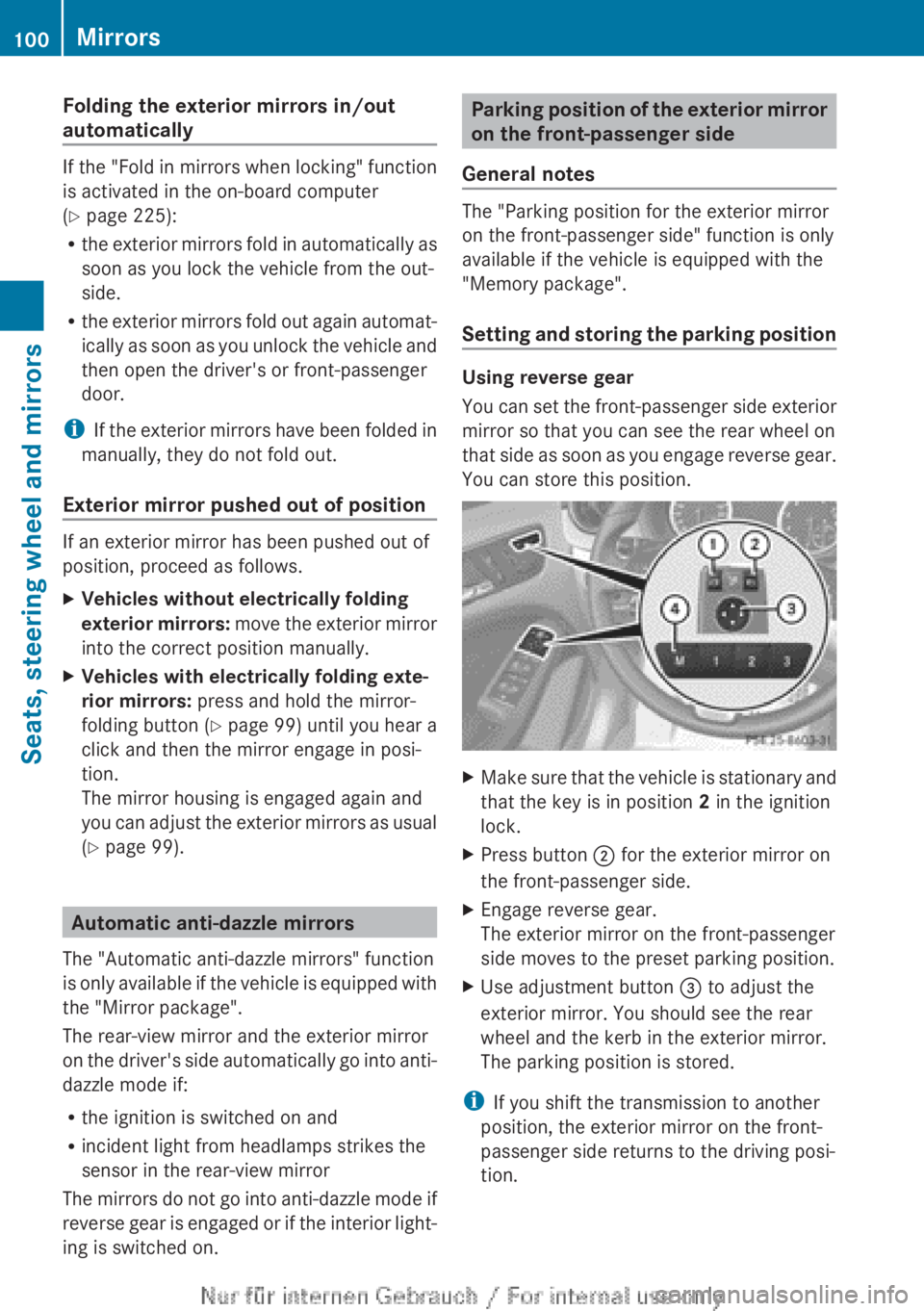
X Press button ; for the exterior mirror on
the front-passenger side.
X Engage reverse gear.
The exterior mirror on the front-passenger
side moves to the preset parking position.
X Use adjustment button = to adjust the
exterior mirror. You should see the rear
wheel and the kerb in the exterior mirror.
The parking position is stored.
i If you shift the transmission to another
position, the exterior mirror on the front-
passenger side returns to the driving posi-
tion. 100
Mirrors
Seats, steering wheel and mirrors
Page 103 of 356
Using the memory button
You
can set the front-passenger side exterior
mirror so that you can see the rear wheel on
that side as soon as you engage reverse gear.
You can store this position. This setting can
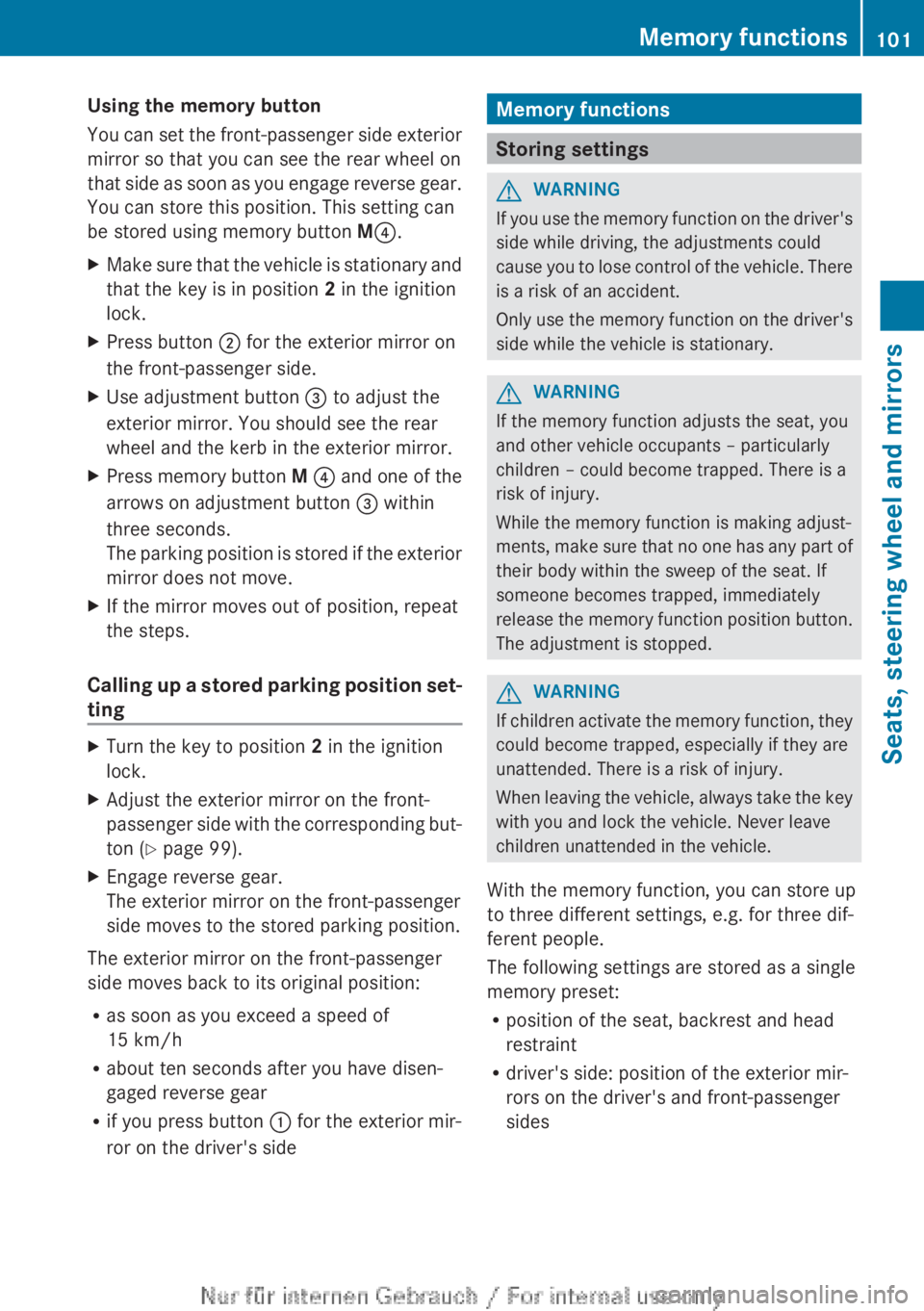
be stored using memory button M?.
X Make sure that the vehicle is stationary and
that the key is in position 2 in the ignition
lock.
X Press button ; for the exterior mirror on
the front-passenger side.
X Use adjustment button = to adjust the
exterior mirror. You should see the rear
wheel and the kerb in the exterior mirror.
X Press memory button M ?
and one of the
arrows on adjustment button = within
three seconds.
The parking position is stored if the exterior
mirror does not move.
X If the mirror moves out of position, repeat
the steps.
Calling up a stored parking position set-
ting X
Turn the key to position 2 in the ignition
lock.
X Adjust the exterior mirror on the front-
passenger
side with the corresponding but-
ton ( Y page 99).
X Engage reverse gear.
The exterior mirror on the front-passenger
side moves to the stored parking position.
The exterior mirror on the front-passenger
side moves back to its original position:
R as soon as you exceed a speed of
15 km/h
R about ten seconds after you have disen-
gaged reverse gear
R if you press button : for the exterior mir-
ror on the driver's side Memory functions
Storing settings
G
WARNING
If you use the memory function on the driver's
side while driving, the adjustments could
cause
you to lose control of the vehicle. There
is a risk of an accident.
Only use the memory function on the driver's
side while the vehicle is stationary. G
WARNING
If the memory function adjusts the seat, you
and other vehicle occupants – particularly
children – could become trapped. There is a
risk of injury.
While the memory function is making adjust-
ments,
make sure that no one has any part of
their body within the sweep of the seat. If
someone becomes trapped, immediately
release the memory function position button.
The adjustment is stopped. G
WARNING
If children activate the memory function, they
could become trapped, especially if they are
unattended. There is a risk of injury.
When
leaving the vehicle, always take the key
with you and lock the vehicle. Never leave
children unattended in the vehicle.
With the memory function, you can store up
to three different settings, e.g. for three dif-
ferent people.
The following settings are stored as a single
memory preset:
R position of the seat, backrest and head
restraint
R driver's side: position of the exterior mir-
rors on the driver's and front-passenger
sides Memory functions
101
Seats, steering wheel and mirrors Z
Page 110 of 356
The blue
K indicator lamp in the instru-
ment cluster lights up when the main-beam
headlamps are switched on.
X To switch off the main-beam head-
lamps:
move the combination switch back
to its normal position.
The blue K indicator lamp in the instru-
ment cluster goes out.
i Vehicles with Adaptive Highbeam Assist:
when Adaptive Highbeam Assist is active,
it controls activation of the main-beam
headlamps
(Y page 110).
Headlamp flasher X
To switch on: turn the key in the ignition
lock to position 1 or 2,
or start the engine.
X Pull the combination switch in the direction
of arrow =. Hazard warning lamps
The hazard warning lamps switch on auto-
matically if:
R
an airbag is deployed or
R the vehicle decelerates rapidly from a
speed
of more than 70 km/h and comes to
a standstill
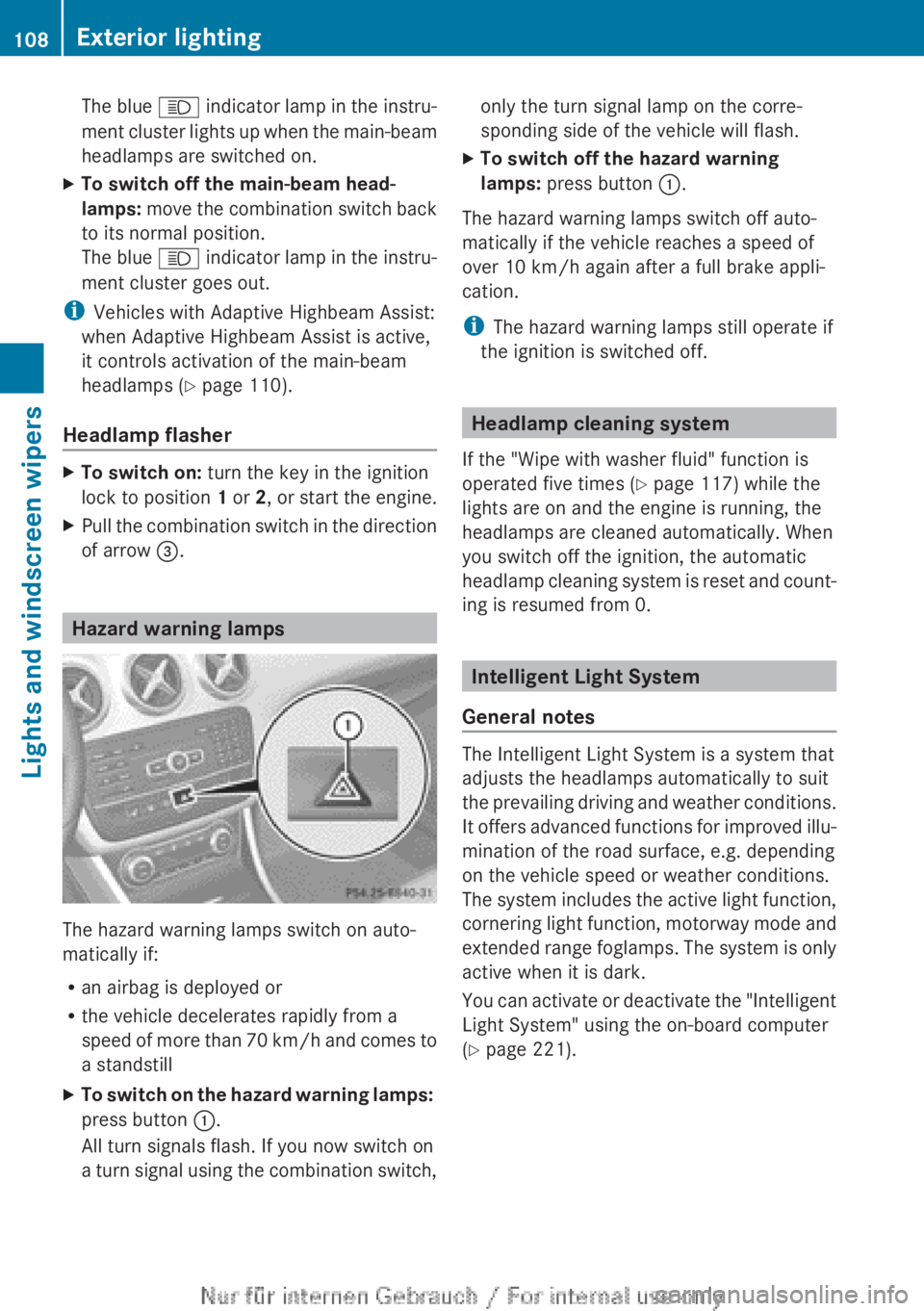
X To switch on the hazard warning lamps:
press button :.
All turn signals flash. If you now switch on
a
turn signal using the combination switch, only the turn signal lamp on the corre-
sponding side of the vehicle will flash.
X To switch off the hazard warning
lamps: press button :.
The hazard warning lamps switch off auto-
matically if the vehicle reaches a speed of
over 10 km/h
again after a full brake appli-
cation.
i The hazard warning lamps still operate if
the ignition is switched off. Headlamp cleaning system
If the "Wipe with washer fluid" function is
operated five times ( Y page 117) while the
lights are on and the engine is running, the
headlamps are cleaned automatically. When
you switch off the ignition, the automatic
headlamp
cleaning system is reset and count-
ing is resumed from 0. Intelligent Light System
General notes The Intelligent Light System is a system that
adjusts the headlamps automatically to suit
the
prevailing driving and weather conditions.
It offers advanced functions for improved illu-
mination of the road surface, e.g. depending
on the vehicle speed or weather conditions.
The system includes the active light function,
cornering light function, motorway mode and
extended range foglamps. The system is only
active when it is dark.
You can activate or deactivate the "Intelligent
Light System" using the on-board computer
(Y page 221). 108
Exterior lightingLights and windscreen wipers
Page 168 of 356
dynamic changes in the bars at the start of
a
journey. During a prolonged driving time,
these changes are smaller. For more
dynamic changes, perform a manual reset.
For further information on the ECO display,
see ( Y page 212). Braking
Important safety notes G
WARNING
If you shift down on a slippery road surface in
an attempt to increase the engine's braking
effect, the drive wheels could lose their grip.
This
increases the risk of skidding and having
an accident.
Do not shift down for additional engine brak-
ing on a slippery road surface.
Downhill gradients Change into a lower gear in good time on long
and
steep downhill gradients. Take particular
note of this when driving a laden vehicle and
when towing a trailer. For vehicles with auto-
matic transmission, you need to have selec-
ted manual drive program M(Y page 156).
i This also applies if you have activated
cruise control, SPEEDTRONIC or DIS-
TRONIC PLUS.
This will use the braking effect of the engine,
so less braking will be required to prevent the
vehicle from gaining speed. This relieves the
load on the brake system and prevents the
brakes from overheating and wearing too
quickly.
i Briefly depressing the accelerator pedal
on downhill gradients while the manual
drive program M is temporarily activated
(vehicles with automatic transmission): the
automatic transmission may switch back to
the last active automatic drive program E
or S. The automatic transmission may shift to a higher gear. This can reduce the
engine's braking effect.
Heavy and light loads G
WARNING
The braking system can overheat if you leave
your foot on the brake pedal while driving.
This
increases the braking distance and could
even cause the braking system to fail. There
is a risk of an accident.
Never use the brake pedal as a footrest. Do
not simultaneously depress both the brake
pedal and the accelerator pedal while driving.
! Depressing the brake pedal constantly
results in excessive and premature wear to
the brake pads.
If heavy demands are made on the brakes, do
not park the vehicle immediately. Drive on for
a short while. This allows the airflow to cool
the brakes more quickly.
If the brakes have been used only moderately,
you should occasionally test their effective-
ness. To do this, brake more firmly from a
higher speed, paying attention to traffic con-
ditions. This improves the grip of the brakes.
Wet road surfaces If you have driven for a long time in heavy rain
without
braking, there may be a delayed reac-
tion from the brakes when braking for the first
time. This may also occur after a car wash or
after driving through deep water.
You have to depress the brake pedal more
firmly. Maintain a greater distance from the
vehicle in front.
After driving on a wet road or having the vehi-
cle washed, brake firmly while paying atten-
tion to the traffic conditions. This will warm
up the brake discs, thereby drying them more
quickly and protecting them against corro-
sion. 166
Driving tips
Driving and parking
Page 176 of 356
This speed can:
R
be too high for a filter lane or a slip road
R be so high in the right lane that you pass
vehicles driving on the left
R be so high in the left lane that you pass
vehicles driving on the right
If
there is a change of drivers, advise the new
driver of the speed stored.
General notes DISTRONIC PLUS regulates the speed and
automatically helps you maintain the dis-
tance to the vehicle detected in front. DIS-
TRONIC PLUS brakes automatically so that
the set speed is not exceeded.
You
must select a lower gear in good time on
long and steep downhill gradients, especially
if the vehicle is laden or towing a trailer. For
this, you need to have selected manual drive
program M(Y page 166). By doing so, you will
make use of the braking effect of the engine.
This relieves the load on the brake system and
prevents the brakes from overheating and
wearing too quickly.
If a slower-moving vehicle is detected in front,
DISTRONIC PLUS brakes your vehicle. It
maintains the preset distance to the vehicle
in front.
If DISTRONIC PLUS detects that there is a risk
of a collision, you will be warned visually and
acoustically. Without your intervention, DIS-
TRONIC PLUS cannot prevent a collision. An
intermittent warning tone will then sound and
the distance warning lamp will light up in the
instrument cluster. Brake immediately to
increase the distance to the vehicle driving in
front, or take evasive action, provided it is
safe to do so.
The radar sensor system is switched off auto-
matically in the vicinity of radio telescope
facilities ( Y page 350).
For DISTRONIC PLUS to assist you when driv-
ing, the radar sensor system must be:
R activated (Y page 223)
R operational i
In some countries you must deactivate
the radar sensor system ( Y page 223).
For
further information about the radar sen-
sor system; see ( Y page 350).
DISTRONIC PLUS is automatically deactiva-
ted if:
R you are driving slower than 25 km/h and
there is no longer a vehicle in front or
R the vehicle ahead has not been detected
If there is no vehicle in front, DISTRONIC
PLUS operates in the same way as cruise
control in the speed range between
30 km/h and 200 km/h. If a vehicle is driving
in front of you, it operates in the speed range
between 0 km/h and 200 km/h.
Do not use DISTRONIC PLUS on roads with
steep gradients.
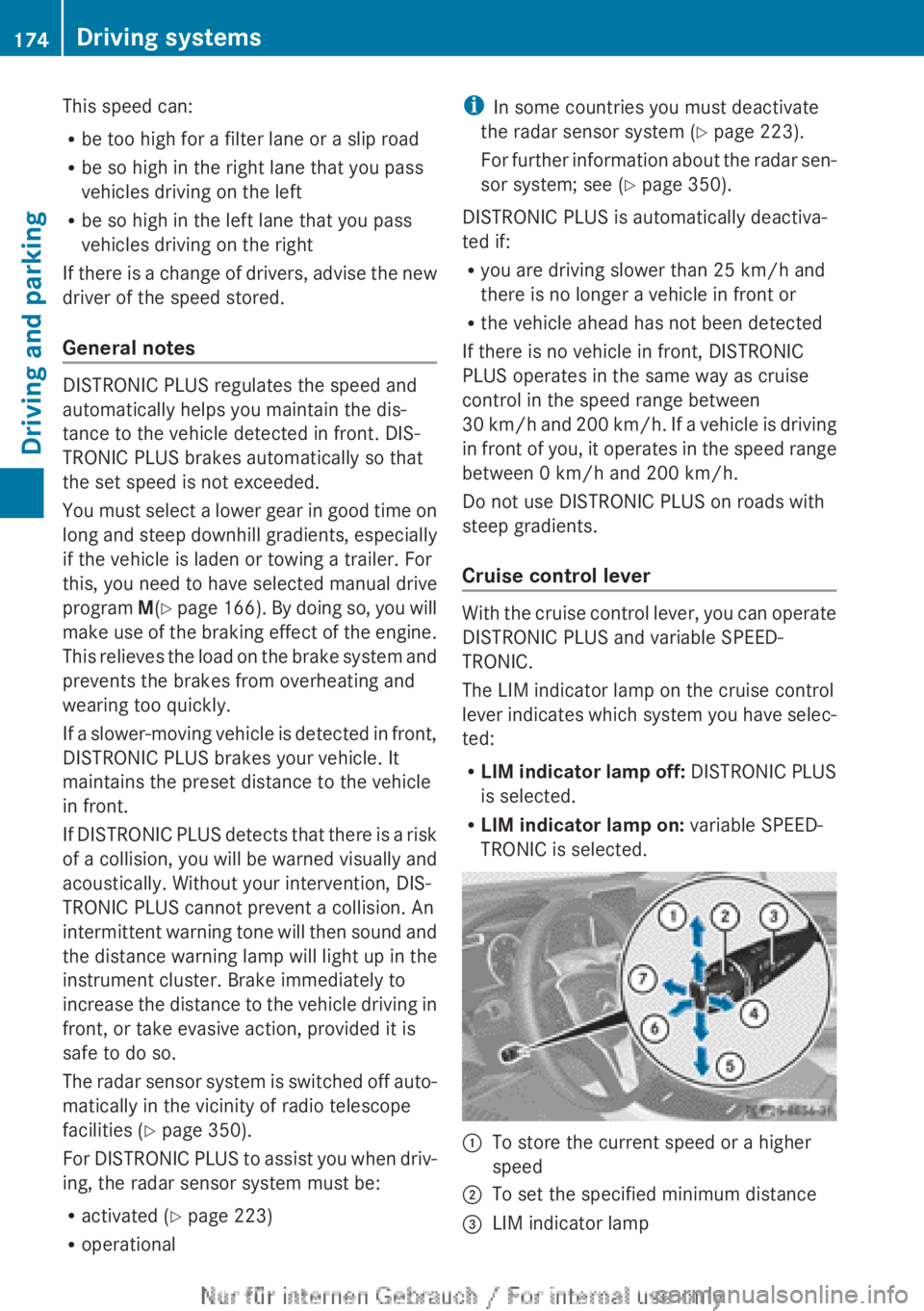
Cruise control lever With the cruise control lever, you can operate
DISTRONIC PLUS and variable SPEED-
TRONIC.
The LIM indicator lamp on the cruise control
lever
indicates which system you have selec-
ted:
R LIM indicator lamp off: DISTRONIC PLUS
is selected.
R LIM indicator lamp on: variable SPEED-
TRONIC is selected. :
To store the current speed or a higher
speed
; To set the specified minimum distance
= LIM indicator lamp174
Driving systems
Driving and parking
Page 198 of 356
R
if you have adopted a sporty driving style
with
high cornering speeds or high rates of
acceleration
R if you are predominantly driving slower
than 80 km/h or faster than 180 km/h
R if you are currently using COMAND Online
or making a telephone call with COMAND
Online
R if the time has been set incorrectly
R in active driving situations, such as when
you change lanes or change your speed
Warning and display messages in the
multifunction display X
Activate ATTENTION ASSIST using the on-
board computer ( Y page 219).
If ATTENTION ASSIST is active, you will be
warned no sooner than 20 minutes after
your journey has begun. You then hear an
intermittent warning tone twice and the
Attention Assist: Take a break!
message appears in the multifunction dis-
play.
X If necessary, take a break.
X Press the a or % button to confirm
the message.
On long journeys, take regular breaks in good
time to allow yourself to rest properly. If you
do
not take a break, you will be warned again
after 15 minutes at the earliest. This will only
happen if ATTENTION ASSIST still detects
typical indicators of fatigue or increasing lap-
ses in concentration.
ATTENTION ASSIST is reset and starts
assessing your tiredness again when you con-
tinue your journey if:
R you switch off the engine
R you take off your seat belt and open the
driver's door, e.g. for a change of drivers or
to take a break
When ATTENTION ASSIST is deactivated, the
é symbol appears in the multifunction
display in the assistance graphic display. Speed Limit Assist
General notes Speed Limit Assist shows you detected speed
limits in the multifunction display. Data from
the navigation system is also used for this
purpose. If a traffic sign indicating a speed
limit or the end of a speed limit is detected,
it is shown in the multifunction display. If
Speed
Limit Assist does not detect any traffic
signs, the speed limit from the digital road
map is taken and shown in the display.
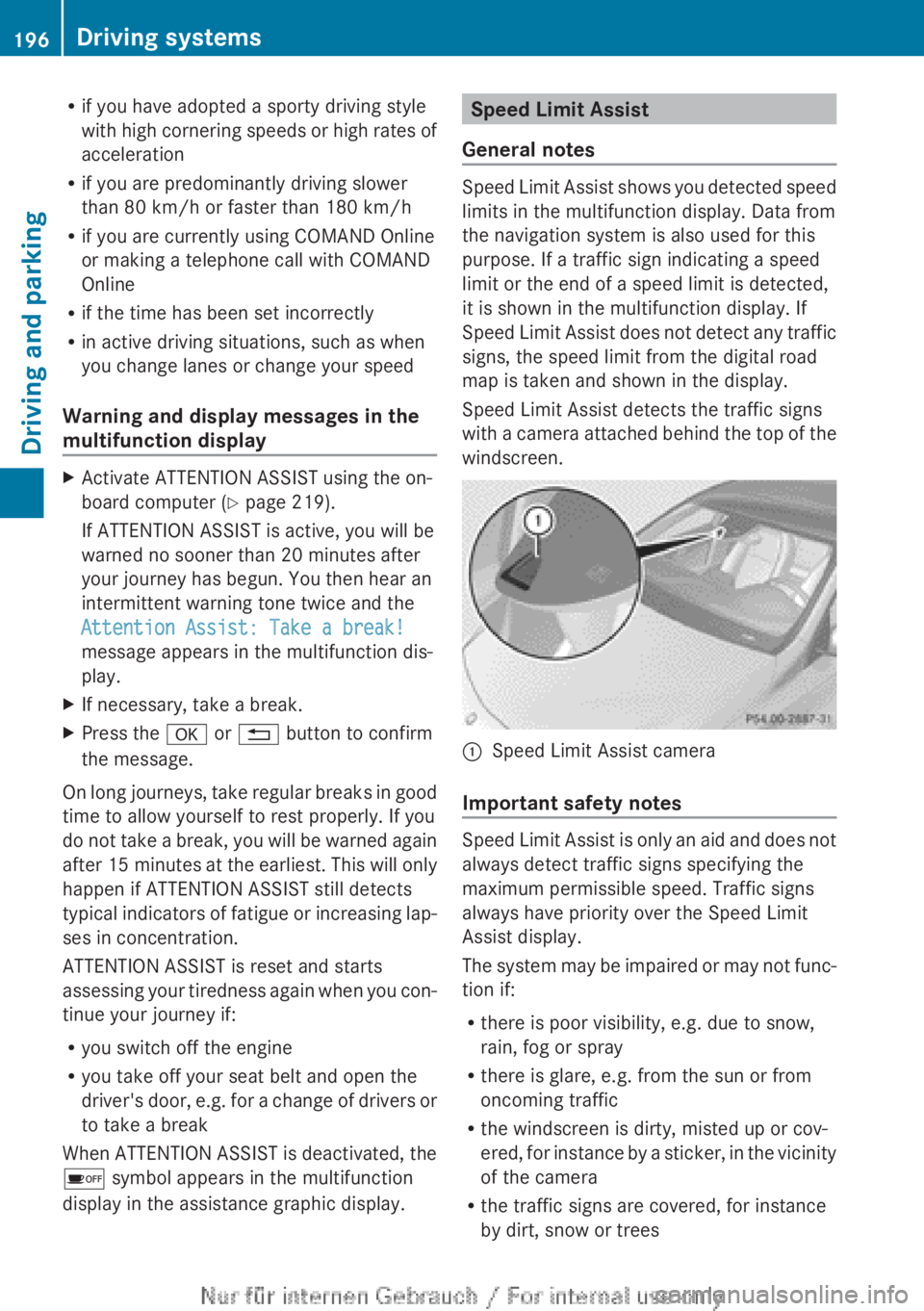
Speed Limit Assist detects the traffic signs
with a camera attached behind the top of the
windscreen. :
Speed Limit Assist camera
Important safety notes Speed Limit Assist is only an aid and does not
always detect traffic signs specifying the
maximum permissible speed. Traffic signs
always have priority over the Speed Limit
Assist display.
The
system may be impaired or may not func-
tion if:
R there is poor visibility, e.g. due to snow,
rain, fog or spray
R there is glare, e.g. from the sun or from
oncoming traffic
R the windscreen is dirty, misted up or cov-
ered, for instance by a sticker, in the vicinity
of the camera
R the traffic signs are covered, for instance
by dirt, snow or trees196
Driving systems
Driving and parking
Page 213 of 356
?
Menu bar
A Drive program (Y page 152)
B Transmission position ( Y page 152)
X To show the menu bar ?: press the
= or ; button on the steering wheel.
Menu bar ?
disappears after a few seconds.
Text field = shows the selected menu or
submenu as well as display messages.
i You can set the time using the audio sys-
tem or COMAND Online; see the separate
operating instructions.
The following messages may appear in the
multifunction display:
Z Gearshift recommendation, for
manual transmission
(Y
page 151) or automatic trans-
mission ( Y page 156)
XjY Active Parking Assist
(Y page 186)
¯ Cruise control ( Y page 168)
È SPEEDTRONIC ( Y page 171)
_ Adaptive Highbeam Assist
(Y page 110)
¤ ECO start/stop function
(Y page 146)
ë HOLD function ( Y page 179)
120 km/h! Maximum permissible speed
exceeded
(only for certain coun-
tries) Menus and submenus
Menu overview
Operating the on-board computer
(Y page 209).
Depending on the equipment fitted in the
vehicle, you can call up the following menus:
R Trip menu (Y page 211)
R Navi menu (navigation instructions)
(Y page 213)
R Audio menu (Y page 214) R
Tel (telephone) menu ( Y page 215)
R Assist (Assistance) menu (Y page 217)
R Serv. menu (Y page 219)
R Settings menu (Y page 220)
R AMG menu in AMG vehicles ( Y page 226)
The Audio, Navi
and Tel menus differ slightly
in vehicles with Audio 5, Audio 20 and in vehi-
cles with COMAND Online. The examples
given in this Owner's Manual apply to vehicles
equipped with COMAND Online. Trip menu
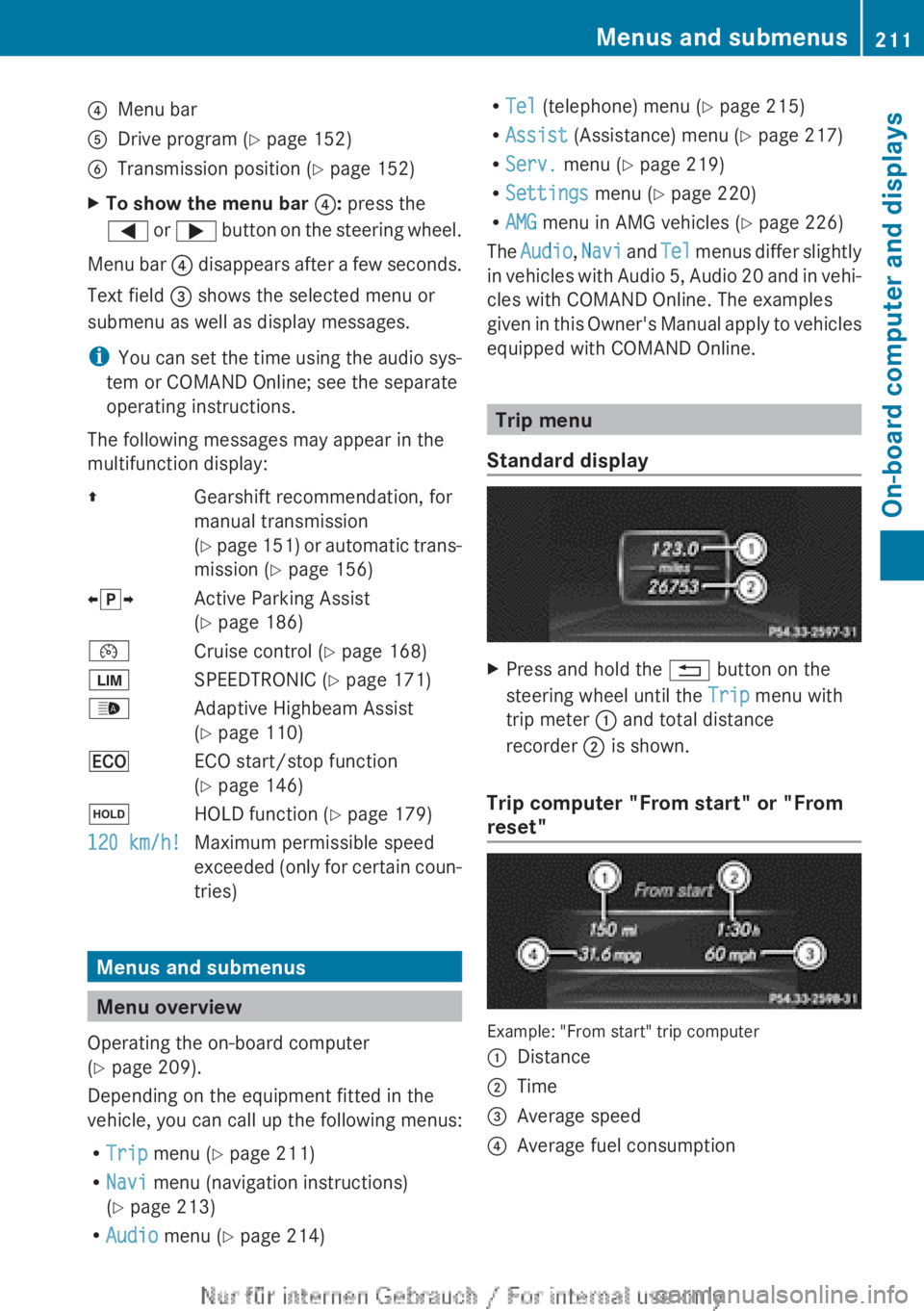
Standard display X
Press and hold the % button on the
steering wheel until the Trip menu with
trip meter : and total distance
recorder ; is shown.
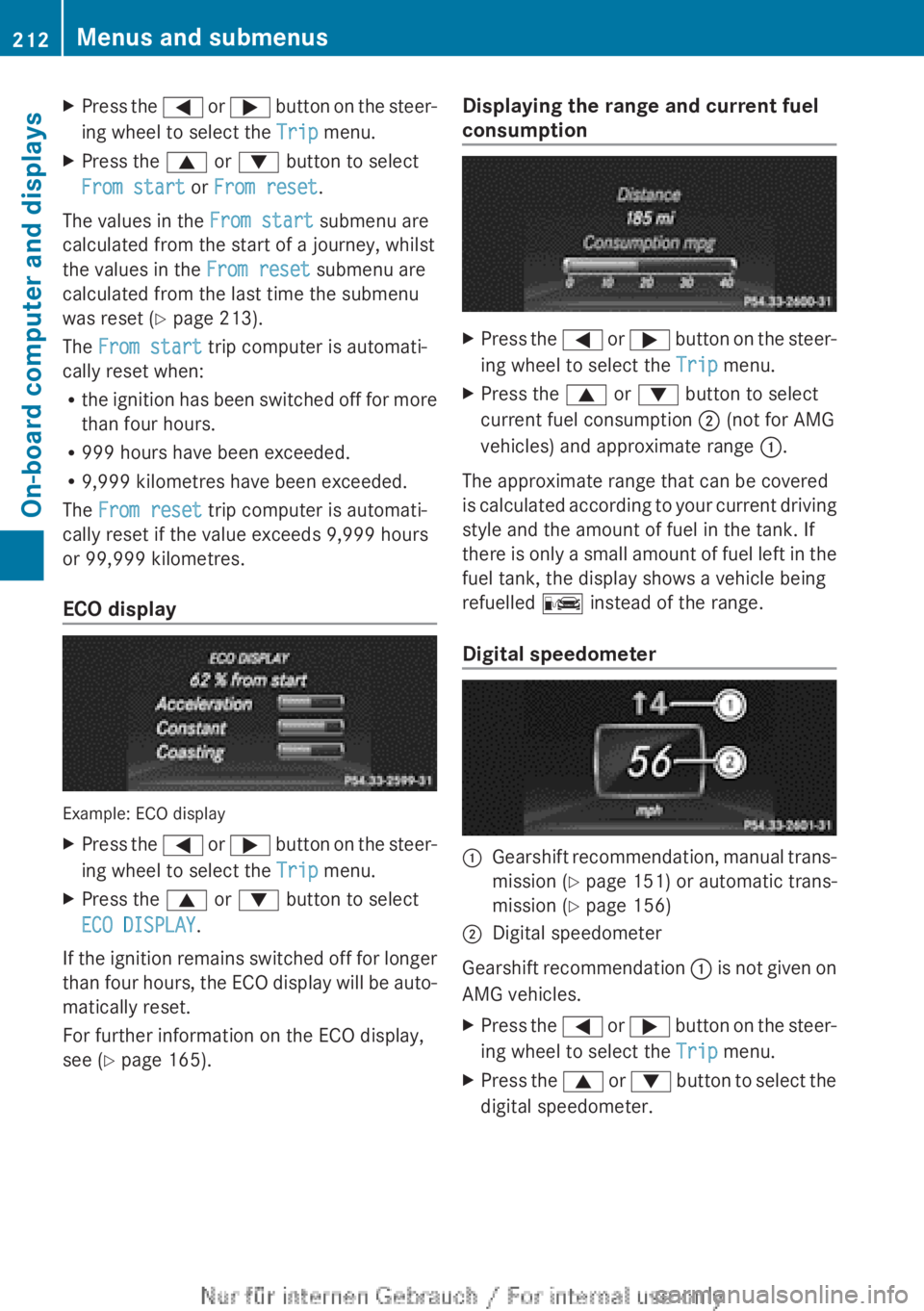
Trip computer "From start" or "From
reset" Example: "From start" trip computer
:
Distance
; Time
= Average speed
? Average fuel consumption Menus and submenus
211
On-board computer and displays Z
Page 214 of 356
X
Press the = or ; button on the steer-
ing wheel to select the Trip menu.
X Press the 9 or : button to select
From start or From reset.
The values in the From start submenu are
calculated from the start of a journey, whilst
the values in the From reset submenu are
calculated from the last time the submenu
was reset ( Y page 213).
The From start trip computer is automati-
cally reset when:
R the
ignition has been switched off for more
than four hours.
R 999 hours have been exceeded.
R 9,999 kilometres have been exceeded.
The From reset trip computer is automati-
cally reset if the value exceeds 9,999 hours
or 99,999 kilometres.
ECO display Example: ECO display
X
Press the =
or ; button on the steer-
ing wheel to select the Trip menu.
X Press the 9 or : button to select
ECO DISPLAY.
If the ignition remains switched off for longer
than
four hours, the ECO display will be auto-
matically reset.
For further information on the ECO display,
see ( Y page 165). Displaying the range and current fuel
consumption X
Press the =
or ; button on the steer-
ing wheel to select the Trip menu.
X Press the 9 or : button to select
current fuel consumption ; (not for AMG
vehicles) and approximate range :.
The approximate range that can be covered
is
calculated according to your current driving
style and the amount of fuel in the tank. If
there is only a small amount of fuel left in the
fuel tank, the display shows a vehicle being
refuelled C instead of the range.
Digital speedometer :
Gearshift recommendation, manual trans-
mission
(Y page 151) or automatic trans-
mission ( Y page 156)
; Digital speedometer
Gearshift recommendation :
is not given on
AMG vehicles.
X Press the =
or ; button on the steer-
ing wheel to select the Trip menu.
X Press the 9
or : button to select the
digital speedometer. 212
Menus and submenus
On-board computer and displays