manual transmission MERCEDES-BENZ A CLASS 2012 Owner's Manual
[x] Cancel search | Manufacturer: MERCEDES-BENZ, Model Year: 2012, Model line: A CLASS, Model: MERCEDES-BENZ A CLASS 2012Pages: 356, PDF Size: 4.96 MB
Page 160 of 356
Before the engine speed reaches the red area,
an
upshift indicator will be shown in the mul-
tifunction display.
X If the colour in the speedometer multifunc-
tion
display changes to red and the UP dis-
play message is shown, shift up a gear.
Downshifting X
Pull the left-hand steering wheel gearshift
paddle
(Y page 156).
The automatic transmission shifts down to
the next gear.
i If you slow down or stop without shifting
down, the automatic transmission auto-
matically shifts down.
i For maximum acceleration, pull the left-
hand steering wheel gearshift paddle until
the
transmission selects the optimum gear
for the current speed.
i If the engine exceeds the maximum
engine speed when shifting down, the auto-
matic transmission protects against engine
damage by not shifting down.
Kickdown AMG vehicles:
it
is only possible to use kick-
down in temporary manual drive program M.
You can also use kickdown for maximum
acceleration in manual drive program M.
X Depress the accelerator pedal beyond the
pressure point.
The transmission shifts to a lower gear
depending on the engine speed.
X Shift back up once the desired speed is
reached.
i During kickdown, you cannot shift gears
using
the steering wheel gearshift paddles.
i If you apply full throttle, the automatic
transmission shifts up to the next gear
when the maximum engine speed is
reached. This prevents the engine from
overrevving. Deactivating the manual drive program X
Press the program selector button
(Y page 155) repeatedly until E or S
appears in the multifunction display.
Deactivating the temporary manual drive
program
X Pull and hold the right steering wheel gear-
shift paddle until the automatic transmis-
sion shifts into the last active automatic
drive program E (drive program C on AMG
vehicles) or S.
i When manual drive program M is deacti-
vated, the automatic transmission in auto-
matic
drive program E (drive program C on
AMG vehicles) or S may shift from the cur-
rent gear into a higher or lower gear. This
is dependent on the position of the accel-
erator pedal, speed and load. 158
Automatic transmission
Driving and parking
Page 164 of 356
Problem Possible causes/consequences and
M SolutionsThe fuel filler flap can-
not be opened. The fuel filler flap is not unlocked.
or
The key battery is discharged.
X
Unlock the vehicle (Y page 75).
or
X Unlock the vehicle using the emergency key element
(Y page 75). The fuel filler flap is unlocked, but the opening mechanism is jam-
med.
X
Consult a qualified specialist workshop. Parking
Important safety notes
G
WARNING
Flammable material such as leaves, grass or
twigs may ignite if they come into contact with
hot parts of the exhaust system or exhaust
gas flow. There is a risk of fire.
Park the vehicle so that no flammable mate-
rial can come into contact with hot vehicle
components. In particular, do not park on dry
grassland or harvested grain fields. G
WARNING
If you leave children unattended in the vehi-
cle, they may be able to set the vehicle in
motion if, for example, they:
R release the parking brake
R shift
the automatic transmission out of park
position P or shift manual transmission into
neutral
R start the engine
In addition, they may operate vehicle equip-
ment and become trapped. There is a risk of
an accident and injury.
When leaving the vehicle, always take the key
with you and lock the vehicle. Never leave
children unattended in the vehicle. !
Always secure the vehicle correctly
against
rolling away. Otherwise, the vehicle
or its drivetrain could be damaged.
To ensure that the vehicle is secured against
rolling away unintentionally:
R the electric parking brake must be applied.
R on vehicles with manual transmission,
engage first gear or reverse gear.
R on vehicles with automatic transmission,
the transmission must be in position P and
the transmission position display must
show P in the multifunction display.
R the key must be removed from the ignition
lock.
R on uphill or downhill gradients, the front
wheels must be turned towards the kerb. Switching off the engine
Important safety notes G
WARNING
The automatic transmission switches to neu-
tral
position N when you switch off the engine.
The vehicle may roll away. There is a risk of
an accident.
After switching off the engine, always switch
to parking position P. Prevent the parked vehi-162
Parking
Driving and parking
Page 165 of 356
cle from rolling away by applying the parking
brake.
Vehicles with manual transmission X
Shift to either first gear or reverse gear R.
X Turn the key to position 0 in the ignition
lock and remove it.
The immobiliser is activated.
X Apply the electric parking brake.
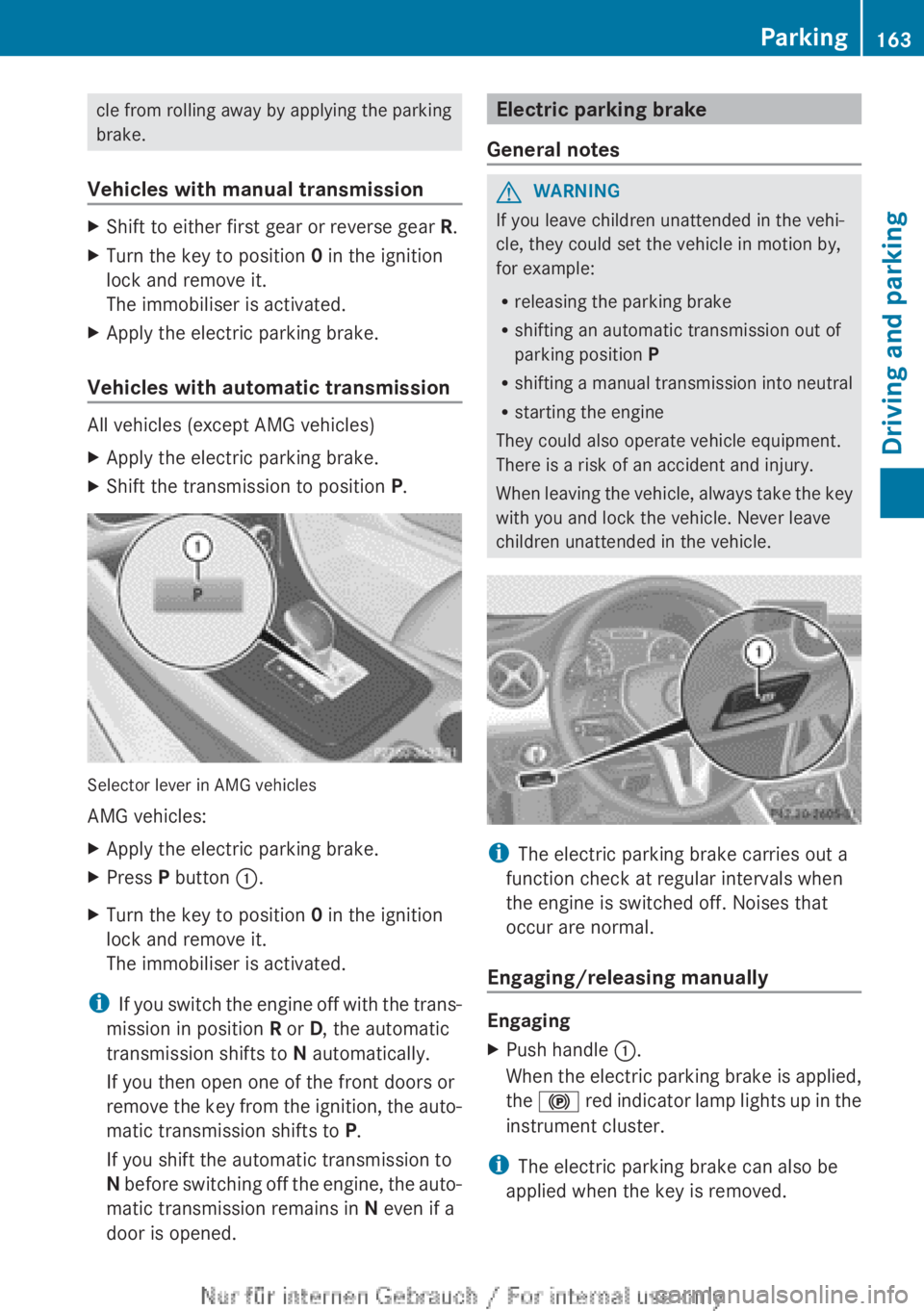
Vehicles with automatic transmission All vehicles (except AMG vehicles)
X
Apply the electric parking brake.
X Shift the transmission to position P.Selector lever in AMG vehicles
AMG vehicles:
X
Apply the electric parking brake.
X Press P button :.
X Turn the key to position 0 in the ignition
lock and remove it.
The immobiliser is activated.
i If you switch the engine off with the trans-
mission in position R or D, the automatic
transmission shifts to N automatically.
If you then open one of the front doors or
remove the key from the ignition, the auto-
matic transmission shifts to P.
If you shift the automatic transmission to
N before switching off the engine, the auto-
matic transmission remains in N even if a
door is opened. Electric parking brake
General notes G
WARNING
If you leave children unattended in the vehi-
cle, they could set the vehicle in motion by,
for example:
R releasing the parking brake
R shifting an automatic transmission out of
parking position P
R shifting
a manual transmission into neutral
R starting the engine
They could also operate vehicle equipment.
There is a risk of an accident and injury.
When leaving the vehicle, always take the key
with you and lock the vehicle. Never leave
children unattended in the vehicle. i
The electric parking brake carries out a
function check at regular intervals when
the engine is switched off. Noises that
occur are normal.
Engaging/releasing manually Engaging
X
Push handle :.
When
the electric parking brake is applied,
the ! red indicator lamp lights up in the
instrument cluster.
i The electric parking brake can also be
applied when the key is removed. Parking
163
Driving and parking Z
Page 168 of 356
dynamic changes in the bars at the start of
a
journey. During a prolonged driving time,
these changes are smaller. For more
dynamic changes, perform a manual reset.
For further information on the ECO display,
see ( Y page 212). Braking
Important safety notes G
WARNING
If you shift down on a slippery road surface in
an attempt to increase the engine's braking
effect, the drive wheels could lose their grip.
This
increases the risk of skidding and having
an accident.
Do not shift down for additional engine brak-
ing on a slippery road surface.
Downhill gradients Change into a lower gear in good time on long
and
steep downhill gradients. Take particular
note of this when driving a laden vehicle and
when towing a trailer. For vehicles with auto-
matic transmission, you need to have selec-
ted manual drive program M(Y page 156).
i This also applies if you have activated
cruise control, SPEEDTRONIC or DIS-
TRONIC PLUS.
This will use the braking effect of the engine,
so less braking will be required to prevent the
vehicle from gaining speed. This relieves the
load on the brake system and prevents the
brakes from overheating and wearing too
quickly.
i Briefly depressing the accelerator pedal
on downhill gradients while the manual
drive program M is temporarily activated
(vehicles with automatic transmission): the
automatic transmission may switch back to
the last active automatic drive program E
or S. The automatic transmission may shift to a higher gear. This can reduce the
engine's braking effect.
Heavy and light loads G
WARNING
The braking system can overheat if you leave
your foot on the brake pedal while driving.
This
increases the braking distance and could
even cause the braking system to fail. There
is a risk of an accident.
Never use the brake pedal as a footrest. Do
not simultaneously depress both the brake
pedal and the accelerator pedal while driving.
! Depressing the brake pedal constantly
results in excessive and premature wear to
the brake pads.
If heavy demands are made on the brakes, do
not park the vehicle immediately. Drive on for
a short while. This allows the airflow to cool
the brakes more quickly.
If the brakes have been used only moderately,
you should occasionally test their effective-
ness. To do this, brake more firmly from a
higher speed, paying attention to traffic con-
ditions. This improves the grip of the brakes.
Wet road surfaces If you have driven for a long time in heavy rain
without
braking, there may be a delayed reac-
tion from the brakes when braking for the first
time. This may also occur after a car wash or
after driving through deep water.
You have to depress the brake pedal more
firmly. Maintain a greater distance from the
vehicle in front.
After driving on a wet road or having the vehi-
cle washed, brake firmly while paying atten-
tion to the traffic conditions. This will warm
up the brake discs, thereby drying them more
quickly and protecting them against corro-
sion. 166
Driving tips
Driving and parking
Page 170 of 356
Have your vehicle winterproofed at a qualified
specialist workshop at the onset of winter.
Observe the notes in the "Winter operation"
section (
Y page 320).
Driving with summer tyres Observe the notes in the "Winter operation"
section (
Y page 320).
Slippery road surfaces G
WARNING
If you shift down on a slippery road surface in
an attempt to increase the engine's braking
effect, the drive wheels could lose their grip.
This
increases the risk of skidding and having
an accident.
Do not shift down for additional engine brak-
ing on a slippery road surface.
If the vehicle threatens to skid or cannot be
stopped when moving at low speed:
X Vehicles with manual transmission:
shift to neutral.
X Vehicles with automatic transmission:
shift the transmission to position N.
X Try to bring the vehicle under control by
using corrective steering.
You should drive particularly carefully on slip-
pery road surfaces. Avoid sudden accelera-
tion, steering and braking manoeuvres.
The outside temperature indicator is not
designed to serve as an ice-warning device
and is therefore unsuitable for that purpose.
Changes in the outside temperature are dis-
played after a short delay.
Indicated temperatures just above the freez-
ing point do not guarantee that the road sur-
face is free of ice. The road may still be icy,
especially
in wooded areas or on bridges. You
should pay special attention to road condi-
tions when temperatures are around freezing
point.
i For more information on driving with
snow chains, see ( Y page 321). Driving systems
Cruise control
Important safety notes If you fail to adapt your driving style, cruise
control
can neither reduce the risk of an acci-
dent nor override the laws of physics. Cruise
control cannot take into account road,
weather or traffic conditions. Cruise control
is only an aid. You are responsible for the dis-
tance to the vehicle in front, for vehicle speed,
for braking in good time, and for staying in the
lane.
Do not use cruise control:
R in road and traffic conditions which do not
allow you to maintain a constant speed
(e.g. in heavy traffic or on winding roads).
R on smooth or slippery roads. Braking or
accelerating can cause the drive wheels to
lose traction and the vehicle could then
skid.
R when there is poor visibility, e.g. due to fog,
heavy rain or snow.
If there is a change of drivers, advise the new
driver of the speed stored.
General notes Cruise control maintains a constant road
speed
for you. It brakes automatically in order
to avoid exceeding the set speed. You must
select a lower gear in good time on long and
steep downhill gradients, especially if the
vehicle is laden or towing a trailer. For vehi-
cles with automatic transmission, you need
to have selected manual drive program
M(Y page 156). By doing so, you will make
use of the braking effect of the engine. This
relieves the load on the brake system and
prevents the brakes from overheating and
wearing too quickly.
Use cruise control only if road and traffic con-
ditions make it appropriate to maintain a
steady speed for a prolonged period. You can
store any road speed above 30 km/h. 168
Driving systems
Driving and parking
Page 171 of 356
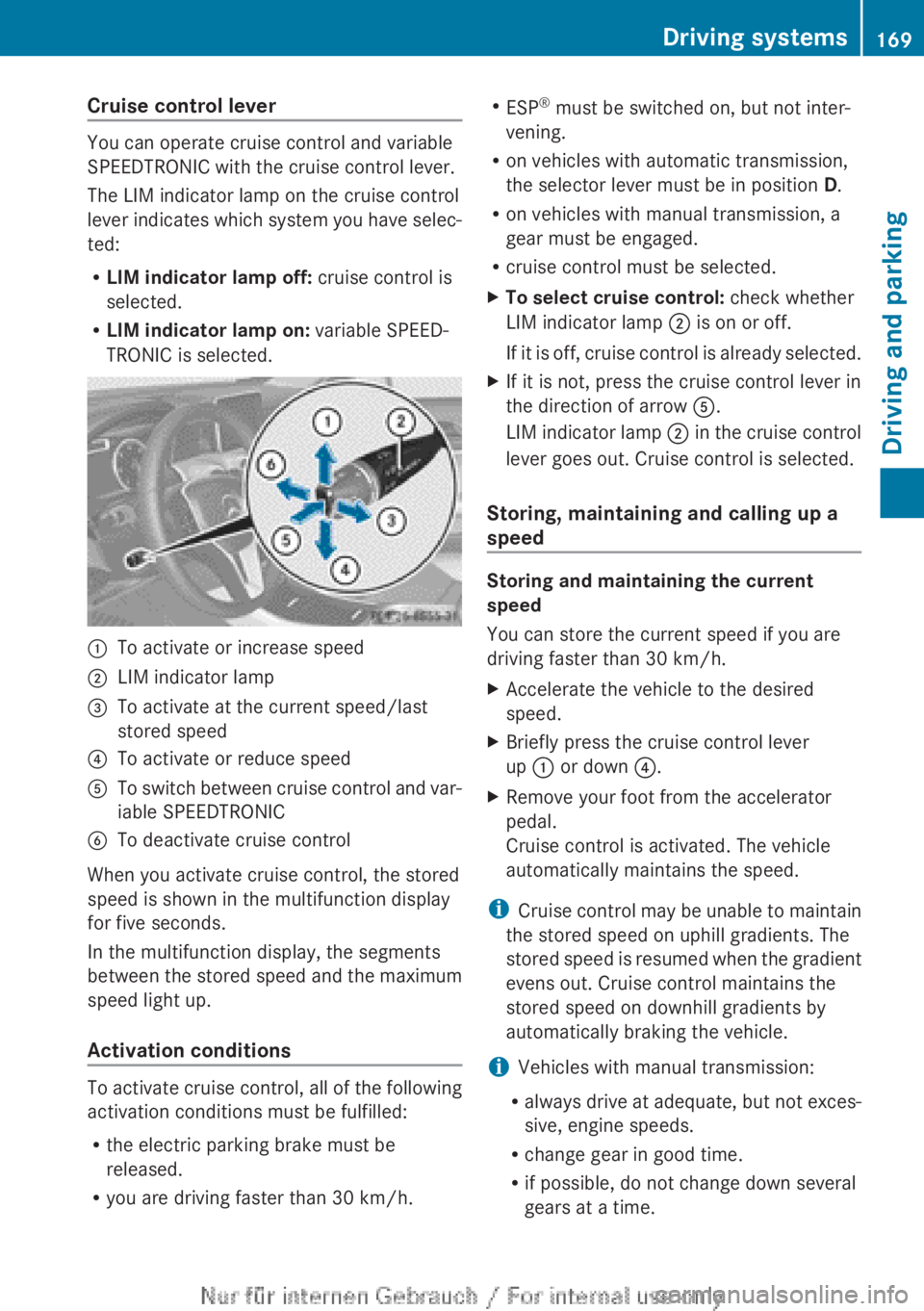
Cruise control lever
You can operate cruise control and variable
SPEEDTRONIC with the cruise control lever.
The LIM indicator lamp on the cruise control
lever
indicates which system you have selec-
ted:
R LIM indicator lamp off: cruise control is
selected.
R LIM indicator lamp on: variable SPEED-
TRONIC is selected. :
To activate or increase speed
; LIM indicator lamp
= To activate at the current speed/last
stored speed
? To activate or reduce speed
A To switch between cruise control and var-
iable SPEEDTRONIC
B To deactivate cruise control
When you activate cruise control, the stored
speed is shown in the multifunction display
for five seconds.
In the multifunction display, the segments
between
the stored speed and the maximum
speed light up.
Activation conditions To activate cruise control, all of the following
activation conditions must be fulfilled:
R
the electric parking brake must be
released.
R you are driving faster than 30 km/h. R
ESP ®
must be switched on, but not inter-
vening.
R on vehicles with automatic transmission,
the selector lever must be in position D.
R on vehicles with manual transmission, a
gear must be engaged.
R cruise control must be selected.
X To select cruise control: check whether
LIM indicator lamp ; is on or off.
If
it is off, cruise control is already selected.
X If it is not, press the cruise control lever in
the direction of arrow A.
LIM
indicator lamp ; in the cruise control
lever goes out. Cruise control is selected.
Storing, maintaining and calling up a
speed Storing and maintaining the current
speed
You can store the current speed if you are
driving faster than 30 km/h
.
X Accelerate the vehicle to the desired
speed.
X Briefly press the cruise control lever
up : or down ?.
X Remove your foot from the accelerator
pedal.
Cruise control is activated. The vehicle
automatically maintains the speed.
i Cruise
control may be unable to maintain
the stored speed on uphill gradients. The
stored speed is resumed when the gradient
evens out. Cruise control maintains the
stored speed on downhill gradients by
automatically braking the vehicle.
i Vehicles with manual transmission:
R always drive at adequate, but not exces-
sive, engine speeds.
R change gear in good time.
R if possible, do not change down several
gears at a time. Driving systems
169
Driving and parking Z
Page 172 of 356
Storing the current speed and calling up
the last stored speed
G
WARNING
If you call up a stored speed and this is dif-
ferent from the current speed, the vehicle
accelerates or brakes. If you do not know
what the stored speed is, the vehicle may
accelerate or brake unexpectedly. There is a
risk of an accident.
Take the traffic conditions into account
before calling up the stored speed. If you do
not know what the stored speed is, store the
desired speed again.
X Briefly pull the cruise control lever towards
you =.
X Remove your foot from the accelerator
pedal.
The first time cruise control is activated, it
stores the current speed or regulates the
speed of the vehicle to the previously
stored speed.
Setting a speed Keep in mind that it may take a brief moment
until
the vehicle has accelerated or braked to
the set speed.
X Press the cruise control lever up : for a
higher
speed or down ? for a lower speed.
X Keep the cruise control lever pressed until
the desired speed is reached.
X Release the cruise control lever.
The new speed is stored.
X To adjust the set speed in 1 km/h incre-
ments: briefly press the cruise control
lever up : or down ? to the pressure
point.
The
last stored speed increases or decrea-
ses in 1 km/h increments.
X To adjust the set speed in 10 km/h
increments:
press the cruise control lever
briefly up : or down ? beyond the pres-
sure point.
The last stored speed increases or decrea-
ses in 10 km/h increments. i
Cruise control is not deactivated if you
depress the accelerator pedal. For exam-
ple, if you accelerate briefly to overtake,
cruise control adjusts the vehicle's speed
to
the last speed stored after you have fin-
ished overtaking.
Deactivating cruise control There are several ways to deactivate cruise
control:
X
Briefly press the cruise control lever for-
wards B.
or
X Brake
or
X Briefly press the cruise control lever in the
direction of arrow A.
Variable SPEEDTRONIC is selected. LIM
indicator
lamp ; in the cruise control lever
lights up.
Cruise control is automatically deactivated if:
R you engage the electric parking brake.
R you are driving at less than
30 km/h.
R ESP ®
intervenes or you deactivate ESP ®
R while driving a vehicle with manual trans-
mission, you shift into neutral or depress
the clutch pedal for longer than six sec-
onds.
R on vehicles with manual transmission, you
shift to a gear that is too high, and as a
result the engine speed is too low.
R on vehicles with automatic transmission,
you shift into position N while driving.
If cruise control is deactivated, you will hear
a warning tone. You will see the Cruise
control off message in the multifunction
display for approximately five seconds.
i The last speed stored is cleared when you
switch off the engine. 170
Driving systems
Driving and parking
Page 174 of 356
Storing the current speed
You can use the cruise control lever to limit
the
speed to any speed above 30 km/h while
the engine is running.
X Briefly press the cruise control lever
up : or down ?.
The current speed is stored. For five sec-
onds, the multifunction display shows the
stored speed, e.g. Limit 100 km/h.
The segments in the speedometer light up
from
the start of the scale up to the stored
speed.
Storing the current speed and calling up
the last stored speed G
WARNING
If you call up the stored speed and it is lower
than the current speed, the vehicle deceler-
ates.
If you do not know the stored speed, the
vehicle could decelerate unexpectedly. There
is a risk of an accident.
Pay attention to the road and traffic condi-
tions before calling up the stored speed. If you
do not know the stored speed, store the
desired speed again.
X Briefly pull the cruise control lever towards
you =.
X To adjust the set speed in 1 km/h incre-
ments: briefly press the cruise control
lever up : to the pressure point for a
higher
speed, or down ? for a lower speed.
or
X Keep the cruise control lever pressed to the
pressure point until the desired speed is
set.
Press the cruise control lever up : for
a higher speed or down ? for a lower
speed.
X To adjust the set speed in 10 km/h
increments: briefly press the cruise con-
trol
lever up : past the pressure point for a higher speed, or down
? for a lower
speed.
or
X Keep the cruise control lever pressed
beyond
the pressure point until the desired
speed is set. Press the cruise control lever
up : for a higher speed or down ? for a
lower speed.
Deactivating variable SPEEDTRONIC
It is not possible to deactivate variable
SPEEDTRONIC by braking.
There
are several ways to deactivate variable
SPEEDTRONIC:
X Briefly press the cruise control lever for-
wards B.
or
X Briefly press the cruise control lever in the
direction of arrow A.
LIM
indicator lamp ; in the cruise control
lever goes out. Variable SPEEDTRONIC is
deactivated.
Cruise control or DISTRONIC PLUS is selec-
ted.
Variable SPEEDTRONIC is automatically
deactivated if:
R you depress the accelerator pedal beyond
the pressure point (kickdown), but only if
your
current speed does not differ by more
than 20 km/h from the stored speed. You
will hear a warning tone if this is the case.
R on vehicles with manual transmission, if
you shift to a higher gear and as a result,
the engine speed is too low.
i The last speed stored is cleared when you
switch off the engine.
Permanent SPEEDTRONIC You can use the on-board computer to limit
the speed permanently to a value between
160
km/h(e.g. for driving on winter tyres) and
the maximum speed ( Y page 223).172
Driving systems
Driving and parking
Page 183 of 356
The electric parking brake secures the vehicle
automatically if the HOLD function is activa-
ted and:
R
the driver's door is open and the driver's
seat belt is unfastened
R the
engine is switched off, unless it is auto-
matically switched off by the ECO start/
stop function
R a system fault occurs
R the power supply is not sufficient
Vehicles with automatic transmission
If a fault occurs, then the transmission may
also be shifted into position P automatically.
Vehicles with manual transmission
The Brake immediately message can also
appear in the multifunction display.
X Immediately depress the brake pedal firmly
until
the warning message in the multifunc-
tion display goes out.
The HOLD function is deactivated.
A horn will sound at regular intervals if you
turn off the engine, take off your seat belt or
open the driver's door when the HOLD func-
tion is activated. The horn alerts you to the
fact that the HOLD function is still activated.
If you attempt to lock the vehicle, the tone
becomes louder. The vehicle cannot be
locked until you have deactivated the HOLD
function.
i Once you have switched off the engine,
you cannot restart it until you have deacti-
vated the HOLD function. RACE START
Important safety notes RACE START enables optimum acceleration
from a standing start. The precondition for
this is a suitable high-grip road surface.
Only
activate RACE START on dedicated race
circuits. i
RACE
START is only available in AMG vehi-
cles.
Activation conditions You can activate RACE START if:
R
the doors, the bonnet and the tailgate are
closed
R the
engine is running and the transmission,
traction control and engine are at operating
temperature
R SPORT handling mode is activated
(Y page 66)
R the steering wheel is in the straight-ahead
position.
R the vehicle is stationary and the brake
pedal is depressed (left foot)
R the transmission is in position D.
R drive program M is selected ( Y page 155).
Activating RACE START X
Depress the brake pedal with your left foot
and keep it depressed.
X Pull and hold both steering wheel gearshift
paddles.
X The RACE START Confirm: Paddle UP
Cancel: Paddle DOWN message appears
in the multifunction display.
X Release both steering wheel gearshift pad-
dles.
i If the activation conditions are no longer
fulfilled, RACE START is cancelled. The
RACE START not possible See Own‐
er's
Manual message appears in the mul-
tifunction display.
X To cancel:
pull the left steering wheel shift
paddle (Y page 156).
or
X To confirm: pull the right steering wheel
shift paddle
(Y page 156).
The RACE START available Depress
accelerator message appears in the mul-
tifunction display. Driving systems
181
Driving and parking Z
Page 186 of 356
Warning displays
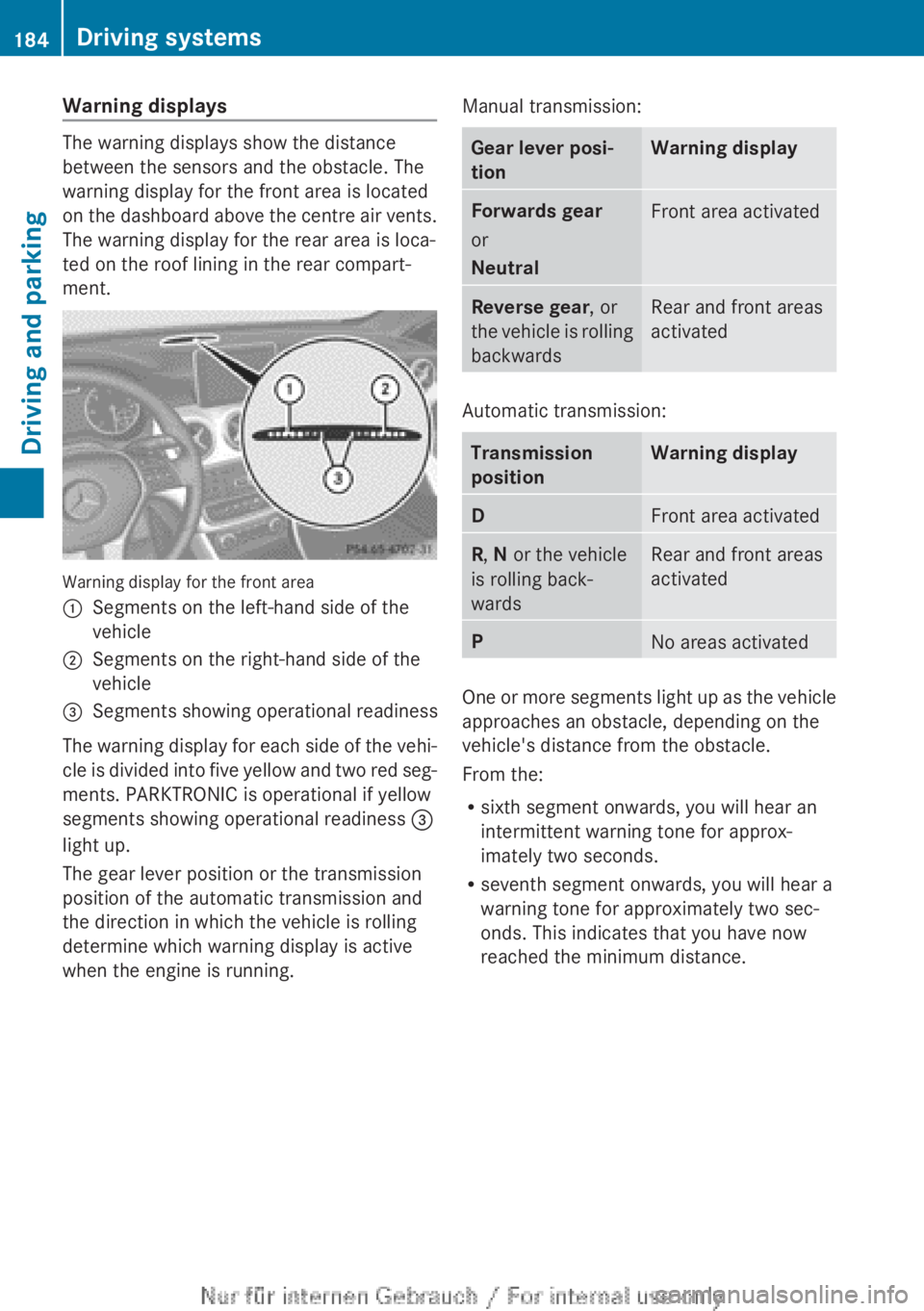
The warning displays show the distance
between the sensors and the obstacle. The
warning display for the front area is located
on
the dashboard above the centre air vents.
The warning display for the rear area is loca-
ted on the roof lining in the rear compart-
ment. Warning display for the front area
:
Segments on the left-hand side of the
vehicle
; Segments on the right-hand side of the
vehicle
= Segments showing operational readiness
The warning display for each side of the vehi-
cle
is divided into five yellow and two red seg-
ments. PARKTRONIC is operational if yellow
segments showing operational readiness =
light up.
The gear lever position or the transmission
position of the automatic transmission and
the direction in which the vehicle is rolling
determine which warning display is active
when the engine is running. Manual transmission: Gear lever posi-
tion Warning display
Forwards gear
or
Neutral
Front area activated
Reverse gear, or
the
vehicle is rolling
backwards Rear and front areas
activated
Automatic transmission:
Transmission
position Warning display
D
Front area activated
R, N or the vehicle
is rolling back-
wards Rear and front areas
activated
P
No areas activated
One or more segments light up as the vehicle
approaches an obstacle, depending on the
vehicle's distance from the obstacle.
From the:
R
sixth segment onwards, you will hear an
intermittent warning tone for approx-
imately two seconds.
R seventh segment onwards, you will hear a
warning tone for approximately two sec-
onds. This indicates that you have now
reached the minimum distance.184
Driving systems
Driving and parking