mirror MERCEDES-BENZ A CLASS 2012 Owner's Manual
[x] Cancel search | Manufacturer: MERCEDES-BENZ, Model Year: 2012, Model line: A CLASS, Model: MERCEDES-BENZ A CLASS 2012Pages: 356, PDF Size: 4.96 MB
Page 104 of 356
X
Adjust the seat ( Y page 94).
X Adjust the exterior mirror on the driver's
side ( Y page 99).
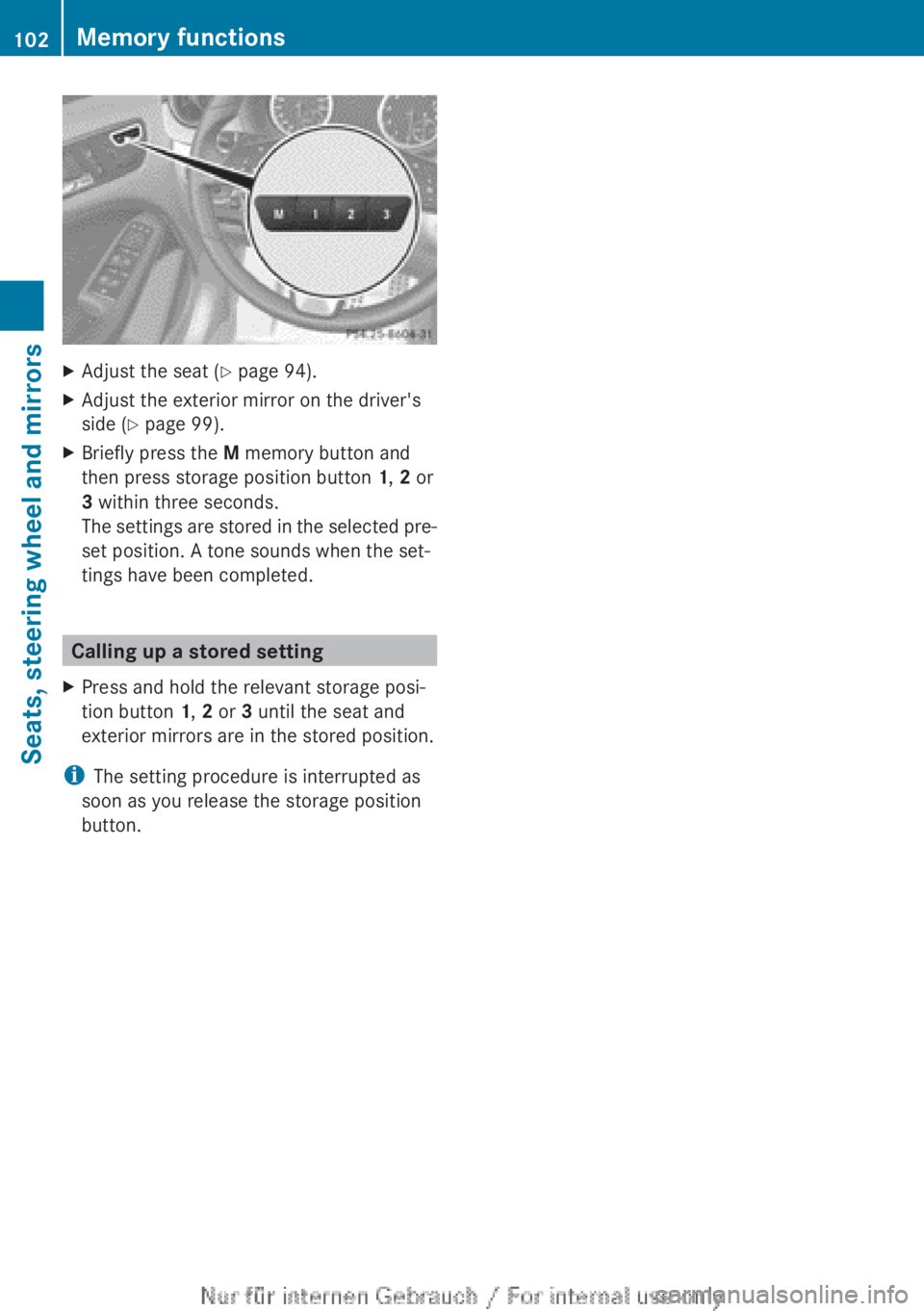
X Briefly press the M memory button and
then press storage position button 1, 2 or
3 within three seconds.
The
settings are stored in the selected pre-
set position. A tone sounds when the set-
tings have been completed. Calling up a stored setting
X Press and hold the relevant storage posi-
tion button 1, 2 or 3 until the seat and
exterior mirrors are in the stored position.
i The setting procedure is interrupted as
soon as you release the storage position
button. 102
Memory functions
Seats, steering wheel and mirrors
Page 193 of 356
Reversing camera
Important safety notes The reversing camera is only an aid. It is not
a substitute for your attention to the imme-
diate
surroundings. The responsibility for safe
manoeuvring and parking remains with you.
Make sure that there are no persons, animals
or objects in range while manoeuvring and
parking.
Under the following circumstances, the
reversing camera will not function, or will
function in a limited manner:
R if the tailgate is open
R in heavy rain, snow or fog
R at night or in very dark places
R if the camera is exposed to very bright light
R if the area is lit by fluorescent light or LED
lighting (the display may flicker)
R if there is a sudden change in temperature,
e.g. when driving into a heated garage in
winter
R if the camera lens is dirty or obstructed
R if the rear of your vehicle is damaged. In
this event, have the camera position and
setting checked at a qualified specialist
workshop.
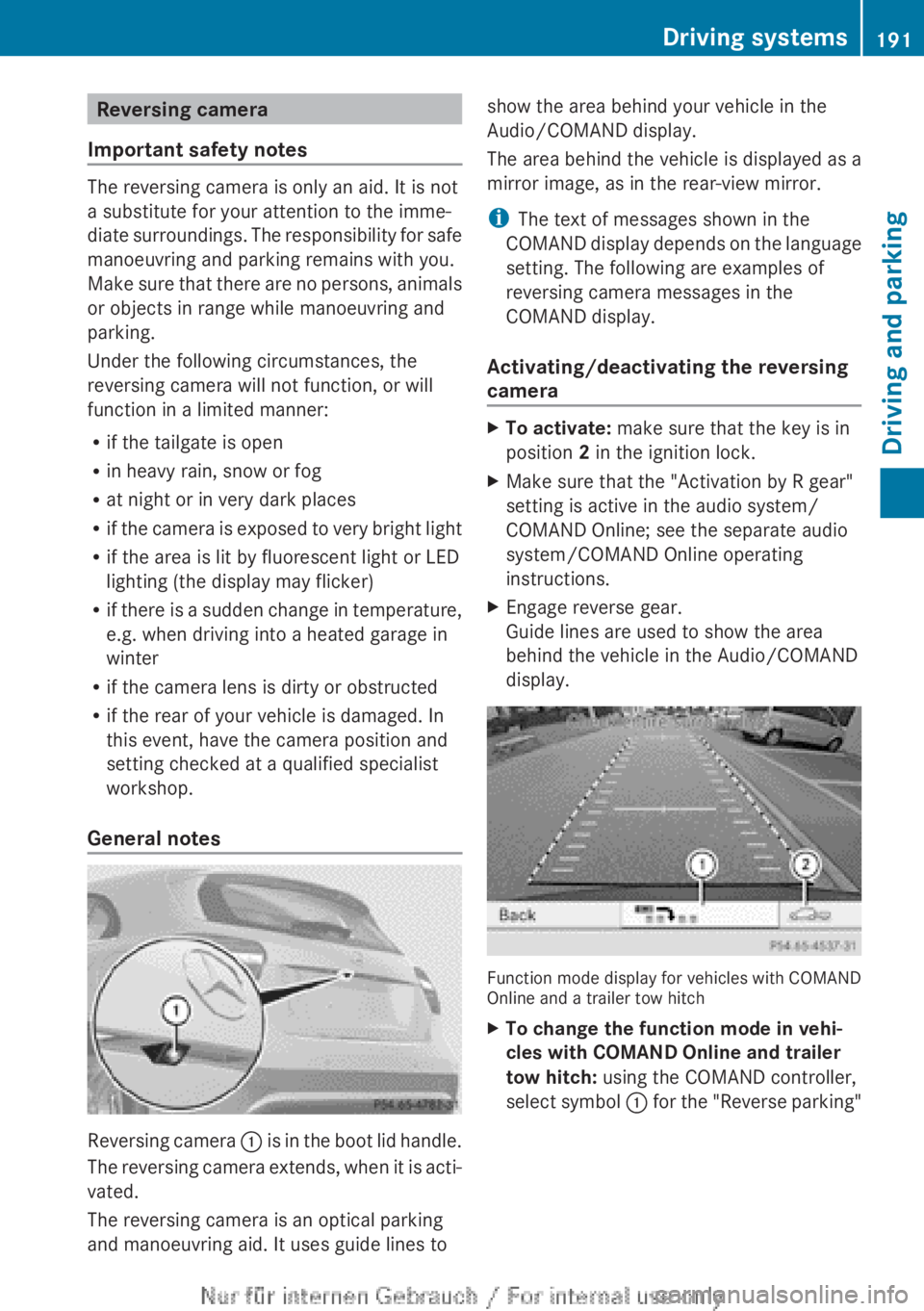
General notes Reversing camera
:
is in the boot lid handle.
The reversing camera extends, when it is acti-
vated.
The reversing camera is an optical parking
and manoeuvring aid. It uses guide lines to show the area behind your vehicle in the
Audio/COMAND display.
The area behind the vehicle is displayed as a
mirror image, as in the rear-view mirror.
i
The text of messages shown in the
COMAND
display depends on the language
setting. The following are examples of
reversing camera messages in the
COMAND display.
Activating/deactivating the reversing
camera X
To activate: make sure that the key is in
position 2 in the ignition lock.
X Make sure that the "Activation by R gear"
setting is active in the audio system/
COMAND Online; see the separate audio
system/COMAND Online operating
instructions.
X Engage reverse gear.
Guide lines are used to show the area
behind the vehicle in the Audio/COMAND
display. Function mode display for vehicles with COMAND
Online and a trailer tow hitch
X
To change the function mode in vehi-
cles with COMAND Online and trailer
tow hitch: using the COMAND controller,
select
symbol : for the "Reverse parking" Driving systems
191
Driving and parking Z
Page 194 of 356
function; see the separate COMAND Online
operating instructions.
or
X Select symbol ; for the coupling up a
trailer
function (see the separate COMAND
Online operating instructions).
The symbol of the selected function is high-
lighted.
To deactivate:
the reversing camera is deac-
tivated if you:
R select transmission position P (vehicles
with automatic transmission)
R drive forward ten metres
R for vehicles with an automatic transmis-
sion, shift the transmission from R to
another position after 15 seconds
R shift out of reverse gear (vehicles with man-
ual transmission) after 15 seconds
R drive forwards at a speed of over
10 km/h
Displays in the Audio/COMAND display The reversing camera may show a distorted
view of obstacles, show them incorrectly or
not at all. Obstacles are not shown by the
reversing camera in the following locations:
R
very close to the rear bumper
R under the rear bumper
R in the area immediately above the tailgate
handle
! Objects
not at ground level may appear to
be further away than they actually are, e.g.:
R the bumper of a parked vehicle
R the drawbar of a trailer
R the ball coupling of a trailer tow hitch
R the rear section of an HGV
R a slanted post
Use the guidelines only for orientation.
Approach objects no further than the bot-
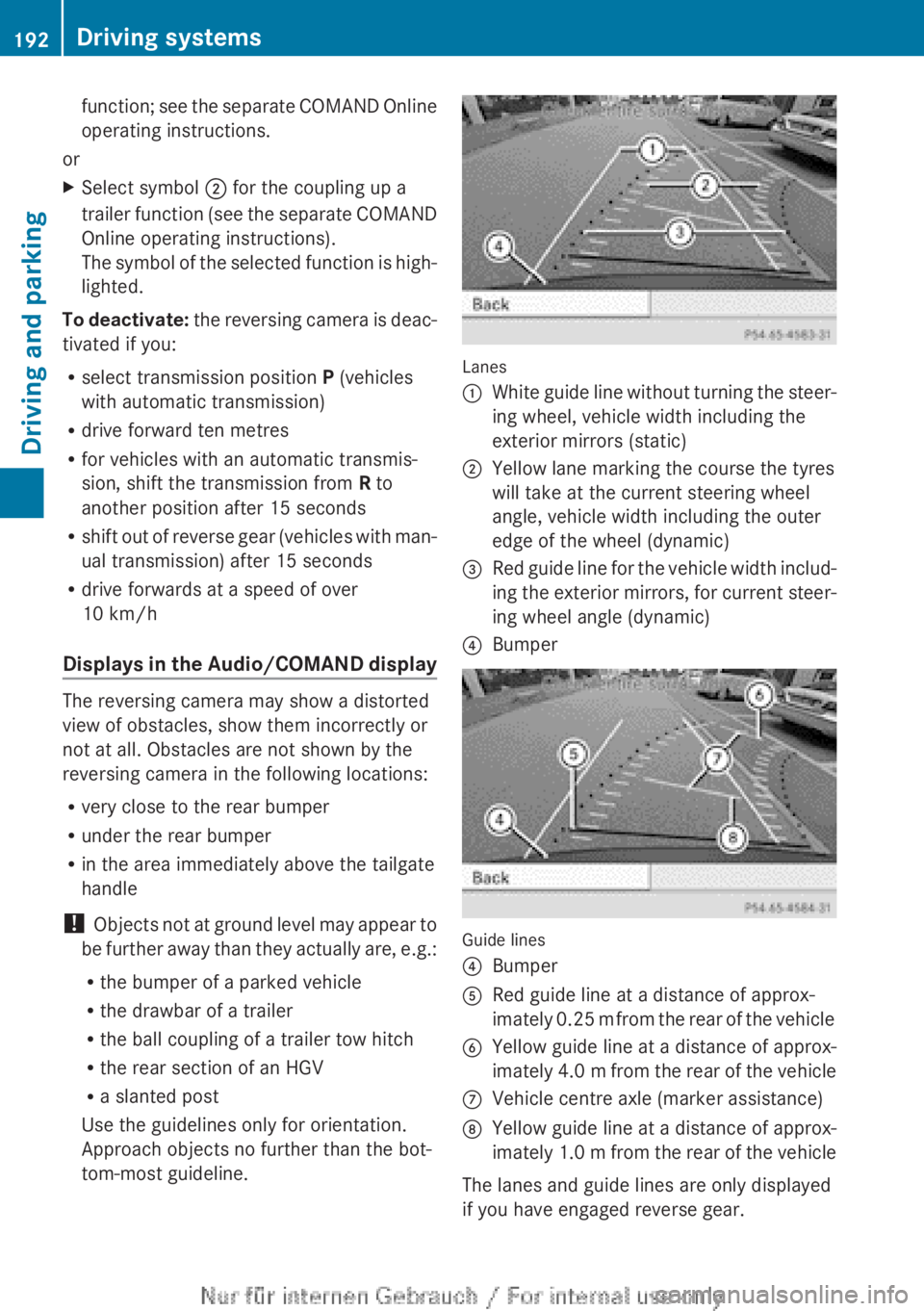
tom-most guideline. Lanes
:
White guide line without turning the steer-
ing wheel, vehicle width including the
exterior mirrors (static)
; Yellow lane marking the course the tyres
will take at the current steering wheel
angle, vehicle width including the outer
edge of the wheel (dynamic)
= Red guide line for the vehicle width includ-
ing
the exterior mirrors, for current steer-
ing wheel angle (dynamic)
? Bumper Guide lines
?
Bumper
A Red guide line at a distance of approx-
imately
0.25 m from the rear of the vehicle
B Yellow guide line at a distance of approx-
imately
4.0 m from the rear of the vehicle
C Vehicle centre axle (marker assistance)
D Yellow guide line at a distance of approx-
imately
1.0 m from the rear of the vehicle
The lanes and guide lines are only displayed
if you have engaged reverse gear. 192
Driving systems
Driving and parking
Page 200 of 356
Blind Spot Assist is only an aid. It may fail to
detect
some vehicles and is no substitute for
attentive driving.
General notes
Blind Spot Assist uses a radar sensor system
to monitor the areas on both sides of your
vehicle. It supports you from speeds of
30 km/h. A warning display in the exterior
mirrors draws your attention to vehicles
detected in the monitored area. If you then
switch on the corresponding turn signal to
change lane, you will also receive an optical
and audible collision warning. For this pur-
pose, Blind Spot Assist uses sensors in the
rear bumper.
The radar sensor system is switched off auto-
matically in the vicinity of radio telescope
facilities ( Y page 350).
For Blind Spot Assist to assist you when driv-
ing, the radar sensor system must be:
R activated(Y page 223)
R operational
i In some countries you must deactivate
the radar sensor system ( Y page 223).
For further information about the radar sen-
sor system; see ( Y page 350).
Monitoring range of the sensors
In particular, the detection of obstacles can
be impaired in the case of:
R dirt on the sensors or anything else cover-
ing the sensors
R poor visibility, e.g. due to fog, heavy rain or
snow
R a narrow vehicle travelling in front, e.g. a
motorcycle or a bicycle
R very wide lanes
R narrow lanes
R vehicles not driving in the middle of their
lane
R barriers or other road boundaries
Vehicles in the monitoring range are then not
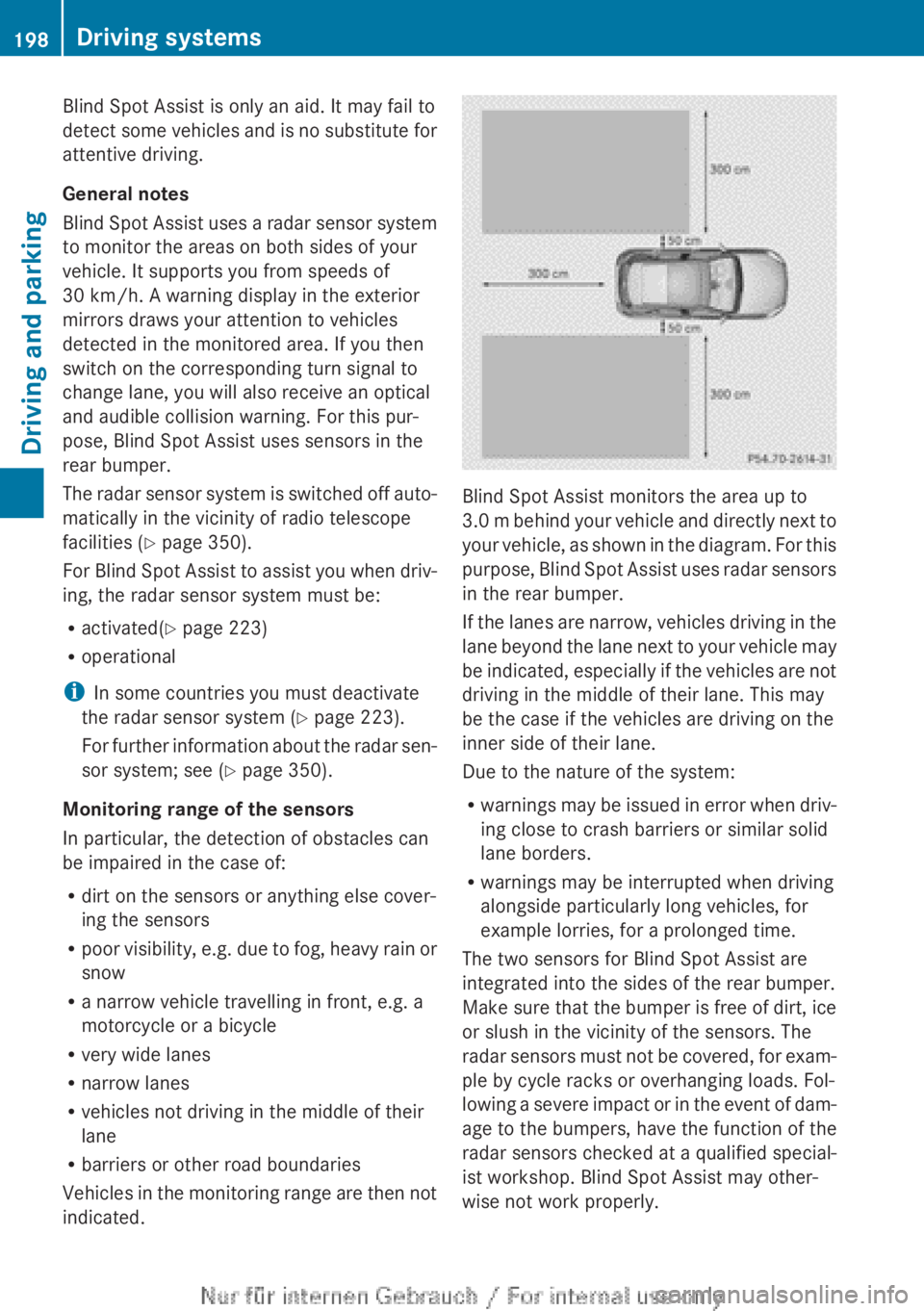
indicated. Blind Spot Assist monitors the area up to
3.0
m behind your vehicle and directly next to
your vehicle, as shown in the diagram. For this
purpose, Blind Spot Assist uses radar sensors
in the rear bumper.
If the lanes are narrow, vehicles driving in the
lane beyond the lane next to your vehicle may
be indicated, especially if the vehicles are not
driving in the middle of their lane. This may
be the case if the vehicles are driving on the
inner side of their lane.
Due to the nature of the system:
R warnings may be issued in error when driv-
ing close to crash barriers or similar solid
lane borders.
R warnings may be interrupted when driving
alongside particularly long vehicles, for
example lorries, for a prolonged time.
The two sensors for Blind Spot Assist are
integrated into the sides of the rear bumper.
Make sure that the bumper is free of dirt, ice
or slush in the vicinity of the sensors. The
radar sensors must not be covered, for exam-
ple by cycle racks or overhanging loads. Fol-
lowing a severe impact or in the event of dam-
age to the bumpers, have the function of the
radar sensors checked at a qualified special-
ist workshop. Blind Spot Assist may other-
wise not work properly. 198
Driving systems
Driving and parking
Page 201 of 356
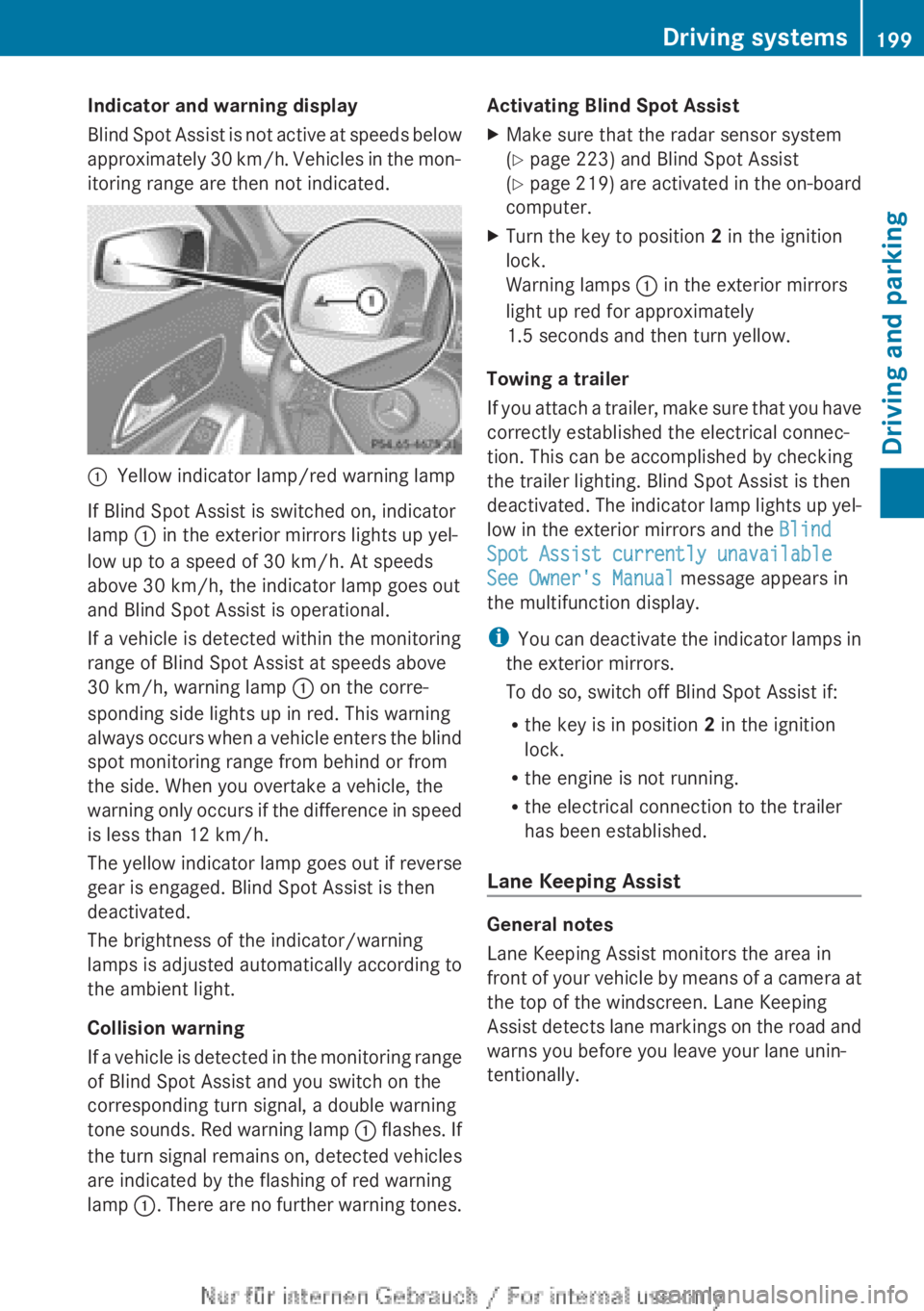
Indicator and warning display
Blind
Spot Assist is not active at speeds below
approximately 30 km/h. Vehicles in the mon-
itoring range are then not indicated. :
Yellow indicator lamp/red warning lamp
If Blind Spot Assist is switched on, indicator
lamp : in the exterior mirrors lights up yel-
low up to a speed of
30 km/h. At speeds
above 30 km/h, the indicator lamp goes out
and Blind Spot Assist is operational.
If a vehicle is detected within the monitoring
range of Blind Spot Assist at speeds above
30 km/h, warning lamp : on the corre-
sponding side lights up in red. This warning
always occurs when a vehicle enters the blind
spot monitoring range from behind or from
the side. When you overtake a vehicle, the
warning only occurs if the difference in speed
is less than 12 km/h.
The yellow indicator lamp goes out if reverse
gear is engaged. Blind Spot Assist is then
deactivated.
The brightness of the indicator/warning
lamps is adjusted automatically according to
the ambient light.
Collision warning
If a vehicle is detected in the monitoring range
of Blind Spot Assist and you switch on the
corresponding turn signal, a double warning
tone sounds. Red warning lamp : flashes. If
the turn signal remains on, detected vehicles
are indicated by the flashing of red warning
lamp :. There are no further warning tones. Activating Blind Spot Assist
X
Make sure that the radar sensor system
(Y page 223) and Blind Spot Assist
(Y page
219) are activated in the on-board
computer.
X Turn the key to position 2 in the ignition
lock.
Warning lamps : in the exterior mirrors
light up red for approximately
1.5 seconds
and then turn yellow.
Towing a trailer
If
you attach a trailer, make sure that you have
correctly established the electrical connec-
tion. This can be accomplished by checking
the trailer lighting. Blind Spot Assist is then
deactivated. The indicator lamp lights up yel-
low in the exterior mirrors and the Blind
Spot Assist currently unavailable
See Owner's Manual message appears in
the multifunction display.
i You can deactivate the indicator lamps in
the exterior mirrors.
To do so, switch off Blind Spot Assist if:
R the key is in position 2 in the ignition
lock.
R the engine is not running.
R the electrical connection to the trailer
has been established.
Lane Keeping Assist General notes
Lane Keeping Assist monitors the area in
front
of your vehicle by means of a camera at
the top of the windscreen. Lane Keeping
Assist detects lane markings on the road and
warns you before you leave your lane unin-
tentionally. Driving systems
199
Driving and parking Z
Page 225 of 356
R
dipped-beam headlamps
R daytime driving lights
R surround lighting in the exterior mirrors
Activating/deactivating
the interior light-
ing delayed switch-off
If you activate the Lighting delayed sw.-
off function, the interior lighting remains on
for 20 seconds after you remove the key from
the ignition lock.
X Press the =
or ; button on the steer-
ing wheel to select the Settings menu.
X Press the :
or 9 button to select the
Lights submenu.
X Press a to confirm.
X Press the :
or 9 button to select the
Lighting delayed sw.-off function.
If the Lighting delayed sw.-off func-
tion has been switched on, the vehicle inte-
rior is displayed in orange in the multifunc-
tion display.
X Press the a button to save the setting.
Vehicle Setting permanent SPEEDTRONIC
X
Press the =
or ; button on the steer-
ing wheel to select the Settings menu.
X Press the :
or 9 button to select the
Vehicle submenu.
X Press a to confirm.
X Press the :
or 9 button to select the
Limit speed (winter tyres): function.
You will see the current setting.
X Press a to confirm.
X Press the : or 9 button to adjust
permanent
SPEEDTRONIC in increments of
ten (230 km/h to 160 km/h). The Off set-
ting switches permanent SPEEDTRONIC
off.
X Press the a button to store the entry.
Using the Limit speed (winter tyres)
function, you can set permanent SPEED-
TRONIC ( Y page 172). Switching the automatic locking feature
on/off
X
Press the =
or ; button on the steer-
ing wheel to select the Settings menu.
X Press the :
or 9 button to select the
Vehicle submenu.
X Press a to confirm.
X Press the :
or 9 button to select the
Automatic door locks function.
When the Automatic door locks func-
tion is activated, the vehicle doors are dis-
played in orange in the multifunction dis-
play.
X Press the a button to save the setting.
If you activate the Automatic door locks
function,
the vehicle is centrally locked above
a speed of around 15 km/h.
For further information on the automatic lock-
ing feature, see ( Y page 81).
Activating/deactivating the acoustic
locking confirmation
If you switch on the Acoustic Lock function,
an acoustic signal sounds when you lock the
vehicle.
X Press the =
or ; button on the steer-
ing wheel to select the Settings menu.
X Press the :
or 9 button to select the
Vehicle submenu.
X Press a to confirm.
X Press the :
or 9 button to select the
Acoustic Lock function.
If the Acoustic Lock function is activated,
the & symbol in the multifunction dis-
play lights up orange.
X Press the a button to save the setting.
Activating/deactivating the radar sensor
system
X Press the =
or ; button on the steer-
ing wheel to select the Settings menu.
X Press the :
or 9 button to select the
Vehicle submenu.
X Press a to confirm. Menus and submenus
223
On-board computer and displays Z
Page 227 of 356
Flammable material such as leaves, grass or
twigs
may ignite if they come into contact with
hot parts of the exhaust system for extended
periods. There is a risk of fire.
When the auxiliary heating is switched on,
make sure that no flammable material can
come into contact with hot vehicle compo-
nents.
! Operating the auxiliary heating/ventila-
tion draws on the vehicle battery. After you
have heated or ventilated the vehicle a
maximum of two times, drive for a longer
distance.
i Switch the auxiliary heating on regularly
once a month for about ten minutes.
Comfort Switching belt adjustment on/off
X
Press the =
or ; button on the steer-
ing wheel to select the Settings menu.
X Press the :
or 9 button to select the
Convenience submenu.
X Press a to confirm.
X Press the :
or 9 button to select the
Belt adjustment function.
If the Belt adjustment function is activa-
ted, the vehicle seat belt is shown in orange
in the multifunction display.
X Press the a button to save the setting.
For further information on belt adjustment,
see ( Y page 47).
Switching the fold in mirrors when lock-
ing function on/off
This
function is only available on vehicles with
a memory function (Y page 101).
When you activate the Auto. fold-in mir‐
rors function, the exterior mirrors are folded
in when the vehicle is locked.
When you unlock the vehicle and then open a
door, the exterior mirrors fold out again.
If you have switched on the Auto. fold-in
mirrors function and you fold in the exterior mirrors using the button on the door
(Y page 99), they will not fold out automati-
cally. The exterior mirrors can then only be
folded out using the button on the door.
X
Press the =
or ; button on the steer-
ing wheel to select the Settings menu.
X Press the :
or 9 button to select the
Convenience submenu.
X Press a to confirm.
X Press the :
or 9 button to select the
Auto. fold-in mirrors function.
If the Auto. fold-in mirrors function is
activated, the vehicle's exterior mirror is
displayed in orange in the multifunction
display.
X Press the a button to save the setting.
Resetting to factory settings X
Press the =
or ; button on the steer-
ing wheel to select the Settings menu.
X Press the :
or 9 button to select the
Factory setting submenu.
X Press a to confirm.
The Reset all settings? message
appears.
X Press the : or 9 button to select
No or Yes.
X Press the a
button to confirm the selec-
tion.
If you have selected Yes , the multifunction
display shows a confirmation message.
For safety reasons, not all functions are reset:
the Limit speed (winter tyres): func-
tion
in permanent SPEEDTRONIC can only be
set in the VEHICLE submenu. If you want to
reset the Daytime driving lights: in the
Light submenu, you must turn the key in the
ignition lock to position 1. Menus and submenus
225
On-board computer and displays Z
Page 242 of 356
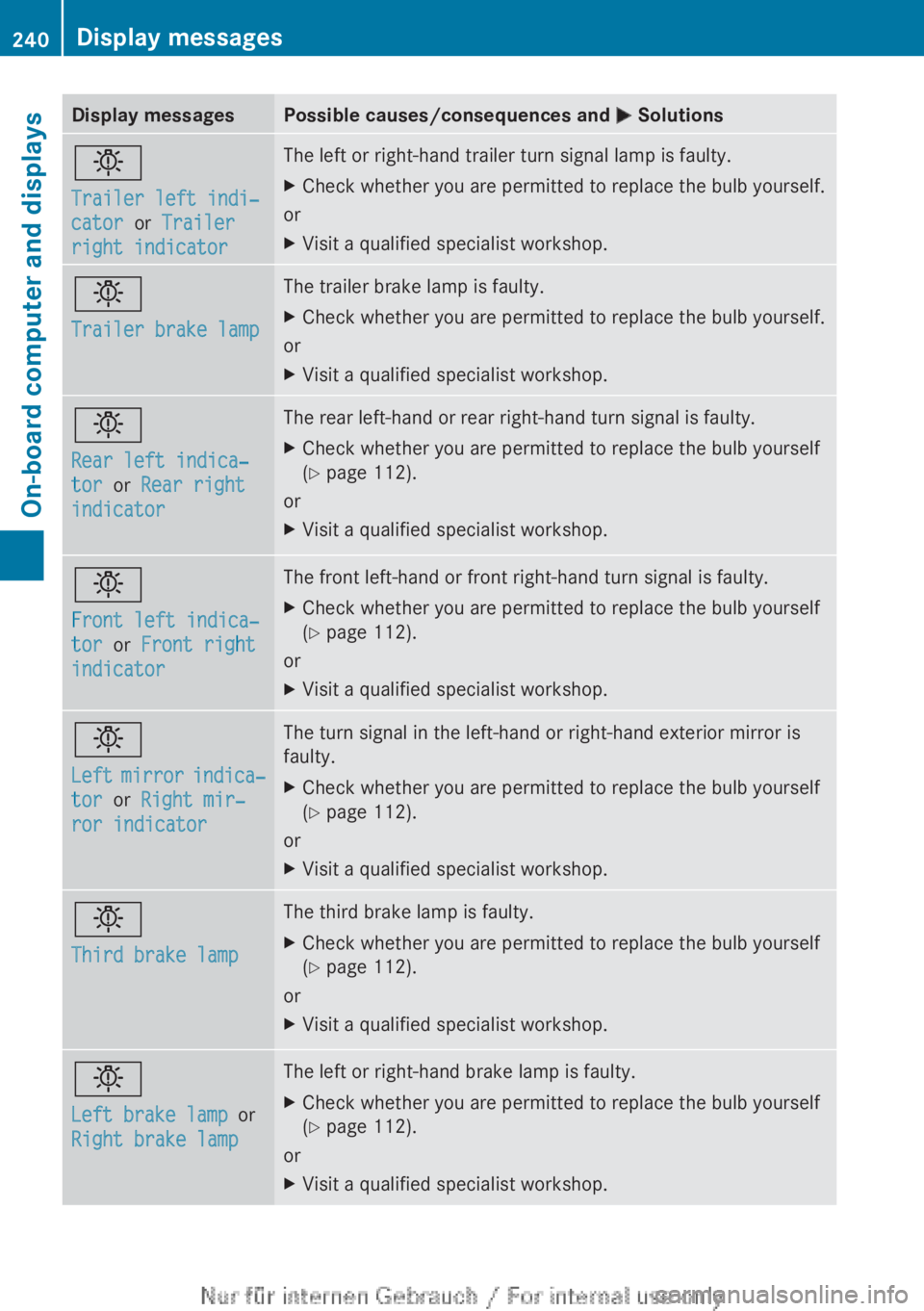
Display messages Possible causes/consequences and
M Solutionsb
Trailer left indi‐
cator or Trailer
right indicator The left or right-hand trailer turn signal lamp is faulty.
X
Check whether you are permitted to replace the bulb yourself.
or
X Visit a qualified specialist workshop. b
Trailer brake lamp The trailer brake lamp is faulty.
X
Check whether you are permitted to replace the bulb yourself.
or
X Visit a qualified specialist workshop. b
Rear left indica‐
tor or Rear right
indicator The rear left-hand or rear right-hand turn signal is faulty.
X
Check whether you are permitted to replace the bulb yourself
(Y page 112).
or
X Visit a qualified specialist workshop. b
Front left indica‐
tor or Front right
indicator The front left-hand or front right-hand turn signal is faulty.
X
Check whether you are permitted to replace the bulb yourself
(Y page 112).
or
X Visit a qualified specialist workshop. b
Left
mirror indica‐
tor or Right mir‐
ror indicator The turn signal in the left-hand or right-hand exterior mirror is
faulty.
X
Check whether you are permitted to replace the bulb yourself
(Y page 112).
or
X Visit a qualified specialist workshop. b
Third brake lamp The third brake lamp is faulty.
X
Check whether you are permitted to replace the bulb yourself
(Y page 112).
or
X Visit a qualified specialist workshop. b
Left brake lamp
or
Right brake lamp The left or right-hand brake lamp is faulty.
X
Check whether you are permitted to replace the bulb yourself
(Y page 112).
or
X Visit a qualified specialist workshop.240
Display messages
On-board computer and displays
Page 248 of 356
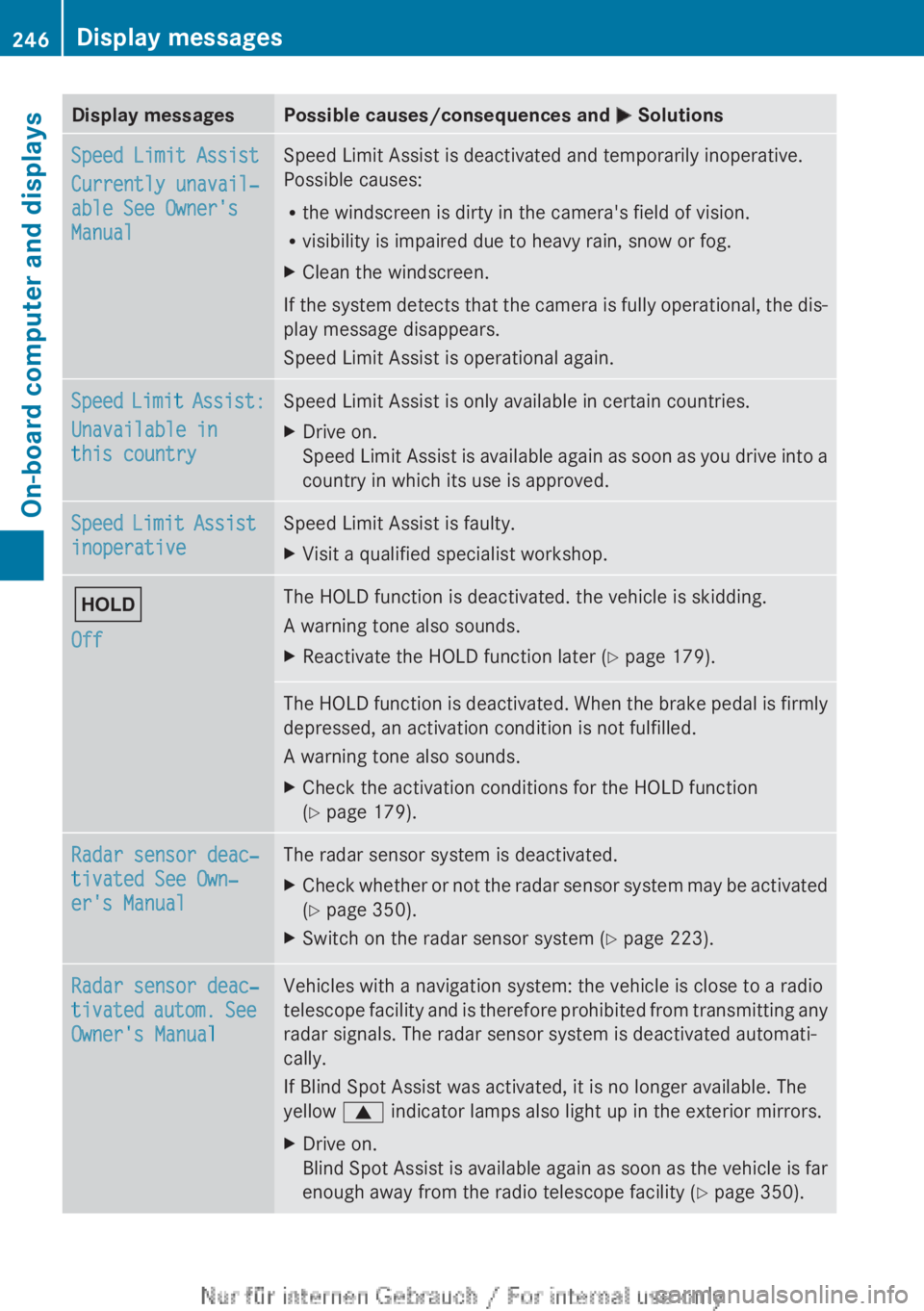
Display messages Possible causes/consequences and
M SolutionsSpeed Limit Assist
Currently unavail‐
able See Owner's
Manual Speed Limit Assist is deactivated and temporarily inoperative.
Possible causes:
R
the windscreen is dirty in the camera's field of vision.
R visibility is impaired due to heavy rain, snow or fog.
X Clean the windscreen.
If the system detects that the camera is fully operational, the dis-
play message disappears.
Speed Limit Assist is operational again. Speed Limit Assist:
Unavailable in
this country Speed Limit Assist is only available in certain countries.
X
Drive on.
Speed
Limit Assist is available again as soon as you drive into a
country in which its use is approved. Speed Limit Assist
inoperative Speed Limit Assist is faulty.
X
Visit a qualified specialist workshop. ë
Off The HOLD function is deactivated. the vehicle is skidding.
A warning tone also sounds.
X
Reactivate the HOLD function later (Y page 179). The HOLD function is deactivated. When the brake pedal is firmly
depressed, an activation condition is not fulfilled.
A warning tone also sounds.
X
Check the activation conditions for the HOLD function
(Y page 179). Radar sensor deac‐
tivated See Own‐
er's Manual The radar sensor system is deactivated.
X
Check whether or not the radar sensor system may be activated
(Y page 350).
X Switch on the radar sensor system (Y page 223). Radar sensor deac‐
tivated
autom. See
Owner's Manual Vehicles with a navigation system: the vehicle is close to a radio
telescope
facility and is therefore prohibited from transmitting any
radar signals. The radar sensor system is deactivated automati-
cally.
If Blind Spot Assist was activated, it is no longer available. The
yellow 9 indicator lamps also light up in the exterior mirrors.
X Drive on.
Blind
Spot Assist is available again as soon as the vehicle is far
enough away from the radio telescope facility ( Y page 350).246
Display messages
On-board computer and displays
Page 279 of 356
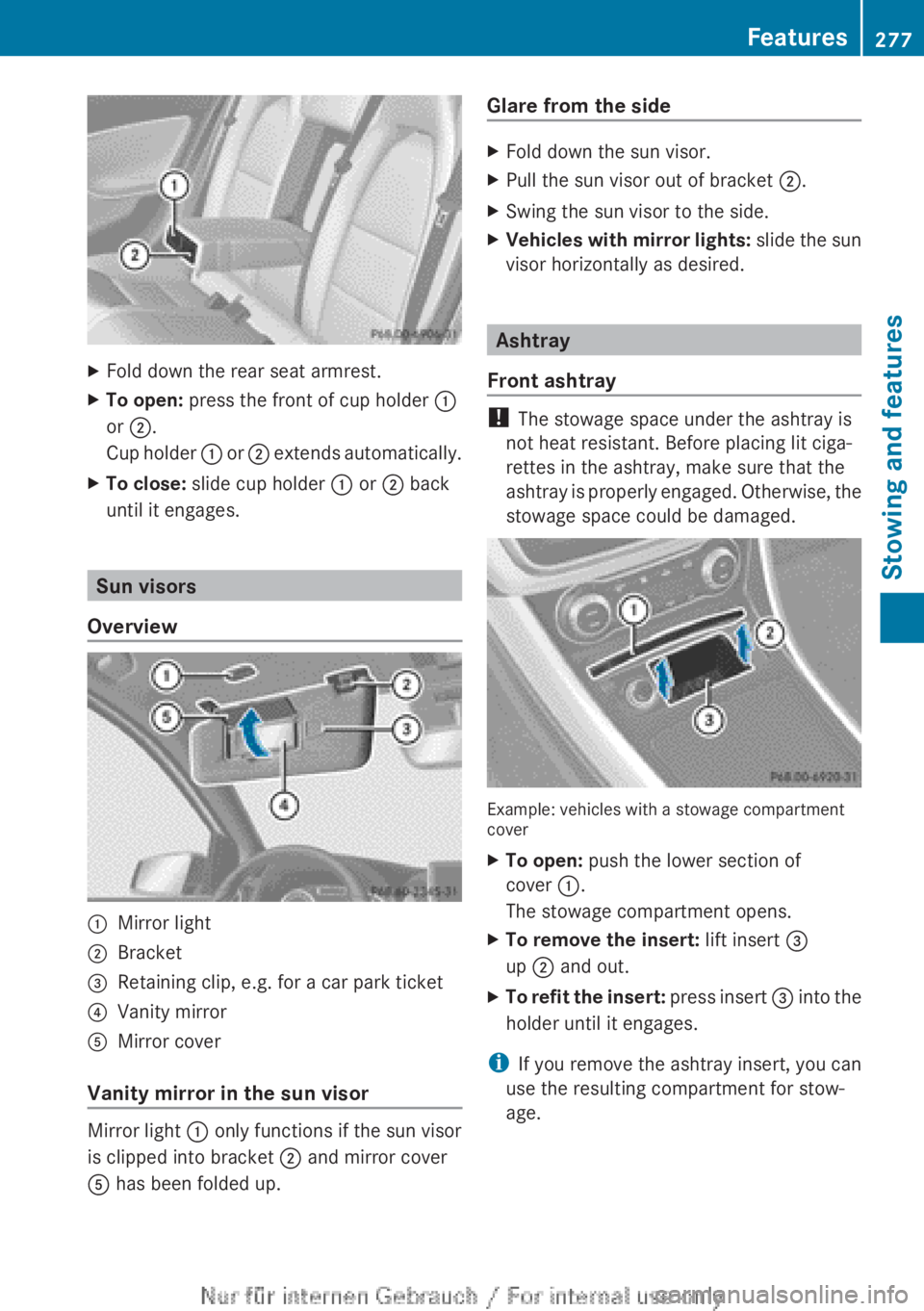
X
Fold down the rear seat armrest.
X To open: press the front of cup holder :
or ;.
Cup
holder : or ; extends automatically.
X To close: slide cup holder : or ; back
until it engages. Sun visors
Overview :
Mirror light
; Bracket
= Retaining clip, e.g. for a car park ticket
? Vanity mirror
A Mirror cover
Vanity mirror in the sun visor Mirror light : only functions if the sun visor
is clipped into bracket ; and mirror cover
A has been folded up. Glare from the side X
Fold down the sun visor.
X Pull the sun visor out of bracket ;.
X Swing the sun visor to the side.
X Vehicles with mirror lights:
slide the sun
visor horizontally as desired. Ashtray
Front ashtray !
The stowage space under the ashtray is
not heat resistant. Before placing lit ciga-
rettes in the ashtray, make sure that the
ashtray
is properly engaged. Otherwise, the
stowage space could be damaged. Example: vehicles with a stowage compartment
cover
X
To open: push the lower section of
cover :.
The stowage compartment opens.
X To remove the insert: lift insert =
up ; and out.
X To refit the insert:
press insert = into the
holder until it engages.
i If you remove the ashtray insert, you can
use the resulting compartment for stow-
age. Features
277
Stowing and features Z