tow MERCEDES-BENZ A CLASS 2012 Workshop Manual
[x] Cancel search | Manufacturer: MERCEDES-BENZ, Model Year: 2012, Model line: A CLASS, Model: MERCEDES-BENZ A CLASS 2012Pages: 356, PDF Size: 4.96 MB
Page 206 of 356
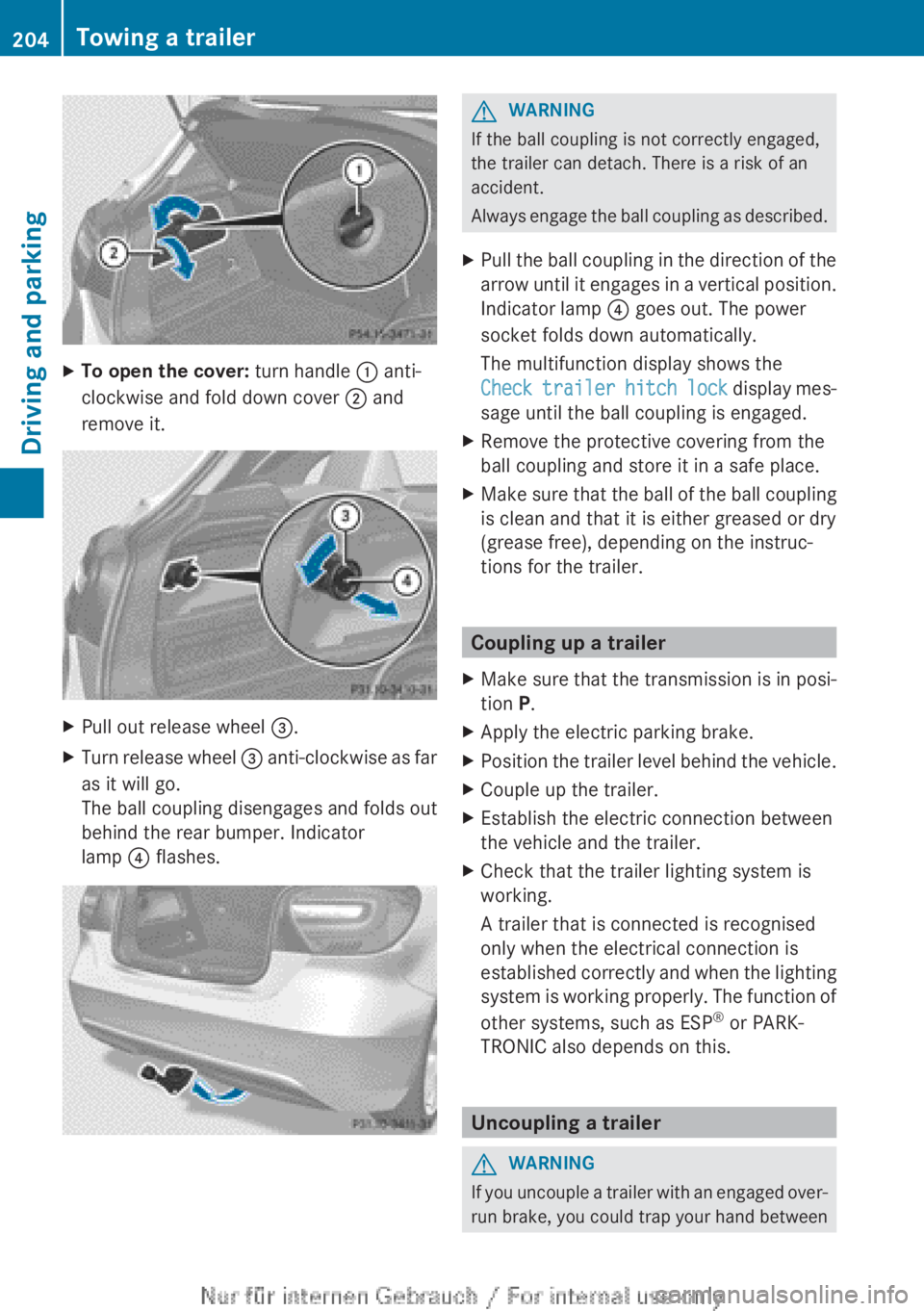
X
To open the cover: turn handle : anti-
clockwise and fold down cover ; and
remove it. X
Pull out release wheel =.
X Turn release wheel = anti-clockwise as far
as it will go.
The ball coupling disengages and folds out
behind the rear bumper. Indicator
lamp ? flashes. G
WARNING
If the ball coupling is not correctly engaged,
the trailer can detach. There is a risk of an
accident.
Always
engage the ball coupling as described.
X Pull the ball coupling in the direction of the
arrow
until it engages in a vertical position.
Indicator lamp ? goes out. The power
socket folds down automatically.
The multifunction display shows the
Check trailer hitch lock display mes-
sage until the ball coupling is engaged.
X Remove the protective covering from the
ball coupling and store it in a safe place.
X Make sure that the ball of the ball coupling
is clean and that it is either greased or dry
(grease free), depending on the instruc-
tions for the trailer. Coupling up a trailer
X Make sure that the transmission is in posi-
tion P.
X Apply the electric parking brake.
X Position the trailer level behind the vehicle.
X Couple up the trailer.
X Establish the electric connection between
the vehicle and the trailer.
X Check that the trailer lighting system is
working.
A trailer that is connected is recognised
only when the electrical connection is
established
correctly and when the lighting
system is working properly. The function of
other systems, such as ESP ®
or PARK-
TRONIC also depends on this. Uncoupling a trailer
G
WARNING
If you uncouple a trailer with an engaged over-
run
brake, you could trap your hand between204
Towing a trailer
Driving and parking
Page 207 of 356
the vehicle and the trailer drawbar. This poses
a risk of injury.
Do not uncouple a trailer with an engaged
overrun brake.
! Do not disconnect a trailer with an
engaged overrun brake. Otherwise, your
vehicle
could be damaged by the rebound-
ing of the overrun brake.
! Remove the installed adapter cable
before folding in the ball coupling. Other-
wise, damage may occur to the rear
bumper and the adapter cable.
X Make sure that the transmission is in posi-
tion P.
X Apply the electric parking brake.
X Secure the trailer against rolling away.
X Remove the trailer cable and decouple the
trailer. Folding in the ball coupling
G
WARNING
If you release the ball coupling or it does not
engage
correctly when folding in, it will swing
out. Within pivoting range of the ball coupling,
there is an increased risk of an accident and
injury.
Only release the ball coupling if the pivoting
range is unobstructed. Always make sure that
the ball coupling engages when folding in.
X Fold the ball coupling back in if you are not
using the trailer tow hitch.
X Place the protective covering on the ball
coupling.
The release wheel is located behind the left-
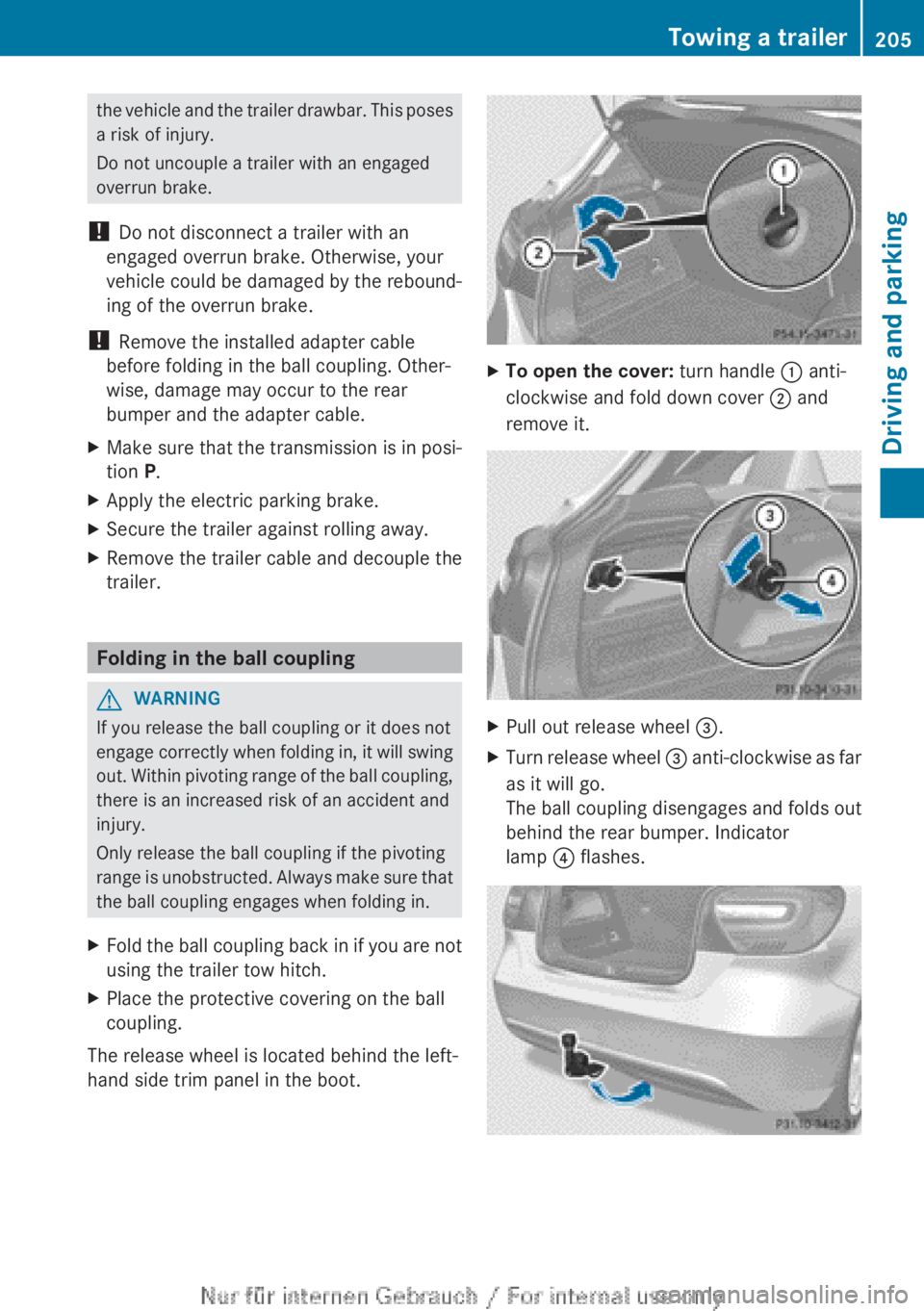
hand side trim panel in the boot. X
To open the cover: turn handle : anti-
clockwise and fold down cover ; and
remove it. X
Pull out release wheel =.
X Turn release wheel =
anti-clockwise as far
as it will go.
The ball coupling disengages and folds out
behind the rear bumper. Indicator
lamp ? flashes. Towing a trailer
205
Driving and parking Z
Page 208 of 356
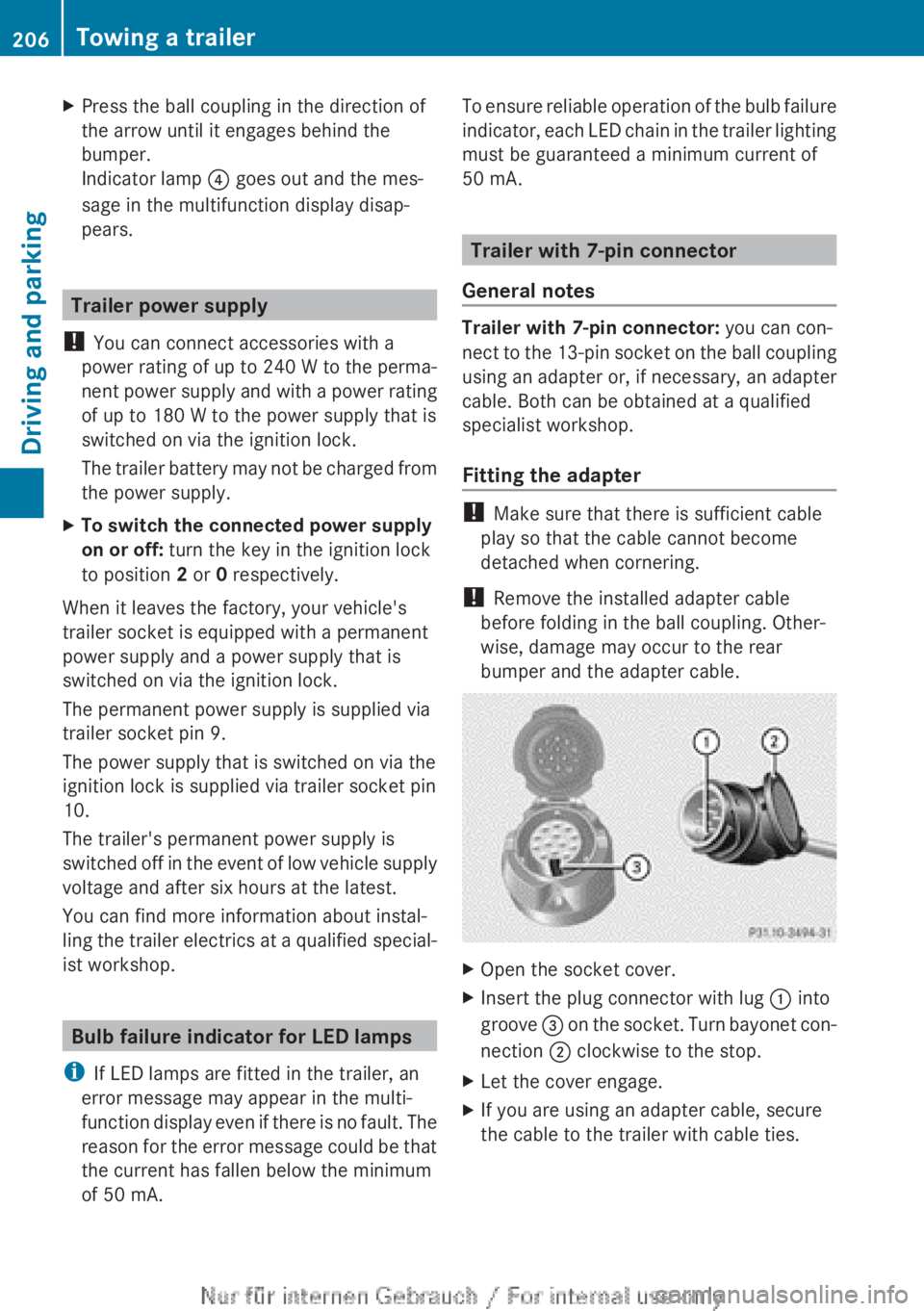
X
Press the ball coupling in the direction of
the arrow until it engages behind the
bumper.
Indicator lamp ? goes out and the mes-
sage in the multifunction display disap-
pears. Trailer power supply
! You can connect accessories with a
power rating of up to 240 W to the perma-
nent
power supply and with a power rating
of up to 180 W to the power supply that is
switched on via the ignition lock.
The trailer battery may not be charged from
the power supply.
X To switch the connected power supply
on or off: turn the key in the ignition lock
to position 2 or 0 respectively.
When it leaves the factory, your vehicle's
trailer socket is equipped with a permanent
power supply and a power supply that is
switched on via the ignition lock.
The permanent power supply is supplied via
trailer socket pin 9.
The power supply that is switched on via the
ignition lock is supplied via trailer socket pin
10.
The trailer's permanent power supply is
switched
off in the event of low vehicle supply
voltage and after six hours at the latest.
You can find more information about instal-
ling the trailer electrics at a qualified special-
ist workshop. Bulb failure indicator for LED lamps
i If LED lamps are fitted in the trailer, an
error message may appear in the multi-
function
display even if there is no fault. The
reason for the error message could be that
the current has fallen below the minimum
of 50 mA. To ensure reliable operation of the bulb failure
indicator,
each LED chain in the trailer lighting
must be guaranteed a minimum current of
50 mA. Trailer with 7-pin connector
General notes Trailer with 7-pin connector: you can con-
nect
to the 13-pin socket on the ball coupling
using an adapter or, if necessary, an adapter
cable. Both can be obtained at a qualified
specialist workshop.
Fitting the adapter !
Make sure that there is sufficient cable
play so that the cable cannot become
detached when cornering.
! Remove the installed adapter cable
before folding in the ball coupling. Other-
wise, damage may occur to the rear
bumper and the adapter cable. X
Open the socket cover.
X Insert the plug connector with lug : into
groove =
on the socket. Turn bayonet con-
nection ; clockwise to the stop.
X Let the cover engage.
X If you are using an adapter cable, secure
the cable to the trailer with cable ties.206
Towing a trailer
Driving and parking
Page 215 of 356
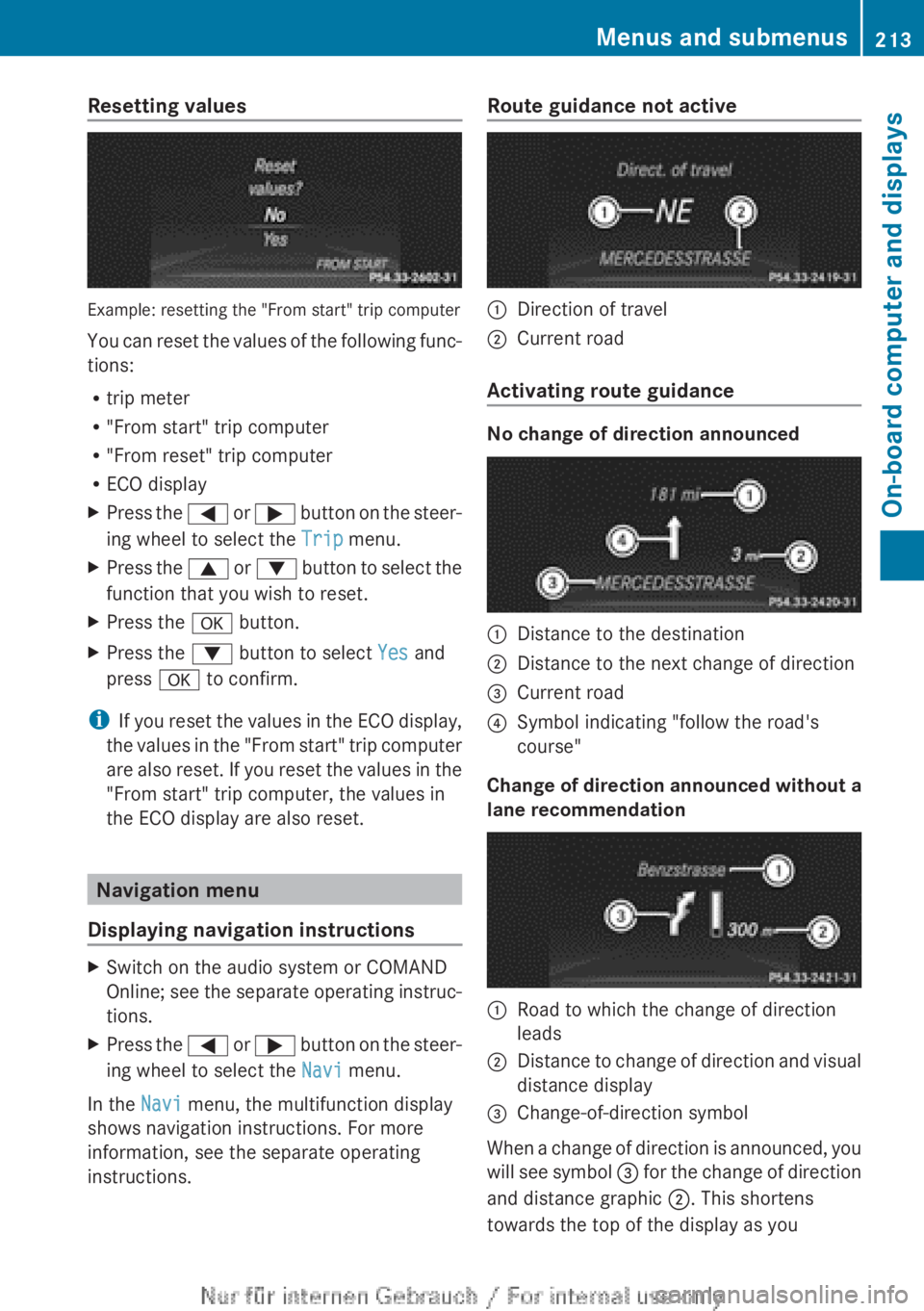
Resetting values
Example: resetting the "From start" trip computer
You
can reset the values of the following func-
tions:
R trip meter
R "From start" trip computer
R "From reset" trip computer
R ECO display
X Press the =
or ; button on the steer-
ing wheel to select the Trip menu.
X Press the 9
or : button to select the
function that you wish to reset.
X Press the a button.
X Press the : button to select Yes and
press a to confirm.
i If
you reset the values in the ECO display,
the values in the "From start" trip computer
are also reset. If you reset the values in the
"From start" trip computer, the values in
the ECO display are also reset. Navigation menu
Displaying navigation instructions X
Switch on the audio system or COMAND
Online;
see the separate operating instruc-
tions.
X Press the =
or ; button on the steer-
ing wheel to select the Navi menu.
In the Navi menu, the multifunction display
shows navigation instructions. For more
information, see the separate operating
instructions. Route guidance not active
:
Direction of travel
; Current road
Activating route guidance No change of direction announced
:
Distance to the destination
; Distance to the next change of direction
= Current road
? Symbol indicating "follow the road's
course"
Change of direction announced without a
lane recommendation :
Road to which the change of direction
leads
; Distance to change of direction and visual
distance display
= Change-of-direction symbol
When a change of direction is announced, you
will
see symbol = for the change of direction
and distance graphic ;. This shortens
towards the top of the display as you Menus and submenus
213
On-board computer and displays Z
Page 236 of 356
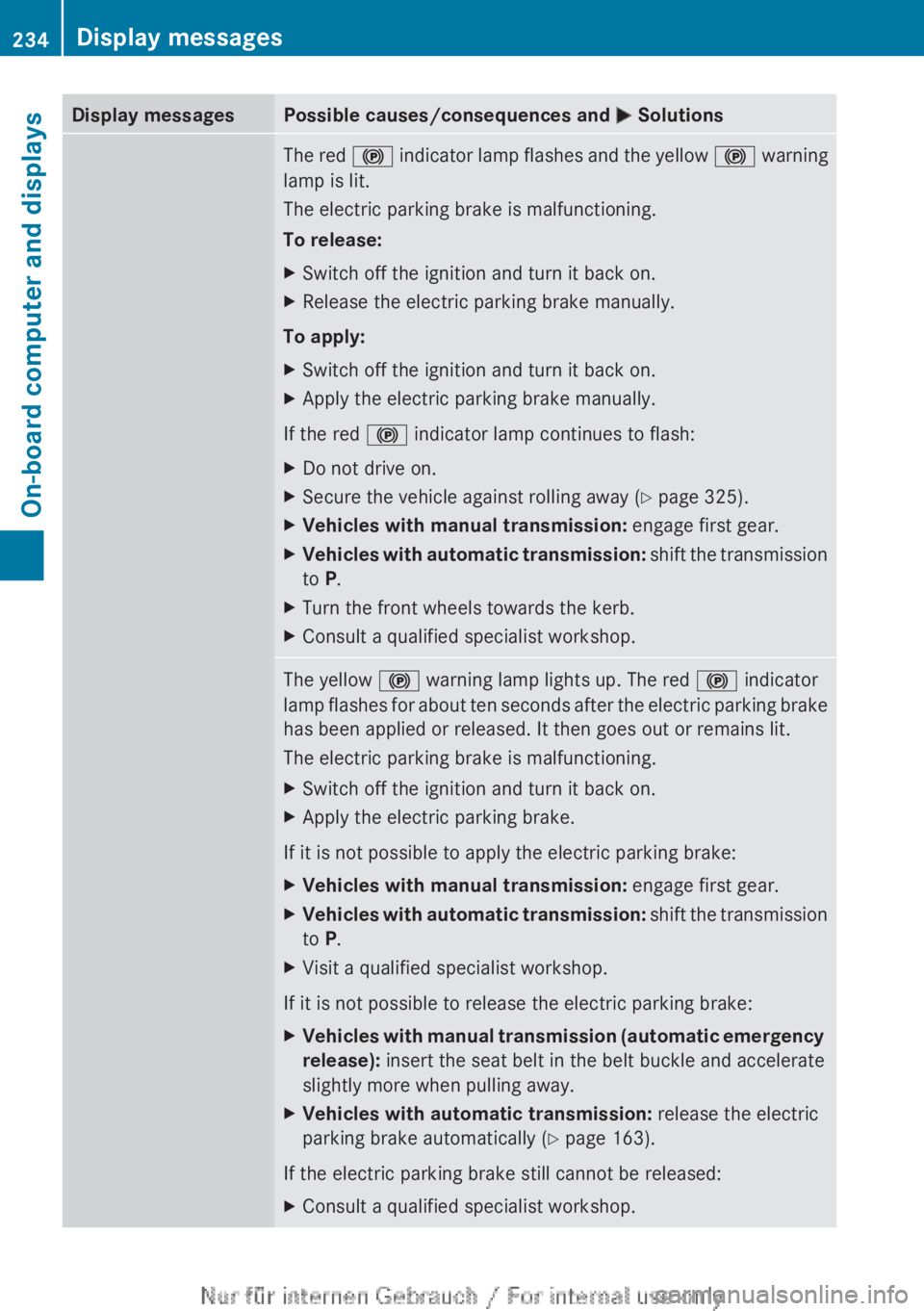
Display messages Possible causes/consequences and
M SolutionsThe red
! indicator lamp flashes and the yellow ! warning
lamp is lit.
The electric parking brake is malfunctioning.
To release:
X Switch off the ignition and turn it back on.
X Release the electric parking brake manually.
To apply:
X Switch off the ignition and turn it back on.
X Apply the electric parking brake manually.
If the red ! indicator lamp continues to flash:
X Do not drive on.
X Secure the vehicle against rolling away ( Y page 325).
X Vehicles with manual transmission: engage first gear.
X Vehicles with automatic transmission:
shift the transmission
to P.
X Turn the front wheels towards the kerb.
X Consult a qualified specialist workshop. The yellow
! warning lamp lights up. The red ! indicator
lamp
flashes for about ten seconds after the electric parking brake
has been applied or released. It then goes out or remains lit.
The electric parking brake is malfunctioning.
X Switch off the ignition and turn it back on.
X Apply the electric parking brake.
If it is not possible to apply the electric parking brake:
X Vehicles with manual transmission: engage first gear.
X Vehicles with automatic transmission:
shift the transmission
to P.
X Visit a qualified specialist workshop.
If it is not possible to release the electric parking brake:
X Vehicles with manual transmission (automatic emergency
release): insert the seat belt in the belt buckle and accelerate
slightly more when pulling away.
X Vehicles with automatic transmission: release the electric
parking brake automatically
(Y page 163).
If the electric parking brake still cannot be released:
X Consult a qualified specialist workshop.234
Display messages
On-board computer and displays
Page 244 of 356
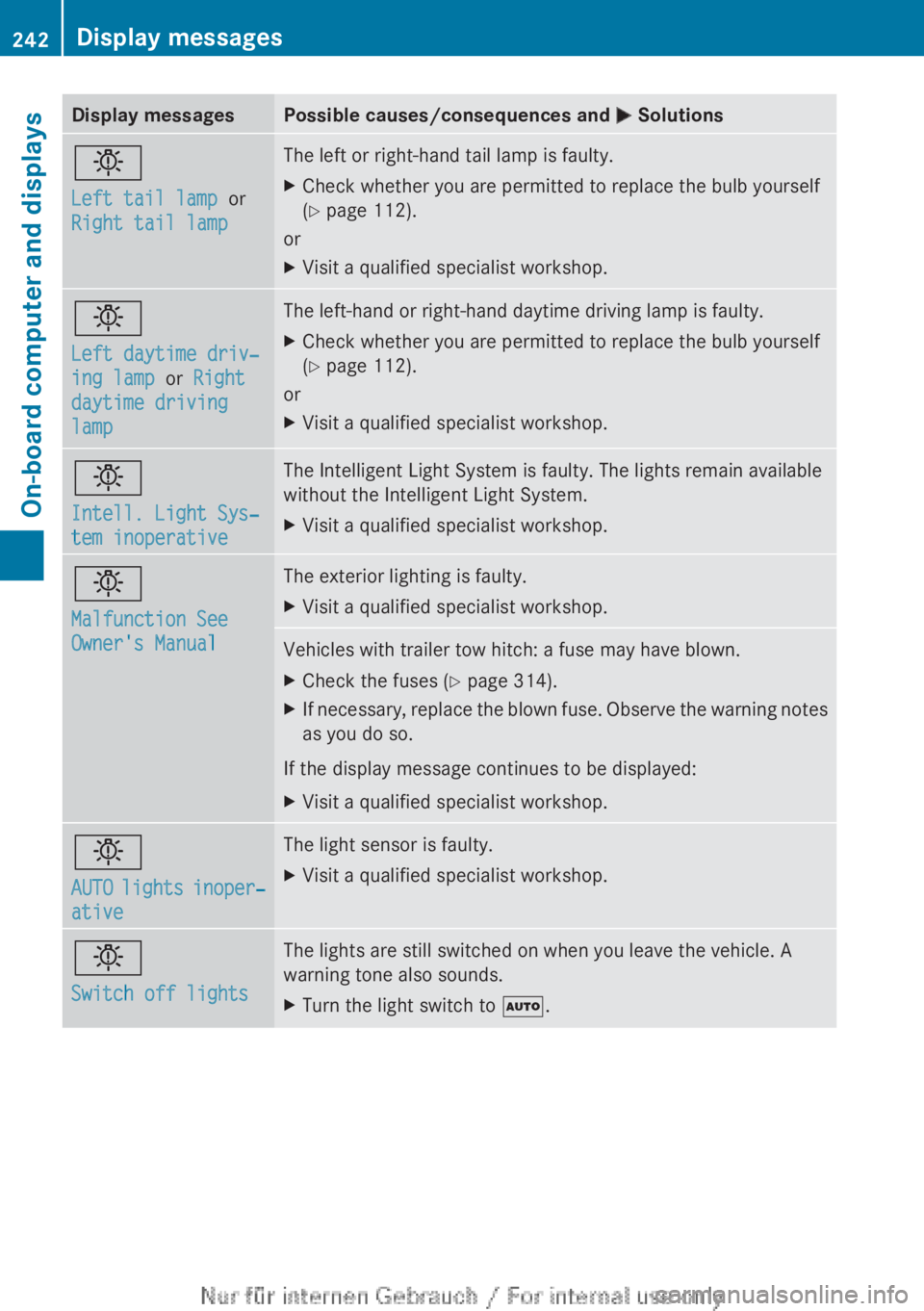
Display messages Possible causes/consequences and
M Solutionsb
Left tail lamp or
Right tail lamp The left or right-hand tail lamp is faulty.
X
Check whether you are permitted to replace the bulb yourself
(Y page 112).
or
X Visit a qualified specialist workshop. b
Left daytime driv‐
ing lamp or Right
daytime driving
lamp The left-hand or right-hand daytime driving lamp is faulty.
X
Check whether you are permitted to replace the bulb yourself
(Y page 112).
or
X Visit a qualified specialist workshop. b
Intell. Light Sys‐
tem inoperative The Intelligent Light System is faulty. The lights remain available
without the Intelligent Light System.
X
Visit a qualified specialist workshop. b
Malfunction See
Owner's Manual The exterior lighting is faulty.
X
Visit a qualified specialist workshop. Vehicles with trailer tow hitch: a fuse may have blown.
X
Check the fuses (Y page 314).
X If necessary, replace the blown fuse. Observe the warning notes
as you do so.
If the display message continues to be displayed:
X Visit a qualified specialist workshop. b
AUTO
lights inoper‐
ative The light sensor is faulty.
X
Visit a qualified specialist workshop. b
Switch off lights The lights are still switched on when you leave the vehicle. A
warning tone also sounds.
X
Turn the light switch to Ã.242
Display messages
On-board computer and displays
Page 249 of 356
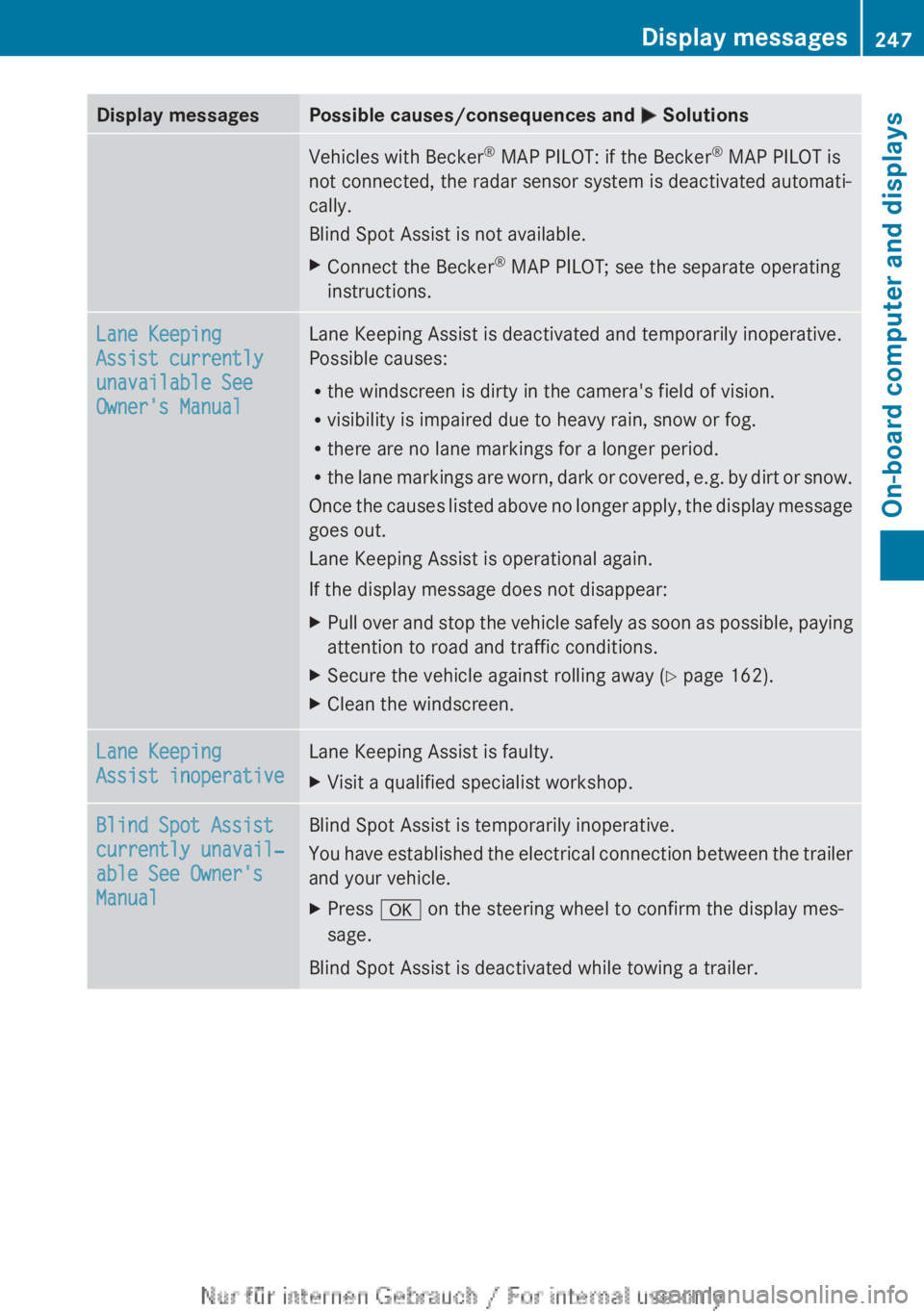
Display messages Possible causes/consequences and
M SolutionsVehicles with Becker
®
MAP PILOT: if the Becker ®
MAP PILOT is
not connected, the radar sensor system is deactivated automati-
cally.
Blind Spot Assist is not available.
X Connect the Becker ®
MAP PILOT; see the separate operating
instructions. Lane Keeping
Assist currently
unavailable See
Owner's Manual Lane Keeping Assist is deactivated and temporarily inoperative.
Possible causes:
R
the windscreen is dirty in the camera's field of vision.
R visibility is impaired due to heavy rain, snow or fog.
R there are no lane markings for a longer period.
R the
lane markings are worn, dark or covered, e.g. by dirt or snow.
Once the causes listed above no longer apply, the display message
goes out.
Lane Keeping Assist is operational again.
If the display message does not disappear:
X Pull over and stop the vehicle safely as soon as possible, paying
attention to road and traffic conditions.
X Secure the vehicle against rolling away ( Y page 162).
X Clean the windscreen. Lane Keeping
Assist inoperative Lane Keeping Assist is faulty.
X
Visit a qualified specialist workshop. Blind Spot Assist
currently unavail‐
able See Owner's
Manual Blind Spot Assist is temporarily inoperative.
You
have established the electrical connection between the trailer
and your vehicle.
X Press a on the steering wheel to confirm the display mes-
sage.
Blind Spot Assist is deactivated while towing a trailer. Display messages
247
On-board computer and displays Z
Page 257 of 356
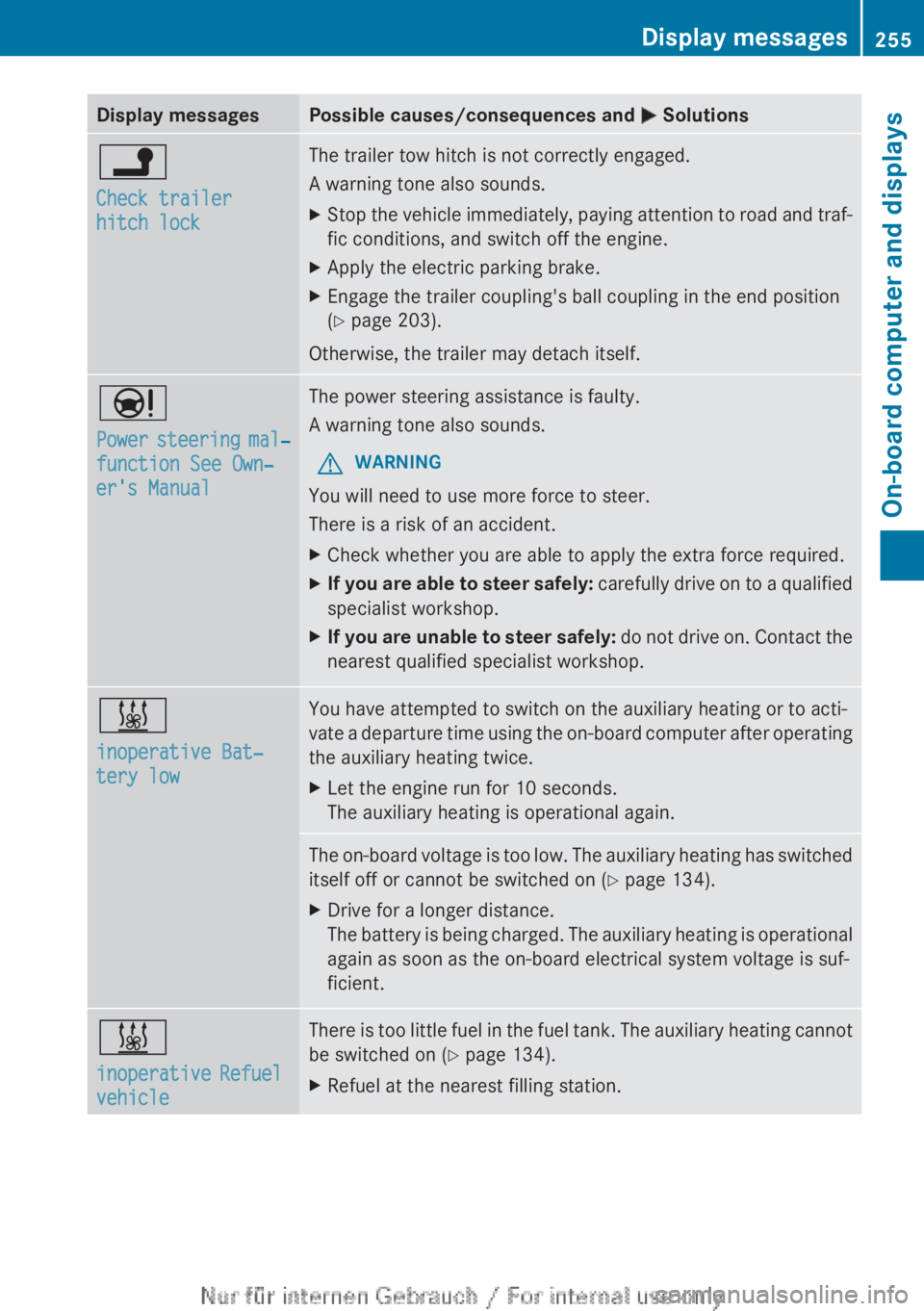
Display messages Possible causes/consequences and
M Solutionsj
Check trailer
hitch lock The trailer tow hitch is not correctly engaged.
A warning tone also sounds.
X
Stop the vehicle immediately, paying attention to road and traf-
fic conditions, and switch off the engine.
X Apply the electric parking brake.
X Engage the trailer coupling's ball coupling in the end position
(Y page 203).
Otherwise, the trailer may detach itself. Ð
Power
steering mal‐
function See Own‐
er's Manual The power steering assistance is faulty.
A warning tone also sounds.
G WARNING
You will need to use more force to steer.
There is a risk of an accident.
X Check whether you are able to apply the extra force required.
X If you are able to steer safely:
carefully drive on to a qualified
specialist workshop.
X If you are unable to steer safely:
do not drive on. Contact the
nearest qualified specialist workshop. &
inoperative Bat‐
tery low You have attempted to switch on the auxiliary heating or to acti-
vate
a departure time using the on-board computer after operating
the auxiliary heating twice.
X Let the engine run for 10 seconds.
The auxiliary heating is operational again. The on-board voltage is too low. The auxiliary heating has switched
itself off or cannot be switched on
(Y page 134).
X Drive for a longer distance.
The
battery is being charged. The auxiliary heating is operational
again as soon as the on-board electrical system voltage is suf-
ficient. &
inoperative
Refuel
vehicle There is too little fuel in the fuel tank. The auxiliary heating cannot
be switched on (
Y page 134).
X Refuel at the nearest filling station. Display messages
255
On-board computer and displays Z
Page 259 of 356
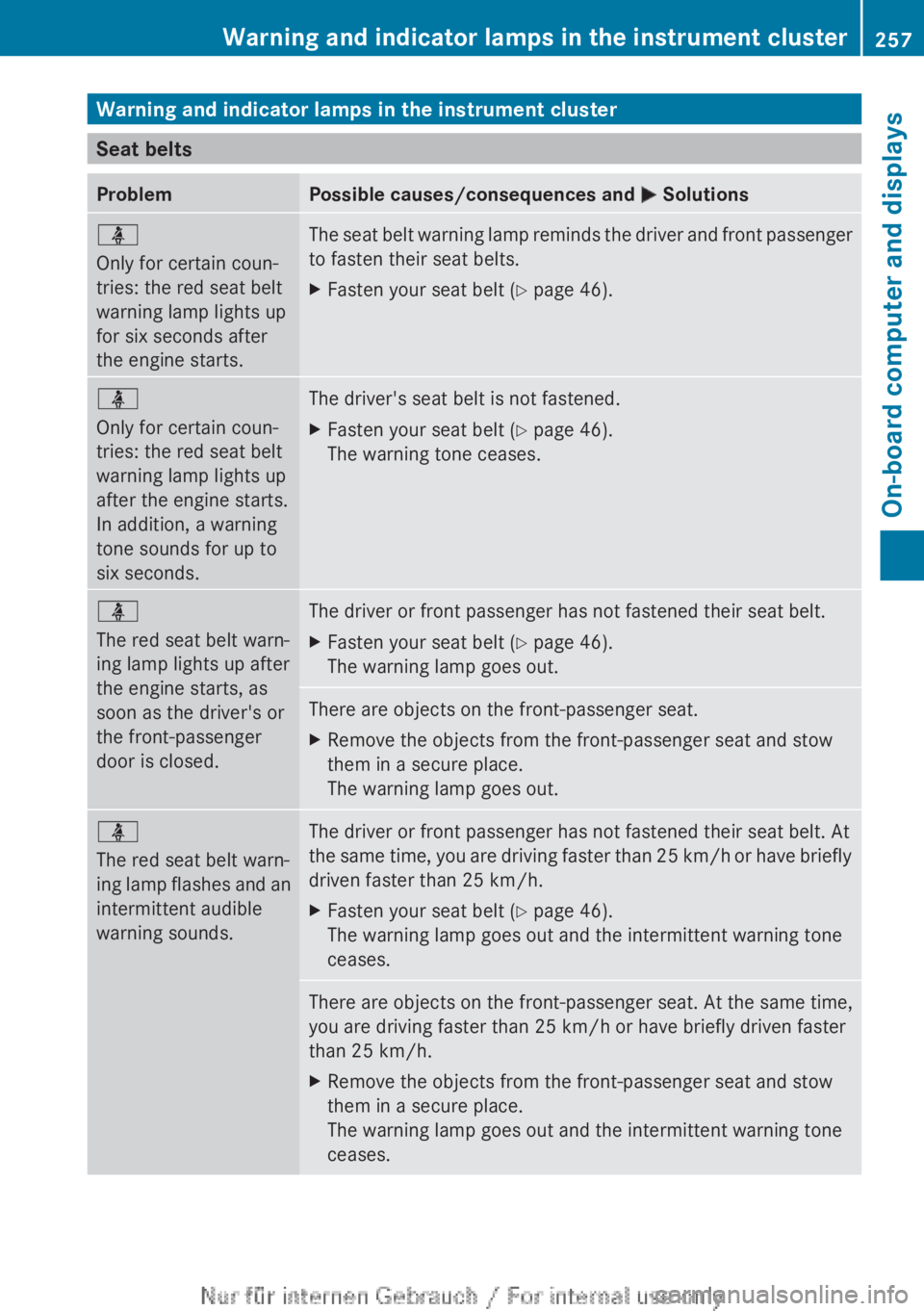
Warning and indicator lamps in the instrument cluster
Seat belts
Problem Possible causes/consequences and
M Solutionsü
Only for certain coun-
tries: the red seat belt
warning lamp lights up
for six seconds after
the engine starts.
The seat belt warning lamp reminds the driver and front passenger
to fasten their seat belts.
X
Fasten your seat belt ( Y page 46).ü
Only for certain coun-
tries: the red seat belt
warning lamp lights up
after the engine starts.
In addition, a warning
tone sounds for up to
six seconds.
The driver's seat belt is not fastened.
X
Fasten your seat belt ( Y page 46).
The warning tone ceases. ü
The red seat belt warn-
ing lamp lights up after
the engine starts, as
soon as the driver's or
the front-passenger
door is closed.
The driver or front passenger has not fastened their seat belt.
X
Fasten your seat belt ( Y page 46).
The warning lamp goes out. There are objects on the front-passenger seat.
X
Remove the objects from the front-passenger seat and stow
them in a secure place.
The warning lamp goes out. ü
The red seat belt warn-
ing
lamp flashes and an
intermittent audible
warning sounds. The driver or front passenger has not fastened their seat belt. At
the
same time, you are driving faster than 25 km/h or have briefly
driven faster than 25 km/h.
X Fasten your seat belt ( Y page 46).
The warning lamp goes out and the intermittent warning tone
ceases. There are objects on the front-passenger seat. At the same time,
you are driving faster than 25 km/h or have briefly driven faster
than 25 km/h
.
X Remove the objects from the front-passenger seat and stow
them in a secure place.
The warning lamp goes out and the intermittent warning tone
ceases. Warning and indicator lamps in the instrument cluster
257
On-board computer and displays Z
Page 269 of 356
Useful information ............................
268
Loading guidelines ............................268
Stowage areas .................................. 269
Features ............................................. 275 267Stowing and features