ESP MERCEDES-BENZ A-CLASS HATCHBACK 2008 User Guide
[x] Cancel search | Manufacturer: MERCEDES-BENZ, Model Year: 2008, Model line: A-CLASS HATCHBACK, Model: MERCEDES-BENZ A-CLASS HATCHBACK 2008Pages: 305, PDF Size: 5.43 MB
Page 59 of 305

Driving safety sys
tems56 G
Risk of accident
If BAS has malfunctioned, the braking sys-
tem remains available with full brake boost-
ing effect. However, braking force is not
automatically increased in emergency
braking situations and the stopping dis-
tance may increase. Adaptive brake lamps
i Adaptive brake lamps are only available in
certain countries.
If you brake sharply from a speed of more
than 50 km/h or if braking is assisted by BAS,
the brake lamps flash rapidly. In this way,
traffic travelling behind you is warned in an
even more noticeable manner.
If you brake sharply from a speed of more
than 70 km/h to a standstill, the hazard warn-
ing lamps are activated automatically. If the
brakes are applied again, the brake lamps
light up continuously. The hazard warning
lamps switch off automatically if you travel
faster than 10 km/h. You can also switch off
the hazard warning lamps using the hazard
warning switch button ( Ypage 80). ESP
®
(Electronic Stability Program)
ESP ®
monitors driving stability and traction,
i.e. power transmission between tyres and
the road surface.
ESP ®
detects when a wheel spins or the vehi-
cle starts to skid. ESP ®
stabilises the vehicle
by targeted braking of individual wheels and
by limiting engine power. It assists you when
pulling away on wet or slippery roads. ESP ®
also stabilises the vehicle during braking.
When ESP ®
intervenes, the vwarning
lamp flashes in the instrument cluster. G
Risk of accident
If the v warning lamp in the instrument
cluster flashes, proceed as follows:
R only depress the accelerator pedal as far
as necessary when pulling away.
R adapt your driving style to suit the pre-
vailing road and weather conditions.
The vehicle could otherwise go into a skid.
ESP ®
cannot reduce the risk of an accident
if you drive too fast. ESP ®
cannot override
the laws of physics.
! The ignition must be switched off (key in
position 0or 1in the ignition lock), if: R
the parking brake is being tested using a
dynamometer
R the vehicle is being towed with the front
axle raised
Application of the brakes by ESP ®
could
otherwise destroy the brake system on the
front axle.
i Only use wheels with the recommended
tyre sizes. Only then will ESP ®
function
properly. Steering assistant STEER CONTROL
The steering assistant STEER CONTROL helps
you by transmitting a noticeable steering
force to the steering wheel in the direction
required for vehicle stabilisation. This steer-
ing assistance is provided in particular if:
R both right wheels or both left wheels are on
a wet or slippery road surface when you
brake
R the vehicle starts to skid
You have control over the steering at all
times. G
Risk of accident
If there is an ESP ®
malfunction, you will not
receive any steering assistance from the Safety
169_AKB; 2; 4, en-GB
wdomann,
Version: 2.10.6
2008-07-16T08:52:06+02:00 - Seite 56 Dateiname: 6515_0315_02_buchblock.pdf; preflight
Page 68 of 305
Seats
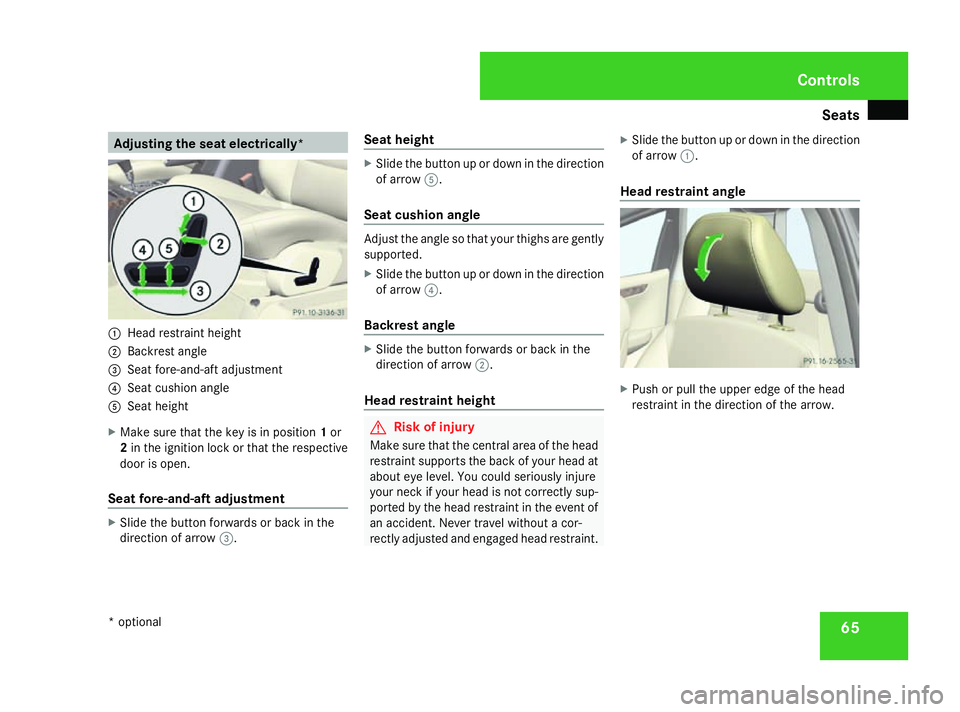
65Adjusting the seat electrically*
1
Head restraint height
2 Backrest angle
3 Seat fore-and-aft adjustment
4 Seat cushion angle
5 Seat height
X Make sure that the key is in position 1or
2 in the ignition lock or that the respective
door is open.
Seat fore-and-aft adjustment X
Slide the button forwards or back in the
direction of arrow 3. Seat height X
Slide the button up or down in the direction
of arrow 5.
Seat cushion angle Adjust the angle so that your thighs are gently
supported.
X
Slide the button up or down in the direction
of arrow 4.
Backrest angle X
Slide the button forwards or back in the
direction of arrow 2.
Head restraint height G
Risk of injury
Make sure that the central area of the head
restraint supports the back of your head at
about eye level. You could seriously injure
your neck if your head is not correctly sup-
ported by the head restraint in the event of
an accident. Never travel without a cor-
rectly adjusted and engaged head restraint. X
Slide the button up or down in the direction
of arrow 1.
Head restraint angle X
Push or pull the upper edge of the head
restraint in the direction of the arrow. Controls
* optional
169_AKB; 2; 4, en-GB
wdomann,
Version: 2.10.6 2008-07-16T08:52:06+02:00 - Seite 65 ZDateiname: 6515_0315_02_buchblock.pdf; preflight
Page 74 of 305

Mirrors
71
and incident light from headlamps strikes the
sensor in the rear-view mirror.
The mirrors do not go into anti-dazzle mode if
reverse gear is engaged and the interior light-
ing is switched on. G
Risk of accident
If the incident light from headlamps cannot
strike the sensor in the rear-view mirror, for
instance by objects in the vehicle, the mir-
rors' automatic anti-dazzle function will not
operate.
Incident light could then dazzle you. This
may prevent you from observing the traffic
conditions, thereby causing an accident. In
this case, adjust the rear-view mirror man-
ually. Exterior mirrors
G
Risk of accident
The exterior mirrors reduce the size of the
image. Objects are actually closer than
they appear. You could misjudge the dis-
tance from vehicles driving behind and
cause an accident, e.g. when changing
lane. For this reason, make sure of the
actual distance from the vehicle driving
behind by glancing over your shoulder.
The convex exterior mirrors provide a larger
field of vision.
At low outside temperatures, the exterior mir-
rors are heated automatically. Adjusting the exterior mirrors 1
Adjustment button
2 Right-hand exterior mirror
3 Left-hand exterior mirror
X Make sure that the key is in position 1or
2 in the ignition lock.
X Press button 2for the right-hand exterior
mirror or button 3for the left-hand exte-
rior mirror.
The indicator lamp in the corresponding
button lights up in red.
The indicator lamp goes out again after
some time. You can adjust the selected
mirror using adjustment button 1as long
as the indicator lamp is lit.
X Press adjustment button 1up, down, to
the right or to the left until the exterior mir- Controls
169_AKB; 2; 4, en-GB
wdomann,
Version: 2.10.6
2008-07-16T08:52:06+02:00 - Seite 71 ZDateiname: 6515_0315_02_buchblock.pdf; preflight
Page 76 of 305
Seat belts
73Seat belts
Wearing seat belts
Seat belts are the most effective means of
restraining the movement of vehicle occu-
pants in the event of an accident. This
reduces the risk of vehicle occupants coming
into contact with the vehicle interior. G
Risk of injury
A seat belt which is not worn correctly, or
which has not been engaged in the seat belt
buckle correctly, cannot perform its inten-
ded protective function. Under certain cir-
cumstances this could cause severe or
even fatal injuries.
Make sure that all occupants – in particular,
pregnant women – wear their seat belt cor-
rectly at all times.
R The seat belt must pass closely over your
body and must not be twisted. You
should therefore avoid wearing bulky
clothing (e.g. a winter coat). The shoulder
belt section must be routed across the
middle of your shoulder – on no account
across your neck or under your arm – and
pulled tight against your upper body. The
lap belt must always pass across your lap
as low down as possible, i.e. over your hip joints – not across your abdomen. If
necessary, push down the belt strap
slightly and then retighten it in the roll-up
direction.
R 3-door vehicle: the swivelling belt guide
must be in the correct position.
R Do not route the belt strap across sharp
or fragile objects, especially if these are
located on or in your clothing, e.g. spec-
tacles, pencils, keys, etc. The seat belt
strap could be damaged and tear in an
accident and you or other vehicle occu-
pants could be injured.
R Only one person should use each seat
belt at any one time. Children must never
travel sitting on the lap of other occu-
pants. It would not be possible to restrain
the child in the event of a sudden change
in direction, braking or an accident. This
could result in severe or even fatal inju-
ries to the child and other occupants.
R Persons less than 1.50 m tall cannot
wear the seat belts correctly. For this
reason, secure persons less than 1.50 m
tall in specially designed, suitable
restraint systems. R
Children less than 1.50 m tall or under
12 years of age cannot wear the seat
belts properly. Therefore, always secure
these children in suitable child restraint
systems on suitable vehicle seats. You
can find more information under "Chil-
dren in the vehicle" in the "Safety" sec-
tion of the Owner's Manual. Follow the
manufacturer's installation instructions
when fitting the child restraint system.
R Do not secure any objects with a seat belt
if the seat belt is also being used by one
of the vehicle's occupants. G
Risk of injury
The seat belt does not offer the intended
level of protection unless the backrest is
almost vertical. Under certain circumstan-
ces this could cause severe or even fatal
injuries.
Before starting a journey, make sure that
the seat is properly adjusted and that the
backrest is almost vertical. G
Risk of injury
A dirty or damaged seat belt or a seat belt
that has been subjected to a load in an
accident or modified no longer offers the Controls
169_AKB; 2; 4, en-GB
wdomann,
Version: 2.10.6 2008-07-16T08:52:06+02:00 - Seite 73 ZDateiname: 6515_0315_02_buchblock.pdf; preflight
Page 81 of 305

Lights
78$
a
Left-hand parking lamp
% g
Right-hand parking lamp 8
& M
Lights off/constant headlamp mode
( U
Automatic headlamp mode/con-
stant headlamp mode
) C
Side lamps, licence plate and instru-
ment lighting
* B
Dipped-beam headlamps or main-
beam headlamps
, ¥
foglamps*
. †
Rear foglamp
i The exterior lighting (except for side
lamps and parking lamps) automatically
switches off when you remove the key from
the ignition lock or open the driver's door while the ignition is switched off (ignition
key in position
0).
! Switch off the side lamps and parking
lamp when you leave the vehicle. This pre-
vents the battery from discharging.
Dipped-beam headlamps X
Turn the ignition key to position 2in the
ignition lock or start the engine.
X To switch on: turn the light switch to
B.
Constant headlamp mode In countries in which constant headlamp
mode is not a legal requirement, you can
make this a setting using the on-board com-
puter.
You can activate or deactivate "constant
headlamp mode" using the on-board com-
puter (Y
page 109).
X To switch on: turn the light switch to
M orU.
The dipped-beam headlamps are switched
on when the engine is running. i
When you turn the light switch to any
position other than MorU, the cor-
responding light goes on.
Automatic headlamp mode G
Risk of accident
When the light switch is set to U, the
lights are not switched on automatically in
foggy conditions. This could endanger you
and others. Therefore, turn the light switch
to B in darkness and fog.
Automatic headlamp mode is only a driving
aid. You are responsible for the vehicle
lighting at all times. G
Risk of accident
When it is dark or foggy, turn the light
switch from UtoB in good time.
Otherwise, the headlamps could switch off
temporarily and you could cause an acci-
dent.
X To switch on: turn the light switch to
U.
Key in position 1in the ignition lock: the
side lamp is switched on or off automati-
cally, depending on the brightness of the
ambient light.
8 You must turn the light switch beyond its resistance point when turning it from the Mposition to the gposition. Controls
* optional
169_AKB; 2; 4, en-GB
wdomann
, Version: 2.10.6
2008-07-16T08:52:06+02:00 - Seite 78 Dateiname: 6515_0315_02_buchblock.pdf; preflight
Page 82 of 305
Lights
79
Starting the engine: the dipped-beam head-
lamps are also switched on or off automat-
ically, depending on the brightness of the
ambient light.
When the dipped-beam headlamps are
switched on, the Bindicator lamp in the
instrument cluster lights up.
Front foglamps*/Rear foglamp G
Risk of accident
If you suspect that driving conditions will be
foggy, turn the light switch to Bbefore
you start your journey. Otherwise, your
vehicle may not be visible and you could
endanger yourself and others.
When the light switch is set to Uyou can-
not switch on the front *or rear foglamps.
X Turn the key to position 2in the ignition
lock.
X To switch on the front foglamps*: turn
the light switch to the BorC posi-
tion.
X Pull the light switch out to the first detent.
The ¥ green indicator lamp next to the
light switch lights up. X
To switch on the rear foglamp: turn the
light switch to BorC.
X On vehicles with front foglamps*, pull the
light switch out to the second detent.
On vehicles without front foglamps*, pull
the light switch out to the detent.
The † yellow indicator lamp next to the
light switch lights up.
X To switch off the front foglamps*/rear
foglamp: push in the light switch to the
stop.
The corresponding indicator lamp goes out. Combination switch (turn signals,
main-beam headlamps and headlamp
flasher)
Turn signal lamp
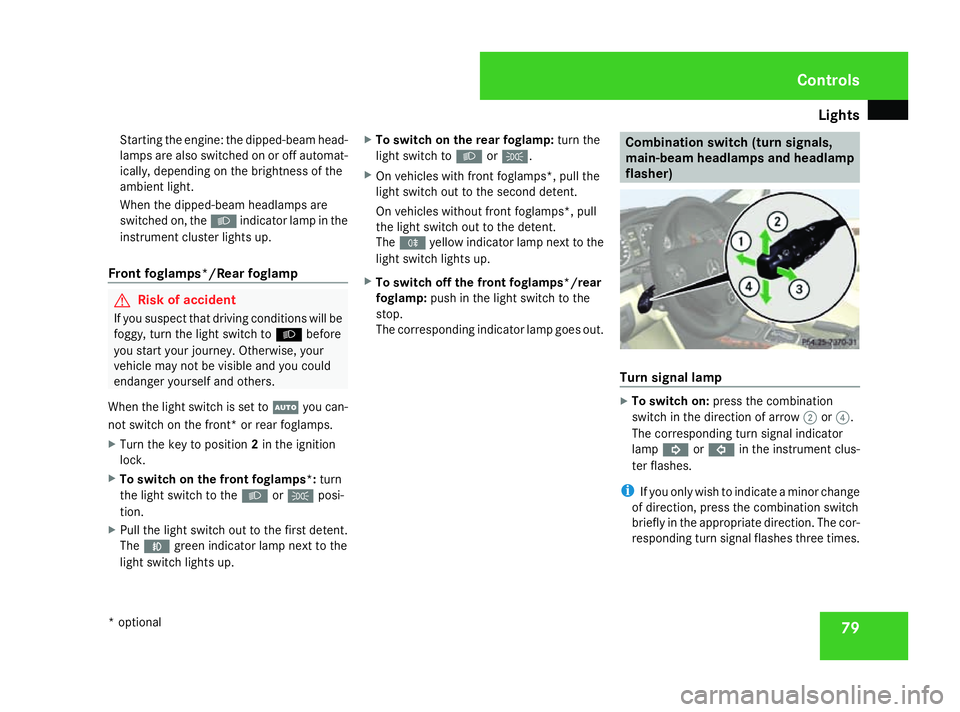
X
To switch on: press the combination
switch in the direction of arrow 2or?.
The corresponding turn signal indicator
lamp K orL in the instrument clus-
ter flashes.
i If you only wish to indicate a minor change
of direction, press the combination switch
briefly in the appropriate direction. The cor-
responding turn signal flashes three times. Controls
* optional
169_AKB; 2; 4, en-GB
wdomann,
Version: 2.10.6 2008-07-16T08:52:06+02:00 - Seite 79 ZDateiname: 6515_0315_02_buchblock.pdf; preflight
Page 83 of 305

Lights
80
Main-beam headlamps X
Turn the ignition key to position 2in the
ignition lock or start the engine.
X Turn the light switch to BorU 9
.
X To switch on: press the combination
switch in the direction of arrow 1.
The A main-beam indicator lamp in the
instrument cluster lights up.
X To switch off: move the combination
switch back to its normal position.
The A main-beam indicator lamp in the
instrument cluster goes out.
Headlamp flasher X
To switch on: briefly pull the combination
switch in the direction of arrow =. Hazard warning lamps
The hazard warning lamps still operate if the
ignition is switched off. They switch on auto-
matically if an airbag is deployed or if you
brake sharply and bring the vehicle to a halt
from a speed of more than 70 km/h.
X
To switch on: press button1.
All turn signals flash. If you now switch on
a turn signal using the combination switch
(Y page 79), only the turn signal lamp on
the corresponding side of the vehicle will
flash.
X To switch off: press button1. Adjusting the headlamp range (halo-
gen headlamps)
The headlamp range control allows you to
adjust the cone of light from the headlamps
to suit the vehicle load.
You can only adjust the headlamp range while
the engine is running. Position Load
0
Driver's seat and front-
passenger seat occupied
1
Driver's seat, front-
passenger seat and rear
seats occupied
9
In the Uposition, the main-beam headlamps are only switched on when it is dark. Controls
169_AKB; 2; 4, en-GB
wdomann,
Version: 2.10.6
2008-07-16T08:52:06+02:00 - Seite 80 Dateiname: 6515_0315_02_buchblock.pdf; preflight
Page 84 of 305

Lights
81Position Load
2
Driver's seat, front passenger
seat and rear seats occupied,
luggage compartment laden
3
Not required
X
Turn headlamp range control 1to the
position which corresponds to the load in
your vehicle. Headlamp cleaning system*
The headlamps are cleaned automatically if
the "Wipe with windscreen washer fluid" func-
tion is operated five times while the lights are
on and the engine is running. When you
switch off the ignition, the automatic head-
lamp cleaning system is reset and counting is
resumed from 0. Cornering light function* (bi-xenon
headlamps*)
Specially designed headlamps light up the
area into which you are driving when turning
corners.
If you are driving at speeds below 40 km/h,
the cornering light function is activated either
by the turn signals or when the steering wheel
is turned. If you are driving at speeds above
40 km/h the cornering light function is deac-
tivated.
Activating X
Start the engine.
X Switch on the dipped-beam headlamps.
X Switch off the foglamps*.
X Switch on the turn signal.
The cornering lamp on the same side as the
turn signal comes on, even if you turn the
steering wheel in the opposite direction
after indicating.
or
X Turn the steering wheel in the desired
direction.
When in a forwards gear: the cornering
lamp on the inside of the bend comes on. When in reverse gear: the cornering lamp
on the outside of the bend comes on.
Deactivating X
Turn the steering wheel back to the straight
ahead position.
The turn signal goes off. The cornering lamp
may remain lit for a short time.
or
X Switch off the turn signal.
The cornering lamp may remain lit for a
short time.
The cornering light will go out after a maxi-
mum of three minutes. Controls
* optional
169_AKB; 2; 4, en-GB
wdomann,
Version: 2.10.6 2008-07-16T08:52:06+02:00 - Seite 81 ZDateiname: 6515_0315_02_buchblock.pdf; preflight
Page 88 of 305
Side windows
85
i
Related topics:
R convenience opening (Y page 86)
R convenience closing (Y page 86)
R override controls in the rear compart-
ment (Y page 54)
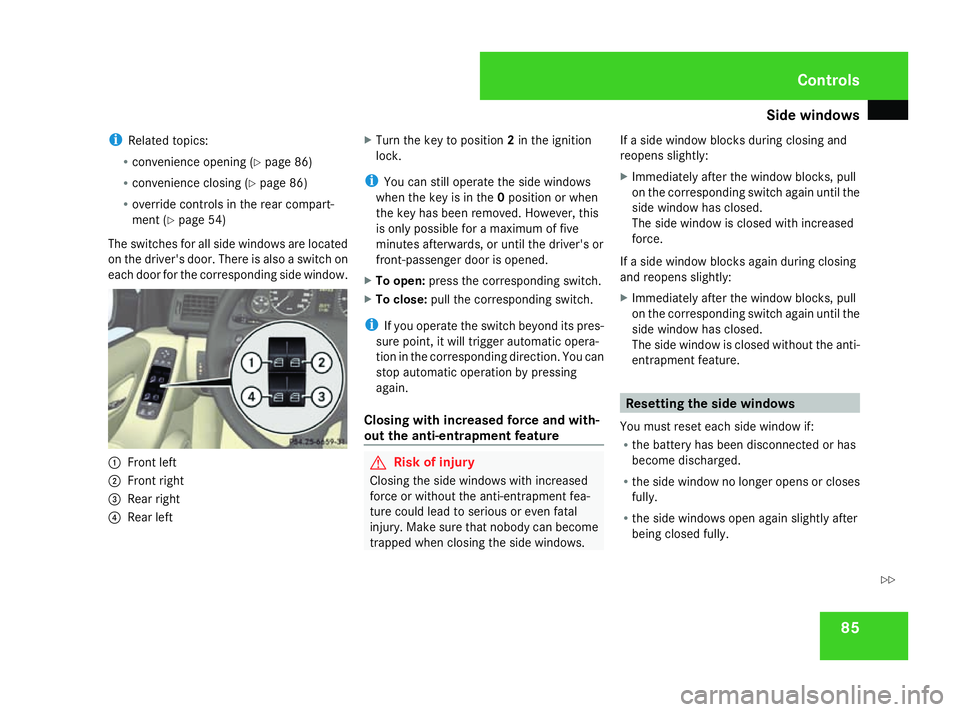
The switches for all side windows are located
on the driver's door. There is also a switch on
each door for the corresponding side window. 1
Front left
2 Front right
3 Rear right
4 Rear left X
Turn the key to position 2in the ignition
lock.
i You can still operate the side windows
when the key is in the 0position or when
the key has been removed. However, this
is only possible for a maximum of five
minutes afterwards, or until the driver's or
front-passenger door is opened.
X To open: press the corresponding switch.
X To close: pull the corresponding switch.
i If you operate the switch beyond its pres-
sure point, it will trigger automatic opera-
tion in the corresponding direction. You can
stop automatic operation by pressing
again.
Closing with increased force and with-
out the anti-entrapment feature G
Risk of injury
Closing the side windows with increased
force or without the anti-entrapment fea-
ture could lead to serious or even fatal
injury. Make sure that nobody can become
trapped when closing the side windows. If a side window blocks during closing and
reopens slightly:
X
Immediately after the window blocks, pull
on the corresponding switch again until the
side window has closed.
The side window is closed with increased
force.
If a side window blocks again during closing
and reopens slightly:
X Immediately after the window blocks, pull
on the corresponding switch again until the
side window has closed.
The side window is closed without the anti-
entrapment feature. Resetting the side windows
You must reset each side window if:
R the battery has been disconnected or has
become discharged.
R the side window no longer opens or closes
fully.
R the side windows open again slightly after
being closed fully. Controls
169_AKB; 2; 4, en-GB
wdomann,
Version: 2.10.6
2008-07-16T08:52:06+02:00 - Seite 85 ZDateiname: 6515_0315_02_buchblock.pdf; preflight
Page 89 of 305
Side windows
86
X
Turn the key to position 2in the ignition
lock.
X Pull the corresponding switch until the side
window is closed.
X Hold the switch for an additional second.
If the side window opens again slightly:
X Pull the corresponding switch again imme-
diately and hold it for approx. one second. Convenience opening*
You can ventilate the vehicle before a journey.
To do this, you can use the key to simultane-
ously:
R open the side windows
R open the panorama louvred sliding sun-
roof* or move it to the ventilation position
i The "Convenience opening" feature can
only be operated using the key. X
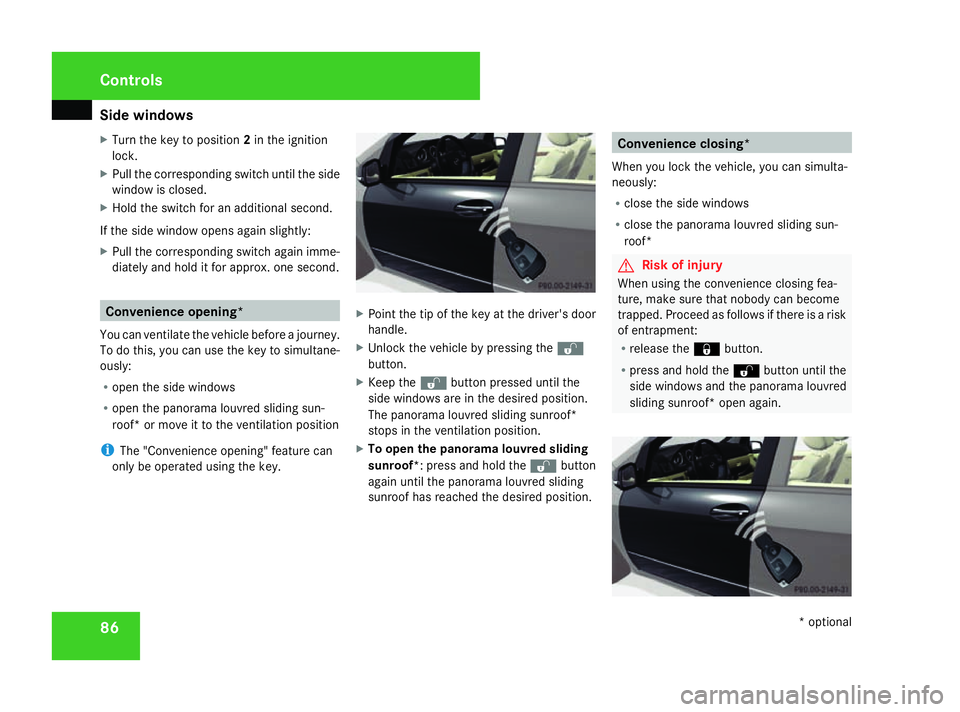
Point the tip of the key at the driver's door
handle.
X Unlock the vehicle by pressing the k
button.
X Keep the kbutton pressed until the
side windows are in the desired position.
The panorama louvred sliding sunroof*
stops in the ventilation position.
X To open the panorama louvred sliding
sunroof*: press and hold the kbutton
again until the panorama louvred sliding
sunroof has reached the desired position. Convenience closing*
When you lock the vehicle, you can simulta-
neously:
R close the side windows
R close the panorama louvred sliding sun-
roof* G
Risk of injury
When using the convenience closing fea-
ture, make sure that nobody can become
trapped. Proceed as follows if there is a risk
of entrapment:
R release the jbutton.
R press and hold the kbutton until the
side windows and the panorama louvred
sliding sunroof* open again. Controls
* optional
169_AKB; 2; 4, en-GB
wdomann,
Version: 2.10.6
2008-07-16T08:52:06+02:00 - Seite 86 Dateiname: 6515_0315_02_buchblock.pdf; preflight