cruise control MERCEDES-BENZ A-CLASS HATCHBACK 2008 User Guide
[x] Cancel search | Manufacturer: MERCEDES-BENZ, Model Year: 2008, Model line: A-CLASS HATCHBACK, Model: MERCEDES-BENZ A-CLASS HATCHBACK 2008Pages: 305, PDF Size: 5.43 MB
Page 121 of 305
Driving sys
tems 118
You can set a variable or permanent limit
speed:
R
variable for speed limits, e.g. in built-up
areas
R permanent for long-term speed restric-
tions, e.g. for driving on winter tyres
(Y page 120) G
Risk of accident
Speedtronic is only an aid designed to
assist driving. You are responsible for the
vehicle's speed and for braking in good
time.
i The speed indicated in the speedometer
may differ slightly from the limit speed
stored.
Variable Speedtronic* You can operate cruise control and variable
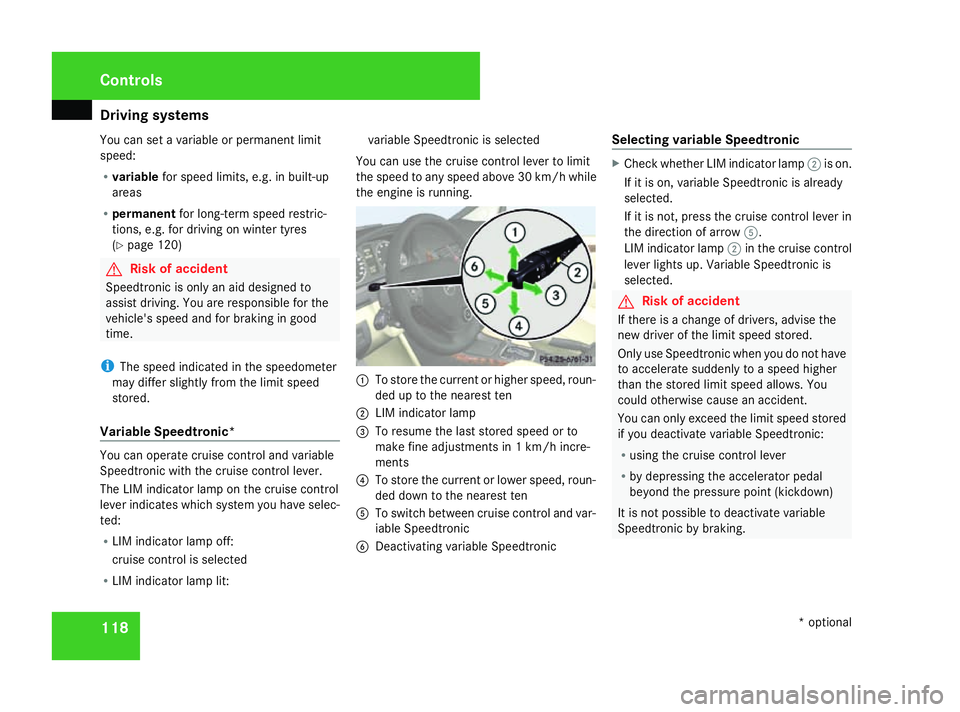
Speedtronic with the cruise control lever.
The LIM indicator lamp on the cruise control
lever indicates which system you have selec-
ted:
R LIM indicator lamp off:
cruise control is selected
R LIM indicator lamp lit: variable Speedtronic is selected
You can use the cruise control lever to limit
the speed to any speed above 30 km/h while
the engine is running. 1
To store the current or higher speed, roun-
ded up to the nearest ten
2 LIM indicator lamp
3 To resume the last stored speed or to
make fine adjustments in 1 km/h incre-
ments
4 To store the current or lower speed, roun-
ded down to the nearest ten
5 To switch between cruise control and var-
iable Speedtronic
6 Deactivating variable Speedtronic Selecting variable Speedtronic X
Check whether LIM indicator lamp 2is on.
If it is on, variable Speedtronic is already
selected.
If it is not, press the cruise control lever in
the direction of arrow 5.
LIM indicator lamp 2in the cruise control
lever lights up. Variable Speedtronic is
selected. G
Risk of accident
If there is a change of drivers, advise the
new driver of the limit speed stored.
Only use Speedtronic when you do not have
to accelerate suddenly to a speed higher
than the stored limit speed allows. You
could otherwise cause an accident.
You can only exceed the limit speed stored
if you deactivate variable Speedtronic:
R using the cruise control lever
R by depressing the accelerator pedal
beyond the pressure point (kickdown)
It is not possible to deactivate variable
Speedtronic by braking. Controls
* optional
169_AKB; 2; 4, en-GB
wdomann,
Version: 2.10.6
2008-07-16T08:52:06+02:00 - Seite 118 Dateiname: 6515_0315_02_buchblock.pdf; preflight
Page 122 of 305
Driving sys
tems 119
Storing the current speed You can use the cruise control lever to limit
the speed to any speed above 30 km/h while
the engine is running.
X Briefly press the cruise control lever up
1 or down 4.
The current speed is stored. Speedtronic
rounds up or down to the nearest ten. You
will see the message "Limit"and the
stored speed in the upper multi-function
display for approximately five seconds. The
yellow LIM indicator lamp lights up in the
instrument cluster.
i On downhill gradients, the speed can be
exceeded despite Speedtronic. In this
case, you will hear a warning tone and the
Limit exceeded message will appear in
the multi-function display. If necessary,
apply the brakes yourself.
Calling up the last speed stored G
Risk of accident
Only select a stored speed if you know what
that speed is and whether it is suitable for
the current driving and traffic situation.
Otherwise, sudden braking could endanger
you or others. X
Briefly pull the cruise control lever towards
you 3.
Making adjustments in 10 km/hincre-
ments X
Briefly press the cruise control lever up
1 for a higher speed or down 4for a
lower speed.
or
X Keep the cruise control lever pressed until
the desired speed is set. Press the cruise
control lever, up 1for a higher speed or
down 4for a lower speed.
Making fine adjustments in
1 km/hincrements X
For a higher speed: briefly pull the cruise
control lever towards you 3.
or
X Keep the cruise control lever pulled
towards you 3until the desired speed is
set. Deactivating variable Speedtronic There are several ways to deactivate variable
Speedtronic:
X
Briefly press the cruise control lever for-
wards 6.
or
X Briefly press the cruise control lever in the
direction of arrow 5.
LIM indicator lamp 2in the cruise control
lever goes out. Variable Speedtronic is
deactivated.
Cruise control is selected.
Variable Speedtronic is deactivated automat-
ically when you depress the accelerator pedal
beyond the pressure point (kickdown), but
only if your current speed does not differ by
more than 20 km/h from the stored speed. G
Risk of accident
It is not possible to deactivate variable
Speedtronic by braking.
i The last speed stored is cleared when you
switch off the engine. Controls
169_AKB; 2; 4, en-GB
wdomann,
Version: 2.10.6 2008-07-16T08:52:06+02:00 - Seite 119 ZDateiname: 6515_0315_02_buchblock.pdf; preflight
Page 186 of 305
Driving
tips 183
X
Vehicles with manual transmission: engage
neutral.
X Vehicles with AUTOTRONIC*: shift the
selector lever to N.
X Try to bring the vehicle under control using
corrective steering. Driving tips
Rolling with the engine switched off
G
Risk of accident
Never switch the engine off while the vehi-
cle is in motion.
There is no power assistance for the steer-
ing and the service brake when the engine
is not running.
You will require considerably more effort to
steer and brake and, therefore, you could
lose control of the vehicle and cause an
accident. Braking
G
Risk of accident
Do not change down for additional engine
braking on a slippery road surface. This
could cause the drive wheels to lose their
grip and the vehicle could skid. G
Risk of accident
Make sure that other road users are not
endangered by your braking. Downhill gradients On long and steep downhill stretches, espe-
cially if the vehicle is laden or towing a trailer,
you must shift to a lower gear in good time or,
on vehicles with AUTOTRONIC*, select shift
range
1,2or 3.
i This also applies if you have activated
cruise control* or Speedtronic *.
This will use the braking effect of the engine,
so less braking will be required to maintain
the speed. This relieves the load on the brake
system and prevents the brakes from over-
heating and wearing too quickly. If you need
additional braking, depress the brake pedal
repeatedly rather than continuously.
Heavy and light loads If the brakes have been subjected to a heavy
load, do not stop the vehicle immediately, but
drive on for a short while. This allows the air-
flow to cool the brakes more quickly.
G
Risk of accident
Never depress the brake pedal continu-
ously while the vehicle is in motion, e.g.
never cause the brakes to rub by applying
constant slight pedal pressure. This causes
the brake system to overheat, increases Operation
* optional
169_AKB; 2; 4, en-GB
wdomann,
Version: 2.10.6 2008-07-16T08:52:06+02:00 - Seite 183 ZDateiname: 6515_0315_02_buchblock.pdf; preflight
Page 192 of 305
Trailer towing*
189
not use a noseweight of less than 50 kg,
otherwise the trailer may come loose.
Bear in mind that the payload and the rear
axle load are reduced by the actual nose-
weight.
i The height of the ball coupling changes
with the load of the vehicle. If necessary,
use a trailer with a height-adjustable draw-
bar.
Coupling up a trailer G
Risk of injury
Do not connect a trailer with an engaged
overrun brake. Otherwise, your hand could
become trapped between the bumper and
drawbar.
! Do not disconnect a trailer with an
engaged overrun brake. Otherwise your
vehicle could be damaged by the spring
action of the overrun brake.
X Position the trailer level behind the vehicle.
X Couple up the trailer.
X Establish the electrical connection
between the vehicle and the trailer. Driving tips In Germany, the maximum permitted speed
for vehicle/trailer combinations is 80 km/h.
G
Risk of accident
A maximum speed of 80 km/h should not
be exceeded, even in countries where
higher speeds are permitted for vehicle/
trailer combinations. This lowers the risk of
an accident.
When towing a trailer, your vehicle's handling
characteristics will be different in comparison
to when driving without a trailer.
The vehicle/trailer combination:
R is heavier
R is restricted in its acceleration and gradi-
ent-climbing capability
R has an increased braking distance
R is affected more by strong crosswinds
R demands more sensitive steering
R consumes more fuel
On long and steep downhill gradients, you
must select a lower gear in good time, or in
vehicles with AUTOTRONIC*, select shift
range 1,2or 3. i
This also applies if you have activated
cruise control* or Speedtronic*.
This will use the braking effect of the engine,
so less braking will be required to maintain
the speed. This relieves the load on the brake
system and prevents the brakes from over-
heating and wearing too quickly. If you need
additional braking, depress the brake pedal
repeatedly rather than continuously. G
Risk of accident
Never depress the brake pedal continu-
ously while the vehicle is in motion, e.g.
never cause the brakes to rub by applying
constant slight pedal pressure. This causes
the brake system to overheat, increases
the braking distance and can lead to the
brakes failing completely.
Driving tips
R Maintain a greater distance from the vehi-
cle in front than when driving without a
trailer.
R Avoid braking abruptly. If possible, brake
gently at first to allow the trailer to run on.
Then increase the braking force rapidly.
R The values given for gradient-climbing
capabilities from a standstill refer to sea
level. When driving in mountainous areas, Operation
* optional
169_AKB; 2; 4, en-GB
wdomann,
Version: 2.10.6 2008-07-16T08:52:06+02:00 - Seite 189 ZDateiname: 6515_0315_02_buchblock.pdf; preflight
Page 215 of 305

Display
messages 212 Symbol messages
G
Risk of ac
cident and injury
If maintenance work is carried out incorrectly this can jeopardise the operating safety of your vehicle. You risk losing control of your vehicle
and thereby causing an accident. The safety systems may also no longer be able to protect you or others as they are designed to do.
Always have maintenance work carried out at a qualified specialist workshop which has the necessary specialist knowledge and tools to
carry out the work required.
Mercedes-Benz recommends that you use a Mercedes-Benz Service Centre for this purpose.
In particular, all work relevant to safety or on safety-related systems must be carried out at a qualified specialist workshop. Display messages Possible cause/consequence Possible solution
< G
Risk of injury
If the symbol appears in the multi-function
display, a seat belt buckle has been
released on a rear seat during the journey. X
Ask occupants in the rear to fasten their seat
belts.
Further information on the status indicator for the
rear seat belts* (Y page 76). 1 The tailgate is open. X
Close the tailgate. 2 At least one door is open. X
Close the doors. ± Some electronic systems are unable to
send information to the on-board com-
puter. The following functions may be mal-
functioning:
R
coolant temperature display
R rev counter
R cruise control *or Speedtronic* display X
Visit a qualified specialist workshop. Practical advice
* optional
169_AKB; 2; 4, en-GB
wdomann,
Version: 2.10.6
2008-07-16T08:52:06+02:00 - Seite 212 Dateiname: 6515_0315_02_buchblock.pdf; preflight
Page 223 of 305
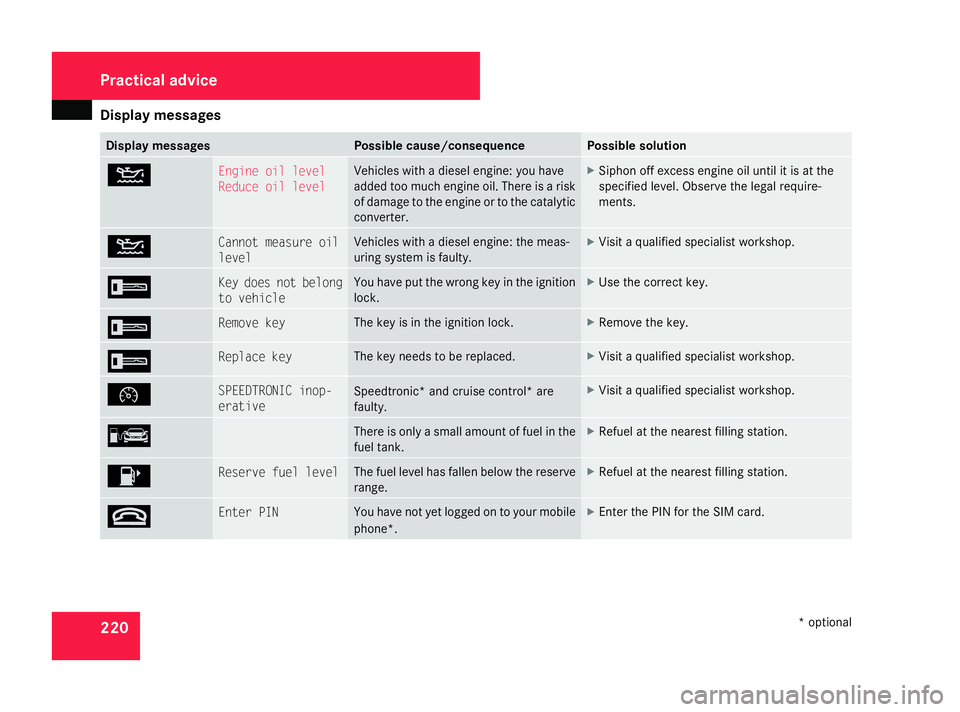
Display
messages 220 Display messages Possible cause/consequence Possible solution
N Engine oil level
Reduce oil level Vehicles with a diesel engine:
you have
added too much engine oil. There is a risk
of damage to the engine or to the catalytic
converter. X
Siphon off excess engine oil until it is at the
specified level. Observe the legal require-
ments. N Cannot measure oil
level Vehicles with a diesel engine: the meas-
uring system is faulty. X
Visit a qualified specialist workshop. I Key does not belong
to vehicle You have put the wrong key in the ignition
lock. X
Use the correct key. I Remove key The key is in the ignition lock. X
Remove the key. I Replace key The key needs to be replaced. X
Visit a qualified specialist workshop. Ñ SPEEDTRONIC inop-
erative
Speedtronic* and cruise control* are
faulty. X
Visit a qualified specialist workshop. ¿ There is only a small amount of fuel in the
fuel tank. X
Refuel at the nearest filling station. 4 Reserve fuel level The fuel level has fallen below the reserve
range. X
Refuel at the nearest filling station. t Enter PIN You have not yet logged on to your mobile
phone*. X
Enter the PIN for the SIM card. Practical advice
* optional
169_AKB; 2; 4, en-GB
wdomann
,V ersion: 2.10.6
2008-07-16T08:52:06+02:00 - Seite 220 Dateiname: 6515_0315_02_buchblock.pdf; preflight