mirror MERCEDES-BENZ A-CLASS HATCHBACK 2008 User Guide
[x] Cancel search | Manufacturer: MERCEDES-BENZ, Model Year: 2008, Model line: A-CLASS HATCHBACK, Model: MERCEDES-BENZ A-CLASS HATCHBACK 2008Pages: 305, PDF Size: 5.43 MB
Page 75 of 305
Mirrors
72ror is set to a position which provides you
with a good overview of traffic conditions.
Folding the exterior mirrors in or out
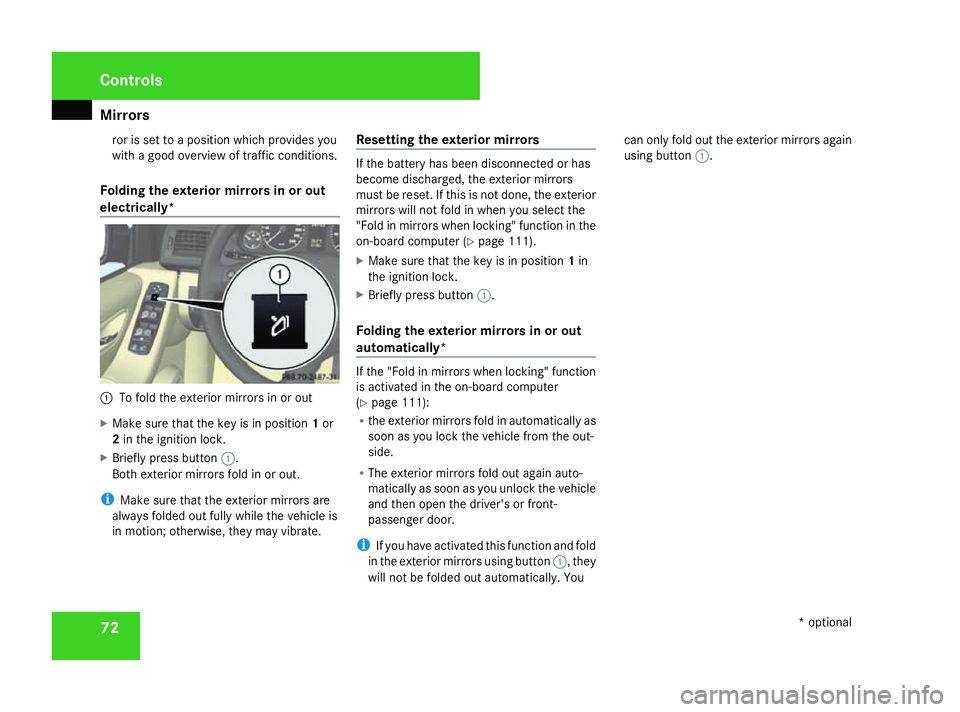
electrically* 1
To fold the exterior mirrors in or out
X Make sure that the key is in position 1or
2 in the ignition lock.
X Briefly press button 1.
Both exterior mirrors fold in or out.
i Make sure that the exterior mirrors are
always folded out fully while the vehicle is
in motion; otherwise, they may vibrate. Resetting the exterior mirrors If the battery has been disconnected or has
become discharged, the exterior mirrors
must be reset. If this is not done, the exterior
mirrors will not fold in when you select the
"Fold in mirrors when locking" function in the
on-board computer (Y
page 111).
X Make sure that the key is in position 1in
the ignition lock.
X Briefly press button 1.
Folding the exterior mirrors in or out
automatically* If the "Fold in mirrors when locking" function
is activated in the on-board computer
(Y
page 111):
R the exterior mirrors fold in automatically as
soon as you lock the vehicle from the out-
side.
R The exterior mirrors fold out again auto-
matically as soon as you unlock the vehicle
and then open the driver's or front-
passenger door.
i If you have activated this function and fold
in the exterior mirrors using button 1, they
will not be folded out automatically. You can only fold out the exterior mirrors again
using button
1. Controls
* optional
169_AKB; 2; 4, en-GB
wdomann,
Version: 2.10.6
2008-07-16T08:52:06+02:00 - Seite 72 Dateiname: 6515_0315_02_buchblock.pdf; preflight
Page 111 of 305

On-board computer
108 Lighting submenu
R
Constant headlamp mode (daytime driv-
ing lights) (Y page 109)
R Surround lighting* (Y page 110)
R Exterior lighting delayed switch-off*
(Y page 110)
R Interior lighting delayed switch-off
(Y page 110) Vehicle submenu
R
Permanent Speedtronic* (Y page 120)
R Radio station selection *( Ypage 111)
R Automatic locking feature (Y page 111)Convenience submenu*
R
Fold the exterior mirrors in when locking
the vehicle* (Y page 111) Selecting the unit of measurement for
distance
The selected unit of measurement for dis-
tance applies to:
R
the total distance recorder and the trip
meter
R the trip computer
R the digital speedometer 15
R the navigation instruction in the Naviga-
tion* menu
R Speedtronic*
X Press the èor· button to select the
Settings menu.
X Press the jbutton to select submenus.
X Press the æorç button to select the
Inst. cluster submenu.
X Press the jbutton to select Display
unit Speed/odom.
X Press æorç to select km(kilome-
tres) or milesas the unit of measurement
for distance.
X Press the j,èorÿ button to
select a different display. Selecting the language X
Press the èor· button to select the
Settings menu.
X Press the jbutton to select submenus.
X Press the æorç button to select the
Inst. cluster submenu.
X Press the jbutton to select Lan-
guage .
X Press the æorç button to select the
desired language.
X Press the j,èorÿ button to
select a different display.
Selecting the status line display Vehicles for the United Kingdom: this func-
tion is not available.
X
Press the èor· button to select the
Settings menu.
X Press the jbutton to select submenus.
X Press the æorç button to select the
Instr. cluster submenu.
X Press the jbutton to select Status
line display.
15 Vehicles for the United Kingdom: the digital speedometer always displays km/h. Controls
* optional
169_AKB; 2; 4, en-GB
wdomann,
Version: 2.10.6
2008-07-16T08:52:06+02:00 - Seite 108 Dateiname: 6515_0315_02_buchblock.pdf; preflight
Page 114 of 305
On-board computer
111
switch off
function is activated, the interior
lighting remains on for 10 seconds if it is dark.
X Press the èor· button to select the
Settings menu.
X Press the jbutton to select submenus.
X Press the æorç button to select the
Lighting submenu.
X Press the jbutton to select Inter.
lighting delay.sw.off.
X Press the æorç button to activate
or deactivate Inter. lighting
delay.sw.off.
X Press the j,èorÿ button to
select a different display.
Setting the radio station selection* This function is only available in conjunction
with Audio 5*.
The
Audio Search allows you to set whether
a new station is searched for every time you
switch on the radio* or a previously stored
station is selected.
X Press the èor· button to select the
Settings menu.
X Press the jbutton to select submenus. X
Press the æorç button to select the
Vehicle submenu.
X Press the jbutton to select Audio
search.
X Press the æorç button to select the
Frequency orMemory setting.
If the Frequency setting is selected, the
station search is started. If the Memoryset-
ting is selected, the next stored station is
selected.
X Press the j,èorÿ button to
select a different display.
Activating/deactivating the automatic
door locking feature When you activate the
Automatic door
locking function, your vehicle will be cen-
trally locked above a speed of approx.
15 km/h.
i For more information on the automatic
door locking feature, see (Y page 61).
X Press the èor· button to select the
Settings menu.
X Press the jbutton to select submenus.
X Press the æorç button to select the
Vehicle submenu. X
Press the jbutton to select Automatic
door lock.
X Press the æorç button to switch
the Automatic door lock feature on or
off.
X Press the j,èorÿ button to
select a different display.
Activating or deactivating the Fold in
mirrors when locking*function When you activate the
Fold mirr. in when
locking function, the exterior mirrors are
folded in when the vehicle is locked. If you
unlock the vehicle and then open the driver's
or front-passenger door, the exterior mirrors
fold out again.
When you fold the exterior mirrors in using
the button on the door with the Fold in mirrors
when locking function activated (Y page 72),
the exterior mirrors do not fold out automat-
ically. The exterior mirrors can then only be
folded out using the button on the door.
X Press the èor· button to select the
Settings menu.
X Press the jbutton to select submenus.
X Press the æorç button to select the
Convenience submenu. Controls
* optional
169_AKB; 2; 4, en-GB
wdomann,
Version: 2.10.6 2008-07-16T08:52:06+02:00 - Seite 111 ZDateiname: 6515_0315_02_buchblock.pdf; preflight
Page 115 of 305
On-board computer
112
X
Press the jbutton to select Fold in
mirrors when locking.
X Press the æorç button to activate
or deactivate Fold in mirrors when
locking.
X Press the j,èorÿ button to
select a different display. Trip computer menu
You can use the Trip computermenu to call
up or reset statistical data for your vehicle.
i Please refer to the menu overview
(Y page 101).
You can select kmormiles as the unit of
measurement for distance (Y page 108).
Use the buttons on the multi-function steer-
ing wheel.
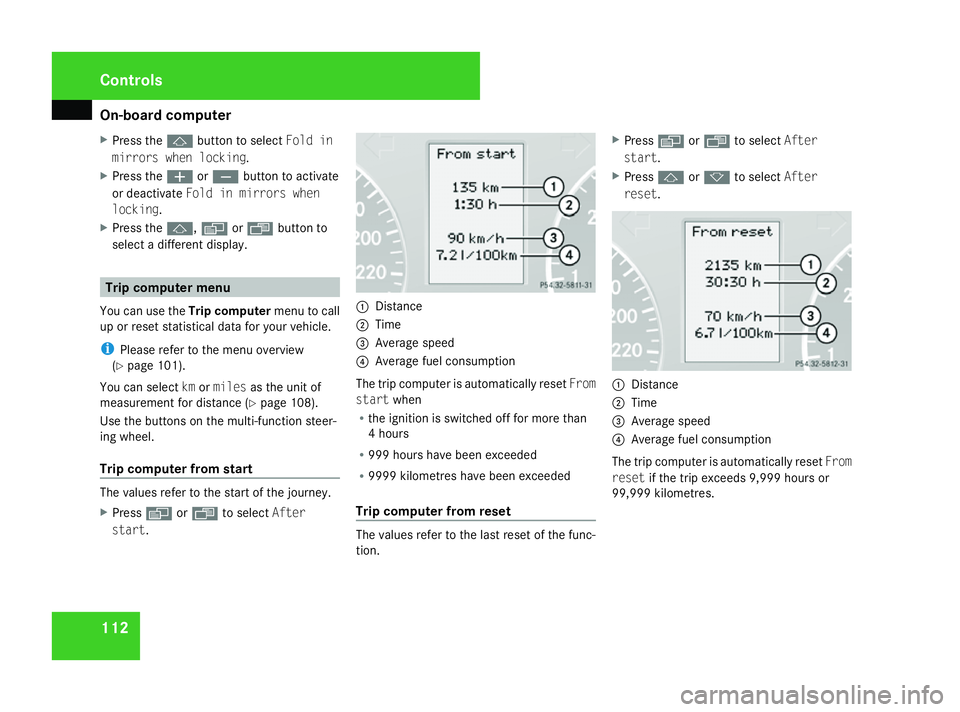
Trip computer from start The values refer to the start of the journey.
X Press èor· to select After
start . 1
Distance
2 Time
3 Average speed
4 Average fuel consumption
The trip computer is automatically reset From
start when
R the ignition is switched off for more than
4 hours
R 999 hours have been exceeded
R 9999 kilometres have been exceeded
Trip computer from reset The values refer to the last reset of the func-
tion.X
Press èor· to select After
start .
X Press jork to select After
reset . 1
Distance
2 Time
3 Average speed
4 Average fuel consumption
The trip computer is automatically reset From
reset if the trip exceeds 9,999 hours or
99,999 kilometres. Controls
169_AKB; 2; 4, en-GB
wdomann,
Version: 2.10.6
2008-07-16T08:52:06+02:00 - Seite 112 Dateiname: 6515_0315_02_buchblock.pdf; preflight
Page 165 of 305
Features
162 objects being thrown around the vehicle
interior in the event of sharp braking, a sud-
den change in direction or an accident.
The stowage compartments are located in the
luggage compartment on the left and right-
hand sides. 1
Handle
i The left-hand stowage compartment con-
tains the first-aid kit, the vehicle tool kit, the
jack, the warning triangle and TIREFIT.
X To open: turn handle 1away from the
direction of travel.
X Fold down the flap. Features
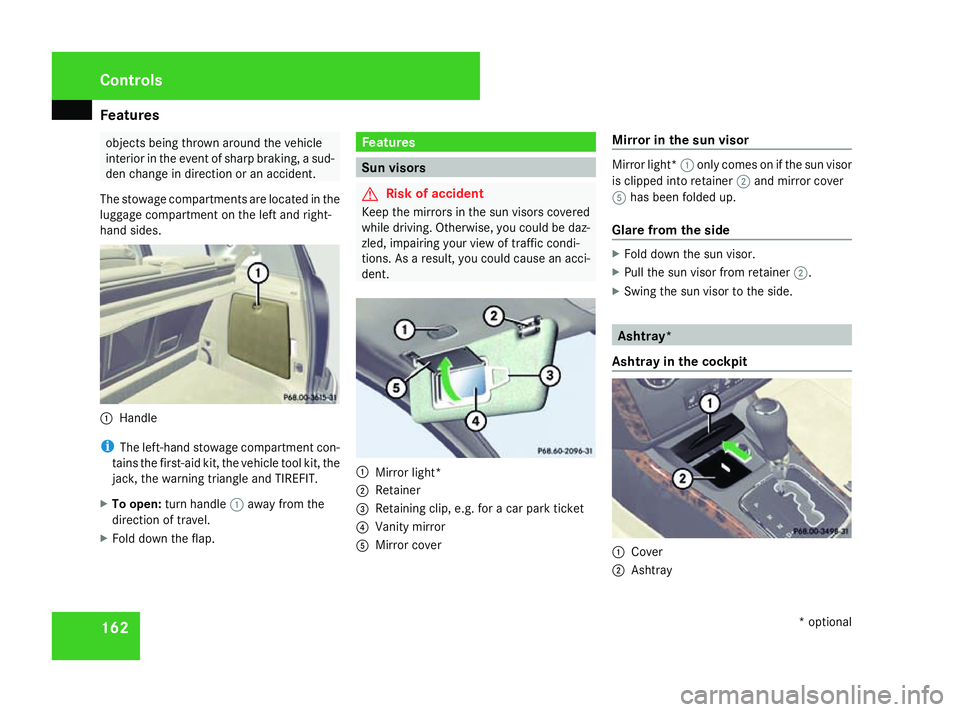
Sun visors
G
Risk of accident
Keep the mirrors in the sun visors covered
while driving. Otherwise, you could be daz-
zled, impairing your view of traffic condi-
tions. As a result, you could cause an acci-
dent. 1
Mirror light*
2 Retainer
3 Retaining clip, e.g. for a car park ticket
4 Vanity mirror
5 Mirror cover Mirror in the sun visor Mirror light*
1only comes on if the sun visor
is clipped into retainer 2and mirror cover
5 has been folded up.
Glare from the side X
Fold down the sun visor.
X Pull the sun visor from retainer 2.
X Swing the sun visor to the side. Ashtray*
Ashtray in the cockpit 1
Cover
2 Ashtray Cont
rols
* optional
169_AKB; 2; 4, en-GB
wdomann,
Version: 2.10.6
2008-07-16T08:52:06+02:00 - Seite 162 Dateiname: 6515_0315_02_buchblock.pdf; preflight
Page 196 of 305
Care
193H
Environmental note
Dispose of empty packaging, cleaning
cloths and polishing wads in an environ-
mentally responsible manner.
! Do not affix to painted surfaces or plastic
surfaces:
R stickers
R films
R magnetic plates
R scented oil bottle or similar items
You could otherwise damage the paint fin-
ish or plastic.
! Clean the water drainage channels of the
windscreen and the rear window at regular
intervals. Deposits such as leaves, petals
and pollen may under certain circumstan-
ces prevent water from draining away lead-
ing to corrosion damage. Vehicle care
! Do not park the vehicle for a long period
of time directly after cleaning, especially if
the wheels have just been cleaned with a
wheel cleaner. Wheel cleaners could cause
rapid corrosion of the brake discs and
brake pads/linings. After cleaning, park
the vehicle when it is at normal operating
temperature.
Automatic car wash You can wash the vehicle in an automatic car
wash from the beginning.
! Do not use a touch-free automatic car
wash that uses chemical agents to wash
the vehicle.
Preferably use automatic car washes with
high-pressure jets for pre-washing.
If the vehicle is very dirty, pre-wash it before
cleaning it in an automatic car wash.
! Make sure that the automatic car wash is
suitable for the size of the vehicle. Fold in
the exterior mirrors before the vehicle is
washed. There is otherwise a risk of dam-
age to the exterior mirrors. !
Make sure that the side windows are com-
pletely closed, that the ventilation/heater
blower is fully turned off and that the wind-
screen wiper switch is set to 0. The rain
sensor may otherwise be activated, trig-
gering unintended wiper movements. This
could cause damage to the vehicle.
After using an automatic car wash, wipe off
wax and drying agents from the windscreen
and the wiper blades. This will prevent smears
and reduce wiping noises caused by residue
on the windscreen.
High-pressure cleaners G
Risk of accident
Do not use high-pressure cleaners with cir-
cular-jet nozzles (dirt grinders) to clean
your vehicle or ― especially ― the tyres.
Otherwise, you could damage the tyres and
cause an accident.
! Observe the instructions issued by the
equipment manufacturer concerning the
distance to be maintained between the
nozzle of the high-pressure cleaner and the
vehicle (at least 30 cm).
Move the high-pressure cleaner nozzle
around when cleaning your vehicle. Operation
169_AKB; 2; 4, en-GB
wdomann
,V ersion: 2.10.6
2008-07-16T08:52:06+02:00 - Seite 193 ZDateiname: 6515_0315_02_buchblock.pdf; preflight
Page 220 of 305
Display
messages 217Display messages Possible cause/consequence Possible solution
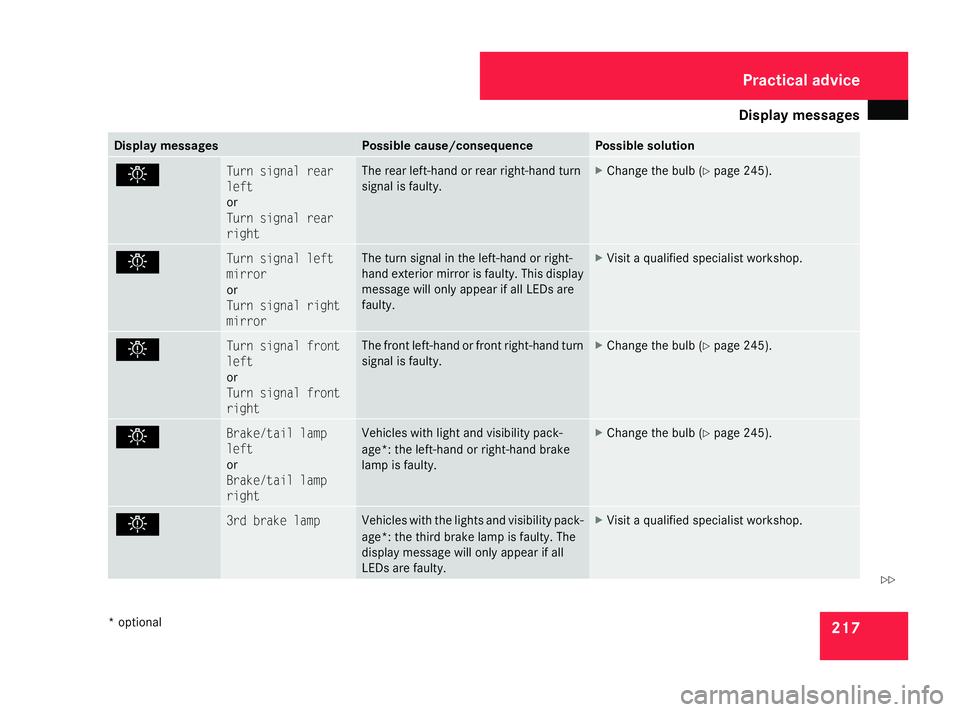
. Turn signal rear
left
or
Turn signal rear
right The rear left-hand or rear right-hand turn
signal is fa
ulty. X
Change the bulb (Y page 245). . Turn signal left
mirror
or
Turn signal right
mirror The turn signal in the left-hand or right-
hand exterior mirror is faulty. This display
message will only appear if all LEDs are
faulty. X
Visit a qualified specialist workshop. . Turn signal front
left
or
Turn signal front
right The front left-hand or front right-hand turn
signal is faulty. X
Change the bulb (Y page 245). . Brake/tail lamp
left
or
Brake/tail lamp
right Vehicles with light and visibility pack-
age*: the left-hand or right-hand brake
lamp is faulty. X
Change the bulb (Y page 245). . 3rd brake lamp Vehicles with the lights and visibility pack-
age*: the third brake lamp is faulty. The
display message will only appear if all
LEDs are faulty. X
Visit a qualified specialist workshop. Practical advice
* optional
169_AKB; 2; 4, en-GB
wdomann
,V ersion: 2.10.6
2008-07-16T08:52:06+02:00 - Seite 217 ZDateiname: 6515_0315_02_buchblock.pdf; preflight
Page 240 of 305

Troubleshooting
237Headlamps
Problem Possible cause/consequence Suggested solutions
The headlamps or the turn signals
in the exterior mirrors are misted
up on the inside. Air humidity is very high. X
Drive with the headlamps switched on.
The headlamps are demisted after a short distance. The headlamp housing is not
sealed and moisture has been
able to enter. X
Have the headlamps checked at a qualified specialist workshop. Windscreen wipers
Problem Possible cause/consequence Suggested solutions
The windscreen wipers are jam-
med. Leaves or snow, for example, may
be obstructing the windscreen
wiper movement. The wiper
motor has been deactivated. X
For safety reasons, you should remove the key from the ignition
lock.
X Remove the cause of the obstruction.
X Switch the windscreen wipers back on. The windscreen wipers fail com-
pletely.
G
Risk of accident
The windscreen wiper drive is
malfunctioning. X
Select another wiper speed on the combination switch.
X Have the windscreen wipers checked at a qualified specialist work-
shop. Practical advice
169_AKB; 2; 4, en-GB
wdomann
,V ersion: 2.10.6
2008-07-16T08:52:06+02:00 - Seite 237 ZDateiname: 6515_0315_02_buchblock.pdf; preflight
Page 241 of 305
Troubleshooting
238 Side windows
Problem Possible cause/consequence Suggested solutions
A side window will not close. Objects are trapped between the
window and the door frame. X
Remove the objects.
X Close the side window. There are objects in the window
guide rail which are preventing
the window from closing. X
Remove the objects.
X Close the side window. You cannot see the cause. X
Close the side window with increased force or without the anti-
entrapment feature ( Ypage 85). Mirrors
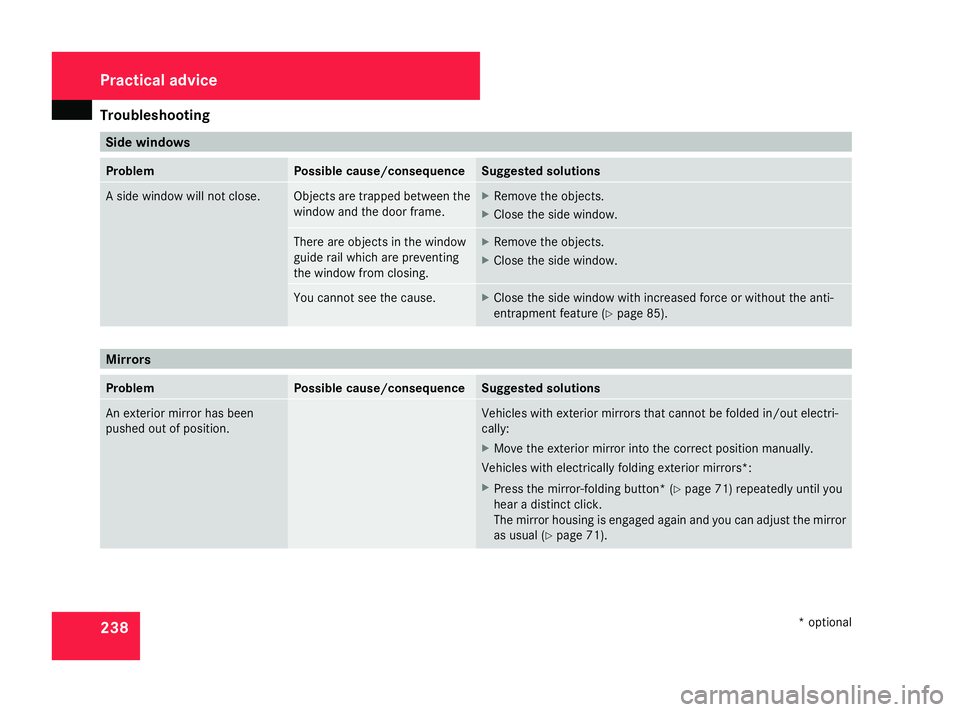
Problem Possible cause/consequence Suggested solutions
An exterior mirror has been
pushed out of position. Vehicles with exterior mirrors that cannot be folded in/out electri-
call
y:
X Move the exterior mirror into the correct position manually.
Vehicles with electrically folding exterior mirrors *:
X Press the mirror-folding button* (Y page 71) repeatedly until you
hear a distinct click.
The mirror housing is engaged again and you can adjust the mirror
as usual (Y page 71). Practical advice
* optional
169_AKB; 2; 4, en-GB
wdomann,
Version: 2.10.6
2008-07-16T08:52:06+02:00 - Seite 238 Dateiname: 6515_0315_02_buchblock.pdf; preflight
Page 269 of 305
Jump-starting
266 G
Risk of injury
Battery acid is caustic. Avoid contact with
the skin, eyes or clothing.
! Only charge the installed battery with a
battery charger which has been tested and
approved by Mercedes-Benz. These battery
chargers allow the battery to be charged
while it is still installed. However, the bat-
tery must always be disconnected first.
! Only use battery chargers with a maxi-
mum charging voltage of 14.8 V.
X Charge the battery. Observe the notes in
the operating instructions for your battery
charger.
X Refit the charged battery.
To do this, follow the steps described in
"Removing the battery" (Y page 265) in
reverse order. Reconnecting the battery
! Always reconnect the battery in the
sequence described below. Never swap the
terminal clamps. You may otherwise dam-
age the vehicle electronics.
X Switch off all electrical consumers.
X Connect the positive terminal clamp and
secure the cover.
X Connect the negative terminal clamp.
X Connect the breather hose. Make sure that
a cell cap is fitted on the side.
i If the battery power supply has been inter-
rupted (e.g. if it has been reconnected), you
must carry out the following tasks:
R set the time (Y page 109).
R reset the function for folding the exterior
mirrors in/out automatically* by folding
the mirrors out once (Y page 72).
R reset the side windows ( Ypage 85) Jump-starting
If your vehicle's battery is discharged, the
engine can be jump-started from another
vehicle or from an external battery using jump
leads.
Observe the following points:
R Jump-starting may only be performed when
the engine and catalytic converter are cold.
R Do not start the engine if the battery is fro-
zen. Let the battery thaw first.
R Jump-starting may only be performed from
batteries with a nominal voltage of 12 V.
R Only use jump leads which have a sufficient
cross-section and insulated terminal
clamps.
i Jump leads and further information about
jump-starting can be obtained from any
Mercedes-Benz Service Centre.
! Avoid repeated and lengthy starting
attempts.
Never start the vehicle using a rapid battery
charger. Practical advice
* optional
169_AKB; 2; 4, en-GB
wdomann
,V ersion: 2.10.6
2008-07-16T08:52:06+02:00 - Seite 266 Dateiname: 6515_0315_02_buchblock.pdf; preflight