stop start MERCEDES-BENZ A-CLASS HATCHBACK 2008 User Guide
[x] Cancel search | Manufacturer: MERCEDES-BENZ, Model Year: 2008, Model line: A-CLASS HATCHBACK, Model: MERCEDES-BENZ A-CLASS HATCHBACK 2008Pages: 305, PDF Size: 5.43 MB
Page 96 of 305
Transmission
93
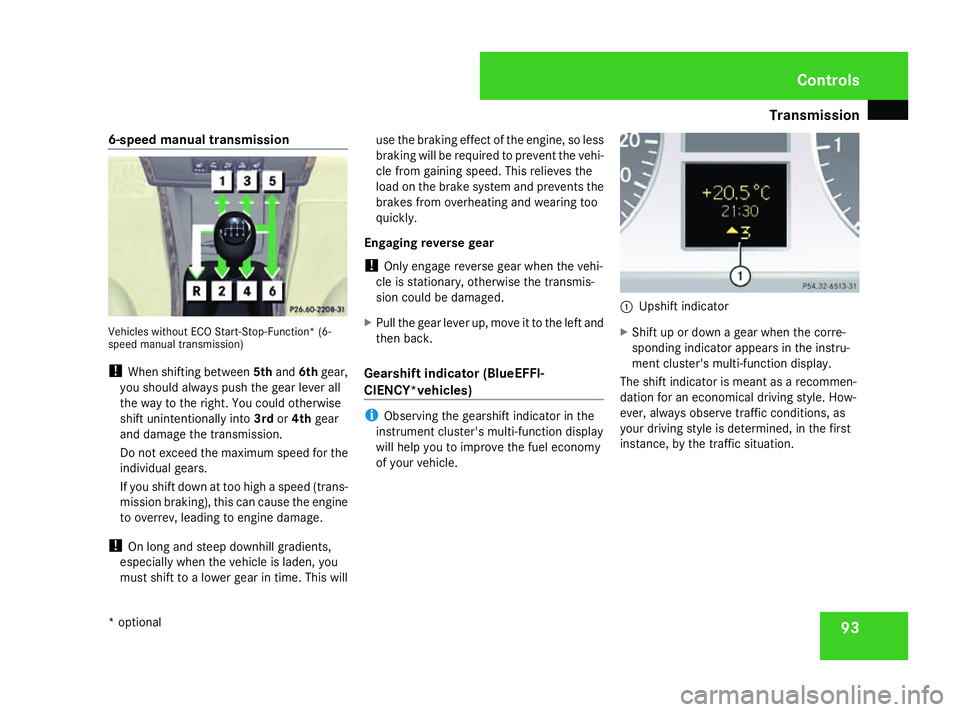
6-speed manual transmission
Vehicles without ECO Start-Stop-Function* (6-
speed manual transmission)
!
When shifting between 5thand 6thgear,
you should always push the gear lever all
the way to the right. You could otherwise
shift unintentionally into 3rdor4th gear
and damage the transmission.
Do not exceed the maximum speed for the
individual gears.
If you shift down at too high a speed (trans-
mission braking), this can cause the engine
to overrev, leading to engine damage.
! On long and steep downhill gradients,
especially when the vehicle is laden, you
must shift to a lower gear in time. This will use the braking effect of the engine, so less
braking will be required to prevent the vehi-
cle from gaining speed. This relieves the
load on the brake system and prevents the
brakes from overheating and wearing too
quickly.
Engaging reverse gear
! Only engage reverse gear when the vehi-
cle is stationary, otherwise the transmis-
sion could be damaged.
X Pull the gear lever up, move it to the left and
then back.
Gearshift indicator (BlueEFFI-
CIENCY*vehicles) i
Observing the gearshift indicator in the
instrument cluster's multi-function display
will help you to improve the fuel economy
of your vehicle. 1
Upshift indicator
X Shift up or down a gear when the corre-
sponding indicator appears in the instru-
ment cluster's multi-function display.
The shift indicator is meant as a recommen-
dation for an economical driving style. How-
ever, always observe traffic conditions, as
your driving style is determined, in the first
instance, by the traffic situation. Controls
* optional
169_AKB; 2; 4, en-GB
wdomann,
Version: 2.10.6 2008-07-16T08:52:06+02:00 - Seite 93 ZDateiname: 6515_0315_02_buchblock.pdf; preflight
Page 118 of 305
Driving sys
tems 115Driving systems
Overview of driving systems
The vehicle's driving systems are described
on the following pages:
R Cruise control* and Speedtronic*, which
are used to control the speed of the vehicle
R Parktronic * and active parking assist*,
which can help you to find a parking space,
to manoeuvre and park
R ECO Start-Stop function*, helps you to
save fuel
The ABS, BAS, adaptive brake lights, ESP ®
and STEER CONTROL driving safety systems
are described in the "Driving safety systems"
section ( Ypage 55). Cruise control*
Cruise control maintains a constant road
speed for you. You must select a low gear in
good time on long and steep downhill gradi-
ents, especially if the vehicle is laden or tow-
ing a trailer. By doing so you will make use of
the braking effect of the engine, which
relieves the load on the brake system and
prevents the brakes from overheating and
wearing too quickly. G
Risk of accident
Never depress the brake pedal continu-
ously while the vehicle is in motion, e.g.
never cause the brakes to rub by applying
constant slight pedal pressure. This causes
the brake system to overheat, increases
the braking distance and can lead to the
brakes failing completely. G
Risk of accident
Do not change down for additional engine
braking on a slippery road surface. This
could cause the drive wheels to lose their
grip and the vehicle could skid.
Use cruise control only if road and traffic con-
ditions make it appropriate to maintain a
steady speed for a prolonged period. You can
store any road speed above 30 km/h. G
Risk of accident
Cruise control cannot take account of road
and traffic conditions.
Always pay attention to traffic conditions
even when cruise control is activated.
Cruise control is only an aid designed to
assist driving. You are responsible for the
vehicle's speed and for braking in good
time. G
Risk of accident
Do not use cruise control:
R in road and traffic conditions which do
not allow you to maintain a constant
speed (e.g. heavy traffic or winding
roads). You could otherwise cause an
accident.
R on slippery roads. Braking or accelerat-
ing could cause the drive wheels to lose
traction and the vehicle could then skid.
R when there is poor visibility, e.g. due to
fog, heavy rain or snow
Cruise control lever You can operate cruise control and variable
Speedtronic with the cruise control lever. Controls
* optional
169_AKB; 2; 4, en-GB
wdomann,
Version: 2.10.6 2008-07-16T08:52:06+02:00 - Seite 115 ZDateiname: 6515_0315_02_buchblock.pdf; preflight
Page 130 of 305
Driving sys
tems 127
A warning tone sounds. the multi-function
display shows the message:
Park Assist
cancelled.
When active parking assist is cancelled, you
must steer again yourself.
Trailer towing* For vehicles with a trailer coupling, the mini-
mum length for parking spaces is slightly
increased.
If you have attached a trailer to your vehicle,
you should not use active parking assist.
Once the electrical connection is established
between your vehicle and the trailer, active
parking assist is no longer available. Park-
tronic is deactivated for the rear area. ECO start/stop function*
The ECO start/stop function automatically
switches off the engine as soon as you stop
the vehicle and restarts the engine as soon as
you prepare to pull away again. Each time the
engine is started using the key, the ECO
start/stop function is activated.
Conditions for the automatic engine
switch-off The ECO start/stop function automatically
switches off the engine if all of the following
conditions are met:
R you have shifted to neutral
R the clutch pedal is not depressed
R the brake pedal is depressed
R the vehicle speed is very low
R the engine has reached its operating tem-
perature
R the indicator lamp in the ECO button is lit
green
R the bonnet is closed
R the outside temperature is within the com-
fort range R
the battery is sufficiently charged
R the brake vacuum is stable
Conditions for the automatic engine
start The ECO start/stop function automatically
switches on the engine if one of the following
conditions is met:
R
the brake pedal is released
R the clutch pedal is depressed
R the vehicle speed exceeds a certain thresh-
old
R the ECO button is pressed
R the brake vacuum has decreased
R the battery charge has dropped
R the demister function of Thermotronic *is
selected Controls
* optional
169_AKB; 2; 4, en-GB
wdomann,
Version: 2.10.6 2008-07-16T08:52:06+02:00 - Seite 127 ZDateiname: 6515_0315_02_buchblock.pdf; preflight
Page 131 of 305
Driving sys
tems 128
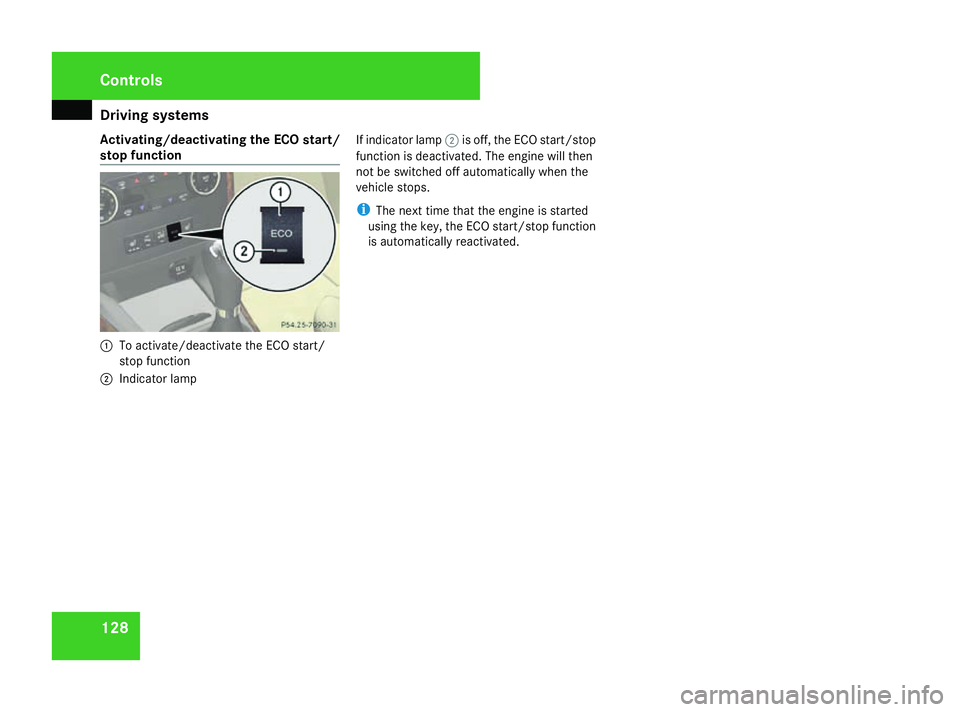
Activating/deactivating the ECO start/
stop function 1
To activate/deactivate the ECO start/
stop function
2 Indicator lamp If indicator lamp
2is off, the ECO start/stop
function is deactivated. The engine will then
not be switched off automatically when the
vehicle stops.
i The next time that the engine is started
using the key, the ECO start/stop function
is automatically reactivated. Controls
169_AKB; 2; 4, en-GB
wdomann,
Version: 2.10.6
2008-07-16T08:52:06+02:00 - Seite 128 Dateiname: 6515_0315_02_buchblock.pdf; preflight
Page 177 of 305
Engine compartment
174ature (if the engine was only started
briefly), before measuring.
i If you wish to cancel the measurement,
press the korj button on the multi-
function steering wheel.
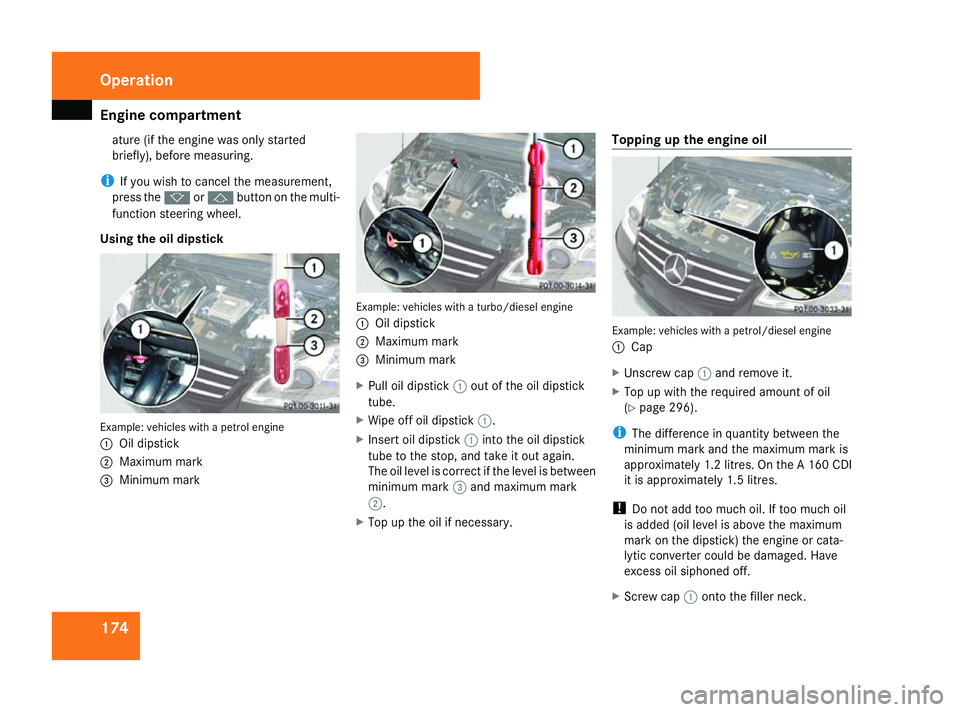
Using the oil dipstick Example: vehicles with a petrol engine
1
Oil dipstick
2 Maximum mark
3 Minimum mark Example: vehicles with a turbo/diesel engine
1
Oil dipstick
2 Maximum mark
3 Minimum mark
X Pull oil dipstick 1out of the oil dipstick
tube.
X Wipe off oil dipstick 1.
X Insert oil dipstick 1into the oil dipstick
tube to the stop, and take it out again.
The oil level is correct if the level is between
minimum mark 3and maximum mark
2.
X Top up the oil if necessary. Topping up the engine oil
Example: vehicles with a petrol/diesel engine
1
Cap
X Unscrew cap 1and remove it.
X Top up with the required amount of oil
(Y page 296).
i The difference in quantity between the
minimum mark and the maximum mark is
approximately 1.2 litres. On the A 160 CDI
it is approximately 1.5 litres.
! Do not add too much oil. If too much oil
is added (oil level is above the maximum
mark on the dipstick) the engine or cata-
lytic converter could be damaged. Have
excess oil siphoned off.
X Screw cap 1onto the filler neck. Operation
169_AKB; 2; 4, en-GB
wdomann,
Version: 2.10.6
2008-07-16T08:52:06+02:00 - Seite 174 Dateiname: 6515_0315_02_buchblock.pdf; preflight
Page 189 of 305
Trailer towing*
186 Trailer towing*
Fitting the ball coupling
X Make a note of the ball coupling key num-
ber.
i You can use this number to obtain a
replacement key from a Mercedes-Benz
Service Centre. G
Risk of injury
If the ball coupling does not engage prop-
erly when it is attached, the vehicle/trailer
combination is not secured and could
become detached. You could therefore
cause an accident. Attach the ball coupling
carefully and make sure that it engages.
Vehicles without ECO start/stop func-
tion: the attachable ball coupling is on the
right of the stowage compartment in the lug-
gage compartment (Y page 161).
X Open the stowage compartment on the
right-hand side of the luggage compart-
ment.
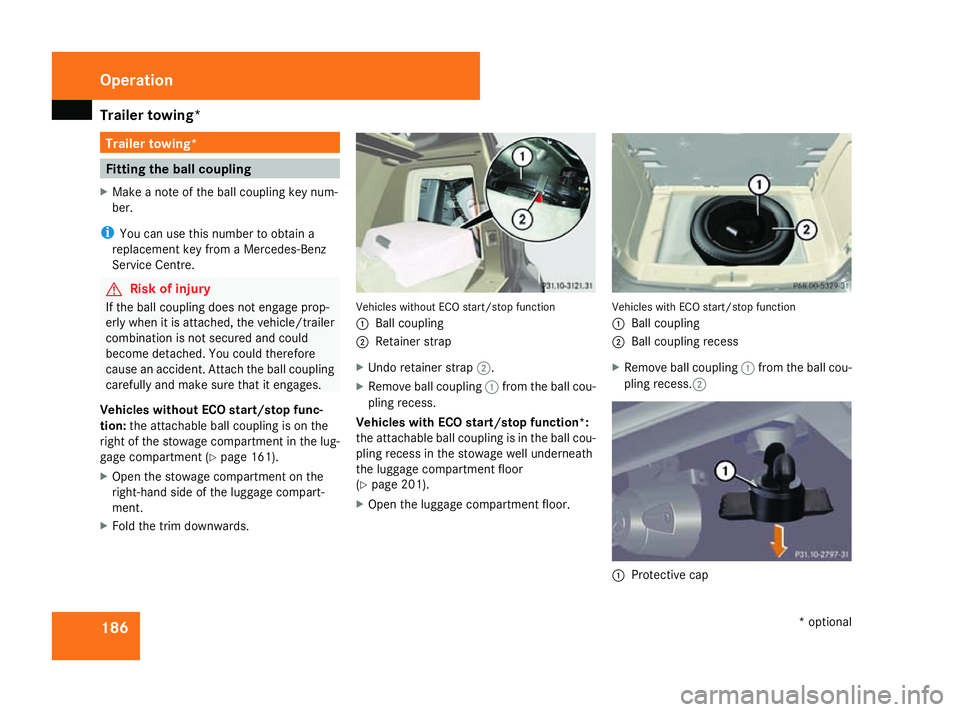
X Fold the trim downwards. Vehicles without ECO start/stop function
1
Ball coupling
2 Retainer strap
X Undo retainer strap 2.
X Remove ball coupling 1from the ball cou-
pling recess.
Vehicles with ECO start/stop function*:
the attachable ball coupling is in the ball cou-
pling recess in the stowage well underneath
the luggage compartment floor
(Y page 201).
X Open the luggage compartment floor. Vehicles with ECO start/stop function
1
Ball coupling
2 Ball coupling recess
X Remove ball coupling 1from the ball cou-
pling recess.2 1
Protective cap Operation
* optional
169_AKB; 2; 4, en-GB
wdomann,
Version: 2.10.6 2008-07-16T08:52:06+02:00 - Seite 186Dateiname: 6515_0315_02_buchblock.pdf; preflight
Page 193 of 305
Trailer towing*
190note that the power output of the engine,
and consequently the vehicle's gradient-
climbing capability, decrease with increas-
ing altitude.
If the trailer swings from side to side:
X Do not accelerate.
X Do not counter-steer.
X Brake if necessary. G
Risk of accident
On no account should you attempt to draw
the vehicle/trailer combination out by
increasing speed. Removing the ball coupling
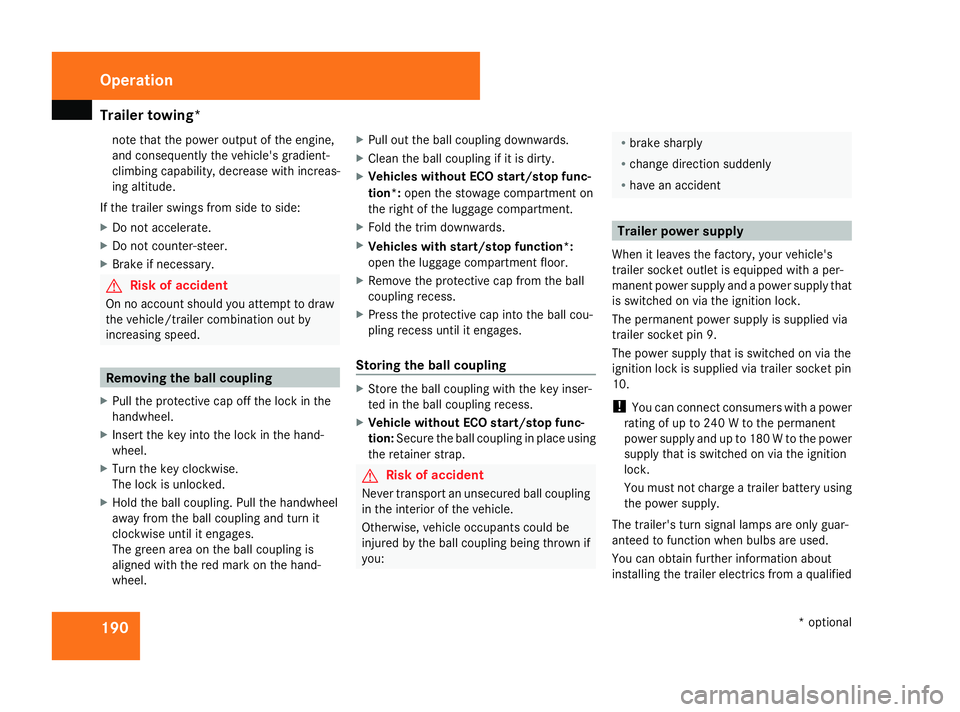
X Pull the protective cap off the lock in the
handwheel.
X Insert the key into the lock in the hand-
wheel.
X Turn the key clockwise.
The lock is unlocked.
X Hold the ball coupling. Pull the handwheel
away from the ball coupling and turn it
clockwise until it engages.
The green area on the ball coupling is
aligned with the red mark on the hand-
wheel. X
Pull out the ball coupling downwards.
X Clean the ball coupling if it is dirty.
X Vehicles without ECO start/stop func-
tion*: open the stowage compartment on
the right of the luggage compartment.
X Fold the trim downwards.
X Vehicles with start/stop function*:
open the luggage compartment floor.
X Remove the protective cap from the ball
coupling recess.
X Press the protective cap into the ball cou-
pling recess until it engages.
Storing the ball coupling X
Store the ball coupling with the key inser-
ted in the ball coupling recess.
X Vehicle without ECO start/stop func-
tion: Secure the ball coupling in place using
the retainer strap. G
Risk of accident
Never transport an unsecured ball coupling
in the interior of the vehicle.
Otherwise, vehicle occupants could be
injured by the ball coupling being thrown if
you: R
brake sharply
R change direction suddenly
R have an accident Trailer po
wer supply
When it leaves the factory, your vehicle's
trailer socket outlet is equipped with a per-
manent power supply and a power supply that
is switched on via the ignition lock.
The permanent power supply is supplied via
trailer socket pin 9.
The power supply that is switched on via the
ignition lock is supplied via trailer socket pin
10.
! You can connect consumers with a power
rating of up to 240 W to the permanent
power supply and up to 180 W to the power
supply that is switched on via the ignition
lock.
You must not charge a trailer battery using
the power supply.
The trailer's turn signal lamps are only guar-
anteed to function when bulbs are used.
You can obtain further information about
installing the trailer electrics from a qualified Operation
* optional
169_AKB; 2; 4, en-GB
wdomann,
Version: 2.10.6
2008-07-16T08:52:06+02:00 - Seite 190 Dateiname: 6515_0315_02_buchblock.pdf; preflight
Page 204 of 305
Where will I find...?
201Setting up the foldable wheel chock
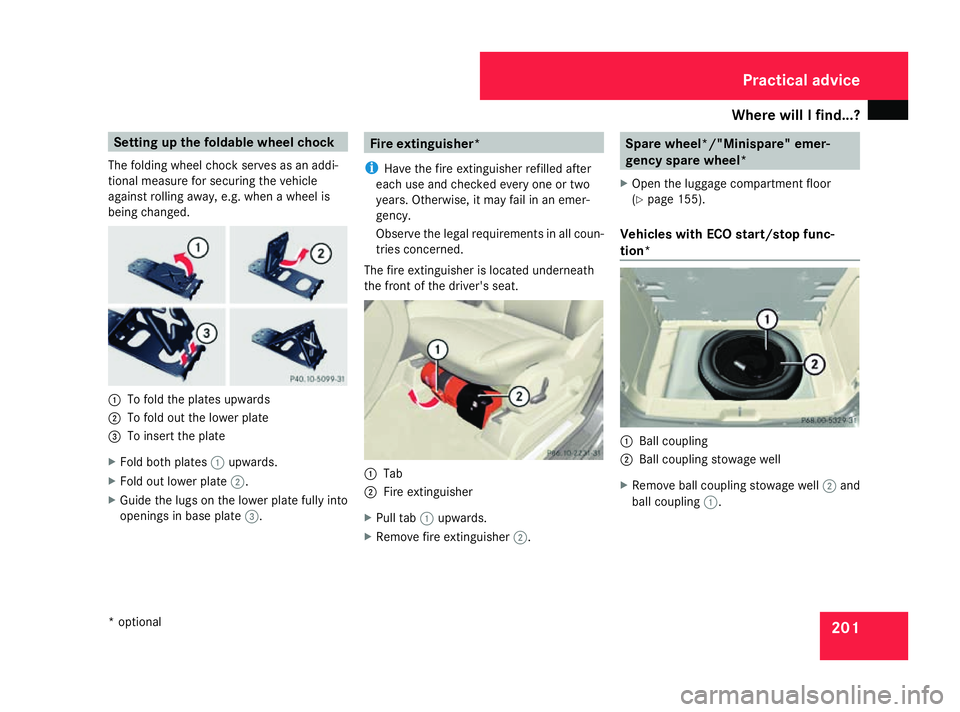
The folding wheel chock serves as an addi-
tional measure for securing the vehicle
against rolling away, e.g. when a wheel is
being changed. 1
To fold the plates upwards
2 To fold out the lower plate
3 To insert the plate
X Fold both plates 1upwards.
X Fold out lower plate 2.
X Guide the lugs on the lower plate fully into
openings in base plate 3. Fire extinguisher*
i Have the fire extinguisher refilled after
each use and checked every one or two
years. Otherwise, it may fail in an emer-
gency.
Observe the legal requirements in all coun-
tries concerned.
The fire extinguisher is located underneath
the front of the driver's seat. 1
Tab
2 Fire extinguisher
X Pull tab 1upwards.
X Remove fire extinguisher 2. Spare wheel*/"Minispare" emer-
gency spare wheel*
X Open the luggage compartment floor
(Y page 155).
Vehicles with ECO start/stop func-
tion* 1
Ball coupling
2 Ball coupling stowage well
X Remove ball coupling stowage well 2and
ball coupling 1. Practical advice
* optional
169_AKB; 2; 4, en-GB
wdomann,
Version: 2.10.6 2008-07-16T08:52:06+02:00 - Seite 201 ZDateiname: 6515_0315_02_buchblock.pdf; preflight
Page 205 of 305
Display
messages 202
Vehi
cles without ECO start/stop func-
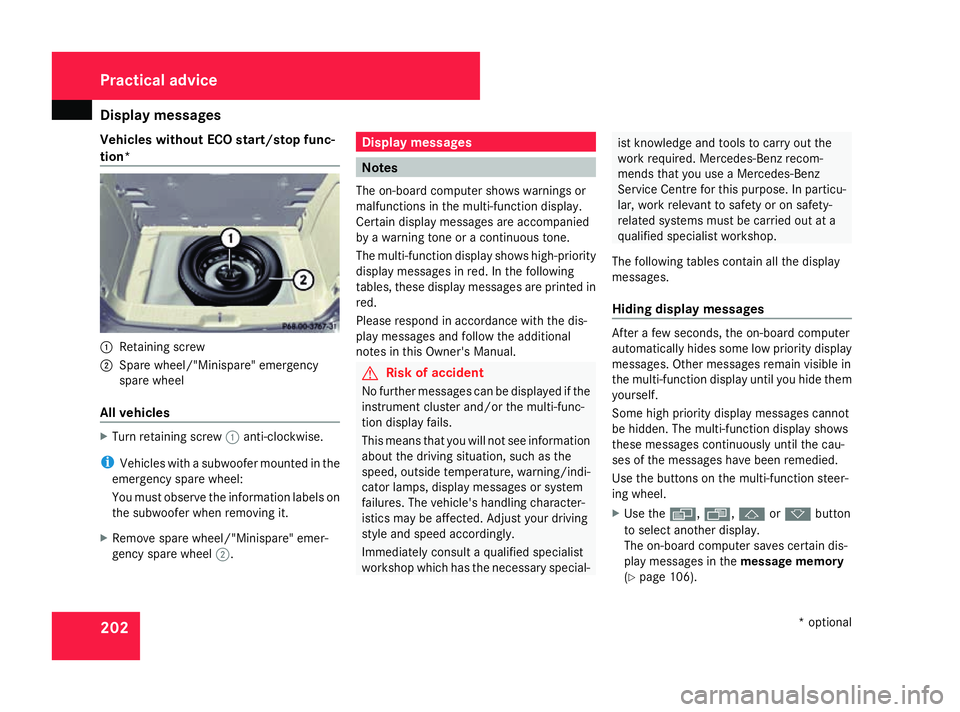
tion* 1
Retaining screw
2 Spare wheel/"Minispare" emergency
spare wheel
All vehicles X
Turn retaining screw 1anti-clockwise.
i Vehicles with a subwoofer mounted in the
emergency spare wheel:
You must observe the information labels on
the subwoofer when removing it.
X Remove spare wheel/"Minispare" emer-
gency spare wheel 2. Display messages
Notes
The on-board computer shows warnings or
malfunctions in the multi-function display.
Certain display messages are accompanied
by a warning tone or a continuous tone.
The multi-function display shows high-priority
display messages in red. In the following
tables, these display messages are printed in
red.
Please respond in accordance with the dis-
play messages and follow the additional
notes in this Owner's Manual. G
Risk of accident
No further messages can be displayed if the
instrument cluster and/or the multi-func-
tion display fails.
This means that you will not see information
about the driving situation, such as the
speed, outside temperature, warning/indi-
cator lamps, display messages or system
failures. The vehicle's handling character-
istics may be affected. Adjust your driving
style and speed accordingly.
Immediately consult a qualified specialist
workshop which has the necessary special- ist knowledge and tools to carry out the
work required. Mercedes-Benz recom-
mends that you use a Mercedes-Benz
Service Centre for this purpose. In particu-
lar, work relevant to safety or on safety-
related systems must be carried out at a
qualified specialist workshop.
The following tables contain all the display
messages.
Hiding display messages After a few seconds, the on-board computer
automatically hides some low priority display
messages. Other messages remain visible in
the multi-function display until you hide them
yourself.
Some high priority display messages cannot
be hidden. The multi-function display shows
these messages continuously until the cau-
ses of the messages have been remedied.
Use the buttons on the multi-function steer-
ing wheel.
X
Use the è,·,jork button
to select another display.
The on-board computer saves certain dis-
play messages in the message memory
(Y page 106). Practical advice
* optional
169_AKB; 2; 4, en-GB
wdomann
,V ersion: 2.10.6
2008-07-16T08:52:06+02:00 - Seite 202 Dateiname: 6515_0315_02_buchblock.pdf; preflight
Page 212 of 305
Display
messages 209Display messages Possible cause/consequence Possible solution
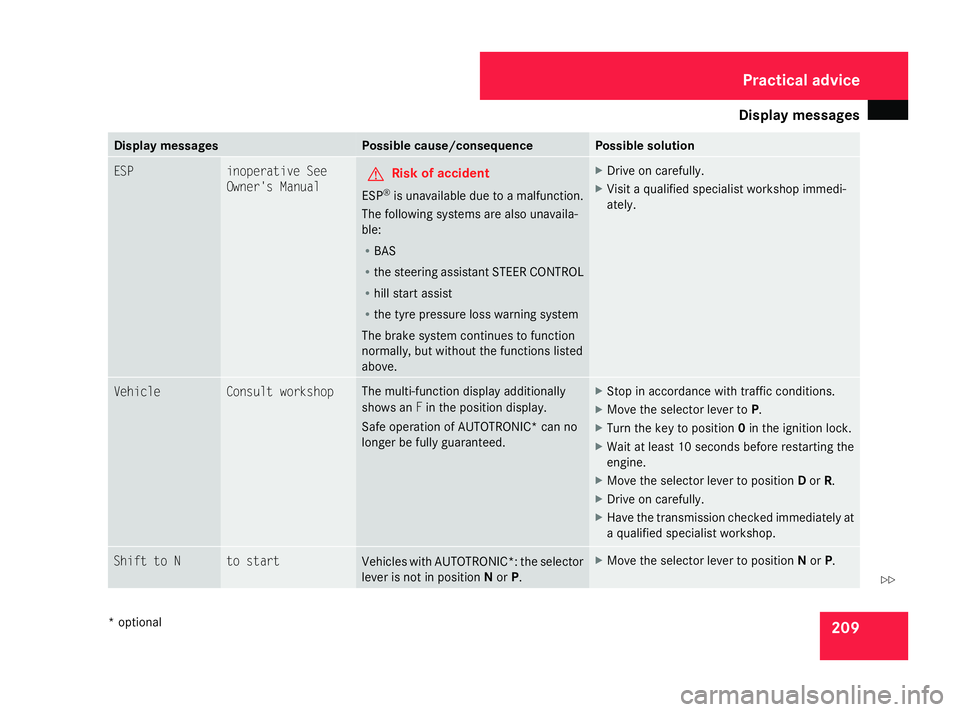
ESP inoperative See
Owner's Manual G
Risk of accident
ESP ®
is unavailable due to a malfunction.
The following systems are also unavaila-
ble:
R BAS
R the steering assistant STEER CONTROL
R hill start assist
R the tyre pressure loss warning system
The brake system continues to function
normally, but without the functions listed
above. X
Drive on carefully.
X Visit a qualified specialist workshop immedi-
ately. Vehicle Consult workshop The multi-function display additionally
shows an
Fin the position display.
Safe operation of AUTOTRONIC* can no
longer be fully guaranteed. X
Stop in accordance with traffic conditions.
X Move the selector lever to P.
X Turn the key to position 0in the ignition lock.
X Wait at least 10 seconds before restarting the
engine.
X Move the selector lever to position Dor R.
X Drive on carefully.
X Have the transmission checked immediately at
a qualified specialist workshop. Shift to N to start
Vehicles with AUTOTRONIC*: the selector
lever is not in position
Nor P. X
Move the selector lever to position Nor P. Practical advice
* optional
169_AKB; 2; 4, en-GB
wdomann
,V ersion: 2.10.6
2008-07-16T08:52:06+02:00 - Seite 209 ZDateiname: 6515_0315_02_buchblock.pdf; preflight