transmission MERCEDES-BENZ A-CLASS HATCHBACK 2008 User Guide
[x] Cancel search | Manufacturer: MERCEDES-BENZ, Model Year: 2008, Model line: A-CLASS HATCHBACK, Model: MERCEDES-BENZ A-CLASS HATCHBACK 2008Pages: 305, PDF Size: 5.43 MB
Page 91 of 305
Driving and pa
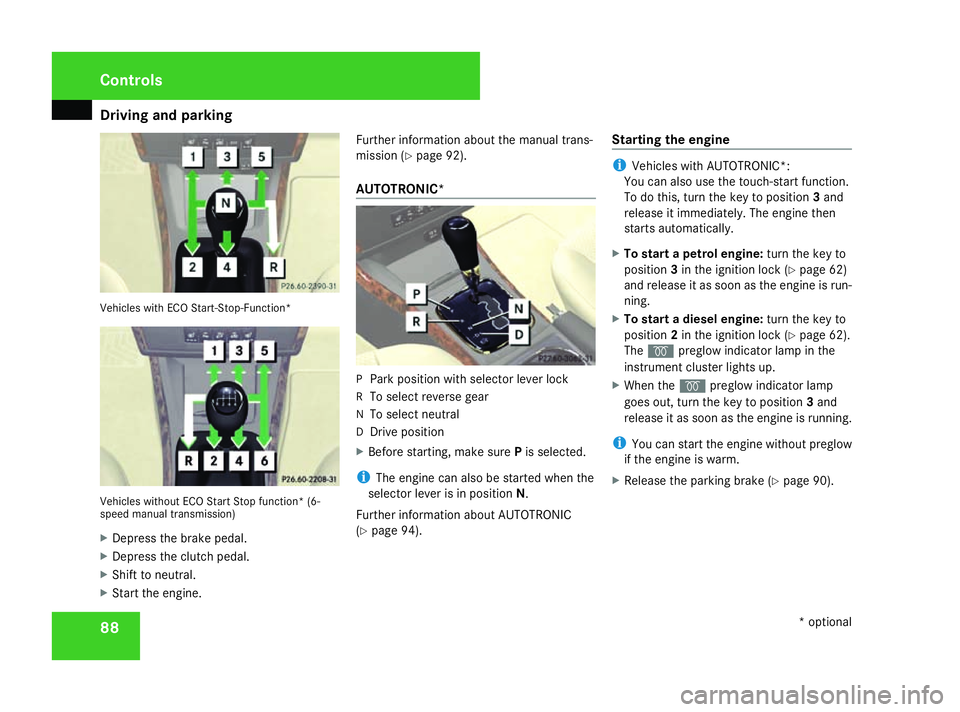
rking 88Vehicles with ECO Start-Stop-Function*
Vehicles without ECO Start Stop function* (6-
speed manual transmission)
X Depress the brake pedal.
X Depress the clutch pedal.
X Shift to neutral.
X Start the engine. Further information about the manual trans-
mission (Y
page 92).
AUTOTRONIC* P
Park position with selector lever lock
R To select reverse gear
N To select neutral
D Drive position
X Before starting, make sure Pis selected.
i The engine can also be started when the
selector lever is in position N.
Further information about AUTOTRONIC
(Y page 94). Starting the engine i
Vehicles with AUTOTRONIC*:
You can also use the touch-start function.
To do this, turn the key to position 3and
release it immediately. The engine then
starts automatically.
X To start a petrol engine: turn the key to
position 3in the ignition lock (Y page 62)
and release it as soon as the engine is run-
ning.
X To start a diesel engine: turn the key to
position 2in the ignition lock (Y page 62).
The q preglow indicator lamp in the
instrument cluster lights up.
X When the qpreglow indicator lamp
goes out, turn the key to position 3and
release it as soon as the engine is running.
i You can start the engine without preglow
if the engine is warm.
X Release the parking brake (Y page 90).Controls
* optional
169_AKB; 2; 4, en-GB
wdomann,
Version: 2.10.6
2008-07-16T08:52:06+02:00 - Seite 88 Dateiname: 6515_0315_02_buchblock.pdf; preflight
Page 92 of 305
Driving and pa
rking 89Automatic engine start (ECO start/
stop function)
The ECO start/stop function automatically
switches on the engine as soon as you pre-
pare to pull away, e.g. by engaging a gear.
X Depress the clutch pedal.
The engine starts automatically.
X Shift to either first or reverse gear and pull
away.
! Do not engage a gear without depressing
the clutch as this disables the automatic
engine start function. As a result, the bat-
tery cannot be recharged and the demister
function of Thermotronic* is not available.
i When manoeuvring in and out of parking
spaces, the ECO start/stop function will
not automatically switch off the vehicle's
engine. The engine will only be switched off
automatically if the vehicle has reached a
speed of at least 15 km/h before coming
to a standstill again.
i The system can differentiate between
starting the engine with the key and the
automatic engine start via the ECO start/
stop function. Pulling away
! Warm up the engine quickly. Do not use
the engine's full performance until it has
reached operating temperature.
Only shift into reverse gear when the vehi-
cle is stationary.
Where possible, avoid spinning the drive
wheels when pulling away on slippery
roads. You could otherwise damage the
drive train.
i The vehicle locks centrally once you have
pulled away. The locking knobs in the doors
drop down.
You can open the doors from the inside at
any time.
You can also deactivate the automatic lock-
ing feature (Y page 111).
Manual transmission X
Depress the brake pedal.
X Depress the clutch pedal.
X Shift to either first or reverse gear.
X Release the parking brake (Y page 90).
X Slowly release the clutch pedal and
depress the accelerator pedal. !
Change gear in good time and avoid spin-
ning the wheels. You could otherwise dam-
age the vehicle.
AUTOTRONIC* i
It is only possible to move the selector
lever to the desired position if you depress
the brake pedal. Only then is the selector
lever lock released.
X Depress the brake pedal and keep it
depressed.
The selector lever lock is released.
X Release the parking brake.
X Move the selector lever to position Dor R.
i Wait until the shift process is completed
before pulling away.
X Release the brake pedal.
X Carefully depress the accelerator pedal.
i Upshifts take place at higher engine
speeds after a cold start. This helps the
catalytic converter to reach its operating
temperature more quickly. Controls
* optional
169_AKB; 2; 4, en-GB
wdomann,
Version: 2.10.6 2008-07-16T08:52:06+02:00 - Seite 89 ZDateiname: 6515_0315_02_buchblock.pdf; preflight
Page 94 of 305
Driving and pa
rking 91
X
To release: depress the brake pedal and
keep it depressed.
On vehicles with AUTOTRONIC*, the selec-
tor lever lock is released.
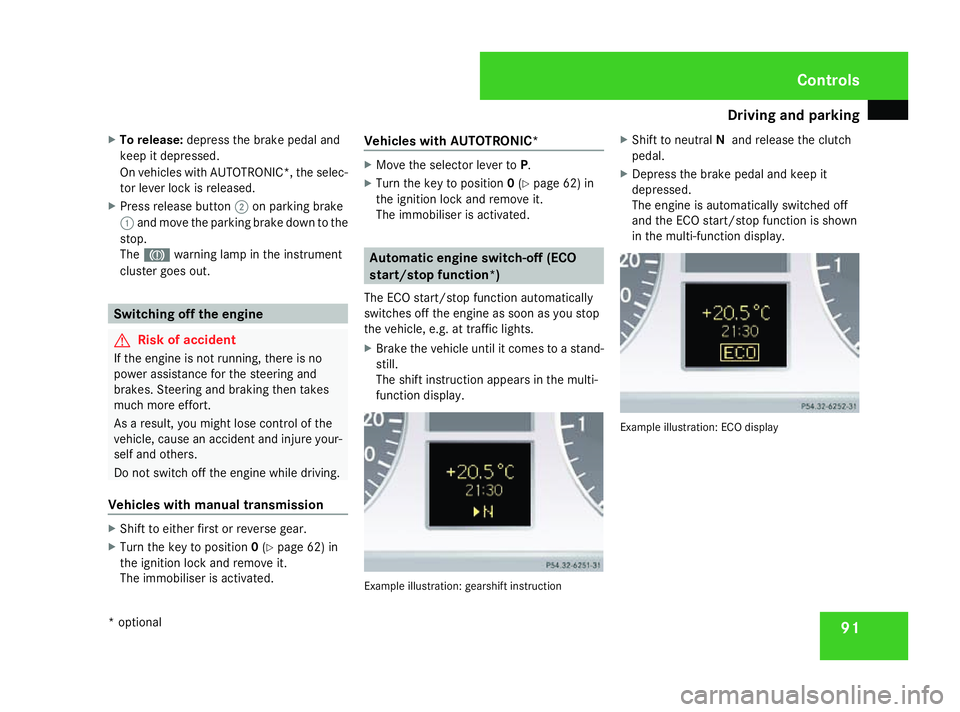
X Press release button 2on parking brake
1 and move the parking brake down to the
stop.
The 3 warning lamp in the instrument
cluster goes out. Switching off the engine
G
Risk of accident
If the engine is not running, there is no
power assistance for the steering and
brakes. Steering and braking then takes
much more effort.
As a result, you might lose control of the
vehicle, cause an accident and injure your-
self and others.
Do not switch off the engine while driving.
Vehicles with manual transmission X
Shift to either first or reverse gear.
X Turn the key to position 0(Y page 62) in
the ignition lock and remove it.
The immobiliser is activated. Vehicles with AUTOTRONIC* X
Move the selector lever to P.
X Turn the key to position 0(Y page 62) in
the ignition lock and remove it.
The immobiliser is activated. Automatic engine switch-off (ECO
start/stop function*)
The ECO start/stop function automatically
switches off the engine as soon as you stop
the vehicle, e.g. at traffic lights.
X Brake the vehicle until it comes to a stand-
still.
The shift instruction appears in the multi-
function display. Example illustration: gearshift instructionX
Shift to neutral Nand release the clutch
pedal.
X Depress the brake pedal and keep it
depressed.
The engine is automatically switched off
and the ECO start/stop function is shown
in the multi-function display. Example illustration: ECO display Controls
* optional
169_AKB; 2; 4, en-GB
wdomann,
Version: 2.10.6 2008-07-16T08:52:06+02:00 - Seite 91 ZDateiname: 6515_0315_02_buchblock.pdf; preflight
Page 95 of 305
Transmission
92 Transmission
Notes on the transmission
G
Risk of accident
The movement of the pedals must not be
impaired in any way. Do not keep any
objects in the driver's footwell. Make sure
that floormats or carpets are correctly
secured and that there is sufficient clear-
ance for the pedals. G
Risk of accident
Do not change down for additional engine
braking on a slippery road surface. This
could cause the drive wheels to lose their
grip and the vehicle could skid. This could
cause you to lose control of your vehicle
and cause an accident. Manual transmission
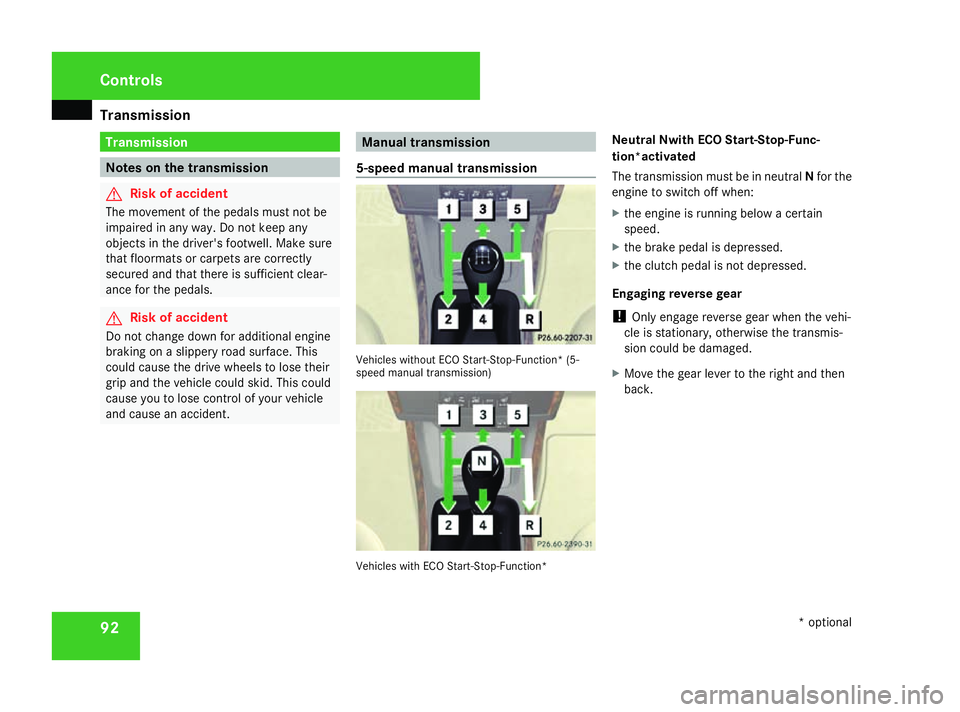
5-speed manual transmission Vehicles without ECO Start-Stop-Function* (5-
speed manual transmission)
Vehicles with ECO Start-Stop-Function*Neutral Nwith ECO Start-Stop-Func-
tion*activated
The transmission must be in neutral
Nfor the
engine to switch off when:
X the engine is running below a certain
speed.
X the brake pedal is depressed.
X the clutch pedal is not depressed.
Engaging reverse gear
! Only engage reverse gear when the vehi-
cle is stationary, otherwise the transmis-
sion could be damaged.
X Move the gear lever to the right and then
back. Controls
* optional
169_AKB; 2; 4, en-GB
wdomann,
Version: 2.10.6
2008-07-16T08:52:06+02:00 - Seite 92 Dateiname: 6515_0315_02_buchblock.pdf; preflight
Page 96 of 305
Transmission
93
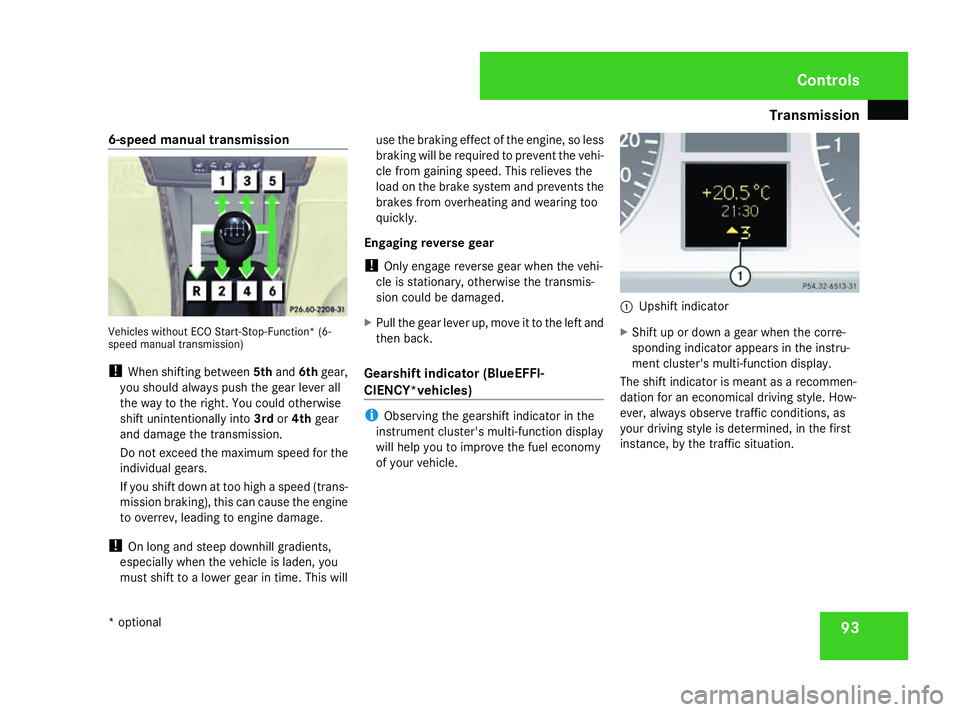
6-speed manual transmission
Vehicles without ECO Start-Stop-Function* (6-
speed manual transmission)
!
When shifting between 5thand 6thgear,
you should always push the gear lever all
the way to the right. You could otherwise
shift unintentionally into 3rdor4th gear
and damage the transmission.
Do not exceed the maximum speed for the
individual gears.
If you shift down at too high a speed (trans-
mission braking), this can cause the engine
to overrev, leading to engine damage.
! On long and steep downhill gradients,
especially when the vehicle is laden, you
must shift to a lower gear in time. This will use the braking effect of the engine, so less
braking will be required to prevent the vehi-
cle from gaining speed. This relieves the
load on the brake system and prevents the
brakes from overheating and wearing too
quickly.
Engaging reverse gear
! Only engage reverse gear when the vehi-
cle is stationary, otherwise the transmis-
sion could be damaged.
X Pull the gear lever up, move it to the left and
then back.
Gearshift indicator (BlueEFFI-
CIENCY*vehicles) i
Observing the gearshift indicator in the
instrument cluster's multi-function display
will help you to improve the fuel economy
of your vehicle. 1
Upshift indicator
X Shift up or down a gear when the corre-
sponding indicator appears in the instru-
ment cluster's multi-function display.
The shift indicator is meant as a recommen-
dation for an economical driving style. How-
ever, always observe traffic conditions, as
your driving style is determined, in the first
instance, by the traffic situation. Controls
* optional
169_AKB; 2; 4, en-GB
wdomann,
Version: 2.10.6 2008-07-16T08:52:06+02:00 - Seite 93 ZDateiname: 6515_0315_02_buchblock.pdf; preflight
Page 97 of 305
Transmission
94 AUTOTRONIC* (continuously variable
automatic transmission)
AUTOTRONIC is an electronically controlled,
continuously variable automatic transmis-
sion. The transmission ratio is changed con-
tinuously. This enables it to be ideally adapted
to your individual driving styles and to provide
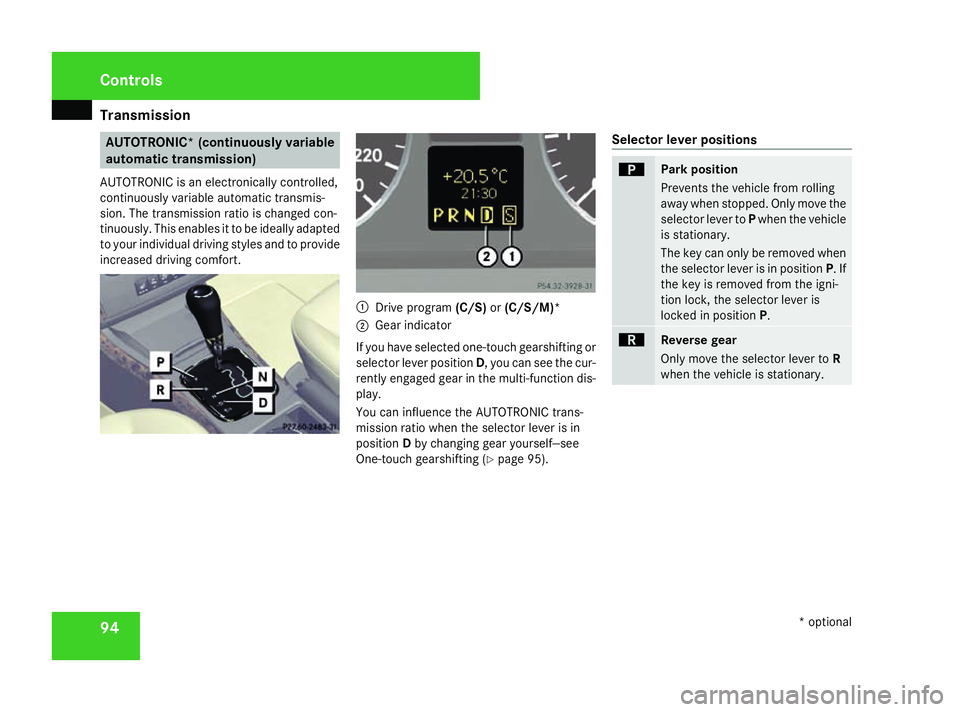
increased driving comfort. 1
Drive program (C/S)or(C/S/M)*
2 Gear indicator
If you have selected one-touch gearshifting or
selector lever position D, you can see the cur-
rently engaged gear in the multi-function dis-
play.
You can influence the AUTOTRONIC trans-
mission ratio when the selector lever is in
position Dby changing gear yourself―see
One-touch gearshifting ( Ypage 95). Selector lever positions ì
Park position
Prevents the vehicle from rolling
away when stopped. Only move the
selector lever to
Pwhen the vehicle
is stationary.
The key can only be removed when
the selector lever is in position P. If
the key is removed from the igni-
tion lock, the selector lever is
locked in position P. í
Reverse gear
Only move the selector lever to
R
when the vehicle is stationary. Controls
* optional
169_AKB; 2; 4, en-GB
wdomann,
Version: 2.10.6
2008-07-16T08:52:06+02:00 - Seite 94 Dateiname: 6515_0315_02_buchblock.pdf; preflight
Page 98 of 305
Transmission
95ë
Neutral
No power is transmitted from the
engine to the drive wheels. Releas-
ing the brakes will allow you to
move the vehicle freely, e.g. to
push it or tow it.
If ESP
®
is deactivated or faulty:
only move the selector lever to Nif
the vehicle is in danger of skidding,
e.g. on icy roads. ê
Drive
The transmission selects the opti-
mum gear ratio automatically for
forward mode.
One-touch gearshifting (manual opera-
tion) When the selector lever is in position
D, you
can select the seven gears yourself.
Activating manual operation
X Press the selector lever lightly to the left
towards D-or to the right towards D+.
M is shown in the multi-function display.
Manual operation is activated. X
To shift down: briefly press the selector
lever to the left towards D–.
The transmission shifts down to the next
gear, depending on the gear currently
selected.
i To prevent the engine from overrevving,
the transmission does not shift down if you
push the selector lever towards D–while
driving at too high a speed.
i AUTOTRONIC shifts down automatically if
the engine speed reaches the lower speed
range for the gear currently selected.
X To shift up: briefly press the selector lever
to the right towards D+.
The transmission shifts up to the next gear,
depending on the gear currently selected.
i If the upper engine speed limit for the gear
currently engaged is reached and you con-
tinue to accelerate, AUTOTRONIC shifts up
automatically.
X To select the ideal gear: press and hold
the selector lever to the left towards D–.
The transmission will shift to a range which
allows ideal acceleration and deceleration.
To do this, the transmission will shift down
one or more gears. Deactivating manual operation
X Press and hold the selector lever towards
D+ until Dis shown again in the multi-func-
tion display.
The transmission shifts from the current
gear to D.
Or:
X Briefly press the program selector button
next to the selector lever.
The letter for the last selected drive pro-
gram Cor Sis shown again in the multi-
function display. The transmission shifts
from the current gear to D.
i If you restart the engine and Mmanual
operation is selected, AUTOTRONIC shifts
into the automatic drive program Cor S. If
automatic drive program Cor Shas been
selected, the automatic transmission will
resume the relevant drive program when
you restart the engine. Controls
169_AKB; 2; 4, en-GB
wdomann,
Version: 2.10.6 2008-07-16T08:52:06+02:00 - Seite 95 ZDateiname: 6515_0315_02_buchblock.pdf; preflight
Page 99 of 305
Transmission
96
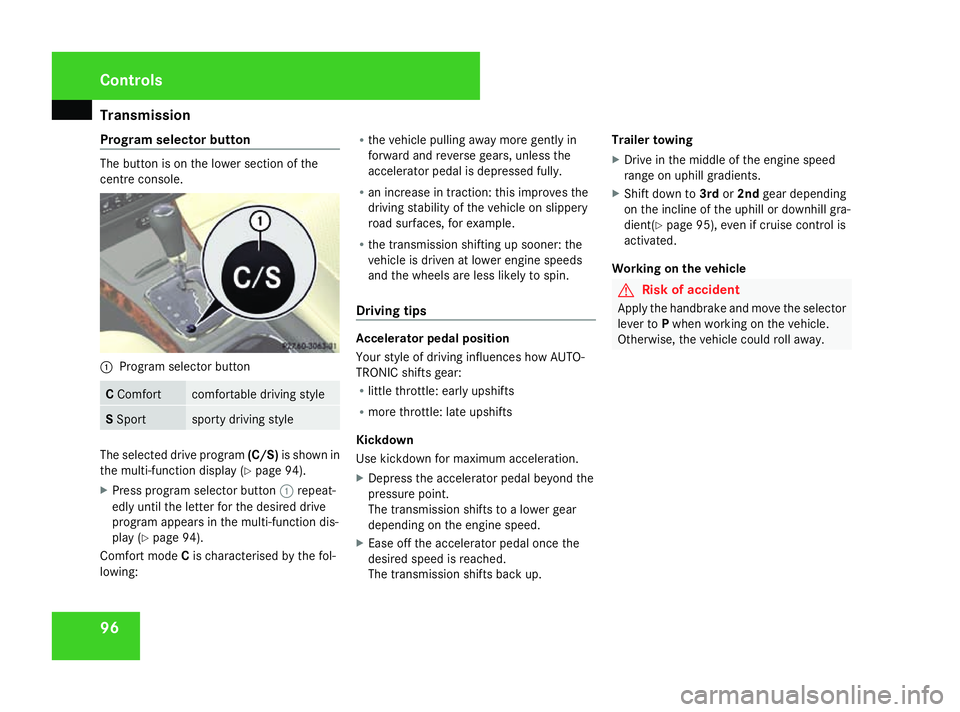
Program selector button The button is on the lower section of the
centre console. 1
Program selector button C
Comfort comfortable driving style
S
Sport sporty driving style
The selected drive program
(C/S)is shown in
the multi-function display (Y page 94).
X Press program selector button 1repeat-
edly until the letter for the desired drive
program appears in the multi-function dis-
play (Y page 94).
Comfort mode Cis characterised by the fol-
lowing: R
the vehicle pulling away more gently in
forward and reverse gears, unless the
accelerator pedal is depressed fully.
R an increase in traction: this improves the
driving stability of the vehicle on slippery
road surfaces, for example.
R the transmission shifting up sooner: the
vehicle is driven at lower engine speeds
and the wheels are less likely to spin.
Driving tips Accelerator pedal position
Your style of driving influences how AUTO-
TRONIC shifts gear:
R
little throttle: early upshifts
R more throttle: late upshifts
Kickdown
Use kickdown for maximum acceleration.
X Depress the accelerator pedal beyond the
pressure point.
The transmission shifts to a lower gear
depending on the engine speed.
X Ease off the accelerator pedal once the
desired speed is reached.
The transmission shifts back up. Trailer towing
X
Drive in the middle of the engine speed
range on uphill gradients.
X Shift down to 3rdor2nd gear depending
on the incline of the uphill or downhill gra-
dient( Ypage 95), even if cruise control is
activated.
Working on the vehicle G
Risk of accident
Apply the handbrake and move the selector
lever to Pwhen working on the vehicle.
Otherwise, the vehicle could roll away. Controls
169_AKB; 2; 4, en-GB
wdomann,
Version: 2.10.6
2008-07-16T08:52:06+02:00 - Seite 96 Dateiname: 6515_0315_02_buchblock.pdf; preflight
Page 116 of 305
On-board computer
113
Resetting X
Using èor·, select From start.
X Press the jork button to select the
function that you wish to reset.
X Press and hold the reset button on the left
of the instrument cluster until the values
have reverted to "0".
Calling up the range X
Using èor·, select From start.
X Press the jork button to select
Range:.
The multi-function display shows the esti-
mated range of the vehicle, based on the
current driving style and the fuel level. If
there is only a small amount of fuel remain-
ing in the fuel tank, a vehicle refuelling
¿ appears instead of the range. Telephone menu*
Functions and displays depend on the
optional equipment installed in your vehicle.
You can place your mobile phone in the
mobile phone bracket* (Y page 164), or set
up a Bluetooth connection to the audio sys-
tem* or COMAND APS* (see separate oper-
ating instructions). G
Risk of accident
You must observe the legal requirements
for the country in which you are currently
driving when operating a mobile phone in
the vehicle.
If it is permitted to operate a mobile phone
while the vehicle is in motion, only operate
it when road and traffic conditions permit.
You could otherwise be distracted from the
traffic conditions, cause an accident and
injure yourself and others.
i Please refer to the menu overview
(Y page 101).
Use the buttons on the multi-function steer-
ing wheel. X
Switch on the mobile phone and audio
equipment* or COMAND APS* (see sepa-
rate operating instructions).
X Press the èor· button to select the
Telephone menu.
Mobile phone on PIN code not yet entered
Once you have inserted the mobile phone into
the mobile phone bracket*, the multi-func-
tion display shows the
PINdisplay message.
X Enter the PIN using the mobile phone, Lin-
guatronic*, the audio system *or COMAND
APS*.
The mobile phone will search for a network.
Mobile phone operational
You will see Readyor the name of the mobile
phone network provider in the multi-function
display. If the operational readiness symbol
of the mobile phone goes out, your vehicle is
outside the transmission and reception
range. In this case you will see No Service
in the multi-function display. Controls
* optional
169_AKB; 2; 4, en-GB
wdomann,
Version: 2.10.6 2008-07-16T08:52:06+02:00 - Seite 113 ZDateiname: 6515_0315_02_buchblock.pdf; preflight
Page 119 of 305
Driving sys
tems 116
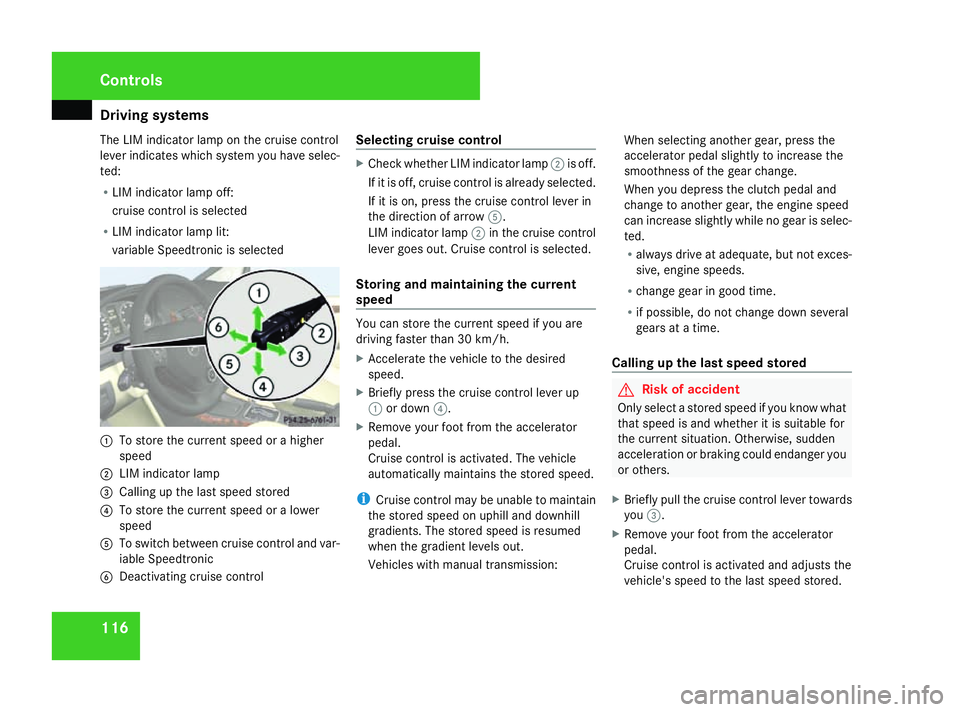
The LIM indicator lamp on the cruise control
lever indicates which system you have selec-
ted:
R LIM indicator lamp off:
cruise control is selected
R LIM indicator lamp lit:
variable Speedtronic is selected 1
To store the current speed or a higher
speed
2 LIM indicator lamp
3 Calling up the last speed stored
4 To store the current speed or a lower
speed
5 To switch between cruise control and var-
iable Speedtronic
6 Deactivating cruise control Selecting cruise control X
Check whether LIM indicator lamp 2is off.
If it is off, cruise control is already selected.
If it is on, press the cruise control lever in
the direction of arrow 5.
LIM indicator lamp 2in the cruise control
lever goes out. Cruise control is selected.
Storing and maintaining the current
speed You can store the current speed if you are
driving faster than 30 km/
h.
X Accelerate the vehicle to the desired
speed.
X Briefly press the cruise control lever up
1 or down 4.
X Remove your foot from the accelerator
pedal.
Cruise control is activated. The vehicle
automatically maintains the stored speed.
i Cruise control may be unable to maintain
the stored speed on uphill and downhill
gradients. The stored speed is resumed
when the gradient levels out.
Vehicles with manual transmission: When selecting another gear, press the
accelerator pedal slightly to increase the
smoothness of the gear change.
When you depress the clutch pedal and
change to another gear, the engine speed
can increase slightly while no gear is selec-
ted.
R
always drive at adequate, but not exces-
sive, engine speeds.
R change gear in good time.
R if possible, do not change down several
gears at a time.
Calling up the last speed stored G
Risk of accident
Only select a stored speed if you know what
that speed is and whether it is suitable for
the current situation. Otherwise, sudden
acceleration or braking could endanger you
or others.
X Briefly pull the cruise control lever towards
you 3.
X Remove your foot from the accelerator
pedal.
Cruise control is activated and adjusts the
vehicle's speed to the last speed stored. Controls
169_AKB; 2; 4, en-GB
wdomann,
Version: 2.10.6
2008-07-16T08:52:06+02:00 - Seite 116 Dateiname: 6515_0315_02_buchblock.pdf; preflight