change wheel MERCEDES-BENZ A-CLASS HATCHBACK 2008 Owners Manual
[x] Cancel search | Manufacturer: MERCEDES-BENZ, Model Year: 2008, Model line: A-CLASS HATCHBACK, Model: MERCEDES-BENZ A-CLASS HATCHBACK 2008Pages: 305, PDF Size: 5.43 MB
Page 33 of 305
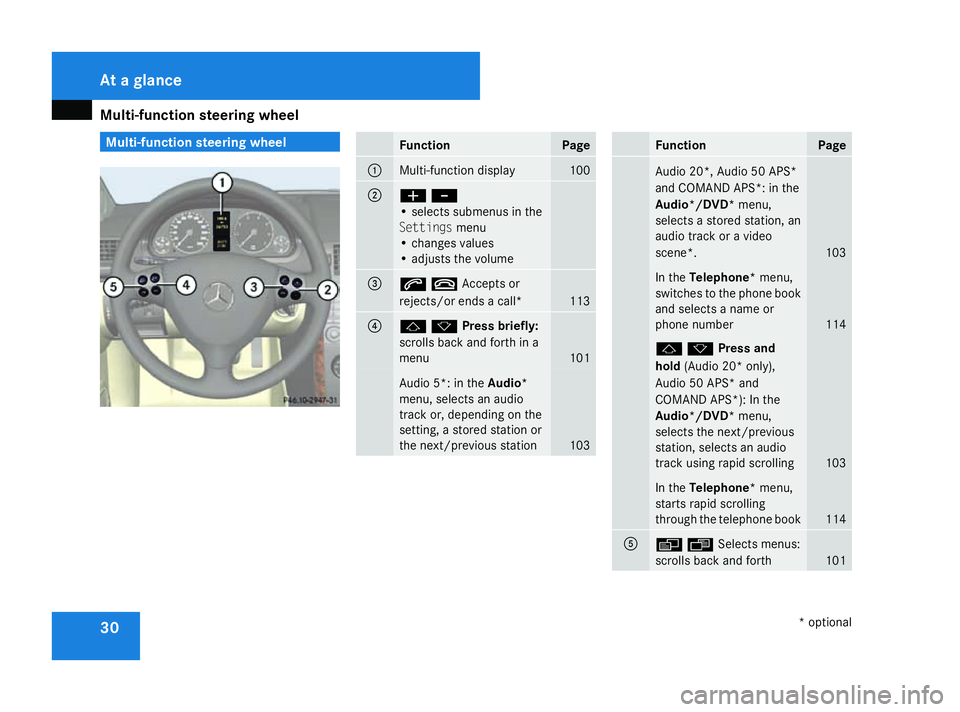
Multi-function steering wheel
30 Multi-function steering wheel
Function Page
1
Multi-function display 100
2
æ
-
• selects submenus in the
Settings menu
• changes values
• adjusts the volume 3
stAccepts or
rejects/or ends a call*
113
4
jkPress briefly:
scrolls back and forth in a
menu
101
Audio 5*: in the
Audio*
menu, selects an audio
track or, depending on the
setting, a stored station or
the next/previous station 103 Function Page
Audio 20*, Audio 50 APS*
and COMAND APS*: in the
Audio*/DVD*
menu,
selects a stored station, an
audio track or a video
scene*. 103
In the
Telephone* menu,
switches to the phone book
and selects a name or
phone number 114
jkPress and
hold
(Audio 20* only),
Audio 50 APS* and
COMAND APS*): In the
Audio*/DVD* menu,
selects the next/previous
station, selects an audio
track using rapid scrolling 103
In the
Telephone* menu,
starts rapid scrolling
through the telephone book 114
5
èÿSelects menus:
scrolls back and forth
101At a glance
* optional
169_AKB; 2; 4, en-GB
wdomann,
Version: 2.10.6
2008-07-16T08:52:06+02:00 - Seite 30 Dateiname: 6515_0315_02_buchblock.pdf; preflight
Page 80 of 305
Lights
77
Make sure that:
R
you are as far away from the driver's front
airbag as possible
R you are sitting in a normal upright posi-
tion
R you can fasten the seat belt properly
R you have moved the backrest to an
almost vertical position
R you have set the seat angle so that your
thighs are gently supported
R you can depress the pedals properly
R you have adjusted the head restraint so
that the back of your head is supported
at eye level by the central area of the
head restraint
X Check whether steering wheel 1is adjus-
ted properly (Y page 70).
Make sure that:
R you can hold the steering wheel with your
arms slightly bent
R you can move your legs freely
R you can see all the displays in the instru-
ment cluster clearly
X Check whether you have fastened seat belt
2 properly (Y page 73). It should:
R
fit snugly across your body
R be routed across the middle of your
shoulder
R routed in your pelvic area across the hip
joints Lights
Light switch
For safety reasons, Mercedes-Benz recom-
mends that you drive with the lights switched
on even during the daytime. In some coun-
tries, daytime operation of headlamps varies
due to legal and voluntary requirements. In
these countries, the constant headlamp
mode is automatically switched on when the
engine is started.
i If you drive in countries in which traffic
drives on the opposite side of the road to
the country where the vehicle is registered,
oncoming traffic may be dazzled by the
asymmetrical dipped-beam headlamps.
Have the headlamps changed to symmet-
rical dipped beam when driving in these
countries. You can obtain information
about this from any Mercedes-Benz Service
Centre. Controls
169_AKB; 2; 4, en-GB
wdomann,
Version: 2.10.6 2008-07-16T08:52:06+02:00 - Seite 77 ZDateiname: 6515_0315_02_buchblock.pdf; preflight
Page 92 of 305
Driving and pa
rking 89Automatic engine start (ECO start/
stop function)
The ECO start/stop function automatically
switches on the engine as soon as you pre-
pare to pull away, e.g. by engaging a gear.
X Depress the clutch pedal.
The engine starts automatically.
X Shift to either first or reverse gear and pull
away.
! Do not engage a gear without depressing
the clutch as this disables the automatic
engine start function. As a result, the bat-
tery cannot be recharged and the demister
function of Thermotronic* is not available.
i When manoeuvring in and out of parking
spaces, the ECO start/stop function will
not automatically switch off the vehicle's
engine. The engine will only be switched off
automatically if the vehicle has reached a
speed of at least 15 km/h before coming
to a standstill again.
i The system can differentiate between
starting the engine with the key and the
automatic engine start via the ECO start/
stop function. Pulling away
! Warm up the engine quickly. Do not use
the engine's full performance until it has
reached operating temperature.
Only shift into reverse gear when the vehi-
cle is stationary.
Where possible, avoid spinning the drive
wheels when pulling away on slippery
roads. You could otherwise damage the
drive train.
i The vehicle locks centrally once you have
pulled away. The locking knobs in the doors
drop down.
You can open the doors from the inside at
any time.
You can also deactivate the automatic lock-
ing feature (Y page 111).
Manual transmission X
Depress the brake pedal.
X Depress the clutch pedal.
X Shift to either first or reverse gear.
X Release the parking brake (Y page 90).
X Slowly release the clutch pedal and
depress the accelerator pedal. !
Change gear in good time and avoid spin-
ning the wheels. You could otherwise dam-
age the vehicle.
AUTOTRONIC* i
It is only possible to move the selector
lever to the desired position if you depress
the brake pedal. Only then is the selector
lever lock released.
X Depress the brake pedal and keep it
depressed.
The selector lever lock is released.
X Release the parking brake.
X Move the selector lever to position Dor R.
i Wait until the shift process is completed
before pulling away.
X Release the brake pedal.
X Carefully depress the accelerator pedal.
i Upshifts take place at higher engine
speeds after a cold start. This helps the
catalytic converter to reach its operating
temperature more quickly. Controls
* optional
169_AKB; 2; 4, en-GB
wdomann,
Version: 2.10.6 2008-07-16T08:52:06+02:00 - Seite 89 ZDateiname: 6515_0315_02_buchblock.pdf; preflight
Page 95 of 305
Transmission
92 Transmission
Notes on the transmission
G
Risk of accident
The movement of the pedals must not be
impaired in any way. Do not keep any
objects in the driver's footwell. Make sure
that floormats or carpets are correctly
secured and that there is sufficient clear-
ance for the pedals. G
Risk of accident
Do not change down for additional engine
braking on a slippery road surface. This
could cause the drive wheels to lose their
grip and the vehicle could skid. This could
cause you to lose control of your vehicle
and cause an accident. Manual transmission
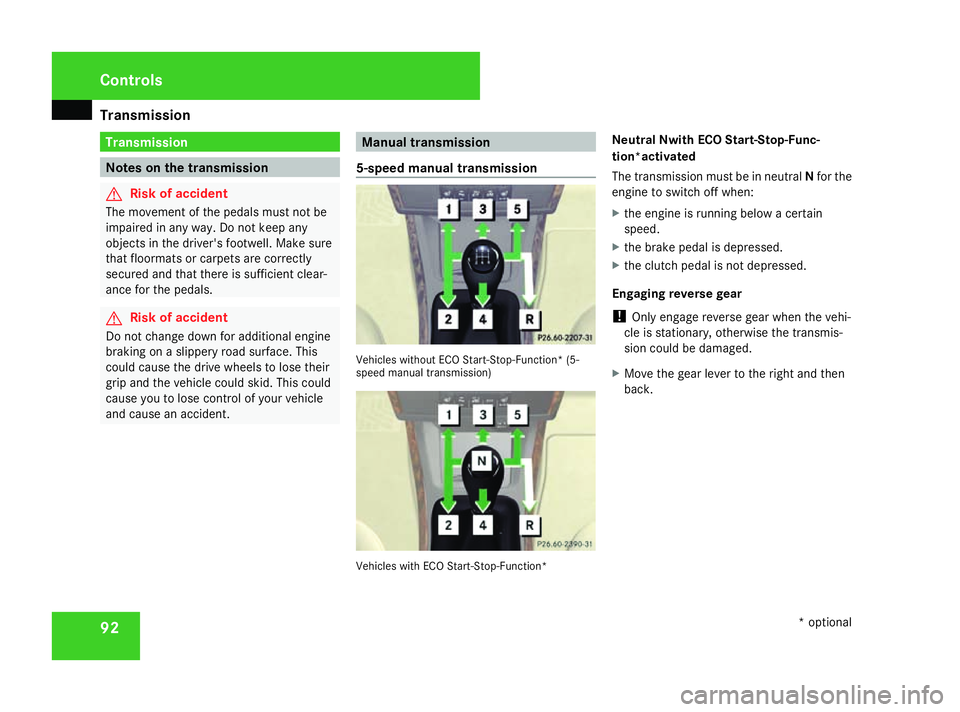
5-speed manual transmission Vehicles without ECO Start-Stop-Function* (5-
speed manual transmission)
Vehicles with ECO Start-Stop-Function*Neutral Nwith ECO Start-Stop-Func-
tion*activated
The transmission must be in neutral
Nfor the
engine to switch off when:
X the engine is running below a certain
speed.
X the brake pedal is depressed.
X the clutch pedal is not depressed.
Engaging reverse gear
! Only engage reverse gear when the vehi-
cle is stationary, otherwise the transmis-
sion could be damaged.
X Move the gear lever to the right and then
back. Controls
* optional
169_AKB; 2; 4, en-GB
wdomann,
Version: 2.10.6
2008-07-16T08:52:06+02:00 - Seite 92 Dateiname: 6515_0315_02_buchblock.pdf; preflight
Page 101 of 305
On-board computer
98 Resetting the trip meter
X Select the Standard display menu
(Y page 103).
X Press and hold the reset button on the left-
hand side of the instrument cluster until the
trip meter is reset. Rev counter
The red band in the rev counter indicates the
engine's overrevving range. The fuel supply is
interrupted to protect the engine when the
red band is reached.
! Do not drive in the overrevving range.
Doing so will damage the engine. H
Environmental note
Avoid driving at high engine speeds, as this
increases your vehicle's consumption
unnecessarily and pollutes the environ-
ment through increased emissions. Clock
On vehicles without an audio system or with
Audio 5*/Audio 20*, you can set the time
using the on-board computer (Y page 109). Outside temperature display
G
Risk of accident
The road surface may be icy, especially in
wooded areas or on bridges, even if tem-
peratures are just above freezing point. The
vehicle could skid if you fail to adapt your
driving style. You should therefore always
adapt your driving style and speed to suit
the weather conditions.
Changes in the outside temperature are dis-
played after a short delay. On-board computer
Points to remember
The on-board computer is activated as soon
as you turn the key to position 1in the ignition
lock. You can use the on-board computer to
call up information relating to your vehicle
and to make and adjust settings. G
Risk of accident
Only use the on-board computer when road
and traffic conditions permit. You would
otherwise be distracted and unable to con-
centrate properly on driving, and could
cause an accident. Multi-function steering wheel
You can control the multi-function display and
the settings in the on-board computer using
the buttons on the multi-function steering
wheel. Controls
* optional
169_AKB; 2; 4, en-GB
wdomann,
Version: 2.10.6
2008-07-16T08:52:06+02:00 - Seite 98 Dateiname: 6515_0315_02_buchblock.pdf; preflight
Page 108 of 305
On-board computer
105
medium (see separate operating instruc-
tions).
X Use the èor· button to select the
Audio/DVD menu.
X To select next/previous track: briefly
press the jork button.
X To select a track from the track list
(rapid scrolling): press and hold the
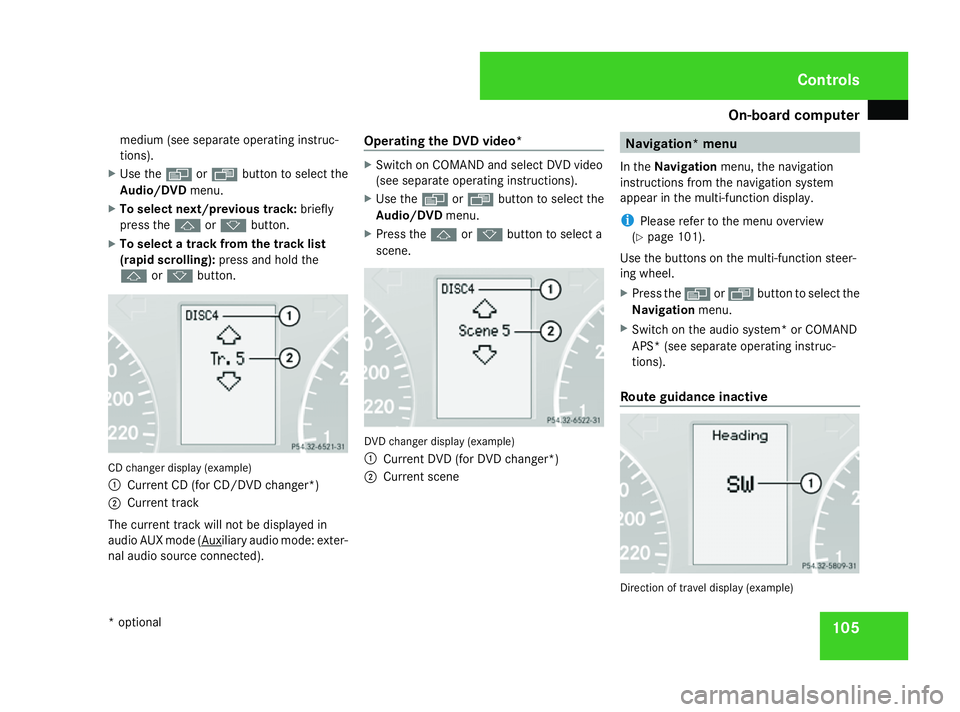
j ork button. CD changer display (example)
1
Current CD (for CD/DVD changer*)
2 Current track
The current track will not be displayed in
audio AUX mode ( Auxiliary audio mode: exter-
nal audio source connected). Operating the DVD video* X
Switch on COMAND and select DVD video
(see separate operating instructions).
X Use the èor· button to select the
Audio/DVD menu.
X Press the jork button to select a
scene. DVD changer display (example)
1
Current DVD (for DVD changer*)
2 Current scene Navigation* menu
In the Navigation menu, the navigation
instructions from the navigation system
appear in the multi-function display.
i Please refer to the menu overview
(Y page 101).
Use the buttons on the multi-function steer-
ing wheel.
X Press the èorÿ button to select the
Navigation menu.
X Switch on the audio system* or COMAND
APS* (see separate operating instruc-
tions).
Route guidance inactive Direction of travel display (example) Controls
* optional
169_AKB; 2; 4, en-GB
wdomann
, Version: 2.10.6 2008-07-16T08:52:06+02:00 - Seite 105 ZDateiname: 6515_0315_02_buchblock.pdf; preflight
Page 118 of 305
Driving sys
tems 115Driving systems
Overview of driving systems
The vehicle's driving systems are described
on the following pages:
R Cruise control* and Speedtronic*, which
are used to control the speed of the vehicle
R Parktronic * and active parking assist*,
which can help you to find a parking space,
to manoeuvre and park
R ECO Start-Stop function*, helps you to
save fuel
The ABS, BAS, adaptive brake lights, ESP ®
and STEER CONTROL driving safety systems
are described in the "Driving safety systems"
section ( Ypage 55). Cruise control*
Cruise control maintains a constant road
speed for you. You must select a low gear in
good time on long and steep downhill gradi-
ents, especially if the vehicle is laden or tow-
ing a trailer. By doing so you will make use of
the braking effect of the engine, which
relieves the load on the brake system and
prevents the brakes from overheating and
wearing too quickly. G
Risk of accident
Never depress the brake pedal continu-
ously while the vehicle is in motion, e.g.
never cause the brakes to rub by applying
constant slight pedal pressure. This causes
the brake system to overheat, increases
the braking distance and can lead to the
brakes failing completely. G
Risk of accident
Do not change down for additional engine
braking on a slippery road surface. This
could cause the drive wheels to lose their
grip and the vehicle could skid.
Use cruise control only if road and traffic con-
ditions make it appropriate to maintain a
steady speed for a prolonged period. You can
store any road speed above 30 km/h. G
Risk of accident
Cruise control cannot take account of road
and traffic conditions.
Always pay attention to traffic conditions
even when cruise control is activated.
Cruise control is only an aid designed to
assist driving. You are responsible for the
vehicle's speed and for braking in good
time. G
Risk of accident
Do not use cruise control:
R in road and traffic conditions which do
not allow you to maintain a constant
speed (e.g. heavy traffic or winding
roads). You could otherwise cause an
accident.
R on slippery roads. Braking or accelerat-
ing could cause the drive wheels to lose
traction and the vehicle could then skid.
R when there is poor visibility, e.g. due to
fog, heavy rain or snow
Cruise control lever You can operate cruise control and variable
Speedtronic with the cruise control lever. Controls
* optional
169_AKB; 2; 4, en-GB
wdomann,
Version: 2.10.6 2008-07-16T08:52:06+02:00 - Seite 115 ZDateiname: 6515_0315_02_buchblock.pdf; preflight
Page 120 of 305
Driving sys
tems 117
Setting a speed X
Press the cruise control lever up 1for a
higher speed or down 4for a lower speed.
X Keep the cruise control lever pressed until
the desired speed is reached.
X Release the cruise control lever.
The new speed is stored.
i Cruise control is not deactivated if you
depress the accelerator pedal. For exam-
ple, if you accelerate briefly to overtake,
cruise control adjusts the vehicle's speed
to the last speed stored after you have fin-
ished overtaking.
i Vehicles with AUTOTRONIC*:
When you decelerate the vehicle using the
cruise control lever, AUTOTRONIC changes
down if deceleration is insufficient.
Making fine adjustments in
1 km/hincrements X
Briefly press the cruise control lever up
1 for a higher speed or down 4for a
lower speed.
The last speed stored is increased or
reduced. Deactivating cruise control There are several ways to deactivate cruise
control:
X Briefly press the cruise control lever for-
wards 6.
or
X Brake.
or
X Briefly press the cruise control lever in the
direction of arrow 5.
Variable Speedtronic is selected. LIM indi-
cator lamp 2in the cruise control lever
lights up.
Cruise control is automatically deactivated if,
for example:
R aquaplaning is detected
R you press the clutch pedal for more than
four seconds on vehicles with a manual
transmission
R you move the selector lever to Nwhile driv-
ing in vehicles with AUTOTRONIC*
i The last speed stored is cleared when you
switch off the engine. Speedtronic*
Speedtronic is used to make sure that you do
not exceed a stored speed. You must select
a low gear in good time on long and steep
downhill gradients, especially if the vehicle is
laden or towing a trailer. By doing so you will
make use of the braking effect of the engine,
which relieves the load on the brake system
and prevents the brakes from overheating
and wearing too quickly. G
Risk of accident
Never depress the brake pedal continu-
ously while the vehicle is in motion, e.g.
never cause the brakes to rub by applying
constant slight pedal pressure. This causes
the brake system to overheat, increases
the braking distance and can lead to the
brakes failing completely. G
Risk of accident
Do not change down for additional engine
braking on a slippery road surface. This
could cause the drive wheels to lose their
grip and the vehicle could skid. Controls
* optional
169_AKB; 2; 4, en-GB
wdomann,
Version: 2.10.6 2008-07-16T08:52:06+02:00 - Seite 117 ZDateiname: 6515_0315_02_buchblock.pdf; preflight
Page 127 of 305
Driving sys
tems 124
Use Active parking assist for parking spaces
R that are parallel to the direction of travel.
R that are on straight roads, not bends.
R that are on the same level as the road, i.e.
not on the pavement, for example;
Parking tips:
R On narrow roads, drive as close to the park-
ing space as possible.
R Parking spaces which are littered, over-
grown or partially occupied by trailer tow-
bars might not be identified properly.
R Snowfall or heavy rain may lead to a parking
space being measured inaccurately.
R Pay attention to the Parktronic warning
messages during the parking procedure
(Y page 121).
R You can intervene in the steering procedure
to correct it at any time. Active parking
assist will then be cancelled.
R When transporting a load which protrudes
from your vehicle you should not use Active
parking assist.
R Never use active parking assist when snow
chains or an emergency spare wheel* are
fitted. R
Make sure that the tyre pressures are
always correct. This has a direct influence
on the parking characteristics of the vehi-
cle.
R The way your vehicle is positioned in the
parking space after parking is dependent
on various factors. These include the posi-
tion and shape of the vehicles parked in
front and behind it as well as the condition
of the location. In some cases, Active park-
ing assist may guide you too far into a park-
ing space, or not far enough into it. In some
cases it may also lead you across or onto
the kerb. If necessary, you should abort the
parking procedure with Active parking
assist.
R You can also engage forward gear prema-
turely. The vehicle redirects and does not
drive as far into the parking space Should
a gear be changed too early to achieve a
sensible parking position, the parking pro-
cedure will be aborted.
! When unavoidable, you should drive over
obstacles such as kerbs slowly and not at
a sharp angle. Otherwise you may damage
the wheel rims or tyres. Detecting parking spaces Active parking assist is switched on automat-
ically when driving forwards. The system is
operational at speeds of up to approximately
35 km/h. While in operation, the system inde-
pendently locates and measures parking
spaces on both sides of the vehicle. When
driving at speeds below 35 km/h, you will see
the parking symbol as a status indicator in the
instrument cluster. Active parking assist only
displays parking spaces on the front-
passenger side as standard. Parking spaces
on the driver's side are displayed as soon as
the turn signal on the driver's side is activa-
ted. If you wish to park in a space on the driv-
er's side, the indicator on the driver's side
must remain on. This must remain switched
on until you acknowledge the use of Active
parking assist by pressing the
jbutton on
the multi-function steering wheel.
When a parking space has been detected, an
arrow towards the right or the left also
appears. Controls
* optional
169_AKB; 2; 4, en-GB
wdomann,
Version: 2.10.6
2008-07-16T08:52:06+02:00 - Seite 124 Dateiname: 6515_0315_02_buchblock.pdf; preflight
Page 129 of 305
Driving sys
tems 126
i
In tight parking spaces, you will achieve
the best parking results by reversing as far
as possible. When doing so, also observe
the Parktronic messages.
X Stop as soon as Parktronic sounds the con-
tinuous warning tone, if not before.
Manoeuvring may be required in tight park-
ing spaces.
Vehicles with manual transmission: the mes-
sage Park Assist active Please shift
to a forward gear appears in the multi-
function display.
Vehicles with AUTOTRONIC*: the message
Park Assist active Please shift to
D appears in the multi-function display.
X Vehicles with manual transmission: When
the car is stationary, shift to first gear.
Vehicles with AUTOTRONIC*: When the car
is stationary, set the selector lever to posi-
tion R.
Active parking assist immediately steers in
the other direction.
On the multi-function display, the message:
Park Assist active Please acceler- ate and brake the vehicle yourself
appears.
i You will achieve the best parking results
by waiting for the steering procedure to
complete before moving forwards.
X Drive forwards and be ready to brake at all
times.
X Stop as soon as Parktronic sounds the con-
tinuous warning tone, if not before.
Vehicles with manual transmission: the mes-
sage Park Assist active Please shift
into reverse gear appears in the multi-
function display.
Vehicles with AUTOTRONIC*, the message
Park Assist active Please shift to
R appears in the multi-function display.
X Further gear changes* may be necessary.
As soon as the parking procedure is com-
plete, the message Parking assistance
finished Please take over appears.
Active parking assist is now deactivated.
Parktronic is still available.
X Manoeuvre if necessary.
X Always observe the warning messages dis-
played by Parktronic (Y page 121).Cancelling active parking assist You can cancel active parking assist at any
time.
X
Stop the movement of the multi-function
steering wheel or steer yourself.
Active parking assist will be cancelled at
once. The multi-function display shows the
message: Park Assist cancelled.
or
X Press the Parktronic button on the centre
console (Y page 122).
Parktronic is switched off and active park-
ing assist is immediately cancelled. The
multi-function display shows the message:
Park Assist cancelled.
Active parking assist is cancelled automati-
cally if:
R a gear is changed* too early
R parking using active parking assist is no
longer possible
R you are driving faster than 10 km/h
R a wheel spins, ESP ®
is activated or fails. In
such cases the vwarning lamp lights
up in the instrument cluster. Controls
* optional
169_AKB; 2; 4, en-GB
wdomann,
Version: 2.10.6
2008-07-16T08:52:06+02:00 - Seite 126 Dateiname: 6515_0315_02_buchblock.pdf; preflight