high beam MERCEDES-BENZ A-CLASS HATCHBACK 2012 Owners Manual
[x] Cancel search | Manufacturer: MERCEDES-BENZ, Model Year: 2012, Model line: A-CLASS HATCHBACK, Model: MERCEDES-BENZ A-CLASS HATCHBACK 2012Pages: 357, PDF Size: 11.61 MB
Page 7 of 357
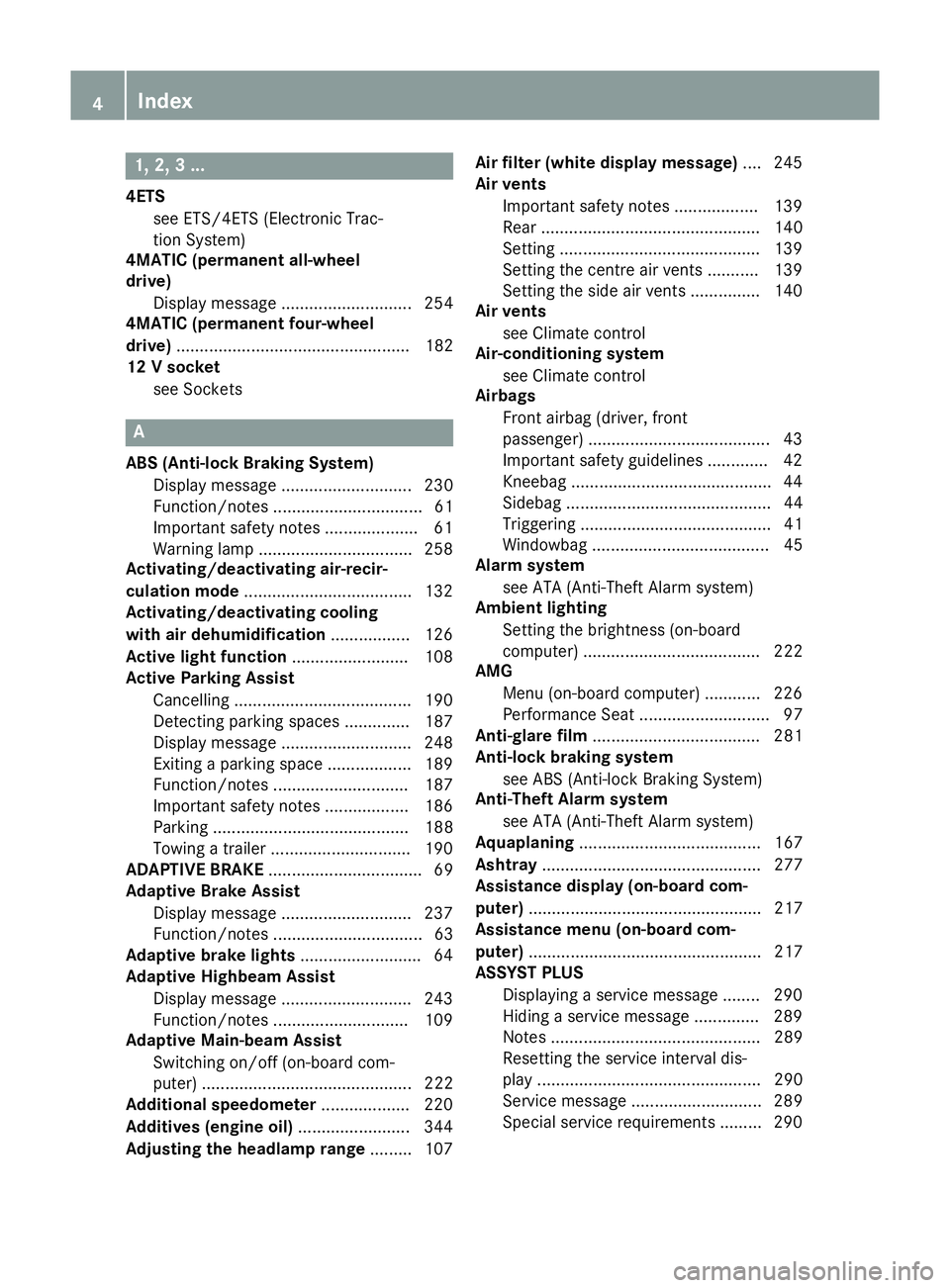
1, 2, 3 ...
4ETS see ETS/4ETS (Electronic Trac-
tion System)
4MATIC (permanent all-wheel
drive)
Display message ............................ 254
4MATIC (permanent four-wheel
drive) .................................................. 182
12 V socket
see Sockets A
ABS (Anti-lock Braking System) Display message ............................ 230
Function/notes ................................ 61
Important safety notes .................... 61
Warning lamp .................................2 58
Activating/deactivating air-recir-
culation mode ................................... .132
Activating/deactivating cooling
with air dehumidification ................. 126
Active light function ......................... 108
Active Parking Assist
Cancelling ...................................... 190
Detecting parking spaces .............. 187
Display message ............................ 248
Exiting a parking space .................. 189
Function/notes ............................ .187
Important safety notes .................. 186
Parking .......................................... 188
Towing a trailer .............................. 190
ADAPTIVE BRAKE ................................. 69
Adaptive Brake Assist
Display message ............................ 237
Function/notes ................................ 63
Adaptive brake lights .......................... 64
Adaptive Highbeam Assist
Display message ............................ 243
Function/notes ............................ .109
Adaptive Main-beam Assist
Switching on/off (on-board com-
puter) ............................................. 222
Additional speedometer ................... 220
Additives (engine oil) ........................ 344
Adjusting the headlamp range ......... 107Air filter (white display message)
.... 245
Air vents
Important safety notes .................. 139
Rear ............................................... 140
Setting .......................................... .139
Setting the centre air vents ........... 139
Setting the side air vents .............. .140
Air vents
see Climate control
Air-conditioning system
see Climate control
Airbags
Front airbag (driver, front
passenger) ....................................... 43
Important safety guidelines ............. 42
Kneebag .......................................... .44
Sidebag ............................................ 44
Triggering ......................................... 41
Windowba g...................................... 45
Alarm system
see ATA (Anti-Theft Alarm system)
Ambient lighting
Setting the brightness (on-board
computer) ...................................... 222
AMG
Menu (on-board computer) ............ 226
Performance Seat ............................ 97
Anti-glare film .................................... 281
Anti-lock braking system
see ABS (Anti-lock Braking System)
Anti-Theft Alarm system
see ATA (Anti-Theft Alarm system)
Aquaplaning ....................................... 167
Ashtray ............................................... 277
Assistance display (on-board com-
puter) .................................................. 217
Assistance menu (on-board com-
puter) .................................................. 217
ASSYST PLUS
Displaying a service message ........ 290
Hiding a service message .............. 289
Notes ............................................. 289
Resetting the service interval dis-
play ................................................ 290
Service message ............................ 289
Special service requirements ......... 290 4
Index
Page 9 of 357
Trailer towing ................................. 199
Bonnet
Active bonnet (pedestrian protec-tion) ............................................... 284
Closing ...........................................2 86
Display message ............................ 254
Important safety notes .................. 284
Opening ......................................... 285
Boot
see Tailgate
Boot load (maximum) ........................ 346
Brake Assist System
see BAS (Brake Assist System)
Brake fluid
Display message ............................ 236
Notes ............................................. 344
Brake lamps
Adaptive .......................................... .64
Changing bulbs .............................. 115
Display message ............................ 240
Brakes
ABS .................................................. 61
Adaptive Brake Assist ...................... 63
BAS .................................................. 62
Brake fluid (notes) ........................ .344
Display message ............................ 230
Driving tips ................................... .166
Important safety notes .................. 166
Parking brake ................................ 163
Warning lamp ................................. 258
Breakdown
see Flat tyre
see Towing away/tow-starting
Bulbs
see Replacing bulbs C
Calling up a fault see Display messages
Car
see Vehicle
Car wash (care) ................................. 291
Care
Automatic car wash ....................... 291
Carpets .......................................... 296
Display .......................................... .295
Exhaust pipe .................................. 294 Exterior lighting ............................
.293
Gear or selector lever .................... 295
High-pressure cleaner .................... 291
Interior .......................................... .295
Matt paintwork .............................. 292
Notes ............................................. 290
Paint .............................................. 292
Plastic trim ................................... .295
Reversing camera .......................... 294
Roof lining ...................................... 296
Seat belt ........................................ 296
Seat cover ..................................... 296
Sensors ......................................... 294
Steering wheel ............................... 295
Trim pieces ................................... .295
Washing by hand ........................... 291
Wheels .......................................... .292
Windows ........................................ 293
Wiper blades .................................. 293
Wooden trim .................................. 295
Central locking
Automatic locking (on-board com-
puter) ............................................. 223
Locking/unlocking (key ).................. 75
Centre console
Lower section .................................. 35
Upper section .................................. 34
Changing bulbs
Brake lamps ................................... 115
Cornering light function ................. 114
Dipped-beam headlamp s............... 113
Main-beam headlamp s................... 114
Rear foglamp ................................. 115
Reversing lamps ............................ 115
Tail lamps ...................................... 115
Turn signals (front) ......................... 114
Turn signals (rear) .......................... 115
Child seat
Automatic recognition ..................... 52
ISOFIX .............................................. 53
On the front-passenger sea t............ 51
Problem (malfunction) ..................... 56
Recommendations ........................... 58
Suitable positions ............................ 56
Top Tether ....................................... 54
Child-proof locks
Important safety notes .................... 60
Rear doors ....................................... 60 6
Index
Page 14 of 357

Problem (malfunction) ...................1
61
Quality (diesel )............................... 341
Refuelling ....................................... 159
Tank content/reserve fue l............. 339
Fuel filler flap
Opening/closing ............................ 160
Fuel filter (white display message) .. 245
Fuel level
Calling up the range (on-board
computer) ...................................... 212
Gaug e.............................................. 30
Fuel reserve
see Fuel
Fuel tank
Capacity ........................................ 339
Problem (malfunction) ................... 161
Fuses
Allocation chart ............................. 315
Before changing ............................. 314
Fuse box in the engine compart-
ment .............................................. 315
Fuse box in the front-passenger
footwell .......................................... 315
Important safety notes .................. 314 G
Gear indicator (on-board com-
puter) .................................................. 226
Gear or selector lever (cleaning
instructions) ...................................... 295
Gearshift program
SETUP (on-board computer) .......... 226
Genuine Mercedes-Benz parts ........... 21
Glove compartment .......................... 269H
Handbrake see Parking brake
Hazard warning lamps ...................... 108
Display message ............................ 256
Head restraints
Adjusting ......................................... 94
Adjusting (electrically) ..................... 95
Adjusting (manually) ........................ 95
Adjusting (rear) ................................ 96
Fitting/removing (rear) .................... 96 Headlamp
Cleaning system (function) ............ 108
Cleaning system (notes) ................ 345
Headlamps
Misting up ...................................... 110
Topping up the cleaning system .... 289
see Automatic headlamp mode
Heating
see Climate control
High-pressure cleaners .................... 291
Hill start assist .................................. 145
HOLD function
Deactivating ................................... 180
Display message ............................ 246
Function/note s............................. 180 I
Ignition lock see Key positions
Immobiliser .......................................... 69
Indicator and warning lamps
Coolant .......................................... 264
DISTRONIC PLUS ........................... 266
Engine diagnostics ......................... 264
SPORT handling mode ................... 261
Indicator lamps
Display message ............................ 240
see Warning and indicator lamps
Inspection
see ASSYST PLUS
Instrument cluster
Overview .......................................... 30
Setting s......................................... 220
Warning and indicator lamps ........... 32
Instrument cluster lighting .............. 208
Intelligent Light System
Activating/deactivating ................. 221
Display message ............................ 242
Overview ........................................ 108
Setting the dipped-beam head-
lamps for driving on the right/left .. 221
Interior lighting ................................. 111
Automatic control system .............. 111
Delayed switch-off (on-board
computer) ...................................... 223
Emergency lighting ........................ 111
Manual control ............................... 111 Index
11
Page 15 of 357

Overview ........................................1
11
Reading lamp ................................. 111
Setting the ambient lighting
brightness (on-board computer) .... 222
Interior motion sensor ........................ 70
ISOFIX child seat securing system .... 53J
Jack Storage location ............................ 299
Using ............................................. 326
Jump starting (engine) ......................308 K
Key Changing the battery ....................... 76
Checking the battery ....................... 76
Convenience closing feature ............ 85
Convenience opening feature .......... 84
Display message ............................ 256
Door central locking/unlocking ....... 75
Emergency key element ................... 75
Important safety notes .................... 74
Loss ................................................. 78
Modifying the programming ............. 75
Positions (ignition lock) ................. 143
Problem (malfunction) ..................... 78
Starting the engine ........................ 144
Key positions (ignition lock) ............ 143
Kickdown
Driving tips ................................... .154
Manual drive program .................... 158
Kneebag ............................................... 44 L
Lamps see Warning and indicator lamps
Lane Keeping Assist
Activating/deactivating ................. 219
Display message ............................ 247
Function/informatio n.................... 199
Lane package ..................................... 197
Lap time (RACETIMER) ...................... 226
Lashing eyelets ................................. 273
Licence plate lamp (display mes-
sage) ................................................... 241 Light sensor (display message)
....... 242
Lighting
see Lights
Lights
Activating/deactivating the Intel-
ligent Light System ........................ 221
Activating/deactivating the inte-
rior lighting delayed switch-off ....... 223
Active light function ....................... 108
Automatic headlamp mod e............ 105
Cornering light function ................. 109
Dipped-beam headlamp s............... 105
Display message ............................ 239
Driving abroad ............................... 104
Foglamps ....................................... 106
Foglamps (extended range) ........... 109
Hazard warning lamps ................... 108
Headlamp flashe r........................... 108
Headlamp rang e............................ 107
Light switch ................................... 105
Main-beam headlamp s................... 107
Motorway mod e............................. 109
Parking lamps ................................ 106
Rear foglamp ................................. 106
Setting the ambient lighting
brightness (on-board computer) .... 222
Side lamps ..................................... 106
Switching Adaptive Highbeam
Assist on/of f................................. 222
Switching the daytime driving
lights on/off (on-board com-
puter) ............................................. 221
Switching the daytime driving
lights on/off (switch) ..................... 105
Switching the exterior lighting
delayed switch-off on/off (on-
board computer) ............................ 222
Switching the surround lighting
on/off (on-board computer) .......... 222
Turn signals ................................... 107
see Interior lighting
see Replacing bulbs
LIM indicator lamp
Cruise control ................................ 169
DISTRONIC PLUS ........................... 174
Variable SPEEDTRONIC ................. 171
Limiting the speed
see SPEEDTRONIC 12
Index
Page 16 of 357
Loading guidelines
............................ 268
Locking
see Central locking
Locking (doors)
Automatic ........................................ 81
Emergency locking .......................... .81
From inside (central locking but-
ton) .................................................. 80
Locking centrally
see Central locking
Locking verification signal (on-
board computer) ............................... 223
Luggage compartment enlarge-
ment ................................................... 271
Important safety notes .................. 271
Luggage compartment floor
Important safety notes .................. 274
opening/closing ............................ 274
stowage well, under ....................... 274
Luggage net ....................................... 271
Lumbar support
Adjusting the 4-way lumbar sup-
port .................................................. 96 M
M+S tyres ........................................... 320
Main-beam headlamps
Changing bulb s.............................. 114
Display message ............................ 241
Switching Adaptive Highbeam
Assist on/of f................................. 109
Switching on/of f........................... 107
Maintenance
see ASSYST PLUS
Manual transmission
Engaging reverse gear ................... 151
Gear lever ...................................... 150
Pulling away ................................... 144
Shift recommendation ................... 151
Shifting to neutral .......................... 151
Starting the engine ........................ 144
Matt finish (cleaning instructions) .. 292
Memory card (audio) ......................... 215
Memory function ............................... 101
Mercedes-Benz Service Centre
see Qualified specialist workshop Message memory (on-board com-
puter) .................................................. 229
Messages
see Display messages
Mirrors
see Exterior mirrors
see Rear-view mirror
see Vanity mirror (in sun visor)
Mobile phone
Frequencies ................................... 336
Installation ..................................... 336
Menu (on-board computer) ............ 215
Notes/placing in the bracket ......... 279
Transmission output (maximum) .... 336
Mobile telephone
Pre-installed bracket ...................... 281
Modifying the programming (key) ..... 75
MOExtended tyres ............................. 300
Motorway mode ................................ 109
MP3
Operating ....................................... 215
see Separate operating instructions
Multifunction display
Function/note s............................. 210
Permanent display ......................... 220
Multifunction steering wheel
Operating the on-board compute r..2 09
Overview .......................................... 33 N
Navigation Menu (on-board computer) ............ 213
see separate operating instructions
Notes on running in a new vehicle .. 142 O
Occupant safety Children in the vehicle ..................... 50
Important safety notes .................... 40
Odometer .......................................... .211
see Total distance recorder
see Trip meter
Oil
see Engine oil
On-board computer
AMG menu ..................................... 226 Index
13
Page 111 of 357

i
Vehicles with Adaptive Highbeam Assist:
when Adaptive Highbeam Assist is active, it controls activation of the main-beam head-lamps (Y page 109).
Headlamp flasher X
To switch on: turn the key in the ignition
lock to position 1or 2, or start the engine.
X Pull the combination switch in the direction
of arrow =. Hazard warning lamps
The hazard warning lamps switch on auto-
matically if:
R an airbag is deployed or
R the vehicle decelerates rapidly from a
speed of more than 70 km/h and comes to
a standstill
X To switch on the hazard warning lamps:
press button :.
All turn signals flash. If you now switch on a turn signal using the combination switch,
only the turn signal lamp on the corre-
sponding side of the vehicle will flash.
X To switch off the hazard warning lamps:
press button :.
The hazard warning lamps switch off auto-
matically if the vehicle reaches a speed of
over 10 km/h again after a full brake appli-
cation.
i The hazard warning lamps still operate if
the ignition is switched off. Headlamp cleaning system
If the "Wipe with washer fluid" function is
operated five times (Y page 116) while the
lights are on and the engine is running, the
headlamps are cleaned automatically. When
you switch off the ignition, the automatic
headlamp cleaning system is reset and count-
ing is resumed from 0. Intelligent Light System
General notes The Intelligent Light System is a system that
adjusts the headlamps automatically to suit
the prevailing driving and weather conditions.
It offers advanced functions for improved illu-
mination of the road surface, e.g. depending
on the vehicle speed or weather conditions.
The system includes the active light function, cornering light function, motorway mode and
extended range foglamps. The system is only active when it is dark.
You can activate or deactivate the "IntelligentLight System" using the on-board computer
(Y page 221).
Active light function The active light function is a system that
moves the headlamps according to the steer-
ing movements of the front wheels. In this
way, relevant areas remain illuminated while
driving. This allows you to recognise pedes-
trians, cyclists and animals.
Active: when the lights are switched on. 108
Exterior lightingLights and windscreen wipers
Page 112 of 357

Cornering light function
The cornering light function improves the illu-
mination of the road over a wide angle in the
direction you are turning, enabling better vis- ibility in tight bends, for example. The corner-ing light function can only be activated when
the dipped-beam headlamps are switched on.
Active:
R if you are driving at speeds below 40 km/h
and the turn signal is activated or the steer- ing wheel is turned.
R if you are driving at speeds between
40 km/h and 70 km/h and turn the steer-
ing wheel.
Not active: if you are driving at speeds above
40 km/h or switch off the turn signal or turn
the steering wheel to the straight-ahead posi-
tion.
The cornering lamp may remain lit for a short
time, but is automatically switched off after
no more than three minutes.
Motorway mode Motorway mode increases the range of the
beam.
Active:
R if you are driving at speeds above
110 km/h and do not make any large steer-
ing movements for 1000 m
R if you are driving at speeds above
130 km/h
Not active: if you are driving at speeds below
80 km/h following activation.
Extended range foglamps The extended range foglamps reduce the
glare experienced by the driver and improve
the illumination of the edge of the carriage-
way.
Active:
if you are driving at speeds below
70 km/h and you switch on the rear foglamp.
Not active: if you are driving at speeds above
100 km/h or if you switch off the rear foglamp following activation. Adaptive Highbeam Assist
G
WARNING
Adaptive Highbeam Assist does not recognise road users:
R who have no lights, e.g. pedestrians
R who have poor lighting, e.g. cyclists
R whose lighting is blocked, e.g. by a barrier
In very rare cases, Adaptive Highbeam Assist
recognises road users too late or not at all. In
this, or in similar situations, the automatic Exterior lighting
109Lights and windscreen wipers
Z
Page 113 of 357
main-beam headlamps will not be deactivated
or activated regardless. There is a risk of an
accident.
Always carefully observe the traffic conditions
and switch off the main-beam headlamps in
good time.
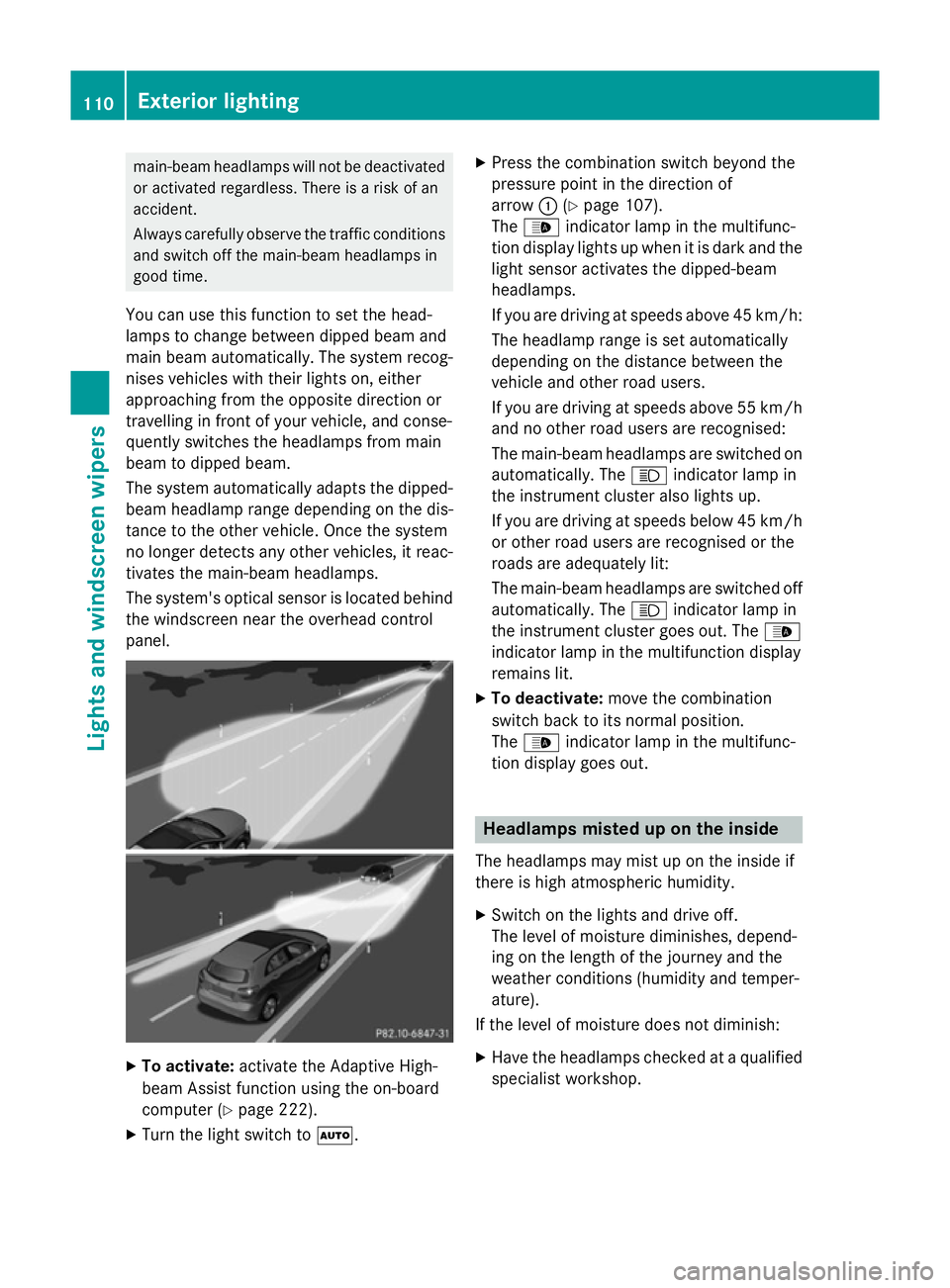
You can use this function to set the head-
lamps to change between dipped beam and
main beam automatically. The system recog-
nises vehicles with their lights on, either
approaching from the opposite direction or
travelling in front of your vehicle, and conse-
quently switches the headlamps from main
beam to dipped beam.
The system automatically adapts the dipped- beam headlamp range depending on the dis-
tance to the other vehicle. Once the system
no longer detects any other vehicles, it reac-
tivates the main-beam headlamps.
The system's optical sensor is located behind
the windscreen near the overhead control
panel. X
To activate: activate the Adaptive High-
beam Assist function using the on-board
computer (Y page 222).
X Turn the light switch to Ã.X
Press the combination switch beyond the
pressure point in the direction of
arrow :(Ypage 107).
The _ indicator lamp in the multifunc-
tion display lights up when it is dark and the light sensor activates the dipped-beam
headlamps.
If you are driving at speeds above 45 km/h:
The headlamp range is set automatically
depending on the distance between the
vehicle and other road users.
If you are driving at speeds above 55 km/h and no other road users are recognised:
The main-beam headlamps are switched on
automatically. The Kindicator lamp in
the instrument cluster also lights up.
If you are driving at speeds below 45 km/h or other road users are recognised or the
roads are adequately lit:
The main-beam headlamps are switched off
automatically. The Kindicator lamp in
the instrument cluster goes out. The _
indicator lamp in the multifunction display
remains lit.
X To deactivate: move the combination
switch back to its normal position.
The _ indicator lamp in the multifunc-
tion display goes out. Headlamps misted up on the inside
The headlamps may mist up on the inside if
there is high atmospheric humidity.
X Switch on the lights and drive off.
The level of moisture diminishes, depend-
ing on the length of the journey and the
weather conditions (humidity and temper-
ature).
If the level of moisture does not diminish:
X Have the headlamps checked at a qualified
specialist workshop. 110
Exterior lightingLights and windscreen wipers
Page 115 of 357
X
To switch off the crash-responsive
emergency lighting: press the hazard
warning lamp button.
or X Lock and then unlock the vehicle using the
key. Replacing bulbs
Important safety notes
Xenon bulbs G
DANGER
Xenon bulbs are under high voltage. You can
get an electric shock if you remove the cover
of the xenon bulb and touch the electrical
contacts. There is a risk of fatal injury.
Never touch the parts or the electrical con-
tacts of the xenon bulb. Always have work on the xenon bulbs carried out at a qualified spe- cialist workshop.
If your vehicle is equipped with xenon bulbs,
you can recognise this by the following: the
cone of light from the xenon bulbs moves
from the top to the bottom and back again
when you start the engine. For this to be
observed, the lights must be switched on
before starting the engine.
Bulbs and lamps are an important aspect of
vehicle safety. You must therefore make sure
that these function correctly at all times.
Have the headlamp setting checked regularly.
Other bulbs G
WARNING
Bulbs, lamps and plug connectors can
become very hot during use. When replacing a bulb, you could burn yourself on these com-
ponents. There is a risk of injury.
Allow these components to cool down before replacing the bulb.
There are bulbs other than the xenon bulbs
that you cannot replace. Replace only the bulbs listed (Y
page 112). Have the bulbs that
you cannot replace yourself replaced at a
qualified specialist workshop.
If you require assistance replacing bulbs, con-
sult a qualified specialist workshop.
Do not touch the glass tube of new bulbs with
your bare hands. Even minor contamination
can burn into the glass surface and reduce
the service life of the bulbs. Always use a lint- free cloth or only touch the base of the bulb
when fitting.
Only use bulbs of the correct type.
If the new bulb still does not light up, consult
a qualified specialist workshop.
Bulbs and lamps are an important aspect of
vehicle safety. You must therefore make sure that these function correctly at all times.
Have the headlamp setting checked regularly. Overview of bulb replacement – bulbs
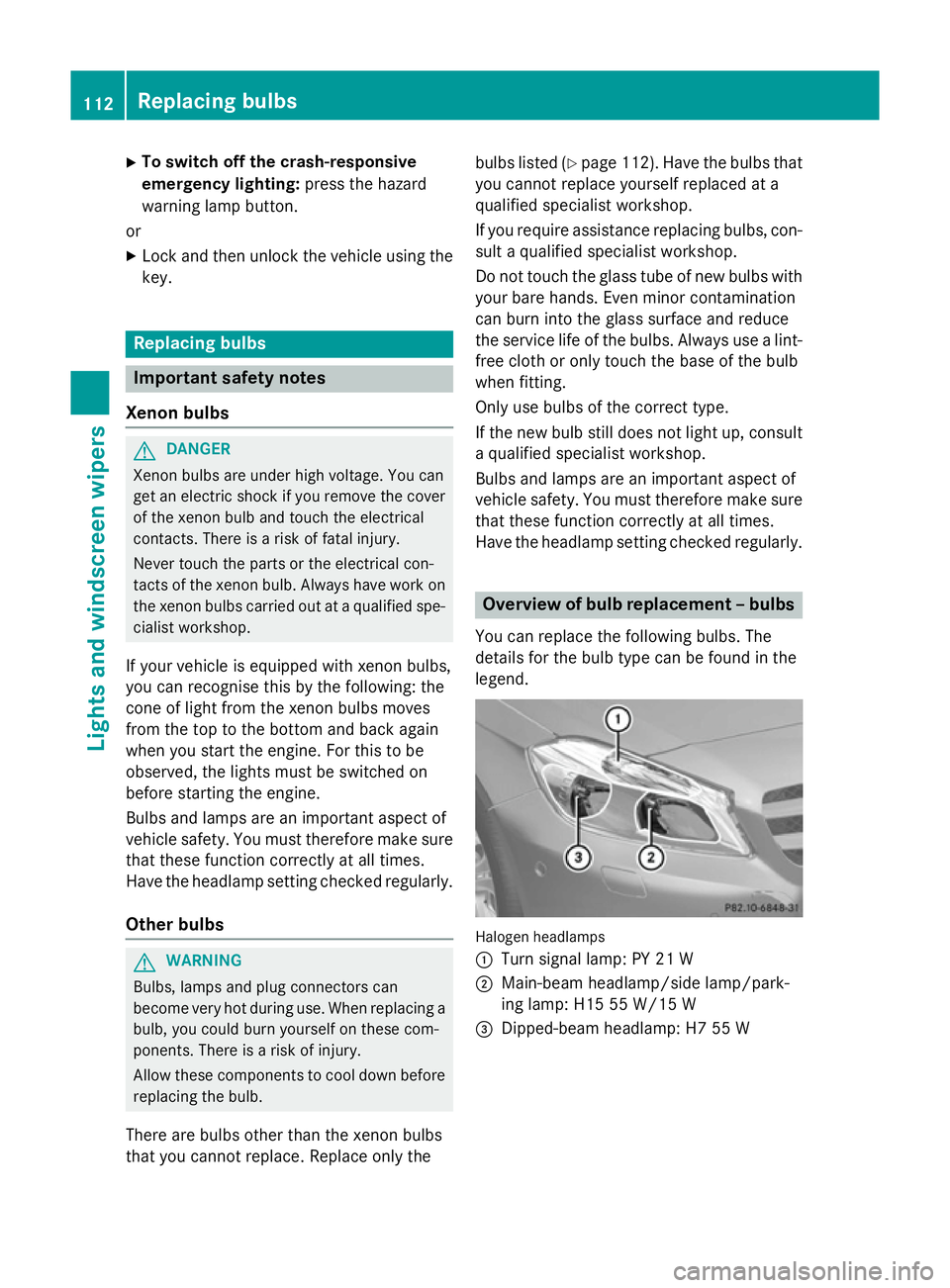
You can replace the following bulbs. The
details for the bulb type can be found in the
legend. Halogen headlamps
:
Turn signal lamp: PY 21 W
; Main-beam headlamp/side lamp/park-
ing lamp: H15 55 W/15 W
= Dipped-beam headlamp: H7 55 W 112
Replacing bulbsLights and
windscreen wipers
Page 214 of 357
?
Menu bar
A Drive program (Y page 152)
B Transmission position (Y page 152)
X To show the menu bar ?:press the =
or ; button on the steering wheel.
Menu bar ?disappears after a few seconds.
Text field =shows the selected menu or
submenu as well as display messages.
i You can set the time using the audio sys-
tem or COMAND Online; see the separate
operating instructions.
The following messages may appear in the
multifunction display:
Z Gearshift recommendation, for
manual transmission
(Ypage 151) or automatic trans-
mission (Y page 156)
XjY Active Parking Assist
(Ypage 186)
¯ Cruise control (Y page 168)
È SPEEDTRONIC (Y page 171)
_ Adaptive Highbeam Assist
(Ypage 109)
¤ ECO start/stop function
(Ypage 146)
ë HOLD function (Y page 179)
120 km/h!
120 km/h! Maximum permissible speed
exceeded (only for certain coun-
tries) Menus and submenus
Menu overview
Operating the on-board computer
(Y page 209).
Depending on the equipment fitted in the
vehicle, you can call up the following menus:
R Trip Trip menu (Y page 211)
R Navi
Navi menu (navigation instructions)
(Y page 213)
R Audio
Audio menu (Y page 214) R
Tel
Tel (telephone) menu (Y page 215)
R Assist
Assist (Assistance) menu (Y page 217)
R Serv.
Serv. menu (Y page 219)
R Settings
Settings menu (Ypage 220)
R AMG
AMG menu in AMG vehicles (Y page 226)
The Audio
Audio, Navi
NaviandTel
Tel menus differ slightly
in vehicles with Audio 5, Audio 20 and in vehi-
cles with COMAND Online. The examples
given in this Owner's Manual apply to vehicles equipped with COMAND Online. Trip menu
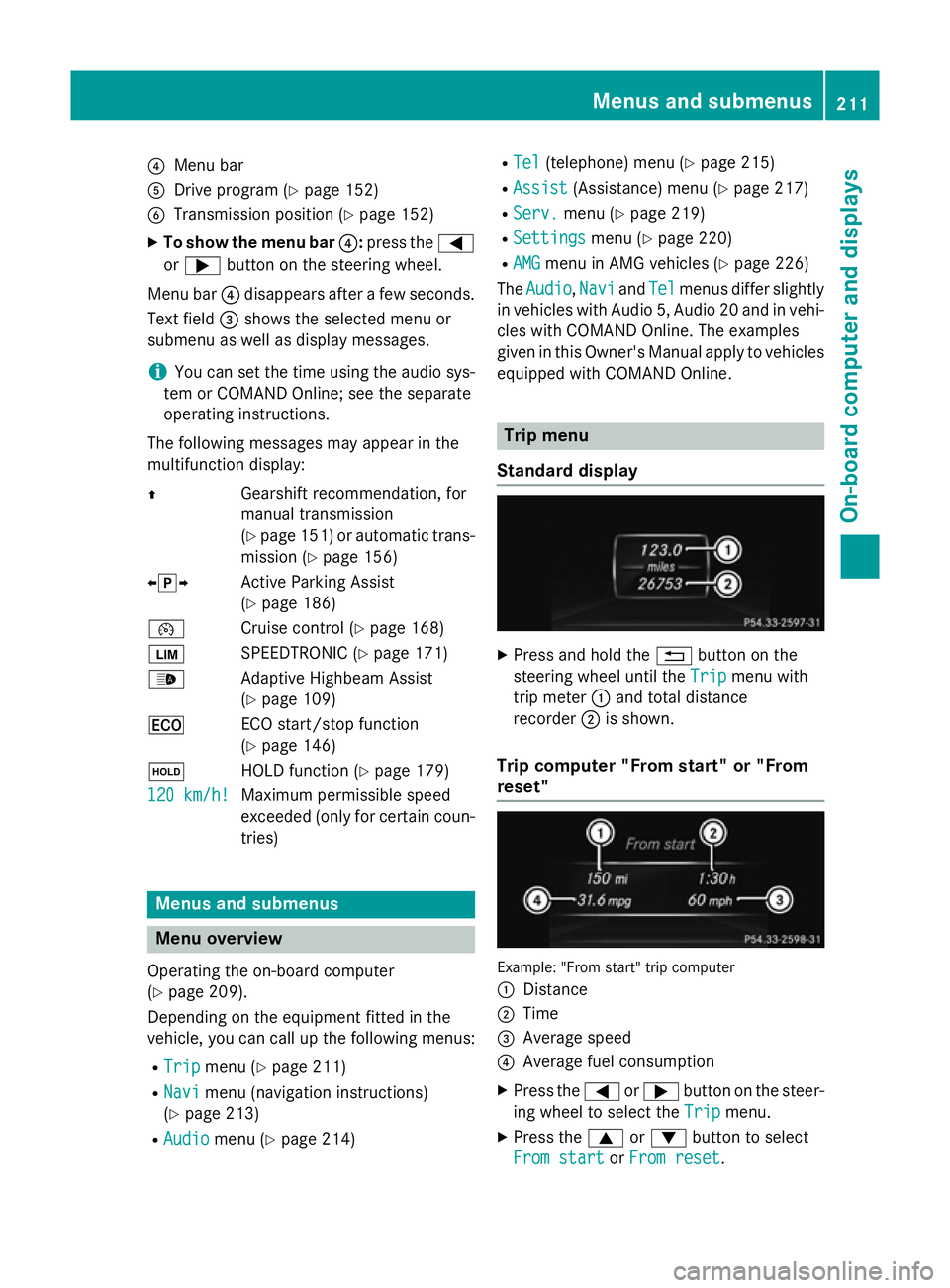
Standard display X
Press and hold the %button on the
steering wheel until the Trip Tripmenu with
trip meter :and total distance
recorder ;is shown.
Trip computer "From start" or "From
reset" Example: "From start" trip computer
:
Distance
; Time
= Average speed
? Average fuel consumption
X Press the =or; button on the steer-
ing wheel to select the Trip Tripmenu.
X Press the 9or: button to select
From start
From start orFrom reset
From reset. Menus and submenus
211On-board computer and displays Z