steering MERCEDES-BENZ A-CLASS HATCHBACK 2015 Owner's Guide
[x] Cancel search | Manufacturer: MERCEDES-BENZ, Model Year: 2015, Model line: A-CLASS HATCHBACK, Model: MERCEDES-BENZ A-CLASS HATCHBACK 2015Pages: 417, PDF Size: 11.91 MB
Page 160 of 417
There is a risk of an accident.
Wear suitable footwear to ensure correct
usage of the pedals. G
WARNING
If you switch off the ignition while driving,
safety-relevant functions are only available
with limitations, or not at all. This could affect, for example, the power steering and the brake
boosting effect. You will require considerably
more effort to steer and brake. There is a risk of an accident.
Do not switch off the ignition while driving. G
WARNING
If the parking brake has not been fully
released when driving, the parking brake can:
R overheat and cause a fire
R lose its hold function.
There is a risk of fire and an accident. Release
the parking brake fully before driving off.
! Do not warm up the engine when the vehi-
cle is stationary. Drive off immediately.
Avoid high engine speeds and driving at full throttle until the engine has reached its
operating temperature.
Only shift the automatic transmission to
the desired drive position when the vehicle is stationary.
Where possible, avoid spinning the drive
wheels when pulling away on slippery
roads. You could otherwise damage the
drive train.
! Mercedes-AMG vehicles:
avoid full-load
operation and engine speeds greater than
5000 rpm when the engine is cold. This will
help to protect the engine and maintain
smooth engine operation. Key positions
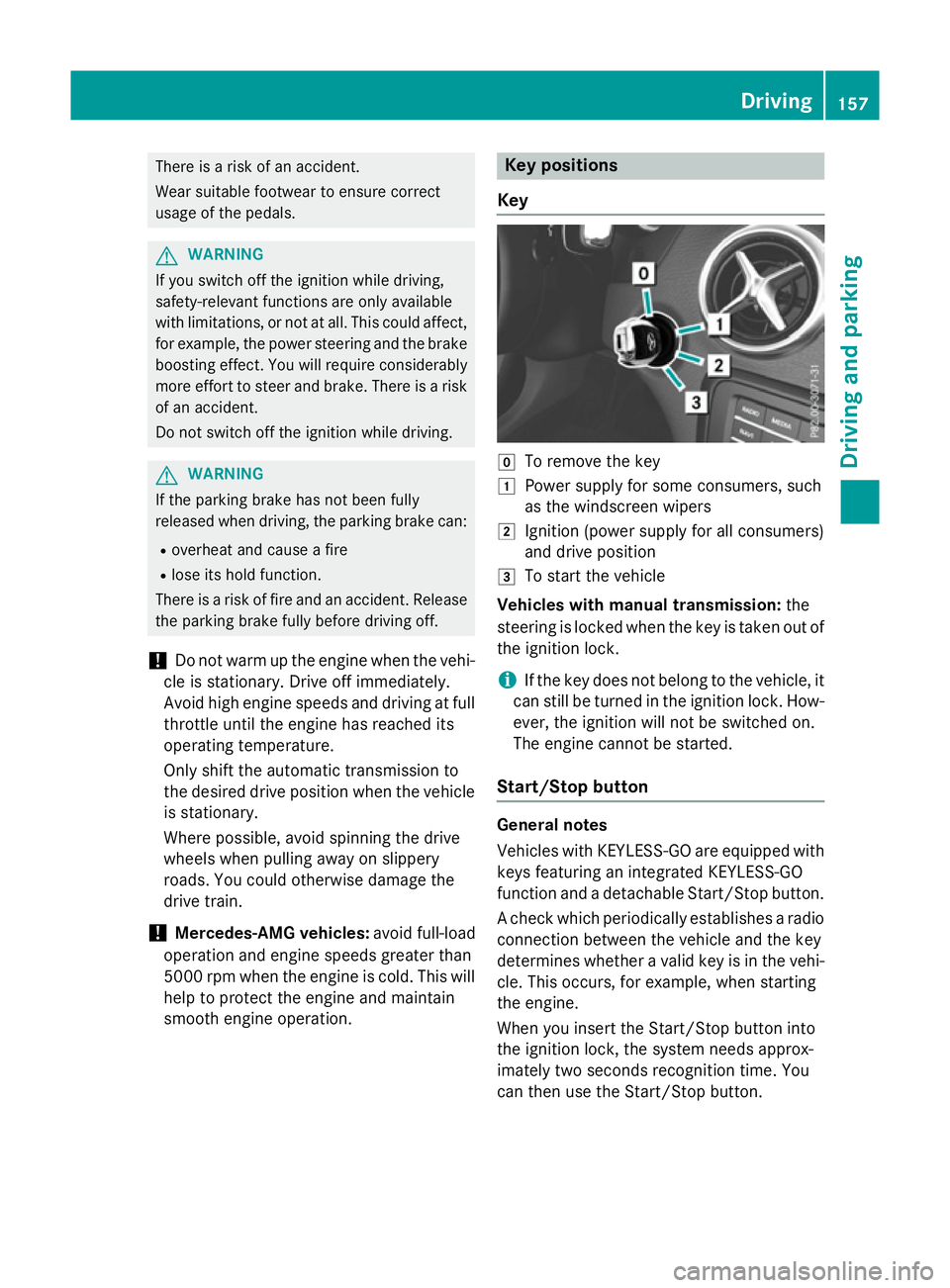
Key g
To remove the key
1 Power supply for some consumers, such
as the windscreen wipers
2 Ignition (power supply for all consumers)
and drive position
3 To start the vehicle
Vehicles with manual transmission: the
steering is locked when the key is taken out of
the ignition lock.
i If the key does not belong to the vehicle, it
can still be turned in the ignition lock. How-
ever, the ignition will not be switched on.
The engine cannot be started.
Start/Stop button General notes
Vehicles with KEYLESS-GO are equipped with
keys featuring an integrated KEYLESS-GO
function and a detachable Start/Stop button.
A check which periodically establishes a radio
connection between the vehicle and the key
determines whether a valid key is in the vehi- cle. This occurs, for example, when starting
the engine.
When you insert the Start/Stop button into
the ignition lock, the system needs approx-
imately two seconds recognition time. You
can then use the Start/Stop button. Driving
157Driving and parking Z
Page 169 of 417
Problem
Possible causes/consequences and
M
MSolutions Vehicles with a petrol
engine:
The engine is not run-
ning smoothly and is
misfiring. There is a malfunction in the engine electronics or in a mechanical
component of the engine management system.
X Only depress the accelerator pedal slightly.
Otherwise, non-combusted fuel may get into the catalytic con-
verter and damage it.
X Have the cause rectified immediately at a qualified specialist
workshop. The coolant tempera-
ture display is showing
more than 120 †. The
coolant warning lamp
may also be on and a
warning tone may
sound. The coolant level is too low. The coolant is too hot and the engine
is no longer being cooled sufficiently.
X Stop as soon as possible and allow the engine and the coolant to
cool down.
X Check the coolant level (Y page 326). Observe the warning
notes as you do so and top up the coolant if necessary. If the coolant level is correct, the engine radiator fan may be faulty.
The coolant is too hot and the engine is no longer being cooled
sufficiently.
X If the coolant temperature is below 120 †, you can continue
driving to the nearest qualified specialist workshop.
X Avoid heavy loads on the engine as you do so, e.g. driving in
mountainous terrain and stop-start traffic. DYNAMIC SELECT button (all vehicles
except Mercedes-AMG vehicles)
Use the DYNAMIC SELECT button to change
the drive program. Depending on the drive
program selected, the following vehicle char- acteristics will change:
R the drive (engine and transmission man-
agement)
R the suspension (vehicles with damping sys-
tem or AMG RIDE CONTROL)
R the steering
R the availability of the ECO start/stop func-
tion
R the climate control
If the ignition is switched off for less than four hours, the previously selected drive program
is activated when the engine is next started. If the ignition is switched off for more than four hours, drive program
Cis activated when the
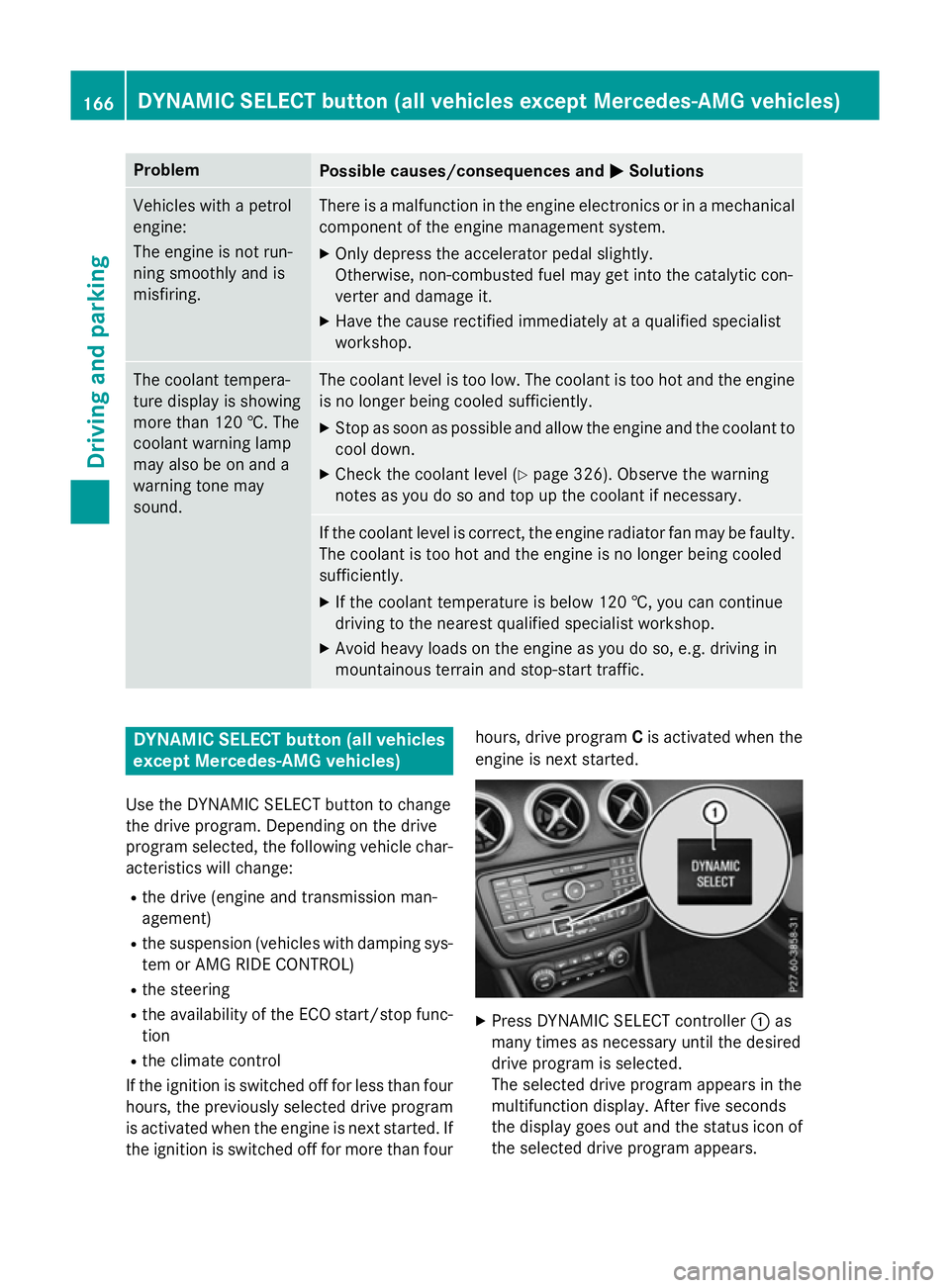
engine is next started. X
Press DYNAMIC SELECT controller :as
many times as necessary until the desired
drive program is selected.
The selected drive program appears in the
multifunction display. After five seconds
the display goes out and the status icon of the selected drive program appears. 166
DYNAMIC SELECT button (all vehicles except Mercedes-AMG vehicles)Driving and parking
Page 170 of 417
In addition, the current drive program set-
tings are displayed briefly in the Audio 20 or
COMAND Online display.
i In a few countries, the ECO start/stop
function is deactivated at the factory due to the quality of the available fuel. In this case,
the ECO start/stop function is not available in any drive program, regardless of the dis-
play in the Audio 20 or COMAND Online
display.
Available drive programs: C
Comfort Comfortable and econom-
ical driving characteristics S
Sport Sporty driving character-
istics
I
Individual Individual settings
E
Economy Particularly economical
driving characteristics
Additional information for drive programs
(Y page 175).
You can also change gear yourself using the
steering wheel gearshift paddles. Further
information on the manual drive program
(Y page 177). DYNAMIC SELECT controller
(Mercedes-AMG vehicles)
Use the DYNAMIC SELECT controller to
change the drive program. Depending on the drive program selected, the following vehiclecharacteristics will change:
R the drive
R the transmission management
R ESP ®
R the suspension (vehicles with AMG RIDE
CONTROL)
R the availability of the ECO start/stop func-
tion
R the availability of gliding mode If the ignition is switched off for less than four
hours, the previously selected drive program
is activated when the engine is next started. Ifthe ignition is switched off for more than four
hours, drive program Cis activated when the
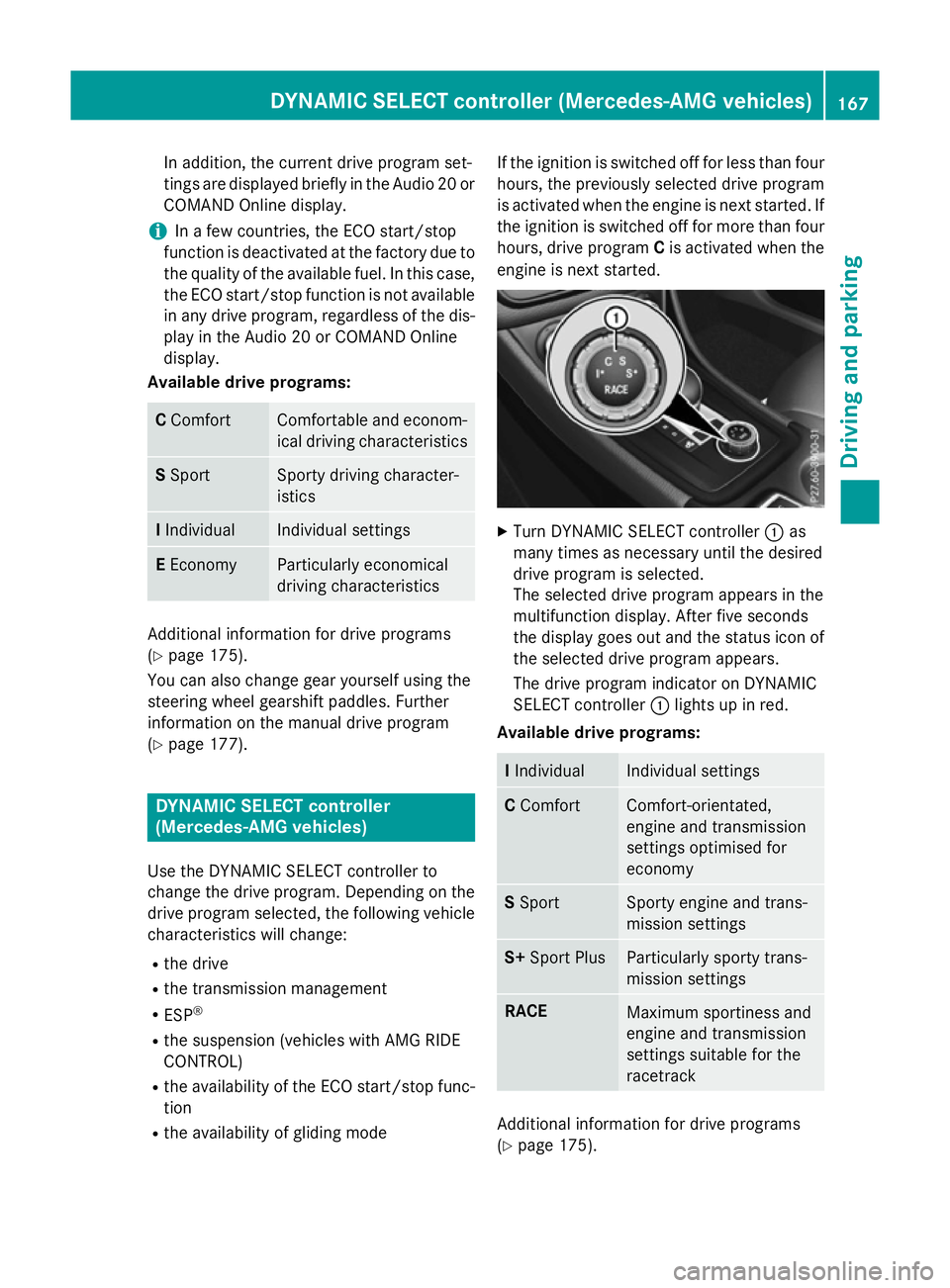
engine is next started. X
Turn DYNAMIC SELECT controller :as
many times as necessary until the desired
drive program is selected.
The selected drive program appears in the
multifunction display. After five seconds
the display goes out and the status icon of the selected drive program appears.
The drive program indicator on DYNAMIC
SELECT controller :lights up in red.
Available drive programs: I
Individual Individual settings
C
Comfort Comfort-orientated,
engine and transmission
settings optimised for
economy
S
Sport Sporty engine and trans-
mission settings
S+
Sport Plus Particularly sporty trans-
mission settings
RACE
Maximum sportiness and
engine and transmission
settings suitable for the
racetrack
Additional information for drive programs
(Y page 175). DYNAMIC SELECT controller (Mercedes-AMG vehicles)
167Driving and parking Z
Page 171 of 417
You can also change gear yourself using the
steering wheel gearshift paddles. Further
information on the manual drive program
(Y page 177). Manual transmission
Gear lever
! Only engage gear when the clutch pedal is
depressed.
! When shifting to
5thand 6thgear, you
must press the shift lever to the right. Oth-
erwise, you could shift unintentionally into
3rd or4th gear and damage the engine or
transmission.
If you shift down at too high a speed (trans-
mission braking), this can cause the engine to overrev, leading to engine damage.
Do not use the clutch bite point to keep the
vehicle stationary on uphill gradients.
There is otherwise a risk of damaging the
clutch.
! On long and steep downhill gradients,
especially if the vehicle is laden or towing a
trailer, you must shift into gear 1, 2or3in
good time. This uses the engine's braking
effect. This relieves the load on the brake
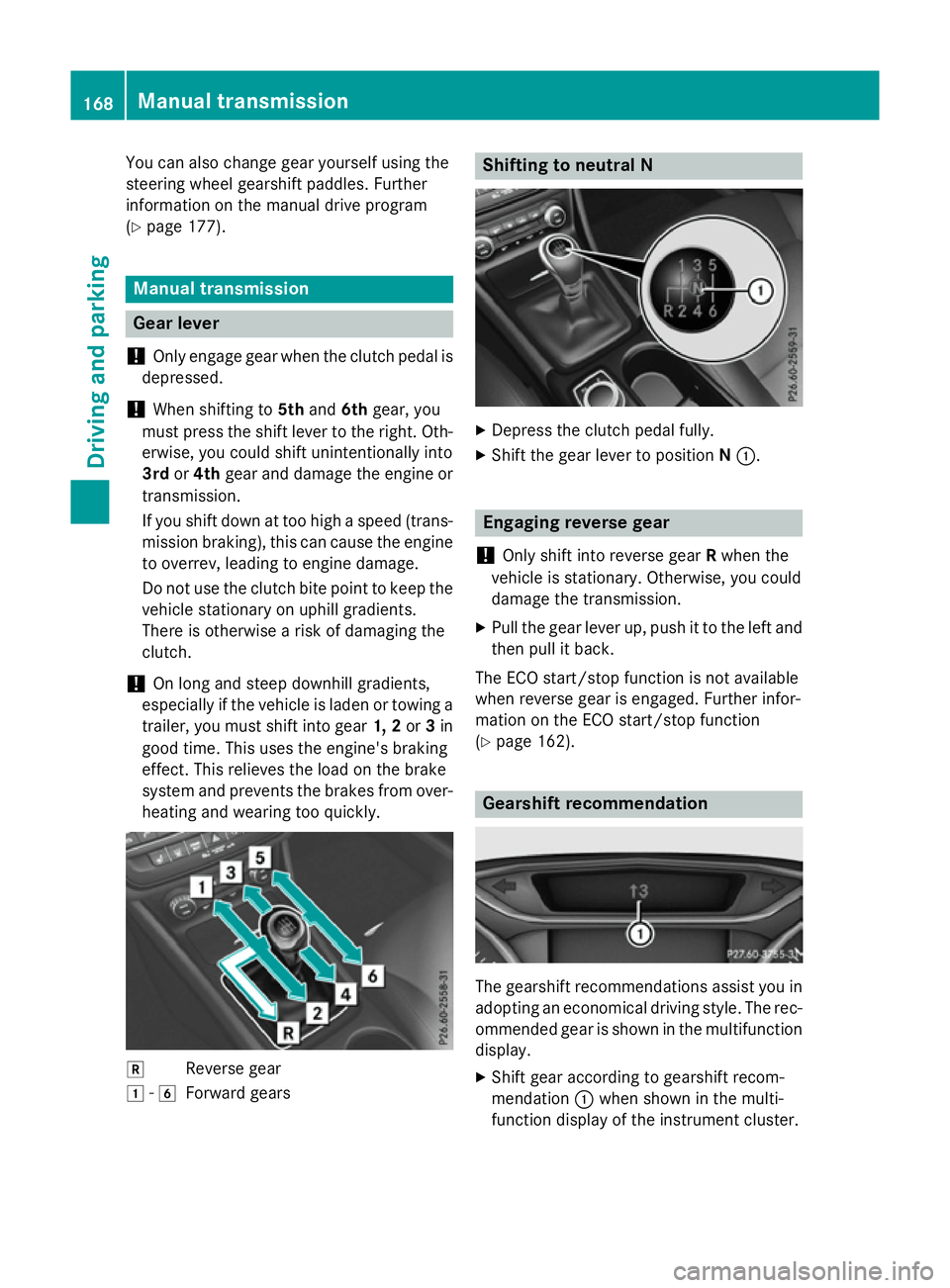
system and prevents the brakes from over- heating and wearing too quickly. k
Reverse gear
1 -6
Forward gears Shifting to neutral N
X
Depress the clutch pedal fully.
X Shift the gear lever to position N:. Engaging reverse gear
! Only shift into reverse gear
Rwhen the
vehicle is stationary. Otherwise, you could
damage the transmission.
X Pull the gear lever up, push it to the left and
then pull it back.
The ECO start/stop function is not available
when reverse gear is engaged. Further infor-
mation on the ECO start/stop function
(Y page 162). Gearshift recommendation
The gearshift recommendations assist you in
adopting an economical driving style. The rec- ommended gear is shown in the multifunction
display.
X Shift gear according to gearshift recom-
mendation :when shown in the multi-
function display of the instrument cluster. 168
Manual transmissionDriving and parking
Page 172 of 417
Drive programs
Drive program C (Comfort) Drive program
Cis characterised by the fol-
lowing:
R the vehicle delivers comfortable, economi-
cal driving characteristics.
R the vehicle having improved driving stabil-
ity, for example on slippery road surfaces.
Drive program S (Sport) Drive program
Sis characterised by the fol-
lowing:
R sporty engine settings.
Drive program I (Individual) In drive program
Ithe following properties of
the drive program can be selected:
R the drive (engine and transmission man-
agement)
R the suspension (vehicles with damping sys-
tem or AMG RIDE CONTROL)
R the steering
R the availability of the ECO start/stop func-
tion
R the climate control
Information about configuring drive program I
with COMAND Online or Audio 20 can be
found in the Digital Owner's Manual.
Drive program E (Economy) Drive program
Eis characterised by the fol-
lowing:
R the vehicle exhibits comfortable, economi-
cal driving characteristics.
R the vehicle having improved driving stabil-
ity, for example on slippery road surfaces.
R the performance of the air-conditioning and
heating systems is reduced. Automatic transmission
Important safety notes
G
WARNING
If the engine speed is above the idling speed
and you engage transmission position Dor R,
the vehicle could pull away suddenly. There is a risk of an accident.
When engaging transmission position Dor R,
always firmly depress the brake pedal and do not simultaneously accelerate. G
WARNING
The automatic transmission switches to neu-
tral position Nwhen you switch off the engine.
The vehicle may roll away. There is a risk of an
accident.
After switching off the engine, always switch
to parking position P. Prevent the parked vehi-
cle from rolling away by applying the parking
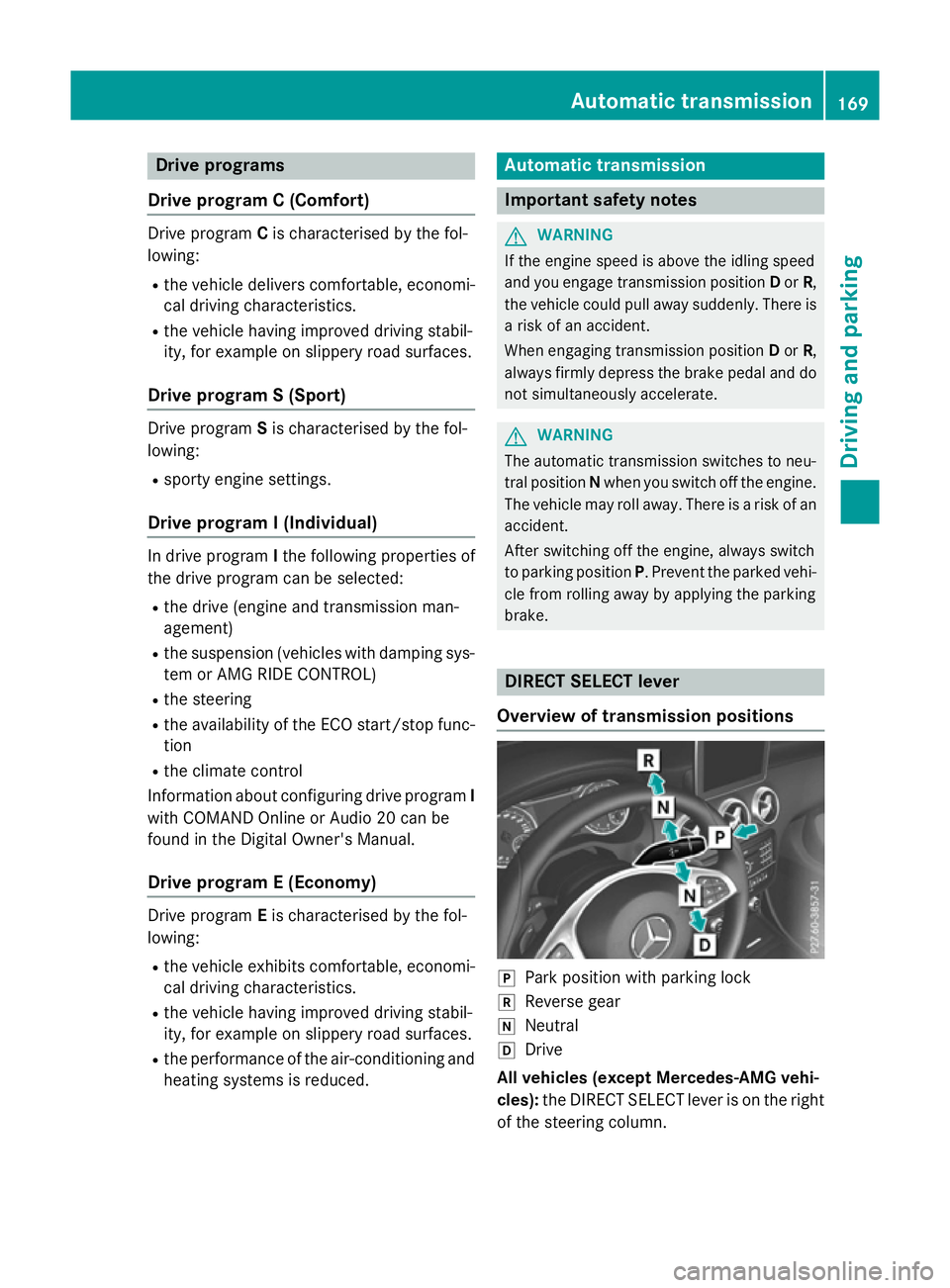
brake. DIRECT SELECT lever
Overview of transmission positions j
Park position with parking lock
k Reverse gear
i Neutral
h Drive
All vehicles (except Mercedes-AMG vehi-
cles): the DIRECT SELECT lever is on the right
of the steering column. Automatic transmission
169Driving and parking Z
Page 178 of 417
Mercedes-AMG vehicles:
it is only possible
to use kickdown in the automatic drive pro-
grams and in temporary manual drive pro-
gram M. When manual drive program Mis
selected permanently, kickdown is not pos-
sible.
For further information on kickdown in man-
ual drive program M(Y page 179).
Towing a trailer Towing a trailer is not possible with all mod-
els. For further information, see
(Y page 231).
X Drive in the middle of the engine speed
range on uphill gradients.
X Depending on the uphill or downhill gradi-
ent, select a lower gear (Y page 189), even
if cruise control, DISTRONIC PLUS, or
SPEEDTRONIC are activated. Drive programs
All vehicles (except Mercedes-AMG
vehicles) Drive program C (Comfort)
Drive program
Cis characterised by the fol-
lowing:
R the vehicle delivers comfortable, economi-
cal driving characteristics.
R the vehicle pulling away more gently in
forward and reverse gears unless the accel-
erator pedal is depressed fully.
R the vehicle having improved driving stabil-
ity, for example on slippery road surfaces.
R optimal fuel consumption resulting from
the automatic transmission shifting up
sooner. The vehicle is driven in the low
engine speed range and the wheels are less
likely to spin. Drive program S (Sport)
Drive program
Sis characterised by the fol-
lowing:
R sporty engine settings.
R the automatic transmission shifting up
later. as a result of the later automatic
transmission shift points, the fuel con-
sumption possibly being higher.
Drive program I (Individual)
In drive program Ithe following properties of
the drive program can be selected:
R the drive (engine and transmission man-
agement)
R the suspension (vehicles with damping sys-
tem or AMG RIDE CONTROL)
R the steering
R the availability of the ECO start/stop func-
tion
R the climate control
Information about configuring drive program I
with COMAND Online or Audio 20 can be
found in the Digital Owner's Manual.
i To permanently select the gears in drive
program Iusing the steering wheel pad-
dles, select the M(manual) setting for the
drive.
Drive program E (Economy)
Drive program Eis characterised by the fol-
lowing:
R comfort-oriented engine settings.
R optimal fuel consumption resulting from
the automatic transmission shifting up
sooner.
R the vehicle pulling away more gently in
forward and reverse gears unless the accel-
erator pedal is depressed fully.
R the vehicle having improved driving stabil-
ity, for example on slippery road surfaces.
R the automatic transmission shifting up
sooner. This results in the vehicle being Automatic transmission
175Driving and parking Z
Page 180 of 417
R
as a result of the later automatic transmis-
sion shift points, the fuel consumption pos-sibly being higher.
R the suspension exhibits particularly stiff
springing and damping settings (vehicles
with AIR RIDE CONTROL).
R gliding mode is not available.
R the ECO start/stop function is not availa-
ble. Manual gearshifting
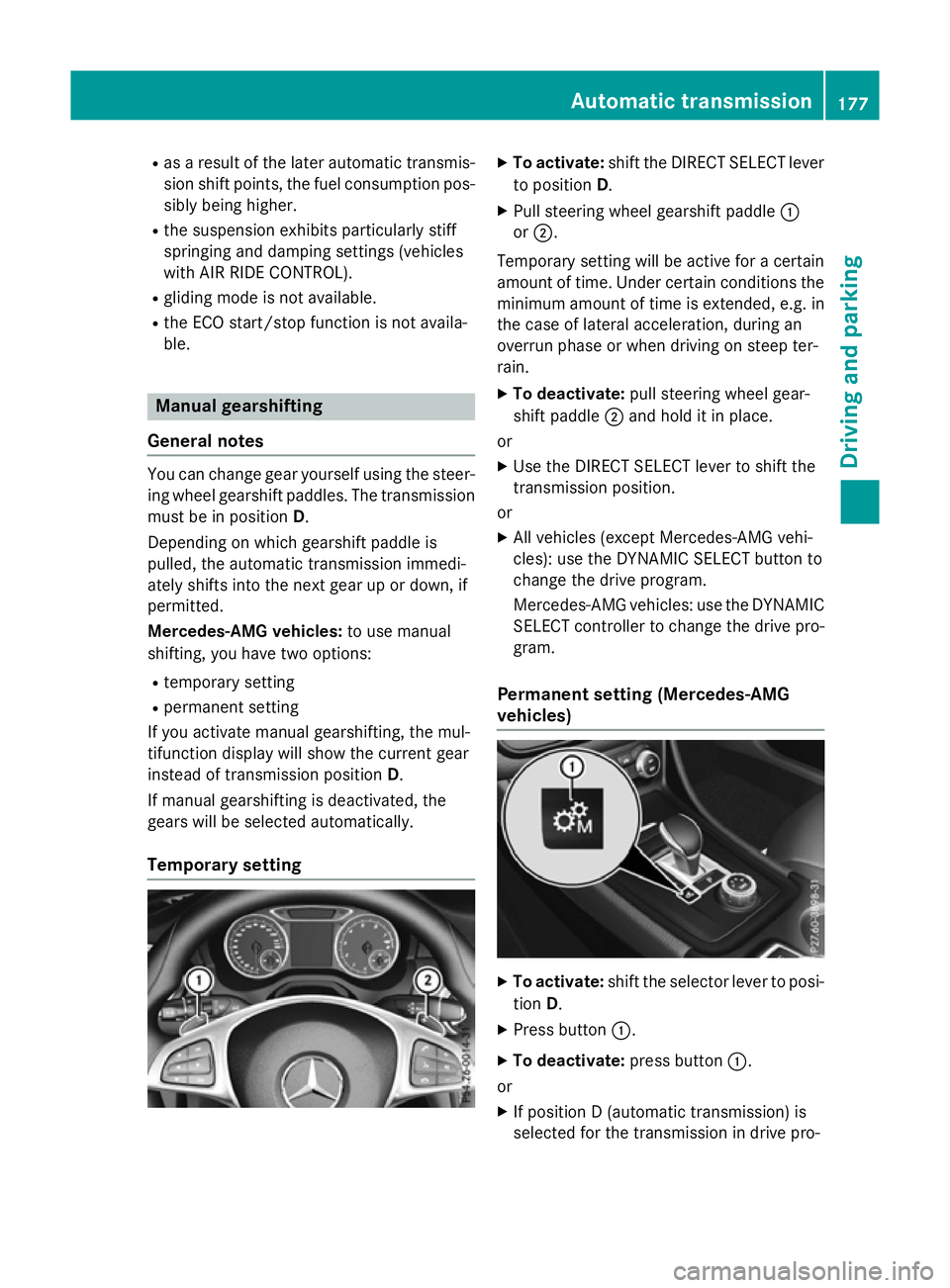
General notes You can change gear yourself using the steer-
ing wheel gearshift paddles. The transmission
must be in position D.
Depending on which gearshift paddle is
pulled, the automatic transmission immedi-
ately shifts into the next gear up or down, if
permitted.
Mercedes-AMG vehicles: to use manual
shifting, you have two options:
R temporary setting
R permanent setting
If you activate manual gearshifting, the mul-
tifunction display will show the current gear
instead of transmission position D.
If manual gearshifting is deactivated, the
gears will be selected automatically.
Temporary setting X
To activate: shift the DIRECT SELECT lever
to position D.
X Pull steering wheel gearshift paddle :
or ;.
Temporary setting will be active for a certain
amount of time. Under certain conditions the
minimum amount of time is extended, e.g. in the case of lateral acceleration, during an
overrun phase or when driving on steep ter-
rain.
X To deactivate: pull steering wheel gear-
shift paddle ;and hold it in place.
or X Use the DIRECT SELECT lever to shift the
transmission position.
or X All vehicles (except Mercedes-AMG vehi-
cles): use the DYNAMIC SELECT button to
change the drive program.
Mercedes-AMG vehicles: use the DYNAMIC
SELECT controller to change the drive pro-
gram.
Permanent setting (Mercedes-AMG
vehicles) X
To activate: shift the selector lever to posi-
tion D.
X Press button :.
X To deactivate: press button:.
or X If position D (automatic transmission) is
selected for the transmission in drive pro- Automatic transmission
177Driving and parking Z
Page 181 of 417
gram
I: shift to drive program Iwith the
DYNAMIC SELECT controller.
Shifting gears !
Mercedes-AMG vehicles:
the automatic
transmission does not shift up automati-
cally even when the engine limiting speed
for the current gear is reached. When the
engine limiting speed is reached, the fuel
supply is cut to prevent the engine from
overrevving. Always make sure that the
engine speed does not reach the red area of
the rev counter. There is otherwise a risk of engine damage. X
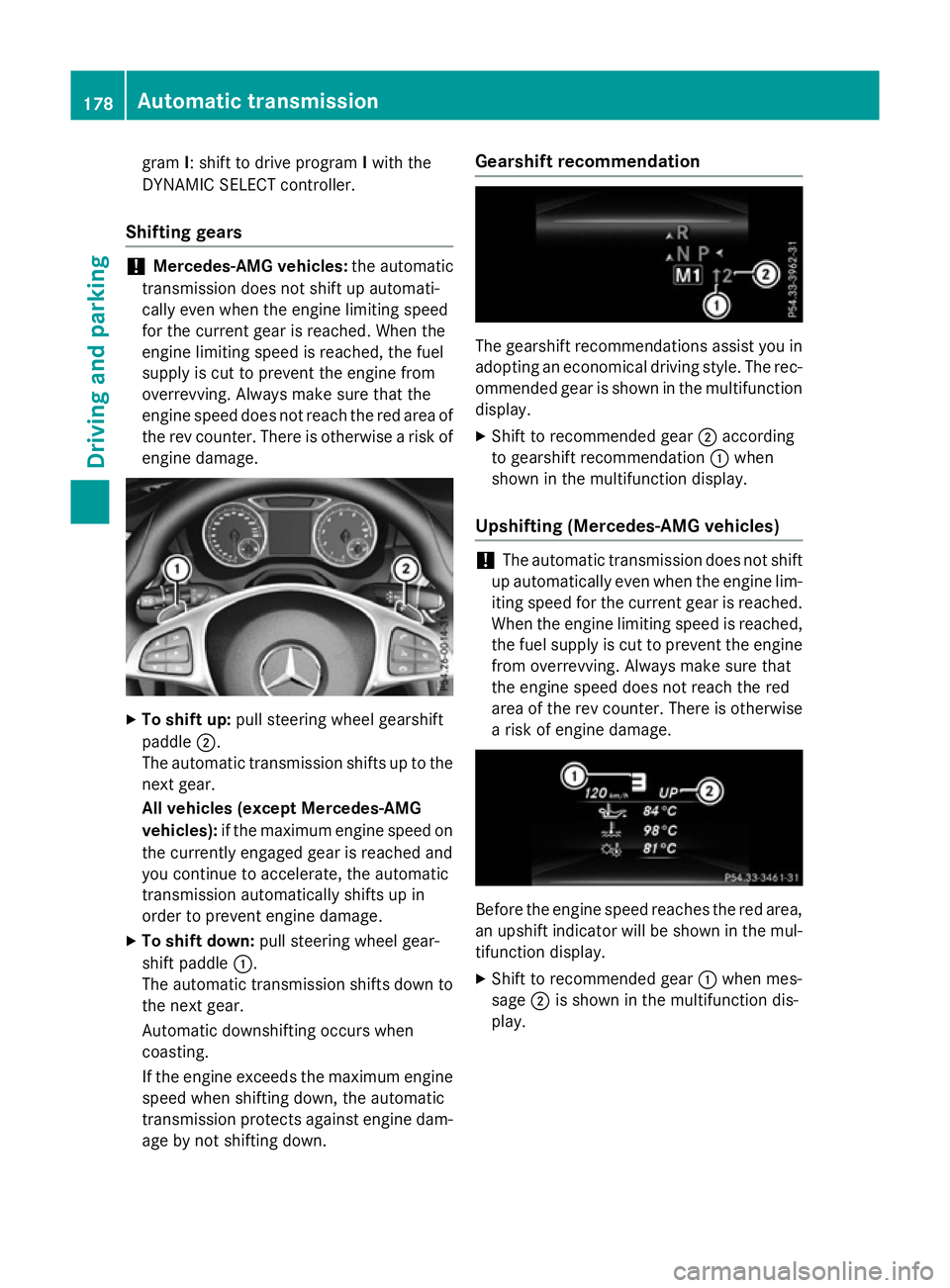
To shift up: pull steering wheel gearshift
paddle ;.
The automatic transmission shifts up to the next gear.
All vehicles (except Mercedes-AMG
vehicles): if the maximum engine speed on
the currently engaged gear is reached and
you continue to accelerate, the automatic
transmission automatically shifts up in
order to prevent engine damage.
X To shift down: pull steering wheel gear-
shift paddle :.
The automatic transmission shifts down to
the next gear.
Automatic downshifting occurs when
coasting.
If the engine exceeds the maximum engine speed when shifting down, the automatic
transmission protects against engine dam-
age by not shifting down. Gearshift recommendation
The gearshift recommendations assist you in
adopting an economical driving style. The rec- ommended gear is shown in the multifunction
display.
X Shift to recommended gear ;according
to gearshift recommendation :when
shown in the multifunction display.
Upshifting (Mercedes-AMG vehicles) !
The automatic transmission does not shift
up automatically even when the engine lim-
iting speed for the current gear is reached.
When the engine limiting speed is reached,
the fuel supply is cut to prevent the engine from overrevving. Always make sure that
the engine speed does not reach the red
area of the rev counter. There is otherwisea risk of engine damage. Before the engine speed reaches the red area,
an upshift indicator will be shown in the mul-
tifunction display.
X Shift to recommended gear :when mes-
sage ;is shown in the multifunction dis-
play. 178
Automatic transmissionDriving and parking
Page 182 of 417
Kickdown
X
For maximum acceleration, depress the
accelerator pedal beyond the pressure
point.
The transmission shifts to a lower gear
depending on the engine speed.
X Shift back up once the desired speed is
reached.
During kickdown, you cannot shift gears
using the steering wheel gearshift paddles.
If you apply full throttle, the automatic trans-
mission shifts up to the next gear when the
maximum engine speed is reached. This pre-
vents the engine from overrevving.
Mercedes-AMG vehicles: it is only possible
to use kickdown in temporary manual drive
program M. When manual drive program Mis
selected permanently, kickdown is not pos-
sible. Automatic trans
mission
179Driving an d parking Z
Page 190 of 417
In addition, at least one of the following con-
ditions must be fulfilled:
R the engine is switched off
R the driver is not wearing a seat belt and the
driver's door is open
R there is a system malfunction
R the power supply is insufficient
R the vehicle is stationary for a lengthy period
The red !indicator lamp in the instrument
cluster lights up.
The electric parking brake is not automati-
cally applied if the engine is switched off by
the ECO start/stop function.
Releasing automatically The electric parking brake can only be
released automatically in vehicles with auto-
matic transmission.
The electric parking brake of your vehicle is
released automatically when all of the follow-
ing conditions are fulfilled:
R the engine is running
R the transmission is in position Dor R
R the seat belt is fastened
R you depress the accelerator pedal
If the transmission is in position R, the tailgate
must be closed.
If your seat belt is not fastened, the following conditions must be fulfilled to automatically
release the electric parking brake:
R the driver's door is closed
R you have shifted out of transmission posi-
tion Por you have previously driven faster
than 3 km/h
Ensure that you do not depress the acceler-
ator pedal unintentionally. Otherwise, the
parking brake will be released and the vehicle will start to move.
Emergency braking The vehicle can also be braked during an
emergency by using the electric parking
brake. X
While driving, push handle :of the electric
parking brake (Y page 185).
The vehicle is braked as long as you keep
handle :of the electric parking brake
pressed. The longer the electric parking
brake handle :is depressed, the greater
the braking force.
During braking:
R a warning tone sounds
R the Release park. brake Release park. brake message
appears
R the red !indicator lamp in the instru-
ment cluster flashes
When the vehicle has been braked to a stand- still, the electric parking brake is applied. Parking up the vehicle
If you leave the vehicle parked up for longer
than four weeks, the battery may be damaged by exhaustive discharging.
If you leave the vehicle parked up for longer
than six weeks, it may suffer from lack of use.
X Visit a qualified specialist workshop and
seek advice.
i You can obtain information about trickle
chargers from a qualified specialist work-
shop. Driving tips
General notes
Important safety notes G
WARNING
If you switch off the ignition while driving,
safety-relevant functions are only available
with limitations, or not at all. This could affect, for example, the power steering and the brake
boosting effect. You will require considerably
more effort to steer and brake. There is a risk of an accident.
Do not switch off the ignition while driving. Driving tips
187Driving and parking Z