brake fluid MERCEDES-BENZ A-CLASS HATCHBACK 2015 Owners Manual
[x] Cancel search | Manufacturer: MERCEDES-BENZ, Model Year: 2015, Model line: A-CLASS HATCHBACK, Model: MERCEDES-BENZ A-CLASS HATCHBACK 2015Pages: 417, PDF Size: 11.91 MB
Page 9 of 417
Activating/deactivating (on the
centre console) .............................. 149
Remote contro l.............................. 149
Axle load, permissible (trailer tow-
ing) ...................................................... 406 B
Bag hook ............................................ 311
Ball coupling
Folding in ....................................... 233
Folding out ..................................... 232
BAS (Brake Assist System) ................. 70
Battery (key)
Checking .......................................... 86
Important safety notes .................... 85
Replacing ......................................... 86
Battery (vehicle)
Charging ........................................ 347
Display message ............................ 276
Important safety notes .................. 344
Jump starting ................................. 348
Belt
see Seat belts
Belt tensioner
Activation ......................................... 55
Blind Spot Assist
Activating/deactivating (on-
board computer) ............................ 249
Display message ............................ 279
Notes/function .............................. 226
Trailer towing ................................. 228
Bonnet
Active bonnet (pedestrian protec-tion) ............................................... 322
Closing ........................................... 324
Display message ............................ 288
Important safety notes .................. 322
Opening ......................................... 323
Boot lid
see Tailgate
Boot load (maximum) ........................ 404
Brake
EBD .................................................. 77
Brake Assist
see BAS (Brake Assist System)
Brake fluid
Display message ............................ 265 Notes ............................................. 402
Brake force distribution
see EBD (electronic brake force
distribution)
Brake lamps
Adaptive ........................................... 73
Changing bulb s.............................. 128
Display message ............................ 272
Brakes
ABS .................................................. 69
Adaptive Brake Assist ...................... 72
BAS .................................................. 70
Brake fluid (notes) ......................... 402
Display message ............................ 258
Driving tips .................................... 189
Hill start assist ............................... 161
HOLD function ............................... 204
Important safety notes .................. 189
Parking brake ................................ 185
Warning lamp ................................. 294
Breakdown
Where will I find...? ........................ 338
see Flat tyre
see Tow-starting
see Towing away
Brightness control (instrument
cluster lighting) ................................... 30
Buttons on the steering column ...... 239 C
Calling up a fault see Display messages
Car
see Vehicle
Car wash (care) ................................. 329
Care
Automatic car wash ....................... 329
Carpets .......................................... 335
Display ........................................... 334
Exhaust pipe .................................. 333
Exterior lighting ............................. 332
Gear or selector lever .................... 334
High-pressure cleaner .................... 330
Interior ........................................... 334
Matt paintwork .............................. 331
Note s............................................. 329
Paint .............................................. 330 6
Index
Page 20 of 417
Switching belt adjustment on/off
(on-board computer) ...................... 253
Seat belts
Adjusting the driver's and front-
passenger seat belt ......................... 45
Adjusting the height ......................... 44
Cleaning ......................................... 335
Display message ............................ 266
Fastening ......................................... 44
Important safety guidelines ............. 42
Introduction ..................................... 42
Rear seat belt status indicator ......... 46
Releasing ......................................... 45
Warning lamp ................................. 292
Warning lamp (function) ................... 45
Seats
Adjusting (electrically) ................... 109
Adjusting (manually) ...................... 108
Adjusting the 4-way lumbar sup-
port ................................................ 110
Adjusting the head restraint .......... 109
Cleaning the cover ......................... 335
Correct driver's seat position ........ 106
Important safety notes .................. 107
Seat heating problem .................... 112
Storing settings (memory func-
tion) ............................................... 116
Switching seat heating on/of f....... 111
Securing a load
see Stowage space
Securing luggage ............................... 311
Selector lever
Cleaning ......................................... 334
Sensors (cleaning instructions) ....... 332
Service
see ASSYST PLUS
Service Centre
see Qualified specialist workshop
Service menu (on-board com-
puter) .................................................. 250
Service message
see ASSYST PLUS
Service products
Brake fluid ..................................... 402
Coolant (engine) ............................ 402
Engine oil ....................................... 400
Fuel ................................................ 396
Important safety notes .................. 396 Washer fluid ................................... 403
Setting the air distribution ............... 143
Setting the airflow ............................ 143
Settings
Factory (on-board computer) ......... 253
On-board computer ....................... 250
SETUP (on-board computer) ............. 254
Shifting to neutral (manual trans-
mission) ............................................. 168
Side lamps
Switching on/of f........................... 121
Side windows
Convenience closing ........................ 95
Convenience opening ...................... 95
Important safety notes .................... 94
Opening/closing .............................. 94
Problem (malfunction) ..................... 98
Resetting ......................................... 96
Reversing feature ............................. 94
Sidebag ................................................ 48
Sliding sunroof
see Panorama sliding sunroof
Snow chains ...................................... 361
Socket
Luggage compartment ................... 317
Sockets
Centre console .............................. 317
General notes ................................ 316
Rear compartment ......................... 317
Specialist workshop ............................ 24
Spectacles compartment ................. 307
Speed, controlling
see Cruise control
Speedometer
Activating/deactivating the addi-
tional speedometer ........................ 250
Digital ............................................ 243
In the Instrument cluster ................. 30
Segments ...................................... 238
Selecting a display uni t.................. 250
SPEEDTRONIC
Deactivating variable ..................... 196
Display message ............................ 281
Function/note s............................. 194
Important safety notes .................. 194
LIM indicator lamp ......................... 195
Permanent ..................................... 196 Index
17
Page 28 of 417
R
traffic rules and regulations
R laws and safety standards pertaining to
motor vehicles Implied warranty
! Follow the instructions in this manual
about the proper operation of your vehicle
as well as about possible vehicle damage.
Damage to your vehicle that arises from
culpable contraventions against these
instructions are not covered either by
Mercedes-Benz implied warranty or by the
New or Used-Vehicle Warranty. QR code for rescue card
The QR code is secured in the fuel filler flap
and on the opposite side on the B-pillar. In the
event of an accident, rescue services can use the QR code to quickly find the appropriate
rescue card for your vehicle. The current res-
cue card contains, in a compact form, the
most important information about your vehi-
cle, e.g. the routing of the electric cables.
You can find more information under http:// portal.aftersales.i.daimler.com/public/
content/asportal/en/communication/
informationen_fuer/QRCode.html. Data stored in the vehicle
A wide range of electronic components in
your vehicle contain data memories.
These data memories temporarily or perma-
nently store technical information about:
R the vehicle's operating state
R events
R faults
In general, this technical information docu-
ments the state of a component, a module, a
system or the surroundings. These include, for example:
R operating conditions of system compo-
nents, e.g. fluid levels
R the vehicle's status messages and those of
its individual components, e.g. number of
wheel revolutions/speed, deceleration in
movement, lateral acceleration, accelera-
tor pedal position
R malfunctions and defects in important sys-
tem components, e.g. lights, brakes
R vehicle reactions and operating conditions
in special driving situations, e.g. airbag
deployment, intervention of stability con-
trol systems
R ambient conditions, e.g. outside tempera-
ture
This data is of an exclusively technical nature and can be used to:
R assist in detecting and rectifying faults and
defects
R analyse vehicle functions, e.g. after an acci-
dent
R optimise vehicle functions
The data cannot be used to trace the vehicle's movements.
When your vehicle is serviced, technical infor-
mation can be read from the event data mem- ory and fault data memory.
Services include, for example:
R repair services
R service processes
R warranty events
R quality assurance
The vehicle is read out by employees of the
service network (including the manufacturer)
using special diagnostic testers. You can
obtain more information there, if required.
After a fault has been rectified, the informa-
tion is deleted from the fault memory or is
continually overwritten.
When operating the vehicle, situations are
conceivable in which this technical data, in
connection with other information (if neces- Introduction
25 Z
Page 132 of 417
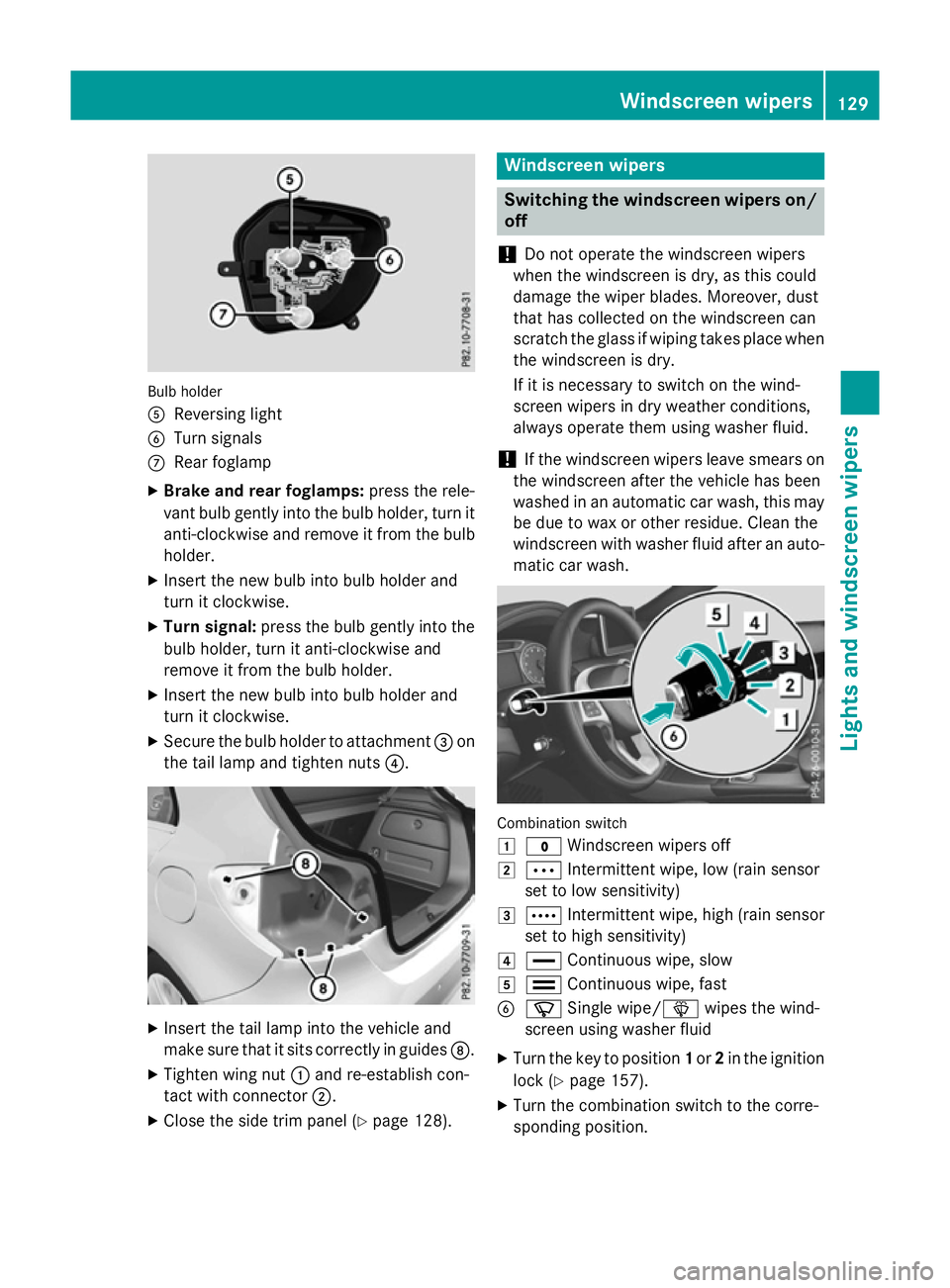
Bulb holder
A
Reversing light
B Turn signals
C Rear foglamp
X Brake and rear foglamps: press the rele-
vant bulb gently into the bulb holder, turn it
anti-clockwise and remove it from the bulb holder.
X Insert the new bulb into bulb holder and
turn it clockwise.
X Turn signal: press the bulb gently into the
bulb holder, turn it anti-clockwise and
remove it from the bulb holder.
X Insert the new bulb into bulb holder and
turn it clockwise.
X Secure the bulb holder to attachment =on
the tail lamp and tighten nuts ?.X
Insert the tail lamp into the vehicle and
make sure that it sits correctly in guides D.
X Tighten wing nut :and re-establish con-
tact with connector ;.
X Close the side trim panel (Y page 128). Windscreen wipers
Switching the windscreen wipers on/
off
! Do not operate the windscreen wipers
when the windscreen is dry, as this could
damage the wiper blades. Moreover, dust
that has collected on the windscreen can
scratch the glass if wiping takes place when the windscreen is dry.
If it is necessary to switch on the wind-
screen wipers in dry weather conditions,
always operate them using washer fluid.
! If the windscreen wipers leave smears on
the windscreen after the vehicle has been
washed in an automatic car wash, this may
be due to wax or other residue. Clean the
windscreen with washer fluid after an auto- matic car wash. Combination switch
1
$ Windscreen wipers off
2 Ä Intermittent wipe, low (rain sensor
set to low sensitivity)
3 Å Intermittent wipe, high (rain sensor
set to high sensitivity)
4 ° Continuous wipe, slow
5 ¯ Continuous wipe, fast
B í Single wipe/î wipes the wind-
screen using washer fluid
X Turn the key to position 1or 2in the ignition
lock (Y page 157).
X Turn the combination switch to the corre-
sponding position. Windscreen wipers
129Lights and windscreen wipers Z
Page 164 of 417
depress the brake pedal. Only then can the
parking lock be deactivated.
All vehicles (except Mercedes-AMG vehi-
cles): if you do not depress the brake pedal,
the DIRECT SELECT lever can still be moved
but the parking lock remains engaged.
Mercedes-AMG vehicles: if you do not
depress the brake pedal, the selector lever
can still be moved but the parking lock
remains engaged.
Vehicles with automatic transmission: at
transmission fluid temperatures below
Ò20 †, you can only shift out of position Pinto
another transmission position when the
engine is running.
i Vehicles with automatic transmis-
sion: upshifts take place at higher engine
speeds after a cold start. This helps the
catalytic converter to reach its operating
temperature more quickly.
Vehicles with automatic transmission:
information on automatically releasing the
electric parking brake (Y page 185).
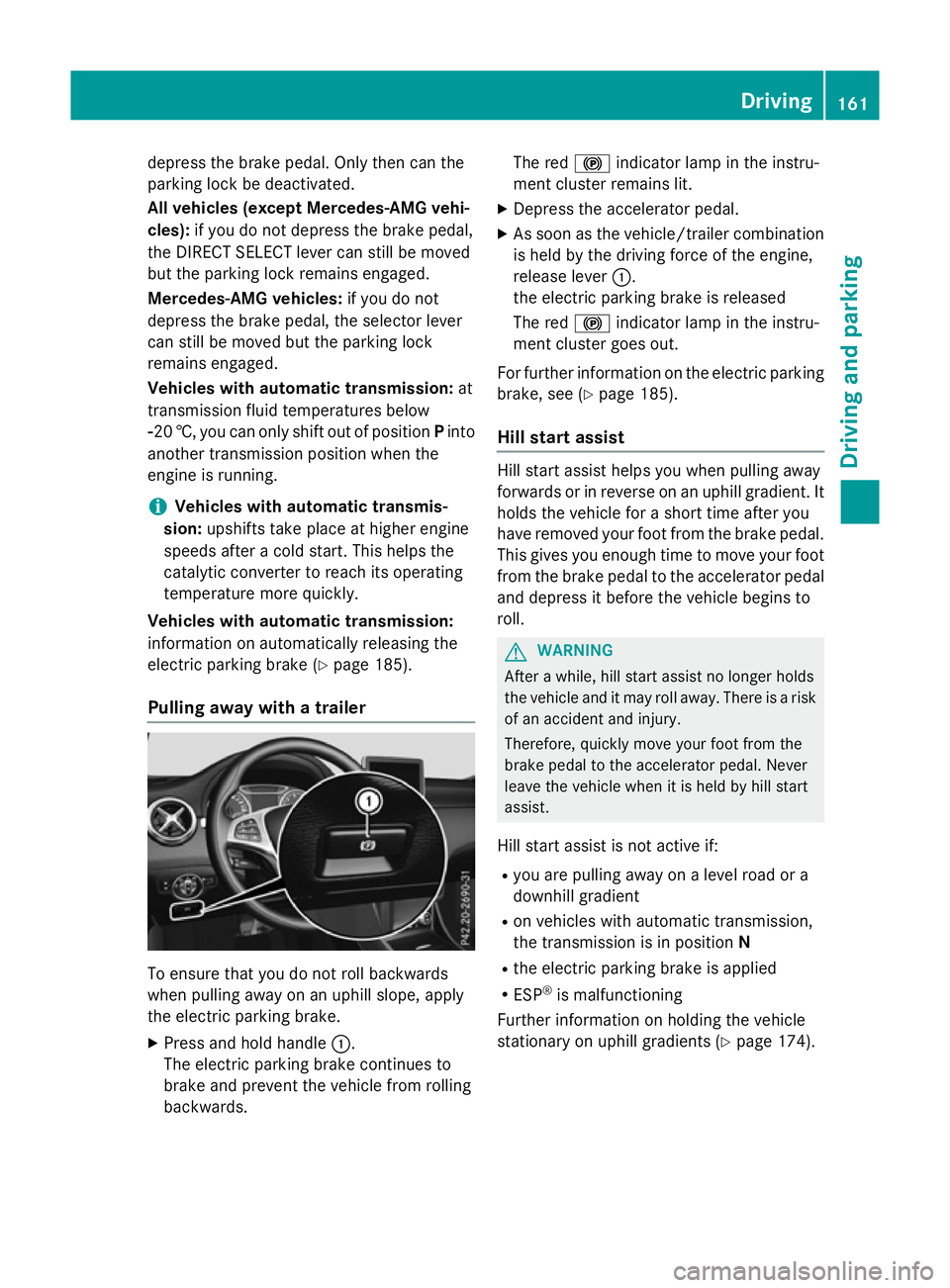
Pulling away with a trailer To ensure that you do not roll backwards
when pulling away on an uphill slope, apply
the electric parking brake.
X Press and hold handle :.
The electric parking brake continues to
brake and prevent the vehicle from rolling
backwards. The red
!indicator lamp in the instru-
ment cluster remains lit.
X Depress the accelerator pedal.
X As soon as the vehicle/trailer combination
is held by the driving force of the engine,
release lever :.
the electric parking brake is released
The red !indicator lamp in the instru-
ment cluster goes out.
For further information on the electric parking
brake, see (Y page 185).
Hill start assist Hill start assist helps you when pulling away
forwards or in reverse on an uphill gradient. It
holds the vehicle for a short time after you
have removed your foot from the brake pedal.
This gives you enough time to move your foot from the brake pedal to the accelerator pedal and depress it before the vehicle begins to
roll. G
WARNING
After a while, hill start assist no longer holds
the vehicle and it may roll away. There is a risk of an accident and injury.
Therefore, quickly move your foot from the
brake pedal to the accelerator pedal. Never
leave the vehicle when it is held by hill start
assist.
Hill start assist is not active if:
R you are pulling away on a level road or a
downhill gradient
R on vehicles with automatic transmission,
the transmission is in position N
R the electric parking brake is applied
R ESP ®
is malfunctioning
Further information on holding the vehicle
stationary on uphill gradients (Y page 174). Driving
161Driving and parking Z
Page 173 of 417
For information on the selector lever in
Mercedes-AMG vehicles (Y page 172).
The DIRECT SELECT lever always returns to
its original position. The current transmission position P,R, Nor Dappears in the transmis-
sion position display in the multifunction dis-
play (Y page 170).
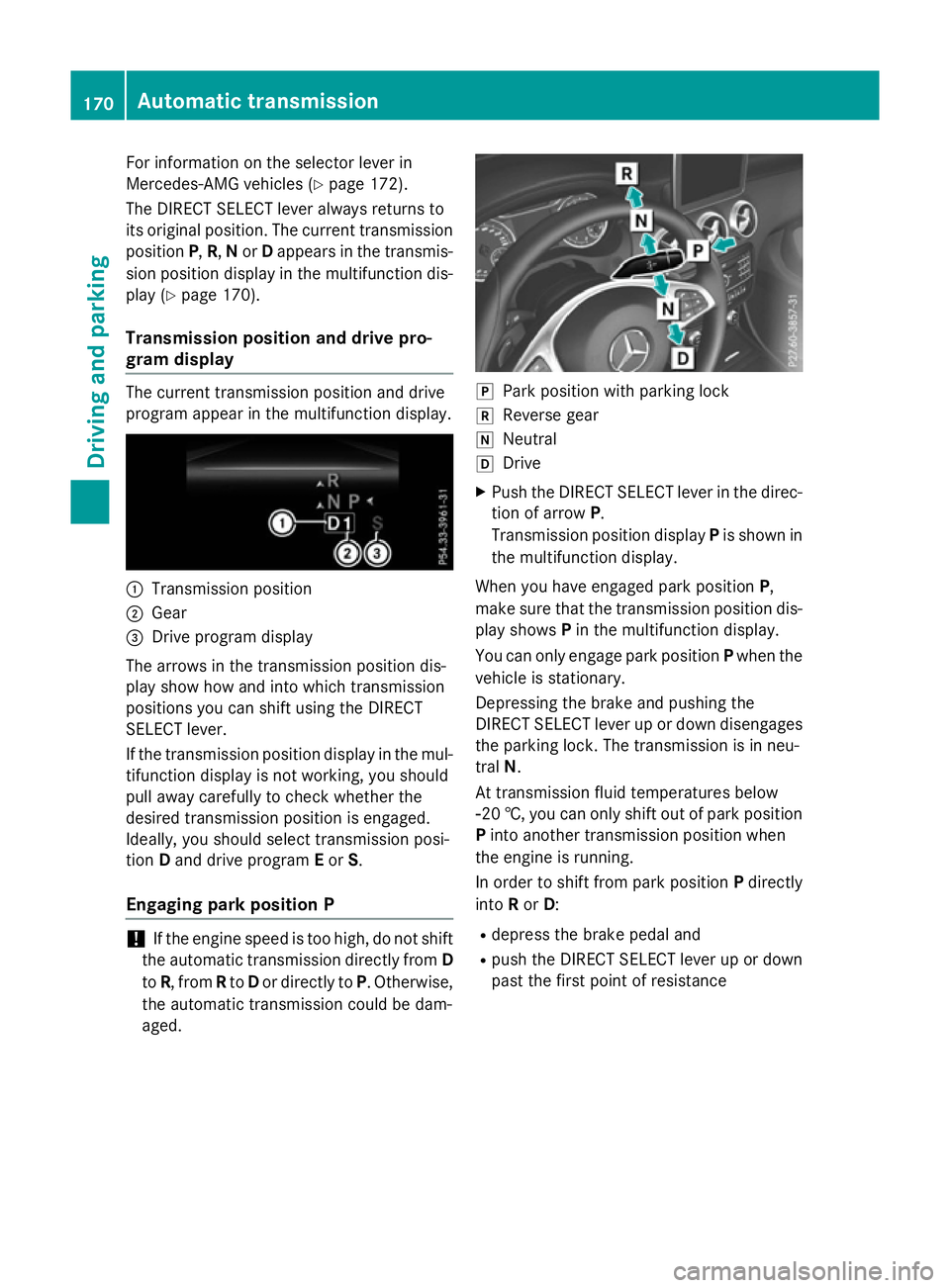
Transmission position and drive pro-
gram display The current transmission position and drive
program appear in the multifunction display.
:
Transmission position
; Gear
= Drive program display
The arrows in the transmission position dis-
play show how and into which transmission
positions you can shift using the DIRECT
SELECT lever.
If the transmission position display in the mul-
tifunction display is not working, you should
pull away carefully to check whether the
desired transmission position is engaged.
Ideally, you should select transmission posi-
tion Dand drive program Eor S.
Engaging park position P !
If the engine speed is too high, do not shift
the automatic transmission directly from D
to R, from Rto Dor directly to P. Otherwise,
the automatic transmission could be dam-
aged. j
Park position with parking lock
k Reverse gear
i Neutral
h Drive
X Push the DIRECT SELECT lever in the direc-
tion of arrow P.
Transmission position display Pis shown in
the multifunction display.
When you have engaged park position P,
make sure that the transmission position dis-
play shows Pin the multifunction display.
You can only engage park position Pwhen the
vehicle is stationary.
Depressing the brake and pushing the
DIRECT SELECT lever up or down disengages the parking lock. The transmission is in neu-
tral N.
At transmission fluid temperatures below
Ò20 †, you can only shift out of park position
P into another transmission position when
the engine is running.
In order to shift from park position Pdirectly
into Ror D:
R depress the brake pedal and
R push the DIRECT SELECT lever up or down
past the first point of resistance 170
Automatic transmissionDriving and parking
Page 268 of 417
Display messages
Possible causes/consequences and
M
MSolutions J
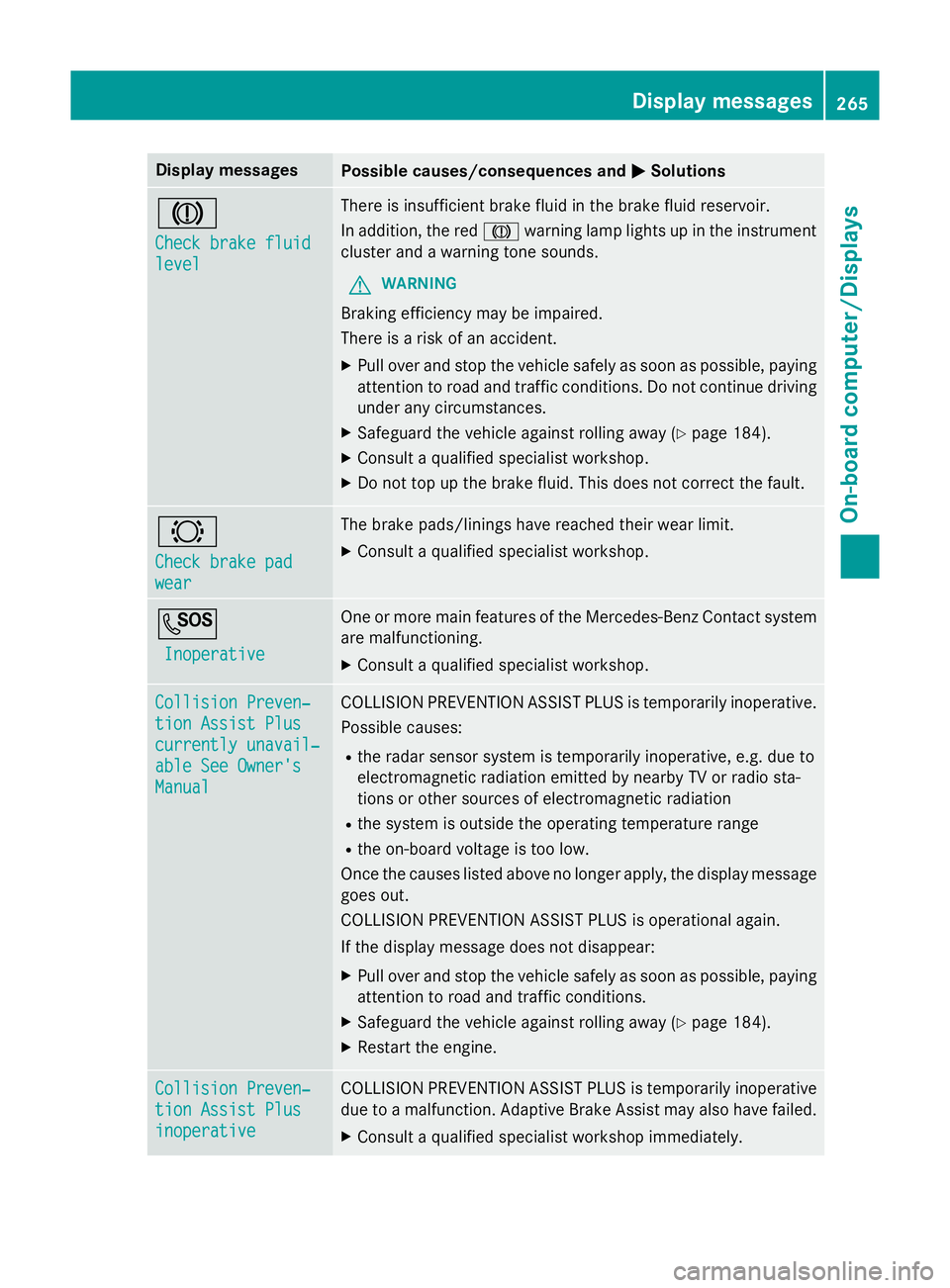
Check brake fluid Check brake fluid
level level There is insufficient brake fluid in the brake fluid reservoir.
In addition, the red Jwarning lamp lights up in the instrument
cluster and a warning tone sounds.
G WARNING
Braking efficiency may be impaired.
There is a risk of an accident. X Pull over and stop the vehicle safely as soon as possible, paying
attention to road and traffic conditions. Do not continue driving
under any circumstances.
X Safeguard the vehicle against rolling away (Y page 184).
X Consult a qualified specialist workshop.
X Do not top up the brake fluid. This does not correct the fault. #
Check brake pad Check brake pad
wear wear The brake pads/linings have reached their wear limit.
X Consult a qualified specialist workshop. G
Inoperative
Inoperative One or more main features of the Mercedes-Benz Contact system
are malfunctioning.
X Consult a qualified specialist workshop. Collision Preven‐
Collision Preven‐
tion Assist Plus tion Assist Plus
currently unavail‐ currently unavail‐
able See Owner's able See Owner's
Manual Manual COLLISION PREVENTION ASSIST PLUS is temporarily inoperative.
Possible causes:
R the radar sensor system is temporarily inoperative, e.g. due to
electromagnetic radiation emitted by nearby TV or radio sta-
tions or other sources of electromagnetic radiation
R the system is outside the operating temperature range
R the on-board voltage is too low.
Once the causes listed above no longer apply, the display message goes out.
COLLISION PREVENTION ASSIST PLUS is operational again.
If the display message does not disappear:
X Pull over and stop the vehicle safely as soon as possible, paying
attention to road and traffic conditions.
X Safeguard the vehicle against rolling away (Y page 184).
X Restart the engine. Collision Preven‐ Collision Preven‐
tion Assist Plus tion Assist Plus
inoperative inoperative COLLISION PREVENTION ASSIST PLUS is temporarily inoperative
due to a malfunction. Adaptive Brake Assist may also have failed.
X Consult a qualified specialist workshop immediately. Display
messages
265On-board computer/Displays Z
Page 288 of 417
Display messages
Possible causes/consequences and
M
MSolutions Tyre press. moni‐
Tyre press. moni‐
tor currently tor currently
unavailable unavailable No signals can be received from the tyre pressure sensors due to
strong RF interference. The tyre pressure monitor is temporarily
malfunctioning.
X Drive on.
The tyre pressure monitor restarts automatically as soon as the
cause has been rectified. Wheel sensor(s) Wheel sensor(s)
missing missing There is no signal from the tyre pressure sensor of one or several
wheels. The pressure of the affected tyre is not displayed in the
multifunction display.
X Have the faulty tyre pressure sensor replaced at a qualified spe-
cialist workshop. Tyre press. moni‐ Tyre press. moni‐
tor tor
inoperative
inoperative No
No
wheel sensors
wheel sensors The wheels fitted do not have suitable tyre pressure sensors. The
tyre pressure monitor is deactivated.
X Fit wheels with suitable tyre pressure sensors.
The tyre pressure monitor is activated automatically after driv-
ing for a few minutes. Tyre press. moni‐ Tyre press. moni‐
tor inoperative tor inoperative The tyre pressure monitor is faulty.
X Consult a qualified specialist workshop. Vehicle
Display messages
Possible causes/consequences and
M
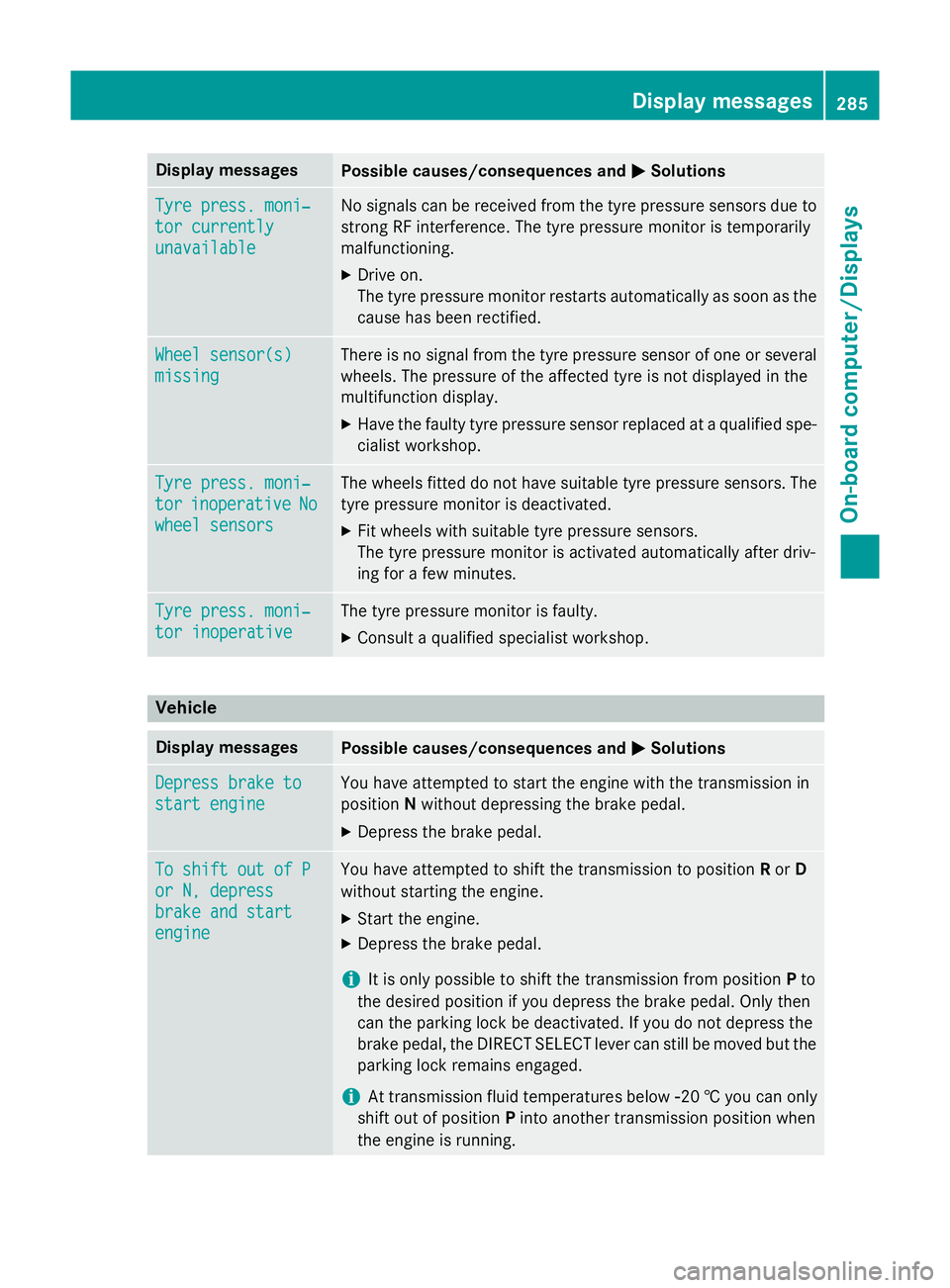
MSolutions Depress brake to
Depress brake to
start engine start engine You have attempted to start the engine with the transmission in
position
Nwithout depressing the brake pedal.
X Depress the brake pedal. To shift out of P To shift out of P
or N, depress or N, depress
brake and start brake and start
engine engine You have attempted to shift the transmission to position
Ror D
without starting the engine.
X Start the engine.
X Depress the brake pedal.
i It is only possible to shift the transmission from position
Pto
the desired position if you depress the brake pedal. Only then
can the parking lock be deactivated. If you do not depress the
brake pedal, the DIRECT SELECT lever can still be moved but the parking lock remains engaged.
i At transmission fluid temperatures below
Ò20 † you can only
shift out of position Pinto another transmission position when
the engine is running. Display
messages
285On-board computer/Displays Z
Page 297 of 417
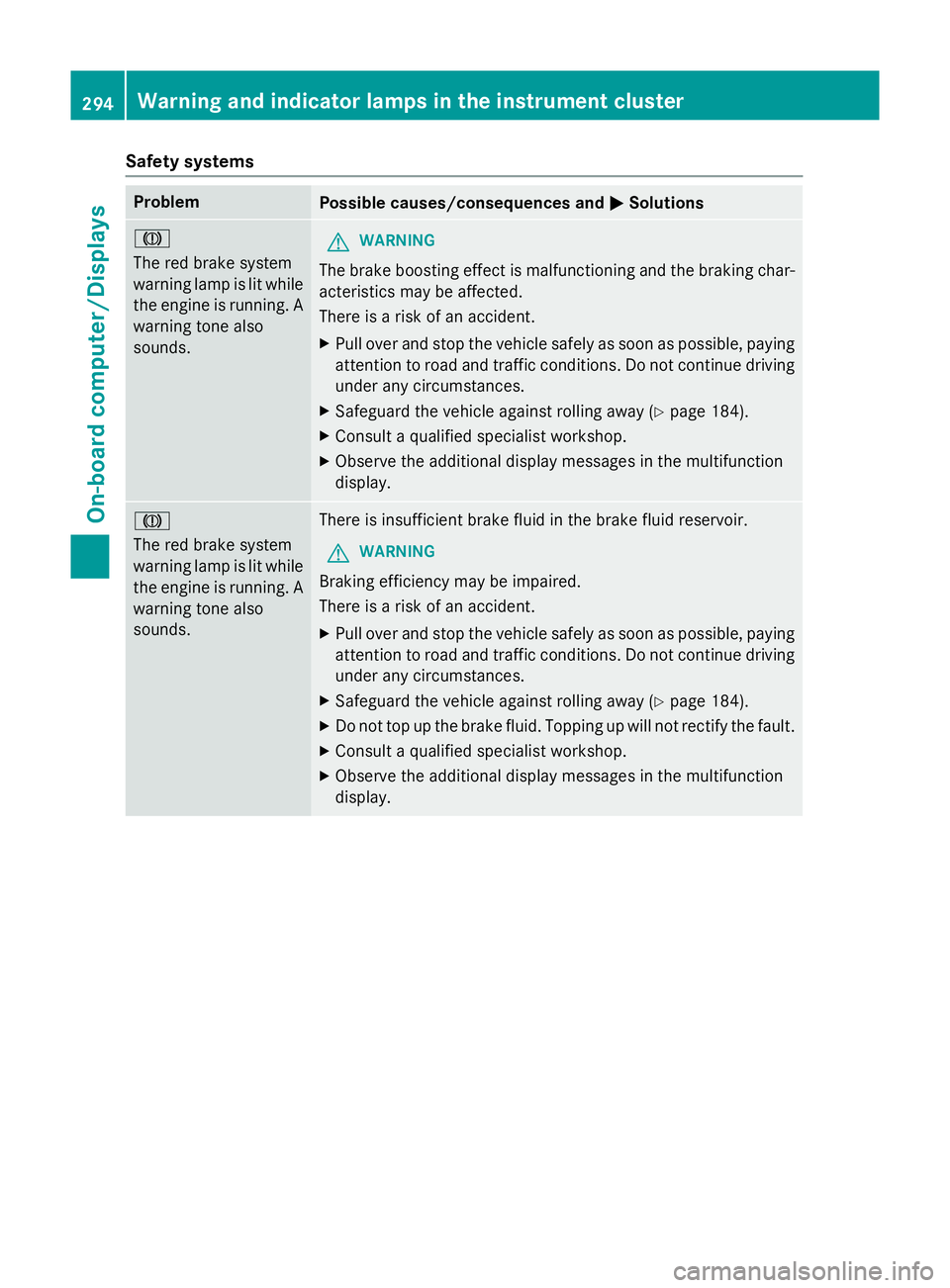
Safety systems
Problem
Possible causes/consequences and
M
MSolutions J
The red brake system
warning lamp is lit while
the engine is running. A
warning tone also
sounds. G
WARNING
The brake boosting effect is malfunctioning and the braking char- acteristics may be affected.
There is a risk of an accident.
X Pull over and stop the vehicle safely as soon as possible, paying
attention to road and traffic conditions. Do not continue driving
under any circumstances.
X Safeguard the vehicle against rolling away (Y page 184).
X Consult a qualified specialist workshop.
X Observe the additional display messages in the multifunction
display. J
The red brake system
warning lamp is lit while
the engine is running. A
warning tone also
sounds. There is insufficient brake fluid in the brake fluid reservoir.
G WARNING
Braking efficiency may be impaired.
There is a risk of an accident. X Pull over and stop the vehicle safely as soon as possible, paying
attention to road and traffic conditions. Do not continue driving
under any circumstances.
X Safeguard the vehicle against rolling away (Y page 184).
X Do not top up the brake fluid. Topping up will not rectify the fault.
X Consult a qualified specialist workshop.
X Observe the additional display messages in the multifunction
display. 294
Warning and indicator lamps in the instrument clusterOn-board computer/Displays
Page 334 of 417
X
Remove coolant, brake fluid, tree resins,
oils, fuels and greases by rubbing gently
with a cloth soaked in petroleum ether or
lighter fluid.
X Use tar remover to remove tar stains.
X Use silicone remover to remove wax.
Care and treatment of matt paintwork !
Never polish the vehicle or the light alloy
wheels. Polishing makes the paintwork
shiny.
! The following may cause the paint to
become shiny and thus reduce the matt
effect:
R vigorous rubbing with unsuitable materi-
als
R frequent use of car washes
R washing the vehicle in direct sunlight
! Never use paint cleaner, buffing or pol-
ishing products, or gloss preserver, e.g.
wax. These products are only suitable for
high-gloss surfaces. Their use on vehicles
with matt finish leads to considerable sur-
face damage (shiny, spotted areas).
Always have paintwork repairs carried out
at a qualified specialist workshop.
! Do not use wash programs with a hot wax
treatment under any circumstances.
Observe these notes if your vehicle has a
clear matt finish. This will help you to avoid
damage to the paintwork due to incorrect
treatment.
These notes also apply to light-alloy wheels
with a clear matt finish.
The vehicle should preferably be washed by
hand using a soft sponge, car shampoo and
plenty of water.
Use only insect remover and car shampoo
from the range of approved Mercedes-Benz
care products. Cleaning vehicle parts
Cleaning the wheels G
WARNING
The water jet of circular-jet nozzles (dirt grind- ers) can cause damage not visible from the
outside to tyres or chassis components. Com-
ponents damaged in this way can unexpect-
edly fail. There is a risk of an accident.
Do not use high-pressure cleaners with circu-
lar-jet nozzles to clean the vehicle. Have dam- aged tyres or chassis components replaced
immediately.
! Do not use acidic wheel cleaning products
to remove brake dust. This could damage
wheel bolts and brake components.
! Do not park up the vehicle for an extended
period straight after cleaning it, particularly after having cleaned the wheels with wheel cleaner. Wheel cleaners could cause
increased corrosion of the brake discs and
brake pads/linings. For this reason, you
should drive for a few minutes after clean-
ing. Braking heats the brake discs and the
brake pads/linings, thus drying them. The
vehicle can then be parked up.
Cleaning the windows G
WARNING
If the windscreen wipers are set in motion
when cleaning the windscreen or wiper
blades, you could become trapped. There is a danger of injury.
Always switch off the windscreen wipers and
the ignition before cleaning the windscreen or wiper blades.
! Only fold the windscreen wipers away
from the windscreen when vertical. Other-
wise, you will damage the bonnet.
! Do not use dry cloths, abrasive products,
solvents or cleaning agents containing sol- vents to clean the inside of the windows. Do
not touch the insides of the windows with Care
331Maintenance and care Z