service MERCEDES-BENZ A-CLASS HATCHBACK 2018 Owners Manual
[x] Cancel search | Manufacturer: MERCEDES-BENZ, Model Year: 2018, Model line: A-CLASS HATCHBACK, Model: MERCEDES-BENZ A-CLASS HATCHBACK 2018Pages: 609, PDF Size: 10.73 MB
Page 523 of 609
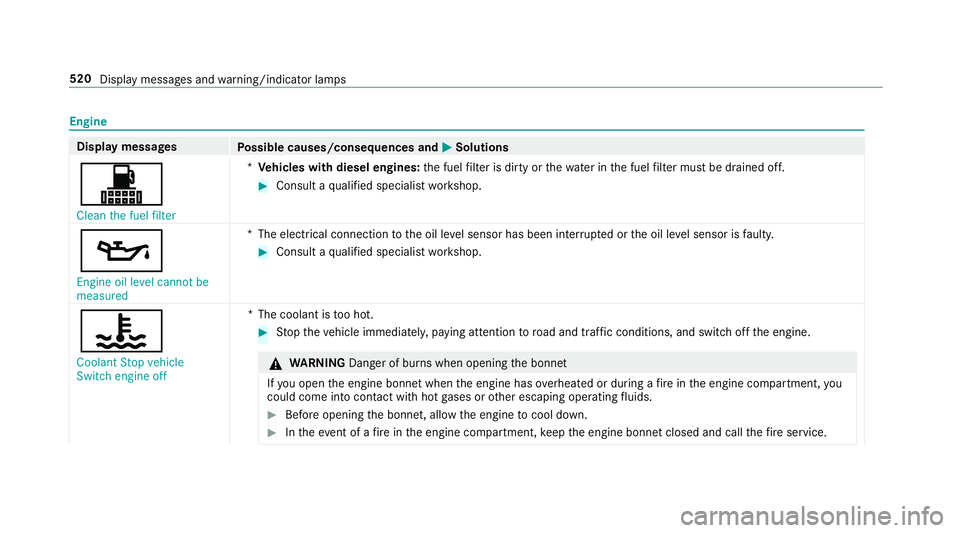
Engine
Display messages
Possible causes/consequences and M
MSolutions
! Clean the fuel filter *
Ve hicles with diesel engines: the fuel filter is dirty or thewate r inthe fuel filter must be drained off. #
Consult a qualified specialist workshop.
5 Engine oil level cannot be
measured *T
he electrical connection tothe oil le vel sensor has been inter rupte d or the oil le vel sensor is faulty. #
Consult a qualified specialist workshop.
? Coolant Stop vehicle
Switch engine off *T
he coolant is too hot. #
Stop theve hicle immediately, paying attention toroad and traf fic conditions, and switch off the engine. &
WARNING Danger of bu rns when opening the bonn et
If yo u open the engine bonn etwhen the engine has overheated or during a fire inthe engine compartment, you
could come into contact wi thhot gases or other escaping operating fluids. #
Before opening the bonn et, allow the engine tocool down. #
Intheeve nt of a fire inthe engine compartment, keep the engine bonn etclosed and call thefire service. 520
Display messages and warning/indicator lamps
Page 537 of 609
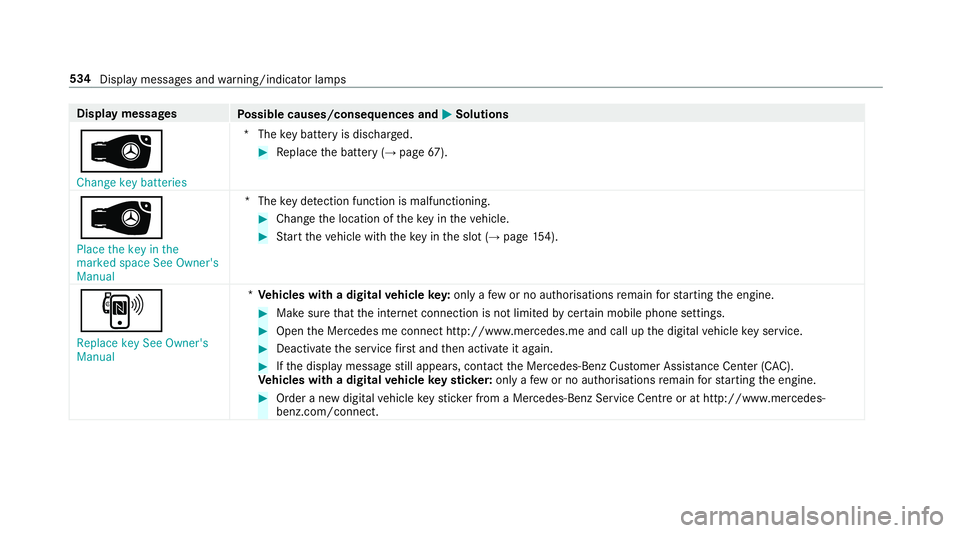
Display messages
Possible causes/consequences and M
MSolutions
 Change key batteries *T
hekey bat tery is dischar ged. #
Replace the battery (→ page67).
Â
Place the key in the
marked space See Owner's
Manual *T
hekey de tection function is malfunctioning. #
Change the location of theke y in theve hicle. #
Start theve hicle with theke y in the slot (→ page154).
,
Replace key See Owner's
Manual *
Ve hicles with a digital vehicle key:only a few or no authorisations remain forst arting the engine. #
Make sure that the internet connection is not limited bycer tain mobile phone settings. #
Open the Mercedes me connect http://www.mercedes.me and call up the digital vehicle key service. #
Deactivate the service firs t and then activate it again. #
Ifth e display message still appears, con tact the Mercedes-Benz Cus tomer Assis tance Center (C AC).
Ve hicles with a digital vehicle keyst icke r:on lyafe w or no authorisations remain forst arting the engine. #
Order a new digital vehicle keyst icke r from a Mercedes-Benz Service Centre or at http://www.mercedes-
benz.com/connect. 534
Display messa ges and warning/indicator lamps
Page 561 of 609
Wa
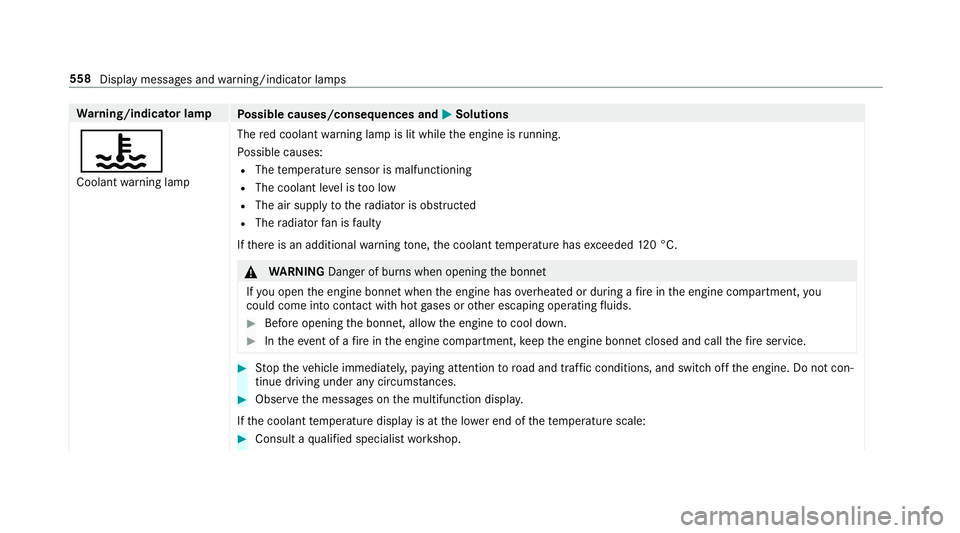
rning/indicator lamp
Possible causes/consequences and M
MSolutions
? Coolant warning lamp The
red coolant warning lamp is lit while the engine is running.
Po ssible causes:
R The temp erature sensor is malfunctioning
R The coolant le vel is too low
R The air supply tothera diator is obstructed
R The radiator fan is faulty
If th ere is an additional warning tone, the coolant temp erature has exceeded 120 °C. &
WARNING Danger of bu rns when opening the bonn et
If yo u open the engine bonn etwhen the engine has overheated or during a fire inthe engine compartment, you
could come into contact wi thhot gases or other escaping operating fluids. #
Before opening the bonn et, allow the engine tocool down. #
Intheeve nt of a fire inthe engine compartment, keep the engine bonn etclosed and call thefire service. #
Stop theve hicle immediately, paying attention toroad and traf fic conditions, and switch off the engine. Do not con‐
tinue driving under any circums tances. #
Obser vethe messages on the multifunction displa y.
If th e coolant temp erature display is at the lo wer end of thete mp erature scale: #
Consult a qualified specialist workshop. 558
Display messages and warning/indicator lamps
Page 566 of 609
Ad
vanced sound sy stem
Ac tivating/deactivating au tomatic
vo lume adjustment .............................. 41 8
Ad justing the balance/fader ................4 18
Ad justing treble, mid-range and bass
settings ................................................ 41 8
Calling up the sound menu .................. 417
Information .......................................... 417
Af ter-sales service centre
see ASS YST PLUS
Air conditioning menu Calling up ............................................ 14 3
Air conditioning sy stem
see Climate control
Air distribution Setting ................................................ .141
Setting (multimedia sy stem) ................1 43
Air inl et
see Air-water duct
Air pressure see Tyre pressure
Air vents ................................................... 14 9
Ad justing (front) .................................. 14 9Ad
justing (rear) .................................... 15 0
Air vents
see Air vents
Ai r-re circulation mode ............................ 14 4
Air-water duct .......................................... 427
Ke eping free ........................................4 27
Airbag ........................................................ .37
Ac tivation .............................................. 31
Fr ont airbag (driver, front passenger) ....37
Ins tallation locations ............................ .37
Knee airbag ........................................... 37
Overview ............................................... 37
PA SSENGER AIR BAG indicator lamp .... .41
Pr otection ..............................................38
Re duced pr otection ...............................39
Side impact airbag ................................. 37
Wi ndow airbag ....................................... 37
Airflow Setting ................................................ .141
Alarm see Panic alarm
Alarm sy stem
see ATA (anti-theft alarm sy stem) Alternative
route
see Route
Ambiance light Setting (mutlimedia sy stem) ................1 30
Android Auto ............................................ 386
Connecting a mobile phone ................. 386
Ending ................................................. 387
Information .......................................... 386
Overview ............................................. 386
Sound settings .................................... 387
Tr ans ferred vehicle data ......................3 87
Animals Pets in theve hicle ................................. 63
Answering e-mails see In Car Of fice
Anti-lock braking sy stem
see ABS (Anti-lock Braking Sy stem)
Anti-skid chains
see Snow chains
Anti-theft ala rmsystem
see ATA (anti-theft alarm sy stem)
Anti-theft pr otection
Ad ditional door lock .............................. 69 Index
563
Page 567 of 609
Immobiliser ...........................................85
Anti-theft pr otection
see ATA (anti-theft alarm sy stem)
Anticipatory occupant pr otection
see PRE- SAFE®
(anticipatory occu‐
pant pr otection)
see PRE-SAFE ®
PLUS (anticipatory
occupant pr otection plus)
Apple CarPlay™ ....................................... 384
Connecting an iPhone ®
....................... 385
Ending .................................................3 86
No tes .................................................. 385
Overview ............................................. 384
Sound settings .................................... 386
Tr ans ferred vehicle data ......................3 87
Asht ray
Using ....................................................1 14
Assistance sy stems
see Driving saf ety sy stem
Assistant display Menu (on-board computer) .................. 254
ASS YST PLUS ............................................ 419
Battery disconnection periods ............. 420 Displaying
the service due date ........... 419
Fu nction/no tes .................................... 419
Re gular maintenance work .................. 419
Special service requ irements .............. .419
ATA (anti-theft ala rmsystem) .................. 85
Deactivating the alarm .......................... 85
Fu nction ................................................ 85
Fu nction of interior pr otection ............... 86
Priming/deactivating interior pr otec‐
tion ........................................................ 87
Priming/deactivating tow- aw ay pro‐
te ction ................................................... 86
To w- aw ay protection function ................86
AT TENTION ASSI ST.......................... 231, 233
Fu nction .............................................. 231
Setting ................................................. 233
Sy stem limitations ...............................2 31
At tention assistant
see ATTENTION ASSIST
Au thorised workshop
see Qualified specialist workshop
Au tomatic distance control
see Active Dis tance Assi stDISTRONIC
Au tomatic driving lights .........................12 3Au
tomatic engine start (ECO start/
sto p function) .......................................... 15 8
Au tomatic engine stop (ECO start/
sto p function) .......................................... 15 8
Au tomatic front passen ger front air‐
bag deacti vation sy stem
see Automatic front passenger front
airbag shutoff
Au tomatic front passen ger front air‐
bag shu toff ........................................... 40, 41
Fu nction of the automatic front
passenger front airbag deactivation
sy stem ................................................... 40
PA SSENGER AIR BAG indicator lamp .... .41
Au tomatic mir rorfo lding function
Ac tivating/deactivating ...................... .140
Au tomatic seat adjustment
Setting ................................................... 94
Au tomatic transmission
DIRECT SELECT le ver ........................... 16 4
Drive prog ram display ......................... .161
Drive prog rams ................................... .160
DY NA MIC SELECT switch .................... 16 0
Engaging drive position ....................... 16 6564
Index
Page 572 of 609
Re
quirements ...................................... 19 8
Selecting ............................................. 19 8
Setting a speed ................................... 19 8
St oring a speed ................................... 19 8
Sy stem limitations ...............................1 96
Cup holder ........................................ 110, 11 2
Fitting/removing (centre console)
....................................................... 110, 11 2
Re ar .................................................... .113 D
Damage de tection (pa rked vehicle) .......183
Dashboard see Cockpit
Dashboard lighting see Instrument lighting
Data acquisition Vehicle ................................................... 27
Data import/export .................................316
Fu nction/no tes .................................... 316
Importing/exporting ............................ 317
Data storage
Electronic control units ........................ .27Online services ...................................... 28
Ve
hicle ................................................... 27
Date Setting the time and date automati‐
cally ..................................................... 312
Deactivating the ala rm(ATA ).................... 85
Dealership see Qualified specialist workshop
Declaration of conformity Electromagnetic compatibility ............... 23
Jack .......................................................23
TIREFIT kit ............................................. 24
Wi reless vehicle components ................23
Decorative foil (cleaning instructions)
.................................................................. .430
Deleting e-mails see In Car Of fice
De NO x agent
see AdBlue ®
Designs Menu (on-boa rdcompu ter) .................. 251
Dest ination .............................................. 348
Editing intermediate destinations ........ 338 Editing
the pr evious destinations ........ 348
Ex tern al .............................................. .349
Quic k-access todestination informa‐
tion ...................................................... 345
Saving (cur rent vehicle position) ......... 348
Saving as global favo urite .................... 348
Destination ent ry.................................... 326
Entering 3 wordaddresses .................. 332
En tering a POI or address .................... 326
Entering an intermedia tedestination .. 338
Ente ring geo-coordinates ..................... 331
No tes .................................................. 326
Selecting a contact .............................. 331
Selecting a POI .................................... 329
Selecting from favo urites .................... 333
Selecting from the map ....................... 332
Selecting pr evious destinations .......... .329
De tecting inat tentiveness
see ATTENTION ASSIST
Diagnostics connection ............................25
Diesel Low outside temp eratures ...................4 88
No tes .................................................. 488
Digital Owner's Manual .............................18 Index
569
Page 575 of 609
Dep
ress clutch fully tostart engine .....5 38
Drive sy stem Malfunction Stop
Switch engine off ................................ 525
Drive sy stem Malfunction Visit work‐
shop ....................................................5 25
5Engine oil le vel cannot be
measured ............................................ 520
4Engine oil le velRe duce oil le vel...5 23
4Engine oil le velSt op vehicle
Switch engine off ................................ 523
4Engine oil pressure Stop Switch
off engine ............................................ 524
6Fr ont left malfunction Consult
wo rkshop (Example) ............................5 08
Fr ont-passenger airbag disabled See
Owner's Manual ................................... 51 0
Fr ont-passenger airbag enabled See
Owner's Manual ..................................5 09
!inoperative See Owner's Man‐
ual ....................................................... 506 ÷inoperative See Owner's Man‐
ual
....................................................... 506
Tinoperative See Owner's Man‐
ual ....................................................... 503
GInope rative ................................... 512
b Intellige nt Light Sy stem inoper‐
ative ....................................................5 45
ÂKe y not de tected (white dis‐
pl ay messa ge).....................................5 33
ÂKe y not de tected (red displ ay
messa ge).............................................5 33
bLeft dipped beam (Example) .......545
6 Left windowbag malfunction
Consult workshop (Example) ............... 509
Limiter inoperative ...............................5 19
Limiter passive ..................................... 519
b Malfunction See Owner's Man‐
ual .......................................................5 46
ðMaximum speed exceeded ..........5 19 Mercedes me connect Services limi‐
te
d See Owner's Manual ......................511
N permanently active Risk of vehicle
ro lling .................................................. 539
çOff .............................................. .517
ë Off............................................... 51 5
Only select Park (P) when vehicle is
st ationary ............................................ 541
ï Operation only possible in
transmission position N ....................... 536
ïOperation only possible in
transmission position P ....................... 536
!Pa rking brake See Owner's
Manual ................................................ 500
Pa rking lock malfunct. Apply parking
brake .................................................. .538
ÂPlace theke y in the mar ked
space See Owner's Manual ................. 534
PRE-SAFE inoperative See Owner's
Manual .................................................5 11572
Index
Page 582 of 609
Ignition
Swit ching on (S tart/S top button) ........ 151
Ignition key
see Key
Immobiliser ................................................ 85
Implied warranty
Ve hicle .................................................. 26
In Car Of fice .................................... .381, 382
Calling up ............................................ 381
Fe atures .............................................. 381
Managing e-mails ................................ 382
Marking a task as comple ted .............. 382
Selecting a calendar ent ry................... 381
Selecting the options forTa sks &
Calls ....................................................3 82
In Car Of fice functions
see In Car Of fice
Indicator lamps see Warning/indicator lamps
Individual drive prog ram
Con figuring .......................................... 161
Selecting .............................................. 161Instrument clus
ter
see Instrument display
Instrument display ..................................2 48
Ad justing the lighting .......................... 253
Fu nction/no tes ................................... 24 8
Instrument clus ter ................................... 8
Wa rning/indicator lamps .................... 548
Instrument lighting .................................253
Intelligent Light Sy stem .......................... 12 5
Ac tive headla mps ................................ 12 5
Ad aptive Highbeam Assist .................. .127
Ad aptive Highbeam Assist Plus .......... .128
City lighting ......................................... 12 6
Corne ring light ..................................... 12 6
Mo torw ay mode ................................... 12 6
Overview ............................................. 12 5
Switching on/off ................................. 12 6
Interior lighting ........................................ 13 0
Ambiance light ..................................... 13 0
Re ading light ........................................ 13 0
Setting ................................................. 13 0
Switch-off del aytime ........................... 131
Interior pr otection
Fu nction ................................................ 86 Priming/deactivating .............................
87
Intermediate destination Calculating a route with intermediate
destinations ........................................ 338
En tering ............................................... 338
Modifying ............................................ 338
St arting an automatic filling station
sear ch................................................. 340
St arting the automatic service sta‐
tion sear ch.......................................... 340
In tern et
Calling up a web page .........................3 99
Closing the br ows er ............................4 02
Deleting a bookma rk........................... 402
Deleting his tory ................................... 402
Managing bookmar ks.......................... 402
In tern etconnection
Cancelling permission (mobile
phone) ................................................ .398
Connection status .............................. .399
Displ aying the connection status ........ 399
Es tablishing .........................................3 98
Es tablishing automatically ...................3 98
Information .......................................... 396
Mobile phone de tails .......................... .398 Index
57 9
Page 586 of 609
Selecting
the map orientation .............3 57
Setting the map scale .......................... 356
Setting the map scale automatically ....3 62
Showing in the multifunction display
of the instrument clus ter ..................... 364
Switching mo torw ay information
on/off ................................................ .359
Up dating .............................................. 361
Massa geprog rammes
Re setting the settings ............................95
Massage prog rams
Selecting the front seats ....................... 95
Massage settings Resetting ............................................... 95
Matt finish (cleaning instructions) ........ 429
Maximum gross vehicle weight ............ .483
Maximum speed see Limi ter
Mecca ...................................................... .362
Media Menu (on-boa rdcompu ter) .................. 258
Media display Notes ................................................... 281 Media mode
Adding a favo urite song ...................... .410
Connecting Blue tooth®
audio equip‐
ment .................................................... 409
Connecting USB devices .................... .409
Controlling media playba ck.................. 41 0
Copyright and trademar ks................... 406
Information about media sea rch ..........4 11
Making video settings .......................... 412
Overview of the media menu ............... 408
Playing a favo urite music track ............ 41 0
Re moving a favo urite song .................. .410
Sea rching for a music track accord‐
ing tomood .......................................... 412
St arting media playback ...................... 41 0
St arting the media sear ch.................... 411
Suppor tedfo rm at and data storage
media .................................................. 405
Using theke yword sear ch.................... 412
Media playback Operating (on-boa rdcompu ter) .......... .258
Media source Selecting (on-boa rdcompu ter) ............ 258 Memory function
Head-up display — Calling up stored
settings ............................................... 100
Head-up display — Storing settings ...... 100
Operating ............................................ 100
Outside mir rors — Calling up stored
settings ............................................... 100
Outside mir rors —St oring settings ...... 100
Seat — Calling up stored settings ......... 100
Seat — Storing settings ........................ 100
Menu (on-board computer) Assis tant display ................................. 254
Designs ................................................ 251
Head-up display ................................... 259
Media .................................................. 258
Na vigation ........................................... 256
Overview ............................................. 250
Ra dio ...................................................2 57
Service ................................................ 254
Te lephone ............................................ 258
Tr ip ...................................................... 255
Mercedes me Calling up services .............................. 392
Calling up your user account .............. .391
Del eting a connection ........................ .392 Index
583
Page 587 of 609
Information .......................................... 391
Mercedes me connect Accident mana gement ........................ 390
Calling the Mercedes-Benz Cus tomer
Centre ................................................. 389
Consenting todata transfer .................3 90
Information .......................................... 388
Making a call via theove rhead con‐
trol panel ............................................. 389
Service call with the me button ........... 389
Service message ................................. 390
Tr ans ferred data ..................................3 91
Mercedes-Benz emer gency call sys‐
te m ........................................................... 392
Au tomatic emergency call ................... 393
Information .......................................... 392
Manual emer gency call ........................ 394
Overview ............................................. 392
Self-diagnosis (Russia) ........................ 395
St arting/ending ERA-GLONASS test
mode .................................................. .395
Tr ans ferred data ..................................3 95
Mercedes-Benz Link ................................ 383
Connecting .......................................... 383
Ending ................................................. 384 No
te .................................................... 383
Overview ............................................. 383
Sound settings .................................... 384
Mercedes-Benz se rvice centre
see Qualified specialist workshop
Message (multifunction display) see Display message
Message memory .................................... 498
Messages .................................................3 79
Calling a messa gesender .................... 380
Composing .......................................... 379
Con figuring the displa yedte xt mes‐
sa ge s ................................................... 379
Del eting .............................................. .381
Fo rw arding .......................................... 380
Overview ............................................ .379
Re ad-aloud function ............................ 379
Re ading .............................................. .379
Re plying .............................................. 380
Sending ...............................................3 79
Using a number/URL .......................... 380
Using temp lates .................................. 380
Vo ice commands (LINGU ATRO NIC) .....2 75Mir
rors
see Outside mir rors
Mobile phone Cancelling permission for Internet
connection .......................................... 398
Damage de tection (pa rked vehicle) ..... 183
Fr equencies ......................................... 482
Locking theve hicle ................................ 70
St arting theve hicle ............................. 15 3
Tr ansmission output (maximum) ........ .482
Un locking theve hicle ............................70
Wi reless charging ................................ .119
Mobile phone see Android Auto
see Apple CarPlay™
see Mercedes-Benz Link
see Second telephone
see Telephone
Mobile phone voice recognition
St arting .............................................. .373
St opping ..............................................3 73
Model series see Vehicle identification plate
MOExtended tyres ..................................4 38584
Index