service MERCEDES-BENZ A-CLASS HATCHBACK 2018 Workshop Manual
[x] Cancel search | Manufacturer: MERCEDES-BENZ, Model Year: 2018, Model line: A-CLASS HATCHBACK, Model: MERCEDES-BENZ A-CLASS HATCHBACK 2018Pages: 609, PDF Size: 10.73 MB
Page 368 of 609
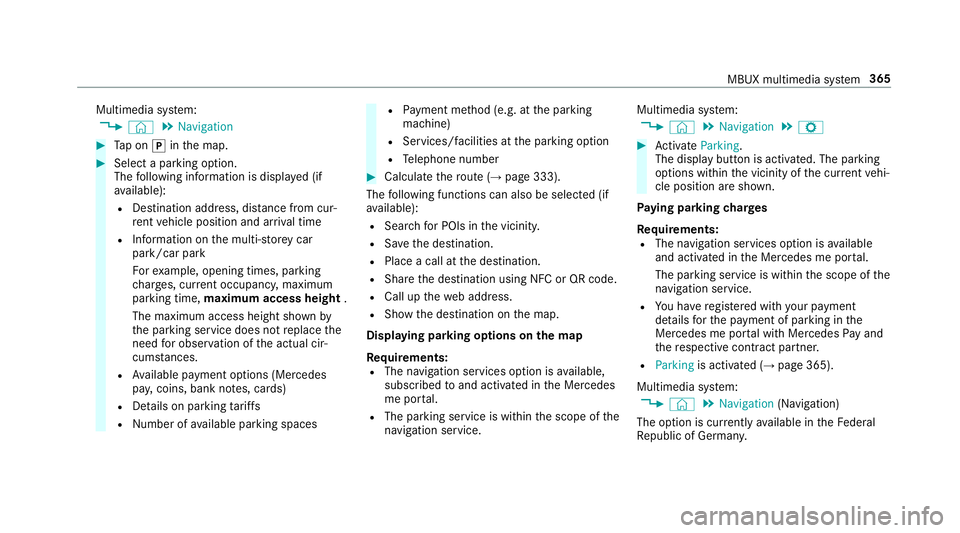
Multimedia sy
stem:
, © .
Navigation #
Tap on jinthe map. #
Select a parking option.
The following information is displa yed (if
av ailable):
R Destination address, dis tance from cur‐
re nt vehicle position and ar riva l time
R Information on the multi-s torey car
park/car park
Fo rex ample, opening times, parking
ch arge s, cur rent occupancy, maximum
pa rking time, maximum access height .
The maximum access height shown by
th e parking service does not replace the
need for obser vation of the actual cir‐
cums tances.
R Available payment options (Mercedes
pa y,coins, bank no tes, cards)
R Details on parking tariffs
R Number of available parking spaces R
Payment me thod (e.g. at the parking
machine)
R Services/ facilities at the parking option
R Telephone number #
Calculate thero ute (→ page 333).
The following functions can also be selec ted (if
av ailable):
R Sear chfor POIs in the vicinit y.
R Save the destination.
R Place a call at the destination.
R Share the destination using NFC or QR code.
R Call up thewe b address.
R Show the destination on the map.
Displaying parking options on the map
Requ irements:
R The navigation services option is available,
subsc ribed toand activated in the Mercedes
me por tal.
R The parking service is within the scope of the
navigation service. Multimedia sy
stem:
, © .
Navigation .
Z #
Activate Parking.
The display button is acti vated. The parking
options within the vicinity of the cur rent vehi‐
cle position are shown.
Pa ying parking charges
Re quirements:
R The navigation services option is available
and activated in the Mercedes me por tal.
The parking service is within the scope of the
navigation service.
R You ha veregis tere d with your payment
de tails forth e payment of parking in the
Mercedes me por talwith Mercedes Pay and
th ere spective contra ct partner.
R Parking is activated (→ page 365).
Multimedia sy stem:
, © .
Navigation (Navigation)
The option is cur rently available in theFe deral
Re public of German y. MBUX multimedia sy
stem 365
Page 370 of 609
&
WARNING Risk of di stra ction from oper‐
ating mobile communication equipment
while theve hicle is in motion
If yo u operate mobile communication equip‐
ment when driving, you will be distracted from
the tra ffic situation. This could also
cause youto lose control of theve hicle. #
Only operate this equipment when the
ve hicle is stationar y. Yo
u must obse rveth e legal requirements forthe
country in whi chyou are cur rently driving when operating mobile communication equipment in
th
eve hicle.
Fu rther information can be obtained from a
Mercedes-Benz service centre or at: http://
www.mercedes-benz.com/connect. MBUX multimedia sy
stem 367
Page 382 of 609
Deleting
the call list
Multimedia sy stem:
, © .
Phone .
Z #
Select the connected mobile phone. #
Select Contacts & call list. #
Select Delete call list. #
Select Yes.
% This function is only available if your mobile
does not suppo rtthe PBAP Blue tooth®
pro‐
fi le. Te
xt messages Overview of message functions
In
the messages menu you can recei veand send
te xt messa ges.
If th e connected mobile phone supports the
Blu etoo th®
MAP profile, the message function
can be used on the multimedia sy stem.
Yo u can obtain fur ther information about set‐
tings and suppor ted functions of Blue tooth®
-
capable mobile phones from a Mercedes-Benz service centre or at: http://www.mercedes-
benz.com/connect
Some mobile phones require fur ther settings
af te r being connected tothe multimedia sy stem
(see manufacturer's operating instructions).
Setting message displa ys
Multimedia sy stem:
, © .
Phone .
Z #
Select the connected mobile phone. #
Select Message display .
The following options are available:
R All messages
R New and unread messages
R Messages while the vehicle is in motion
R Off (The message function is no lon ger
av ailable.) #
Select a setting.
Re ading messages
Multimedia sy stem:
, © .
Phone .
Messages #
Select a message sequence with a conta ct.Using the
read-aloud function #
Select a messa ge. #
Select .
The messa geisread aloud.
Dictating and sending a new message
Re quirements:
R There is an Internet connection.
Multimedia sy stem:
, © .
Phone .
Messages #
r select a new message.
Ad ding a recipient #
Select f. #
Select a con tact.
Dictating text #
Select p.
The dictating function is star ted. MBUX multimedia sy
stem 37 9
Page 384 of 609
If a
telephone number is selec tedth efo llow‐
ing options are available:
R Call
R Write new text message #
Select an option.
Deleting a message
Multimedia sy stem:
, © .
Phone .
Messages #
Select a conta ct. #
Press and hold on a message. #
Todel eteth e message: selectDelete. In Car Of
fice In Car Of
fice functions
Using In Car Of fice, you can connect your online
services with the multimedia sy stem.
The following functions are available:
R Display of the upcoming appointments in the
calendar
R Selection of an appointment as a destination
in the navigation R
Display of upcoming telephone con fere nces
R Display of pa rticipants in a telephone con fer‐
ence
R Display and selection of tasks and calls to
compl ete
% Please no tethat cer tain functions are only
av ailable when theve hicle is stationar y.
Calling up In Car Of fice
Re quirements:
R A mobile phone is connec ted as the main
phone tothe multimedia sy stem.
R You ha vea user account on thewe bsite from
Mercedes me (http://www.mercedes.me).
R The In Car Of fice service is acti vated in the
Mercedes me por tal.
R You ha vea user account with an online
service, forex ample Of fice 365. Multimedia sy
stem:
, © .
Mercedes me & Apps #
Select In Car Office.
Yo u will see an appointments overview for
th e cur rent da y.
Yo u can find thefo llowing displa ysinthe
appointments overview:
R All day: all-day appointment
Selecting a calendar entry function in In Car
Of fice
Multimedia sy stem:
, © .
Mercedes me & Apps .
In Car
Office .
Calendar #
Select an appointment.
The following functions are available: Read aloud
R Call
Z Navigate MBUX multimedia sy
stem 381
Page 386 of 609
#
Enter the subject and text of the e-mail with
th eke ypad. #
Select Send. Mercedes-Benz link
Overview of Mercedes-Benz Link
&
WARNING Risk of di stra ction from infor‐
mation sy stems and communications
equipment
If yo u operate information and communica‐
tion equipment integ rated in theve hicle
when driving, you will be distracted from the
traf fic situation. This could also cause youto
lose control of theve hicle. #
Only operate this equipment when the
traf fic situation permits. #
Ifyo u cannot be sure of this, stop the
ve hicle whilst paying attention toroad
and traf fic conditions and ope rate the
equipment with theve hicle stationar y. Yo
u must obse rveth e legal requirements forthe
country in whi chyou are cur rently driving when
operating the multimedia sy stem.
Wi th Mercedes-Benz Link you can use mobile
phone functions via the multimedia sy stem. It is
operated using theto uchsc reen or thevo ice-
opera ted control sy stem. You can activate the
vo ice-opera ted control sy stem bypressing and
holding the£ button on the multifunction
st eering wheel.
When using Mercedes-Benz Link via thevo ice-
opera ted control sy stem, the multimedia sy stem
can still be operated via LINGU ATRO NIC
(→ page 261).
The Mercedes-Benz Link control box supplemen‐
ta ry equipment is requiredforth is. This is availa‐
ble at a Mercedes-Benz service centre.
On ly one mobile phone at a time can be connec‐
te d via Mercedes-Benz Link tothe multimedia
sy stem.
Also when using Mercedes-Benz Link in two
phone mode, only one additional mobile phone
can be connected using Blue tooth®
with the
multimedia sy stem. %
The Mercedes-Benz Link control box uses
the Android operating sy stem.
% The service pr ovider is responsible forth ese
apps and the services and conte nt connec‐
te dto it.
Note s on Mercedes-Benz Link
If a mobile phone is used with Mercedes-Benz
Link, USB access using the media menu is not
possible forth is mobile phone.
Only one route guidance can be active at a time.
If ro ute guidance is active on the multimedia sys‐
te m, it is closed when route guidance is star ted
on the mobile phone.
Connecting Mercedes-Benz Link with the
mu ltimedia sy stem
Re quirements:
R The vehicle is fitted wi th the Mercedes-Benz
Link control box.
R The Mercedes-Benz Link app is ins talled on
th e mobile phone.
R The mobile phone is switched on. MBUX multimedia sy
stem 383
Page 388 of 609
Yo
u must obse rveth e legal requirements forthe
country in whi chyou are cur rently driving when
operating the multimedia sy stem.
iPhone ®
functions can be used via the multime‐
dia sy stem using Apple CarPlay™. They are oper‐
ated using theto uchsc reen, touchpad, Touch
Control or the Siri ®
vo ice-operated control sys‐
te m. You can activate thevo ice-opera ted control
sy stem bypressing and holding the£ button
on the multifunction steering wheel.
When using Apple CarPlay™ via thevo ice-oper‐
ated control sy stem, the multimedia sy stem can
st ill be operated via LINGU ATRO NIC
(→ page 261).
Only one mobile phone at a time can be connec‐
te d via Apple CarPlay™ tothe multimedia sys‐
te m.
Also for use of Apple CarPlay™ with two phone
mode, only one additional mobile phone can be
connected using Blue tooth®
with the multimedia
sy stem.
The availability of Apple CarPlay™ may vary
according tothe count ry. The service pr
ovider is responsible forth is appli‐
cation and the services and conte nt connected
to it.
Information on Apple CarPlay™
When Apple CarPlay™ is being used, the iPod ®
media source is not available forth ere spective
iPhone ®
.
Only one route guidance can be active at a time.
If ro ute guidance is active on the multimedia sys‐
te m, it is closed when route guidance is star ted
on the mobile phone.
Connecting an iPhone ®
via Apple CarPlay™
(cable)
Re quirements:
R The cur rent version of your device's operat‐
ing sy stem is being used (see the manufac‐
turer's operating instructions).
R There is an Internet connection forth e full
ra nge of functions for Apple CarPlay™.
R The iPhone ®
is connected tothe multimedia
sy stem via the USB port çusing a suita‐
ble cable (→ page 409). Multimedia sy
stem:
, © .
Mercedes me & Apps .
Smart-
phone .
Apple CarPlay .
Start Apple CarPlay #
Alternative: If Apple CarPlay™ is active (e.g.
when music is being pla yed or the navigation
sy stem is being used), you can call up the
application using the|, zor%
buttons (→ page 288).
Ac cepting/rejecting the data pr otection reg‐
ulations
Fo rth e initial start of the application: a message
with the data pr otection pr ovisions appears. #
Select Accept & start .
Exiting Apple CarPlay™ #
Press theò button.
% Apple CarPlay™ starts automatically when
th e iPhone ®
is connected with the sy stem
using a cable. If Apple CarPlay™ was not dis‐
pla yed in thefo re ground before disconnect‐
ing, the application starts in the bac kground
when reconnected. You can call up Apple
CarPlay™ in the main menu. MBUX multimedia sy
stem 385
Page 389 of 609
Calling up Apple CarPlay™ sound settings
Multimedia sy
stem:
, © .
Mercedes me & Apps .
Smart-
phone .
Apple CarPlay .
Z #
Select sound settings.
Ending Apple CarPlay™ #
Toend the connection of Apple Carplay
(cable): disconnect the connection via the
connecting cable between the iPhone ®
and
multimedia sy stem.
% Mercedes-Benz recommends disconnecting
th e connecting cable only when theve hicle
is stationar y. Android
Auto Android
Autoove rview &
WARNING Risk of di stra ction from infor‐
mation sy stems and communications
equipment
If yo u operate information and communica‐
tion equipment integ rated in theve hicle when driving,
you will be distracted from the
traf fic situation. This could also cause youto
lose control of theve hicle. #
Only operate this equipment when the
traf fic situation permits. #
Ifyo u cannot be sure of this, stop the
ve hicle whilst paying attention toroad
and traf fic conditions and ope rate the
equipment with theve hicle stationar y. Yo
u must obse rveth e legal requirements forthe
country in whi chyou are cur rently driving when
operating the multimedia sy stem.
Mobile phone functions can be used with
Android Autousing the Android operating sys‐
te m on the multimedia sy stem. It is operated
using theto uchsc reen or thevo ice-opera ted
control sy stem. You can activate thevo ice-oper‐
ated control sy stem bypressing and holding the
£ button on the multifunction steering wheel.
When using Android Autovia thevo ice-opera ted
control sy stem, the multimedia sy stem can still
be opera ted via LINGU ATRO NIC (→ page 261). Only one mobile phone at a time can be connec‐
te
d via Android Auto to the multimedia sy stem.
Also for use of Android Autowith two phone
mode, only one additional mobile phone can be
connec ted using Blue tooth®
with the multimedia
sy stem.
The availability of Android Autoand Android Auto
Apps may vary according tothe count ry.
The service pr ovider is responsible forth is appli‐
cation and the services and conte nt connected
to it.
Information on Android Auto
If a mobile phone is used with Android Auto,
USB access using the media menu is not possi‐
ble forth is mobile phone.
Only one route guidance can be active at a time.
If ro ute guidance is active on the multimedia sys‐
te m, it is closed when route guidance is star ted
on the mobile phone.
Connecting a mobile phone via Android Auto
Requ irements:
R The mobile phone supports Android Auto
from Android 5.0. 386
MBUX multimedia sy stem
Page 390 of 609
R
The Android Autoapp is ins talled on the
mobile phone.
R In order touse thete lephone functions, the
mobile phone must be connected tothe mul‐
timedia sy stem via Blue tooth®
(→ page 369).
If th ere was no prior Internet connection, this
is es tablished with the use of the mobile
phone with Android Auto.
R The mobile phone is connected tothe multi‐
media sy stem via the USB port çusing a
suitable cable (→ page 409).
R There is an Internet connection forth e full
ra nge of functions for Android Auto.
Multimedia sy stem:
, © .
Mercedes me & Apps .
Smart-
phone .
Android Auto .
Start Android Auto #
Alternative: If Android Autois active (e.g.
when music is being pla yed or the navigation
sy stem is being used), you can call up the
application using the|, zor%
buttons (→ page 288). %
The firs t acti vation of Android Autoon the
multimedia sy stem must be car ried out
when theve hicle is stationary for saf etyre a‐
sons.
Ac cepting/rejecting the data pr otection reg‐
ulations
Fo rth e initial start of the application: a message
with the data pr otection pr ovisions appears. #
Select Accept & start .
Exiting Android Auto #
Press theò button.
% Android Autostarts automatically when the
mobile phone is connected with the sy stem
using a cable. If Android Autowa s not dis‐
pla yed in thefo re ground before disconnect‐
ing, the application starts in the bac kground
when reconnected. You can call up Android
Au tointhe main menu. Calling up
the Android Autosound settings
Multimedia sy stem:
, © .
Mercedes me & Apps .
Smart-
phone .
Android Auto .
Z #
Select sound settings.
Ending Android Auto #
Disconnect the connecting cable between
th e mobile phone and multimedia sy stem.
% Mercedes-Benz recommends disconnecting
th e connecting cable only when theve hicle
is stationar y. Tr
ansfer redve hicle data with Android Auto
and Apple CarPlay™ Overview of transfer
redve hicle data
When using Android Autoor Apple CarPlay™,
cer tain vehicle data is transfer redto the mobile
phone. This enables youto getth e best out of
selected mobile phone services. Vehicle data is
not directly accessible.
The following sy stem information is transmit ted:
R Software release of the multimedia sy stem MBUX multimedia sy
stem 387
Page 391 of 609
R
System ID (anonymised)
The transfer of this data is used tooptimise
communication between theve hicle and the
mobile phone.
To do this, and toassign se veralve hicles tothe
mobile phone, a vehicle identifier is randomly
ge nerated.
This has no connection totheve hicle identifica‐
tion number (VIN) and is dele ted when the multi‐
media sy stem is reset (→ page 320).
The following driving status data is transmit ted:
R Transmission position engaged
R Distinction between par ked, standstill, rolling
and driving
R Day/night mode of the instrument clus ter
The transfer of this data is used toalter how
con tent is displ ayed tocor respond tothe driving
situation.
The following position data is transmitte d:
R Coordinates
R Speed R
Compass direction
R Acceleration di rection
This da tais only transfer red while the navigation
sy stem is active, in order toimpr oveit (e.g. so it
can continue functioning when in a tunnel). Mercedes me connect
Note
s on Mercedes me connect
Mercedes me connect pr ovides thefo llowing
services:
R Accident and breakdown mana gement (me
button or auto matic accident or breakdown
de tection)
R Appointment requests or similar (me button)
R Ifth e service is activated: Concier geService
(me button)
R Mercedes-Benz emergency call sy stem (SOS
button)
Mercedes me connect accident and breakdown
management, the Mercedes me connect Con‐
cier geService (if service is acti vated) and the Mercedes-Benz emer
gency call centre are availa‐
ble foryo u around the cloc k.
The me button and the SOS button can be found
on theve hicle's overhead control panel
(→ page 389).
Yo u can also call the Mercedes-Benz Cus tomer
Centre using the multimedia sy stem
(→ page 389).
Please no tethat Mercedes me connect is a
Mercedes-Benz service. In emer gencies, al ways
call the national emer gency services firs t using
th est andard national emer gency service phone
numbe rs. In eme rgencies, you can also use the
Mercedes-Benz emer gency call sy stem
(→ page 392).
Obser vethe conditions of use for Mercedes me
connect and other services. These can be
obtained in the Mercedes me por tal: https://
me.secu re.mercedes-benz.com
Fu rther information on Mercedes me connect,
th e pr ovided service scope and operation:
http://manuals.daimler.com/baix/cars/
connectme/en_GB/index.html 388
MBUX multimedia sy stem
Page 392 of 609
Calling
the Mercedes-Benz Cus tomer Centre
using the multimedia sy stem
Re quirements:
R Access toa GSM network is available.
R The contract partner's GSM network co ver‐
age is available in there spective region.
R The ignition must be switched on so that
ve hicle data can be transfer red automati‐
cally.
Multimedia sy stem:
, © .
Phone .
g #
Call Mercedes me connect.
Af ter confirmation, the multimedia sy stem
sends there qu ired vehicle data. The data
transfer is shown in the media displa y.
Then, you can select a service and be connected
to a specialist at the Mercedes-Benz Cus tomer
Centre.
Fu rther information on Mercedes me connect,
th e pr ovided service scope and operation are
av ailable at: http://manuals.daimler.com/baix/
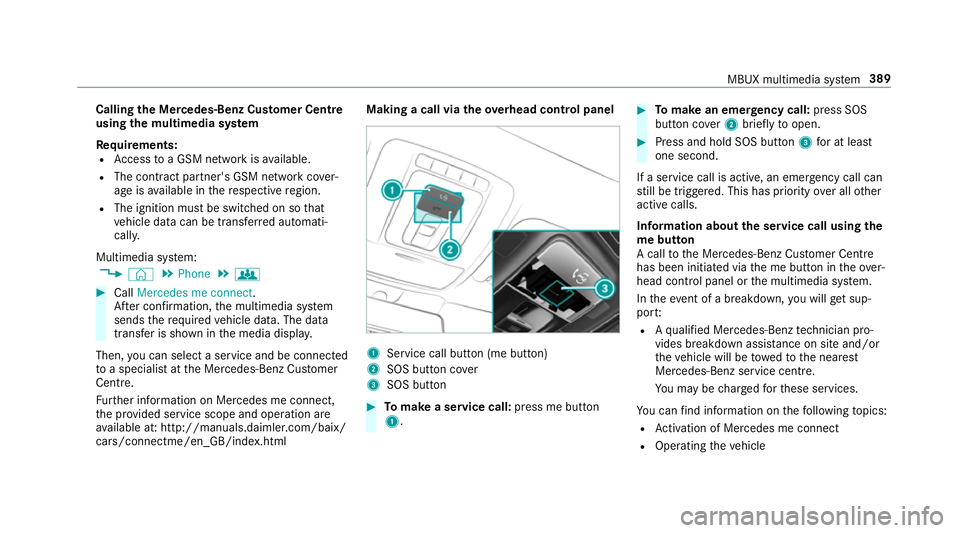
cars/connectme/en_GB/ind ex.html Making a call via the
overhead control panel 1
Service call button (me button)
2 SOS button co ver
3 SOS button #
Tomake a se rvice call: press me button
1. #
Tomake an eme rgency call: press SOS
button co ver2 briefly toopen. #
Press and hold SOS button 3for at least
one second.
If a service call is active, an emer gency call can
st ill be triggered. This has priority over all other
active calls.
Information about the service call using the
me button
A call tothe Mercedes-Benz Cus tomer Centre
has been initia ted via the me button in theove r‐
head control panel or the multimedia sy stem.
In theeve nt of a breakdown, you will get sup‐
po rt:
R Aqu alified Mercedes-Benz tech nician pro‐
vides breakdown assi stance on site and/or
th eve hicle will be towe dto the nearest
Mercedes-Benz service cent re.
Yo u may be charge dfo rth ese services.
Yo u can find information on thefo llowing topics:
R Activation of Me rcedes me connect
R Operating theve hicle MBUX multimedia sy
stem 389