ad blue MERCEDES-BENZ A-CLASS HATCHBACK 2018 User Guide
[x] Cancel search | Manufacturer: MERCEDES-BENZ, Model Year: 2018, Model line: A-CLASS HATCHBACK, Model: MERCEDES-BENZ A-CLASS HATCHBACK 2018Pages: 609, PDF Size: 10.73 MB
Page 318 of 609
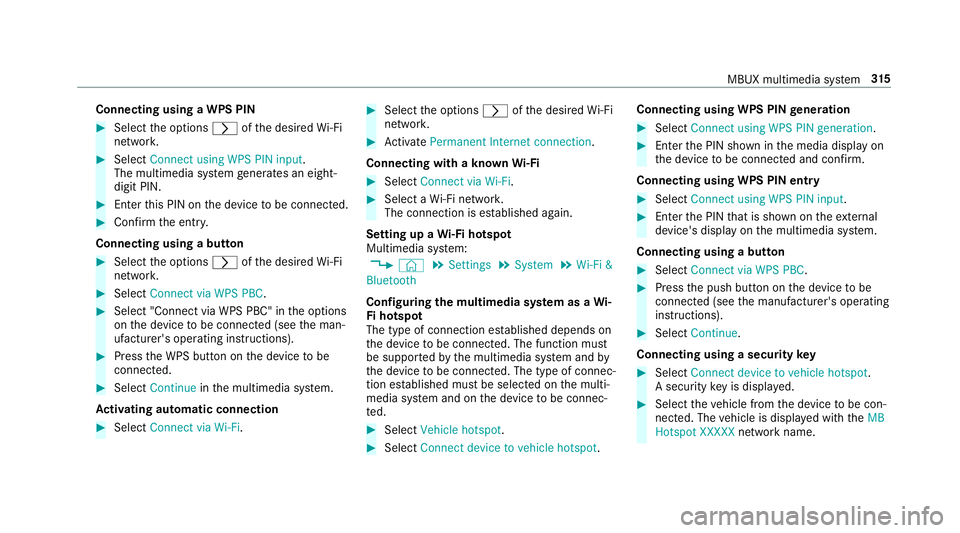
Connecting using a WPS PIN
#
Select the options rofthe desired Wi-Fi
networ k. #
Select Connect using WPS PIN input .
The multimedia sy stem generates an eight-
digit PIN. #
Enter this PIN on the device tobe connec ted. #
Confirm the entry.
Connecting using a but ton#
Select the options rofthe desired Wi-Fi
networ k. #
Select Connect via WPS PBC .#
Select "Connect via WPS PBC" in the options
on the device tobe connec ted (see the man‐
ufacturer's operating instructions). #
Press the WPS button on the device tobe
connec ted. #
Select Continue inthe multimedia sy stem.
Ac tivating automatic connection #
Select Connect via Wi-Fi . #
Select the options rofthe desired Wi-Fi
networ k. #
Activate Permanent Internet connection .
Connecting with a known Wi-Fi #
Select Connect via Wi-Fi . #
Select a Wi-Fi networ k.
The connection is es tablished again.
Setting up a Wi-Fi hotspot
Multimedia sy stem:
, © .
Settings .
System .
Wi-Fi &
Bluetooth
Configuring the multimedia sy stem as a Wi-
Fi hotspot
The type of connection es tablished depends on
th e device tobe connec ted. The function must
be suppor tedby the multimedia sy stem and by
th e device tobe connec ted. The type of connec‐
tion es tablished must be selected on the multi‐
media sy stem and on the device tobe connec‐
te d. #
Select Vehicle hotspot. #
Select Connect device to vehicle hotspot .Connecting using WPS PIN
generation #
Select Connect using WPS PIN generation. #
Ente rth e PIN shown in the media display on
th e device tobe connec ted and con firm.
Connecting using WPS PIN entry #
Select Connect using WPS PIN input. #
Enterth e PIN that is shown on theex tern al
device's display on the multimedia sy stem.
Connecting using a button #
Select Connect via WPS PBC. #
Press the push button on the device tobe
connec ted (see the manufacturer's operating
instructions). #
Select Continue.
Connecting using a security key #
Select Connect device to vehicle hotspot .
A secu rity key is displa yed. #
Select theve hicle from the device tobe con‐
nec ted. The vehicle is displa yed with theMB
Hotspot XXXXX network name. MBUX multimedia sy
stem 315
Page 347 of 609
When
thech ange of direction is comple te,
th e map appears in full-screen mode.
% Changes of direction are also shown in the
Instrument Displa y.
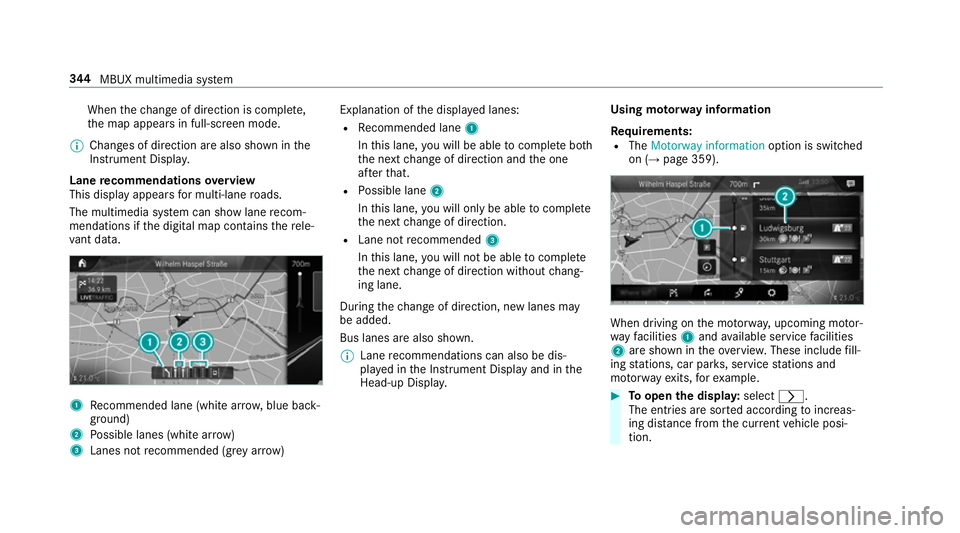
Lane recommendations overview
This display appears for multi-lane roads.
The multimedia sy stem can show lane recom‐
mendations if the digital map conta insthere le‐
va nt da ta. 1
Recommended lane (white ar row, blue back‐
ground)
2 Possible lanes (white ar row)
3 Lanes not recommended (gr eyarro w) Explanation of
the displa yed lanes:
R Recommended lane 1
In this lane, you will be able tocompl ete bo th
th e next change of direction and the one
af te rth at.
R Possible lane 2
In this lane, you will on lybe able tocompl ete
th e next change of direction.
R Lane not recommended 3
In this lane, you will not be able tocompl ete
th e next change of direction without chang‐
ing lane.
During thech ange of direction, new lanes may
be added.
Bus lanes are also shown.
% Lane recommendations can also be dis‐
pl ay ed in the Instrument Display and in the
Head-up Displa y. Using mo
torw ay information
Re quirements:
R The Motorway information option is switched
on (→ page 359). When driving on
the mo torw ay, upcoming mo tor‐
wa yfa cilities 1and available service facilities
2 are shown in theove rview. These include fill‐
ing stations, car par ks, service stations and
mo torw ay ex its,forex ample. #
Toopen the displa y:select r.
The entries are sor ted according toinc reas‐
ing dis tance from the cur rent vehicle posi‐
tion. 344
MBUX multimedia sy stem
Page 366 of 609
#
Switch Satellite map on or off.
If th e display button is activated, satellite
maps are displa yed in map scales from 2 km.
If th e display button is deactivated, satellite
maps are not displa yed in map scales from
2 km to20 km.
% The satellite maps forth ese map scales are
not available in all countries.
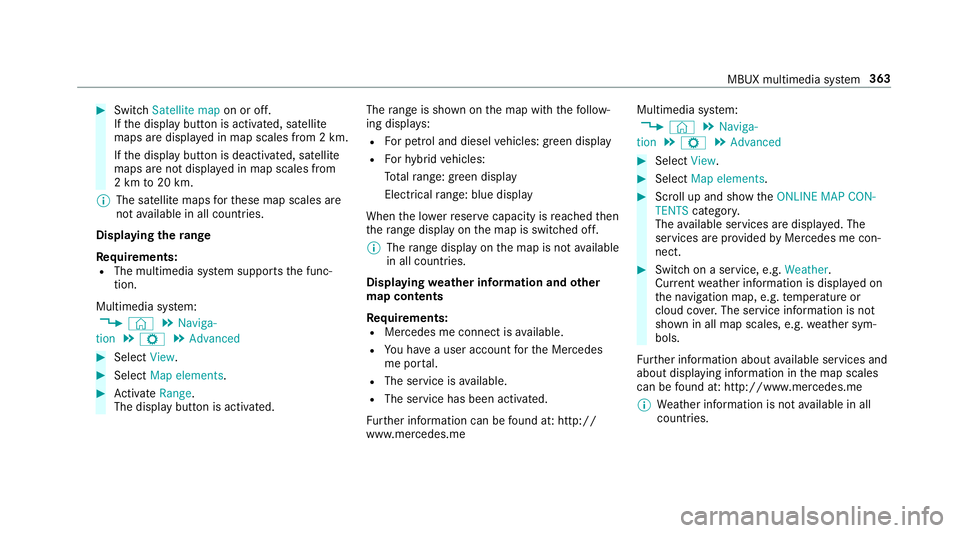
Displ aying thera nge
Re quirements:
R The multimedia sy stem supports the func‐
tion.
Multimedia sy stem:
, © .
Naviga-
tion .
Z .
Advanced #
Select View. #
Select Map elements. #
Activate Range.
The display button is acti vated. The
range is shown on the map with thefo llow‐
ing displa ys:
R For petrol and diesel vehicles: green display
R Forhy brid vehicles:
To talra nge: green displ ay
Electrical range: blue displ ay
When the lo werre ser vecapacity is reached then
th era nge displ ayon the map is switched off.
% The range displ ayon the map is not available
in all countries.
Displ aying weather information and other
map contents
Re quirements:
R Mercedes me connect is available.
R You ha vea user account forth e Mercedes
me por tal.
R The service is available.
R The service has been activated.
Fu rther information can be found at: http://
www.mercedes.me Multimedia sy
stem:
, © .
Naviga-
tion .
Z .
Advanced #
Select View. #
Select Map elements. #
Scroll up and show theONLINE MAP CON-
TENTS categor y.
The available services are displa yed. The
services are pr ovided byMercedes me con‐
nect. #
Switch on a service, e.g. Weather.
Cur rent we ather information is displa yed on
th e navigation map, e.g. temp erature or
cloud co ver.The service information is not
shown in all map scales, e.g. weather sym‐
bols.
Fu rther information about available services and
about displaying information in the map scales
can be found at: http://www.mercedes.me
% Weather information is not available in all
countries. MBUX multimedia sy
stem 363
Page 371 of 609
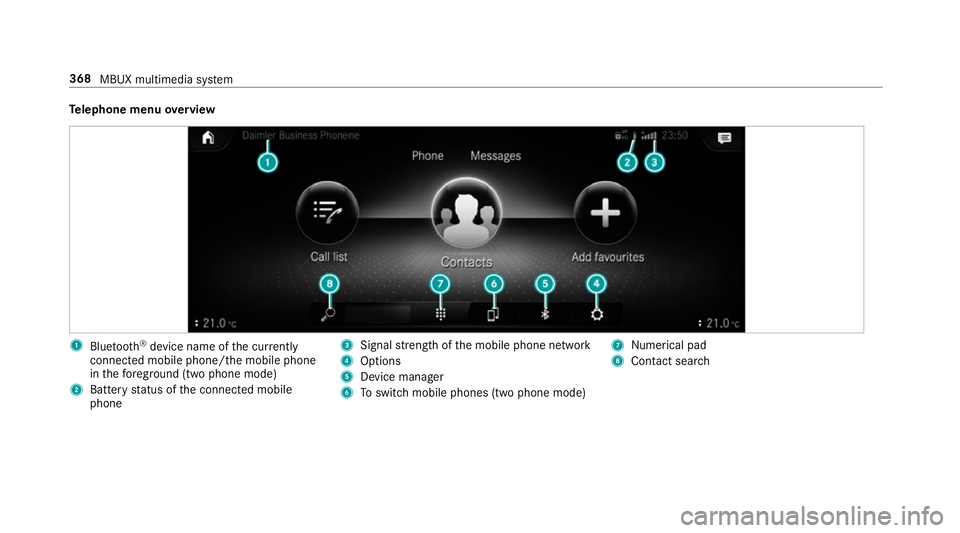
Te
lephone menu overview 1
Blue tooth ®
device name of the cur rently
connected mobile phone/the mobile phone
in thefo re ground (two phone mode)
2 Battery status of the connected mobile
phone 3
Signal stre ngth of the mobile phone network
4 Options
5 Device manager
6 Toswitch mobile phones (two phone mode) 7
Numerical pad
8 Contact sear ch 368
MBUX multimedia sy stem
Page 372 of 609
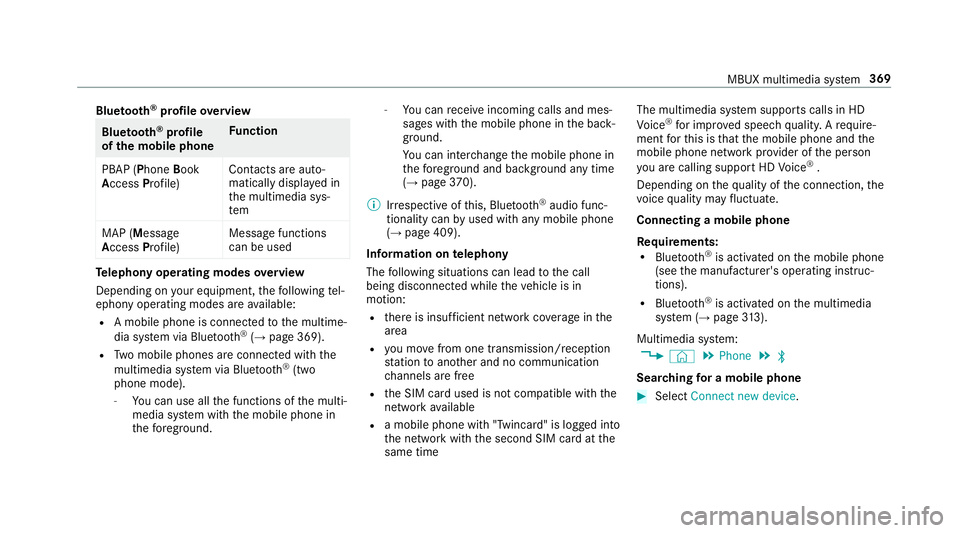
Blue
tooth ®
profile overview Blue
tooth ®
profile
of the mobile phone Fu
nction
PBAP (Phone Book
Access Profile) Contacts are auto‐
matically displa
yed in
th e multimedia sys‐
tem
MAP (Message
Access Profile) Message functions
can be used Te
lephony operating modes overview
Depending on your equipment, thefo llowing tel‐
ephony operating modes are available:
R A mobile phone is connec tedto the multime‐
dia sy stem via Blue tooth®
(→ page 369).
R Two mobile phones are connected with the
multimedia sy stem via Blue tooth®
(two
phone mode).
- You can use all the functions of the multi‐
media sy stem with the mobile phone in
th efo re ground. -
You can recei veincoming calls and mes‐
sages with the mobile phone in the back‐
ground.
Yo u can inter change the mobile phone in
th efo re ground and bac kground any time
(→ page 370).
% Irre spective of this, Blue tooth®
audio func‐
tionality can byused with any mobile phone
(→ page 409).
Information on telephony
The following situations can lead tothe call
being disconnected while theve hicle is in
motion:
R there is insuf ficient network co verage inthe
area
R you mo vefrom one transmission/reception
st ation toano ther and no communication
ch annels are free
R the SIM card used is not compatible with the
network available
R a mobile phone with "Twincard" is logged into
th e network with the second SIM card at the
same time The multimedia sy
stem supports calls in HD
Vo ice ®
for impr oved speech qualit y.Arequ ire‐
ment forth is is that the mobile phone and the
mobile phone network pr ovider of the person
yo u are calling suppo rtHD Voice ®
.
Depending on thequ ality of the connection, the
vo ice quality may fluctuate.
Connecting a mobile phone
Requ irements:
R Blue tooth ®
is activated on the mobile phone
(see the manufacturer's operating instruc‐
tions).
R Blue tooth ®
is activated on the multimedia
sy stem (→ page313).
Multimedia sy stem:
, © .
Phone .
ª
Sear ching for a mobile phone #
Select Connect new device . MBUX multimedia sy
stem 369
Page 373 of 609
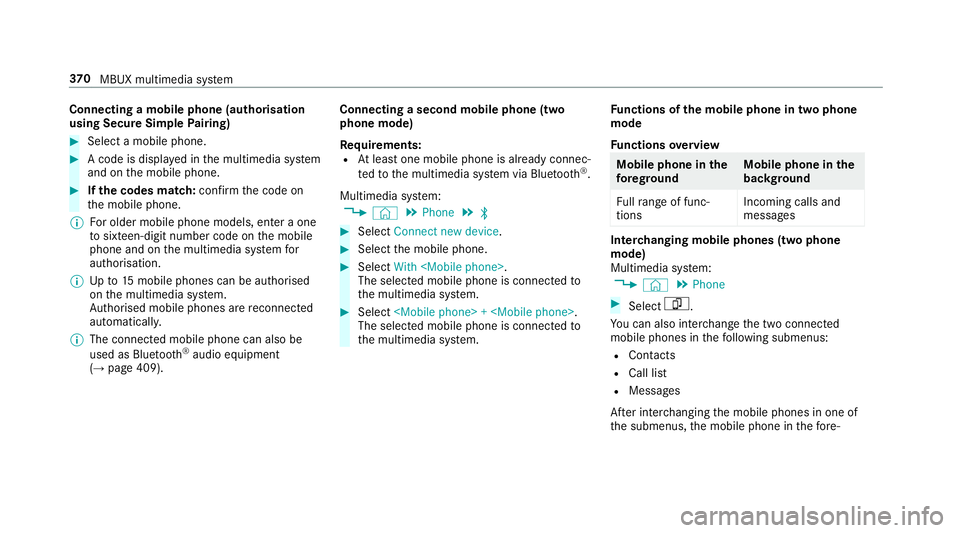
Connecting a mobile phone (au
thorisation
using Secure Simple Pairing) #
Select a mobile phone. #
A code is displa yed in the multimedia sy stem
and on the mobile phone. #
Ifth e codes match: confirm the code on
th e mobile phone.
% For older mobile phone models, enter a one
to sixteen-digit number code on the mobile
phone and on the multimedia sy stem for
authorisation.
% Upto15 mobile phones can be auth orised
on the multimedia sy stem.
Auth orised mobile phones are reconnected
au tomatical ly.
% The connected mobile phone can also be
used as Blue tooth®
audio equipment
(→ page 409). Connecting a second mobile phone (two
phone mode)
Requ irements:
R Atleast one mobile phone is already connec‐
te dto the multimedia sy stem via Blue tooth®
.
Multimedia sy stem:
, © .
Phone .
ª #
Select Connect new device. #
Select the mobile phone. #
Select With
The selected mobile phone is connected to
th e multimedia sy stem. #
Select
The selected mobile phone is connected to
th e multimedia sy stem. Fu
nctions of the mobile phone in two phone
mode
Fu nctions overview Mobile phone in
the
fo re gr ound Mobile phone in
the
bac kground
Fu llra nge of func‐
tions Incoming calls and
messa
ges Inter
changing mobile phones (two phone
mode)
Multimedia sy stem:
, © .
Phone #
Select F.
Yo u can also inter change the two connected
mobile phones in thefo llowing submenus:
R Contacts
R Call list
R Messages
Af ter inter changing the mobile phones in one of
th e submenus, the mobile phone in thefo re‐ 37 0
MBUX multimedia sy stem
Page 379 of 609
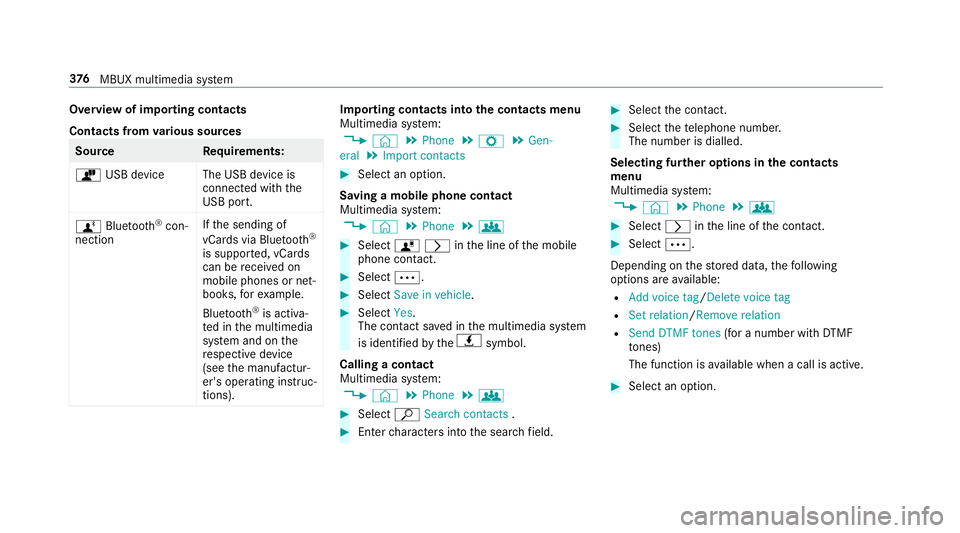
Overview of importing contacts
Contacts from
various sources Source
Requirements:
ò USB device The USB device is
connected with the
USB port.
ñ Bluetooth ®
con‐
nection If
th e sending of
vCards via Blue tooth®
is suppor ted, vCards
can be recei ved on
mobile phones or net‐
books, forex ample.
Blue tooth ®
is activa‐
te d in the multimedia
sy stem and on the
re spective device
(see the manufactur‐
er's operating instruc‐
tions). Importing contacts into
the contacts menu
Multimedia sy stem:
, © .
Phone .
Z .
Gen-
eral .
Import contacts #
Select an option.
Saving a mobile phone contact
Multimedia sy stem:
, © .
Phone .
g #
Select órinthe line of the mobile
phone conta ct. #
Select Ä. #
Select Save in vehicle . #
Select Yes.
The contact sa ved in the multimedia sy stem
is identified bytheq symbol.
Calling a contact
Multimedia sy stem:
, © .
Phone .
g #
Select ªSearch contacts . #
Ente rch aracters into the sear chfield. #
Select the conta ct. #
Select thete lephone number.
The number is dialled.
Selecting fur ther options in the contacts
menu
Multimedia sy stem:
, © .
Phone .
g #
Select rinthe line of the conta ct. #
Select Ä.
Depending on thestored data, thefo llowing
options are available:
R Add voice tag /Delete voice tag
R Set relation /Remove relation
R Send DTMF tones (for a number with DTMF
to nes)
The function is available when a call is active. #
Select an option. 376
MBUX multimedia sy stem
Page 381 of 609
#
Select Z. #
Select the connected telephone. #
Select Contacts & call list. #
Select Do you want to delete all favourites? .#
Select Yes. Call list
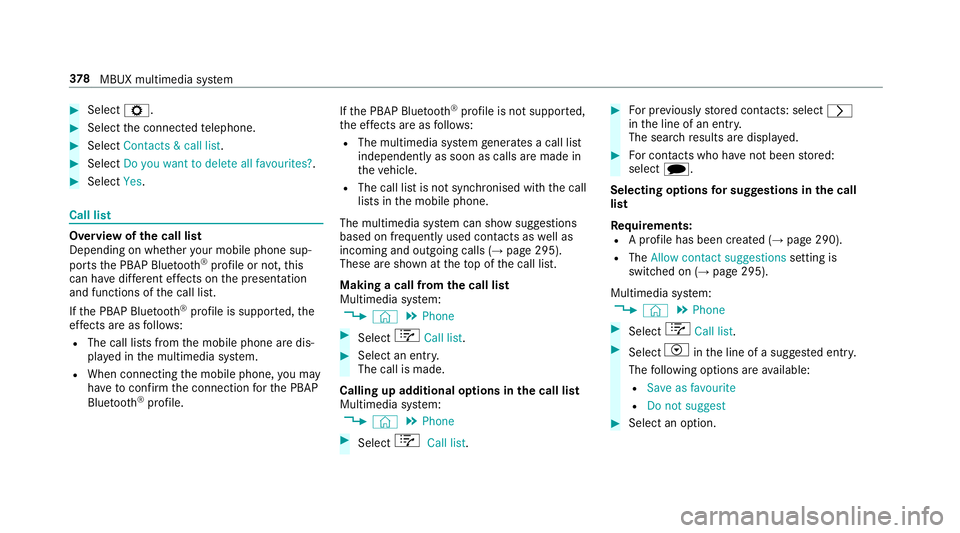
Overview of
the call list
Depending on whe ther your mobile phone sup‐
ports the PBAP Blue tooth®
profile or not, this
can ha vediffere nt ef fects on the presentation
and functions of the call list.
If th e PBAP Blue tooth ®
profile is suppor ted, the
ef fects are as follo ws:
R The call lists from the mobile phone are dis‐
pla yed in the multimedia sy stem.
R When connecting the mobile phone, you may
ha ve toconfirm the connection forth e PBAP
Blue tooth ®
profile. If
th e PBAP Blue tooth ®
profile is not suppor ted,
th e ef fects are as follo ws:
R The multimedia sy stem generates a call li st
independently as soon as calls are made in
th eve hicle.
R The call list is not synchronised with the call
lists in the mobile phone.
The multimedia sy stem can show suggestions
based on frequently used conta cts aswell as
incoming and outgoing calls (→ page 295).
These are shown at theto p of the call list.
Making a call from the call list
Multimedia sy stem:
, © .
Phone #
Select +Call list . #
Select an entry.
The call is made.
Calling up additional options in the call list
Multimedia sy stem:
, © .
Phone #
Select +Call list . #
For pr eviously stored contacts: select r
in the line of an entry.
The sear chresults are displa yed. #
For contacts who ha venot been stored:
select i.
Selecting options for sug gestions in the call
list
Re quirements:
R A profile has been created (→ page 290).
R The Allow contact suggestions setting is
switched on (→ page 295).
Multimedia sy stem:
, © .
Phone #
Select +Call list . #
Select Vinthe line of a sugges ted ent ry.
The following options are available:
R Save as favourite
R Do not suggest #
Select an option. 378
MBUX multimedia sy stem
Page 382 of 609
Deleting
the call list
Multimedia sy stem:
, © .
Phone .
Z #
Select the connected mobile phone. #
Select Contacts & call list. #
Select Delete call list. #
Select Yes.
% This function is only available if your mobile
does not suppo rtthe PBAP Blue tooth®
pro‐
fi le. Te
xt messages Overview of message functions
In
the messages menu you can recei veand send
te xt messa ges.
If th e connected mobile phone supports the
Blu etoo th®
MAP profile, the message function
can be used on the multimedia sy stem.
Yo u can obtain fur ther information about set‐
tings and suppor ted functions of Blue tooth®
-
capable mobile phones from a Mercedes-Benz service centre or at: http://www.mercedes-
benz.com/connect
Some mobile phones require fur ther settings
af te r being connected tothe multimedia sy stem
(see manufacturer's operating instructions).
Setting message displa ys
Multimedia sy stem:
, © .
Phone .
Z #
Select the connected mobile phone. #
Select Message display .
The following options are available:
R All messages
R New and unread messages
R Messages while the vehicle is in motion
R Off (The message function is no lon ger
av ailable.) #
Select a setting.
Re ading messages
Multimedia sy stem:
, © .
Phone .
Messages #
Select a message sequence with a conta ct.Using the
read-aloud function #
Select a messa ge. #
Select .
The messa geisread aloud.
Dictating and sending a new message
Re quirements:
R There is an Internet connection.
Multimedia sy stem:
, © .
Phone .
Messages #
r select a new message.
Ad ding a recipient #
Select f. #
Select a con tact.
Dictating text #
Select p.
The dictating function is star ted. MBUX multimedia sy
stem 37 9
Page 386 of 609
#
Enter the subject and text of the e-mail with
th eke ypad. #
Select Send. Mercedes-Benz link
Overview of Mercedes-Benz Link
&
WARNING Risk of di stra ction from infor‐
mation sy stems and communications
equipment
If yo u operate information and communica‐
tion equipment integ rated in theve hicle
when driving, you will be distracted from the
traf fic situation. This could also cause youto
lose control of theve hicle. #
Only operate this equipment when the
traf fic situation permits. #
Ifyo u cannot be sure of this, stop the
ve hicle whilst paying attention toroad
and traf fic conditions and ope rate the
equipment with theve hicle stationar y. Yo
u must obse rveth e legal requirements forthe
country in whi chyou are cur rently driving when
operating the multimedia sy stem.
Wi th Mercedes-Benz Link you can use mobile
phone functions via the multimedia sy stem. It is
operated using theto uchsc reen or thevo ice-
opera ted control sy stem. You can activate the
vo ice-opera ted control sy stem bypressing and
holding the£ button on the multifunction
st eering wheel.
When using Mercedes-Benz Link via thevo ice-
opera ted control sy stem, the multimedia sy stem
can still be operated via LINGU ATRO NIC
(→ page 261).
The Mercedes-Benz Link control box supplemen‐
ta ry equipment is requiredforth is. This is availa‐
ble at a Mercedes-Benz service centre.
On ly one mobile phone at a time can be connec‐
te d via Mercedes-Benz Link tothe multimedia
sy stem.
Also when using Mercedes-Benz Link in two
phone mode, only one additional mobile phone
can be connected using Blue tooth®
with the
multimedia sy stem. %
The Mercedes-Benz Link control box uses
the Android operating sy stem.
% The service pr ovider is responsible forth ese
apps and the services and conte nt connec‐
te dto it.
Note s on Mercedes-Benz Link
If a mobile phone is used with Mercedes-Benz
Link, USB access using the media menu is not
possible forth is mobile phone.
Only one route guidance can be active at a time.
If ro ute guidance is active on the multimedia sys‐
te m, it is closed when route guidance is star ted
on the mobile phone.
Connecting Mercedes-Benz Link with the
mu ltimedia sy stem
Re quirements:
R The vehicle is fitted wi th the Mercedes-Benz
Link control box.
R The Mercedes-Benz Link app is ins talled on
th e mobile phone.
R The mobile phone is switched on. MBUX multimedia sy
stem 383