load capacity MERCEDES-BENZ A-CLASS HATCHBACK 2018 Owners Manual
[x] Cancel search | Manufacturer: MERCEDES-BENZ, Model Year: 2018, Model line: A-CLASS HATCHBACK, Model: MERCEDES-BENZ A-CLASS HATCHBACK 2018Pages: 609, PDF Size: 10.73 MB
Page 245 of 609
Assi
stinter venes. The li kelihood of inter vention
is therefore higher.
Setting Active Lane Keeping Assist
Multimedia sy stem:
, © .
Settings .
Assistance .
Act.
Lane Keep. Assist
Setting the sensitivity
% The availability of this function is dependent
on the count ry. #
Select Standard ,Sensitive orOff.
Ac tivating/deactivating the haptic warning #
Select Warning.
Ac tivate or deacti vate the function. Tr
ailer hitch Tr
ailer operation no tesObser
vethefo llowing no tes on theto ngue
we ight:
R do not use a tongue weight that exceeds or
fa lls below the permissible tongue weight R
use a tongue weight as close as possible to
th e maximum tongue weight
Do not exceed thefo llowing values:
R permissible towing capacity
R permissible rear axle load of theto wing vehi‐
cle
R permissible gross mass of theto wing vehicle
R permissible gross mass of the trailer
R maximum permissible speed of the trailer
Ensure thefo llowing before starting a journey:
R the tyre pressure on there ar axle of theto w‐
ing vehicle is set for a maximum load
R the lighting of the connected trailer is opera‐
tional
R vehicles without LED headlamps or MUL‐
TIBEAM LED headlamps: the headlamps
ha ve been set cor rectly
In theeve nt of increased rear axle load, the car/
trailer combination may not exceed a maximum
speed of 100 km/h forre asons concerning the
operating permit. This also applies in countri esin which
the permissible maximum speed for
car/trailer combinations is ab ove100 km/h. Fo
lding the ball neck out/in &
WARNING Risk of accident due tothe
ball neck not being engaged
If th e ball neck is not engaged, the trailer
may come loose. #
Alw ays engage the ball neck as descri‐
bed. &
WARNING Risk of inju ryfrom ball neck
swinging outwards
The ball neck may swing outwards when
unlo cking or when it has not been properly
engaged.
There is a risk of injury within the ball neck's
ra nge of mo vement! #
Unlock the ball neck only when its
ra nge of mo vement is unobstructed. 242
Driving and pa rking
Page 248 of 609
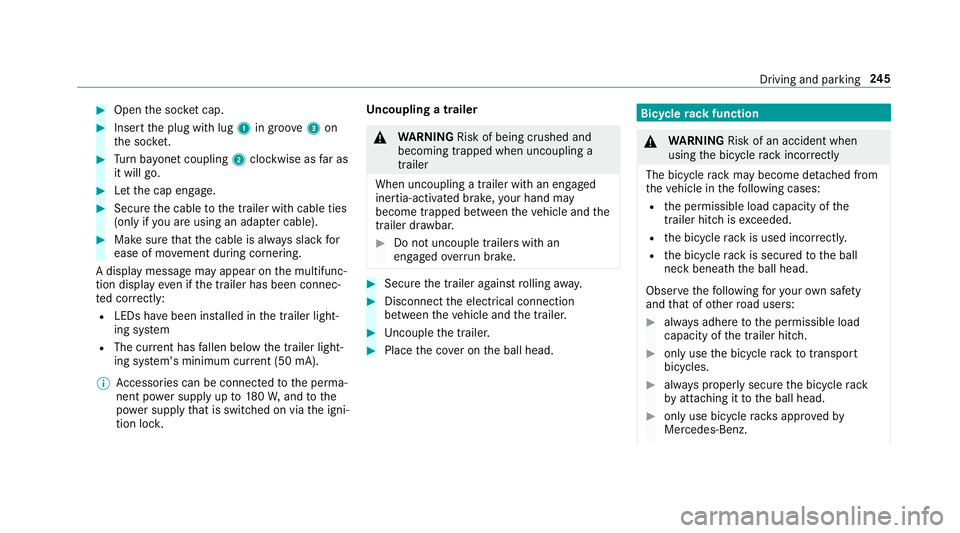
#
Open the soc ket cap. #
Inse rtthe plug with lug 1in groo ve3 on
th e soc ket. #
Turn bayonet coupling 2clockwise as far as
it will go. #
Let the cap engage. #
Secure the cable tothe trailer with cable ties
(only if you are using an adap ter cable). #
Make sure that the cable is alw ays slack for
ease of mo vement during cornering.
A display messa gemay appear on the multifunc‐
tion display even if the trailer has been connec‐
te d cor rectly:
R LEDs ha vebeen ins talled in the trailer light‐
ing sy stem
R The cur rent has fallen below the trailer light‐
ing sy stem's minimum cur rent (50 mA).
% Accessories can be connected tothe perma‐
nent po wer supp lyup to180W, and tothe
po we r supp lythat is swit ched on via the igni‐
tion loc k. Un
coupling a trailer &
WARNING Risk of being crushed and
becoming trapped when uncoupling a
trailer
When uncoupling a trailer wi than engaged
ine rtia-activated brake, your hand may
become trapped between theve hicle and the
trailer dr awbar. #
Do not uncouple trailers with an
engaged overrun brake. #
Secu rethe trailer against rolling away. #
Disconnect the electrical connection
between theve hicle and the trailer. #
Uncouple the trailer. #
Place the co ver on the ball head. Bicycle
rackfunction &
WARNING Risk of an accident when
using the bicycle rack incor rectly
The bicycle rack may become de tach ed from
th eve hicle in thefo llowing cases:
R the permissible load capacity of the
trailer hitch is exceeded.
R the bicycle rack is used incor rectl y.
R the bicycle rack is secured tothe ball
neck beneath the ball head.
Obser vethefo llowing foryo ur ow n sa fety
and that of other road users: #
always adhere tothe permissible load
capacity of the trailer hitch. #
only use the bicycle rack totranspo rt
bicycles. #
always proper lysecure the bicycle rack
by attaching it tothe ball head. #
only use bicycle rack s appr ovedby
Mercedes-Benz. Driving and parking
245
Page 249 of 609
#
always obser vethe bicycle rack operat‐
ing instructions. *
NO
TEDama geto, or cra cks on, the
trailer hitch due tounsuitable bic ycle
ra ck s or bicycle rack s being used incor‐
re ctly #
use only bicycle rack s appr ovedby
Mercedes-Benz. Depending on
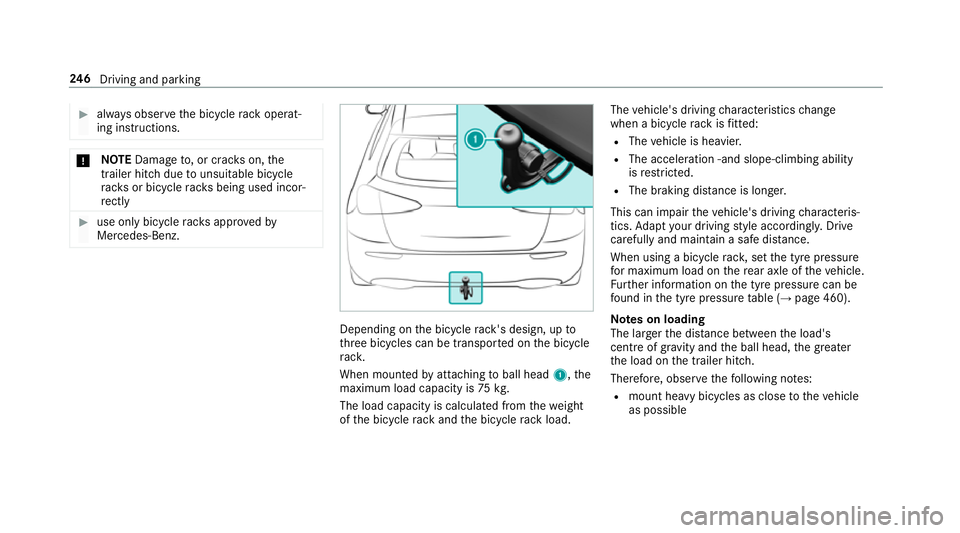
the bicycle rack 's design, up to
th re e bicycles can be transpor ted on the bicycle
ra ck.
When mounted byattaching toball head 1,the
maximum load capacity is 75kg.
The load capacity is calculated from thewe ight
of the bicycle rack and the bicycle rack load. The
vehicle's driving characteristics change
when a bicycle rack isfitted:
R The vehicle is heavier.
R The acceleration ‑and slope-climbing ability
is restricted.
R The braking di stance is lon ger.
This can impair theve hicle's driving characteris‐
tics. Adapt your driving style according ly. Drive
carefully and maintain a sa fedis tance.
When using a bicycle rack , set the tyre pressure
fo r maximum load on there ar axle of theve hicle.
Fu rther information on the tyre pressure can be
fo und in the tyre pressure table (→ page 460).
Note s on loading
The lar gerth e dis tance between the load's
cent reof gr avity and the ball head, the greater
th e load on the trailer hitch.
Therefore, obser vethefo llowing no tes:
R mount heavy bicycles as close totheve hicle
as possible 246
Driving and pa rking
Page 471 of 609
#
Toconfirm restart, press Touch Control on
th e left-hand side of thesteering wheel.
The Run Flat Indicator restarted message is
shown in the multifunction displa y.
Af teryo u ha vedriven for a few minutes, the
tyre pressu reloss warning sy stem monitors
th e set tyre pressures of all the tyres.
Be sure toalso obse rveth efo llowing fur ther
re lated subjects:
R Notes on tyre pressure (→ page 459)Wheel
change Note
s on selecting, fitting and replacing
tyres Yo
u can ask for information rega rding permit ted
wheel/tyre combinations at a Mercedes-Benz
Service Cent re. &
WARNING Risk of accident due toincor‐
re ct dimensions of wheels and tyres
If wheels and tyres of the wrong size are
used, the wheel brakes or wheel suspension
components may become damaged. #
Alw aysre place wheels and tyres with
th ose that fulfil the specifications of the
original part.
When replacing wheels, make sure tofit the
cor rect:
R Designation
R Type
When replacing tyres, make sure tofit the
cor rect:
R Designation
R Manufactu rer
R Type &
WARNING Risk of inju rythro ugh exceed‐
ing the specified tyre load-bearing capa‐
city or the permissible speed rating
Exceeding the specified tyre load-bearing
capacity or the permissible speed rating may
lead totyre dama geand tothe tyres bur st‐
ing. #
Therefore, only use tyre types and sizes
appr ovedfo ryo ur vehicle model. #
Obser vethe tyre load-bearing capacity
ra ting and speed rating requ iredfor
yo ur vehicle. *
NO
TEVehicle and tyre damage thro ugh
tyre types and sizes that ha venot been
appr oved Fo
r saf etyre asons, on lyuse tyres, wheels
and accessories which ha vebeen specially
appr ovedby Mercedes-Benz foryo ur vehicle. 468
Wheels and tyres
Page 475 of 609
%
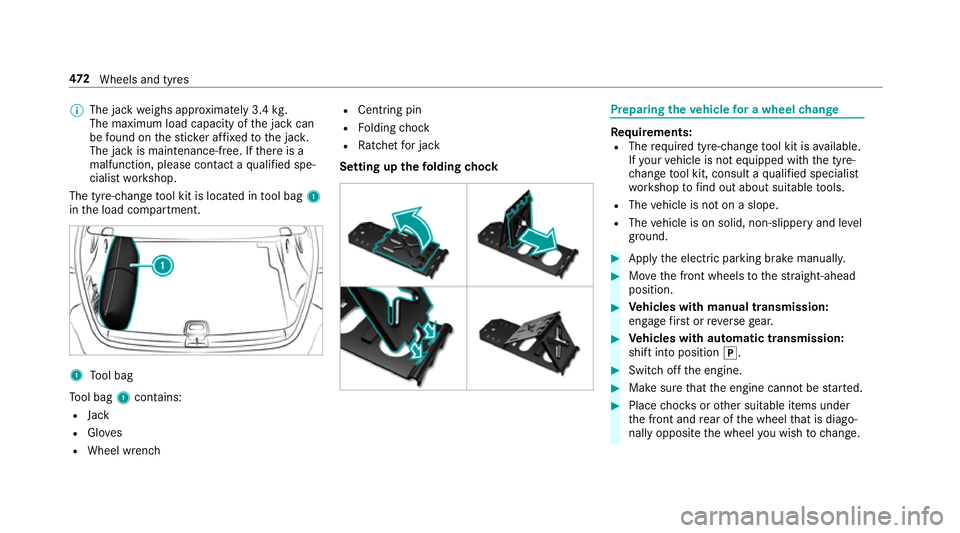
The jack weighs appr oximately 3.4 kg.
The maximum load capacity of the jack can
be found on thest icke r af fixe dto the jac k.
The jack is maintenance-free. If there is a
malfunction, please conta ct aqualified spe‐
cialist workshop.
The tyre-change tool kit is located in tool bag 1
in the load compartment. 1
Tool bag
To ol bag 1contains:
R Jack
R Gloves
R Wheel wrench R
Centring pin
R Folding chock
R Ratchet for jack
Setting up thefo lding chock Prepa
ring theve hicle for a wheel change Re
quirements:
R The requ ired tyre-change tool kit is available.
If yo ur vehicle is not equipped with the tyre-
ch ange tool kit, consult a qualified specialist
wo rkshop tofind out about suitable tools.
R The vehicle is not on a slope.
R The vehicle is on solid, non-slippery and le vel
ground. #
Apply the electric parking brake manually. #
Movethe front wheels tothest ra ight-ahead
position. #
Vehicles with manual transmission:
engage firs t or reve rsege ar. #
Vehicles with automatic transmission:
shift into position j. #
Switch off the engine. #
Make sure that the engine cann otbe star ted. #
Place choc ks orother suitable items under
th e front and rear of the wheel that is diago‐
nally opposite the wheel you wish tochange. 472
Wheels and tyres
Page 498 of 609
We
ights and loads Please obser
vethefo llowing no tesfo rth e speci‐
fi ed vehicle data:
R items of optional equipment increase the
unladen weight and reduce the pa yload.
R vehicle-specific weight information can be
fo und on theve hicle identification plate .
Ro of load All models
Maximum
roof load 75kg Tr
ailer hitch Gene
ral no tes on the trailer hit ch Not all models can be used
for trailer operation
(→ page 242).
Modi fications tothe engine cooling sy stem may
be necessar y,depending on theve hicle model.
The retrofitting of a trailer hitch is only pe rmissi‐
ble if a towing capacity is specified in your vehi‐
cle documents. Fu
rther information can be obtained at a quali‐
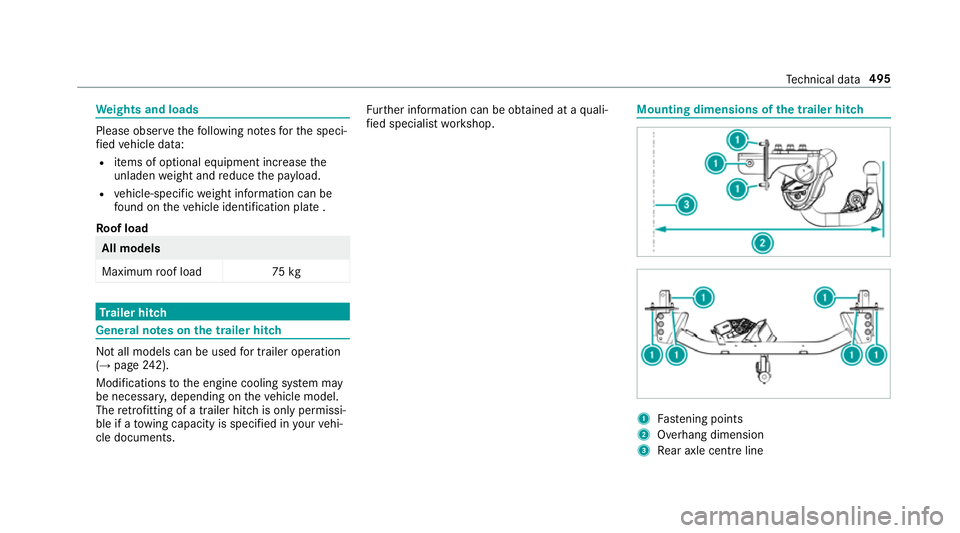
fi ed specialist workshop. Mounting dimensions of
the trailer hit ch 1
Fastening points
2 Overhang dimension
3 Rear axle centre line Te
ch nical da ta495
Page 598 of 609
Overhang dimension (trailer hitch) ...... 495
To ngue weight .................................... .497
To wing capacity (trailer operation) ...... 496
Ty re pressure monitoring sy stem ........ 463
Ve hicle identification plate .................. 483
Te lephone ........................................ 258, 368
Ac tivating functions du ring a call ......... 374
Changing a function ............................ .371
Connecting a mobile phone (Near
Field Communication (NFC)) ................ 372
Connecting a mobile phone (Pass‐
ke y) .................................................... .369
Connecting a mobile phone (Secu re
Simple Pairing) .................................... 369
Disconnecting a mobile phone ............ .371
Importing contacts .............................. 376
Importing contacts (o verview) ............ .376
Incoming call during an existing call .... 374
Information ..........................................3 69
Inter changing mobile phones .............. 370
Locking theve hicle (mobile phone) .......70
Menu (on-board computer) .................. 258
Mobile phone voice recognition ........... 373
No tes .................................................. 366
Operating modes ................................. 369 Re
ception and transmission volume .... 372
Ring tone volume .................................. 373
St arting theve hicle (mobile phone) ..... 15 3
Switching mobile phones ..................... 371
Switching mobile phones (Near Field
Communication (NFC)) ........................ 372
Te lephone menu overview ...................3 68
Te lephone operation ............................ 373
Un locking theve hicle (mobile phone) ....70
Using Near Field Communication
(NFC) ................................................... 372
Vo ice commands (LINGU ATRO NIC) .....2 69
Wi reless charging (mobile phone) ........ 11 9
Te lephone
see Second telephone
Te lephone number
Dialling (on-board computer) .............. .258
Te lephone operation
see Calls
Te lephony operating modes
Blue tooth ®
Te lephony .......................... 369
Business telephony ............................ .369
Te lephony operating modes
see Second telephone Te
mp erature ............................................ .141
Te xt messages
Vo ice commands (LINGU ATRO NIC) .....2 75
Te xt messages
see Messages
Themes ..................................................... 292
Calling up ............................................ 293
Creating ..............................................2 93
Deleting ............................................... 294
Displ aying information (DI BA) .............. 294
Modifying ............................................ 294
Moving ................................................ 294
Overview .............................................2 92
Through-loading feature
see Seat
Ti e-d owney es .......................................... 108
Time Manual time setting ............................. 312
Setting the time and date automati‐
cally ..................................................... 312
Setting the time zone ........................... 312
Setting the time/date form at .............. .312 Index
595