fog light MERCEDES-BENZ A-CLASS HATCHBACK 2018 User Guide
[x] Cancel search | Manufacturer: MERCEDES-BENZ, Model Year: 2018, Model line: A-CLASS HATCHBACK, Model: MERCEDES-BENZ A-CLASS HATCHBACK 2018Pages: 609, PDF Size: 10.73 MB
Page 223 of 609
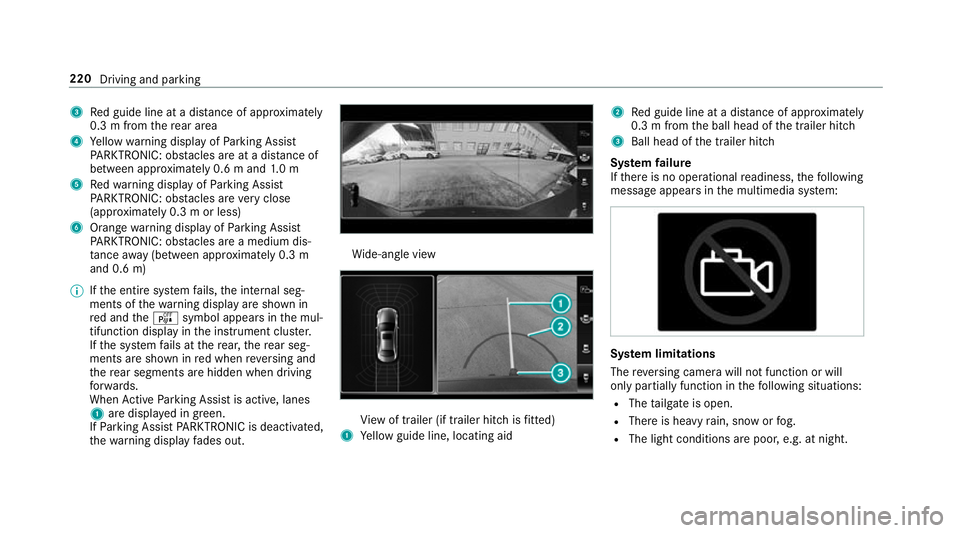
3
Red guide line at a dis tance of appr oximately
0.3 m from there ar area
4 Yellow warning display of Parking Assist
PA RKTRONIC: obstacles are at a dis tance of
between appr oximately 0.6 m and 1.0 m
5 Redwa rning display of Parking Assist
PA RKTRONIC: obstacles are very close
(appr oximately 0.3 m or less)
6 Orange warning display of Parking Assist
PA RKTRONIC: obstacles are a medium dis‐
ta nce away (between appr oximately 0.3 m
and 0.6 m)
% Ifth e entire sy stem fails, the internal seg‐
ments of thewa rning display are shown in
re d and theé symbol appears in the mul‐
tifunction display in the instrument clus ter.
If th e sy stem fails at there ar, there ar seg‐
ments are shown in red when reve rsing and
th ere ar segments are hidden when driving
fo rw ards.
When Active Parking Assist is active, lanes
1 are displa yed in green.
If Pa rking Assist PARKTRONIC is deacti vated,
th ewa rning display fades out. Wi
de-angle view Vi
ew of trailer (if trailer hitch is fitted)
1 Yellow guide line, locating aid 2
Red guide line at a dis tance of appr oximately
0.3 m from the ball head of the trailer hitch
3 Ball head of the trailer hitch
Sy stem failure
If th ere is no operational readiness, thefo llowing
message appears in the multimedia sy stem: Sy
stem limitations
The reve rsing camera will not function or will
only partially function in thefo llowing situations:
R The tailgate is open.
R There is heavy rain, snow or fog.
R The light conditions are poor, e.g. at night. 220
Driving and parking
Page 227 of 609
Sy
stem limitations
The 360° Camera will not function or will only
partially function in thefo llowing situations:
R The doors are open.
R The side mir rors are folded in.
R The tailgate is open.
R There is heavy rain, snow or fog.
R The light conditions are poor, e.g. at night.
R The camera lens is obstructed, dirty or mis‐
ted up.
R Cameras, or vehicle components in which
th e cameras are fitted, are dama ged. In this
eve nt, ha vethe cameras, their positions and th
eir setting checked at a qualified specialist
wo rkshop.
% Do not use the 360° Camera under such cir‐
cums tances. You could otherwise injure oth‐
ers or collide with objects when parking the
ve hicle.
If th eve hicle is car rying a heavy load, leaving the
st andard height can result in inaccuracies in the
guide lines and in the display of thege nerated
ima ges, depending on tech nical conditions.
The field of vision and other functions of the
came rasystem may be restricted due toaddi‐
tional attachments on theve hicle (e.g. licence
plate brac ket, bicycle rack ).
% The contrast of the display may be impaired
by abrupt direct sunlight or by other light
sources, e.g. when driving out of a garage . In
th is case, pay particular attention.
% Have the display repaired or replaced if, for
ex ample, pixel er rors considerably restrict its
use.
See the no tes on cleaning the 360° Camera
(→ page 432). Selecting a view
for the 360° Camera
Re quirements:
R The Auto reversing camera function is activa‐
te d in the multimedia sy stem (→ page 224). #
Enga gereve rsege ar. #
Inthe multimedia sy stem, select the desired
vie w.
Switching reve rsing camera automatic mode
on/off
The reve rsing camera is only an aid. It is not a
substitute foryo ur attention tothe sur roundings.
The responsibility for safe manoeuvring and
parking remains with you. Make sure that no
persons, animals or objects etc. are in the
manoeuvring range. Pay attention to your sur‐
ro undings and be ready tobrake at all times.
Multimedia sy stem:
, © .
Settings .
Assis-
tance .
Camera & parking #
Switch Auto reversing camera on or off.224
Driving and parking
Page 237 of 609
Wa
rning when the maximum permissible
speed is exceeded
The sy stem can warnyou if you unin tentional ly
exc eed the maximum permissible speed. Todo
th is, you can specify in the multimedia sy stem
by how much the maximum permissible speed
can be exceeded before a warning is issued. Yo u
can specify whe ther thewa rning is tobe just a
visual warning or an acoustic one as well.
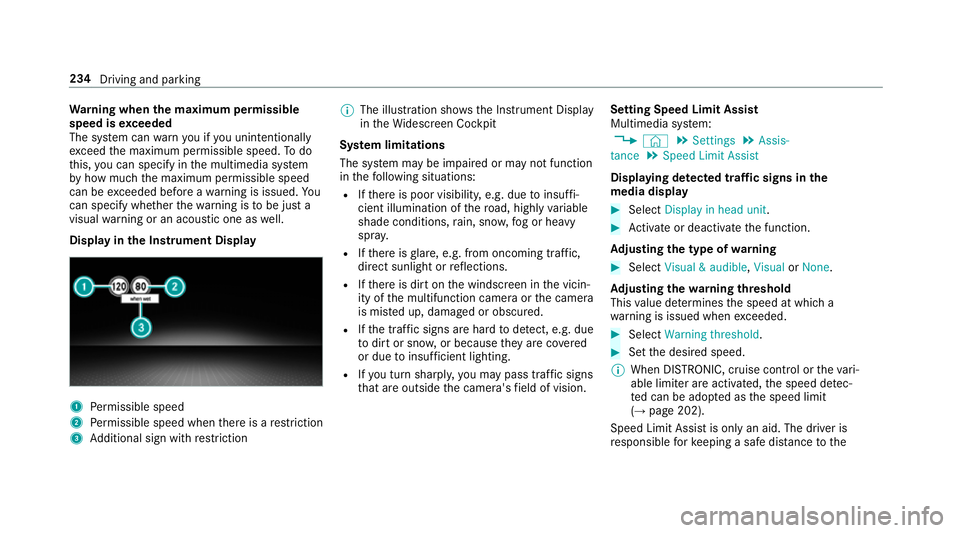
Display in the Instrument Display 1
Perm issible speed
2 Perm issible speed when there is a restriction
3 Additional sign with restriction %
The illu stra tion sho wsthe Instrument Display
in theWi descreen Cockpit
Sy stem limitations
The sy stem may be impaired or may not function
in thefo llowing situations:
R Ifth ere is poor visibility, e.g. due toinsuf fi‐
cient illumination of thero ad, high lyvariable
shade conditions, rain, sno w,fog or heavy
spr ay.
R Ifth ere is glare, e.g. from oncoming traf fic,
di re ct sunlight or reflections.
R Ifth ere is dirt on the windscreen in the vicin‐
ity of the multifunction camera or the camera
is mis ted up, damaged or obscured.
R Ifth e traf fic signs are ha rdtodetect, e.g. due
to dirt or sno w,or because they are co vered
or due toinsuf ficient lighting.
R Ifyo u turn sharpl y,yo u may pass traf fic signs
th at are outside the camera's field of vision. Setting Speed Limit Assist
Multimedia sy
stem:
, © .
Settings .
Assis-
tance .
Speed Limit Assist
Displaying de tected traf fic signs in the
medi a display #
Select Display in head unit. #
Activate or deacti vate the function.
Ad justing the type of warning #
Select Visual & audible ,Visual orNone.
Ad justing the warning threshold
This value de term ines the speed at which a
wa rning is issued when exceeded. #
Select Warning threshold. #
Set the desired speed.
% When DISTRONIC, cruise control or theva ri‐
able limiter are activated, the speed de tec‐
te d can be adop ted as the speed limit
(→ page 202).
Speed Limit Assist is only an aid. The driver is
re sponsible forke eping a safe dis tance tothe 234
Driving and parking
Page 239 of 609
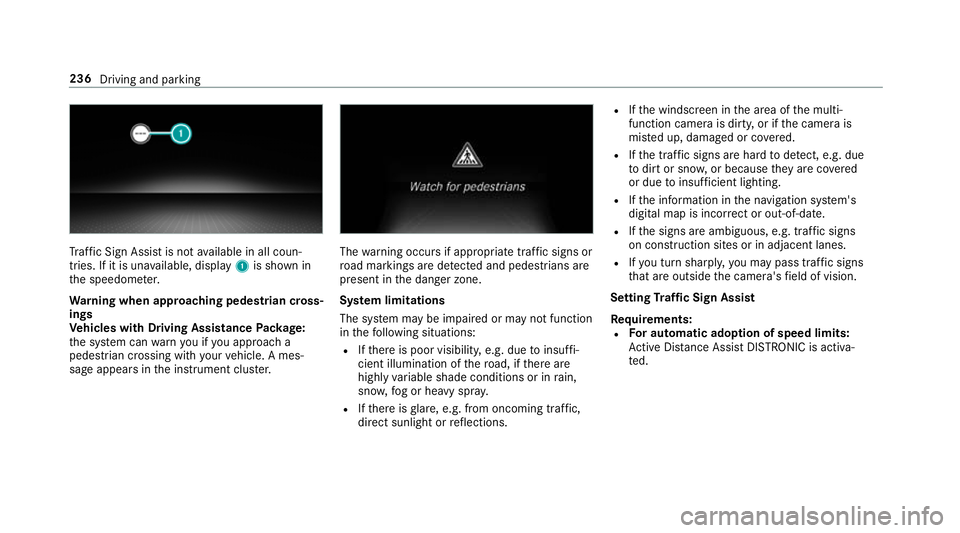
Tr
af fic Sign Assi stis not available in all coun‐
tries. If it is una vailable, display 1is shown in
th e speedome ter.
Wa rning when app roaching pedestrian cross‐
ings
Ve hicles with Driving Assistance Package:
th e sy stem can warnyou if you approach a
pedestrian crossing with your vehicle. A mes‐
sage appears inthe instrument clus ter. The
warning occurs if appropriate traf fic signs or
ro ad markings are de tected and pedestrians are
present in the danger zone.
Sy stem limitations
The sy stem may be impaired or may not function
in thefo llowing situations:
R Ifth ere is poor visibility, e.g. due toinsuf fi‐
cient illumination of thero ad, if there are
highly variable shade conditions or in rain,
sno w,fog or heavy spr ay.
R Ifth ere is glare, e.g. from oncoming traf fic,
di re ct sunlight or reflections. R
Ifth e windscreen in the area of the multi‐
function camera is dirty, or if the camera is
mis ted up, damaged or co vered.
R Ifth e tra ffic signs are hard todetect, e.g. due
to dirt or sno w,or because they are co vered
or due toinsuf ficient lighting.
R Ifth e information in the navigation sy stem's
digital map is incor rect or out-of-da te.
R Ifth e signs are ambiguous, e.g. tra ffic signs
on con stru ction sites or in adjacent lanes.
R Ifyo u turn sharpl y,yo u may pass traf fic signs
th at are outside the camera's field of vision.
Setting Traf fic Sign Assist
Requ irements:
R For automatic ado ption of speed limits:
Ac tive Dis tance Assi stDISTRONIC is acti va‐
te d. 236
Driving and parking
Page 551 of 609
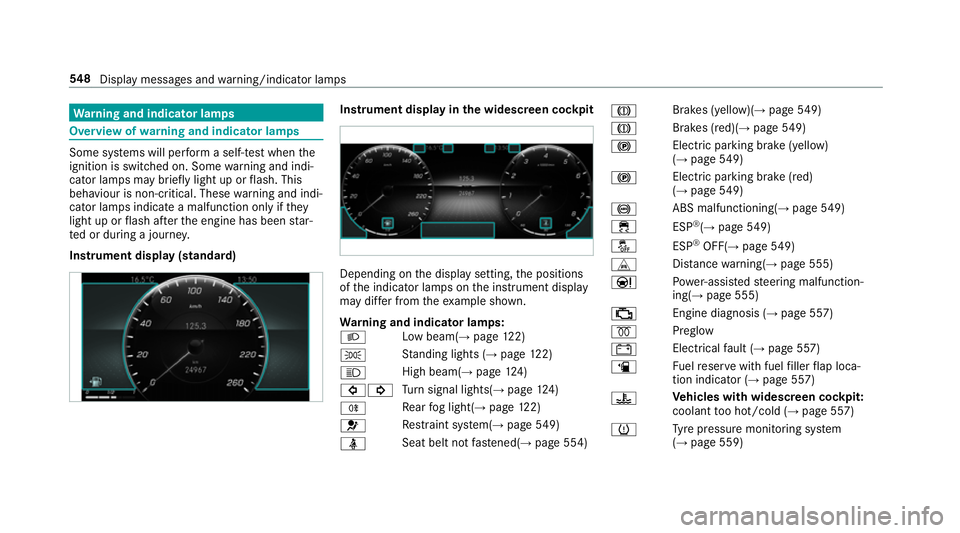
Wa
rning and indicator lamps Overview of
warning and indicator lamps Some sy
stems will per form a self-test when the
ignition is switched on. Some warning and indi‐
cator lamps may brief lylight up or flash. This
behaviour is non-critical. These warning and indi‐
cator lamps indicate a malfunction only if they
light up or flash af terth e engine has been star‐
te d or during a journe y.
Instrument display (standard) Instrument display in
the widescreen cockpit Depending on
the display setting, the positions
of the indicator lamps on the instrument display
may dif fer from theex ample shown.
Wa rning and indicator lamps:
L Low beam(→
page122)
T St
anding lights (→ page122)
K High beam(→
page124)
#! Tu
rn signal lights(→ page124)
R Re
ar fog light(→ page122)
6 Re
stra int sy stem(→ page549)
ü Seat belt not
fastened(→ page 554) J
Brakes (yellow)(
→page 549)
J Brakes (red)(
→page 549)
! Electric pa
rking brake (yellow)
(→ page 549)
! Electric pa
rking brake (red)
(→ page 549)
! ABS malfunctioning(→
page 549)
÷ ESP®
(→ page 549)
å ESP®
OFF( →page 549)
L Distance warning(→ page 555)
Ð Po
we r-assis tedsteering malfunction‐
ing( →page 555)
; Engine diagnosis (→
page 557)
% Preglow
# Elect
rical fault (→ page 557)
æ Fu
elreser vewith fuel filler flap loca‐
tion indicator (→ page 557)
? Ve
hicles with widescreen cock pit:
coolant too hot/cold (→ page 557)
h Ty
re pressure monitoring sy stem
(→ page 559) 548
Displaymessa ges and warning/indicator lamps
Page 584 of 609
Setting .................................................
316
LED light see In telligent Light Sy stem
Light switch Overview ............................................. 12 2
Lighting see In terior lighting
see Lights
Lights ........................................................ 12 2
Ac tive headla mps ................................ 12 5
Ad aptive Highbeam Assist .................. .127
Ad aptive Highbeam Assist Plus .......... .128
Ad justing the instrument lighting ........ 253
Au tomatic driving lights ....................... 12 3
Changing bulbs .................................... 131
City lighting ........................................ .126
Combination switch ............................ .124
Corne ring light ..................................... 12 6
Driving ab road (symm etrical dipped
beam) .................................................. 12 2
Haza rdwa rning lights .......................... 12 5
Headla mpflasher ................................ .124
Headla mprange .................................. 12 3
High beam ........................................... 124Intellige
nt Light Sy stem ....................... 12 5
Light switch .........................................1 22
Low beam ............................................ 12 2
Mo torw ay mode ................................... 12 6
Pa rking lights ...................................... .122
Re ar fog light ....................................... 12 2
Re sponsibility for lighting sy stems .......1 22
St anding lights .................................... .122
Tu rn signal lights ..................................1 24
Limiter ...................................................... 197
Ac tivating ............................................ 19 8
Buttons ................................................ 19 8
Calling up a speed .............................. .198
Deactivating ........................................ 19 8
Fu nction .............................................. 197
Pa ssive mode ....................................... 197
Pe rm anent setting .............................. .200
Re quirements: .................................... .198
Selecting ............................................. 19 8
Setting a speed ................................... 19 8
St oring a speed ................................... 19 8
Sy stem limitations ...............................1 97
Limiting speed see Limiter LINGU
ATRO NIC ........................................ 261
Au dible help functions .........................2 64
Impr oving speech quality .................... .264
Langua gesetting ................................. 263
Media pla yervo ice commands ............ 272
Message voice commands .................. .275
Multifunction steering wheel (operat‐
ing) ...................................................... 261
Na vigation voice commands ................ 267
No tes on thevo ice commands ............ 265
Online voice control ............................ 265
Operable functions .............................. 263
Operating saf ety .................................. 261
Ra dio voice commands ........................ 271
Setting (multimedia sy stem) ................2 63
Switch voice commands ...................... 265
Te lephone voice controls .................... .269
Te xt messa gevoice commands .......... .275
Ve hicle voice commands .................... .276
Vo ice prom pting .................................. 262
Live Traf fic Information
Displaying subsc ript ion information .... 350
Displaying the tra ffic map .................... 351
Displaying traf fic incidents .................. 352
Extending a subscription ...................... 351 Index
581
Page 592 of 609
Switching traf
fic announcements
on/off .................................................. 41 5
Vo ice commands (LINGU ATRO NIC) ...... 271
Ra dio stations
Dialling (on-boa rdcompu ter) ............... 257
Ra in closing function
Sliding sunroof ...................................... 82
Ra in-closing feature
Side wind ows ........................................77
Ra nge
Ad Blue ®
............................................... 254
Displaying ............................................ 255
REA CHregulation ...................................... 26
Re ading e-mails
see In Car Of fice
Re ading light
see Interior lighting
Re ading out e-mails
see In Car Of fice
Re alwo od (Care) .................................... .434
Re ar door (child saf ety lock) .................... 62 Re
ar fog light ...........................................1 22
Switching on/off ................................. 12 3
Re ar seat
see Seat
Re ar seat belt
St atus display ........................................ 36
Re ar seat belt status display .................... 36
Re ar window
Changing the wiper blade .................... 13 6
Re ar window heater ................................ 141
Re ar window wipers
Ac tivating/deactivating ...................... .134
Re ar-view mir ror
see Outside mir rors
Re cycling
see Take -ba ckof end-of-life vehicles
Re ducing agent
see AdBlue ®
Re fuelling
Re fuelling theve hicle .......................... 16 9
To pping up AdBlue ®
............................. 173Re
gistration
Ve hicle .................................................. 26
Re mo tecont rol (stationa ryheater)
Displ ays ............................................... 147
Problems ............................................. 14 9
Re placing the battery .......................... 14 8
Setting ................................................. 14 6
Re mo teOnline
Charging the battery ............................1 55
Cooling or heating theve hicle inte‐
ri or .......................................................1 55
St arting theve hicle ............................. 15 5
Re placing a bulb
see Changing bulbs
Re scue card ............................................... 27
Re ser ve
Fu el ..................................................... 489
Re set function (multimedia sy stem) .....3 20
Re sidual heat ...........................................1 44
Re storing (factory settings)
see Reset function (multimedia sy stem)
Re stra int sy stem ...................................... .30
Children, no tes on safe transpor tation .. 46 Index
589