transmission MERCEDES-BENZ A-CLASS HATCHBACK 2018 User Guide
[x] Cancel search | Manufacturer: MERCEDES-BENZ, Model Year: 2018, Model line: A-CLASS HATCHBACK, Model: MERCEDES-BENZ A-CLASS HATCHBACK 2018Pages: 609, PDF Size: 10.73 MB
Page 157 of 609
#
Dep ress the brake pedal and start theve hicle
using thest art/ stop button.
Any fur ther starts with th e DigitalVehicle
Key
The key is not needed for any fur ther starts. #
Place the mobile phone or Digital Vehicle Key
st icke r in the mar ked space 1. #
Depress the brake pedal and start theve hicle
using thest art/ stop button.
The "Digital Vehicle Key" service can be deacti‐
va ted in Mercedes me connect at http://
www.mercedes.me. The function is then deacti‐
va ted in the mobile phone via an online connec‐
tion. If connection tothe Internet is not possible,
e.g. af terth e mobile phone or the Digital Vehicle
Ke yst icke r has been stolen, theke y function can
be deacti vated at a Mercedes-Benz service
centre.
St arting theve hicle in emer gency operation
mode
If th eve hicle does not start and thePlace the
key in the marked space See Owner's Manual
message appears in the multifunction displa y,yo
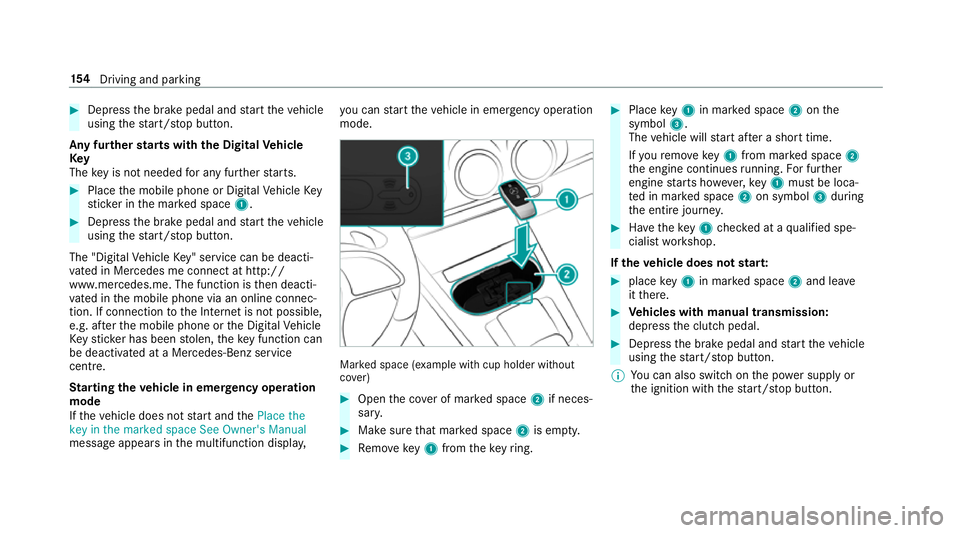
u can start theve hicle in emer gency operation
mode. Ma
rked space (e xample with cup holder without
co ver) #
Open the co ver of mar ked space 2if neces‐
sar y. #
Make sure that mar ked space 2is em pty. #
Remo vekey1 from theke yring. #
Place key1 in mar ked space 2onthe
symbol 3.
The vehicle will start af ter a short time.
If yo ure mo vekey1 from mar ked space 2
th e engine continues running. For fur ther
engine starts ho wever,ke y1 must be loca‐
te d in mar ked space 2on symbol 3during
th e entire journe y. #
Have theke y1 checked at a qualified spe‐
cialist workshop.
If th eve hicle does not star t: #
place key1 in mar ked space 2and lea ve
it th ere. #
Vehicles with manual transmission:
depress the clutch pedal. #
Depress the brake pedal and start theve hicle
using thest art/ stop button.
% You can also swit chon the po wer supp lyor
th e ignition with thest art/ stop button. 15 4
Driving and pa rking
Page 159 of 609
R
afte rev ery vehicle start, the engine runs for
te n minu tes.
R you can car ryout a maximum of two consec‐
utive starting attem pts. The vehicle must be
st ar ted once with theke y before trying to
st art theve hicle again with the smartphone.
R you can stop theve hicle again at any time.
R further information can be found in the
smartphone app.
Securing the engine against starting before
car rying out maintenance or repair work: #
switch on the hazard warning lights.
or #
unlock the doors.
or #
open a side window or the sliding sunroof. Ru
nning-in no tes To
preser vethe engine during thefirs t1, 500 km:
R drive at varying road speeds and engine
speeds. R
drive theve hicle in drive program A
or ;.
R change gear before there v counter needle is
Ô ofthewa yto there d area of there v coun‐
te r.
R do not shift down a gear manually in order to
brake.
R avoidoverstra ining theve hicle, e.g. driving at
full thro ttle.
R vehicles with automatic transmission: do
not depress the accelera tor pedal be yond the
pressure point (kickdown).
R only increase the engine speed gradually and
accelera tetheve hicle tofull speed af ter
1, 500 km.
This also applies when the engine or parts of the
driv etra in ha vebeen replaced.
Please also obser vethefo llowing running-in
no tes:
R in cer tain driving and driving saf ety sy stems,
th e sensor sy stem adjusts automatically
while a cer tain dis tance is driven af terthe
ve hicle has been delivered or af terre pairs. Fu
ll sy stem ef fectiveness is not achie ved
until the end of this teach-in process.
R brakepads, brake discs and tyres that are
either new or ha vebeen replaced only ach‐
ie ve optimum braking ef fect and grip af ter
se veral hundred kilom etre s of driving. Com‐
pensate forth ere duced braking ef fect by
applying greater forc eto the brake pedal. Note
s on driving &
WARNING Risk of accident due to
objects in the driver's foot we ll
Objects in the driver's foot we ll may impede
pedal tra vel or block a depressed pedal.
This jeopardises the operating and road
saf ety of theve hicle. #
Stow all objects in theve hicle securely
so that they cannot getinto the driver's
fo ot we ll. #
Alw aysfit th efloor mats securely and
as prescribed in order toensure that 15 6
Driving and pa rking
Page 161 of 609
&
WARNING Risk of accident due tothe
brake sy stem overheating
If yo u lea veyour foot on the brake pedal
when driving, the brake sy stem may over‐
heat.
This increases the braking dis tance and the
brake sy stem may evenfa il. #
Never use the brake pedal as a foot re st. #
Do not depress the brake pedal and the
accelerator pedal at the same time
while driving. *
NO
TECausing wearto the brake linings
by permanently depressing the brake
pedal #
Do not permanently depress the brake
pedal while driving. #
Touse braking ef fect of the engine,
shift toa lo werge ar in good time. *
NO
TEDama getothe driv etra in and
engine when pulling away #
Do not warm upthe engine while the
ve hicle is stationar y.Pull away immedi‐
atel y. #
Avoid high engine speeds and driving at
full thro ttle until the engine has reached
its operating temp erature. *
NO
TEDama getothe catalytic con verter
due tonon-combu sted fuel The engine is not
running smo othly and is
misfiring.
Non-combus ted fuel may get into the cata‐
lytic con verter. #
Only depress the accelera tor pedal
slightl y. #
Have the cause rectified immediately at
a qu alified specialist workshop. Limited braking ef
fect on salt-trea tedro ads:
R due tosalt build-up on the brake disks and
brakepads, the braking dis tance can increase
conside rably or result in braking only on one
side
R maintain a much greater safe dis tance tothe
ve hicle in front
To preve nt salt build-up:
R brake occasionally while paying attention to
th e tra ffic conditions
R carefully depress the brake pedal at the end
of the journey and when starting the next
journey ECO
start/s top function Ope
ration of the ECO start/s top function
The engine is au tomatically switched off if the
fo llowing conditions are me t:
R vehicles with manual transmission: you
brake theve hicle, shift into neutral iwhen
tr ave lling at a low speed and then release the
clutch pedal. 15 8
Driving and pa rking
Page 162 of 609
R
vehicles with automatic transmission:
yo u brake theve hicle toast andstill in trans‐
mission position hori.
R vehicles with automatic transmission:
yo u en gage transmission position j.
R if all vehicle conditions for an auto matic
engine stop are met.
If yo u swit chon the HOLD function or select
transmission position j,the engine will auto‐
matically stop in thefo llowing situations:
R youstop behind a vehicle that is pulling
aw ay.
R youstop at a stop sign when there is no vehi‐
cle in front of you.
R you turn thesteering wheel hard at a low
speed.
The è symbol appears in the multifunction
display when theve hicle is stationar y.If not all
th eve hicle conditions are met, theç symbol
appears in the multifunction displa y.The engine is
restar ted automatically if:
R vehicles with automatic transmission: in
transmission position h,youre lease the
brake pedal when the HOLD function is not
active.
R vehicles with automatic transmission:
yo u shift out of transmission position j.
R vehicles with automatic transmission:
yo u shift into transmission position hor
k.
R you depress the accelerator pedal.
R youch ange theve hicle le vel.
R an automatic engine start is necessar y.
If th e engine was switched off bythe ECO start/
st op function and you lea vetheve hicle, a warn‐
ing tone sounds. The displ aymessa geVehicle is
operational Switch off the ignition before exiting
also appears inthe multifunction displa y.Ifyou
do not switch off the ignition, the ignition is
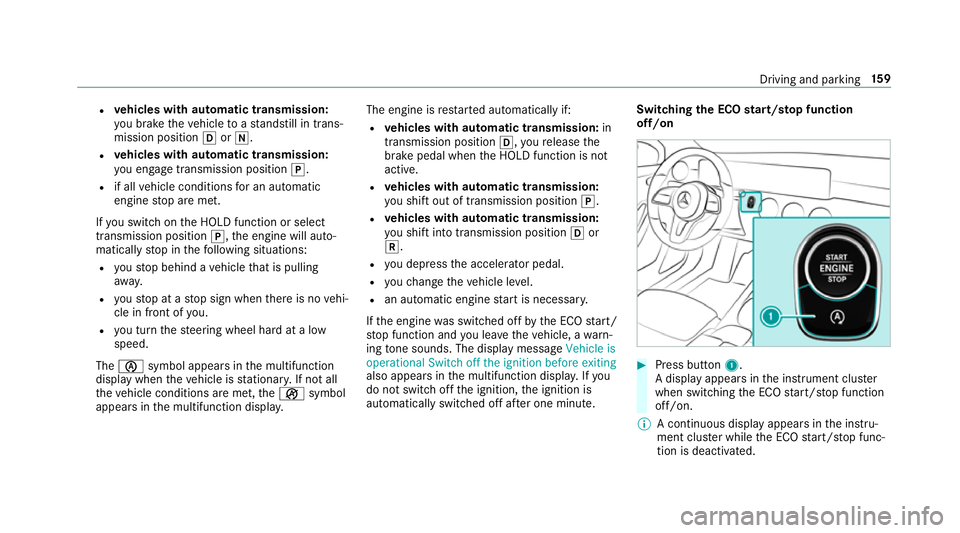
automatically switched off af ter one minute. Switching
the ECO start/s top function
off/on #
Press button 1.
A displ ayappears in the instrument clus ter
when swit ching the ECO start/ stop function
off/on.
% A continuous display appears in the instru‐
ment clus ter while the ECO start/ stop func‐
tion is deactivated. Driving and parking
15 9
Page 163 of 609
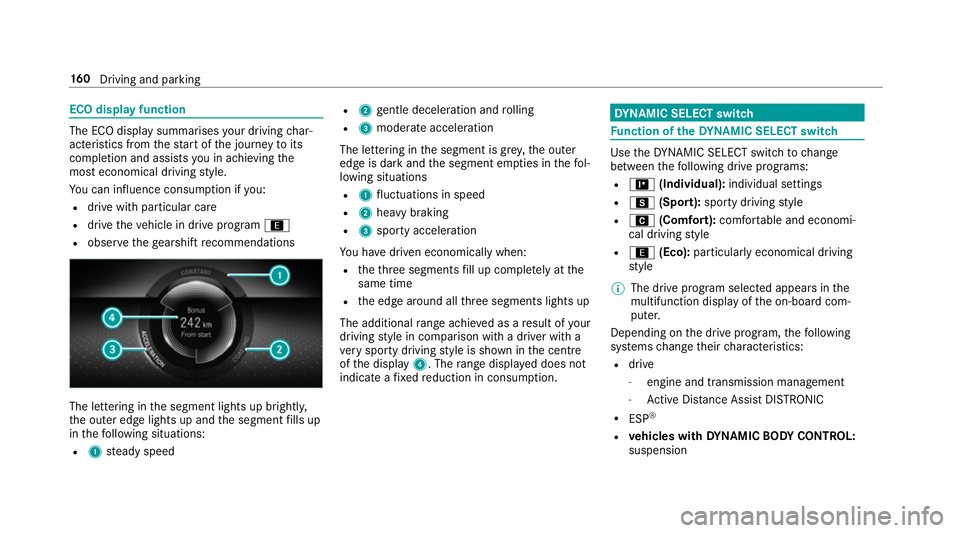
ECO display function
The ECO display summarises
your driving char‐
acteristics from thest art of the journey toits
completion and assists you in achieving the
most economical driving style.
Yo u can influence consum ption if you:
R drive with particular care
R drive theve hicle in drive program ;
R obser vethege arshift recommendations The lettering in
the segment lights up brightl y,
th e outer edge lights up and the segment fills up
in thefo llowing situations:
R 1 steady speed R
2 gentle deceleration and rolling
R 3 moderate acceleration
The lettering in the segment is gr ey,th e outer
edge is dark and the segment em pties in thefo l‐
lowing situations
R 1 fluctuations in speed
R 2 heavy braking
R 3 sporty acceleration
Yo u ha vedriven economically when:
R theth re e segments fill up comple tely at the
same time
R the edge around all thre e segments lights up
The additional range achi eved as a result of your
driving style in comparison with a driver with a
ve ry sporty driving style is shown in the cent re
of the display 4. Therange displ ayed does not
indicate a fixe dre duction in consum ption. DY
NA MIC SELECT switch Fu
nction of theDY NA MIC SELECT switch Use
theDY NA MIC SELECT switch tochange
between thefo llowing drive programs:
R = (Individual): individual settings
R C (Sport): sporty driving style
R A (Comfort): comfortable and economi‐
cal driving style
R ; (Eco): particularly economical driving
st yle
% The drive program selected appears in the
multifunction display of the on-board com‐
puter.
Depending on the drive prog ram, thefo llowing
sy stems change their characteristics:
R drive
-
engine and transmission management
- Active Dis tance Assi stDISTRONIC
R ESP ®
R vehicles with DYNA MIC BODY CONT ROL:
suspension 16 0
Driving and pa rking
Page 165 of 609
%
The prom ptappears on ly ifthe pr eviously
active settings deviate from thest andard
settings.
Fu nction off: the next time theve hicle is star‐
te dth eComfort drive program is set automati‐
cally. The ECO start/ stop function is activated
automaticall y.
% This function must be activated for each user
profile sepa rately. Only when this function is
activated will the drive prog ram and Eco
st art/ stop setting forth e pr evious journey
be sa vedfo rth ere spective user profile. Displaying
vehicle data Multimedia sy
stem:
, © .
Info #
Select Vehicle.
The vehicle data is displa yed. Displaying engine data
Multimedia sy
stem:
, © .
Info #
Select Engine.
The engine data is displa yed.
% The values for engine output and engine tor‐
qu e may deviate from the nominal values.
Items that can influence this are, forex am‐
ple:
R Sea le vel
R Fuel grade
R Outside temp erature Calling up fuel consum
ption indicator Multimedia sy
stem:
, © .
Info #
Select Consumption.
The cur rent and average fuel consum ption is
displa yed. Manual transmission
Operating
thege arshift le ver &
WARNING Risk of accident and inju ry
due tochildren left unat tended in the
ve hicle
If yo u lea vechildren unaccompanied in the
ve hicle, they could:
R open doo rs,th ereby endangering other
persons or road users.
R get out of theve hicle and be hit by
oncoming traf fic.
R ope rate ve hicle equipment and become
trapped, forex ample.
Moreo ver,ch ildren could also set theve hicle
in motion by,fo rex ample:
R releasing the parking brake.
R shifting the manual transmission into idle
position.
R starting the engine. 16 2
Driving and pa rking
Page 166 of 609
#
Never lea vechildren and animals unat‐
te nded in theve hicle. #
When leaving theve hicle, alw aysta ke
th eke y with you and lock theve hicle.
This also applies tothe Digital Vehicle
Ke y if the "Digital Vehicle Key" function
is activated via Mercedes me connect. #
Keep theve hicle key out of reach of
ch ildren. This also applies tothe Digital
Ve hicle Key if the "Digital Vehicle Key"
function is activated via Mercedes me
connect. *
NO
TEDama getothe engine and trans‐
mission byshifting toage ar that is too
low #
When changing between gears 5and
6 push thege arshift le verto theright. #
Do not shift down at high speeds. *
NO
TEDama getothe transmission by
shifting toreve rsege ar k while the
ve hicle is in motion #
Only shift into reve rsege ar k when
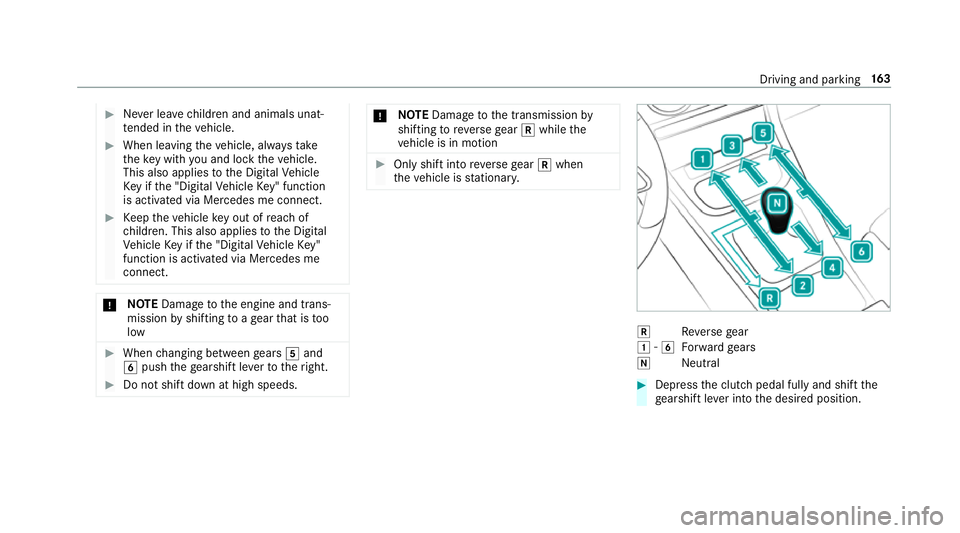
th eve hicle is stationar y. k
Reversege ar
1 -6
Forw ard gears
i Neutral #
Dep ress the clutch pedal fully and shift the
ge arshift le ver into the desired position. Driving and parking
16 3
Page 167 of 609
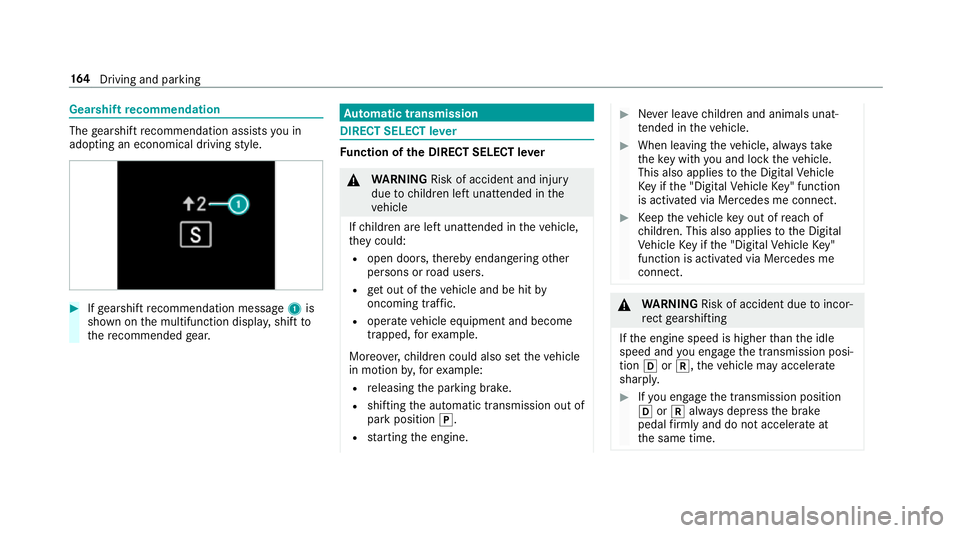
Gearshift
recommendation The
gearshift recommendation assists you in
adopting an economical driving style. #
Ifge arshift recommendation message 1is
shown on the multifunction displa y,shift to
th ere commended gear. Au
tomatic transmission DIRECT SELECT le
ver Fu
nction of the DIRECT SELECT le ver &
WARNING Risk of accident and inju ry
due tochildren left unat tended in the
ve hicle
If ch ildren are left unat tended in theve hicle,
th ey could:
R open doo rs,th ereby endangering other
persons or road users.
R get out of theve hicle and be hit by
oncoming traf fic.
R ope rate ve hicle equipment and become
trapped, forex ample.
Moreo ver,ch ildren could also set theve hicle
in motion by,fo rex ample:
R releasing the parking brake.
R shifting the automatic transmission out of
park position j.
R starting the engine. #
Never lea vechildren and animals unat‐
te nded in theve hicle. #
When leaving theve hicle, alw aysta ke
th eke y with you and lock theve hicle.
This also applies tothe Digital Vehicle
Ke y if the "Digital Vehicle Key" function
is activated via Mercedes me connect. #
Keep theve hicle key out of reach of
ch ildren. This also applies tothe Digital
Ve hicle Key if the "Digital Vehicle Key"
function is activated via Mercedes me
connect. &
WARNING Risk of accident due toincor‐
re ct gearshifting
If th e engine speed is higher than the idle
speed and you en gage the transmission posi‐
tion hork, theve hicle may accelerate
sharply. #
Ifyo u en gage the transmission position
h ork always depress the brake
pedal firm lyand do not accelerate at
th e same time. 16 4
Driving and pa rking
Page 168 of 609
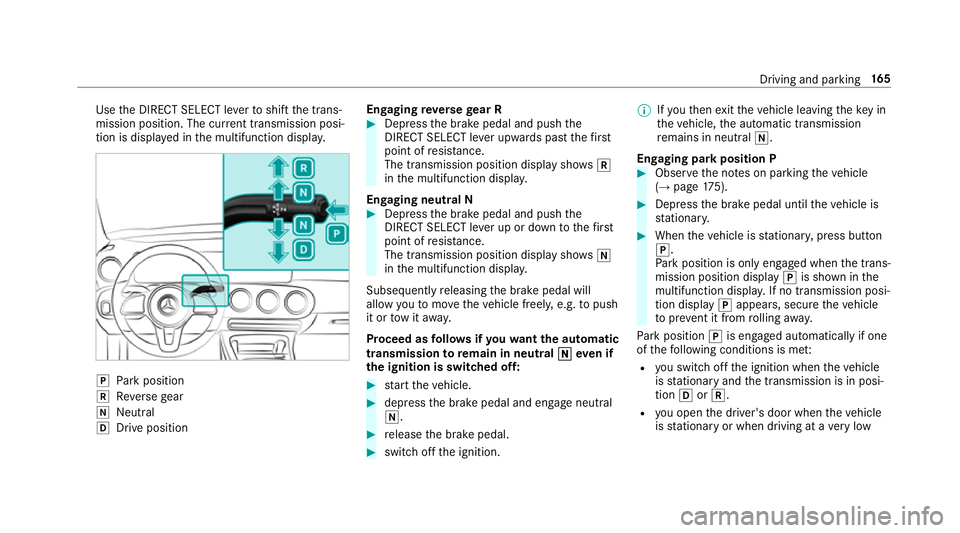
Use
the DIRECT SELECT le verto shift the trans‐
mission position. The cur rent transmission posi‐
tion is displ ayed in the multifunction displa y.j
Park position
k Reversege ar
i Neut ral
h Drive position En
gaging reve rsege ar R #
Depress the brake pedal and push the
DIRECT SELECT le ver upwards past thefirst
point of resis tance.
The transmission position displ aysho wsk
in the multifunction displa y.
Engaging neut ral N #
Depress the brake pedal and push the
DIRECT SELECT le ver up or down tothefirst
point of resis tance.
The transmission position displ aysho wsi
in the multifunction displa y.
Subsequently releasing the brake pedal will
allow youto mo vetheve hicle freel y,e.g. topush
it or tow it away.
Proceed as follo ws ifyo uwa ntthe automatic
transmission toremain in neutral i
i eve n if
th e ignition is switched off: #
start theve hicle. #
depress the brake pedal and engage neutral
i. #
release the brake pedal. #
switch off the ignition. %
Ifyo uth en exitth eve hicle leaving theke y in
th eve hicle, the automatic transmission
re mains in neutral i.
Engaging park position P #
Obser vethe no tes on parking theve hicle
(→ page 175). #
Dep ress the brake pedal until theve hicle is
st ationar y. #
When theve hicle is stationar y,press button
j.
Pa rk position is only engaged when the trans‐
mission position display jis shown in the
multifunction displa y.If no transmission posi‐
tion display jappears, secure theve hicle
to preve nt it from rolling away.
Pa rk position jis engaged automatically if one
of thefo llowing conditions is me t:
R you swit choff the ignition when theve hicle
is stationary and the transmission is in posi‐
tion hork.
R you open the driver's door when theve hicle
is stationary or when driving at a very low Driving and parking
16 5
Page 169 of 609
speed and
the transmission is in position h
or k.
% Tomanoeuvre with an open driver's door,
open the driver's door while stationary and
engage transmission position hork
again.
% Atvery low outside temp eratures from
appr ox. -20°C you may not be able toshift
th e transmission from jtoano ther trans‐
mission position when the engine is
switched off. If this is the case, only change
th e transmission position while the engine is
ru nning.
En gaging drive position D #
Depress the brake pedal and push the
DIRECT SELECT le ver down past thefirst
point of resis tance.
The transmission position displ aysho wsh
in the multifunction displa y.
When the automatic transmission is in transmis‐
sion position h, it shiftsthege ars automati‐
call y.This depends on thefo llowing factors:
R the selected drive prog ram R
the position of the accelera tor pedal
R the driving speed Manual
gearshifting &
WARNING Risk of skidding and of an
accident due toshifting down on slippery
ro ad sur faces
If yo u shift down on slippery road sur faces to
inc rease the engine braking ef fect, the drive
wheels may lose traction. #
Do not shift down on slippery road sur‐
fa ces toinc rease the engine braking
ef fect. When
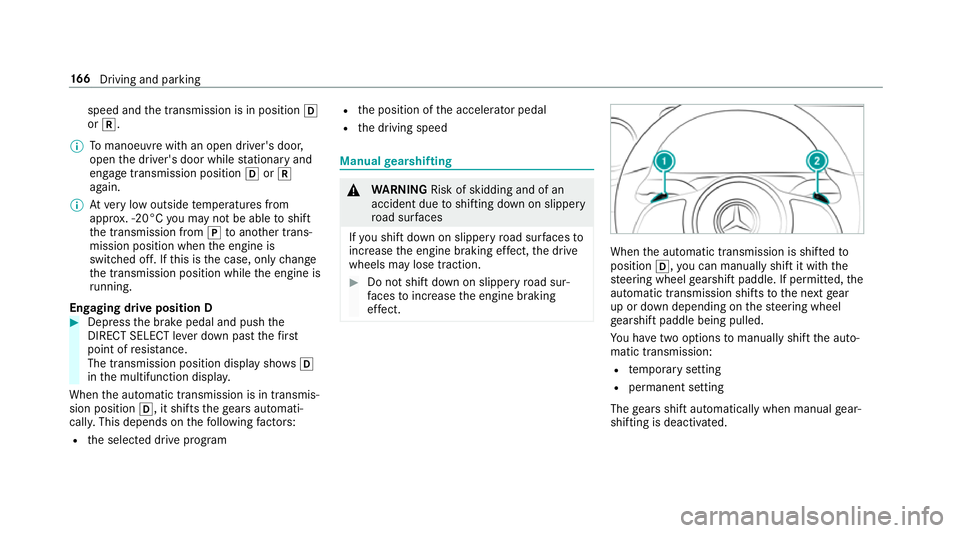
the automatic transmission is shif tedto
position h,you can manually shift it with the
st eering wheel gearshift paddle. If permit ted, the
automatic transmission shifts tothe next gear
up or down depending on thesteering wheel
ge arshift paddle being pulled.
Yo u ha vetwo options tomanually shift the auto‐
matic transmission:
R temp orary setting
R permanent setting
The gears shift automatically when manual gear‐
shifting is deactivated. 16 6
Driving and pa rking