lane assist MERCEDES-BENZ A-CLASS HATCHBACK 2018 Owner's Manual
[x] Cancel search | Manufacturer: MERCEDES-BENZ, Model Year: 2018, Model line: A-CLASS HATCHBACK, Model: MERCEDES-BENZ A-CLASS HATCHBACK 2018Pages: 609, PDF Size: 10.73 MB
Page 245 of 609
Assi
stinter venes. The li kelihood of inter vention
is therefore higher.
Setting Active Lane Keeping Assist
Multimedia sy stem:
, © .
Settings .
Assistance .
Act.
Lane Keep. Assist
Setting the sensitivity
% The availability of this function is dependent
on the count ry. #
Select Standard ,Sensitive orOff.
Ac tivating/deactivating the haptic warning #
Select Warning.
Ac tivate or deacti vate the function. Tr
ailer hitch Tr
ailer operation no tesObser
vethefo llowing no tes on theto ngue
we ight:
R do not use a tongue weight that exceeds or
fa lls below the permissible tongue weight R
use a tongue weight as close as possible to
th e maximum tongue weight
Do not exceed thefo llowing values:
R permissible towing capacity
R permissible rear axle load of theto wing vehi‐
cle
R permissible gross mass of theto wing vehicle
R permissible gross mass of the trailer
R maximum permissible speed of the trailer
Ensure thefo llowing before starting a journey:
R the tyre pressure on there ar axle of theto w‐
ing vehicle is set for a maximum load
R the lighting of the connected trailer is opera‐
tional
R vehicles without LED headlamps or MUL‐
TIBEAM LED headlamps: the headlamps
ha ve been set cor rectly
In theeve nt of increased rear axle load, the car/
trailer combination may not exceed a maximum
speed of 100 km/h forre asons concerning the
operating permit. This also applies in countri esin which
the permissible maximum speed for
car/trailer combinations is ab ove100 km/h. Fo
lding the ball neck out/in &
WARNING Risk of accident due tothe
ball neck not being engaged
If th e ball neck is not engaged, the trailer
may come loose. #
Alw ays engage the ball neck as descri‐
bed. &
WARNING Risk of inju ryfrom ball neck
swinging outwards
The ball neck may swing outwards when
unlo cking or when it has not been properly
engaged.
There is a risk of injury within the ball neck's
ra nge of mo vement! #
Unlock the ball neck only when its
ra nge of mo vement is unobstructed. 242
Driving and pa rking
Page 247 of 609
#
Remo vethe co ver from the ball head and
st ore it in a safe place.
Make sure that the ball of the ball neck is clean.
Check that it is either greased or dr y (grease
free), depending on the instructions forthe
traile r.
Fo lding the ball neck in #
Pull release switch 2until the ball neck
unloc ks.
The ball neck folds up under there ar
bumper.
Indicator lamp 1flashes. #
Push the ball neck in the direction of the
ar row until it en gage s audibly behind the
bumper.
Indicator lamp 1goes out and the message
on the multifunction display disappears.
Obser vethe information on the displa yson the
instrument clus ter:
R Warning and indicator lamps (→ page548)
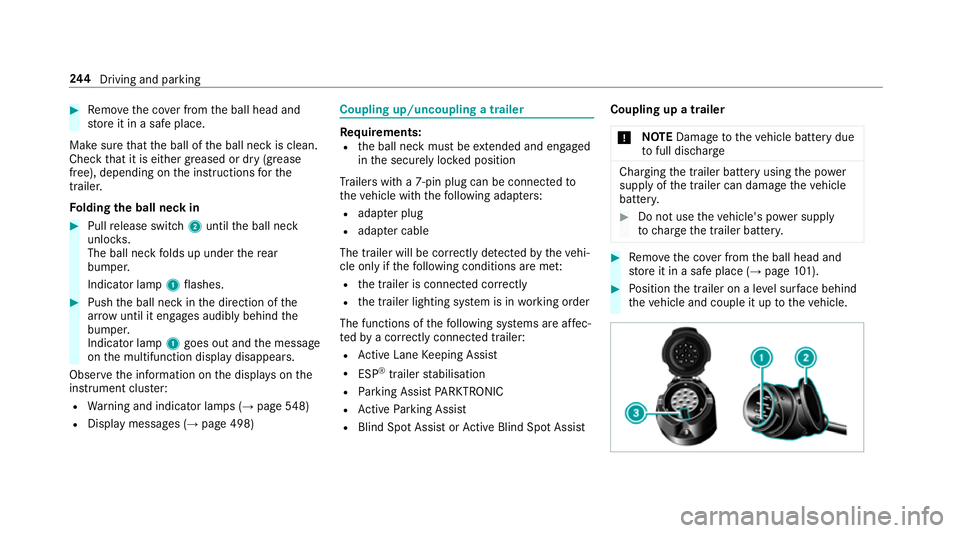
R Displ aymessa ges (→ page 498) Coupling up/uncoupling a trailer
Re
quirements:
R the ball neck must be extended and engaged
in the securely loc ked position
Tr ailers with a 7-pin plug can be connec tedto
th eve hicle with thefo llowing adap ters:
R adap ter plug
R adapte r cable
The trailer will be cor rectly de tected bytheve hi‐
cle only if thefo llowing conditions are me t:
R the trailer is connected cor rectly
R the trailer lighting sy stem is in working order
The functions of thefo llowing sy stems are af fec‐
te dby a cor rectly connected traile r:
R Active Lane Keeping Assist
R ESP ®
trailer stabilisation
R Parking Assist PARKTRONIC
R Active Parking Assist
R Blind Spot Assist or Active Blind Spot Assi stCoupling up a trailer
* NO
TEDama getotheve hicle battery due
to full dischar ge Charging
the trailer battery using the po wer
supply of the trailer can damage theve hicle
batter y. #
Do not use theve hicle's po wer supply
to charge the trailer batter y. #
Remo vethe co ver from the ball head and
st ore it in a safe place (→ page101). #
Position the trailer on a le vel sur face behind
th eve hicle and couple it up totheve hicle. 244
Driving and pa rking
Page 256 of 609
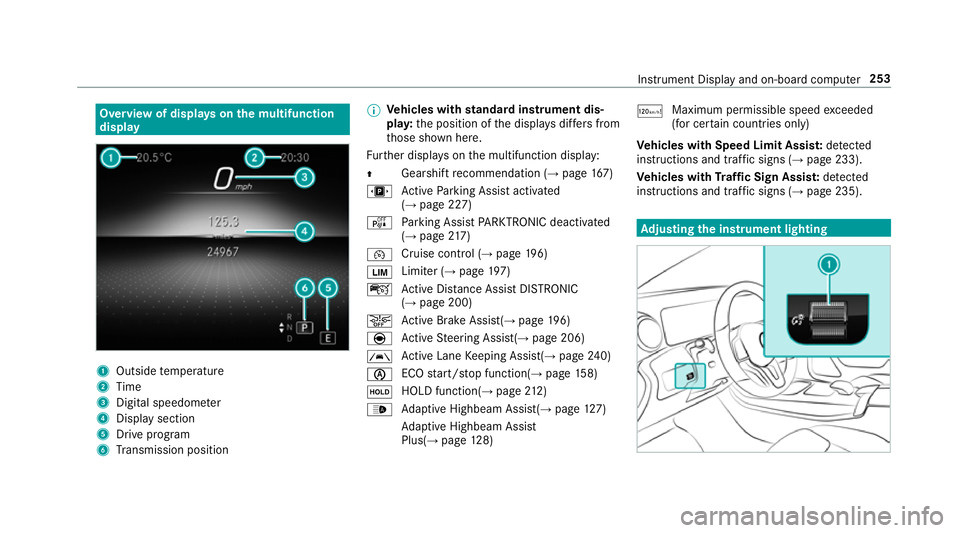
Overview of displa
yson the multifunction
display 1
Outside temp erature
2 Time
3 Digital speedome ter
4 Displ aysection
5 Drive program
6 Transmission position %
Ve
hicles with standard instrument dis‐
pla y:the position of the displa ysdiffers from
th ose shown here.
Fu rther displa yson the multifunction display:
Z Gearshift
recommendation (→ page 167)
u Active Parking Assist activated
(→ page 227)
é Parking Assist PARKTRONIC deacti vated
( → page 217)
¯ Cruise
control (→ page 196)
È Limi
ter (→ page 197)
ç Active Dis tance Assi stDISTRONIC
(→ page 200)
æ Ac
tive Brake Assi st(→ page 196)
è Active Steering Assis t(→ page 206)
à Ac
tive Lane Keeping Assist(→ page240)
è ECO
start/ stop function(→ page158)
ë HOLD function(→
page212)
_ Ad
aptive Highbeam Assist(→ page127)
Ad aptive Highbeam Assist
Plus(→ page128) ð
Ma
ximum pe rmissible speed exceeded
(for cer tain countries only)
Ve hicles with Speed Limit Assis t:de tected
instructions and traf fic signs (→ page 233).
Ve hicles with Traf fic Sign Assis t:de tected
instructions and traf fic signs (→ page 235). Ad
justing the in stru ment lighting Instrument Displ
ayand on-board computer 253
Page 517 of 609
Display messages
Possible causes/consequences and M
MSolutions Active Steering Assist cur-
rently unavailable See Own-
er's Manual
*A
ctive Steering Assist is temp orarily una vailable.
The ambient conditions are outside the sy stem limits (→ page 206). #
Drive on.
As soon as the ambient conditions are within the sy stem limits, the sy stem will become available again. #
If necessar y,clean the windscreen in the camera's field of vision. #
Check the tyre pressure if necessar y.
À ATTENTION ASSIST: Take a
break! *A
TTENTION ASSIST has de tected fatigue or an increasing la ckof concentration on the part of the driver
(→ page 231). #
If necessar y,take a break.
Traffic Sign Assist inopera-
tive *T
raffic Sign Assist is malfunctioning. #
Consult a qualified specialist workshop.
Active Lane Keeping Assist
currently unavailable See
Owner's Manual *A
ctive Lane Keeping Assist is temp orarily una vailable.
The ambient conditions are outside the sy stem limits (→ page240). #
Drive on.
As soon as the ambient conditions are within the sy stem limits, the sy stem will become available again.
*A ctive Steering Assist has reached its sy stem limits. #
Take ove rth esteering and drive on in accordance with the traf fic conditions. 514
Displaymessa ges and warning/indicator lamps
Page 518 of 609
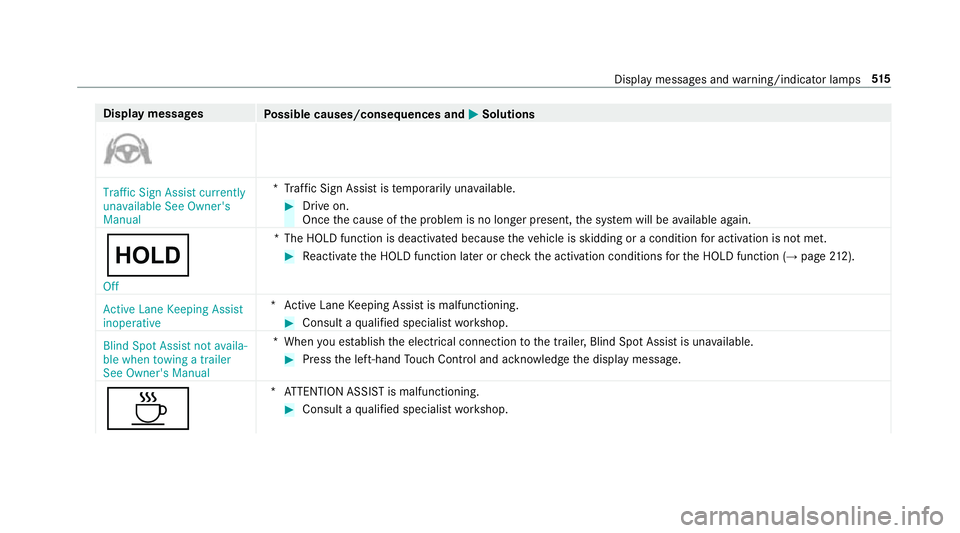
Display messages
Possible causes/consequences and M
MSolutions Traffic Sign Assist currently
unavailable See Owner's
Manual
*T
raffic Sign Assist is temp orarily una vailable. #
Drive on.
Once the cause of the problem is no longer present, the sy stem will be available again.
ë
Off *T
he HOLD function is deactivated because theve hicle is skidding or a condition for activation is not met. #
Reactivate the HOLD function later or check the activation conditions forth e HOLD function (→ page212).
Active Lane Keeping Assist
inoperative *A
ctive Lane Keeping Assist is malfunctioning. #
Consult a qualified specialist workshop.
Blind Spot Assist not availa-
ble when towing a trailer
See Owner's Manual *W
hen you es tablish the electrical connection tothe trailer, Blind Spot Assist is una vailable. #
Press the left-hand Touch Control and ackn owledge the display message.
À *A
TTENTION ASSIST is malfunctioning. #
Consult a qualified specialist workshop. Display messages and
warning/indicator lamps 515
Page 564 of 609
1,
2, 3 ...
12 V battery
see Battery (vehicle)
12 V so cket
see Soc ket (12 V)
11 5 V soc ket
see Soc ket (1 15 V)
230 V soc ket
see Soc ket (230 V)
360° Camera ........................................... 221
Ca re .................................................... 432
Fu nction .............................................. 221
Opening the camera co ver (r eve rsing
camera) .............................................. .225
Selecting a view ................................... 224
Setting favo urites ................................ 225
Swit ching automatic operation
on/off (r eversing camera) .................. .224 A
A/C function Activating/deactivating (multimedia
sy stem) ................................................ 14 3Switching on/off (control panel) .........
14 2
ABS (Anti-lock Braking Sy stem) ............ .185
Ac celeration
see Kickdown
Ac cess data
Setting (Blue tooth®
) ............................ 397
Ac oustic locking verification signal
Ac tivating/deactivating ......................... 66
Ac tivating/deactivating automatic
vo lume adjustment
Ad vanced sound sy stem ......................4 18
Burmes ter®
sur round sound sy stem ....4 16
Ac tive Blind Spot Assi st.......................... 237
Ac tivating/deactivating ...................... .240
Brake application ................................. 238
Fu nction .............................................. 237
Sy stem limitations ...............................2 37
Tr ailer operation .................................. 238
Ac tive bonn et(pedestrian pr otection) .. 420
Operation ............................................ 420
Re setting ............................................. 420
Ac tive Brake Assi st
Fu nction/no tes ................................... 19 0Setting .................................................
19 6
Ac tive Di stance Assist DISTRO NIC........ 200
Ac tive Emergency Stop Assist .............. 210
Ac tive Lane Change Assi st.................. 208
Calling up a speed ............................... 202
Displa ysinthe Instrument Display .......2 10
Fu nction .............................................. 200
Increasing/decreasing speed .............. 202
Re quirements: .................................... .202
Ro ute-based speed adap tation ........... .205
Selecting ............................................. 202
St eering wheel buttons ....................... 202
St oring a speed ................................... 202
Switching off/deactivating .................. 202
Switching on/activating ......................2 02
Sy stem limitations ...............................2 00
Ac tive Eme rgency Stop Assist ................ 210
Ac tive headlamps .................................... 12 5
Ac tive Lane Change Assi st..................... 208
Ac tivating/deactivating ...................... .210
Fu nction .............................................. 208
Ac tive Lane Keeping Assist .................... 24 0
Ac tivating/deactivating ...................... .241
Ac tivating/deactivating thewa rning .... 24 2 Index
561
Page 565 of 609
Fu
nction .............................................. 24 0
Sensitivity (function/no tes) ................. 241
Setting the sensitivity .......................... 24 2
Sy stem limitations ...............................2 40
Tr ailer operation .................................. 24 0
Ac tive Parking Assist .............................. 225
Cross Traf fic Alert ................................ 231
Drive AwayAssi st................................ 230
Exiting a pa rking space ...................... .228
Fu nction .............................................. 225
Manoeuvring assi stance ...................... 231
Pa rking ................................................ 227
Sy stem limitations ...............................2 25
Ac tive Se rvice Sy stem PLUS
AS SYST PLUS ....................................... 419
Ac tive Speed Limit Assi st....................... 204
Display ................................................ 204
Fu nction .............................................. 204
Ac tive Steering Assist ............................ .206
Ac tivating/deactivating ...................... .208
Ac tive Emergency Stop Assist .............. 210
Ac tive Lane Change Assi st.................. 208
Displa ysinthe Instrument Display .......2 10
Fu nction .............................................. 206 Sy
stem limitations ...............................2 06
Ad aptive brake lights ..............................19 6
Ad aptive cruise control
see Active Dis tance Assi stDISTRONIC
Ad aptive functions, MULTIBEAM LED
see Intelligent Light Sy stem
Ad aptive Highbeam Assist
Fu nction .............................................. 127
Switching on/off ................................. 12 8
Ad aptive Highbeam Assist Plus
Fu nction .............................................. 12 8
Switching on/off ................................. 12 9
Ad Blue ®
.................................................... 489
Ad ditives .............................................4 89
Capacity .............................................. 490
Consu mption ....................................... 490
Fill le vel .............................................. .254
No tes ................................................... 172
Purity ................................................... 489
Ra nge .................................................. 254
To pping up ...........................................1 73
Ad ditional door lo ck.................................. 69 Ad
diti ves.................................................. 490
Ad Blue ................................................. 489
Engine oil ............................................ 490
Fu el ..................................................... 487
Ad diti ves (AdBlue ®
)
see AdBlue ®
Ad diti ves (engine oil)
see Additives
Ad diti ves (fuel)
see Fuel
Ad dress book
see Contacts
Ad justing the balance/ fader
Adva nced sound sy stem ......................4 18
Burmes ter®
sur round sound sy stem ....4 17
Ad justing the headlamp range ............... 12 3
Ad justing the sound focus
Burmes ter®
sur round sound sy stem ....4 17
Ad justing treble, mid- range and bass
settings
Adva nced sound sy stem ......................4 18
Burmes ter®
sur round sound sy stem ....4 16 562
Index
Page 573 of 609
Digital speedome
ter ............................... 255
Digital Vehicle Keyst icker
Locking theve hicle ................................ 70
St arting theve hicle ............................. 15 3
Un locking theve hicle ............................70
Dinghy towing
see Tow- bar sy stem
Dipped beam Changing bulbs .................................... 13 3
DIRECT SELECT le ver............................... 16 4
Engaging drive position ....................... 16 6
Engaging neutral .................................. 16 5
Engaging pa rkposition ........................ 16 5
Engaging pa rkposition automatically .. 16 5
Engaging reve rsege ar ........................ .165
Fu nction .............................................. 16 4
Display Care .................................................... 434
Display (MBUX multimedia sy stem)
Home screen ...................................... .282
Operating ............................................ 285
Display (multimedia sy stem)
Settings ................................................ 311Display (on-boa
rdcompu ter)
Displ ays on the multifunction display .. 253
Display content Displaying ............................................ 252
Display message .....................................4 98
Calling up (on-boa rdcompu ter) .......... .498
No tes .................................................. 498
Display messages ¯ - - - km/h .................................... 51 8
ç - - - km/h .................................... 517
È - - - km/h .................................... 519
# 12V battery See Owner's Man‐
ual ....................................................... 524
Ac tive Blind Spot Assi stcur rently
una vailable See Owner's Manual .........513
Ac tive Blind Spot Assi stinope rative ..... 516
Ac tive Blind Spot Assi stnot available
when towing a trailer See Owner's
Manual ................................................ .512
Ac tive bonnet malfunction See Own‐
er's Manual ......................................... 543Ac
tive Brake Assi stFunctions cur‐
re ntly limited See Owner's Manual .......511
Ac tive Brake Assi stFunctions limited
See Owner's Manual ............................511
Ac tive Dis tance Assi stavailable
again .................................................... 51 8
Ac tive Dis tance Assi stcur rently
una vailable See Owner's Manual .........518
Ac tive Dis tance Assi stinope rative ....... 51 8
Ac tive Lane Keeping Assist cur rently
una vailable See Owner's Manual .........514
Ac tive Lane Keeping Assist inopera‐
tive .......................................................5 15
b Active Light Sy stem inoperative ..546
Ac tive Parking Assist and
PA RKTRONIC inoperati veSee Own‐
er's Manual .......................................... 513
Ac tive Steering Assist cur rently
una vailable See Owner's Manual .........514
Ac tive Steering Assist inoperative ........513 57 0
Index
Page 577 of 609
hTy
repress. monitor cur rently
una vailable .......................................... 531
hTy repress. monitor inoperative
No wheel sensors ................................ 531
hTy repress. monitor inoperative ...531
Ty re pressure Check tyres ...................528
Ty re(s) ove rheated ...............................5 32
dVe hicle is operational Switch
off the ignition before exiting .............. 537
hWa rning tyre defect .....................529
hWheel sensor(s) missing .............. 531
Wi thout changing gear, consult work‐
shop ....................................................5 38
Display on the windscreen
see Head-up display
Distance control see Active Dis tance Assi stDISTRONIC
Di stance recorder
see Trip dis tance
DI STRO NIC
see Active Dis tance Assi stDISTRONIC Door
Additional door lock .............................. 69
Child saf ety lock (rear door) .................. 62
Locking (emer gency key) ...................... .73
Opening (from the inside) ......................70
Un locking (emer gency key) .................... 73
Un locking (from the inside) ...................70
Door cont rol panel .................................... .14
Dr aw bar
see Tow- bar sy stem
Drinks holder see Cup holder
Drive Away Assist .................................... 230
Drive position Engaging .............................................. 16 6
Drive prog ram display ............................. 161
Drive prog rams
see DYNA MIC SELECT
Driver's seat see Seat
Driving abroad Symmetrical dipped beam ...................1 22Driving lights
see Automatic driving lights
Driving saf ety sy stem ............................ .184
ABS (Anti-lo ckBraking Sy stem) ........... 185
Ac tive Brake Assi st.............................. 19 0
Ad aptive brake lights .......................... .196
BA S (Brake Assi stSystem) .................. 186
EBD (Electronic Brake forc e Distribu‐
tion) ..................................................... 19 0
ESP ®
Crosswind Assi st........................ 189
ESP ®
trailer stabilisation .................... .189
Overview ............................................. 185
Ra dar sensors .....................................1 85
Re sponsibility ...................................... 184
ST EER CONTROL ................................. 19 0
Driving sy stem
DY NA MIC BODY CONTROL .................. 214
Driving sy stem
see 360° Camera
see Active Blind Spot Assi st
see Active Dis tance Assi stDISTRONIC
see Active Emergency Stop Assist
see Active Lane Change Assi st
see Active Lane Keeping Assist 574
Index
Page 583 of 609
Re
strictions ......................................... 396
Setting access da ta(Blue tooth ®
) .........3 97
Setting au tomatic disconnection ......... 398
Setting up (Blu etoo th®
) .......................3 97
Setting up (Wi-Fi) ................................. 397
Vi a communication module ................ .396
Internet radio
Calling up ............................................ 403
Calling up thest ation list (category
last selec ted) .......................................4 05
Deleting stations ................................ .405
Logging out ......................................... 405
Overview ............................................. 404
Re gis tering .......................................... 405
Saving stations .................................... 405
Selecting and connecting toast ation
............................................................ .405
Selecting stre am ................................ .405
Setting options ................................... .405
Te rm s of use ........................................4 05
iPhone ®
see Apple CarPlay™
see Mercedes-Benz Link ISOFIX
child seat securing sy stem .......... 48
Fitting .................................................... 49
No tes ..................................................... 48
Seats suitable for attaching ................... 57 J
Jack Declaration of conformity ......................23
Storage location ................................... 471
Jump-start connection ............................448
Gene ral no tes ...................................... 446
No tes .................................................. 446 K
Ke y.............................................................. 65
Ac oustic locking verification signal ....... 66
Battery ................................................... 67
Emergency key ...................................... 67
Energy consumption .............................. 66
Fe atures ................................................ 65
Ke yring attachment .............................. 67
Overview ............................................... 65
Pa nic alarm ........................................... 66
Problem ................................................. 68 Un
locking setting .................................. 66
Ke y functions
Deactivating .......................................... 66
KEYLESS-GO Locking theve hicle ................................ 71
Problem .................................................72
Un locking setting .................................. 66
Un locking theve hicle ............................71
Kickd own.................................................. 167
Using ................................................... 167
Knee airbag ................................................ 37 L
Lamp see In terior lighting
Lamps (instrument display) see Warning/indicator lamps
Lane de tection (au tomatic)
see Active Lane Keeping Assist
Lane Keeping Assist
see Active Lane Keeping Assist
Language .................................................. 316
No tes ................................................... 316580
Index