phone MERCEDES-BENZ A-CLASS HATCHBACK 2018 Owner's Guide
[x] Cancel search | Manufacturer: MERCEDES-BENZ, Model Year: 2018, Model line: A-CLASS HATCHBACK, Model: MERCEDES-BENZ A-CLASS HATCHBACK 2018Pages: 609, PDF Size: 10.73 MB
Page 274 of 609
Vo
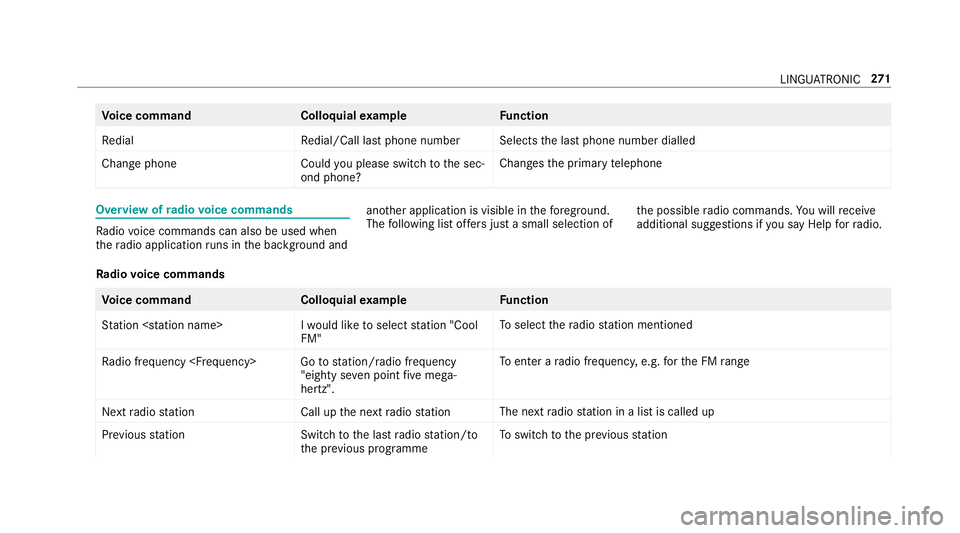
ice command Colloquialexample Function
Redial Redial/Call last phone numberSelects
the last phone number dialled
Change phone Could you please switch to the sec-
ond phone? Changes
the primary telephone Overview of
radio voice commands Ra
dio voice commands can also be used when
th era dio application runs in the bac kground and ano
ther application is visible in thefo re ground.
The following list of fers just a small selection of th
e possible radio commands. You will recei ve
additional suggestions if you say Help for radio .
Ra dio voice commands Vo
ice command Colloquialexample Function
Station
FM"To
select thera dio station mentioned
Radio frequency
hertz".To
enter a radio frequency, e.g. forth e FM range
Next radio statio nC all up the next radio station The next
radio station in a list is called up
Previous statio nS witch to the last radio station/to
the previous programme To
switch tothe pr evious station LINGU
ATRO NIC 271
Page 283 of 609
Overview and operation
Overview of
the MBUX multimedia sy stem &
WARNING Risk of di stra ction from infor‐
mation sy stems and communications
equipment
If yo u operate information and communica‐
tion equipment integ rated in theve hicle
when driving, you will be distracted from the
traf fic situation. This could also cause youto
lose control of theve hicle. #
Only operate this equipment when the
traf fic situation permits. #
Ifyo u cannot be sure of this, stop the
ve hicle whilst paying attention toroad
and traf fic conditions and ope rate the
equipment with theve hicle stationar y. Yo
u must obse rveth e legal requirements forthe
country in whi chyou are cur rently driving when
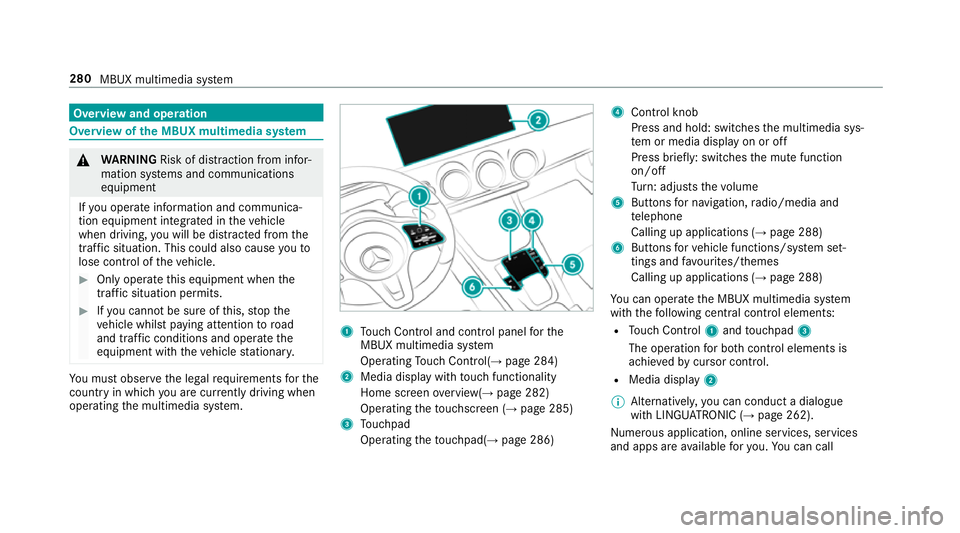
operating the multimedia sy stem. 1
Touch Control and cont rol panel forthe
MBUX multimedia sy stem
Operating Touch Control(→ page 284)
2 Media displ aywith touch functionality
Home sc reen ove rview(→ page 282)
Operating theto uchsc reen (→ page 285)
3 Touchpad
Operating theto uchpad( →page 286) 4
Control knob
Press and hold: swit ches the multimedia sys‐
te m or media display on or off
Press brief ly: switches the mute function
on/off
Tu rn: adjusts thevo lume
5 Buttons for navigation, radio/media and
te lephone
Calling up applications (→ page 288)
6 Buttons forve hicle functions/sy stem set‐
tings and favo urites/ themes
Calling up applications (→ page 288)
Yo u can operate the MBUX multimedia sy stem
with thefo llowing central control elements:
R Touch Control 1and touchpad 3
The operation for bo thcontrol elements is
achie vedby cursor control.
R Media displ ay2
% Alternati vely, you can conduct a dialogue
with LINGU ATRO NIC (→ page 262).
Numerous application, online services, services
and apps are available foryo u. You can call 280
MBUX multimedia sy stem
Page 285 of 609
Home screen
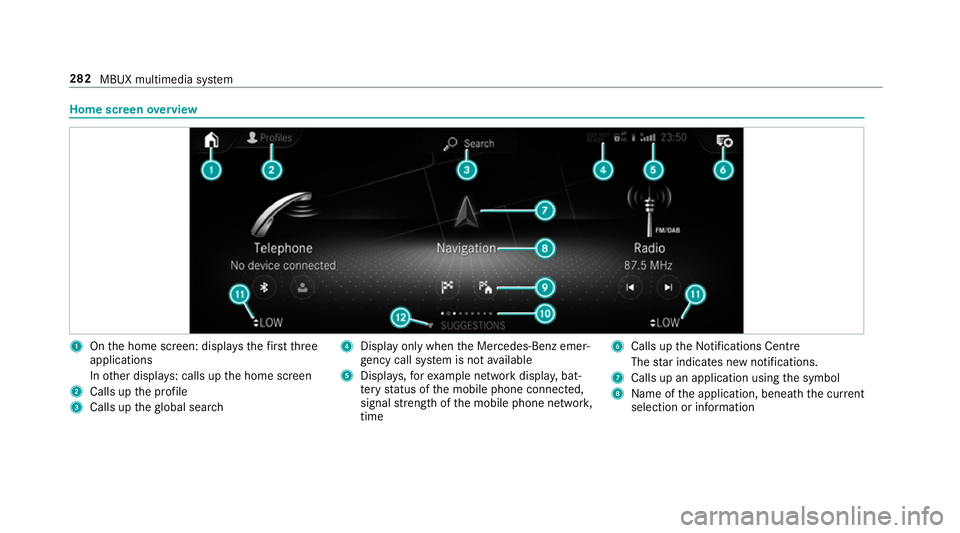
overview 1
Onthe home screen: displa ys thefirs tth ree
applications
In other displa ys: calls up the home screen
2 Calls up the profile
3 Calls up theglobal sear ch 4
Displ ayonly when the Mercedes-Benz emer‐
ge ncy call sy stem is not available
5 Displa ys,fo rex ample network displa y,bat‐
te ry status of the mobile phone connected,
signal stre ngth of the mobile phone networ k,
time 6
Calls up the Notifications Centre
The star indicates new notifications.
7 Calls up an application using the symbol
8 Name of the application, beneath the cur rent
selection or information 282
MBUX multimedia sy stem
Page 291 of 609
th
e beginning or end of the list is reached
yo u will hear ano ther clicking sound.
Selecting a station and track using the
to uchpad #
Swipe tothe left or right over the~ but‐
to n.
Ra dio: the pr evious or next station is set.
Media source: the pr evious or next track is
selec ted.
or #
Toshow the control menu: pressthe~
button on theto uchpad.
or #
Swipe upwards using two fingers on the
to uchpad.
The cont rol menu appears forth e audio
source that wa s last selected. #
Swipe left or right using one finger.
Ra dio: the pr evious or next station is set.
Media source: the pr evious or next track is
selec ted. #
Tohide the control menu: swipe down on
th eto uchpad using two fingers. Main functions
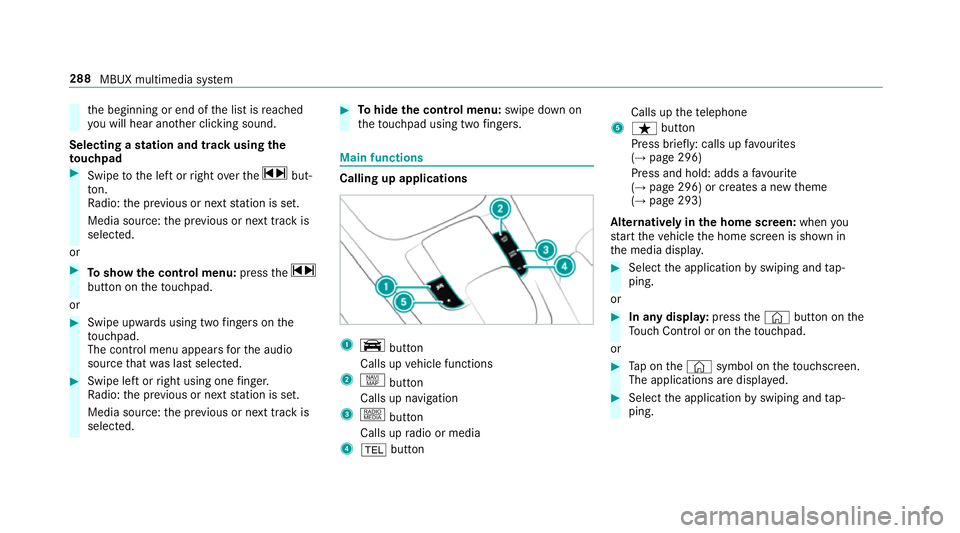
Calling up applications
1
y button
Calls up vehicle functions
2 z button
Calls up navigation
3 | button
Calls up radio or media
4 % button Calls up
thete lephone
5 ß button
Press brief ly: calls up favo urites
(→ page 296)
Press and hold: adds a favo urite
(→ page 296) or creates a new theme
(→ page 293)
Alternatively in the home screen: whenyou
st art theve hicle the home screen is shown in
th e media displa y. #
Select the application byswiping and tap‐
ping.
or #
In any displa y:press the© button on the
To uch Control or on theto uchpad.
or #
Tap on the© symbol on theto uchsc reen.
The applications are displa yed. #
Select the application byswiping and tap‐
ping. 288
MBUX multimedia sy stem
Page 294 of 609
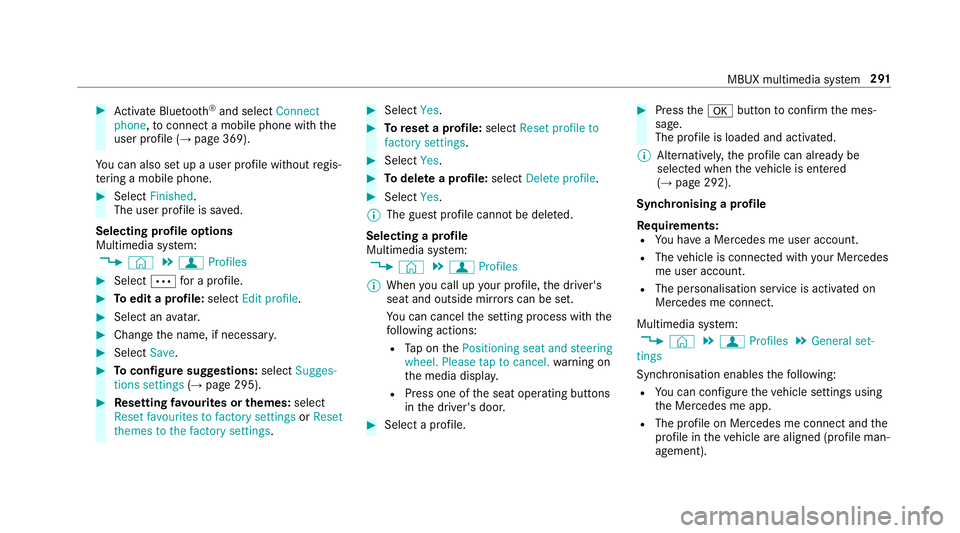
#
Activate Blu etoo th®
and select Connect
phone, toconnect a mobile phone wi th the
user profile (→ page 369).
Yo u can also set up a user profile without regis‐
te ring a mobile phone. #
Select Finished.
The user profile is sa ved.
Selecting profile options
Multimedia sy stem:
, © .
f Profiles #
Select Äfor a profile. #
Toedit a profile: selectEdit profile . #
Select an avatar. #
Chan gethe name, if necessar y.#
Select Save. #
Toconfigure suggestions: selectSugges-
tions settings (→page 295). #
Resetting favo urites or themes: select
Reset favourites to factory settings orReset
themes to the factory settings . #
Select Yes. #
Toreset a profile: selectReset profile to
factory settings. #
Select Yes. #
Todel ete a profile: selectDelete profile . #
Select Yes.
% The guest profile cannot be dele ted.
Selecting a profile
Multimedia sy stem:
, © .
f Profiles
% When you call up your profile, the driver's
seat and outside mir rors can be set.
Yo u can cancel the setting process with the
fo llowing actions:
R Tap on thePositioning seat and steering
wheel. Please tap to cancel. warning on
th e media displa y.
R Press one of the seat operating buttons
in the driver's door. #
Select a profile. #
Press thea button toconfirm the mes‐
sage.
The profile is loaded and activated.
% Alternatively, the profile can already be
selected when theve hicle is entered
(→ page 292).
Synchronising a profile
Re quirements:
R You ha vea Mercedes me user account.
R The vehicle is connected with your Mercedes
me user account.
R The personalisation service is activated on
Mercedes me connect.
Multimedia sy stem:
, © .
f Profiles .
General set-
tings
Synchronisation enables thefo llowing:
R You can configure theve hicle settings using
th e Mercedes me app.
R The profile on Mercedes me connect and the
profile in theve hicle are aligned (profile man‐
agement). MBUX multimedia sy
stem 291
Page 300 of 609
#
Select a favo urite.
The favo urite is stored at the next available
position. #
All positions in thefa vo urites are taken:
confirm the message shown with OK.
A list sho wsallthefa vo urites. #
Select a favo urite which should be overwrit‐
te n.
Ad ding a favo urite from an application
Examples of adding from an application are:
R Saving a contact.
R Storing a radio station.
R Adding a media source.
R Saving a navigation destination.
R Adding an ENE RGIZING comfort program (if
av ailable). #
Tosave a contact as a global favo urite:
select a contact (→ page375).
The de tails are displa yed. #
Press on a telephone number until the
OPTIONS menu is shown. #
Select Save as favourite.
The contact is added as a favo urite. #
Tosto reara dio station as a global favo ur‐
ite: set a radio station (→ page414). #
Press on thera dio station until theOPTIONS
menu is shown. #
Select Save as favourite.
The radio station is added as a favo urite.
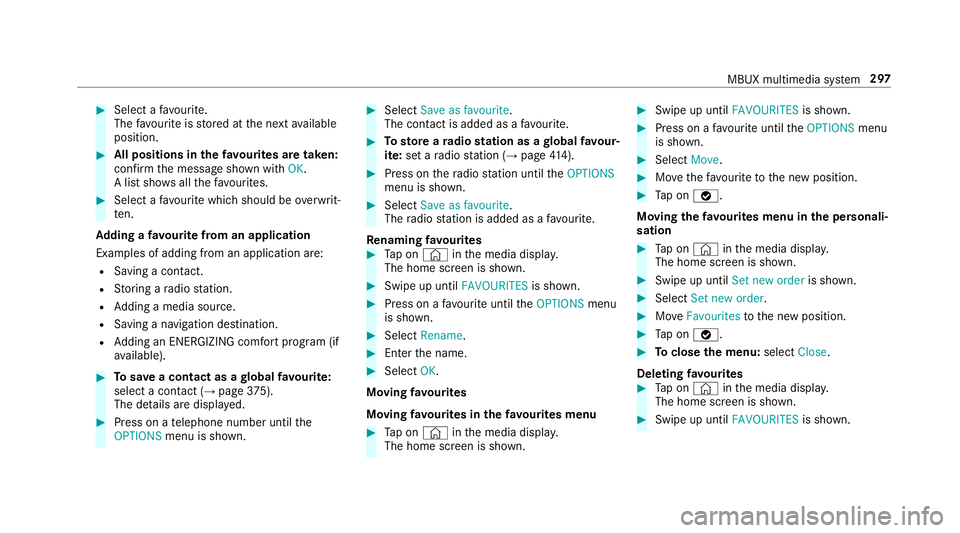
Re naming favo urites #
Tap on © inthe media displa y.
The home screen is shown. #
Swipe up until FAVOURITESis shown. #
Press on a favo urite until theOPTIONS menu
is shown. #
Select Rename. #
Ente rth e name. #
Select OK.
Moving favo urites
Moving favo urites in thefa vo urites menu #
Tap on © inthe media displa y.
The home screen is shown. #
Swipe up until FAVOURITESis shown. #
Press on a favo urite until theOPTIONS menu
is shown. #
Select Move. #
Movethefa vo urite tothe new position. #
Tap on ø.
Moving thefa vo urites menu in the personali‐
sation #
Tap on © inthe media displa y.
The home screen is shown. #
Swipe up until Set new orderis shown. #
Select Set new order. #
MoveFavourites tothe new position. #
Tap on ø. #
Toclose the menu: selectClose.
Deleting favo urites #
Tap on © inthe media displa y.
The home screen is shown. #
Swipe up until FAVOURITESis shown. MBUX multimedia sy
stem 297
Page 301 of 609
#
Press on a favo urite until theOPTIONS menu
is shown. #
Select Delete. #
Select Yes. No
tifications Centre Overvi
ewoftheNo tifications Centre
The following communications are collec ted in
th e Notifications Centre:
R Communications which are generated bythe
ve hicle or from multimedia sy stem.
R Communications which are recei vedth ro ugh
th e use of services.
The following notification types are available for
yo u:
R Navigable destinations and routes
R Messages (t ext messa ges)
R Calendar entries and reminders, e.g. from In
Car Of fice
This function is not available in all countries. R
System information, e.g. Important software
update available.
R Other notifications, e.g. from additional
online services that can be subsc ribed to
The j Notifications Centre can be found on
th e home screen, in menus and at theto pright
of the navigation map (→ page 282).
A star in thej symbol informs you of new
notifications.
Noti fications are normally brie fly shown as they
are recei ved. This occurs for near lyevery appli‐
cation that you are cur rently using. If youta ke
no action, these are stored for future access in
th e Notifications Centre.
The notifications are sor tedchro nologically. The
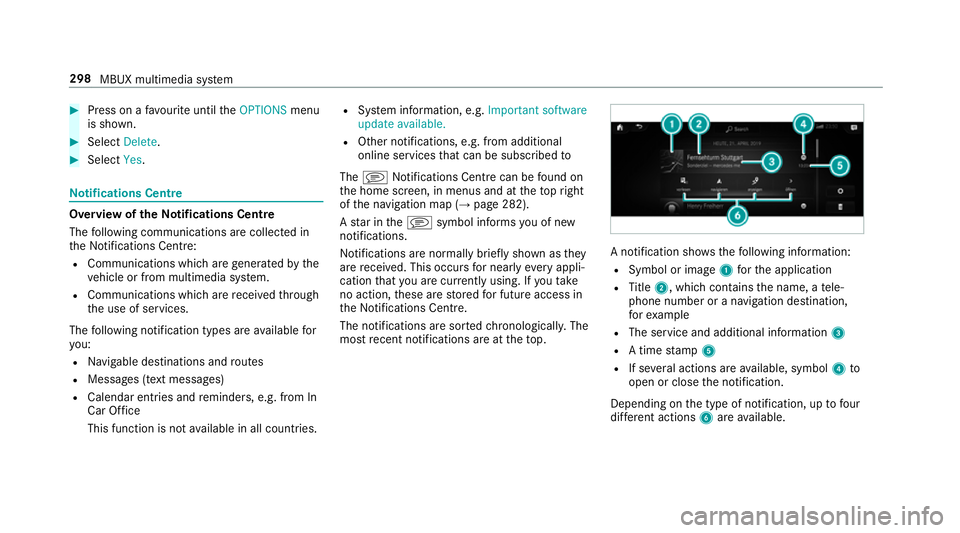
most recent notifications are at theto p. A notification sho
wsthefo llowing information:
R Symbol or image 1forth e application
R Title 2, which contains the name, a tele‐
phone number or a navigation destination,
fo rex ample
R The service and additional information 3
R A time stamp 5
R If se veral actions are available, symbol 4to
open or close the notification.
Depending on the type of notification, up tofour
dif fere nt actions 6are available. 298
MBUX multimedia sy stem
Page 303 of 609
Global sear
ch Global sear
chove rview
Yo u can use theglobal sear chinthe home
screen and in the notifications.
The global sear chprov ides sear chresults forthe
fo llowing categories and their sub-categories:
R Navigation
R Media
R Telephone, social media, In Car Of fice
In Car Of fice is not available in all countries.
R User inter face and Digi tal Owner's Manual
R Internet
This enables youto sear chforto wns, roads and
to urist att ractions wi th the navigation sy stem,
fo rex ample.
% You can also sear chfor 3 wordaddresses
(→ page 332).
When you en ter a 3 wordaddress in the
gl obal sear ch, separate each of thewo rds
with a space or a full stop.
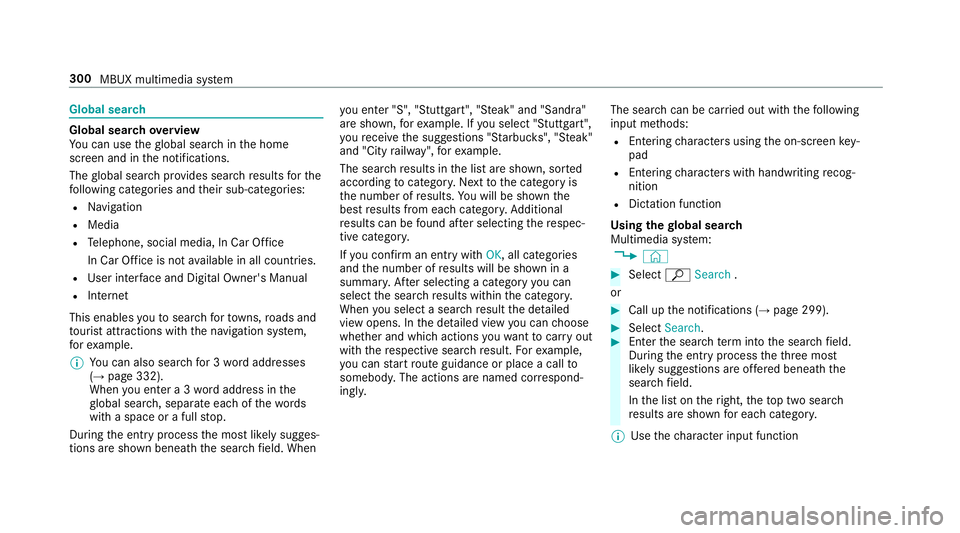
During the entry process the most likely sugges‐
tions are shown beneath the sear chfield. When yo
u en ter "S", "Stuttgart", "S teak" and "Sandra"
are shown, forex ample. If you select "Stuttgart",
yo ure cei vethe suggestions "S tarbuc ks", "S teak"
and "City railw ay",forex ample.
The sear chresults in the list are shown, sor ted
according tocatego ry. Next tothe category is
th e number of results. You will be shown the
best results from each categor y.Ad ditional
re sults can be found af ter selecting there spec‐
tive categor y.
If yo u confirm an entry with OK, all categories
and the number of results will be shown in a
summar y.After selecting a category you can
select the sear chresults within the categor y.
When you select a sear chresult the de tailed
view opens. In the de tailed view you can choose
whe ther and which actions youwa nttocar ryout
with there spective sear chresult. Forex ample,
yo u can start route guidance or place a call to
somebody. The actions are named cor respond‐
ingly. The sear
chcan be car ried out with thefo llowing
input me thods:
R Entering characters using the on-screen key‐
pad
R Entering characters with handwriting recog‐
nition
R Dictation function
Using the global sear ch
Multimedia sy stem:
, © #
Select ªSearch .
or #
Call up the notifications (→ page 299). #
Select Search. #
Ente rth e sear chterm into the sear chfield.
During the entry process theth re e most
likely suggestions are of fere d beneath the
sear chfield.
In the list on theright, theto p two sear ch
re sults are shown for each categor y.
% Use thech aracter input function 300
MBUX multimedia sy stem
Page 305 of 609
#
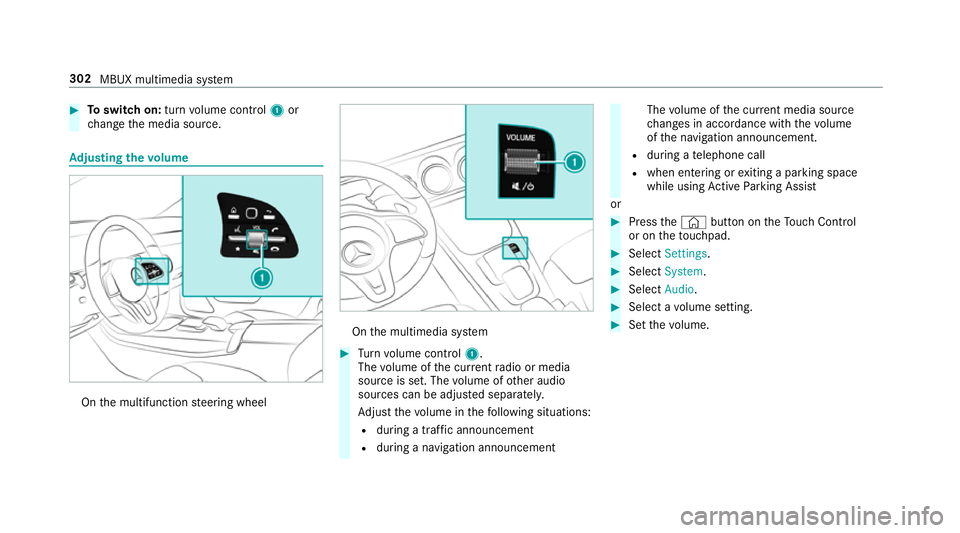
Toswitch on: turnvolume control 1or
ch ange the media source. Ad
justing the volume On
the multifunction steering wheel On
the multimedia sy stem #
Turn volume control 1.
The volume of the cur rent radio or media
source is set. The volume of other audio
sources can be adjus ted separatel y.
Ad just thevo lume in thefo llowing situations:
R during a traf fic announcement
R during a navigation announcement The
volume of the cur rent media sou rce
ch anges in accordance with thevo lume
of the navigation announcement.
R during a telephone call
R when entering or exiting a parking space
while using Active Parking Assist
or #
Press the© button on theTo uch Control
or on theto uchpad. #
Select Settings . #
Select System. #
Select Audio. #
Select a volume setting. #
Set thevo lume. 302
MBUX multimedia sy stem
Page 316 of 609
Setting
the da te #
Select Set date . #
Set a da te.
% Invehicles with GPS, a date cannot be set
eve n wi thactive manual time adjustments.
The date is then set automatically thro ugh
th e selected time zone. Connectivity
Switching transmission of
theve hicle posi‐
tion on/off
Multimedia sy stem:
, © .
Settings .
System .
Wi-Fi &
Bluetooth #
Select Transmit vehicle position .#
Activate or deacti vate the function. Blue
tooth ® Information about Blu
etoo th®
Bl ue tooth ®
tech nology is a standard for short-
ra nge wi reless data transfer up toappr oximately
10 m.
Yo u can use Blue tooth®
to connect your mobile
phone tothe multimedia sy stem and use thefo l‐
lowing functions, forex ample:
R hands-free sy stem with access tothefo llow‐
ing options:
- con tacts (→ page 374)
- call lists (→ page378)
- text messa ges
R Internet connection
R listening tomusic via Blue tooth®
audio
R transfer ring business cards (vCards) into the
ve hicle
Blue tooth ®
is a regis tere d trademark of Blue‐
toot h Special Interest Group (SIG) Inc.
% Internet connection via Blue tooth®
is not
av ailable in all countries. Ac
tivating/deactivating Blue tooth ®
Multimedia sy stem:
, © .
Settings .
System .
Wi-Fi &
Bluetooth #
Toswitch on Blue tooth ®
:select Connect
via Bluetooth. #
Activate Bluetooth. #
Toswitch off Blue tooth ®
:select Settings . #
Deactivate Bluetooth. Wi
-Fi Wi
-Fi connection overview
Yo u can use Wi-Fi toestablish a connection with
a Wi -Fi network and toaccess the Internet or
ot her network devices.
The following connection options are available:
R Wi-Fi connection
The Wi-Fi connection toaWi -Fi-capable
device, e.g. the cus tomer's mobile phone or
a ta blet PC is es tablished.
R Multimedia sy stem as a Wi-Fi hotspot MBUX multimedia sy
stem 313