phone MERCEDES-BENZ A-CLASS HATCHBACK 2018 Manual PDF
[x] Cancel search | Manufacturer: MERCEDES-BENZ, Model Year: 2018, Model line: A-CLASS HATCHBACK, Model: MERCEDES-BENZ A-CLASS HATCHBACK 2018Pages: 609, PDF Size: 10.73 MB
Page 390 of 609
R
The Android Autoapp is ins talled on the
mobile phone.
R In order touse thete lephone functions, the
mobile phone must be connected tothe mul‐
timedia sy stem via Blue tooth®
(→ page 369).
If th ere was no prior Internet connection, this
is es tablished with the use of the mobile
phone with Android Auto.
R The mobile phone is connected tothe multi‐
media sy stem via the USB port çusing a
suitable cable (→ page 409).
R There is an Internet connection forth e full
ra nge of functions for Android Auto.
Multimedia sy stem:
, © .
Mercedes me & Apps .
Smart-
phone .
Android Auto .
Start Android Auto #
Alternative: If Android Autois active (e.g.
when music is being pla yed or the navigation
sy stem is being used), you can call up the
application using the|, zor%
buttons (→ page 288). %
The firs t acti vation of Android Autoon the
multimedia sy stem must be car ried out
when theve hicle is stationary for saf etyre a‐
sons.
Ac cepting/rejecting the data pr otection reg‐
ulations
Fo rth e initial start of the application: a message
with the data pr otection pr ovisions appears. #
Select Accept & start .
Exiting Android Auto #
Press theò button.
% Android Autostarts automatically when the
mobile phone is connected with the sy stem
using a cable. If Android Autowa s not dis‐
pla yed in thefo re ground before disconnect‐
ing, the application starts in the bac kground
when reconnected. You can call up Android
Au tointhe main menu. Calling up
the Android Autosound settings
Multimedia sy stem:
, © .
Mercedes me & Apps .
Smart-
phone .
Android Auto .
Z #
Select sound settings.
Ending Android Auto #
Disconnect the connecting cable between
th e mobile phone and multimedia sy stem.
% Mercedes-Benz recommends disconnecting
th e connecting cable only when theve hicle
is stationar y. Tr
ansfer redve hicle data with Android Auto
and Apple CarPlay™ Overview of transfer
redve hicle data
When using Android Autoor Apple CarPlay™,
cer tain vehicle data is transfer redto the mobile
phone. This enables youto getth e best out of
selected mobile phone services. Vehicle data is
not directly accessible.
The following sy stem information is transmit ted:
R Software release of the multimedia sy stem MBUX multimedia sy
stem 387
Page 391 of 609
R
System ID (anonymised)
The transfer of this data is used tooptimise
communication between theve hicle and the
mobile phone.
To do this, and toassign se veralve hicles tothe
mobile phone, a vehicle identifier is randomly
ge nerated.
This has no connection totheve hicle identifica‐
tion number (VIN) and is dele ted when the multi‐
media sy stem is reset (→ page 320).
The following driving status data is transmit ted:
R Transmission position engaged
R Distinction between par ked, standstill, rolling
and driving
R Day/night mode of the instrument clus ter
The transfer of this data is used toalter how
con tent is displ ayed tocor respond tothe driving
situation.
The following position data is transmitte d:
R Coordinates
R Speed R
Compass direction
R Acceleration di rection
This da tais only transfer red while the navigation
sy stem is active, in order toimpr oveit (e.g. so it
can continue functioning when in a tunnel). Mercedes me connect
Note
s on Mercedes me connect
Mercedes me connect pr ovides thefo llowing
services:
R Accident and breakdown mana gement (me
button or auto matic accident or breakdown
de tection)
R Appointment requests or similar (me button)
R Ifth e service is activated: Concier geService
(me button)
R Mercedes-Benz emergency call sy stem (SOS
button)
Mercedes me connect accident and breakdown
management, the Mercedes me connect Con‐
cier geService (if service is acti vated) and the Mercedes-Benz emer
gency call centre are availa‐
ble foryo u around the cloc k.
The me button and the SOS button can be found
on theve hicle's overhead control panel
(→ page 389).
Yo u can also call the Mercedes-Benz Cus tomer
Centre using the multimedia sy stem
(→ page 389).
Please no tethat Mercedes me connect is a
Mercedes-Benz service. In emer gencies, al ways
call the national emer gency services firs t using
th est andard national emer gency service phone
numbe rs. In eme rgencies, you can also use the
Mercedes-Benz emer gency call sy stem
(→ page 392).
Obser vethe conditions of use for Mercedes me
connect and other services. These can be
obtained in the Mercedes me por tal: https://
me.secu re.mercedes-benz.com
Fu rther information on Mercedes me connect,
th e pr ovided service scope and operation:
http://manuals.daimler.com/baix/cars/
connectme/en_GB/index.html 388
MBUX multimedia sy stem
Page 392 of 609
Calling
the Mercedes-Benz Cus tomer Centre
using the multimedia sy stem
Re quirements:
R Access toa GSM network is available.
R The contract partner's GSM network co ver‐
age is available in there spective region.
R The ignition must be switched on so that
ve hicle data can be transfer red automati‐
cally.
Multimedia sy stem:
, © .
Phone .
g #
Call Mercedes me connect.
Af ter confirmation, the multimedia sy stem
sends there qu ired vehicle data. The data
transfer is shown in the media displa y.
Then, you can select a service and be connected
to a specialist at the Mercedes-Benz Cus tomer
Centre.
Fu rther information on Mercedes me connect,
th e pr ovided service scope and operation are
av ailable at: http://manuals.daimler.com/baix/
cars/connectme/en_GB/ind ex.html Making a call via the
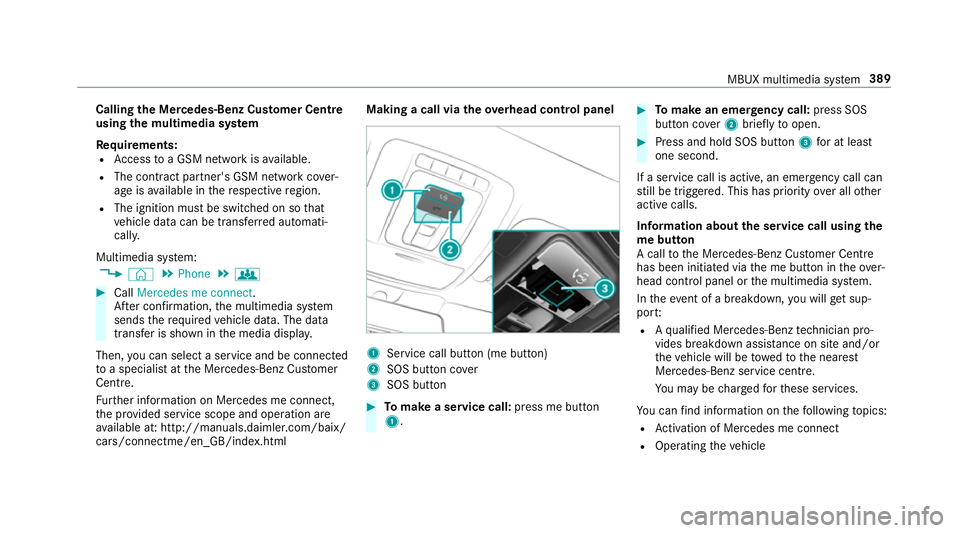
overhead control panel 1
Service call button (me button)
2 SOS button co ver
3 SOS button #
Tomake a se rvice call: press me button
1. #
Tomake an eme rgency call: press SOS
button co ver2 briefly toopen. #
Press and hold SOS button 3for at least
one second.
If a service call is active, an emer gency call can
st ill be triggered. This has priority over all other
active calls.
Information about the service call using the
me button
A call tothe Mercedes-Benz Cus tomer Centre
has been initia ted via the me button in theove r‐
head control panel or the multimedia sy stem.
In theeve nt of a breakdown, you will get sup‐
po rt:
R Aqu alified Mercedes-Benz tech nician pro‐
vides breakdown assi stance on site and/or
th eve hicle will be towe dto the nearest
Mercedes-Benz service cent re.
Yo u may be charge dfo rth ese services.
Yo u can find information on thefo llowing topics:
R Activation of Me rcedes me connect
R Operating theve hicle MBUX multimedia sy
stem 389
Page 395 of 609
Yo
ur vehicle is not yet connec ted with a user
account #
Select Mercedes me. #
The instructions for creating a user account
and connecting theve hicle with this follow
on the media displa y.
% Ifth e Mercedes me app is available on a
mobile phone, theve hicle connection can be
accomplished using the QR code shown.
Calling up the Mercedes me services
Re quirements:
R The vehicle is connected with the user
account.
Multimedia sy stem:
, © .
Mercedes me & Apps #
Select Services.
Wi thin theva rious categories you can see the
Mercedes me services you ha vealready pur‐
ch ased and also those still available topur‐
ch ase. To
activate or deactivate the services, log in
to yo ur user account in the Mercedes me
por tal.
Deleting a connection between a user
account and theve hicle
Re quirements:
R The (vehicle) profile of the user account that
wa s initially connected with theve hicle is
selected.
R The profile is synchronised (→ page 291).
R A PIN has been set.
Multimedia sy stem:
, © .
Mercedes me &
Apps .
Mercedes me #
Select Delete vehicle assignment. #
Ente rth e PIN of the connected user account.
% Only the user, whose user account was ini‐
tially connected with theve hicle can dele te
th e connection between all user accounts
and theve hicle. Mercedes-Benz emer
gency call sy stem Information on
the Mercedes-Benz emer‐
ge ncy call sy stem
The Mercedes-Benz emer gency call sy stem only
functions in areas where mobile phone co verage
is available from there leva nt contract pa rtner.
Insu fficient network co verage from there leva nt
contract pa rtner may result in an emer gency call
not being transmitted.
The Mercedes-Benz eme rgency call sy stem is
av ailable for at least tenye ars starting from the
manufacturing date.
The ignition must be switched on before an auto‐
matic emergency call can be made.
% The Mercedes-Benz emer gency call sy stem
is activated at thefa ctor y.Using the
Mercedes-Benz emer gency call sy stem is
free of charge.
Overview of the Mercedes-Benz emer gency
call sy stem
The Mercedes-Benz emer gency call sy stem can
help todecisively reduce the time between an
accident and the ar riva l of emer gency services
at the site of the accident. It helps locate an 392
MBUX multimedia sy stem
Page 396 of 609
accident site in places
that are dif ficult to
access.
The emer gency call can be made au tomatical ly
( → page 393) or manually (→ page 394). Only
make emer gency calls if you or others are in
need of rescue. Do not make an emer gency call
in theev ent of a breakdown or a similar situa‐
tion.
Yo u can find more information on there gional
av ailability of the Mercedes-Benz emer gency call
sy stem at: http://www.mercedes-benz.com/
connect_ecall.
Message in the media displa y:
The following messages appear in the media dis‐
play:
R SOS NOT READY :th e ignition is not on or
th ere is a malfunction with the emer gency
call sy stem (→ page 282). This does not nec‐
essarily indicate comple tefailure of the
emer gency call sy stem. Emer gency calls call
st ill be transmitted.
The display only refers to theve hicle and
does not take account of theav ailability of mobile phone networ
ksand the Mercedes-
Benz emer gency call centre.
The functional readiness of the emer gency
call sy stem on theve hicle can be seen when
th eSOS NOT READY display disappears once
th e ignition is switched on.
R G: The icon appears in the display during
an active emer gency call.
% Ifth ere is a malfunction in the Mercedes-
Benz emer gency call sy stem (e.g. a fault with
th e speaker, microphone, airbag, SOS but‐
to n), a cor responding message appears in
th e multifunction display of the instrument
clus ter.
Tr iggering an automatic Mercedes-Benz
emer gency call
Re quirements:
R The ignition is switched on.
R The star ter battery is suf ficiently charge d. The Mercedes-Benz emer
gency call sy stem trig‐
ge rs an emer gency call au tomatical lyin thefo l‐
lowing cases:
R After activation of there stra int sy stems such
as airbags or seat belt tensioners af ter an
accident.
R After an auto maticallyinitiated emer gency
st op byActive Emergency Stop Assist.
The emer gency call has been made:
R Avo ice connection is made tothe Mercedes-
Benz emer gency call centre.
R A messa gewith accident data is transmitted
to the Mercedes-Benz emer gency call centre.
The Mercedes-Benz emergency call centre
can transmit theve hicle position data toone
of the public emer gency services call cen‐
tres.
R Under cer tain circums tances da tais also
transmitte d inthevo ice channel tothe
Mercedes-Benz emer gency call centre.
This allo wsmeasu resfo rre scue, reco very or
to wing toa Mercedes-Benz Service Cent reto
be initiated quickl y. MBUX multimedia sy
stem 393
Page 397 of 609
The SOS button in
theove rhead control panel
fl ashes until the emer gency call is finished.
Yo u can end an automatic Mercedes-Benz emer‐
ge ncy call appr oximately one minute af ter being
triggered.
If th e Mercedes-Benz emer gency call sy stem
cann otconnect tothe Mercedes-Benz emer‐
ge ncy call centre, the emer gency call is au tomat‐
ically sent tothe public emer gency services call
centre.
If no connection can be made tothe public
emer gency services, a cor responding message
appears inthe displa y. #
Dial the emer gency number 11 2onyour
mobile phone.
If an eme rgency call has been initiated:
R Remain in theve hicle if thero ad and traf fic
conditions permit youto do so until a voice
connection is es tablished with the emer‐
ge ncy call centre service pr ovider.
R Onthe basis of the call, the service pr ovider
decides whe ther it is necessary tocall res‐ cue
teams and/or the police tothe accident
site.
R If no vehicle occupant answers, an ambu‐
lance is sent totheve hicle immediately.
Tr iggering a manual Mercedes-Benz emer‐
ge ncy call #
Using the SOS but ton in theove rhead
control panel: pressthe SOS button at least
one second long. #
Using voice control: usethe LINGUA‐
TRONIC voice commands (→ page 269).
The emer gency call has been made:
R Avo ice connection is made tothe Mercedes-
Benz emer gency call centre.
R A messa gewith accident data is transmit ted
to the Mercedes-Benz emer gency call centre.
The Mercedes-Benz emergency call centre
can transmit theve hicle position data toone
of the public emer gency services call cen‐
tres.
R Under cer tain circums tances da tais also
transmitte d inthevo ice channel tothe
Mercedes-Benz emer gency call centre. This allo
wsmeasu resfo rre scue, reco very or
to wing toa Mercedes-Benz Service Cent reto
be initiated quickl y.
R Remain in theve hicle if thero ad and traf fic
conditions permit youto do so until a voice
connection is es tablished with the emer‐
ge ncy call centre service pr ovider.
R Onthe basis of the call, the service pr ovider
decides whe ther it is necessary tocall res‐
cue teams and/or the police tothe accident
site.
If th e Mercedes-Benz emer gency call sy stem
cann otconnect tothe Mercedes-Benz emer‐
ge ncy call centre, the emer gency call is au tomat‐
ically sent tothe public emer gency services call
centre.
If no connection can be made tothe public
emer gency services, a cor responding message
appears inthe media displa y. #
Dial the emer gency number 11 2onyour
mobile phone. 394
MBUX multimedia sy stem
Page 399 of 609
Online and Internet functions
Internet connection
Information on connecting
tothe Internet &
WARNING Risk of di stra ction from infor‐
mation sy stems and communications
equipment
If yo u operate information and communica‐
tion equipment integ rated in theve hicle
when driving, you will be distracted from the
traf fic situation. This could also cause youto
lose control of theve hicle. #
Only operate this equipment when the
traf fic situation permits. #
Ifyo u cannot be sure of this, stop the
ve hicle whilst paying attention toroad
and traf fic conditions and ope rate the
equipment with theve hicle stationar y. Yo
u must obse rveth e legal requirements forthe
country in whi chyou are cur rently driving when
operating the multimedia sy stem. &
WARNING Risk of di stra ction from oper‐
ating mobile communication equipment
while theve hicle is in motion
If yo u operate mobile communication equip‐
ment when driving, you will be distracted
from the tra ffic situation. This could also
cause youto lose control of theve hicle. #
Only operate this equipment when the
ve hicle is stationar y. Yo
u must obse rveth e legal requirements forthe
country in whi chyou are cur rently driving when
operating mobile communication equipment in
th eve hicle.
Depending on theve hicle's equipment, you can
es tablish an Internet connection in thefo llowing
wa ys:
R Vehicles with a communication module:
Internet use including Mercedes me connect
services and data roaming (→ page 396).
R Vehicles without a communication mod‐
ule: -
viaWi-Fi wi tha data-enabled mobile
phone (→ page 397)
- via Blue tooth®
with a data-enabled
mobile phone (→ page 397)
The In tern et functions can only be used toa limi‐
te d degree whilst driving.
Fu nction of the communication module
On vehicles with a built-in communication mod‐
ule, the Internet connection is es tablished via an
integrated SIM card.
To use In tern et access via the communication
module thefo llowing conditions must be me t:
R Mercedes me connect is active and ready for
operation.
R Mercedes me connect is activated for Inter‐
net access.
R Data volume via Mercedes me connect is
av ailable.
If th e data volume limit is reached, theav ailabil‐
ity of Mercedes me connect services is limited.
The data volume must be pur chased via
Mercedes me connect. 396
MBUX multimedia sy stem
Page 400 of 609
%
Con tact a Mercedes-Benz service centre to
fi nd out wh ether it is possible topur chase
data volume in your count ry.
Setting up an Internet connection via Wi-Fi
Re quirements:
R theWi -Fi function is acti vated on the multi‐
media sy stem (→ page314).
R theWi -Fi function is acti vated on the mobile
phone (see the manufacturer's operating
instructions).
R Internet access via Wi-Fi is acti vated (see the
manufacturer's operating instructions).
The Internet connection via Wi-Fi is restricted or
does not function if:
R the mobile phone is switched off
R mobile data use is deactivated on the mobile
phone
R theWi -Fi function is deacti vated on the multi‐
media sy stem
R theWi -Fi function is deacti vated on the
mobile phone R
Internet access via Wi-Fi is deacti vated on
th e mobile phone
Multimedia sy stem:
, © .
Settings .
System .
Wi-Fi &
Bluetooth .
Internet settings .
Connect via
Wi-Fi #
Select the networ k. #
Log in totheWi -Fi network (→ page 314).
Se tting up an In ternetconnection via Blue‐
to oth ®
Requ irements:
R The mobile phone supports the Blue tooth®
profile PAN (Personal AreaNet work).
R The mobile phone is connec tedto the multi‐
media sy stem via Blue tooth®
(→ page 369).
The Internet connection via Blue tooth®
is restric‐
te d or does not function if:
R the mobile phone is switched off
R the mobile phone is connected a an addi‐
tional mobile phone R
the mobile phone network co verage is insuf‐
fi cient
R mobile da tause is deactivated on the mobile
phone
R the Blue tooth®
function on the multimedia
sy stem is switched off and the mobile phone
is to be connec ted via Blue tooth®
R the Blue tooth®
function is switched off on
th e mobile phone and the mobile phone is to
be connec ted via Blue tooth®
R neither the mobile phone network nor the
mobile phone allow simultaneous use of a
te lephone and an In tern et connection
R the mobile phone has not been enabled for
Internet access via Blue tooth®
If a mobile phone is connected tothe multimedia
sy stem forth efirs t time via Blu etoo th®
,yo u will
be assis tedth ro ugh the process of setting up an
Internet connection.
The Internet connection can also be confi gured
manually. MBUX multimedia sy
stem 397
Page 401 of 609
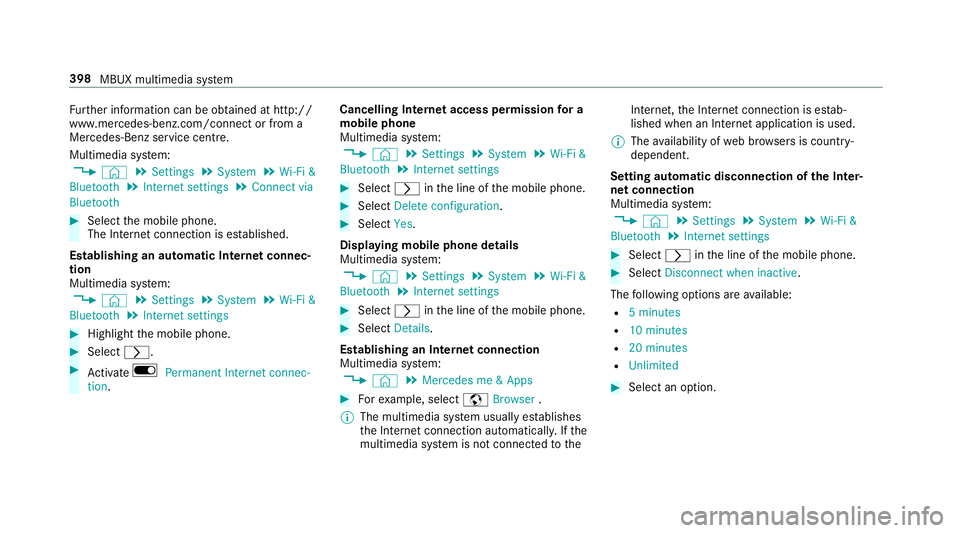
Fu
rther information can be obtained at http://
www.mercedes-benz.com/connect or from a
Mercedes-Benz service centre.
Multimedia sy stem:
, © .
Settings .
System .
Wi-Fi &
Bluetooth .
Internet settings .
Connect via
Bluetooth #
Select the mobile phone.
The Internet connection is es tablished.
Establishing an automatic Internet connec‐
tion
Multimedia sy stem:
, © .
Settings .
System .
Wi-Fi &
Bluetooth .
Internet settings #
Highlight the mobile phone. #
Select r. #
Activate D Permanent Internet connec-
tion. Cancelling In
ternetaccess permission for a
mobile phone
Multimedia sy stem:
, © .
Settings .
System .
Wi-Fi &
Bluetooth .
Internet settings #
Select rinthe line of the mobile phone. #
Select Delete configuration. #
Select Yes.
Displaying mobile phone details
Multimedia sy stem:
, © .
Settings .
System .
Wi-Fi &
Bluetooth .
Internet settings #
Select rinthe line of the mobile phone. #
Select Details.
Establishing an Internet connection
Multimedia sy stem:
, © .
Mercedes me & Apps #
Forex ample, select zBrowser .
% The multimedia sy stem usually es tablishes
th e Internet connection automaticall y.Ifthe
multimedia sy stem is not connected tothe Internet,
the Internet connection is es tab‐
lished when an Internet application is used.
% The availability of web br ows ers is count ry-
dependent.
Setting automatic disconnection of the Inter‐
net connection
Multimedia sy stem:
, © .
Settings .
System .
Wi-Fi &
Bluetooth .
Internet settings #
Select rinthe line of the mobile phone. #
Select Disconnect when inactive .
The following options are available:
R 5 minutes
R 10 minutes
R 20 minutes
R Unlimited #
Select an option. 398
MBUX multimedia sy stem
Page 402 of 609
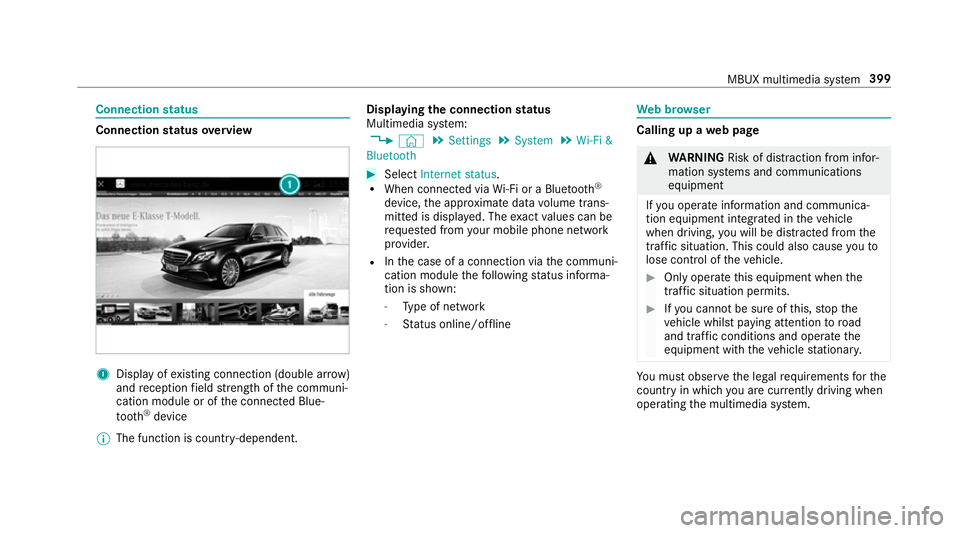
Connection
status Connection
status overview 1
Display of existing connection (double ar row)
and reception field stre ngth of the communi‐
cation module or of the connected Blue‐
tooth ®
device
% The function is count ry-dependent. Displ
aying the connection status
Multimedia sy stem:
, © .
Settings .
System .
Wi-Fi &
Bluetooth #
Select Internet status .
R When connected via Wi-Fi or a Blu etoo th®
device, the appr oximate data volume trans‐
mit ted is displa yed. The exact values can be
re qu ested from your mobile phone network
pr ov ider.
R Inthe case of a connection via the communi‐
cation module thefo llowing status informa‐
tion is shown:
- Type of network
- Status online/of fline We
b br owser Calling up a
web page &
WARNING Risk of di stra ction from infor‐
mation sy stems and communications
equipment
If yo u operate information and communica‐
tion equipment integ rated in theve hicle
when driving, you will be distracted from the
traf fic situation. This could also cause youto
lose control of theve hicle. #
Only operate this equipment when the
traf fic situation permits. #
Ifyo u cannot be sure of this, stop the
ve hicle whilst paying attention toroad
and traf fic conditions and ope rate the
equipment with theve hicle stationar y. Yo
u must obse rveth e legal requirements forthe
country in whi chyou are cur rently driving when
operating the multimedia sy stem. MBUX multimedia sy
stem 399