steering MERCEDES-BENZ A-CLASS HATCHBACK 2018 Owner's Guide
[x] Cancel search | Manufacturer: MERCEDES-BENZ, Model Year: 2018, Model line: A-CLASS HATCHBACK, Model: MERCEDES-BENZ A-CLASS HATCHBACK 2018Pages: 609, PDF Size: 10.73 MB
Page 213 of 609
Ac
tivating/deactivating Active Lane Change
Assi st
Multimedia sy stem:
, © .
Settings .
Assistance .
Act.
lane chan. assist #
Activate or deacti vate the function.
Fu nction of Active Eme rgency Stop Assist
If th e driver continues toigno rethewa rning to
put their hands on thesteering wheel, Active
Dis tance Assi stDISTRONIC reduces the speed.
If th e driver still does not respond, theBegin-
ning emergency stop message is shown inthe
multifunction displa y.The vehicle is decelerated
in stages toast andstill. Atspeeds below
60 km/h the hazard warning lights switch on
automaticall y.
When theve hicle is stationar y,thefo llowing
actions are car ried out:
R theve hicle is secured with the electric park‐
ing brake
R Active Dis tance Assi stDISTRONIC is ended
R theve hicle is unloc ked R
if possible, an emer gency call is placed to
th e Mercedes-Benz emer gency call centre
The driver can cancel the deceleration at any
time byper form ing one of thefo llowing actions:
R steering
R depressing the brake or accelerator pedal
R pressing a steering wheel button or operating
To uch Control
R activating or deactivating Active Dis tance
Assi stDISTRONIC Overvi
ewofActive Di stance Assist
DISTRO NIC displa ysinthe instrument clus‐
ter The assis
tance graphic and thest atus display
show thest atus of thefo llowing functions in the
instrument clus ter:
R Active Dis tance Assi stDISTRONIC
R Route-based speed adap tation
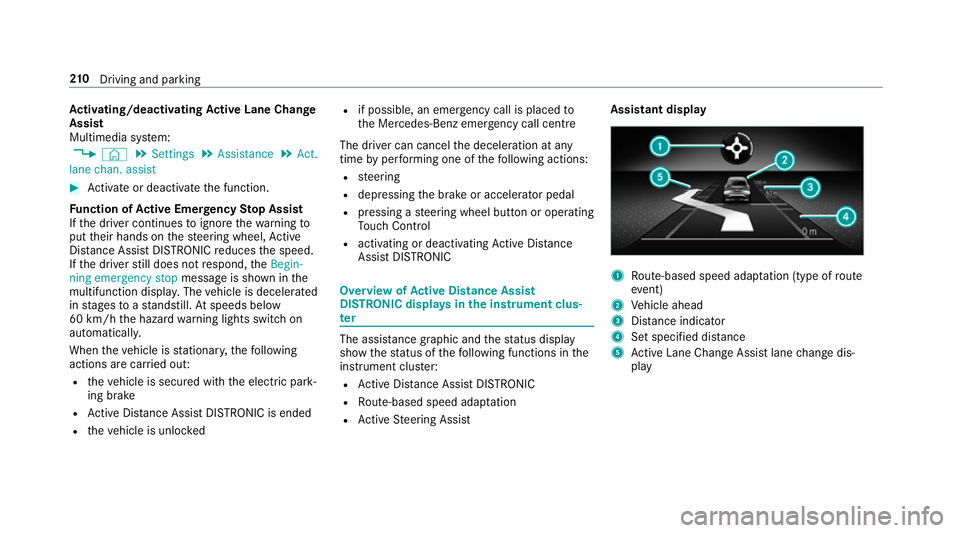
R Active Steering Assist Assistant display
1
Route-based speed adap tation (type of route
eve nt)
2 Vehicle ahead
3 Distance indica tor
4 Set specified di stance
5 Active Lane Change Assi stlane change dis‐
play 210
Driving and pa rking
Page 214 of 609
Ac
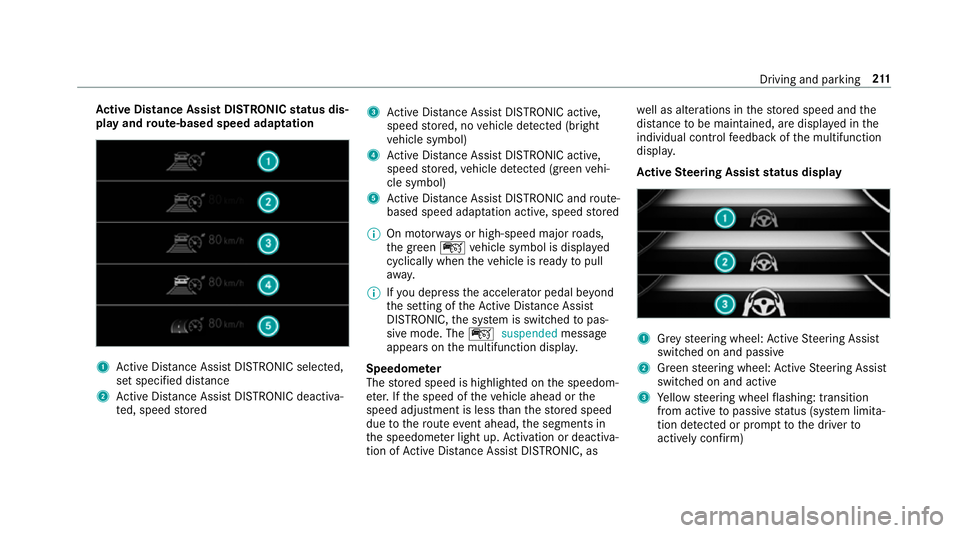
tive Di stance Assist DISTRO NICstatus dis‐
play and route-based speed adaptation 1
Active Dis tance Assi stDISTRONIC selected,
set speci fied dis tance
2 Active Dis tance Assi stDISTRONIC deacti va‐
te d, speed stored 3
Active Dis tance Assi stDISTRONIC acti ve,
speed stored, no vehicle de tected (bright
ve hicle symbol)
4 Active Dis tance Assi stDISTRONIC acti ve,
speed stored, vehicle de tected (green vehi‐
cle symbol)
5 Active Dis tance Assi stDISTRONIC and route-
based speed adap tation acti ve, speed stored
% On mo torw ays or high-speed major roads,
th e green çvehicle symbol is displa yed
cyclically when theve hicle is ready topull
aw ay.
% Ifyo u depress the accelerator pedal be yond
th e setting of theAc tive Dis tance Assi st
DISTRONIC, the sy stem is switched topas‐
sive mode. The çsuspended message
appears on the multifunction displa y.
Speedome ter
The stored speed is highlighted on the speedom‐
et er. If the speed of theve hicle ahead or the
speed adjustment is less than thestored speed
due tothero ute event ahead, the segments in
th e speedome ter light up. Activation or deacti va‐
tion of Active Dis tance Assi stDISTRONIC, as we
ll as alterations in thestored speed and the
dis tance tobe maintained, are displa yed in the
individual control feedback of the multifunction
displa y.
Ac tive Steering Assist status display 1
Grey steering wheel: Active Steering Assist
switched on and passive
2 Green steering wheel: Active Steering Assist
switched on and active
3 Yellow steering wheel flashing: transition
from active topassive status (sy stem limita‐
tion de tected or prom pttothe driver to
actively con firm) Driving and pa
rking 211
Page 217 of 609
Ac
tivating the start-off assi st &
WARNING Risk of skidding and having
an accident from wheels spinning
When you use start-off assist, individual
wheels could spin and you could lose cont rol
of theve hicle.
If ESP ®
is deactivated, there is a risk of skid‐
ding and accident! #
Make sure that no persons or obstacles
are in the close vicinity of your vehicle. #
Deactivating ESP ®
(→ page 189). #
Movethesteering wheel tothest ra ight-
ahead position. #
Depress the brake pedal firm ly wi thyour left
fo ot and keep it depressed. #
Enga getheh drive position (→ page166). #
Select the sportiest available drive program
B orC(→ page161). #
Rapidly depress the accelerator pedal full y. #
Take your foot off the brake, but keep the
accelerator pedal depressed.
The vehicle pulls away at maximum accelera‐
tion. #
Swit chon ESP ®
once the acceleration proce‐
dure is comple te. ESP ®
will otherwise not be
able tostabilise theve hicle if theve hicle
st arts toskid or a wheel starts tospin.
Cancelling thest art-off assi st #
Remo veyour foot from the accelerator pedal. #
Reactivate the ESP ®
. DY
NA MIC BODY CONT ROL function DY
NA MIC BODY CONTROL continuously adjusts
th ech aracteristics of the suspension dampers to
th e cur rent operating and driving conditions.
The da mping is tuned individually for each wheel
and is af fected bythefo llowing factors:
R The road sur face conditions
R Vehicle load
R The drive program selected R
The driving style
The drive program can be adjus ted using the
DY NA MIC SELECT switch. Park
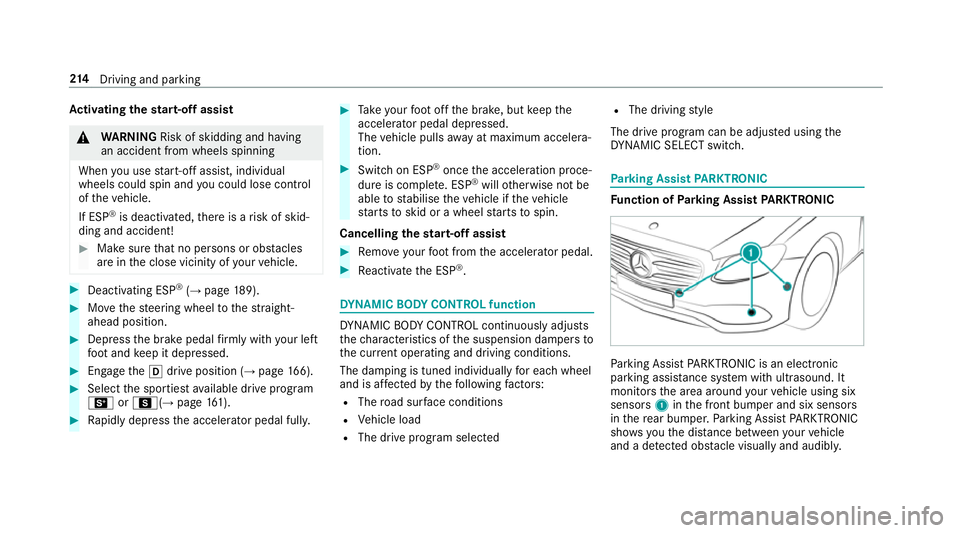
ing Assist PARKTRONIC Fu
nction of Parking Assist PARKTRONIC Pa
rking Assist PARKTRONIC is an electronic
parking assi stance sy stem with ultrasound. It
monitors the area around your vehicle using six
sensors 1inthe front bumper and six sensors
in there ar bumper. Parking Assist PARKTRONIC
sho wsyouth e dis tance between your vehicle
and a de tected obs tacle visually and audibly. 214
Driving and pa rking
Page 222 of 609
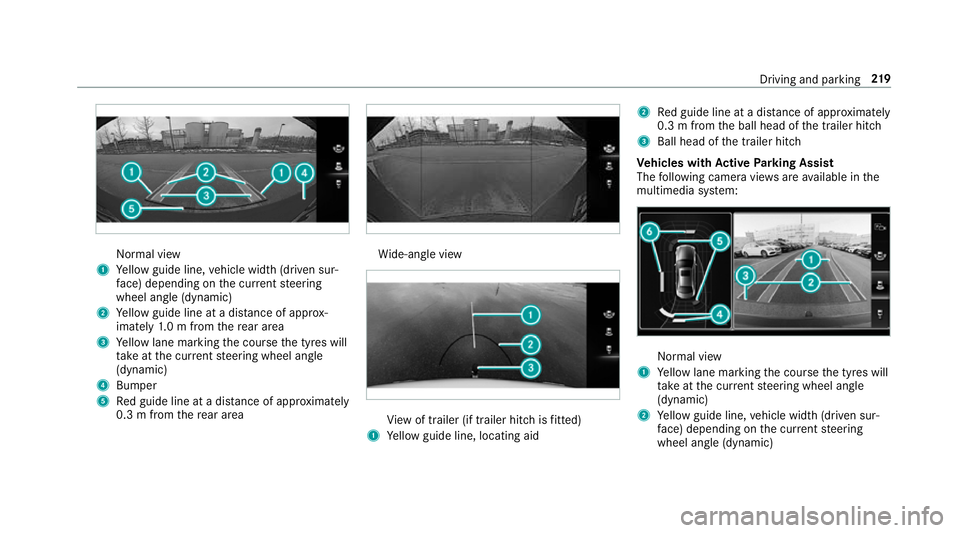
Normal view
1 Yellow guide line, vehicle width (driven sur‐
fa ce) depending on the cur rent steering
wheel angle (dynamic)
2 Yellow guide line at a dis tance of appr ox‐
imately 1.0 m from there ar area
3 Yellow lane marking the course the tyres will
ta ke atthe cur rent steering wheel angle
(dynamic)
4 Bumper
5 Red guide line at a dis tance of appr oximately
0.3 m from there ar area Wi
de-angle view Vi
ew of trailer (if trailer hitch is fitted)
1 Yellow guide line, locating aid 2
Red guide line at a dis tance of appr oximately
0.3 m from the ball head of the trailer hitch
3 Ball head of the trailer hitch
Ve hicles with Active Parking Assist
The following camera vie wsare available in the
multimedia sy stem: Normal view
1 Yellow lane marking the course the tyres will
ta ke atthe cur rent steering wheel angle
(dynamic)
2 Yellow guide line, vehicle width (driven sur‐
fa ce) depending on the cur rent steering
wheel angle (dynamic) Driving and parking
219
Page 225 of 609
To
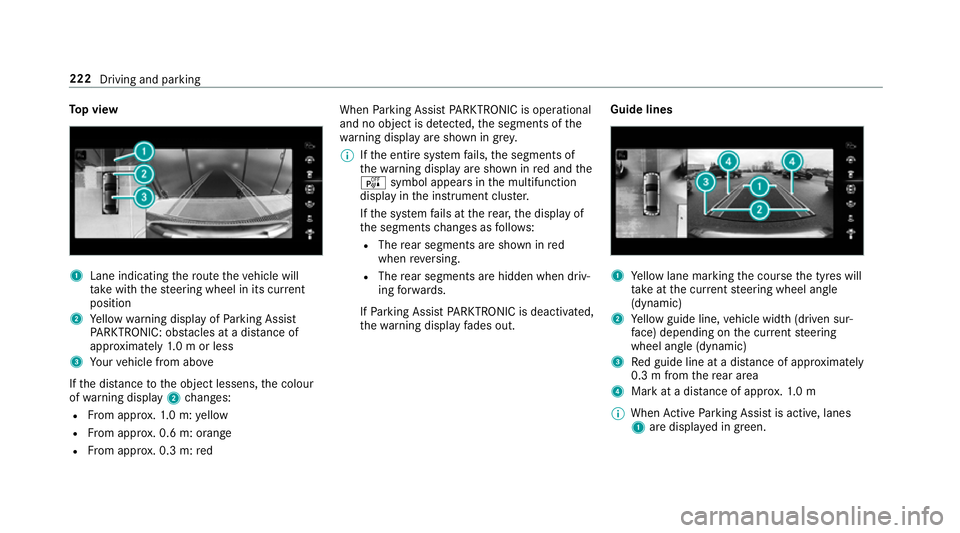
p view 1
Lane indicating thero ute theve hicle will
ta ke with thesteering wheel in its cur rent
position
2 Yellow warning display of Parking Assist
PA RKTRONIC: obstacles at a dis tance of
appr oximately 1.0 m or less
3 Your vehicle from abo ve
If th e dis tance tothe object lessens, the colour
of wa rning display 2changes:
R From appr ox.1. 0 m: yellow
R From appr ox. 0.6 m: oran ge
R From appr ox. 0.3 m:red When
Parking Assist PARKTRONIC is operational
and no object is de tected, the segments of the
wa rning display are shown in grey.
% Ifth e entire sy stem fails, the segments of
th ewa rning display are shown in red and the
é symbol appears inthe multifunction
display in the instrument clus ter.
If th e sy stem fails at there ar, the display of
th e segments changes as follo ws:
R The rear segments are shown in red
when reve rsing.
R The rear segments are hidden when driv‐
ing forw ards.
If Pa rking Assist PARKTRONIC is deacti vated,
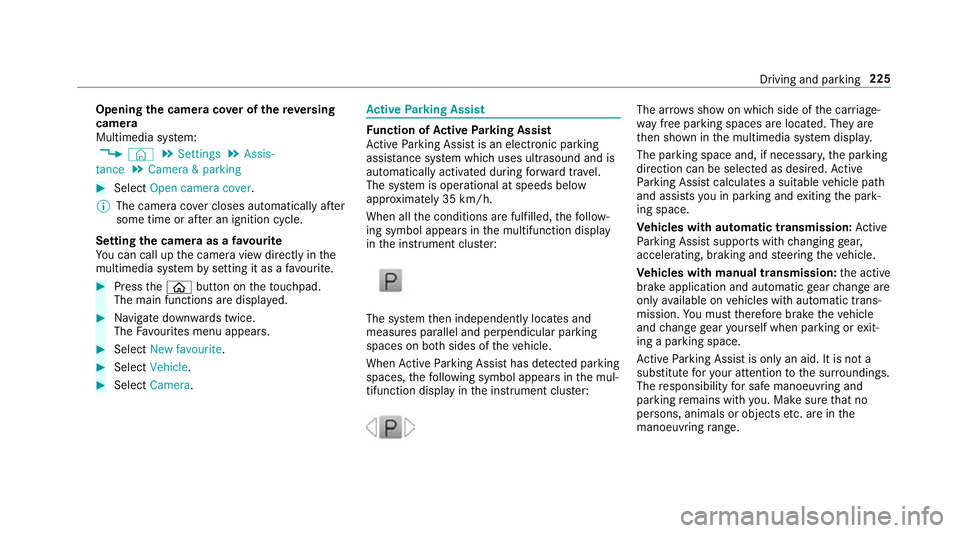
th ewa rning display fades out. Guide lines 1
Yellow lane marking the course the tyres will
ta ke atthe cur rent steering wheel angle
(dynamic)
2 Yellow guide line, vehicle width (driven sur‐
fa ce) depending on the cur rent steering
wheel angle (dynamic)
3 Red guide line at a dis tance of appr oximately
0.3 m from there ar area
4 Mark at a distance of appr ox.1. 0 m
% When Active Parking Assist is active, lanes
1 are displa yed in green. 222
Driving and parking
Page 228 of 609
Opening
the camera co ver of the reve rsing
camera
Multimedia sy stem:
, © .
Settings .
Assis-
tance .
Camera & parking #
Select Open camera cover.
% The camera co ver closes auto maticallyafter
some time or af ter an ignition cycle.
Setting the camera as a favo urite
Yo u can call up the camera view directly in the
multimedia sy stem bysetting it as a favo urite. #
Press theò button on theto uchpad.
The main functions are displ ayed. #
Navigate down wards twice.
The Favourites menu appears. #
Select New favourite. #
Select Vehicle . #
Select Camera. Ac
tive Parking Assist Fu
nction of Active Parking Assist
Ac tive Parking Assist is an elect ronic pa rking
assis tance sy stem which uses ultrasound and is
automatically activated during forw ard tra vel.
The sy stem is operational at speeds below
appr oximately 35 km/h.
When all the conditions are fulfilled, thefo llow‐
ing symbol appears in the multifunction display
in the instrument clus ter: The sy
stem then independently locates and
measures parallel and perpendicular parking
spaces on bo thsides of theve hicle.
When Active Parking Assist has de tected pa rking
spaces, thefo llowing symbol appears in the mul‐
tifunction display in the instrument clus ter: The ar
rows show on which side of the car riage‐
wa y free parking spaces are located. They are
th en shown in the multimedia sy stem displa y.
The parking space and, if necessar y,the parking
direction can be selected as desired. Active
Pa rking Assist calculates a suitable vehicle path
and assists you in parking and exiting the park‐
ing space.
Ve hicles with automatic transmission: Active
Pa rking Assist supports with changing gear,
accelerating, braking and steering theve hicle.
Ve hicles with manual transmission: the active
brake application and automatic gear change are
on lyavailable on vehicles with automatic trans‐
mission. You must therefore brake theve hicle
and change gear yourself when parking or exit‐
ing a parking space.
Ac tive Parking Assist is only an aid. It is not a
substitute foryo ur attention tothe sur roundings.
The responsibility for safe manoeuvring and
parking remains with you. Make sure that no
persons, animals or objects etc. are in the
manoeuvring range. Driving and pa
rking 225
Page 229 of 609
Ac
tive Parking Assist is cancelled if, among
ot her things, one of thefo llowing actions is car‐
ri ed out:
R You deactivate Parking Assist PARKTRONIC.
R You deactivate Active Parking Assist.
R You begin steering.
R You apply the parking brake.
R Vehicles with automatic transmission:
yo u en gage transmission position j.
R ESP ®
inter venes.
R You open the doors or theta ilgate while driv‐
ing.
Sy stem limitations
Objects located abo veor below the de tection
ra nge of Active Parking Assist are not de tected
when the parking space is being measured.
These are also not take n into account when the
parking manoeuvre is calculated, e.g. overhang‐
ing loads, overhangs or loading ramp s of lor ries
or the boundaries of parking spaces. In some cir‐
cums tances, Active Parking Assist may therefore
guide you into the parking space prematurely. &
WARNING Risk of accident due to
objects located abo veor below the
de tection range of Active Parking Assist
If th ere are objects abo veor below the
de tection range, thefo llowing situations may
arise:
R Active Parking Assist may steer too ear ly.
R Vehicles with automatic transmis‐
sion: Thevehicle may not stop in front of
th ese objects.
This could cause a collision. #
Inthese situations, do not use Active
Pa rking Assist. Sn
owfa ll or heavy rain may lead toa parking
space being measured inaccuratel y.Pa rking
spaces that are partial lyoccupied bytrailer
dr aw bars might not be identified as such or be
measured incor rectly. Only use Active Parking
Assist on le vel, high-grip ground. Do not
useActive Parking Assist in thefo llowing
situations:
R Inextreme weather conditions such as ice,
pac ked snow or in heavy rain.
R Ifyo u are transporting a load that pr otru des
be yond theve hicle.
R Ifth e parking space is on a steep downhill or
uphill gradient.
R Ifyo u ha veinstalled snow chains.
Ac tive Parking Assist may also display parking
spaces that are not suitable for parking, e.g.:
R Parking spaces where parking is prohibited.
R Parking spaces on unsuitable sur faces.
Ac tive Parking Assist will not assist you with
parking spaces at right angles tothe direction of
tr ave l in thefo llowing situations:
R If two parking spaces are located immedi‐
ately next toeach other.
R Ifth e parking space is directly next toa low
obs tacle su chas a kerb. 226
Driving and parking
Page 243 of 609
Ac
tivating/deactivating Blind Spot Assi stor
Ac tive Blind Spot Assi st
Multimedia sy stem:
, © .
Settings .
Assistance #
Activate or deacti vate Blind Spot Assist .Ac
tive Lane Keeping Assist Fu
nction of Active Lane Keeping Assist Ac
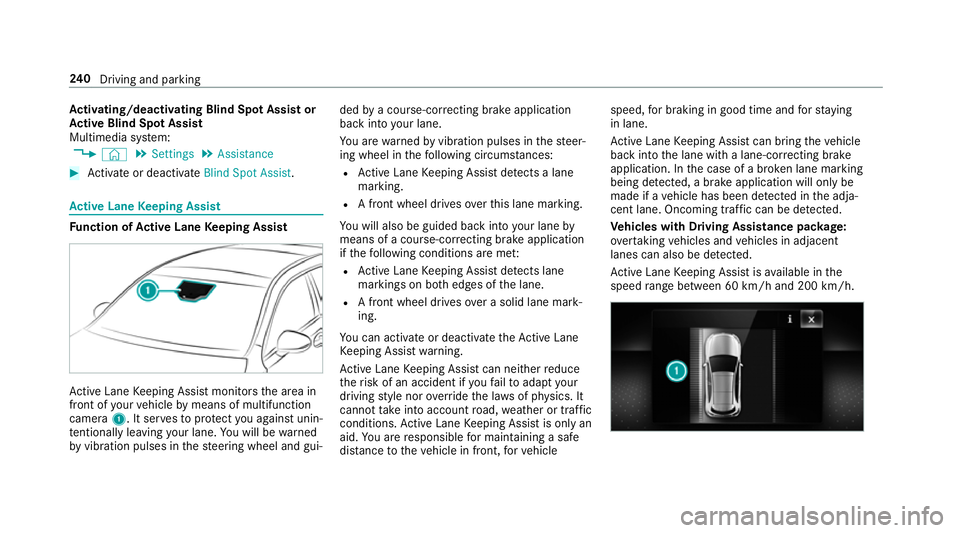
tive Lane Keeping Assist monitors the area in
front of your vehicle bymeans of multifunction
camera 1. It ser vesto protect you against unin‐
te ntional lyleaving your lane. You will be warned
by vibration pulses in thesteering wheel and gui‐ ded
bya course-cor recting brake application
ba ck into your lane.
Yo u are warned byvibration pulses in thesteer‐
ing wheel in thefo llowing circums tances:
R Active Lane Keeping Assist de tects a lane
marking.
R A front wheel drives overth is lane marking.
Yo u will also be guided back into your lane by
means of a course-cor recting brake application
if th efo llowing conditions are me t:
R Active Lane Keeping Assist de tects lane
markings on bo thedges of the lane.
R A front wheel drives over a solid lane mark‐
ing.
Yo u can activate or deactivate theAc tive Lane
Ke eping Assist warning.
Ac tive Lane Keeping Assist can neither reduce
th erisk of an accident if youfa ilto adapt your
driving style nor override the la wsof ph ysics. It
cannot take into account road, weather or traf fic
conditions. Active Lane Keeping Assist is only an
aid. You are responsible for maintaining a safe
dis tance totheve hicle in front, forve hicle speed,
for braking in good time and forst ay ing
in lane.
Ac tive Lane Keeping Assist can bring theve hicle
back into the lane with a lane-cor recting brake
application. In the case of a broken lane marking
being de tected, a brake application will only be
made if a vehicle has been de tected in the adja‐
cent lane. Oncoming tra ffic can be de tected.
Ve hicles with Driving Assistance pac kage:
ov ertaking vehicles and vehicles in adjacent
lanes can also be de tected.
Ac tive Lane Keeping Assist is available in the
speed range between 60 km/h and 200 km/h. 240
Driving and pa rking
Page 256 of 609
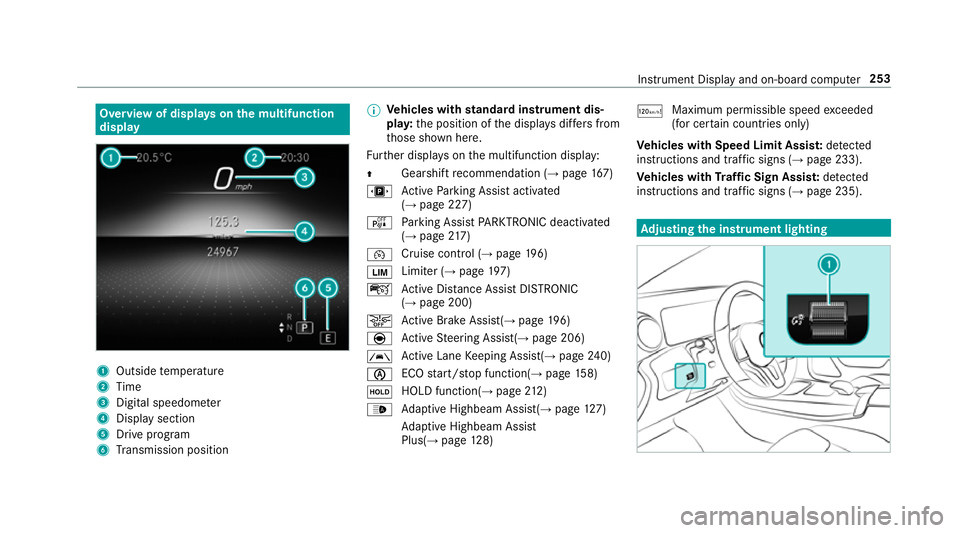
Overview of displa
yson the multifunction
display 1
Outside temp erature
2 Time
3 Digital speedome ter
4 Displ aysection
5 Drive program
6 Transmission position %
Ve
hicles with standard instrument dis‐
pla y:the position of the displa ysdiffers from
th ose shown here.
Fu rther displa yson the multifunction display:
Z Gearshift
recommendation (→ page 167)
u Active Parking Assist activated
(→ page 227)
é Parking Assist PARKTRONIC deacti vated
( → page 217)
¯ Cruise
control (→ page 196)
È Limi
ter (→ page 197)
ç Active Dis tance Assi stDISTRONIC
(→ page 200)
æ Ac
tive Brake Assi st(→ page 196)
è Active Steering Assis t(→ page 206)
à Ac
tive Lane Keeping Assist(→ page240)
è ECO
start/ stop function(→ page158)
ë HOLD function(→
page212)
_ Ad
aptive Highbeam Assist(→ page127)
Ad aptive Highbeam Assist
Plus(→ page128) ð
Ma
ximum pe rmissible speed exceeded
(for cer tain countries only)
Ve hicles with Speed Limit Assis t:de tected
instructions and traf fic signs (→ page 233).
Ve hicles with Traf fic Sign Assis t:de tected
instructions and traf fic signs (→ page 235). Ad
justing the in stru ment lighting Instrument Displ
ayand on-board computer 253
Page 262 of 609
When
telephoning, you must obse rveth e legal
re qu irements forth e count ryin which you are
cur rently driving.
Re quirements:
R The mobile phone is connec tedto the multi‐
media sy stem.
On-board computer: , Telephone
The most recent telephone calls (dialled,
re cei ved and missed calls) are displa yed on the
Telephone menu. #
Toselect an entr y:swipe upwards or down‐
wa rds on the left-hand Touch Control. #
Press the left-hand Touch Control.
If th ere is only one telephone number
sa ve dto an entr y:thete lephone number is
selec ted. #
Ifth ere are multiple telephone numbers
sa ve dto an entr y:swipe upwards or down‐
wa rds on the left-hand touch cont rolto
select the desired telephone number. #
Press the left-hand Touch Control.
The telephone number will be dialled. The
following displa ysmay appear ins tead of the
te lephone numbers dialled:
R Please wait :th e application is starting. If a
Blue tooth ®
connection tothe mobile phone
is not es tablished, the menu for auth orising
and connecting a mobile phone will be dis‐
pla yed on the multimedia sy stem
(→ page 369).
R Updating data: the call list is being updated.
R Importing contacts : contacts are being
impor ted from the mobile phone or a storage
medium.
Ac cepting/rejecting a call
Ve hicles with head-up displa y:When you
re cei vea call, theIncoming call message will
appear on the head-up displa y. #
Swipe up wards or down wards on the left-
hand Touch Control and select 6(Accept)
or ~ (Reject). #
Press the left-hand Touch Control.
Yo u may accept/ reject the call using button
6 or~ onthesteering wheel. Setting
the head-up display using the on-
board compu ter On-board computer:
, HEAD-UP DISPLAY
The following head-up display settings can be
selec ted:
R Position
R Brightness
R Displa ys #
Toselect a setting: swipe upwards or down‐
wa rds on the left-hand Touch Control. #
Press the left-hand Touch Control. #
Toadjust the position: swipe upwards or
down wards on the left-hand Touch Control. #
Toadjust the brightness: swipetothe left
or right on the left-hand Touch Control. #
Press the left-hand Touch Control. In
stru ment Display and on-board computer 259