steering MERCEDES-BENZ A-CLASS HATCHBACK 2018 User Guide
[x] Cancel search | Manufacturer: MERCEDES-BENZ, Model Year: 2018, Model line: A-CLASS HATCHBACK, Model: MERCEDES-BENZ A-CLASS HATCHBACK 2018Pages: 609, PDF Size: 10.73 MB
Page 100 of 609
#
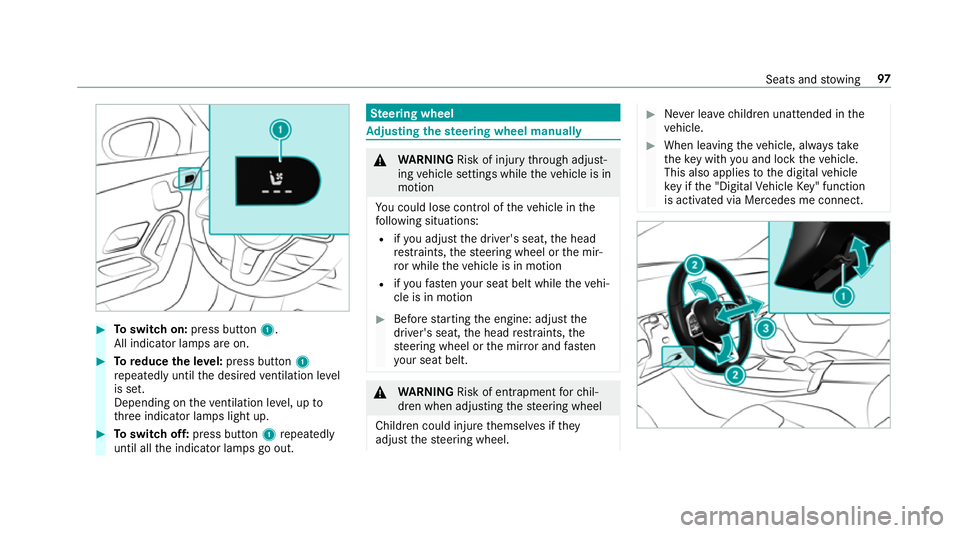
Toswitch on: press button 1.
All indicator lamps are on. #
Toreduce the le vel:press button 1
re peatedly until the desired ventilation le vel
is set.
Depending on theve ntilation le vel, up to
th re e indicator lamps light up. #
Toswitch off: press button 1repeatedly
until all the indicator lamps go out. Ste
ering wheel Ad
justing the steering wheel manually &
WARNING Risk of inju rythro ugh adjust‐
ing vehicle settings while theve hicle is in
motion
Yo u could lose cont rol of theve hicle in the
fo llowing situations:
R ifyo u adjust the driver's seat, the head
re stra ints, thesteering wheel or the mir‐
ro r while theve hicle is in motion
R ifyo ufast enyour seat belt while theve hi‐
cle is in motion #
Before starting the engine: adjust the
driver's seat, the head restra ints, the
st eering wheel or the mir ror and fasten
yo ur seat belt. &
WARNING Risk of entrapment forch il‐
dren when adjusting thesteering wheel
Children could injure themselves if they
adjust thesteering wheel. #
Never lea vechildren unat tended in the
ve hicle. #
When leaving theve hicle, alw aysta ke
th eke y with you and lock theve hicle.
This also applies tothe digital vehicle
ke y if the "Digital Vehicle Key" function
is activated via Mercedes me connect. Seats and
stowing 97
Page 101 of 609
#
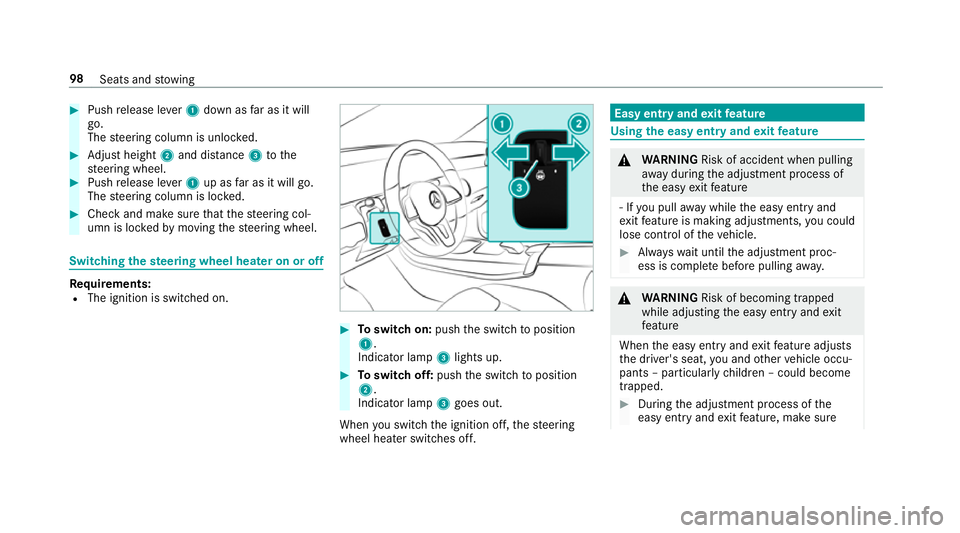
Push release le ver1 down as far as it will
go.
The steering column is unloc ked. #
Adjust height 2and di stance 3tothe
st eering wheel. #
Push release le ver1 up as far as it will go.
The steering column is loc ked. #
Check and make sure that thesteering col‐
umn is loc kedby moving thesteering wheel. Switching
thest eering wheel heater on or off Re
quirements:
R The ignition is switched on. #
Toswitch on: pushthe switch toposition
1.
Indicator lamp 3lights up. #
Toswitch off: pushthe switch toposition
2.
Indicator lamp 3goes out.
When you swit ch the ignition off, thesteering
wheel heater switches off. Easy entry and
exitfeature Using
the easy entry and exitfeature &
WARNING Risk of accident when pulling
aw ay during the adjustment process of
th e easy exitfeature
‑ If you pull away while the easy entry and
ex itfeature is making adjustments, you could
lose cont rol of theve hicle. #
Alw ayswa it until the adjustment proc‐
ess is comple tebefore pulling away. &
WARNING Risk of becoming trapped
while adjusting the easy entry andexit
fe ature
When the easy entry andexitfeature adjusts
th e driver's seat, you and other vehicle occu‐
pants – particularly children – could become
trapped. #
During the adjustment process of the
easy entry andexitfeature, make sure 98
Seats and stowing
Page 128 of 609
Ac
tivating/deactivating the hazard warning
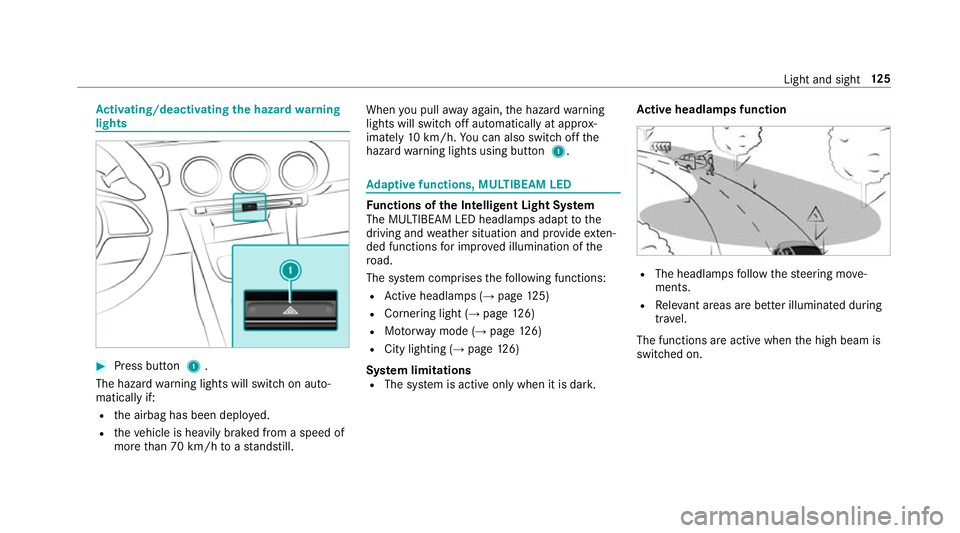
lights #
Press button 1.
The hazard warning lights will switch on auto‐
matically if:
R the airbag has been deplo yed.
R theve hicle is heavily braked from a speed of
more than 70 km/h toast andstill. When
you pull away again, the hazard warning
lights will switch off automatically at appr ox‐
imately 10km/h. You can also swit choff the
hazard warning lights using button 1. Ad
aptive functions, MULTIBEAM LED Fu
nctions of the Intelligent Light Sy stem
The MULTIBEAM LED headlamps adapt tothe
driving and weather situation and pr ovide exten‐
ded functions for impr oved illumination of the
ro ad.
The sy stem comprises thefo llowing functions:
R Active headla mps (→ page 125)
R Cornering light (→ page126)
R Motorw ay mode (→ page126)
R City lighting (→ page126)
Sy stem limitations
R The sy stem is active only when it is dar k.Ac
tive headlamps function R
The headlamps follow thesteering mo ve‐
ments.
R Releva nt areas are better illumina ted during
tra vel.
The functions are active when the high beam is
switched on. Light and sight
12 5
Page 129 of 609
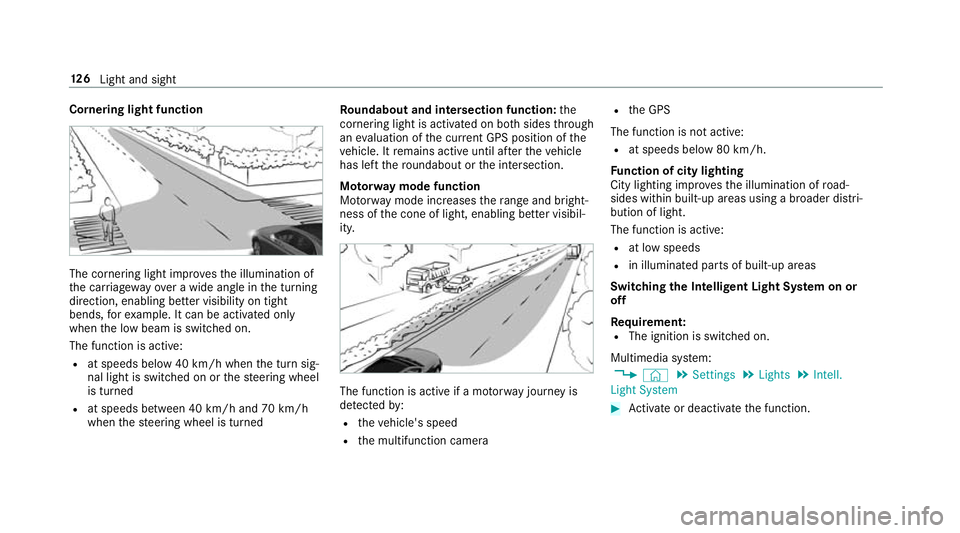
Cornering light function
The cornering light impr
ovesth e illumination of
th e car riag ewa yove r a wide angle in the turning
direction, enabling better visibility on tight
bends, forex ample. It can be activated on ly
when the low beam is switched on.
The function is active:
R at speeds below 40 km/h when the turn sig‐
nal light is switched on or thesteering wheel
is turned
R at speeds between 40 km/h and 70 km/h
when thesteering wheel is turned Ro
undabout and intersection function: the
cornering light is acti vated on bo thsides thro ugh
an evaluation of the cur rent GPS position of the
ve hicle. It remains active until af terth eve hicle
has left thero undabout or the intersection.
Mo torw ay mode function
Mo torw ay mode increases thera nge and bright‐
ness of the cone of light, enabling better visibil‐
ity. The function is active if a mo
torw ay jou rney is
de tected by:
R theve hicle's speed
R the multifunction camera R
the GPS
The function is not active: R at speeds below 80 km/h.
Fu nction of city lighting
City lighting impr ovesth e illumination of road‐
sides within built-up areas using a broader distri‐
bution of light.
The function is active:
R at low speeds
R in illuminated parts of built-up areas
Swit ching the Intelligent Light Sy stem on or
off
Requ irement:
R The ignition is switched on.
Multimedia sy stem:
, © .
Settings .
Lights .
Intell.
Light System #
Activate or deacti vate the function. 12 6
Light and sight
Page 140 of 609
#
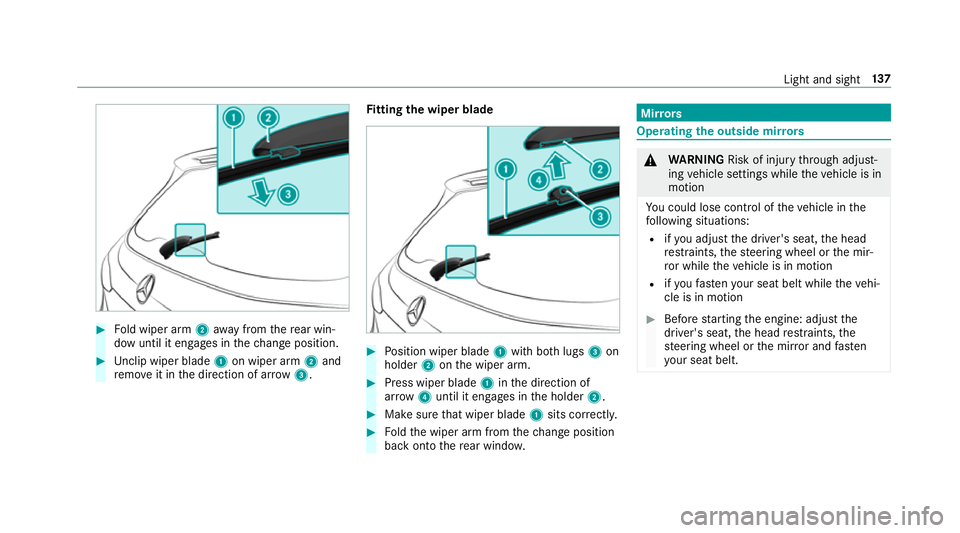
Fold wiper arm 2away from there ar win‐
dow until it engages in thech ange position. #
Unclip wiper blade 1on wiper arm 2and
re mo veit in the direction of ar row 3. Fi
tting the wiper blade #
Position wiper blade 1with bo thlugs 3on
holder 2onthe wiper arm. #
Press wiper blade 1inthe direction of
ar row 4until it en gage s in the holder 2. #
Make sure that wiper blade 1sits cor rectl y. #
Foldthe wiper arm from thech ange position
back on tothere ar wind ow. Mir
rors Operating
the outside mir rors &
WARNING Risk of inju rythro ugh adjust‐
ing vehicle settings while theve hicle is in
motion
Yo u could lose cont rol of theve hicle in the
fo llowing situations:
R ifyo u adjust the driver's seat, the head
re stra ints, thesteering wheel or the mir‐
ro r while theve hicle is in motion
R ifyo ufast enyour seat belt while theve hi‐
cle is in motion #
Before starting the engine: adjust the
driver's seat, the head restra ints, the
st eering wheel or the mir ror and fasten
yo ur seat belt. Light and sight
137
Page 162 of 609
R
vehicles with automatic transmission:
yo u brake theve hicle toast andstill in trans‐
mission position hori.
R vehicles with automatic transmission:
yo u en gage transmission position j.
R if all vehicle conditions for an auto matic
engine stop are met.
If yo u swit chon the HOLD function or select
transmission position j,the engine will auto‐
matically stop in thefo llowing situations:
R youstop behind a vehicle that is pulling
aw ay.
R youstop at a stop sign when there is no vehi‐
cle in front of you.
R you turn thesteering wheel hard at a low
speed.
The è symbol appears in the multifunction
display when theve hicle is stationar y.If not all
th eve hicle conditions are met, theç symbol
appears in the multifunction displa y.The engine is
restar ted automatically if:
R vehicles with automatic transmission: in
transmission position h,youre lease the
brake pedal when the HOLD function is not
active.
R vehicles with automatic transmission:
yo u shift out of transmission position j.
R vehicles with automatic transmission:
yo u shift into transmission position hor
k.
R you depress the accelerator pedal.
R youch ange theve hicle le vel.
R an automatic engine start is necessar y.
If th e engine was switched off bythe ECO start/
st op function and you lea vetheve hicle, a warn‐
ing tone sounds. The displ aymessa geVehicle is
operational Switch off the ignition before exiting
also appears inthe multifunction displa y.Ifyou
do not switch off the ignition, the ignition is
automatically switched off af ter one minute. Switching
the ECO start/s top function
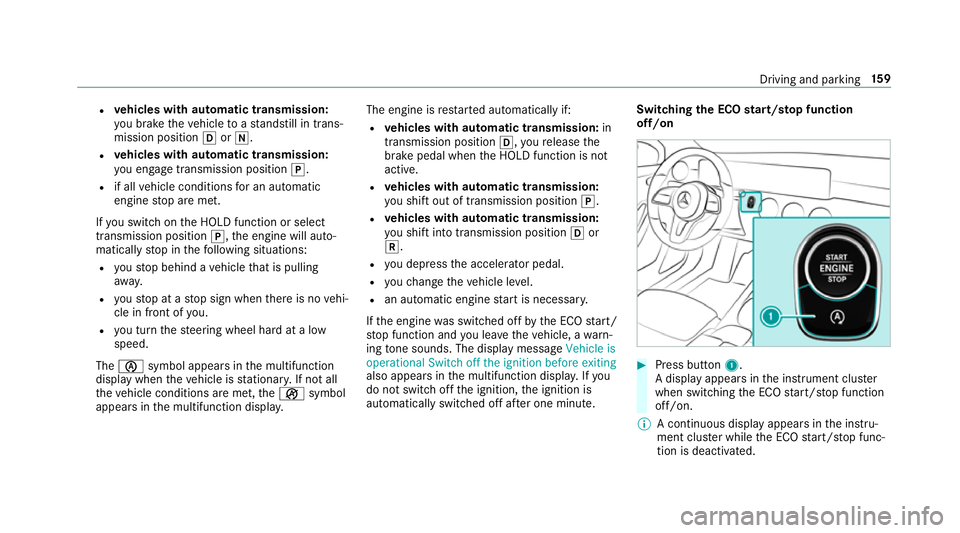
off/on #
Press button 1.
A displ ayappears in the instrument clus ter
when swit ching the ECO start/ stop function
off/on.
% A continuous display appears in the instru‐
ment clus ter while the ECO start/ stop func‐
tion is deactivated. Driving and parking
15 9
Page 169 of 609
speed and
the transmission is in position h
or k.
% Tomanoeuvre with an open driver's door,
open the driver's door while stationary and
engage transmission position hork
again.
% Atvery low outside temp eratures from
appr ox. -20°C you may not be able toshift
th e transmission from jtoano ther trans‐
mission position when the engine is
switched off. If this is the case, only change
th e transmission position while the engine is
ru nning.
En gaging drive position D #
Depress the brake pedal and push the
DIRECT SELECT le ver down past thefirst
point of resis tance.
The transmission position displ aysho wsh
in the multifunction displa y.
When the automatic transmission is in transmis‐
sion position h, it shiftsthege ars automati‐
call y.This depends on thefo llowing factors:
R the selected drive prog ram R
the position of the accelera tor pedal
R the driving speed Manual
gearshifting &
WARNING Risk of skidding and of an
accident due toshifting down on slippery
ro ad sur faces
If yo u shift down on slippery road sur faces to
inc rease the engine braking ef fect, the drive
wheels may lose traction. #
Do not shift down on slippery road sur‐
fa ces toinc rease the engine braking
ef fect. When
the automatic transmission is shif tedto
position h,you can manually shift it with the
st eering wheel gearshift paddle. If permit ted, the
automatic transmission shifts tothe next gear
up or down depending on thesteering wheel
ge arshift paddle being pulled.
Yo u ha vetwo options tomanually shift the auto‐
matic transmission:
R temp orary setting
R permanent setting
The gears shift automatically when manual gear‐
shifting is deactivated. 16 6
Driving and pa rking
Page 170 of 609
#
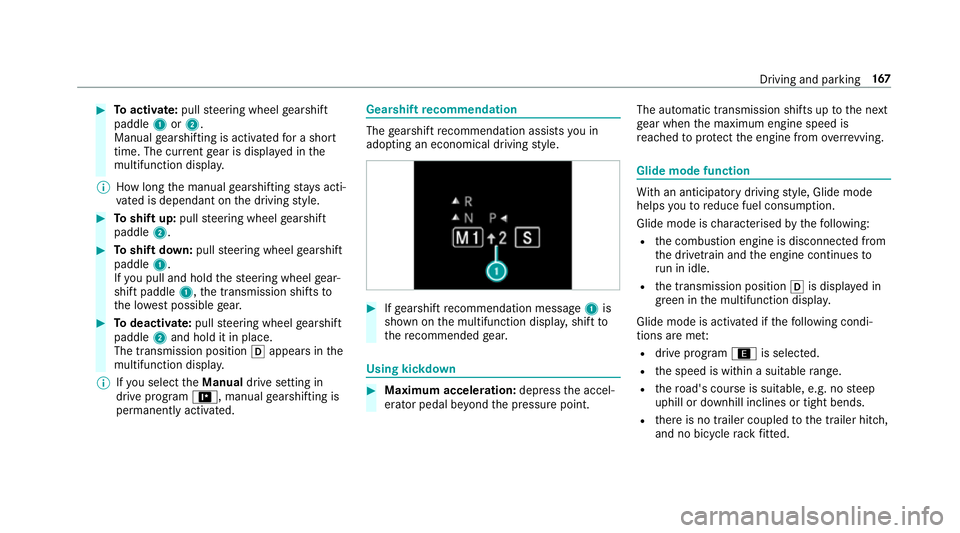
Toactivate: pullsteering wheel gearshift
paddle 1or2.
Manual gearshifting is activated for a short
time. The cur rent gear is displa yed in the
multifunction displa y.
% How long the manual gearshifting stay s acti‐
va ted is dependant on the driving style. #
Toshift up: pullsteering wheel gearshift
paddle 2. #
Toshift down: pullsteering wheel gearshift
paddle 1.
If yo u pull and hold thesteering wheel gear‐
shift paddle 1,the transmission shifts to
th e lo west possible gear. #
Todeactivate: pullsteering wheel gearshift
paddle 2and hold it in place.
The transmission position happears in the
multifunction displa y.
% Ifyo u select theManual drive setting in
drive prog ram =, manual gearshifting is
permanent lyactivated. Gea
rshift recommendation The
gearshift recommendation assists you in
adopting an economical driving style. #
Ifge arshift recommendation message 1is
shown on the multifunction displa y,shift to
th ere commended gear. Using kickd
own #
Maximum acceleration: depressthe accel‐
erator pedal be yond the pressure point. The automatic transmission shifts up
tothe next
ge ar when the maximum engine speed is
re ached toprotect the engine from overrev ving. Glide mode function
Wi
th an anticipatory driving style, Glide mode
helps youto reduce fuel consum ption.
Glide mode is characterised bythefo llowing:
R the combustion engine is disconnected from
th e driv etra in and the engine continues to
ru n in idle.
R the transmission position his displa yed in
green in the multifunction displa y.
Glide mode is activated if thefo llowing condi‐
tions are me t:
R drive program ;is selected.
R the speed is within a suitable range.
R thero ad's course is suitable, e.g. no steep
uphill or downhill inclines or tight bends.
R there is no trailer coupled tothe trailer hitch,
and no bicycle rack fitted. Driving and pa
rking 167
Page 171 of 609
R
you are no lon ger depressing the accelerator
or brake pedal.
% Glide mode can also be activated if you ha ve
selected the "Eco" setting forth e drive in the
drive prog ram =.
Glide mode is deactivated again if one of the
conditions is no longer met.
Ve hicles with Driving Assistance Package,
Ac tive Di stance Assist DISTRO NIC orActive Brake Assi
st:Glide mode is not acti vated if one
of these sy stems is active.
Glide mode can also be pr evented bythefo llow‐
ing parame ters:
R incline
R downhill gradient
R temp erature
R height R
speed
R operating status of the engine
% Glide mode can be ended bypressing the
ri ght-hand steering wheel gearshift paddle
(→ page 166). Problems with th
e transmissionProblem
Possible causes/consequences and M
MSolutions
The transmission has problems shifting
ge ar. The transmission is losing oil. #
Have the transmission checked at a qualified specialist workshop immediatel y.
The acceleration characteristics are
de teriorating.
The transmission no longer shifts gear. The transmission is in emer
gency operation mode. #
Pull over and stop theve hicle, paying attention toroad and traf fic conditions. #
Switch the transmission toposition j. #
Switch off the engine. #
Wait at least ten seconds be fore re starting the engine. #
Switch the transmission toposition h. 16 8
Driving and pa rking
Page 188 of 609
Fu
nction of thera dar senso rs Some driving and driving sa
fety sy stems use
ra dar sensors tomonitor the area in front of,
behind or next totheve hicle (depending on the
ve hicle's equipment).
Depending on theve hicle's equipment, thera dar
sensors are integrated behind the bumpers
and/or behind the Mercedes star. Keep these
parts free of dirt, ice and slush (→ page 432).
The sensors must not be co vered, forex ample
by cycle rack s, ove rhanging loads, sticke rs,fo il
or foils toprotect against stone chipping. In the
eve nt of dama getothe bumpers or radiator
grille, or following a collision impacting the
bumpers or radiator grille, ha vethe function of
th era dar sensors checked at a qualified special‐
ist workshop. The driver assis tance sy stem may
no longer workproper ly. Overview of driving sy
stems and driving
saf ety sy stems In
this section, you will find information about
th efo llowing driving sy stems and driving saf ety
sy stems:
R 360° Camera (→ page 221)
R ABS (Anti-lock Braking System)
(→ page 185)
R Active Dis tance Assi stDISTRONIC
(→ page 200)
R Adaptive brake lights (→ page196)
R Active Brake Assi st (→page 190)
R Active Lane Keeping Assist (→ page240)
R ATTENTION ASSIST (→ page 231)
R BAS (Brak eAssist System) (→ page186)
R Hill Start Assist
R DYNA MIC BODY CONTROL (→ page214)
R EBD ( Electronic Brakeforc eDistribution)
(→ page 190)
R ESP ®
(Electronic Stability Program)
(→ page 186) R
Speed Limit Assist (→ page 233)
R Active Speed Limit Assi st (→page 204)
R HOLD function (→ page212)
R STEER CONTROL (→ page 190)
R Active Steering Assist (→ page 206)
R Speed limiter (→ page197)
R Active Parking Assist (→ page 225)
R Parking Assist PARKTRONIC ( →page 214)
R Reversing camera (→ page218)
R Cruise control (→ page196)
R Function of Blind Spot Assi stand Active Blind
Spot Assi stwith exitwa rning (→ page 237)
R Traf fic Sign Assi st (→page 235) Fu
nction of ABS (Anti-lock Braking Sy stem) ABS
regulates the brake pressure in critical driv‐
ing situations:
R During braking, e.g. at full brake application
or insuf ficient tyre traction, the wheels are
pr eve nted from lo cking.
R Vehicle steerability while braking is ensured. Driving and parking
18 5