interior light MERCEDES-BENZ A-CLASS HATCHBACK 2018 Owners Manual
[x] Cancel search | Manufacturer: MERCEDES-BENZ, Model Year: 2018, Model line: A-CLASS HATCHBACK, Model: MERCEDES-BENZ A-CLASS HATCHBACK 2018Pages: 609, PDF Size: 10.73 MB
Page 5 of 609
Symbols
........................................................ 5At
agl ance .................................................... 6
Cockpit ........................................................... 6
Wa rning and indicator lamps .......................... 8
Overhead control panel ................................ 12
Door control panel and seat adjustment ....... 14
Emergencies and breakdowns ...................... 16Digital Owner's Manual
.............................18
Calling up the Digital Owner's Manual ..........18 Genera
l notes............................................. 20
Pr otection of the environment ......................20
Ta ke -ba ckof end-of-life vehicles ...................20
Mercedes-Benz Genuine Parts ......................21
Owner's Manual ...........................................22
Operating saf ety .......................................... .22
Declaration of Conformity ............................ 23
Diagno stics connection ................................ 25
Qualified specialist workshop ....................... 25
Ve hicle registration ....................................... 26
Cor rect use of theve hicle ............................26 Information on
the REA CHregulation ........... 26
Implied warranty .......................................... .26
QR code forre scue card ...............................27
Data storage .................................................27
Copyright ...................................................... 29 Occupant saf
ety......................................... 30
Re stra int sy stem ...........................................30
Seat belts ..................................................... 32
Airbags ......................................................... 37
PRE-SAFE ®
sy stem ....................................... 44
Children in theve hicle ..................................46
No tes on pets in theve hicle .........................63 Opening and closing
.................................. 65
Ke y .............................................................. .65
Doo rs............................................................ 69
Load compa rtment ....................................... 74
Side windo ws................................................ 76
Sliding sunroof ............................................. 80
Anti-theft pr otection .....................................85 Seats and
stowing ..................................... 88
No tes on the cor rect driver's seat posi‐
tion ............................................................... 88
Seats ............................................................ 89
St eering wheel ..............................................97
Easy entry and exitfeature .......................... .98
Operating the memory function .................. 100
St ow age areas ............................................ 101
Cup holders ................................................ .110
Ashtr ayand cigar ette lighter ...................... .114
Soc kets ....................................................... 11 5
Wi reless charging of the mobile phone
and connection with theex terior aerial .......1 18
Fitting/removing thefloor mats ................. 12 0 Light and sight
......................................... 12 2
Exterior lighting .......................................... 12 2
Interior lighting ........................................... 13 0
Changing bulbs (on lyforve hicles with
halogen headlamp s) .................................... 131
Wi ndsc reen wipers and windscreen
wa sher sy stem ............................................ 13 4
Mir rors ........................................................ 137
Operating the sun visors ............................. 14 02
Contents
Page 16 of 609
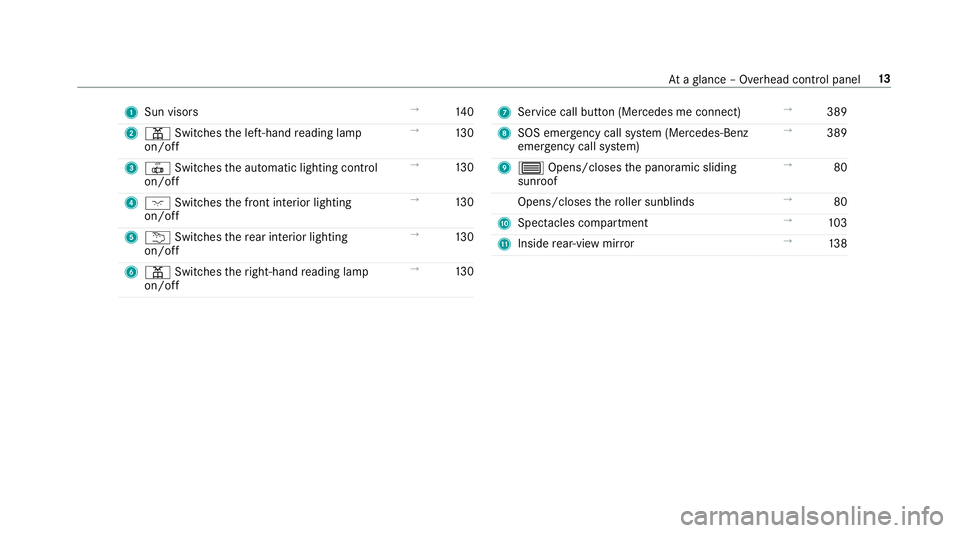
1
Sun visors →
14 0
2 p Switches the left-hand reading lamp
on/off →
13 0
3 | Switches the automatic lighting control
on/off →
13 0
4 c Switches the front interior lighting
on/off →
13 0
5 u Switches there ar interior lighting
on/off →
13 0
6 p Switches theright-hand reading lamp
on/off →
13 0 7
Service call button (Me rcedes me connect) →
389
8 SOS emer gency call sy stem (Mercedes-Benz
emer gency call sy stem) →
389
9 3 Opens/closes the panoramic sliding
sunroof →
80
Opens/closes thero ller sunblinds →
80
A Spec tacles compa rtment →
103
B Inside rear-view mir ror →
13 8 At
aglance – Overhead control panel 13
Page 31 of 609
to
product liability. Forth is, the manufacturer
re qu ires tech nical da tafrom vehicles.
Fa ult memories in theve hicle can be reset by a
service outlet as part of repair or maintenance
wo rk.
Depending on the selected equipment, you can
import your ow n da tainto vehicle con venience
and inf otainment functions.
This includes, forex ample:
R multimedia data, such as music, films or pho‐
to sfo r playback in an integrated multimedia
sy stem
R address book data for use in connection with
an integrated hands-free sy stem or an inte‐
grated navigation sy stem
R entered navigation destinations
R data about the use of Internet services
This data can be sa ved locally in theve hicle or it
is located on a device which you ha veconnected
to theve hicle (e.g. a smartphone, USB flash
drive or MP3 pla yer). If this data is stored in the
ve hicle, you can dele teit at any time. This data
can only be transmitted tothird parties upon yo
ur requ est with particular rega rd tothe scope
of use of online services according to your selec‐
te d settings.
Yo u can store or change con venience settings/
individualisations in theve hicle at any time.
Depending on the equipment, this includes, for
ex ample:
R settings of the seat positions
R suspension and climate control settings
R customisations such as interior lighting
If yo ur vehicle is accordingly equipped, you can
connect your smartphone or ano ther mobile end
device totheve hicle. You can cont rolth is by
means of the control elements integrated in the
ve hicle. Images and audio from the smartphone
can be output via the multimedia sy stem. Cer‐
ta in information is simultaneously transfer redto
yo ur smartphone.
Depending on the type of integration, this can
include:
R general vehicle data
R position data This allo
wsyouto use selected apps on your
smartphone, such as navigation or music play‐
bac k.There is no fur ther interaction between the
smartphone and theve hicle; in particular, vehi‐
cle data is not directly accessible. Which type of
fur ther data processing occurs is de term ined by
th e pr ovider of the specific app used. Which set‐
tings you can make, if an y,depends on the spe‐
cific app and the operating sy stem of your
smartphone. Online services
Wire
less network connection
If yo ur vehicle has a wireless network connec‐
tion, it enables data tobe exc hanged between
yo ur vehicle and additional sy stems. The wire‐
less network connection is enabled via theve hi‐
cle's transmission and reception unit or via con‐
nected mobile end devices (e.g. sma rtphones).
Online functions can be used via the wireless
network connection. This includes online serv‐
ices and applications/apps pr ovided bythe man‐
ufacturer or other pr oviders. 28
General no tes
Page 47 of 609
with a build cor
responding tothat of an adult
should not use the front passenger seat.
Ins tead, they should use a rear seat.
R Ifth e front passenger seat is occupied by a
person of smaller stature (e.g. a teenager or
small adult), thePA SSENGER AIR BAG OFF
indicator lamp either lights up continuously
or remains off, depending on there sult of the
classi fication.
- Ifth ePA SSENGER AIR BAG OFF indicator
lamp is off: mo vethe front passenger
seat as far back as possible, or the per‐
son of smaller stature should use a rear
seat.
- Ifth ePA SSENGER AIR BAG OFF indicator
lamp is lit continuously: the person of
smaller stature should not use the front
passenger seat. &
WARNING Risk of inju ryor death when
th ePA SSENGER AIR BAG OFF indicator
lamp is lit
If th ePA SSENGER AIR BAG OFF indicator
lamp remains lit af terth e sy stem self-test,
th e front passenger airbag is disabled. It will
not be deplo yed in theeve nt of an accident.
In this case, the front passenger airbag can‐
not per form its intended pr otective function,
e.g. when a person is seated in the front
passenger seat.
That person could, forex ample, come into
con tact wi th theve hicle interior, especially if
th e person is sitting too close tothe cockpit.
If th e front passenger seat is occupied,
alw ays ensure that:
R The classification of the person in the
front passenger seat is cor rect and the
front passenger airbag is enabled or disa‐
bled in accordance with the person in the
front passenger seat. R
The person is sea ted proper lywith a cor‐
re ctly fastened seat belt.
R The front passenger seat has been mo ved
as far back as possible. Be sure
toalso obse rveth efo llowing fur ther
re lated subjects:
R Child restra int sy stem on the front passenger
seat (→ page 52).
R Suitable positioning of thech ild restra int sys‐
te m (→ page54). PR
E-SAFE ®
sy stem PRE-
SAFE®
(anticipa tory occupant pr otec‐
tion) PRE-
SAFE®
is able todetect cer tain critical driv‐
ing situations and implement pre-em ptive meas‐
ures toprotect theve hicle occupants.
PRE-SAFE ®
can implement thefo llowing meas‐
ures independently of each other:
R Tightening the seat belts on the driver's seat
and front passenger seat. 44
Occupant saf ety
Page 85 of 609
&
WARNING Risk of entrapment even wi th
th ere ve rsing feature active
The reve rse function does not react in partic‐
ular:
R tosoft, light and thin objects, e.g. fingers
R overth e last 4 mm of the closing path
R during resetting
This means that there ve rse function cann ot
pr eve nt someone from becoming trapped in
th ese situations. #
When closing, make sure that no body
parts are in the closing area. #
Release the button immediately if
somebody becomes trapped.
or #
Brief lypress the button in any direction
during automatic operation.
The closing process is stopped. Au
tomatic reve rsing function of thero ller
sunblind
If th ere is an object obstructing thero ller sun‐
blind during the closing process, thero ller sun‐
blind will open again automaticall y.The auto‐
matic reve rsing function is only an aid and is not
a substitute foryo ur attentiveness. #
When closing thero ller sunblind, make sure
th at no body parts are in thera nge of mo ve‐
ment. &
WARNING Risk of becoming trapped
despi tereve rsing function
In particular, there ve rsing function does not
re act tosoft, light and thin objects, e.g. fin‐
ge rs.
This means that there ve rsing function can‐
not pr event entrapment in these situations. #
When closing thero ller sunblind, make
sure that no body parts are in thera nge
of mo vement. #
Release the button immediately if
somebody becomes trapped. or
#
Press the button in any direction during
th e automatic closing process.
The closing process is stopped. Au
tomatic functions of the sliding sun roof %
The term "sliding sun roof" also refers to the
panoramic sliding sunroof.
By pushing or pulling the3 button, you can
inter rupt the automatic functions: "Rain closing
function when driving" and "Automatic lo wer‐
ing".
The sliding sunroof is auto maticallyclosed when
th eve hicle has been switched off:
R if it starts torain (de tection bythera in sen‐
sor on the windscreen)
R intheeve nt of extreme outside temp eratures
R afte r six hours
R ifth ere is a malfunction in the po wer supp ly
The sliding sunroof then rises at there ar in order
to continue ventilating theve hicle interior. 82
Opening and closing
Page 133 of 609
Switching
the sur round lighting on or off Multimedia sy
stem:
, © .
Settings .
Lights .
Sur-
round lighting
The exterior lighting remains lit for 40 seconds
af te rth eve hicle is unloc ked. When youstart the
ve hicle, the sur round lighting is deactivated and
th e automatic driving lights are activated. #
Activate or deacti vate the function. Interior lighting
Ad
justing the in terior lighting Fr
ont overhead control panel 1
p Front left reading lamp
2 | Automatic interior lighting control
3 c Front interior lighting
4 u Rear interior lighting
5 p Front right reading lamp #
Toswitch on or off: press button1–5
accordingly. Control panel in
thegr ab handle 1
p Rear reading lamp #
Toswitch on or off: press button1. Ad
justing the ambient lighting Multimedia sy
stem:
, © .
Comfort .
Ambient lighting
Setting the colour #
Select Colour. #
Set therequ ired colour.
% There are 64colours available. 13 0
Light and sight
Page 134 of 609
Ad
justing the brightness #
Select Brightness .
Ad just the brightness.
Ac tivating the brightness for zones #
Select Brightness . #
Select Brightness zones . #
Activate or deacti vate the function.
The EMPHASIS, AMBIENTandVENTS zones
can be set separatel y.
Ac tivating multi-coloured lighting #
Select Colour. #
Select Multi-colour.
The reare ten preset colour combinations
av ailable. #
Select a colour combination.
Ac tivating multi-coloured animation #
Select Colour. #
Select Multi-colour animat..
The chosen colour combination changes at
predefined inter vals. Ac
tivating welcome lighting #
Select Colour. #
Select Welcome.
When theve hicle is unloc ked, a special ambi‐
ent lighting sequence runs.
Ac tivating dependency on air conditioning
settings #
Select Colour. #
Select Climate.
If ch anges are made tothete mp erature set‐
ting in theve hicle, the colour of the ambient
lighting changes brief ly. Switching
the interior lighting switch-off
delay time on or off Multimedia sy
stem:
, © .
Settings .
Lights .
Int. light.
del. shut-off #
Switch the lighting switch-off delay time on
or off.
When this function is active, the interior light‐
ing lights up again briefly af terth eve hicle
has been loc ked. Changing bulbs (only
forve hicles with halo‐
ge n headla mps) Note
s onchanging bulbs &
WARNING Risk of bu rns from hot com‐
ponent parts whilst replacing a bulb
Bulbs, lamps and plugs can become very hot
during operation.
When replacing a bulb, you could burn your‐
self on these component parts. Light and sight
131
Page 142 of 609
skin,
eyes,respiratory organs or clo thing or
be swallo wed. #
Ifyo u come into contact with electro‐
ly te , obser vethefo llowing:
R Rinse the electrolyte from your skin
and seek medical attention immedi‐
atel y.
R If electrolyte comes into contact
with your eyes, rinse them thor‐
oughly with clean water and seek
medical attention immediately.
R Ifth e electrolyte is swallo wed,
immediately rinse your mouth out
th oroughly. Do not induce vomiting.
Seek medical attention immediately.
R Immedia tely ch ange out of clo thing
which has come into con tact wi th
electrolyte.
R If an allergic reaction occurs, seek
medical attention immediatel y.The inside
rearview mir ror and the outside mir‐
ro r on the driver's side automatically go into anti-dazzle mode if light from a headlamp hits
th
e sensor on the inside rearview mir ror.
Sy stem limitations
The sy stem does not go into anti-dazzle mode in
th efo llowing situations:
R the engine is switched off
R reve rsege ar is engaged
R the interior lighting is switched on Fu
nction of the front-passenger outside mir‐
ro r parking position The pa
rking position makes parking easier.
The front-passenger outside mir ror tilts down‐
wa rds and sho ws there ar wheel on the front-
passenger side in thefo llowing situations:
R the parking position is stored (→ page140)
R the passenger mir ror is selected
R reve rsege ar is engaged The front-passenger outside mir
ror mo ves back
to its original position in thefo llowing situations:
R you shift the transmission toano ther trans‐
mission position
R at speeds greater than 15 km/h
R you press the button forth e outside mir ror
on the driver's side Light and sight
13 9
Page 158 of 609
St
arting theve hicle via Remo teOnline serv‐
ices Cooling or heating
theve hicle interior before
commencing your journey
% This function is not available in all countries.
If yo ustart theve hicle via your smartphone, the
pr ev iously selec ted air conditioning adjustment
is active.
Ensure thefo llowing before starting the engine:
R the legal stipulations in the area where your
ve hicle is par ked allow engine starting via
smartphone.
R it is safe tostart and runth e engine where
yo ur vehicle is par ked.
R the fuel tank is su fficiently filled.
R thest ar ter battery is suf ficiently charge d.
% You can also set thete mp erature with your
smartphone. In form ation on Mercedes me
connect and other services: http://
www.mercedes.me
This function is not available for all models. Charging
the bat tery before commencing
yo ur journey
R Ifth eve hicle battery is discharged, you
re cei vea message on your smartphone.
R You can then start theve hicle with the
smartphone tocharge the batter y.
R The vehicle is automatically switched off
af te rte n minu tes.
Ensure thefo llowing before starting the engine:
R the legal stipulations in the area where your
ve hicle is par ked allow engine starting via
smartphone.
R it is safe tostart and runth e engine where
yo ur vehicle is par ked.
R the fuel tank is su fficiently filled. St
arting theve hicle &
WARNING Risk of crushing or entrap‐
ment due tounin tentional starting of the
engine
Limbs could be crushed or trapped if the
engine is star ted unintentionally during
service or maintenance work. #
Alw ays secure the engine against unin‐
te ntional starting before car rying out
maintenance or repair work. Re
quirements:
R park position jis selected.
R the anti- theft alarm sy stem is not activated.
R the panic alarm is not activated.
R the hazard warning lights are switched off.
R the bonn etis closed.
R the doors are closed and loc ked.
R the windo wsand sliding sun roof are closed. #
Start theve hicle using the smartphone: Driving and parking
15 5
Page 257 of 609
#
Turn brightness control 1up or down.
The lighting of the instrument display and in
th e control elements of theve hicle interior is
adjus ted. Menus and submenus
Fu
nctions on the service menu of the on-
board compu terOn-board computer:
, Service #
Toselect the function: swipe upwards or
down wards on the left-hand Touch Control. #
Press the left-hand Touch Control.
Fu nctions on theService menu:
R Message memory (→ page 498)
R AdBlue :Ad blue ®
ra nge and fill le vel
R Tyres:
- Restart the tyre pressure loss warning
sy stem (→ page 467) -
Check the tyre pressure with the tyre
pressure monitoring sy stem
(→ page 461)
- Restart the tyre pressure monitoring sys‐
te m (→ page 462)
R ASSYST PLUS : calls upthe service due date
(→ page 419)
R Coolant: coolant temp erature display
R Engine oil level: engine oil le vel
R Consumption info: fuel life cycle consump‐
tion Calling up
the assistant display On-board computer:
, Assistance
The following displa ysare available on the assis‐
ta nt displ aymenu:
R Assis tant displ ay
R Attention le vel (→ page 231)
R Full-sur face menu displ ay #
Toswitch between the displa ys:swipe
upwards or down wards on the left-hand
To uch Control. St
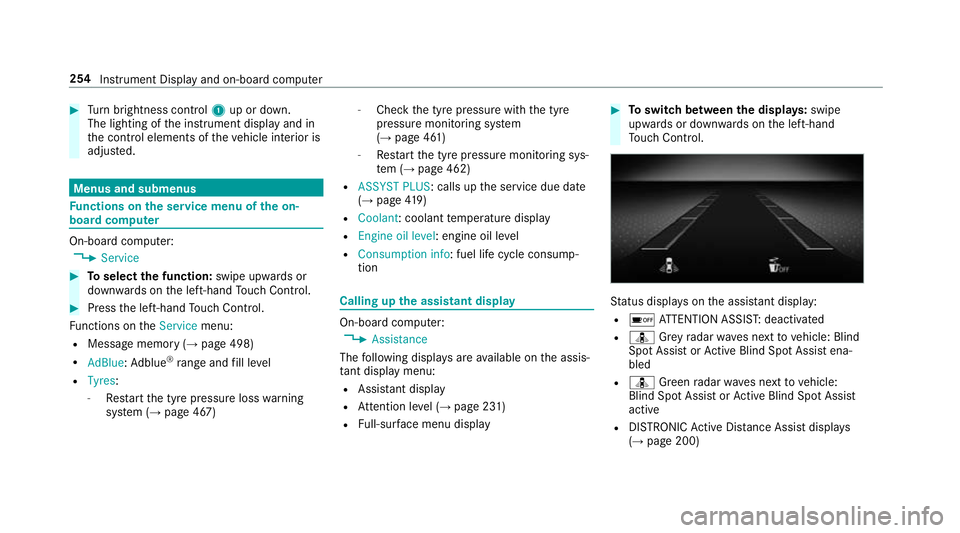
atus displa yson the assis tant displ ay:
R é ATTENTION ASSIS T:deactivated
R ¸ Grey radar waves next tovehicle: Blind
Spot Assist or Active Blind Spot Assi stena‐
bled
R ¸ Green radar waves next tovehicle:
Blind Spot Assist or Active Blind Spot Assi st
active
R DISTRO NICActive Dis tance Assi stdispla ys
( → page 200) 254
Instrument Display and on-board computer