height MERCEDES-BENZ A-CLASS SALOON 2018 User Guide
[x] Cancel search | Manufacturer: MERCEDES-BENZ, Model Year: 2018, Model line: A-CLASS SALOON, Model: MERCEDES-BENZ A-CLASS SALOON 2018Pages: 621, PDF Size: 10.5 MB
Page 374 of 621
If
th e map data on your vehicle has been ins tal‐
led at thefa ctory and you wish toreins tall it, you
do not need toenter the activation code.
Fo r map data that you ha vepur chased in the
fo rm of a data storage medium, you must en ter
th e accompanying activation code.
% Ifyo u sa vethe map data on a data storage
medium with the online map update service,
no entry isrequ ired. The activation code is
st ored on the data storage medium during
th e downloading process.
Obser vethefo llowing when entering the activa‐
tion code:
R The activation code can be used for one vehi‐
cle
R The activation code is not transferable
R The activation code has six digits
In theeve nt of thefo llowing problems, please
con tact a Mercedes-Benz service centre:
R The multimedia sy stem does not accept the
activation code
R You ha velost the activation code Displaying
the compass
Multimedia sy stem:
4 © 5
Navigation 5
¡ 5
Position #
Select Compass.
The compass display sho wsthefo llowing
information:
R the cur rent di rection of tr avel with bear‐
ing (360° form at) and compass direction
R longitude and latitude coo rdinates in
degrees, minutes and seconds
R height (rounded)
R number of GPS satellites from which a
signal can be recei ved
The information is not available in every count ry.
Displaying Qibla
Multimedia sy stem:
4 © 5
Navigation 5
¡ 5
Position #
Select Qibla.
The ar rowonthe compass sho wsthe direc‐
tion toMecca in relation tothe cur rent di rec‐
tion of tr avel. The number of satellites
recei ved is shown.
% This function is not available in all countries.
Setting the map scale automatically
Multimedia sy stem:
4 © 5
Navigation 5
Z
5 Advanced #
Select View. #
Select Map orientation. #
Activate Auto zoom.
The display button is acti vated. The map
scale is set automatically depending on your
driving speed and the type of road.
% The automatically selec ted map scale can be
ch anged manuall y.After a few seconds, this
is automatically reset.
Displaying the satellite map
Multimedia sy stem:
4 © 5
Navigation 5
Z
5 Advanced #
Select View. #
Select Map elements. MBUX multimedia sy
stem 371
Page 376 of 621
Showing map view in
the multifunction dis‐
play of the instrument clus ter
Multimedia sy stem:
4 © 5
Navigation 5
Z
5 Advanced #
Select View. #
Select Map orientation. #
Scroll up and show theINSTRUMENT CLUS-
TER VIEW category. #
Toset the map scale automaticall y:switch
on Auto zoom.
The display button is activated. The map
scale is set automatically depending on your
driving speed and the type of road. #
Toselect map orientation: select an option.
The #dot indicates the cur rent selection.
The following options are available:
R 2D heading up option:the 2D map view is
aligned tothe direction of tra vel.
R 2D north up option:the 2D map view is
displa yed so that no rth is alw ays at the
to p. R
3Doption: the 3D map view is aligned to
th e direction of tra vel. Pa
rking service Note
s onthe pa rking service &
WARNING Risk of accident and inju ry
due tonot observing the maximum per‐
mitted access height
If th eve hicle height exceeds the maximum
permitted access height for multi-s torey car
par ksand unde rgro und car par ks,th eve hicle
ro of as well as other vehicle parts could be
damaged.
There could be a risk of injury totheve hicle
occupants. #
Before driving into a multi-s torey car
park or under ground car pa rkobser ve
th e locally signpos ted access height. #
Ifth eve hicle height, including any addi‐
tional equipment, exceeds the maxi‐
mum permitted access height, do not drive into
the multi-s torey car park or
underground car par k. This service is not
available in all countries.
Selecting pa rking options
* NO
TEBefore selecting the parking
option The data is based on
the information made
av ailable bythere spective service pr ovider. #
Alw ays pay attention tothe local infor‐
mation and circums tances. Re
quirements:
R The navigation services option is available,
subsc ribed toand activated in the Mercedes
me por tal.
R The parking service is within the scope of the
navigation service.
R Parking is activated (/ page374). MBUX multimedia sy
stem 373
Page 377 of 621
Multimedia sy
stem:
4 © 5
Navigation #
Tap on jinthe map. #
Select a parking option.
The following information is displa yed (if
av ailable):
R Destination address, dis tance from cur‐
re nt vehicle position and ar riva l time
R Information on the multi-s torey car
park/car park
Fo rex ample, opening times, parking
ch arge s, cur rent occupancy, maximum
pa rking time, maximum access height .
The maximum access height shown by
th e parking service does not replace the
need for obser vation of the actual cir‐
cums tances.
R Available payment options (Mercedes
pa y,coins, bank no tes, cards)
R Details on parking tariffs
R Number of available parking spaces R
Payment me thod (e.g. at the parking
machine)
R Services/ facilities at the parking option
R Telephone number #
Calculate thero ute (/ page 342).
The following functions can also be selec ted (if
av ailable):
R Sear chfor POIs in the vicinit y.
R Save the destination.
R Place a call at the destination.
R Share the destination using NFC or QR code.
R Call up thewe b address.
R Show the destination on the map.
Displaying parking options on the map
Re quirements:
R The navigation services option is available,
subsc ribed toand activated in the Mercedes
me por tal.
R The parking service is within the scope of the
navigation service. Multimedia sy
stem:
4 © 5
Navigation 5
Z #
Activate Parking.
The display button is acti vated. The parking
options within the vicinity of the cur rent vehi‐
cle position are shown.
Pa ying parking charges
Re quirements:
R The navigation services option is available
and activated in the Mercedes me por tal.
The parking service is within the scope of the
navigation service.
R You ha veregis tere d with your payment
de tails forth e payment of parking in the
Mercedes me por tal with Mercedes Pay and
th ere spective contra ct partner.
R Parking is activated (/ page374).
Multimedia sy stem:
4 © 5
Navigation
The option is cur rently available in theFe deral
Re public of German y.374
MBUX multimedia sy stem
Page 436 of 621
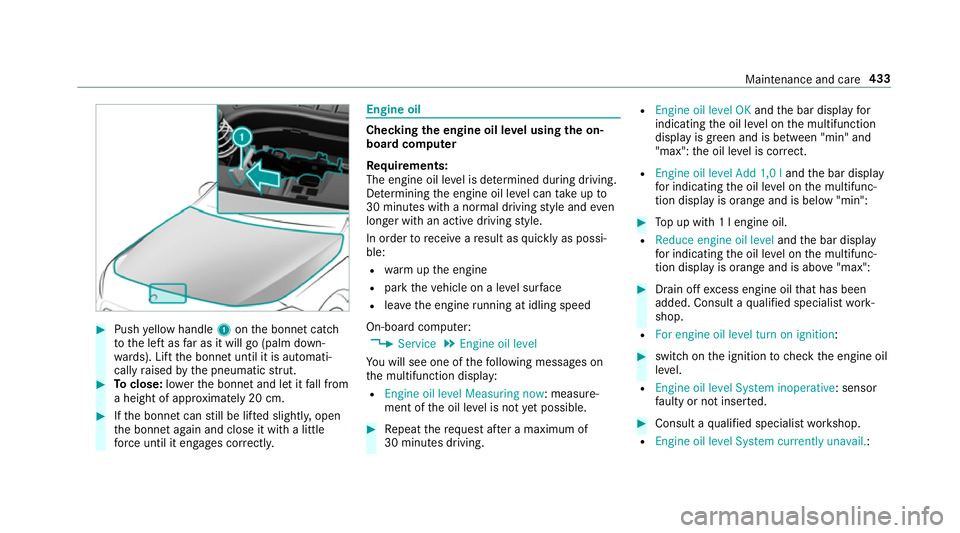
#
Push yellow handle 1onthe bonn etcatch
to the left as far as it will go (palm down‐
wa rds). Lift the bonn etuntil it is automati‐
cally raised bythe pneumatic stru t. #
Toclose: lowe rth e bonn etand let it fall from
a height of appr oximately 20 cm. #
Ifth e bonn etcan still be lif ted slightl y,open
th e bonn etagain and close it with a little
fo rc e until it engages cor rectl y. Engine oil
Checking
the engine oil le vel using the on-
board compu ter
Re quirements:
The engine oil le vel is de term ined during driving.
De term ining the engine oil le vel can take up to
30 minutes with a normal driving style and even
longer with an active driving style.
In order torecei veare sult as quickly as possi‐
ble:
R warm upthe engine
R park theve hicle on a le vel sur face
R leave the engine running at idling speed
On-board compu ter:
4 Service 5
Engine oil level
Yo u will see one of thefo llowing messages on
th e multifunction display:
R Engine oil level Measuring now : measure‐
ment of the oil le vel is not yet possible. #
Repeat there qu est af ter a maximum of
30 minutes driving. R
Engine oil level OK andthe bar display for
indicating the oil le vel on the multifunction
display is green and is between "min" and
"max": the oil le vel is cor rect.
R Engine oil level Add 1,0 l andthe bar display
fo r indicating the oil le vel on the multifunc‐
tion display is orange and is below "min": #
Top up with 1 l engine oil.
R Reduce engine oil level andthe bar display
fo r indicating the oil le vel on the multifunc‐
tion display is orange and is abo ve"max": #
Drain off excess engine oil that has been
added. Consult a qualified specialist work‐
shop.
R For engine oil level turn on ignition: #
switch on the ignition tocheck the engine oil
le ve l.
R Engine oil level System inoperative : sensor
fa ulty or not inser ted. #
Consult a qualified specialist workshop.
R Engine oil level System currently unavail. : Maintenance and care
433
Page 507 of 621
The proportion of cor
rosion inhibitor/antifreeze
concentrate in the engine cooling sy stem should
be:
R a minimum of 50% (antifreeze pr otection
down toappr oximately -37 °C)
R a maximum of 55% (antifreeze pr otection
down to-45 °C) Note
s on windscreen washer fluid Obser
vethe no tes on operating fluids
(/ page 496). &
WARNING ‑ Risk of fire and injury due to
windscreen washer concentrate
Wi ndsc reen washer concentrate is highly
fl ammable. It could ignite if it comes into
con tact wi thhot engine component parts or
th eex haust sy stem. #
Make sure that no windsc reen washer
concentrate spills out next tothefiller
opening. *
NO
TEDama getotheex terior lighting
due tounsuitable windsc reen washer
fl uid Uns
uitable windsc reen washer fluids may
damage the plastic sur face of theex terior
lighting. #
Only use windscreen washer fluids
which are also suitable for use on plas‐
tic sur faces, e.g. MB SummerFit or MB
Wi nterFit. *
NO
TEBlocked spr aynozzles caused by
mixing windscreen washer fluids #
Do not mix MB SummerFit and MB Win‐
te rFit with other windscreen washer flu‐
ids. Do not use distilled or de-ionised
water asthefill
le ve l sensor may be triggered er roneously.
Re commended windscreen washer fluid:
R Abo vefreezing point: e.g. MB SummerFit
R Below freezing point: e.g. MB WinterFit Fo
rth e cor rect mixing ratio, referto the informa‐
tion on the antif reeze conta iner.
Mix thewa sher fluid with the windscreen washer
fl uid all year round. Ve
hicle data Ve
hicle dimensions The heights speci
fied may vary as a result of the:
R tyres
R load
R condition of the suspension
R optional equipment 504
Tech nical da ta
Page 508 of 621
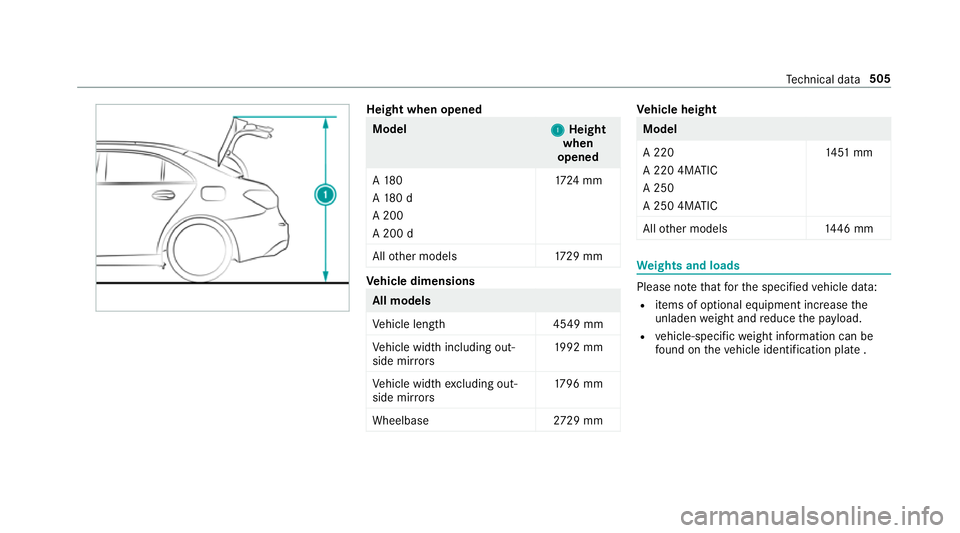
Height when opened
Model
1 1Height
when
opened
A 180
A 18 0 d
A 200
A 200 d 17
24 mm
All other models 1729 mm Ve
hicle dimensions All models
Ve
hicle lengt h4 549 mm
Ve hicle width including out‐
side mir rors 19
92 mm
Ve hicle width excluding out‐
side mir rors 17
96 mm
Wheelbase 2729 mm Ve
hicle height Model
A 220
A 220 4MATIC
A 250
A 250 4MATIC
14
51 mm
All other models 1446 mm We
ights and loads Please no
tethat forth e specified vehicle data:
R items of optional equipment increase the
unladen weight and reduce the pa yload.
R vehicle-specific weight information can be
fo und on theve hicle identification plate . Te
ch nical da ta505
Page 615 of 621
Ad
ditional door lock .............................. 77
Cor rect use ........................................... 28
Dama gedetection (pa rking) ................ 188
Data acquisition .................................... 29
Data storage .......................................... 29
Diagnostics connection .........................27
Equipment ............................................. 24
Implied warranty .................................. .29
Locking (auto matically) ......................... .81
Locking (digital vehicle keyst icke r) ...... .78
Locking (from the inside) ....................... 78
Locking (KEYLESS-GO) ..........................79
Locking (mobile phone) ......................... 78
Locking/unlocking (emergency key) ...... 81
Lo we ring ............................................. 488
Pa rking up .......................................... .189
QR code rescue card ............................. 29
Qualifi ed specialist workshop ................27
Ra ising ................................................ 484
REA CHregulation ..................................28
Re gistration ...........................................28
St andby mode function ...................... .189
St arting (Digital Vehicle Keyst icke r) .... 15 6
St arting (eme rgency operation
mode) .................................................. 157
St arting (mobile phone) ...................... .156 St
arting (Remo teOnline) ..................... 15 9
St arting (s tart/s top button) ................ 15 6
Switching off (s tart/s top button) ........ 180
To wing ................................................ .253
Un locking (digital vehicle keyst icke r) .... 78
Un locking (from the inside) ...................78
Un locking (KEYLESS-GO) ...................... .79
Un locking (mobile phone) ...................... 78
Ve ntilating (co nvenience opening) ......... 87
Vo ice commands (LINGU ATRO NIC) .....2 83
Ve hicle data
Displ aying (DYNAMIC SELECT) ............ 16 6
Ro of load ............................................. 505
Tr ans ferring toAndroid Auto ............... 396
Tr ans ferring toApple CarPl ay.............. 396
Tr ans ferring toBaidu CarLife ............... 396
Ve hicle height ...................................... 504
Ve hicle length ...................................... 504
Ve hicle width ....................................... 504
Wheelbase ...........................................5 04
Ve hicle dimensions ................................. 504
Ve hicle identification number
see VIN Ve
hicle identification plate .................... 494
EU general operating pe rmit number .. .494
Pa int code .......................................... .494
Pe rm issible axle load .......................... .494
Pe rm issible gross mass ...................... .494
VIN ...................................................... 494
Ve hicle interior
Cooling or heating (Remo teOnline) ..... 15 8
Ve hicle key
see Key
Ve hicle maintenance
see ASS YST PLUS
Ve hicle position
Switching transmission on/off ............ 320
Ve hicle tool kit ........................................ 450
TIREFIT kit .......................................... .450
To wing eye ...........................................4 64
Ve ntilating
Con venience opening ............................ 87
Ve ntilation
see Climate cont rol
Ve nts
see Air vents 612
Index