ignition MERCEDES-BENZ A-CLASS SALOON 2018 Service Manual
[x] Cancel search | Manufacturer: MERCEDES-BENZ, Model Year: 2018, Model line: A-CLASS SALOON, Model: MERCEDES-BENZ A-CLASS SALOON 2018Pages: 621, PDF Size: 10.5 MB
Page 365 of 621
#
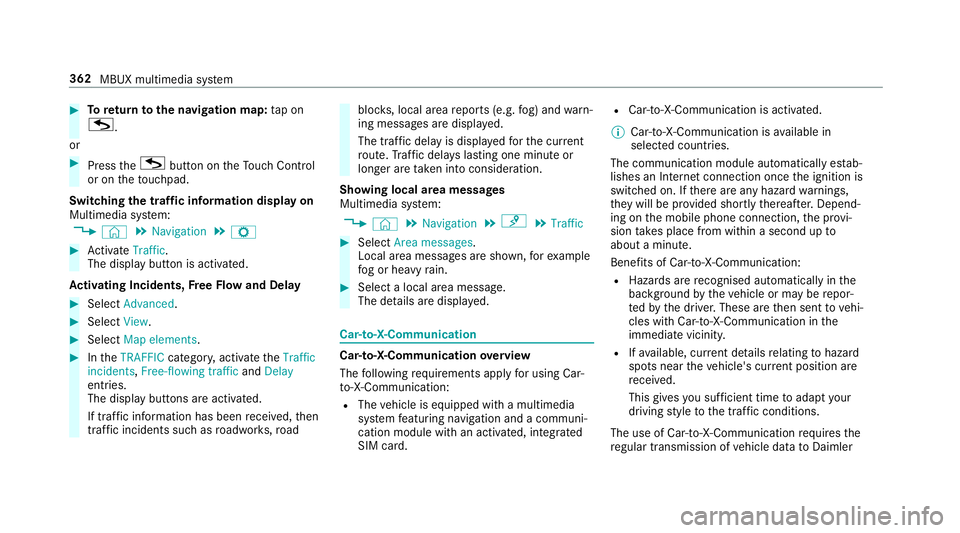
Toreturn tothe navigation map: tapon
G.
or #
Press theG button on theTo uch Control
or on theto uchpad.
Swit ching the traf fic information display on
Multimedia sy stem:
4 © 5
Navigation 5
Z #
Activate Traffic.
The display button is acti vated.
Ac tivating Incidents, Free Flow and Delay #
Select Advanced. #
Select View. #
Select Map elements. #
IntheTRAFFIC category,activate theTraffic
incidents, Free-flowing traffic andDelay
entri es.
The display buttons are activated.
If tra ffic information has been recei ved, then
tra ffic incidents such as roadwor ks,ro ad bloc
ks, local area reports (e.g. fog) and warn‐
ing messages are displa yed.
The tra ffic delay is displa yedfo rth e cur rent
ro ute. Traf fic del ays lasting one minute or
longer are take n into conside ration.
Showing local area messages
Multimedia sy stem:
4 © 5
Navigation 5
¡ 5
Traffic #
Select Area messages.
Local area messages are shown, forex ample
fo g or heavy rain. #
Select a local area message.
The de tails are displa yed. Car-to-X-Communication
Car-to-X-Communication
overview
The following requ irements apply for using Car-
to -X-Communication:
R The vehicle is equipped with a multimedia
sy stem featuring navigation and a communi‐
cation module with an activated, integ rated
SIM card. R
Car-to -X-Communication is acti vated.
% Car-to-X-Communication is available in
selec ted count ries.
The communication module automatically es tab‐
lishes an Internet connection once the ignition is
switched on. If there are any hazard warnings,
th ey will be pr ovided shortly thereaf ter.Depend‐
ing on the mobile phone connection, the pr ovi‐
sion take s place from within a second up to
about a minute.
Benefits of Car-to-X-Communication:
R Hazards are recognised au tomatical lyin the
bac kground bytheve hicle or may be repor‐
te dby the driver. These are then sent tovehi‐
cles with Car-to-X-Communication in the
immediate vicinity.
R Ifav ailable, cur rent de tails relating tohazard
spots near theve hicle's cur rent position are
re cei ved.
This gives you suf ficient time toadapt your
driving style to the traf fic conditions.
The use of Ca r-to -X-Communication requ ires the
re gular transmission of vehicle data toDaimler 362
MBUX multimedia sy stem
Page 378 of 621
#
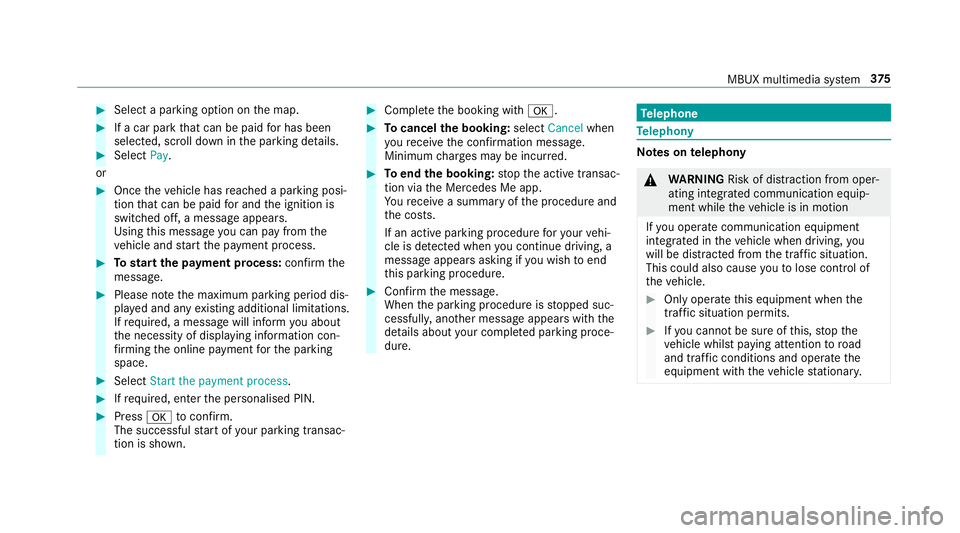
Select a pa rking option on the map. #
If a car park that can be paid for has been
selected, scroll down in the parking de tails. #
Select Pay.
or #
Once theve hicle has reached a parking posi‐
tion that can be paid for and the ignition is
switched off, a message appears.
Using this message you can pay from the
ve hicle and start the payment process. #
Tostart the payment process: confirm the
messa ge. #
Please no tethe maximum parking period dis‐
pla yed and any existing additional limitations.
If re qu ired, a message will inform you about
th e necessity of displaying information con‐
fi rm ing the online payment forth e parking
space. #
Select Start the payment process. #
Ifre qu ired, enter the personalised PIN. #
Press atoconfirm.
The successful start of your parking transac‐
tion is shown. #
Comple tethe booking with a. #
Tocancel the booking: selectCancel when
yo ure cei vethe confi rmation message.
Minimum charge s may be incur red. #
Toend the booking: stop the active transac‐
tion via the Mercedes Me app.
Yo ure cei vea summary of the procedure and
th e costs.
If an active parking procedure foryo ur vehi‐
cle is de tected when you continue driving, a
message appears asking if you wish toend
th is parking procedure. #
Confirm the message.
When the parking procedure is stopped suc‐
cessfull y,ano ther message appears with the
de tails about your co mplete d parking proce‐
dure. Te
lephone Te
lephony Note
s ontelephony &
WARNING Risk of di stra ction from oper‐
ating integrated communication equip‐
ment while theve hicle is in motion
If yo u operate communication equipment
integrated in theve hicle when driving, you
will be distracted from the tra ffic situation.
This could also cause youto lose control of
th eve hicle. #
Only operate this equipment when the
traf fic situation permits. #
Ifyo u cannot be sure of this, stop the
ve hicle whilst paying attention toroad
and traf fic conditions and ope rate the
equipment with theve hicle stationar y. MBUX multimedia sy
stem 375
Page 401 of 621
obtained in
the Mercedes me por tal: https://
me.secure.mercedes-benz.com
Fu rther information on Mercedes me connect,
th e pr ovided service scope and operation:
http://manuals.daimler.com/baix/cars/
connectme/en_GB/index.html
Calling the Mercedes-Benz Cus tomer Centre
using the multimedia sy stem
Re quirements:
R Access toa GSM network is available.
R The contract partner's GSM network co ver‐
age is available in there spective region.
R The ignition must be switched on so that
ve hicle data can be transfer red automati‐
cally.
Multimedia sy stem:
4 © 5
Phone 5
g #
Call Mercedes me connect.
Af ter confirmation, the multimedia sy stem
sends there qu ired vehicle data. The data
transfer is shown in the media displa y.Then,
you can select a service and be connected
to a specialist at the Mercedes-Benz Cus tomer
Centre.
Fu rther information on Mercedes me connect,
th e pr ovided service scope and operation are
av ailable at: http://manuals.daimler.com/baix/
cars/connectme/en_GB/ind ex.html Making a call via the
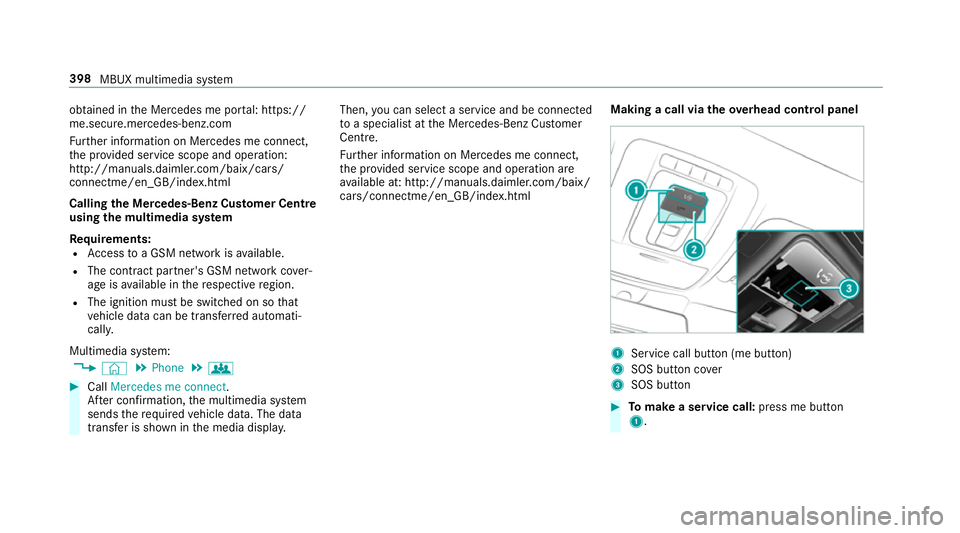
overhead control panel 1
Service call button (me button)
2 SOS button co ver
3 SOS button #
Tomake a se rvice call: press me button
1. 398
MBUX multimedia sy stem
Page 405 of 621
Mercedes-Benz emer
gency call sy stem Information on
the Mercedes-Benz emer‐
ge ncy call sy stem
The Mercedes-Benz emer gency call sy stem only
functions in areas where mobile phone co verage
is available from there leva nt contract pa rtner.
Insu fficient network co verage from there leva nt
contract pa rtner may result in an emer gency call
not being transmitted.
The Mercedes-Benz eme rgency call sy stem is
av ailable for at least tenye ars starting from the
manufacturing date.
The ignition must be switched on before an auto‐
matic emergency call can be made.
% The Mercedes-Benz emer gency call sy stem
is activated at thefa ctor y.Using the
Mercedes-Benz emer gency call sy stem is
free of charge.
Overview of the Mercedes-Benz emer gency
call sy stem
The Mercedes-Benz emer gency call sy stem can
help todecisively reduce the time between an
accident and the ar riva l of emer gency services
at the site of the accident. It helps locate an accident site in places
that are dif ficult to
access.
The emer gency call can be made au tomatical ly
( / page 402) or manually (/ page 403).
Only make emer gency calls if you or others are
in need of rescue. Do not make an emer gency
call in theeve nt of a breakdown or a similar sit‐
uation.
Yo u can find more information on there gional
av ailability of the Mercedes-Benz emer gency call
sy stem at: http://www.mercedes-benz.com/
connect_ecall.
Message in the media displa y:
The following messages appear in the media dis‐
play:
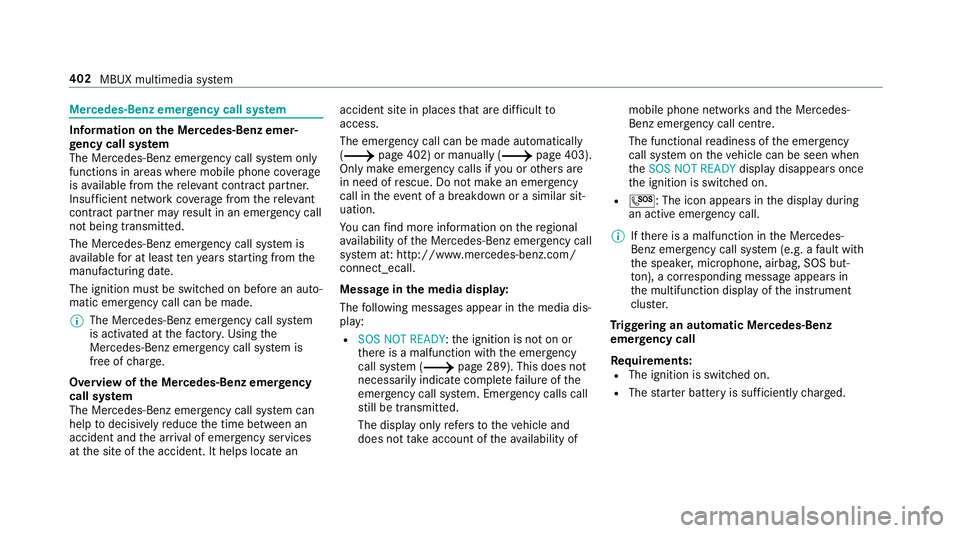
R SOS NOT READY :th e ignition is not on or
th ere is a malfunction with the emer gency
call sy stem (/ page 289). This does not
necessarily indicate comple tefailure of the
emer gency call sy stem. Emer gency calls call
st ill be transmitted.
The display only refers to theve hicle and
does not take account of theav ailability of mobile phone networ
ksand the Mercedes-
Benz emer gency call centre.
The functional readiness of the emer gency
call sy stem on theve hicle can be seen when
th eSOS NOT READY display disappears once
th e ignition is switched on.
R G: The icon appears in the display during
an active emer gency call.
% Ifth ere is a malfunction in the Mercedes-
Benz emer gency call sy stem (e.g. a fault with
th e speaker, microphone, airbag, SOS but‐
to n), a cor responding message appears in
th e multifunction display of the instrument
clus ter.
Tr iggering an automatic Mercedes-Benz
emer gency call
Re quirements:
R The ignition is switched on.
R The star ter battery is suf ficiently charge d. 402
MBUX multimedia sy stem
Page 407 of 621
This allo
wsmeasu resfo rre scue, reco very or
to wing toa Mercedes-Benz Service Cent reto
be initiated quickl y.
R Remain in theve hicle if thero ad and traf fic
conditions permit youto do so until a voice
connection is es tablished with the emer‐
ge ncy call centre service pr ovider.
R Onthe basis of the call, the service pr ovider
decides whe ther it is necessary tocall res‐
cue teams and/or the police tothe accident
site.
If th e Mercedes-Benz emer gency call sy stem
cann otconnect tothe Mercedes-Benz emer‐
ge ncy call centre, the emer gency call is au tomat‐
ical lysent tothe public emer gency services call
centre.
If no connection can be made tothe public
emer gency services, a cor responding message
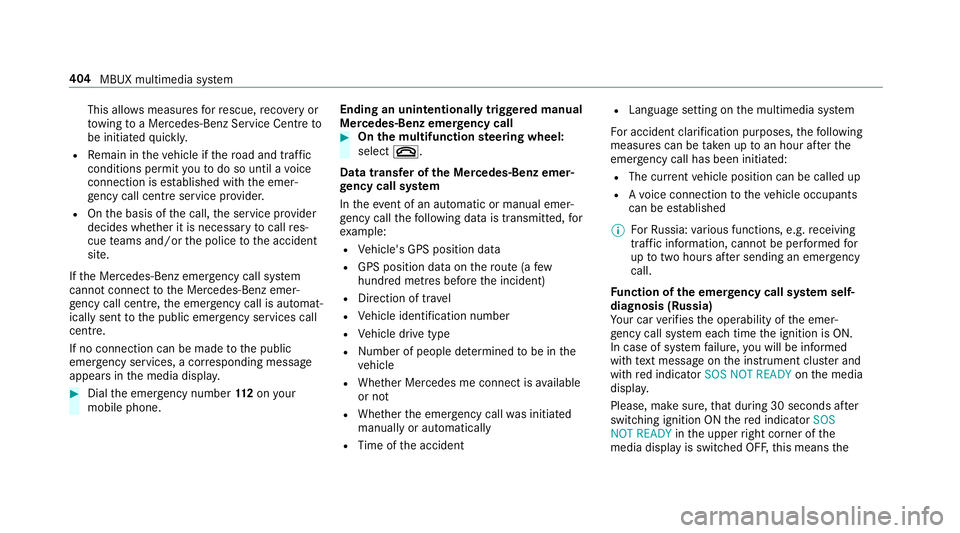
appears inthe media displa y.#
Dial the emer gency number 11 2onyour
mobile phone. Ending an unin
tentionally triggered manual
Mercedes-Benz emer gency call #
On the multifunction steering wheel:
select ~.
Data transfer of the Mercedes-Benz emer‐
ge ncy call sy stem
In theeve nt of an au tomatic or manual emer‐
ge ncy call thefo llowing data is transmitte d,for
ex ample:
R Vehicle's GPS position data
R GPS position data on thero ute (a few
hundred metres before the incident)
R Direction of tra vel
R Vehicle identification number
R Vehicle drive type
R Number of people de term ined tobe in the
ve hicle
R Whe ther Mercedes me connect is available
or not
R Whe ther the emer gency call was initiated
manually or automatically
R Time of the accident R
Language setting on the multimedia sy stem
Fo r accident clarification purposes, thefo llowing
measures can be take n up toan hour af terthe
emer gency call has been initia ted:
R The cur rent vehicle position can be called up
R Avo ice connection totheve hicle occupants
can be es tablished
% ForRu ssia: various functions, e.g. receiving
traf fic information, cannot be per form ed for
up totwo hou rsafte r sending an emer gency
call.
Fu nction of the emer gency call sy stem self-
diagnosis (Russia)
Yo ur car verifies the operability of the emer‐
ge ncy call sy stem each time the ignition is ON.
In case of sy stem failure, you will be informed
with text messa geon the instrument clus ter and
with red indicator SOS NOT READY onthe media
displa y.
Please, make sure, that during 30 seconds af ter
switching ignition ON there d indicator SOS
NOT READY inthe upper right corner of the
media display is switched OFF, this means the 404
MBUX multimedia sy stem
Page 408 of 621
emer
gency call sy stem passed diagnostics suc‐
cessfully. If necessar y,switch ON the media dis‐
pla y,if it was switched OFF before.
St arting/ending ERA-GLONASS test mode
(Russia)
Re quirements:
R The star ter battery is suf ficiently charge d.
R The ignition is switched on.
R The vehicle has been stationary for at least
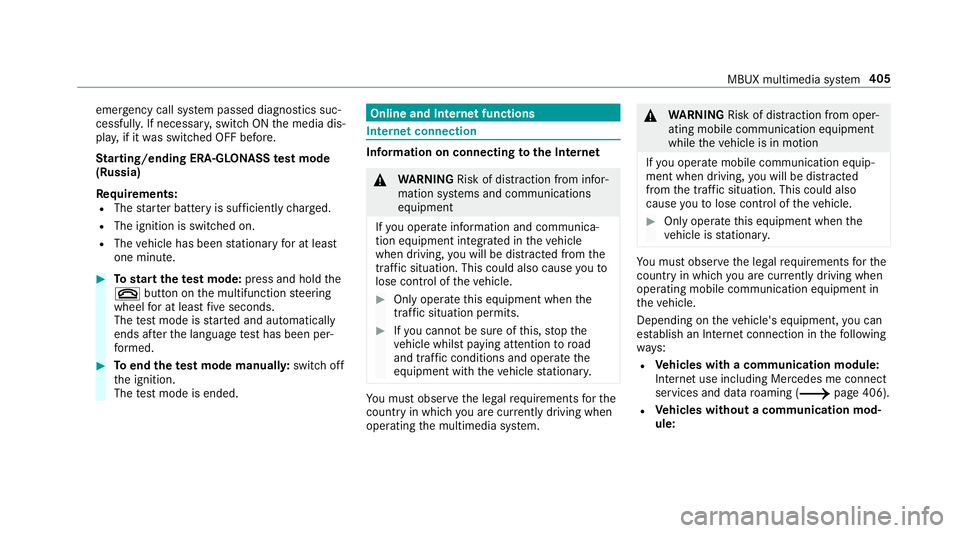
one minute. #
Tostart thete st mode: press and hold the
~ button on the multifunction steering
wheel for at least five seconds.
The test mode is star ted and automatically
ends af terth e language test has been per‐
fo rm ed. #
Toend thete st mode manuall y:switch off
th e ignition.
The test mode is ended. Online and Internet functions
Internet connection
Information on connecting
tothe Internet &
WARNING Risk of di stra ction from infor‐
mation sy stems and communications
equipment
If yo u operate information and communica‐
tion equipment integ rated in theve hicle
when driving, you will be distracted from the
traf fic situation. This could also cause youto
lose control of theve hicle. #
Only operate this equipment when the
traf fic situation permits. #
Ifyo u cannot be sure of this, stop the
ve hicle whilst paying attention toroad
and traf fic conditions and ope rate the
equipment with theve hicle stationar y. Yo
u must obse rveth e legal requirements forthe
country in whi chyou are cur rently driving when
operating the multimedia sy stem. &
WARNING Risk of di stra ction from oper‐
ating mobile communication equipment
while theve hicle is in motion
If yo u operate mobile communication equip‐
ment when driving, you will be distracted
from the tra ffic situation. This could also
cause youto lose control of theve hicle. #
Only operate this equipment when the
ve hicle is stationar y. Yo
u must obse rveth e legal requirements forthe
country in whi chyou are cur rently driving when
operating mobile communication equipment in
th eve hicle.
Depending on theve hicle's equipment, you can
es tablish an Internet connection in thefo llowing
wa ys:
R Vehicles with a communication module:
Internet use including Mercedes me connect
services and data roaming (/ page 406).
R Vehicles without a communication mod‐
ule: MBUX multimedia sy
stem 405
Page 434 of 621
#
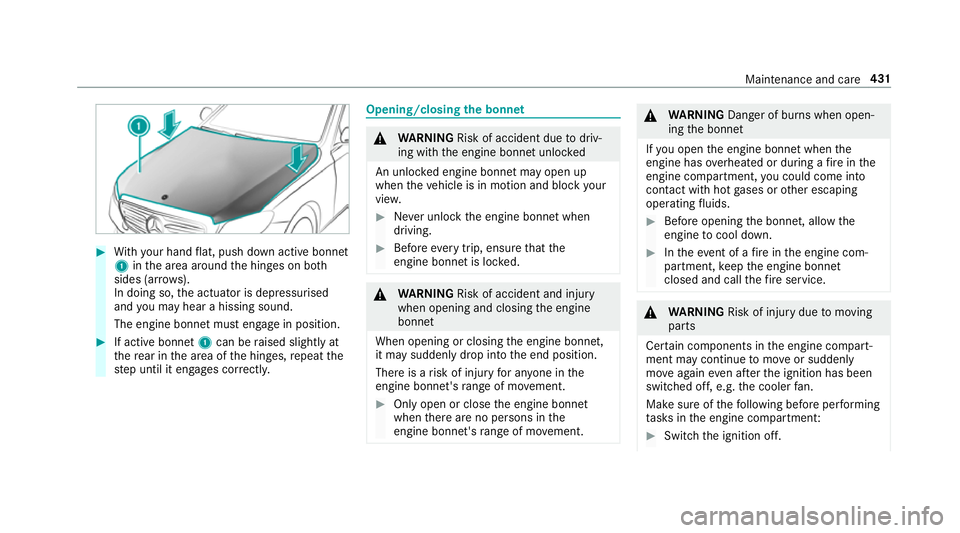
With your hand flat, push down active bonnet
1 inthe area around the hinges on bo th
sides (ar rows).
In doing so, the actuator is depressurised
and you may hear a hissing sound.
The engine bonnet must en gage in position. #
If active bonn et1 can be raised slight lyat
th ere ar in the area of the hinges, repeat the
st ep until it engages cor rectl y. Opening/closing
the bonnet &
WARNING Risk of accident due todriv‐
ing with the engine bonn etunlo cked
An unloc ked engine bonn etmay open up
when theve hicle is in motion and block your
vie w. #
Never unlock the engine bonn etwhen
driving. #
Before every trip, ensure that the
engine bonn etis loc ked. &
WARNING Risk of accident and inju ry
when opening and closing the engine
bonn et
When opening or closing the engine bonn et,
it may suddenly drop into the end position.
There is a risk of injury for an yone in the
engine bonn et's range of mo vement. #
Only open or close the engine bonn et
when there are no persons in the
engine bonn et's range of mo vement. &
WARNING Danger of bu rns when open‐
ing the bonn et
If yo u open the engine bonn etwhen the
engine has overheated or during a fire inthe
engine compartment, you could come into
contact with hot gases or other escaping
operating fluids. #
Before opening the bonn et, allow the
engine tocool down. #
Intheeve nt of a fire inthe engine com‐
partment, keep the engine bonn et
closed and call thefire service. &
WARNING Risk of inju rydue tomoving
parts
Cer tain components in the engine compart‐
ment may continue tomo veor suddenly
mo veagain even af terth e ignition has been
switched off, e.g. the cooler fan.
Ma kesure of thefo llowing before per form ing
ta sks in the engine compartmen t: #
Switch the ignition off. Maintenance and care
431
Page 435 of 621
#
Neverto uch the danger zone sur round‐
ing moving co mponent parts, e.g. the
ro tation area of thefa n. #
Remo vejewe llery and watches. #
Keep items of clo thing and hair away
from moving parts. &
WARNING Risk of inju ryfrom touching
co mp onent parts under voltage
The ignition sy stem and the fuel injection
sy stem workunder high voltage. If youto uch
co mp onent parts which are under voltage,
yo u could recei vean electric shoc k.#
Neverto uch co mponents of the ignition
sy stem or the fuel injection sy stem
when the ignition is switched on. &
WARNING Danger of bu rns from hot
component parts in the engine compart‐
ment
Cer tain component parts in the engine com‐
partment may be very hot, e.g. the engine, th
era diator and parts of theex haust sy stem. #
Let the engine cool down and only
to uch the component parts described
below: &
WARNING Risk of inju ryfrom using the
windscreen wipers while the engine bon‐
net is open
When the engine bonn etis open, and the
windscreen wipers are set in motion, you can
be trapped bythe wiper linkage. #
Alw ays switch off the windscreen wip‐
ers and ignition before opening the
engine bonn et. #
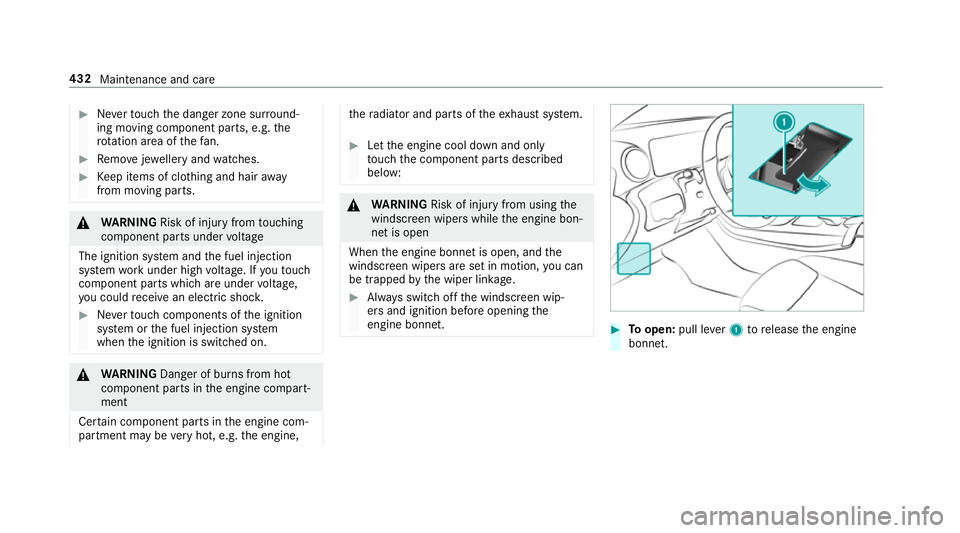
Toopen: pull lever1 torelease the engine
bonn et. 432
Maintenance and care
Page 436 of 621
#
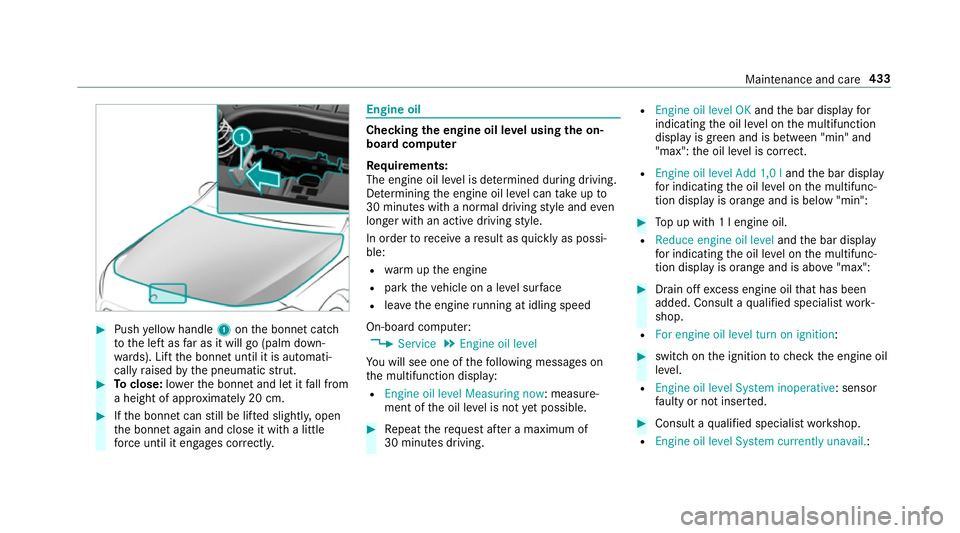
Push yellow handle 1onthe bonn etcatch
to the left as far as it will go (palm down‐
wa rds). Lift the bonn etuntil it is automati‐
cally raised bythe pneumatic stru t. #
Toclose: lowe rth e bonn etand let it fall from
a height of appr oximately 20 cm. #
Ifth e bonn etcan still be lif ted slightl y,open
th e bonn etagain and close it with a little
fo rc e until it engages cor rectl y. Engine oil
Checking
the engine oil le vel using the on-
board compu ter
Re quirements:
The engine oil le vel is de term ined during driving.
De term ining the engine oil le vel can take up to
30 minutes with a normal driving style and even
longer with an active driving style.
In order torecei veare sult as quickly as possi‐
ble:
R warm upthe engine
R park theve hicle on a le vel sur face
R leave the engine running at idling speed
On-board compu ter:
4 Service 5
Engine oil level
Yo u will see one of thefo llowing messages on
th e multifunction display:
R Engine oil level Measuring now : measure‐
ment of the oil le vel is not yet possible. #
Repeat there qu est af ter a maximum of
30 minutes driving. R
Engine oil level OK andthe bar display for
indicating the oil le vel on the multifunction
display is green and is between "min" and
"max": the oil le vel is cor rect.
R Engine oil level Add 1,0 l andthe bar display
fo r indicating the oil le vel on the multifunc‐
tion display is orange and is below "min": #
Top up with 1 l engine oil.
R Reduce engine oil level andthe bar display
fo r indicating the oil le vel on the multifunc‐
tion display is orange and is abo ve"max": #
Drain off excess engine oil that has been
added. Consult a qualified specialist work‐
shop.
R For engine oil level turn on ignition: #
switch on the ignition tocheck the engine oil
le ve l.
R Engine oil level System inoperative : sensor
fa ulty or not inser ted. #
Consult a qualified specialist workshop.
R Engine oil level System currently unavail. : Maintenance and care
433
Page 445 of 621
Note
s on care of car parts &
WARNING Risk of entrapment if the
windscreen wipers are swit ched on while
th e windscreen is being cleaned
If th e windscreen wipers are set in motion
while you are cleaning the windscreen or
wiper blades, you can be trapped bythe
wiper arm. #
Alw ays switch off the windscreen wip‐
ers and the ignition before cleaning the
windscreen or wiper blades. &
WARNING Risk of bu rning from theta il‐
pipe or tailpipe trim
The tailpipe and tailpipe trim can become
ve ry hot. If you come into contact with these
car parts, you could burn yourself. #
Alw ays be particular lycareful when in
th e vicinity of theta ilpipe and tailpipe
trims and supervise children very
closely when in this area. #
Before any con tact, allow the car parts
to cool down. Obser
vethefo llowing information: Note
s on cleaning and car eA voiding vehicle damage
Wheels/rims Usewate r and acid-free wheel cleaners. R
Do not use acidic wheel cleaners toremo vebrake dust.
This could damage wheel bolts and brake components.
R Toavoid cor rosion of the brake discs and brakepads, drive
th eve hicle for a few minutes af ter cleaning before parking
it. The brake discs and brakepads warm up and dry out.
Wi ndo ws
Cleanthe windo wsonthe inside and outside using a damp
clo thand cleaning agents recommended byMercedes-Benz. Do not use dry clo
ths or abrasive or sol vent-based cleaning
agents toclean the inside of windo ws.
Wi per blades
Fold out the wiper blades and clean them using a damp clo th.D o not clean the wiper blades too of ten. 442
Maintenance and care