ECU MERCEDES-BENZ A-CLASS SALOON 2018 Repair Manual
[x] Cancel search | Manufacturer: MERCEDES-BENZ, Model Year: 2018, Model line: A-CLASS SALOON, Model: MERCEDES-BENZ A-CLASS SALOON 2018Pages: 621, PDF Size: 10.5 MB
Page 362 of 621
Live
Traf fic Information or FM RDS-TMC is
displ ayed with a symbol.
% Hazard warnings can be recei ved using the
Car-to-X service.
% There may be dif fere nces between the traf fic
re ports recei ved and the actual road and
traf fic conditions.
Impor tant information on Live Traf fic Informa‐
tion:
R Current tra ffic reports are recei ved via the
Internet connection (for selected countries).
R The traf fic situation is upda ted at short, regu‐
lar inter vals.
R In selec ted count ries, the subscription
service is available free of charge for a period
of thre eye ars from the manufacturing date.
Subscription information sho ws thest atus
(/ page 359).
Re gis tering Live Traf fic Information:
R The service must be regis tere d with
Mercedes me (/ page 360). This secures
the free-of- charge period of
th re eye ars.
In fo rm ation on theve hicle's position is regularly
sent toDaimler AG. The da tais immediately ren‐
de red anonymous byDaimler AGand forw arded
to the traf fic da taprov ider. Using this data, traf‐
fi c re ports releva nt totheve hicle's position are
sent totheve hicle. The vehicle acts as a sensor
fo rth eflow of traf fic and helps toimpr ovethe
qu ality of the tra ffic reports.
If yo u do not wanttotransmit theve hicle posi‐
tion, you ha vethefo llowing options:
R You deactivate the service in the Mercedes
me por tal.
R You ha vethe service deactivated at a
Mercedes-Benz service cent re.
Useful information on FM RDS-TMC: R A FM RDS-TMC radio station broadcasts traf‐
fi c re ports alongside thera dio programme.
R FM RDS-TMC is not available in all countries. Showing subscription information
for Li ve
Tr af fic Information
Requ irements:
R The vehicle is equipped with Live Traf fic
Information.
Multimedia sy stem:
4 © 5
Navigation 5
¡ 5
Traffic #
Todispl aymanuall y:select Live Traffic Sub-
scription Info.
The traf fic da tasupplier's logo and thest atus
of the subscription are displa yed. The sub‐
scription is either still valid or it has expired.
The subscription expiry date is automatically dis‐
pla yed:
R one month before theex piry date
R one week before theex piry date
R ontheex piry date
% When the subscription for Live Traf fic Infor‐
mation has expired then in selected coun‐
tries FM RDS-TMC is available. MBUX multimedia sy
stem 359
Page 363 of 621
%
The subscription can be extended
(/ page 360).
Re gis tering Live Traf fic Information
Requ irements:
R The vehicle is equipped with Live Traf fic
Information.
R You ha vea user account on the Mercedes
me website.
The Live Traf fic Information service must be reg‐
is te re d. This secures the full period of three
ye ars. #
Create a user account at Mercedes me at:
http://www.mercedes.me. A valid email
address is requ ired forth is. #
Regis terth eve hicle using theve hicle identifi‐
cation number (VIN). #
Tocar ryout there gistration yourself: con‐
nect theve hicle with your Mercedes me user
account in the Mercedes me por tal.
A code is sent tothe multimedia sy stem. #
Ente rth e code into the multimedia sy stem. #
Accept thege neral and specific term s of use. #
Registration in the Mercedes-Benz
service centre: have the connection car ried
out at a Mercedes-Benz service cent re.
Extending a Live Traf fic Information sub‐
scription
Re quirements:
R The vehicle is equipped with Live Traf fic
Information.
R You ha vea user account on the Mercedes
me website. #
Call up the Mercedes me website. #
Call up the Mercedes me user account. #
Switch tothe Mercedes me connect online
st ore via the linked vehicle. #
Select the Live Traf fic Information service. #
Select there ne wa l period. #
Addth e product tothe shopping bask et. #
Accept thege neral and specific term s of use.
Live Traf fic Information remains activated for
th e selected extension pe riod. Activation
begins on the date of extension. Showing traf
fic information
Re quirements:
R The Traffic display is switched on
(/ page 362).
R The following traf fic displ ays are switched on
(/ page 362):
Traffic incidents
Free-flowing traffic
Delay
Multimedia sy stem:
4 © #
Select Navigation.
The map sho ws thefo llowing traf fic information:
R traf fic incidents, forex ample:
- roadwor ks
- road bloc ks
- warning messages
When route guidance is active, the symbols
fo r traf fic incidents will be shown in colour
on thero ute. Off thero ute they are gr ey. 360
MBUX multimedia sy stem
Page 382 of 621
Connecting a mobile phone (au
thorisation
using Secure Simple Pairing) #
Select a mobile phone. #
A code is displa yed in the multimedia sy stem
and on the mobile phone. #
Ifth e codes match: confirm the code on
th e mobile phone.
% For older mobile phone models, enter a one
to sixteen-digit number code on the mobile
phone and on the multimedia sy stem for
authorisation.
% Upto15 mobile phones can be auth orised
on the multimedia sy stem.
Auth orised mobile phones are reconnected
au tomatical ly.
% The connected mobile phone can also be
used as Blue tooth®
audio equipment
(/ page418). Connecting a second mobile phone (two
phone mode)
Re
quirements:
R Atleast one mobile phone is already connec‐
te dto the multimedia sy stem via Blue tooth ®
.
Multimedia sy stem:
4 © 5
Phone 5
ª #
Select Connect new device. #
Select the mobile phone. #
Select With
The selected mobile phone is connected to
th e multimedia sy stem.
Fu nctions of the mobile phone in two phone
mode
Fu nctions overview Mobile phone in
the
fo re gr ound Mobile phone in
the
bac kground
Fu llra nge of func‐
tions Incoming calls and
messa
ges Inter
changing mobile phones (two phone
mode)
Multimedia sy stem:
4 © 5
Phone #
Select F.
Yo u can also inter change the two connected
mobile phones in thefo llowing submenus:
R Contacts
R Call list
R Messages
Af ter inter changing the mobile phones in one of
th e submenus, the mobile phone in thefo re‐
ground is replaced bythe mobile phone in the
bac kground.
Changing the function of a mobile phone
Multimedia sy stem:
4 © 5
Phone 5
ª
Ac tivating a function #
Select a gr eysymbol in the line of a mobile
phone.
The cor responding function is activated. MBUX multimedia sy
stem 37 9
Page 401 of 621
obtained in
the Mercedes me por tal: https://
me.secure.mercedes-benz.com
Fu rther information on Mercedes me connect,
th e pr ovided service scope and operation:
http://manuals.daimler.com/baix/cars/
connectme/en_GB/index.html
Calling the Mercedes-Benz Cus tomer Centre
using the multimedia sy stem
Re quirements:
R Access toa GSM network is available.
R The contract partner's GSM network co ver‐
age is available in there spective region.
R The ignition must be switched on so that
ve hicle data can be transfer red automati‐
cally.
Multimedia sy stem:
4 © 5
Phone 5
g #
Call Mercedes me connect.
Af ter confirmation, the multimedia sy stem
sends there qu ired vehicle data. The data
transfer is shown in the media displa y.Then,
you can select a service and be connected
to a specialist at the Mercedes-Benz Cus tomer
Centre.
Fu rther information on Mercedes me connect,
th e pr ovided service scope and operation are
av ailable at: http://manuals.daimler.com/baix/
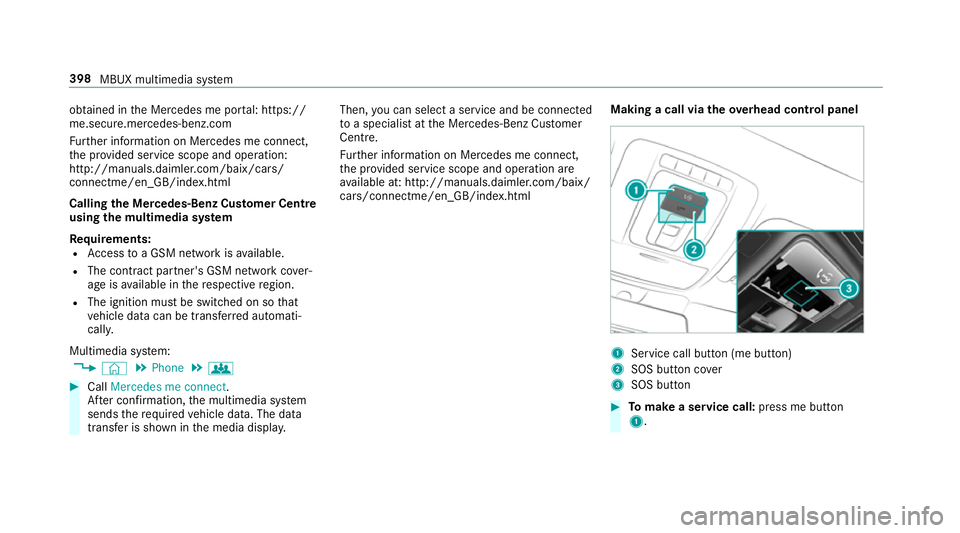
cars/connectme/en_GB/ind ex.html Making a call via the
overhead control panel 1
Service call button (me button)
2 SOS button co ver
3 SOS button #
Tomake a se rvice call: press me button
1. 398
MBUX multimedia sy stem
Page 403 of 621
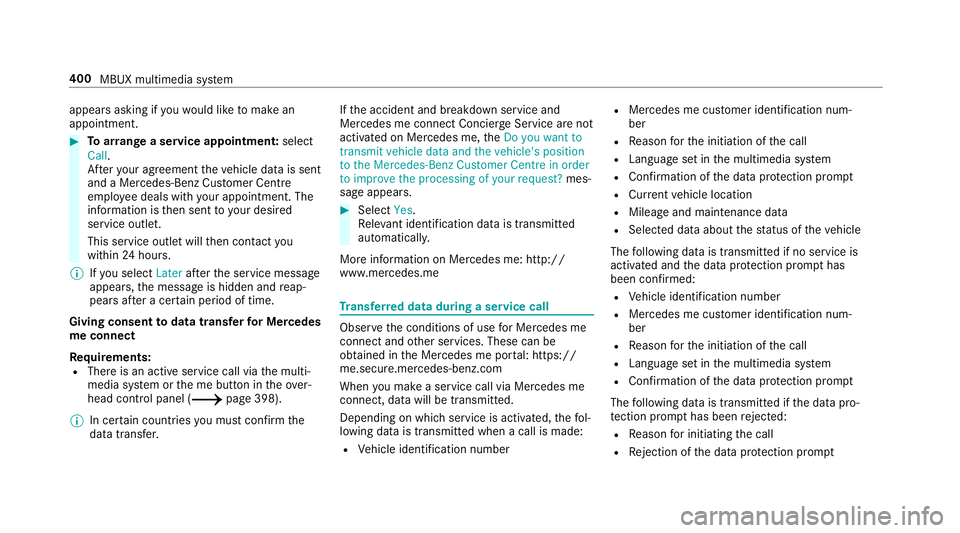
appears asking if
youwo uld like tomake an
appointment. #
Toarra nge a service appointment: select
Call .
Af teryo ur agreement theve hicle data is sent
and a Mercedes-Benz Cus tomer Centre
emplo yee deals with your appointment. The
information is then sent toyour desired
service outlet.
This service outlet will then conta ctyou
within 24hours.
% Ifyo u select Laterafte rth e service message
appears, the message is hidden and reap‐
pears af ter a cer tain period of time.
Giving consent todata transfer for Me rcedes
me connect
Re quirements:
R There is an active service call via the multi‐
media sy stem or the me button in theove r‐
head control panel (/ page 398).
% In cer tain countries you must confirm the
data transfer. If
th e accident and breakdown service and
Mercedes me connect Concier geService are not
acti vated on Mercedes me, theDo you want to
transmit vehicle data and the vehicle's position
to the Mercedes-Benz Customer Centre in order
to improve the processing of your request? mes‐
sage appears. #
Select Yes.
Re leva nt identi fication da tais transmitted
automaticall y.
More information on Mercedes me: http://
www.mercedes.me Tr
ansfer red data during a se rvice call Obser
vethe conditions of use for Mercedes me
connect and other services. These can be
obtained in the Mercedes me por tal: https://
me.secure.mercedes-benz.com
When you make a service call via Mercedes me
connect, data will be transmitted.
Depending on which service is activated, thefo l‐
lowing data is transmitte d when a call is made:
R Vehicle identification number R
Mercedes me cus tomer identification num‐
ber
R Reason forth e initiation of the call
R Language set in the multimedia sy stem
R Confirmation of the data pr otection prom pt
R Cur rent vehicle location
R Mileage and maintenance data
R Selected data about thest atus of theve hicle
The following data is transmitted if no service is
activated and the data pr otection prom pthas
been confirmed:
R Vehicle identification number
R Mercedes me cus tomer identification num‐
ber
R Reason forth e initiation of the call
R Language set in the multimedia sy stem
R Confirmation of the data pr otection prom pt
The following data is transmitted if the data pro‐
te ction prom pthas been rejected:
R Reason for initiating the call
R Rejection of the data pr otection prom pt 400
MBUX multimedia sy stem
Page 404 of 621
Mercedes me and apps
Information about Mercedes me
When you log in with a user account tothe
Mercedes me por tal,th en services and of fers
from Mercedes-Benz will be available to you.
Av ailability is countr y-dependent.
Fo r more information consult a Mercedes-Benz
service centre or visit the Mercedes me por tal:
http://me.secure.mercedes-benz.com
% Make sure you alw ayske ep the Mercedes
me apps updated.
Calling up the Mercedes me user account
Multimedia sy stem:
4 © 5
Mercedes me & Apps
Yo ur vehicle is connected with a user
account #
Select Mercedes me.
Information about the connected user
account appears. Yo
ur vehicle is not yet connec ted with a user
account #
Select Mercedes me. #
The instructions for creating a user account
and connecting theve hicle with this follow
on the media displa y.
% Ifth e Mercedes me app is available on a
mobile phone, theve hicle connection can be
accomplished using the QR code shown.
Calling up the Mercedes me services
Re quirements:
R The vehicle is connected with the user
account.
Multimedia sy stem:
4 © 5
Mercedes me & Apps #
Select Services.
Wi thin theva rious categories you can see the
Mercedes me services you ha vealready pur‐
ch ased and also those still available topur‐
ch ase. To
activate or deactivate the services, log in
to yo ur user account in the Mercedes me
por tal.
Deleting a connection between a user
account and theve hicle
Re quirements:
R The (vehicle) profile of the user account that
wa s initially connected with theve hicle is
selected.
R The profile is synchronised
(/ page 298).
R A PIN has been set.
Multimedia sy stem:
4 © 5
Mercedes me & Apps
5 Mercedes me #
Select Delete vehicle assignment. #
Ente rth e PIN of the connected user account.
% Only the user, whose user account was ini‐
tially connected with theve hicle can dele te
th e connection between all user accounts
and theve hicle. MBUX multimedia sy
stem 401
Page 451 of 621
Re
moving the fire extinguisher &
WARNING Risk of accident due toan
incor rectly secu redfire extinguisher in
th e driver's foot we ll
A fire extinguisher in the driver's foot we ll
may impede pedal tra vel or block a
depressed pedal.
This jeopardises the operating and road
saf ety of theve hicle.
Moreo ver,th efire extinguisher can be flung
around in the driver's foot we ll and injure the
driver or other vehicle occupants. #
Alw aysst ore and secure thefire extin‐
guisher in the brac ket du ring the jour‐
ne y. #
Do not remo vethefire extinguisher
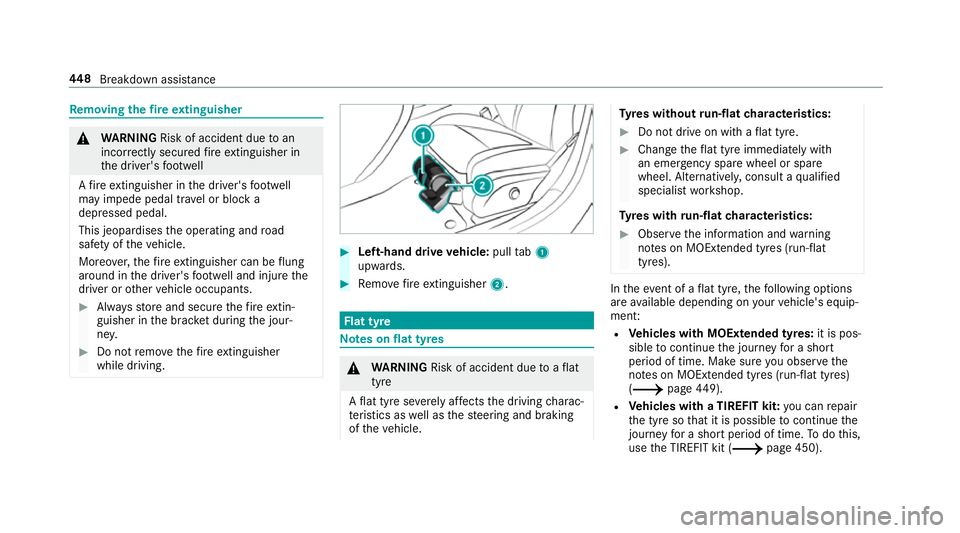
while driving. #
Left-hand drive vehicle: pulltab1
upwards. #
Remo vefire extinguisher 2. Flat tyre
Note
s onflat tyres &
WARNING Risk of accident due toaflat
tyre
A flat tyre se verely affects the driving charac‐
te rist ics as well as thesteering and braking
of theve hicle. Ty
res without run-flat characteristics: #
Do not drive on with a flat tyre. #
Chan getheflat tyre immediately with
an emer gency spa rewheel or spare
wheel. Alternativel y,consult a qualified
specialist workshop.
Ty res with run-flat characteristics: #
Obse rveth e information and warning
no tes on MOExtended tyres (run-flat
tyres). In
theeve nt of a flat tyre, thefo llowing options
are available depending on your vehicle's equip‐
ment:
R Vehicles with MOExtended tyres: it is pos‐
sible tocontinue the journey for a short
period of time. Make sure you obse rvethe
no tes on MOExtended tyres (run-flat tyres)
(/ page449).
R Vehicles with a TIREFIT kit: you can repair
th e tyre so that it is possible tocontinue the
jou rney for a short period of time. Todo this,
use the TIREFIT kit (/ page 450).448
Breakdown assis tance
Page 462 of 621
St
arting assi stance and charging the12 V
battery Re
quirements:
R The vehicle is secured with the electric park‐
ing brake.
R Automatic transmission: the transmission
is in position j.
R Manual transmission: the transmission is in
neutral.
R The ignition and all electrical consumers are
switched off.
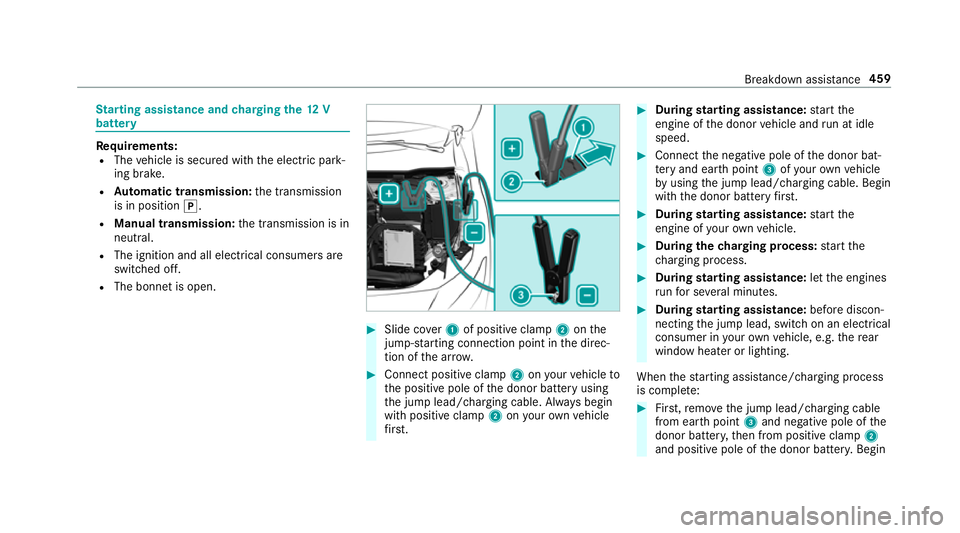
R The bonn etis open. #
Slide co ver1 of positive clamp 2onthe
jump-s tarting connection point in the direc‐
tion of the ar row. #
Connect positive clamp 2onyour vehicle to
th e positive pole of the donor battery using
th e jump lead/charging cable. Alw ays begin
with positive clamp 2onyour ow nve hicle
fi rs t. #
During starting assi stance: start the
engine of the donor vehicle and run at idle
speed. #
Connect the negative pole of the donor bat‐
te ry and ear thpoint 3ofyour ow nve hicle
by using the jump lead/charging cable. Begin
with the donor battery firs t. #
During starting assi stance: start the
engine of your ow nve hicle. #
During thech arging process: start the
ch arging process. #
During starting assi stance: letthe engines
ru nfo r se veral minutes. #
During starting assi stance: before discon‐
necting the jump lead, switch on an electrical
consumer in your ow nve hicle, e.g. there ar
wind owheater or lighting.
When thest arting assis tance/charging process
is compl ete: #
First,re mo vethe jump lead/charging cable
from ear thpoint 3and negative pole of the
donor batter y,then from positive clamp 2
and positive pole of the donor batter y.Begin Breakdown assis
tance 459
Page 466 of 621
R
the brake sy stem or po werst eering sys‐
te m is malfunctioning.
R the energy supply or the on-board electri‐
cal sy stem is malfunctioning.
When your vehicle is then towe daw ay, signif‐
icantly more ef fort may be requ ired tosteer
and brake than is no rmally requ ired. #
Use a tow bar. #
Make sure that thesteering wheel can
mo vefreely, before towing theve hicle
aw ay. *
NO
TEDama gedue toexcessive tracti ve
po wer If
yo u pull away sharpl y,the tractive po wer
may be too high and theve hicles could be
damaged. #
Pull away slowly and smoo thly. Loading the
vehicle for transport #
Obser vethe no tes on towing away
( / page 461). #
Connect theto w bar totheto wing eye in
order toload theve hicle.
% You can also attach theto w bar tothe trailer
hitch. #
Vehicles with automatic transmission:
shift the automatic transmission toposition
i.
% Ve
hicles with automatic transmission:
th e automatic transmission may be loc ked in
position jintheeve nt of dama getothe
electrical sy stem. Toshift toi , pr ovide the
on-board electrical sy stem with po wer
( / page 459). #
Vehicles with manual transmission: shift
to neutral. #
Load theve hicle onto the transpor ter. #
Vehicles with automatic transmission:
shift the automatic transmission toposition
j. #
Vehicles with manual transmission:
engage firs t or reve rsege ar. #
Use the electric parking brake tosecure the
ve hicle against rolling away. #
Only secure theve hicle bythe wheels.
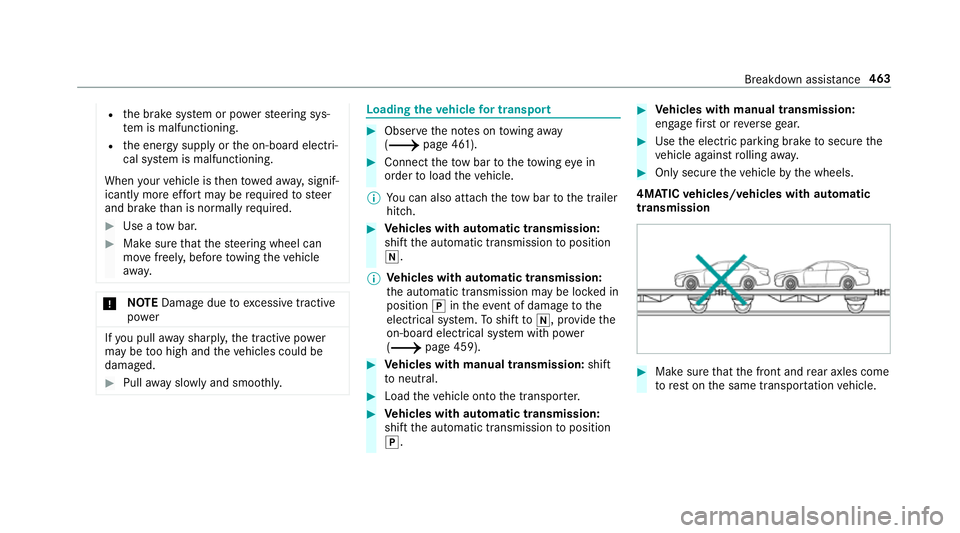
4MATIC vehicles/ vehicles with automatic
transmission #
Make sure that the front and rear axles come
to rest on the same transpor tation vehicle. Breakdown assis
tance 463
Page 469 of 621
If
th e newly inser ted fuse also blo ws, ha vethe
cause traced and rectified at a qualified special‐
ist workshop.
Ensure thefo llowing before replacing a fuse:
R The vehicle is secured against rolling away
R All electrical consumers are switched off
R The ignition is switched off
The electrical fuses are located in various fuse
bo xes:
R Fuse box in the engine compartment on the
left-hand side of theve hicle, when vie wed in
th e direction of tr avel (/ page 466)
R Fuse box in the front passenger foot we ll
(/ page 467)
R Fuse box in the cent reofthe boot
(/ page 468) Opening and closing
the fuse box in the
engine compa rtment Re
quirements:
R A dry clo thand a sc rewdriver are available. Obse
rveth e no tes on electrical fuses
(/ page 465).
Opening &
WARNING Risk of inju ryfrom using the
windscreen wipers while the engine bon‐
net is open
When the engine bonn etis open, and the
windscreen wipers are set in motion, you can
be trapped bythe wiper linkage. #
Alw ays switch off the windscreen wip‐
ers and ignition before opening the
engine bonn et. #
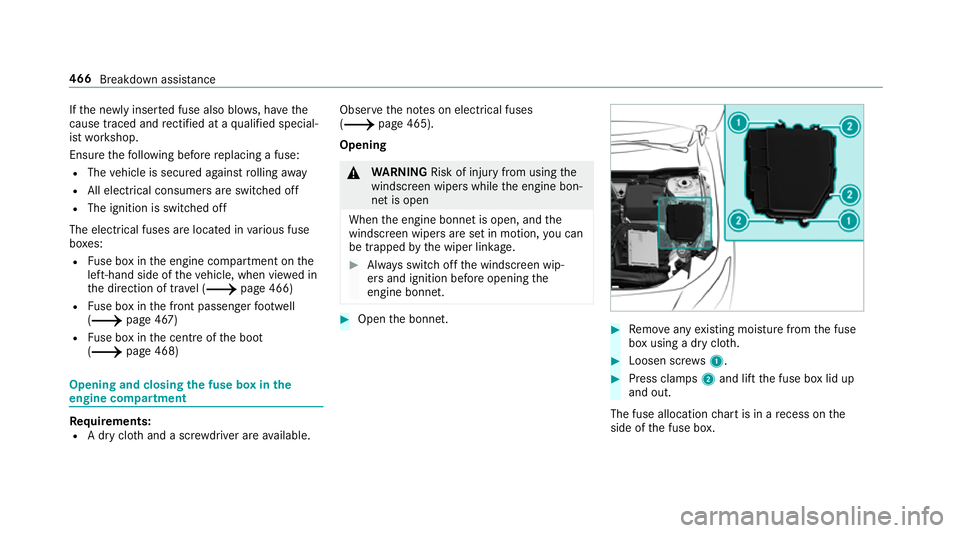
Open the bonn et. #
Remo veany existing moisture from the fuse
box using a dry clo th. #
Loosen scr ews1. #
Press clamps 2and lift the fuse box lid up
and out.
The fuse allocation chart is in a recess on the
side of the fuse box. 466
Breakdown assis tance