seat memory MERCEDES-BENZ A-CLASS SALOON 2018 Owners Manual
[x] Cancel search | Manufacturer: MERCEDES-BENZ, Model Year: 2018, Model line: A-CLASS SALOON, Model: MERCEDES-BENZ A-CLASS SALOON 2018Pages: 621, PDF Size: 10.5 MB
Page 5 of 621
Symbols
........................................................ 5At
agl ance .................................................... 6
Cockpit ........................................................... 6
Indica tor and warning lamps ........................ .10
Indicator and warning lamps ........................ .12
Overhead contro l panel ................................ 14
Door control panel and seat adjustment ....... 16
Emergencies and breakdowns ...................... 18Digital Owner's Manual
.............................20
Calling up the Digital Owner's Manual ..........20 Genera
l notes............................................. 22
Pr otection of the environment ......................22
Ta ke -ba ckof end-of-life vehicles ...................22
Mercedes-Benz Genuine Parts ......................23
Owner's Manual ............................................ 24
Operating saf ety .......................................... .24
Declaration of Conformity ............................ 25
Diagno stics connection ................................ 27
Qualified specialist workshop ....................... 27
Ve hicle registration ....................................... 28 Cor
rect use of theve hicle ............................28
Information on the REA CHregulation ........... 28
Implied warranty .......................................... .29
QR code forre scue card ...............................29
Data storage .................................................29
Copyright ...................................................... 31 Occupant saf
ety......................................... 32
Re stra int sy stem ...........................................32
Seat belts ..................................................... 34
Airbags ......................................................... 39
PRE-SAFE ®
sy stem ....................................... 46
Safely transporting children in theve hi‐
cle ................................................................. 47
No tes on pets in theve hicle .......................... 71 Opening and closing
.................................. 73
Ke y .............................................................. .73
Doo rs............................................................ 77
Boot .............................................................. 82
Side windo ws............................................... 85
Sliding sunroof ............................................. 89
Anti-theft pr otection .....................................94 Seats and
stowing ...................................... 97
No tes on the cor rect driver's seat posi‐
tion ............................................................... 97
Seats ............................................................ 98
St eering wheel ............................................ 105
Easy entry and exitfeature ........................ .106
Operating the memory function .................. 107
St ow age areas ............................................ 109
Cup holders ................................................ .115
Ashtr ayand cigar ette lighter ...................... .119
Soc kets ....................................................... 12 0
Wi reless charging of the mobile phone
and connection with theex terior aerial ...... 12 3
Fitting/removing thefloor mats ................. 12 5 Light and sight
......................................... 127
Exterior lighting .......................................... 127
Interior lighting ........................................... 13 5
Changing bulbs (on lyforve hicles with
halogen headlamp s) .................................... 13 6
Wi ndsc reen wipers and windscreen
wa sher sy stem ............................................ 13 9
Mir rors ........................................................ 141
Operating the sun visors ............................. 14 42
Contents
Page 20 of 621
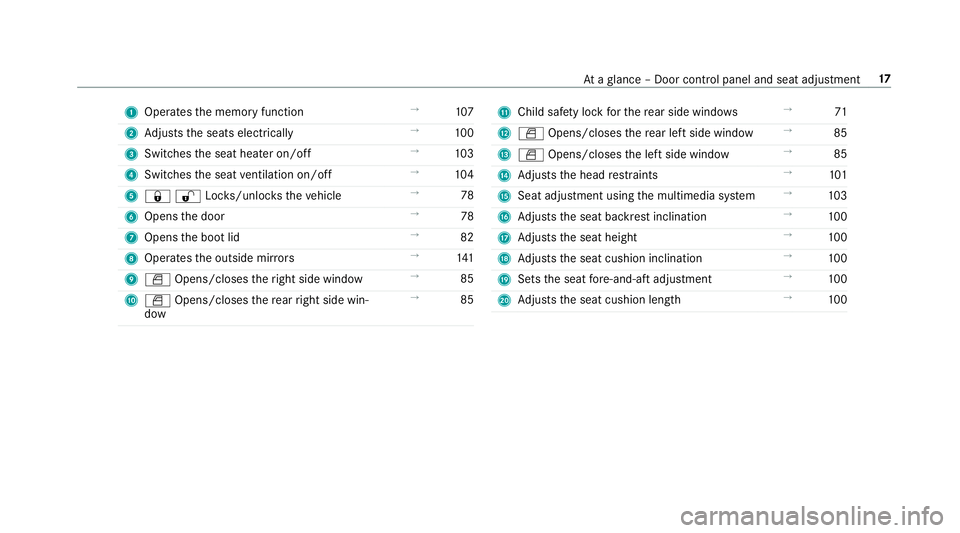
1
Operates the memory function →
107
2 Adjusts the seats electrically →
100
3 Switches the seat heater on/off →
103
4 Switches the seat ventilation on/o ff →
104
5 &%Loc ks/unloc kstheve hicle →
78
6 Opens the door →
78
7 Opens the boot lid →
82
8 Operates the outside mir rors →
141
9 W Opens/closes theright side window →
85
A W Opens/closes there ar right side win‐
dow →
85 B
Child saf ety lock forth ere ar side wind ows →
71
C W Opens/closes there ar left side wind ow→
85
D W Opens/closes the left side window →
85
E Adjusts the head restra ints →
101
F Seat adjustment using the multimedia sy stem →
103
G Adjusts the seat backrest inclination →
100
H Adjusts the seat height →
100
I Adjusts the seat cushion inclination →
100
J Sets the seat fore -and-aft adjustment →
100
K Adjusts the seat cushion length →
100 At
aglance – Door control panel and seat adjustment 17
Page 49 of 621
-
Ifth ePA SSENGER AIR BAG OFF indicator
lamp is lit continuously: the person of
smaller stature should not use the front
passenger seat. &
WARNING Risk of inju ryor death when
th ePA SSENGER AIR BAG OFF indicator
lamp is lit
If th ePA SSENGER AIR BAG OFF indicator
lamp remains lit af terth e sy stem self-test,
th e front passenger airbag is disabled. It will
not be deplo yed in theeve nt of an accident.
In this case, the front passenger airbag can‐
not per form its intended pr otective function,
e.g. when a person is seated in the front
passenger seat.
That person could, forex ample, come into
con tact wi th theve hicle interior, especially if
th e person is sitting too close tothe cockpit.
If th e front passenger seat is occupied,
alw ays ensure that:
R The classification of the person in the
front passenger seat is cor rect and the front passenger airbag is enabled or disa‐
bled in accordance with
the person in the
front passenger seat.
R The person is sea ted proper lywith a cor‐
re ctly fastened seat belt.
R The front passenger seat has been mo ved
as far back as possible. Be sure
toalso obse rveth efo llowing fur ther
re lated subjects:
R Child restra int sy stem on the front passenger
seat (/ page 68).
R Suitable positioning of thech ild restra int sys‐
te m (/ page54). PR
E-SAFE ®
sy stem PRE-
SAFE®
(anticipa tory occupant pr otec‐
tion) PRE-
SAFE®
is able todetect cer tain critical driv‐
ing situations and implement pre-em ptive meas‐
ures toprotect theve hicle occupants. PRE-SAFE
®
can implement thefo llowing meas‐
ures independently of each other:
R Tightening the seat belts on the driver's seat
and front passenger seat.
R Closing the side windo ws.
R Vehicles with sliding sunroof: closingthe
sliding sunroof.
R Vehicles with memory function: moving
th e front passenger seat toa more favo ura‐
ble seat position.
R Vehicles with multicontour seat: increas‐
ing the air pressure in the seat side bols ters
of the seat backrest.
R PRE-SAFE ®
Sound: pr ovided that the multi‐
media sy stem is switched on, generates a
brief noise signal tostimulate the innate pro‐
te ctive mechanism of a person's hea ring.
* NO
TEDama gecaused byobjects in the
fo ot we ll or behind the seat The automatic adjustment of
the seat posi‐
tion may result in damage tothe seat and/or
th e object. 46
Occupant saf ety
Page 103 of 621
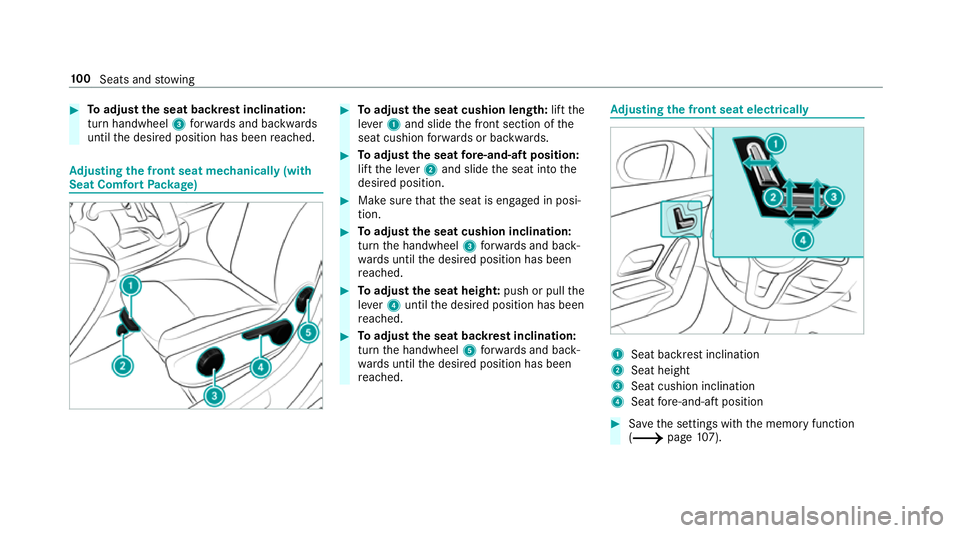
#
Toadjust the seat backrest inclination:
turn handwheel 3forw ards and backwards
until the desired position has been reached. Ad
justing the front seat mechanically (with
Seat Comfort Package) #
Toadjust the seat cushion length: liftthe
le ve r1 and slide the front section of the
seat cushion forw ards or backwards. #
Toadjust the seat fore -and-aft position:
lift the le ver2 and slide the seat into the
desired position. #
Make sure that the seat is engaged in posi‐
tion. #
Toadjust the seat cushion inclination:
turn the handwheel 3forw ards and back‐
wa rds until the desired position has been
re ached. #
Toadjust the seat heigh t:push or pull the
le ve r4 until the desired position has been
re ached. #
Toadjust the seat backrest inclination:
turn the handwheel 5forw ards and back‐
wa rds until the desired position has been
re ached. Ad
justing the front seat electrically 1
Seat ba ckrest inclination
2 Seat height
3 Seat cushion inclination
4 Seat fore -and-aft position #
Save the settings with the memory function
(/ page107). 100
Seats and stowing
Page 110 of 621
th
at no one has any body parts in the
sweep of the driver's seat.
If th ere is a risk of becoming trapped bythe
driver's seat: #
Press the seat adjustment switch.
The adjustment process is stopped. #
Never lea vechildren unat tended in the
ve hicle. #
When leaving theve hicle, alw aysta ke
th eke y with you and lock theve hicle.
This also applies tothe Digital Vehicle
Ke y if the "Digital Vehicle Key" function
is activated via Mercedes me connect. Yo
u can stop the adjustment process bypress‐
ing one of the memory function position buttons. &
WARNING Risk of becoming trapped
du ring acti vation of the easy entry and
ex itfeature bychildren
If ch ildren activate the easy entry andexit
fe ature, they can become trapped, pa rticu‐
lar lywhen unat tended. #
Never lea vechildren unat tended in the
ve hicle. #
When leaving theve hicle, alw aysta ke
th eke y with you and lock theve hicle. When
the easy entry andexitfeature is active,
th e driver's seat will mo vebackwards and the
backrest will be mo vedto ast eeper position
when:
R you swit ch the ignition off when the driver's
door is open
R you open the driver's door when the ignition
is switched off
% The driver's seat will mo vebackwards only if
it is not already in there armost position.
The seat backrest will mo veforw ards on lyif
it is not already in the frontmost position.
The driver's seat will mo veback tothe last drive
position when:
R you swit ch the ignition on when the driver's
door is closed
R you close the driver's door when the ignition
is switched on The last drive position will be
stored when:
R you swit chthe ignition off
R you call up the seat settings via the memory
function
R you sa vethe seat setting using the memory
function Setting
the easy entry and exitfeature Multimedia sy
stem:
4 © 5
Settings 5
Fahrzeug (Vehicle)
5 Easy Entry/Exit #
Activate or deacti vate the function. Operating
the memory function &
WARNING Risk of an accident if the
memory function is used while driving
If yo u use the memory function on the driv‐
er's side while driving, you could lose cont rol
of theve hicle as a result of the adjustments
being made. Seats and
stowing 107
Page 111 of 621
#
Only use the memory function on the
driver's side when theve hicle is station‐
ar y. &
WARNING Risk of entrapment when set‐
ting the seat with the memory function
When the memory function adjusts the seat,
yo u and other vehicle occupants – particu‐
lar lych ildren – could become trapped. #
During the adjustment process of the
memory function, make sure that no
one has any body parts in the sweep of
th e seat. #
If someone becomes trapped, press a
memory position switch or seat adjust‐
ment switch immediately. &
WARNING Risk of entrapment if the
memory function is activated bychildren
Children could become trapped if they acti‐
va te the memory function, particularly when
unattended. #
Never lea vechildren unat tended in the
ve hicle. #
When leaving theve hicle, alw aysta ke
th eke y with you and lock theve hicle.
This also applies tothe digital vehicle
ke y if the "Digital Vehicle Key" function
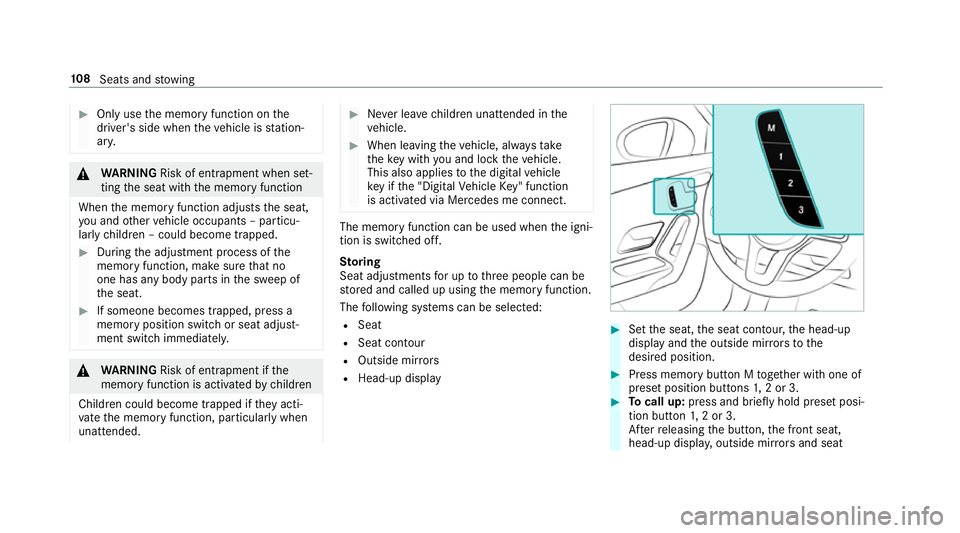
is activated via Mercedes me connect. The memory function can be used when
the igni‐
tion is switched off.
St oring
Seat adjustments for up tothre e people can be
st ored and called up using the memory function.
The following sy stems can be selected:
R Seat
R Seat conto ur
R Outside mir rors
R Head-up display #
Set the seat, the seat conto ur,the head-up
display and the outside mir rors to the
desired position. #
Press memory button M toge ther with one of
preset position buttons 1,2 or 3. #
Tocall up: press and brief lyhold preset posi‐
tion button 1,2 or 3.
Af terre leasing the button, the front seat,
head-up displa y,outside mir rors and seat 108
Seats and stowing
Page 115 of 621
If
th e seat backrests are not engaged and loc ked
in place, the lock verification indicator will be
re d.
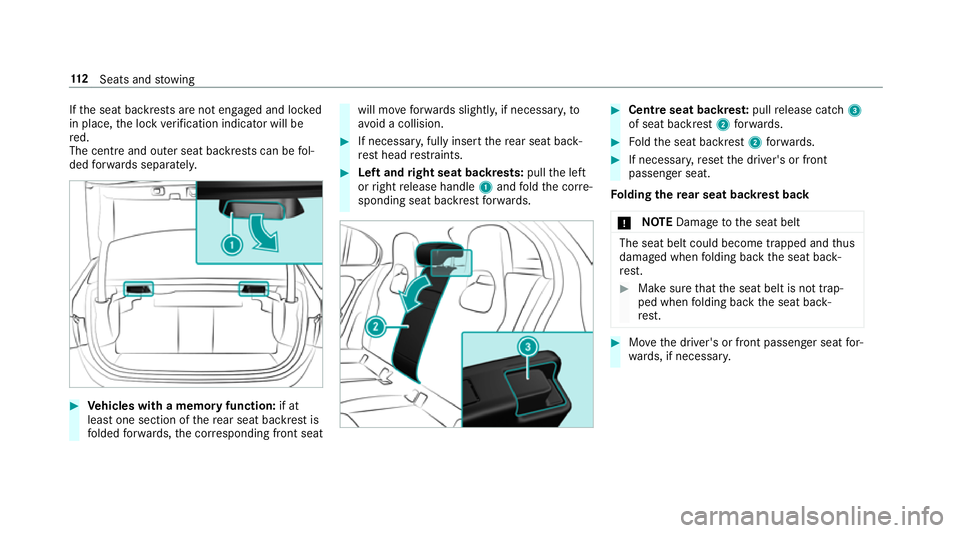
The centre and outer seat backrests can be fol‐
ded forw ards separatel y.#
Vehicles with a memory function: if at
lea stone section of there ar seat backrest is
fo lded forw ards, the cor responding front seat will mo
veforw ards slightl y,if necessar y,to
av oid a collision. #
If necessar y,fully insert there ar seat back‐
re st head restra ints. #
Left and right seat backrests: pullthe left
or right release handle 1and fold the cor re‐
sponding seat backrest forw ards. #
Cent reseat backres t:pull release cat ch3
of seat backrest 2forw ards. #
Foldthe seat backrest 2forw ards. #
If necessar y,reset the driver's or front
passenger seat.
Fo lding there ar seat backrest back
* NO
TEDama getothe seat belt The seat belt could become trapped and
thus
damaged when folding back the seat back‐
re st. #
Make sure that the seat belt is not trap‐
ped when folding back the seat back‐
re st. #
Movethe driver's or front passenger seat for‐
wa rds, if necessar y. 11 2
Seats and stowing
Page 299 of 621
Changing
the ar rangement of applications on
th e home screen #
Call up the home screen. #
Touch and hold an application on the
to uchsc reen until symbols appear. #
Tap on = or; and mo vethe applica‐
tion in the menu. #
Tap on ø. Profile
Note
s on profiles &
WARNING Risk of becoming trapped
du ring adjustment of the driver's seat
af te r calling up a driver profile
Selecting a profile may trigger an adju stment
of the driver's seat tothe position sa ved
under the profile. You or other vehicle occu‐
pants could be injured in the process. #
Make sure that when the position of
driver's seat is being adjus ted using the
multimedia sy stem, no people or body parts are in
the seat's range of mo ve‐
ment.
If th ere is a risk of someone becoming trap‐
ped, stop the adjustment process immedi‐
ately: #
a)Tapth ewa rning message on the
media displa y.
or #
b) Press a memory position button or a
seat adjustment switch in the driver's
door.
The adjustment process is stopped. The driver's seat is equipped with an anti-entrap‐
ment feature.
If th e driver's door is open, the driver's seat will
not be set af ter calling up the driver's profile.
Overview of profiles
Using the multimedia sy stem up toseven pro‐
fi les can be created in theve hicle.
Profiles store your personal vehicle settings and
settings forth e multimedia sy stem. If
th eve hicle is used byseveral drivers, the
driver can select their profile before the journe y,
without changing the settings of other drivers.
Yo u can select the profile:
R when entering (/ page 299)
R using the home screen (/ page 289)
The profile settings are activated as soon as a
profile is selected.
% When you call up your profile, the driver's
seat and outside mir rors can be set.
If yo u call up your profile when driving then
th e driver's seat position will not be adjus‐
te d.
Yo u can cancel the setting process with the
fo llowing actions:
R Tap on thePositioning seat and steering
wheel. Please tap to cancel. warning on
th e media displa y.
R Press one of the seat operating buttons
in the driver's door. 296
MBUX multimedia sy stem
Page 300 of 621
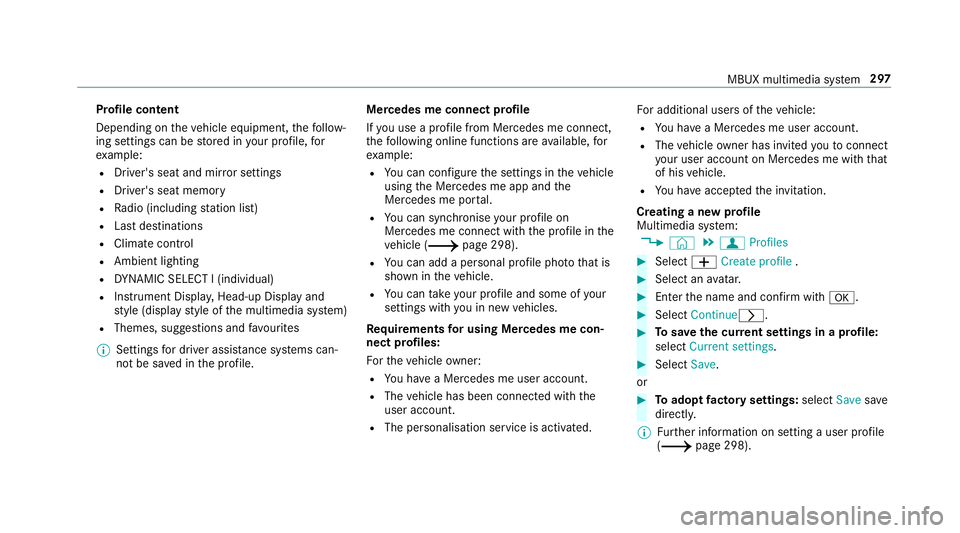
Profile content
Depending on
theve hicle equipment, thefo llow‐
ing settings can be stored in your profile, for
ex ample:
R Driver's seat and mir ror settings
R Driver's seat memory
R Radio (including station list)
R Last destinations
R Climate control
R Ambient lighting
R DYNA MIC SELECT I (individual)
R Instrument Displa y,Head-up Display and
st yle (display style of the multimedia sy stem)
R Themes, suggestions and favo urites
% Settings for driver assi stance sy stems can‐
not be sa ved in the profile. Mercedes me connect profile
If yo u use a profile from Mercedes me connect,
th efo llowing online functions are available, for
ex ample:
R You can configure the settings in theve hicle
using the Mercedes me app and the
Mercedes me por tal.
R You can syn chronise your profile on
Mercedes me connect with the profile in the
ve hicle (/ page 298).
R You can add a personal profile pho tothat is
shown in theve hicle.
R You can take your profile and some of your
settings with you in new vehicles.
Requ irements for using Me rcedes me con‐
nect profiles:
Fo rth eve hicle owner:
R You ha vea Mercedes me user account.
R The vehicle has been connected with the
user account.
R The personalisation service is activated. Fo
r additional users of theve hicle:
R You ha vea Mercedes me user account.
R The vehicle owner has invited youto connect
yo ur user account on Mercedes me with that
of his vehicle.
R You ha veaccep tedth e invitation.
Creating a new profile
Multimedia sy stem:
4 © 5
f Profiles #
Select WCreate profile . #
Select an avatar. #
Enterth e name and confi rmwith a. #
Select Continuer . #
Tosave the cur rent settings in a profile:
select Current settings. #
Select Save.
or #
Toadopt factory settings: selectSavesave
directly.
% Further information on setting a user profile
(/ page 298). MBUX multimedia sy
stem 297
Page 331 of 621
A prom
ptappears again asking whe ther you
re ally wish toreset. #
Select Yes.
The multimedia sy stem is reset tothefa ctory
settings. If you ha veset a PIN foryo ur sys‐
te m, this will also be reset. Fi
t & Healthy Setting ENE
RGIZING seat kinetics Re
quirements:
R These functions are available on lyfor fully
electric seats with a memory function.
Multimedia sy stem:
4 © 5
Comfort 5
Seat comfort #
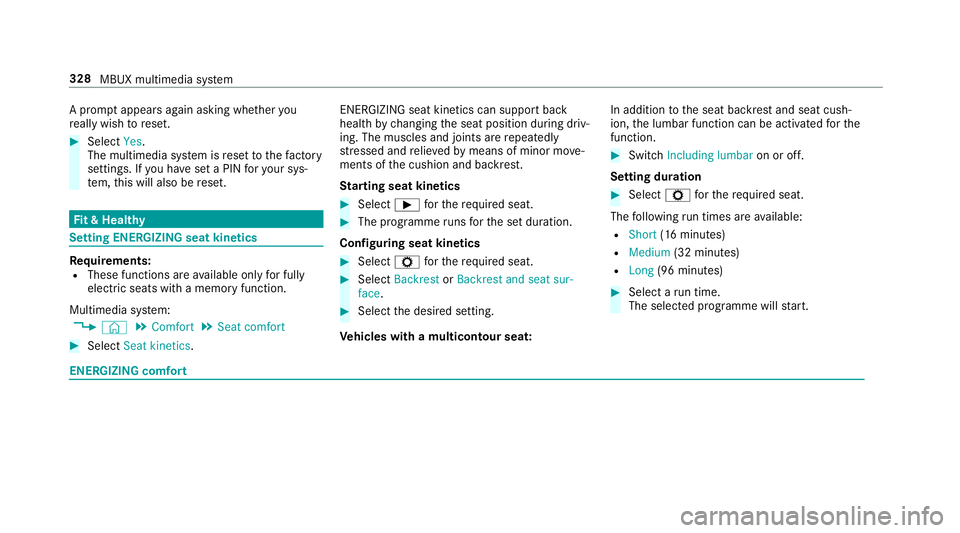
Select Seat kinetics . ENERG
IZING seat kinetics can support back
health bychanging the seat position during driv‐
ing. The muscles and joints are repeatedly
st re ssed and relie vedby means of minor mo ve‐
ments of the cushion and backrest.
St arting seat kinetics #
Select Ìforth ere qu ired seat. #
The programme runs forth e set duration.
Configuring seat kinetics #
Select Zforth ere qu ired seat. #
Select Backrest orBackrest and seat sur-
face . #
Select the desired setting.
Ve hicles with a multicontour seat: In addition
tothe seat backrest and seat cush‐
ion, the lumbar function can be activated forthe
function. #
Switch Including lumbar on or off.
Setting duration #
Select Zforth ere qu ired seat.
The following run times are available:
R Short (16 minutes)
R Medium (32 minutes)
R Long (96 minutes) #
Select a run time.
The selected programme will start. ENERGIZING comfort328
MBUX multimedia sy stem