display MERCEDES-BENZ AMG GT 4-DOOR COUPE 2019 Service Manual
[x] Cancel search | Manufacturer: MERCEDES-BENZ, Model Year: 2019, Model line: AMG GT 4-DOOR COUPE, Model: MERCEDES-BENZ AMG GT 4-DOOR COUPE 2019Pages: 530, PDF Size: 45.15 MB
Page 257 of 530

#
Tomut e:pres svo lume control 1.
The 0063 symbol appearsin thest atus line
of themedia display.
Yo uwill also hear traffic annou ncements and
na vig ation annou ncements even when the
sound ismut ed. #
Toswitc hon: chang eth emedia sourceor
tur nvo lume control 1. Ad
jus tingthe volum e On
themultifunc tionsteer ing wheel On
themultimedia system #
On themu ltifunct ionsteer ing wheel: turn
vo lume control 1.
The volume ofthecur rent radio ormedia
sour ceisset.The volume ofother audi o
sour cescan beadjus tedsepar ately.
Ad jus tth is in thefo llo wing situat ions:
R during atraf fic annou ncement R
during ana vig ation anno uncement
The volume ofthena vig ation announ ce‐
ment chang esinacc ordanc ewit hth evo l‐
ume ofthecur rent med iasou rce.
R during ate lephon ecall
R when entering orexitin gapar kingspace
while using ActivePa rking Assist #
On themu ltim edia system: press rock er
switc h1 upordown.
The volume isinc reased orreduced.
When adjustingth evo lume, thedispla ybut‐
to nto thelef tof thero ck er switc hsho wsthe
cur rent volume.
or #
Selec tSyst eminthemultimedia system. #
Select Audio. #
Select avo lume setting. #
Setth evo lume. Multim
ediasystem 255
Page 259 of 530
Ex
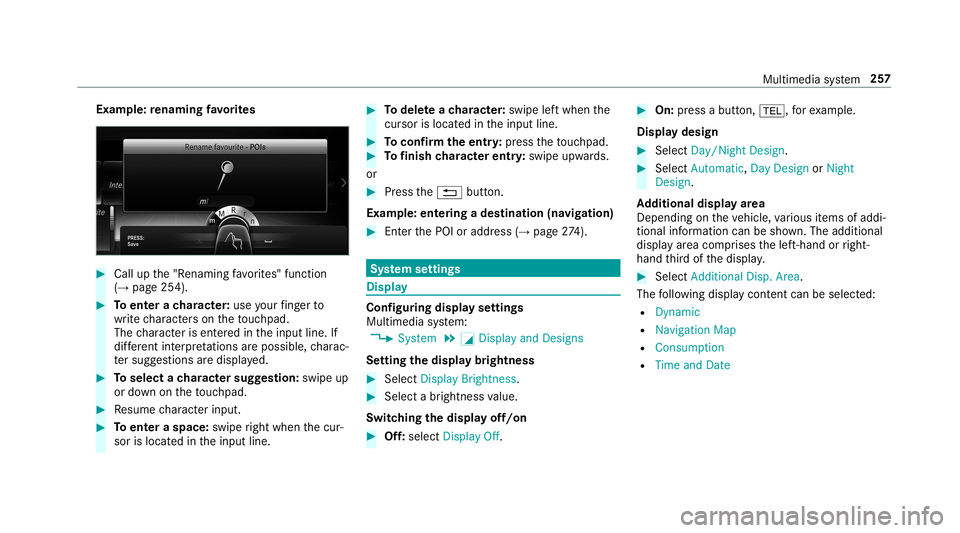
am ple: renaming favo rite s #
Call upthe"R enaming favo rite s" function
(→ pag e25 4). #
Toent erach aract er:use your fing er to
wr ite ch aract erson theto uc hpad.
The charact erisent ered intheinput line. If
dif fere nt interpr etatio nsareposs ible, charac‐
te rsugg estions aredisp laye d. #
Toselect ach aract ersugg estion :swi peup
or down ontheto uc hpad. #
Resume charact erinput. #
Toent eraspa ce:swipe right when thecur‐
sor islocat edintheinput line. #
Todel eteach aract er:swi peleftwhe nth e
cur sor isloca tedin theinput line. #
Toconf irm theentr y:press theto uc hpad. #
Tofinish charact erentr y:swipe upwards.
or #
Press the0038 button.
Ex am ple: entering ades tinat ion(navigation) #
Enterth ePOI oraddr ess(→pag e27 4). Sy
stem settings Displa
y Conf
iguringdisp layse ttings
Multi media system:
, System .
0043 Display andDesign s
Se tting thedisp laybr ight ness #
Sele ctDis play Bright ness. #
Sele ctabr ight nessva lue.
Switc hingthedisp layof f/on #
Off:selec tDis play Off. #
On: press abutt on,002B, forex am ple.
Displ aydes ign #
Select Day /Nig htDesi gn. #
Select Autom atic,Day DesignorNig ht
Desi gn.
Ad diti onaldispl ayarea
Dependi ngon theve hicle, various items ofaddi‐
tional information canbesho wn. The additional
displa yar ea com prises thelef t-hand orright-
hand third of thedispla y. #
Select Addi tiona lDisp .Area .
The follo wing displa ycon tent can beselect ed:
R Dyna mic
R Navig ation Map
R Consu mpti on
R Time and Date Mu
ltimed iasystem 25
7
Page 263 of 530
De
vice hasalr ead ybeen connect ed: #
Toaut omatic allyco nne ct:high light aWi -Fi
ne tworkin thelis t. #
Activate0080 Connect Automatica lly0073 . #
Toconnect :high light aWi -Fi networkin the
lis t. #
Selec t0080 Connect.
The connection ises tablished again. These
func tionsar epossible whenthede vice has
alr eady been connect edtotheWi -Fi network.
Se tting upaWi -Fiho tspo t
Mul timed iasystem:
, System .
ö Connec tivity
Conf iguringthemu ltim edia system asaWi -
Fi ho tspo t
The type ofconnection established depends on
th ede vice tobe con nected. The func tion must
be suppor tedby themultimedia system and by
th ede vice tobe con nected. The type ofcon nec‐
tion established mustbe select edon themulti‐
media system and onthede vice tobe con nec‐
te d. #
Select SetUpHot spot. #
Highlight ConnectDevic eto Vehicle Hotspot.
Gener atingaWPS PIN #
Select 0080Connec tvia WPS PINGenera-
tion . #
Enterth ePIN showninthemedia displayon
th ede vice tobe con nectedand confirm .
Connect ingusin gaWPS PIN #
Sele ct0080 ConnectviaWPS PINInput. #
Sele ctEnter WPS PIN. #
Enterth ePIN that issho wnontheex tern al
de vic e's displa yon themultimedia system. #
Select Continue.
Connecting usingabutt on
Re quiremen ts
R This function isonl yav ailable inaWi -Fi fre‐
qu ency of2.4 GHz. #
Select 0080Connec tvia WPS PBC. #
Press theWPS buttononthede vice tobe
con nectedor select Connec t. #
Select Continueinthemultimedia system.
Connecting usingasecur itykey #
Select Connect DevicetoVeh icleHotsp ot.
A secu rity keyis disp laye d. #
Select theve hicle from thede vice tobe con ‐
nec ted. The vehicle isdispla yedwit hth e
SSID MBHotsp otXXX XX. #
Enterthesecur itykeywhic his sho wninthe
media display on thede vice tobe con nected. #
Conf irm theent ry.
Gene ratin gane wse cur itykey: #
Select Set UpHotsp ot. #
Select Genera teSecu rityKey.
A connecti onwillbe established withth e
ne wly crea tedsecur itykey. #
Tosave asec urity key:select Save.
When ane wsecur itykeyis save d, all existin g
Wi -Fi conne ctionsareth en discon nected.If
th eWi -Fi conne ctionsarebe ing re-es tab‐
lished, thene wsecur itykeymus tbe entere d. Multimedia
system 26
1
Page 264 of 530
Managin
gCOMA NDTouc hde vic es Re
quirement s:
R The COMAND Touc happ isins talled onthe
ex tern al de vic e(e. g.table tor smar tphon e).
R Wi-Fi isacti vated(→ pag e260) andthemul‐
timedia system iscon figur edasaWi -Fi hot‐
spo t(→ page 261).
Mul timedi asy stem:
, System .
COMAND Touch
Connecting andauthor izing ane wde vice #
Select AuthorizeaNew Devic e. #
Select Connec tNew Devic e. #
Enterth esecur itykeyin theex tern al de vic e.
The Please start COMA NDTouc hon your
devi ceand follow theins truct ions.mes sage
appear s. #
Select Con tinue. #
Accep tth econ nect ionrequ estfr om thene w
de vice. #
Enterth ePIN shownontheex tern al de vic e.
The devic eis aut hor ized. Au
thorizing aconnect eddevice #
Sele ctAut hori zeaNew Device.
The devic es already connectedar edispla yed. #
Select Continue Using Connec tedDevic es.
The Please startCOMAND Touchonyour
device andfollow theinstruct ions. messag e
appear s. #
Select Continue. #
The connection requ estfr om thede vice
Acc ept. #
Enterth ePIN shownontheex tern al de vic e.
The devic eis aut hor ized.
De-a uthor izin gth ede vice #
Sele ctan aut hor ized devic efrom thelis t.
A pr om ptwill appear askingwhe ther you
wo uld liketo de-aut horize theselect ed
de vice. #
Select Yes.
The device isde-aut horized. Ac
tiv atin g/deac tivatin gch ild safetyloc k Multimedi
asy stem:
, System .
Parent alContr ol
Loc king anextern al de vic e #
Select anextern al de vic e. #
Select Lock.
The devic econ nectedvia theCO MAND
To uc happ isloc ked0073 orunloc ked0053. Sy
stem langu age No
teson thesy stem langu age
This function allowsyouto determ ine thelan‐
guag efo rth emenu displaysand thena vig ation
announ cements.The select edlanguag eaf fects
th ech aract ersav ailable forentr y.The navig ation
announc ementsar eno tav ailable inall lan‐
guag es.Ifalang uageis no tav ailable, thena vig a‐
tion announ cementswill beinEn glish. 262
Multim ediasystem
Page 266 of 530
Ac
tiv atin g/deac tivatin gPI N protection Multi
media system:
, System .
PIN Protec tion
Se tting thePIN #
Sele ctSet PIN. #
Entera fo ur -di git PIN. #
Enterth efo ur -di git PIN again.
If bo th PINs match,PIN protect ion isactiv e.
Changing thePIN
Re quiremen ts
R Acur rent PIN mustbe set. #
Select Change Settings. #
Enterth ecur rent PIN . #
Select Chang ePIN . #
Seta ne wPIN .
Ac tiv atin gPI N protection fordat aex por t #
Sele ctCh ange Setting s.
Co nfirm with thePIN. #
Select ProtectData Export .
Ac tivate0073 ordeacti vate 0053 thefunc tion.
Un bloc king thePIN
Re quiremen ts:
R Ther eis an Interne tcon nection .
R AMer cedes meaccount exists at htt p:/ /
www .mercedes.me .
R The Person alization service isactiv e
(→ pag e265).
If th ePIN has been entered incor rectly thre e
tim es,th ePIN willbebloc ked. Youcan have a
sing le-use passwordsent toyouvia the
Mer cedes meconn ectonline portalto rese tth e
PIN protect ion. #
Select Unbloc kPIN. #
Enterth esing le-use password.
PIN protect ion isrese t,and youcan seta
ne wPIN.
% Alternat ivel y, yo ucan have PIN protect ion
re se tat an aut hor ized Mercedes-Benz Cen‐
te r. User
profile Se
tting auser profile
Multimedia system:
, System .
g Person alization
Displa yingauser profile when star ting
If th is func tion isact ive, apr om ptappear swhen
st ar tin gth esy stem asking whichuser profile to
use. #
Select Display Profile Select ion afterStart . #
Activate0073 ordeacti vate 0053 thefunc tion.
Selecting auser profile #
Select GuestProfile orindividual profile 003B.
% Some settings from theuser profile areonl y
loaded whentheve hicle isstatio naryor
when theignition isswitc hedon.
Au tomatic synchronizat ion
Eac htime theignition isswitc hedoffor on, the
indiv idual userprofiles aresync hroniz edon the
multime diasystem and ontheser ver.This
ensur esthat thelat estuser profiles arealw ays
av ailable. 26
4
Mult imed iasystem
Page 273 of 530
R
num berof Trac kRa ces, Drag Races and
la ps driven
R maxi mum speed
Co nne cting amobi lede vic evia the TRACK
PA CE app
The TRACKPACE app makesitposs ibletorecor d
vid eos and tosync hronize them withstor ed
tr ac ks. #
Select theTRACK PACEApp.
Alr eady author ized devices aredispla yedin
th elis t. #
Select Authorizenew device.
Av ailable devic es aredispla yed. #
Startth eTRA CKPACE app onthede vice to
be con nectedand follo wtheins truction s. #
Conf irm theaut hor ization prom pt. #
Enterthecode displa yedon thede vice.
The device isaut hor ized.
or #
Select ade vice that isalr eady author ized.
The devic eis de- aut hor ized.
Se tting theTR AC KPA CE displa yin thehead -
up disp lay #
Sele ctHUD Contents. #
Activate0073 ordeacti vate 0053 thedesir ed
con tents.
The cont ents intheHead-up Displayar e
adap ted.
% Forfur ther information ontheHead-up Dis‐
pla y,see (→pag e23 7) (→ pag e238).
Se tting acous ticfeedba ck #
Select Acou sticfeedba ck.
The follo wing settings areav ailable:
R Loud
R Medium
R Quiet R
Off #
Select ase tting .
Ac tiv atin g/deac tivatin gadditi onalinfo rm a‐
tion #
Activate0073 ordeacti vate 0053 Display help.
Wh enadditio nal informa tionis acti vated, popups
pr ov ide informatio non theindividual menus. #
Conf irm popups withOK orselect Donot dis-
play.
Calling upinformat ion #
Select Info.
The follo wing informatio nis displa yed:
R Softwareve rsion
R Memor yused
R Totalnumb eroftrac kssave d
R Totalnumb erofraces driven Fi
t& Hea lthy ENE
RGIZIN Gcomf ort Mult
imed iasystem 27
1
Page 275 of 530
%
Please note that theav ailable prog rams and
th eassociat edfunc tionsar edependent on
yo ur vehicle equipment. Depending onyour
eq uipme nt,fe we rfunctions maybe availa‐
ble.
St arting theENER GIZIN Gcomf ortpr og ram
Re quirement s:
R The ignit ionisswitc hedon.
% ENE RGIZING comfortis available approx‐
imat elyfive minut esafte rst ar tin gth emulti‐
media system.
Multimedia system:
, Vehicle .
ENE RGIZING Comfort
Selecting aseat #
Select SeatSelect ion. #
Select thedesir edseat orAll Seats 0073.
St arting apr og ram #
Select Refres h,Wa rmth, Vitality, Enjoym ent
or Wel l-being.
The select edprogr am willru nfo rte nminu tes. Conf
iguringapr og ram #
Call upfurther option sÜ forth edesir ed
pr ogr am. #
Switc hth efunc tionsincluded inthepr ogr am
on 0073 oroff0053.
St arting traini ng #
Select Training. #
Select MuscleRelaxati on,Mus cleStimul a-
tion orBala nce.
The selected trai ning videostar ts and isdis‐
pla yedin themedia display. #
Select FullScree n:Vid eo.
The trai ning video isdispl ayed infull screen.
% Formor einf ormation onpau sing orskippi ng
th ro ugh videos,see (→pag e32 9).
If ,dur ing anact ive pr og ram, afunction requ ire‐
men tis no long erme t,acor responding message
appea rs.The activeprogr am iscanc eled. Na
vig ation Switc
hingnavig ation on Multimedia
system:
, Navigation #
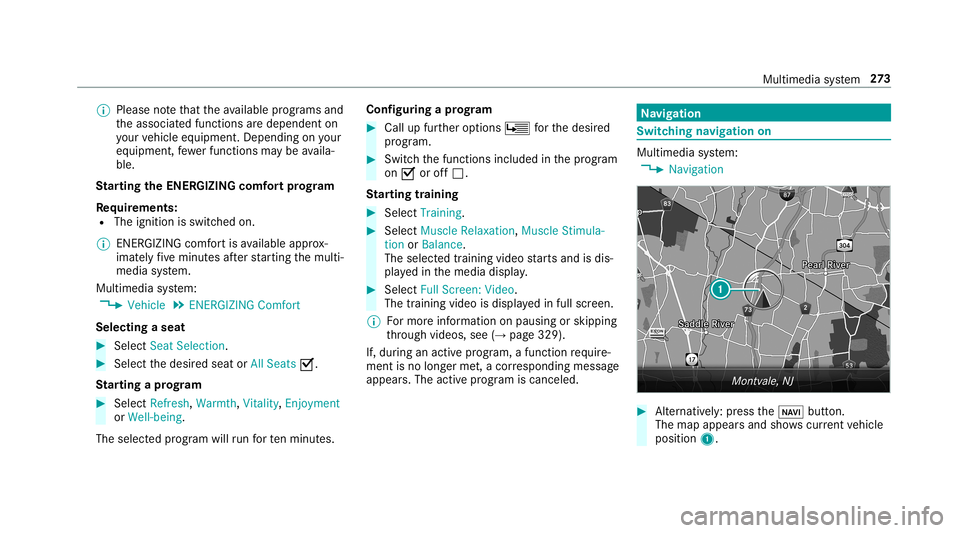
Alternativ ely:press the00CB button.
The map appear sand showscurrent vehicle
position 1. Multimedia
system 27
3
Page 288 of 530
dr
ops down to0feet (0 m) and thecur rent
ve hicle position symbolhasreac hed the
highlight edchang e-of-dir ect ion poin t.
When thech ang eof dir ect ion iscom plete,
th emap appear sin full-scr eenmode.
% Chang esofdir ect ion arealso showninthe
Ins trument Display.
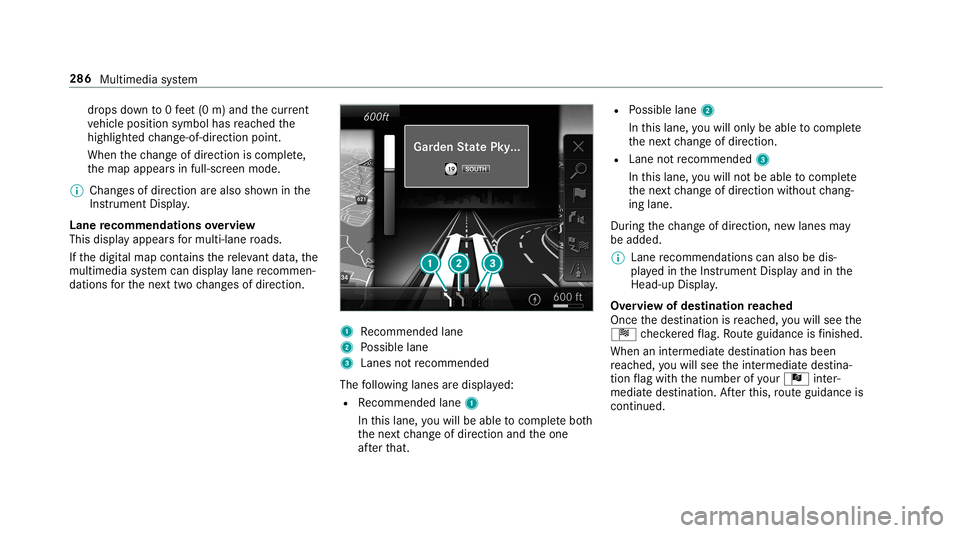
Lane recomm endationsov ervie w
This displa yappear sfo rmulti -lane roads.
If th edigit almap contains there leva nt data,th e
multime diasystem can displa ylane recomme n‐
da tions forth ene xt twoch ang esofdir ect ion. 1
Recomme ndedlane
2 Possible lane
3 Lanes notre comme nded
The follo wing lanes aredispla yed:
R Recomme ndedlane 1
In this lane, youwill beable tocom plet ebo th
th ene xt chang eof dir ect ion and theone
af te rth at. R
Possible lane2
In this lane, youwill onlybe able tocom plet e
th ene xt chang eof dir ect ion.
R Lan eno tre comme nded3
In this lane, youwill notbe able tocom plet e
th ene xt chang eof dir ect ion without chang ‐
ing lane .
Dur ing thech ang eof dir ect ion,ne wlane sma y
be added.
% Lanere comme ndations canalso be dis‐
pl ay ed intheIns trument Displayand inthe
Hea d-up Display.
Ov ervie wof des tinat ionreac hed
Once thedes tinat ionisreac hed, youwill see the
Í checkeredflag. Routeguidan ceisfinis hed .
Whe nan intermed iate des tination hasbeen
re ac hed, youwill see theint ermediat edes tina‐
tion flag withth enumber ofyour Î inter‐
med iatedes tinatio n.Afterth is, routeguidan ceis
co ntinue d. 286
Multimed iasystem
Page 290 of 530
#
Select Nav igati on and Traffic Announce -
ments . #
Swi tchAud ioFad eou tDuri ngVoi ceGuidance
on 0073 oroff0053.
Re peati ngnavig atio nanno unceme nts
Re quirement s:
R Aro utehas already been creat ed.
R Routeguidan ceisact ive.
Mult imed iasystem:
, Navigation #
Select !Voice Guidance . #
Select #Voice Guidance .
The current navig ation anno uncement is
re peat ed.
% Youcan add andcallupthis func tion asa
fa vo rite und erRepeat VoiceGuidan ce.
Cancel ingrout eguidanc e
Re quirement s:
R Aro utehas already been creat ed.
R Routeguidan ceisact ive. Mult
imed iasystem:
, Navigation #
Select %Cancel RouteGuidance .
Ov ervie wof routeguidanc eto an off-r oad
des tinatio n
Of f-road destinatio n:thedes tinat ioniswit hin
th edigit almap. However,th emap contains no
ro ads that lead tothedes tinat ion.
Yo ucan enterof f-r oad destinations onthemap.
Ro uteguidan ceguides youfo ras long aspossi ‐
ble withna vig ation announcements anddisplays
on roads that arekn ow nto themultimedia sys‐
te m.
Shor tlybef oreyo ure ac hth elas tkn ow npo sitio n
on themap, youwill hear the"Please follo wthe
dir ect ion arrow "ann oun cem ent.The displ ay
sho wsadir ect ion arrow and thelinear distance
to thedes tinat ion.
Ov ervie wof routeguidanc efrom anoff-r oad
loc ation toades tinatio n
Of f-road position: thecur rent vehicle position is
locat edwithin thedigit almap onroads that are
no tav ailable. When
routeguidan cebegin sth efo llo wing dis‐
pla ysappear :
R The Road NotMapped messageis sho wn.
R Adir ect ion arro w sho wing thelinear direc‐
tion tothePOI.
When theve hicle isbac kon aro ad know nto the
multime diasystem, routeguidan cecontinue sas
no rm al.
Ov ervie wof off-ro ad status during rout e
guidanc e
Due toroadw orks ,fo rex am ple, ther ema ybe dif‐
fe re nces betwee nth edat aon thedigit almap
and theactual courseofthero ad. Insuc hcas es,
th emultimedia system will temp orarily be
unable tolocat eth eve hicle's current positio non
th edigit almap. Thevehicle isoff-r oad.
When theve hicle isoff-r oad, thefo llo wing dis‐
pla ysaresho wn:
R theRoad NotMapped message
R adir ect ion arrow showing thelinear direct ion
to thePOI 288
Multimedia system
Page 291 of 530
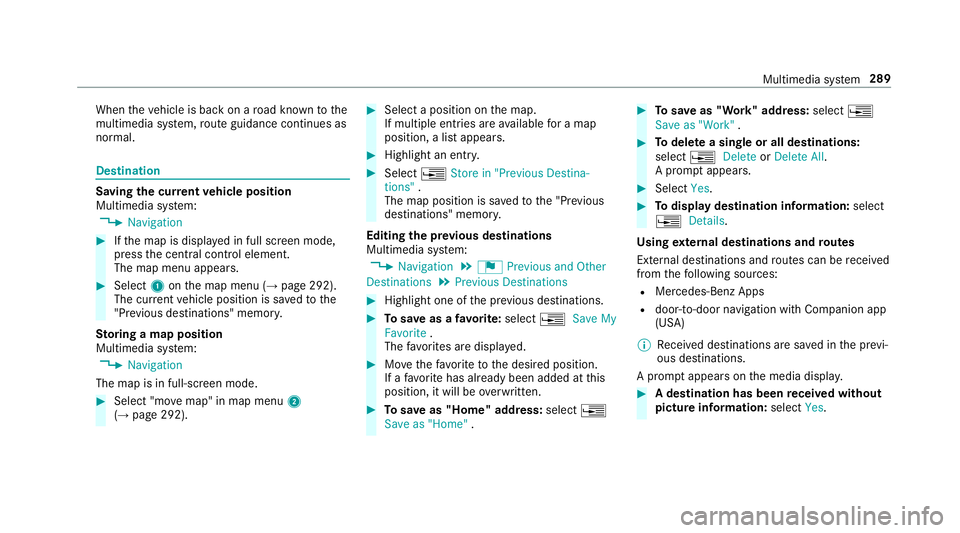
When
theve hicle isbac kon aro ad know nto the
multime diasystem, routeguidan cecontinue sas
no rm al. Des
tination Sa
ving thecur rent vehicl eposi tion
Mul timedi asy stem:
, Navigation #
Ifth emap isdispla yedin full screen mode,
pr ess thecent ralcon trol elemen t.
The map menuappear s. #
Selec t1 onthemap menu (→pag e292).
The current vehicle position issave dto the
"Pr evious destination s"memo ry.
St oring ama pposit ion
Multi media system:
, Navigation
The map isin full-scr eenmode. #
Select "movemap" inmap menu 2
(→ pag e292) . #
Select aposi tion onthemap.
If multiple entries areav ailable fora map
posi tion, alis tapp ears. #
Highl ightanentr y. #
Select 0080 Store in"Previ ousDesti na-
tions ".
The map position issave dto the"Pr evious
des tination s"memo ry.
Edit ingthepr ev ious destina tions
Multime diasystem:
, Navigation .
¬ Previous andOther
Dest ination s.
Previous Destination s #
Highlight oneofthepr ev ious destination s. #
Tosave asafa vo rite :sel ect 0080 SaveMy
Fav orite.
The favo rite sar edispla yed. #
Movethefa vo rite to thedesir edposition .
If afa vo rite has already been added atthis
posit ion,itwill beove rwritt en. #
Tosave as"Home "addr ess:sele ct0080
Save as"Home ". #
Tosave as"W ork" addr ess:sele ct0080
Save as"Wo rk". #
Todel eteasing leor all des tina tions :
selec t0080 Deleteor Dele teAll.
A pr om ptappear s. #
Select Yes. #
Todispl aydes tina tioninf ormatio n:sel ect
0080 Details.
Usi ngextern al des tinatio nsand rout es
Ext ernal destinations androutes can berecei ved
fr om thefo llo wing sources:
R Mer cedes -Benz Apps
R door -to-do ornavig ation withCom panion app
(US A)
% Recei veddes tinations aresa ve din thepr ev i‐
ous destination s.
A pr om ptappear son themedia display. #
Ades tination hasbeen receiv edwit hou t
pict ureinf orma tion :selec tYes . Mult
imed iasystem 289