belt MERCEDES-BENZ AMG GT COUPE 2018 Owner's Manual
[x] Cancel search | Manufacturer: MERCEDES-BENZ, Model Year: 2018, Model line: AMG GT COUPE, Model: MERCEDES-BENZ AMG GT COUPE 2018Pages: 294, PDF Size: 4.76 MB
Page 7 of 294
Anti-skid chainssee Snow chains
Anti-theft ala rmsystem
see ATA (Anti-Theft Alarm system)
Asht ray.............................................. .217
Assistance display (on-board com-
puter) ..................................................1 62
Assistance menu (on-board com-
puter) ..................................................1 63
Assistance system
see Driving systems
ASSYST PLUS
Displaying a service message ........2 38
Hiding a service message .............. 237
Resetting the service interval dis-
play ................................................ 238
Service message ............................ 237
Special service requirements ......... 238
ATA (Anti-Theft Alarm system)
Activating/deactivating ................... 63
Function ...........................................6 3
Switching off the alarm .................... 63
ATTENTION ASSIST
Activating/deactivating ................. 163
Display message ............................ 183
Function/notes ............................. 148
Authorized Mercedes-Benz Center
see Qualified specialist workshop
Authorized workshop
see Qualified specialist workshop
AUTO lights
Display message ............................ 180
see Lights
Automatic car wash (care) ............... 239
Automatic engine start (ECO start/
stop function) .................................... 109
Automatic engine switch-off (ECO
start/stop function) .......................... 108
Automatic headlamp mode ................ 91
Automatic transmission
Accelerator pedal position ............. 115
Automatic drive program ............... 117
Changing gear ............................... 115
Display message ............................ 188
Double-clutch function .................. 115
Drive program display .................... 114
Driving tips .................................... 115 Emergency running mode
.............. 120
Eng
aging neutral ............................ 113
Engaging park position automati-
cally ............................................... 113
Engaging reverse gear ................... 113
Engaging the park position ............ 113
Gearshift recommendation ............ 118
Gliding mode ................................. 115
Important safety notes .................. 112
Kickdown ....................................... 115
Manual drive program .................... 117
Manual mode ................................. 118
Oil temperature (on-board com-
puter) ............................................. 165
Overview ........................................ 112
Problem (malfunction) ................... 120
Pulling away ................................... 107
Rocking the vehicle free ................ 115
Shift override ................................. 119
Starting the engine ........................ 107
Steering wheel paddle shifters ...... 116
Transmission position display ........ 114
Transmission positions .................. 114
Automatic transmission emer-
gency mode ....................................... 120
B
Back button ....................................... 205
BAS (Brake Assist System) ................. 58
Basic settings
see Settings
Battery (SmartKey)
Checking .......................................... 68
Important safety notes .................... 67
Replacing ......................................... 68
Battery (vehicle)
Charging ........................................ 251
Display message ............................ 182
Important safety notes .................. 250
Jump starting ................................. 251
Belt
see Seat belts
Belt warning ......................................... 43
Blind Spot Assist
Activating/deactivating (on-
board computer) ............................ 163
Display message ............................ 184
Index5
Page 8 of 294
Notes/function .............................. 150
Blower
see Climate control
Bluetooth
®
Searching for a mobile phone ........ 211
see also Digital Operator's Man-
ual .................................................. 204
Brake Assist System
see BAS (Brake Assist System)
Brake assistance
see BAS (Brake Assist System)
Brake fluid
Display message ............................ 175
Notes .............................................2 86
Brake force distribution
see EBD (electronic brake force
distribution)
Brakes
ABS ..................................................5 7
AMG high-performance and
ceramic brakes .............................. 128
BAS .................................................. 58
Brake fluid (notes) ......................... 286
Braking assistance appropriate to
the situation .....................................6 0
Display message ............................ 170
EBD .................................................. 63
Hill start assist ............................... 107
Important safety notes .................. 127
Maintenance .................................. 128
Parking brake ................................ 124
Riding tips ...................................... 127
Warning lamp ................................. 195
Braking assistance appropriate to
the situation
Function/notes ................................ 60
Breakdown
see Flat tire
see Towing away
Breakdown assistance
Where will I find...? ........................ 245
Buttons on the steering wheel ......... 155
C
California
Important notice for retail cus-
tomers and lessees .......................... 25 Calling up a malfunction
see Display messages
Calling up the climate control bar
Multimedia system ........................ 208
Calling up the climate control
menu
Multimedia system ........................ 208
Car
see Vehicle
Care
Car wash ........................................ 239
Carpets .......................................... 244
Display ........................................... 243
Exhaust pipe .................................. 242
Exterior lights ................................ 242
Gear or selector lever .................... 243
General notes ................................ 238
Interior ........................................... 243
Matte finish ................................... 241
Paint .............................................. 240
Plastic trim .................................... 243
Power washer ................................ 240
Rear view camera .......................... 242
Roof lining ...................................... 244
Seat belt ........................................ 244
Seat cover ..................................... 244
Sensors ......................................... 242
Steering wheel ............................... 243
Trim pieces .................................... 243
Washing by hand ........................... 239
Wheels ........................................... 241
Windows ........................................ 241
Wiper blades .................................. 241
Cargo compartment cover
Important safety notes .................. 215
Cargo net ........................................... 215
CD
see also Digital Operator's Man-
ual .................................................. 204
CD player (on-board computer) ........ 160
Center console
Overview .......................................... 36
Central locking
Locking/unlocking (SmartKey) ........ 65
Changing the media source ............. 160
Charge retention
Socket ........................................... 125
6Index
Page 9 of 294
Charge-air pressure (on-board
computer).......................................... 165
Child
Restraint system .............................. 55
Child seat
Forward-facing restraint system ...... 56
On the front-passenger seat ............ 56
Rearward-facing restraint system .... 56
Children
Special seat belt retractor .............. .55
Children in the vehicle
Important safety notes .................... 54
Cigarette lighter ................................ 218
Cleaning
Mirror turn signal .......................... .242
Climate control
Air-recirculation mode ................... 102
Automatic climate control (dual-
zone) ................................................ 98
Controlling automatically ...............1 00
Cooling with air dehumidification ..... 99
Cooling with air dehumidification
(multimedia system) ......................2 08
Defrosting the windows ................. 101
Defrosting the windshield .............. 101
ECO start/stop function (3-zone
automatic climate control) ...............9 9
General notes .................................. 98
Indicator lamp ................................ 100
Information about using auto-
matic climate control ...................... .99
Overview ........................................2 08
Overview of systems ........................ 98
Problem with the rear wi ndow
defroster ........................................ 102
Probl
ems with cooling with air
dehumidification ............................ 100
Refrigerant ..................................... 288
Refrigerant filling capacity ............. 288
Setting the air distribution ............. 100
Setting the air vents ......................1 02
Setting the airflow ......................... 101
Setting the climate mode (multi-
media system) ............................... 208
Setting the temperature ................ 100
Switching air-recirculation mode
on/off ............................................ 102
Switching on/off .............................. 99 Switching the rear window
defroster on/off ............................ 101
Switching the synchronization
function on and off ........................ 101
Synchronization function (multi-
media system) ............................... 209
Climate control settings
Multimedia system ........................ 208
Climate control system
Climate control (3-zone automatic
climate control) ................................ 99
Cockpit
Overview .......................................... 33
Code for Apps
see QR code
COMAND display
Cleaning ......................................... 243
Combination switch ............................ 92
Connecting a USB device
see also Digital Operator's Man-
ual ..................................................2 04
Consumption statistics (on-board
computer) .......................................... 157
Controller ...........................................2 05
Convenience closing feature .............. 77
Convenience opening
With the SmartKey ........................... 76
Coolant (engine)
Checking the level ......................... 236
Display message ............................ 181
Filling capacity ............................... 287
Important safety notes .................. 287
Temperature display in the instru-
ment cluster .................................. 154
Warning lamp ..................... ............ 199
C
ooling
see Climate control
Copyright ............................................. 32
Cornering light function
Display message ............................ 180
Cruise control
Cruise control lever ....................... 130
Deactivating ................................... 131
Display message ............................ 185
General notes ................................ 129
Setting a speed .............................. 131
Index7
Page 16 of 294
Multifunction steering wheelOperating the on-board computer .. 155
Overview .......................................... 35
Multimedia system
Switching on and off ...................... 205
Music files
see also Digital Operator's Man-
ual .................................................. 204
N
NavigationDisplaying (on-board computer) ..... 158
Menu (on-board computer) ............ 158
see also Digital Operator's Man-
ual .................................................. 204
Notes on breaking-in a new vehi-
cle ....................................................... 104
O
Occupant Classification System
(OCS)
Conditions ....................................... 47
Faults ............................................... 50
Operation .........................................4 7
System self-test ............................... 49
Occupant safety
Air bags ........................................... 44
Automatic measures after an acci-
dent ................................................. 54
Belt warning ..................................... 43
Children in the vehicle ..................... 54
Important safety notes .................... 39
Introduction to the restraint sys-
tem .................................................. 39
Occupant Classification System
(OCS) ............................................... 46
PASSENGER AIR BAG indicator
lamps ............................................... 40
Pets in the vehicle ........................... 57
PRE-SAFE
®(anticipatory occu-
pant protection) ............................... 53
Restraint system warning lamp ........ 40
Seat belt .......................................... 40
OCS
Conditions ....................................... 47
Faults ............................................... 50 Operation ......................................... 47
System self-test ............................... 49
Odometer ........................................... 156
Oil
see Engine oil
On-board computer
AMG menu ..................................... 165
Assistance graphic menu ............... 162
Assistance menu ........................... 163
Display messages .......................... 168
Displaying a service message ........ 238
Distance Pilot DISTRONIC ............. 137
Factory settings ............................. 165
G-Meter ......................................... 166
Important safety notes .................. 154
Instrument cluster menu ............... 164
Lights menu ................................... 164
Media menu ................................... 160
Menu overview .............................. 156
Message memory .......................... 169
Navigation menu ............................ 158
Operation ....................................... 155
RACETIMER ................................... 167
Radio menu ................................... 159
Service menu ................................. 163
Settings menu ............................... 163
Standard display ............................ 156
Telephone menu ............................ 161
Trip menu ...................................... 156
Video DVD operation ..................... 161
On-board diagnostic interface
see Diagnostics connection
Operating safety
Declaration of conformity ................ 27
Importa
nt safety notes .................... 27
Operating system
see On-board computer
Operation
Digital Operator's Manual ................ 23
Operator's Manual
Overview .......................................... 25
Vehicle equipment ........................... 25
Outside temperature display ........... 154
Overhead control panel ...................... 37
14Index
Page 18 of 294
Radio-wave reception/transmis-
sion in the vehicleDeclaration of conformity ................ 27
Reading lamp ....................................... 94
Rear axle steering
Function/notes .............................1 08
Rear fog lamp
Display message ............................ 180
Switching on/off .............................. 92
Rear lamps
see Lights
Rear spoiler
Display message ............................ 190
Extending/retracting ..................... 226
Problem ......................................... 227
Rear view camera
Cleaning instructions ..................... 242
Function/notes .............................1 45
Switching on/off ........................... 146
Rear window defroster
Problem (malfunction) ................... 102
Switching on/off ........................... 102
Rear-view mirror
Anti-glare (manual) .......................... 86
Dipping (automatic) ......................... 88
Recycling
see Protection of the environment
Reflective safety jacket .................... 245
Refrigerant (air-conditioning sys-
tem)
Important safety notes .................. 288
Refueling
Fuel gauge ....................................... 34
Important safety notes .................. 120
Refueling process .......................... 121
see Fuel
Remote control
Garage door opener ....................... 228
Replacing bulbs
General notes .................................. 95
Reporting safety defects .................... 28
Rescue card ......................................... 29
Reserve (fuel tank)
see Fuel
Reserve fuel
Display message ............................ 183
Warning lamp ................................. 199 Restraint system
Display message ............................ 176
Introduction ..................................... 39
Warning lamp ................................. 198
Warning lamp (function) ................... 40
Reversing feature
Side windows ................................... 75
Reversing lamps (display mes-
sage) ................................................... 180
Roadside Assistance (breakdown) .... 26
Roll away protection
see HOLD function
Roller sunblind for the panorama
roof
Opening and closing ........................ 79
Ope rating ......................................... 79
Ro
of lining and carpets (cleaning
guidelines) ......................................... 244
Route guidance
see also Digital Operator's Man-
ual .................................................. 204
S
SafetyChildren in the vehicle ..................... 54
see Occupant safety
see Operating safety
Safety system
see Driving safety systems
SD card
Inserting/removing ........................ 212
SD memory card
see also Digital Operator's Man-
ual .................................................. 204
Selecting ........................................ 160
Search & Send
see also Digital Operator's Man-
ual .................................................. 204
Seat
Correct driver's seat position ........... 80
Seat belts
Adjusting the driver's and front-
passenger seat belt ......................... 43
Cleaning ......................................... 244
Correct usage .................................. 42
Fastening ......................................... 43
Important safety guidelines ............. 41
16Index
Page 20 of 294
Special seat belt retractor.................. 55
Specialist workshop ............................28
Speed, controlling
see Cruise control
Speedometer
Activating/deactivating the addi-
tional speedometer ........................ 165
Digital ............................................ 157
Segments ...................................... 154
Selecting the display unit ............... 164
SPORT handling mode
Activating/deactivating ...................6 1
Warning lamp ................................. 198
Sports exhaust system
see AMG sports exhaust system
Standing lamps
Display message ............................1 80
Switching on/off .............................. 92
Start/Stop button
General notes ................................ 105
Key positions ................................. 105
Starting the engine ........................ 107
Start/stop function
see ECO start/stop function
Starting (engine) ................................ 106
Starting the engine
see Starting (engine)
Steering
Display message ............................ 191
Warning lamps ............................... 203
Steering wheel
Adjusting (electrically) ..................... 85
Button overview ............................... 35
Buttons (on-board computer) ......... 155
Calling up a stored setting (mem-
ory function) ....................................9 0
Cleaning ........................................ .243
EASY ENTRY/EXIT feature ...............8 5
Important safety notes .................... 85
Paddle shifters ............................... 116
Storing settings (memory func-
tion) .................................................8 9
Steering wheel paddle shifters ........ 116
Stopwatch (RACETIMER) ...................167
Stowage areas ................................... 213
Stowage compartments
Armrest (front) ............................... 214 Armrest (under) .............................2
14
Cup hol
ders ................................... 216
Glove box ....................................... 214
Important safety information ......... 213
Stowage net ................................... 215
see Stowage areas
Stowage net ....................................... 215
Summer opening
see Side windows
Summer tires
In winter ........................................ 260
Sun visor ............................................ 217
Suspension setting
AMG adaptive sport suspension
system ...........................................1 42
Suspension tuning
SETUP (on-board computer,
Mercedes-AMG vehicles) ...............1 66
Switching air-recirculation mode
on/off ................................................. 102
Switching on media mode
Via the device list .......................... 211
T
Tachometer ........................................ 154
Tail lamps
Display message ............................ 180
see Lights
Tailgate
Display message ............................ 190
Emergency unlocking ....................... 75
Important safety notes .................... 73
Opening (automatically from
inside) .............................................. 74
Opening dimensions ...................... 288
Opening with an extended rear
spoiler .............................................. 73
Opening/closing (from outside) ....... 73
Unlocking with KEYLESS-GO ............ 73
Tank
see Fuel tank
Tank content
Fuel gauge ....................................... 34
Technical data
Capacities ...................................... 283
Information .................................... 282
Tires/wheels ................................. 280
18Index
Page 23 of 294
USB devicesConnecting to the Media Inter-
face .............................................. .212
V
Vanity mirror (in the sun visor) ........217
Vehicle
Correct use ...................................... 28
Data acquisition ............................... 29
Display message ............................ 188
Electronics ..................................... 282
Equipment ....................................... 25
Individual settings .......................... 163
Limited Warranty .............................2 9
Loading .......................................... 266
Locking (in an emergency) ............... 72
Locking (SmartKey) .......................... 65
Lowering ........................................ 280
Maintenance .................................... 26
Operating safety .............................. 27
Parking .......................................... 122
Parking for a long period ................ 125
Pulling away ................................... 107
Raising ........................................... 277
Reporting problems ......................... 28
Securing from rolling away ............ 277
Towing away .................................. 254
Transporting .................................. 256
Unlocking (in an emergency) ........... 72
Unlocking (SmartKey) ...................... 65
Vehicle data ................................... 288
Vehicle battery
see Battery (vehicle)
Vehicle data
Trunk load (maximum) ................... 288
Vehicle dimensions ........................... 288
Vehicle emergency locking ................ 72
Vehicle identification number
see VIN
Vehicle identification plate .............. 282
Vehicle maintenance
see ASSYST PLUS
Vehicle tool kit .................................. 245
Ventilation
see Climate control
Video
Operating the DVD ......................... 161 see also Digital Operator's Man-
ual .................................................. 204
VIN
Seat ............................................... 283
Type plate ...................................... 282W
Warning and indicator lampsABS ................................................ 196
Active Brake Assist ........................ 201
Brakes ........................................... 195
Check Engine ................................. 199
Coolant .......................................... 199
Distance warning ........................... 201
ESP
®.............................................. 196
ESP®OFF ....................................... 197
Fuel tank ........................................ 199
Overview .......................................... 34
Parking brake ................................ 198
PASSENGER AIR BAG ...................... 40
Reserve fuel ................................... 199
Restraint system ............................ 198
Seat belt ........................................ 193
SPORT handling mode ................... 198
Steering ......................................... 203
Tire pressure monitor .................... 202
Warranty .............................................. 25
Washer fluid
Display message ............................ 191
Weather display (COMAND)
see also Digital Operator's Man-
ual .................................................. 204
Wheel and tire combinations
Tires ............................................... 280
Wheel bolt tightening torque ........... 280
Wheel chock ...................................... 277
Wheels
Changing a wheel .......................... 276
Checking ........................................ 259
Cleaning ......................................... 241
Important safety notes .................. 258
Information on driving .................... 258
Interchanging/changing ................ 276
Mounting a new wheel ................... 279
Mounting a wheel .......................... 277
Notes on sport tires ....................... 258
Removing a wheel .......................... 279
Index21
Page 31 of 294
The following text is published as required of
manufacturers under Title 49, Code of U.S. Fed-
eral Regulations, Part 575 pursuant to the
"National Traffic and Motor Vehicle Safety Act of
1966".
If you believe that your vehicle has a defect
which could cause a crash or could cause injury
or death, you should immediately inform the
National Highway Traffic Safety Administration
(NHTSA) in addition to notifying Mercedes-Benz USA, LLC.
If NHTSA receives similar complaints, it may
open an investigation, and if it finds that a safety
defect exists in a group of vehicles, it may order
a recall and remedy campaign. However, NHTSA
cannot become involved in individual problems
between you, your dealer, or Mercedes-Benz
USA, LLC.
To contact NHTSA, you may call the Vehicle
Safety Hotline toll-free at 1-888-327-4236
(TTY: 1-800-424-9153); go tohttp://
www.safercar.gov; or write to: Administrator,
NHTSA, 400 Seventh Street, SW., Washington,
DC 20590.
You can also obtain other information about
motor vehicle safety at:
http://www.safercar.gov
Limited Warranty
!
Observe the notes in this Operator's Manual
regarding the correct operation of your vehi-
cle and possible damage to the vehicle. Dam-
age to the vehicle which is caused by violation
of these notes is not covered by the
Mercedes-Benz implied warranty or the new
or used-vehicle warranty.
QR code for rescue card
The QR codes are secured in the fuel filler flap
and on the opposite side on the B-pillar. In the
event of an accident, rescue services can use
the QR code to quickly find the appropriate res- cue card for your vehicle. The current rescue
card contains the most important information
about your vehicle in a compact form, e.g. the
routing of the electric cables.
You can find more information under
www.mercedes-benz.de/qr-code.
Data stored in the vehicle
Information from electronic control
units
There are electronic control units installed in
your vehicle. Some of these are necessary for
your vehicle to operate safely, while some offer
support during driving (driver assistance sys-
tems). In addition, your vehicle offers comfort
and entertainment functions that are also made
possible by electronic control units.
Electronic control units contain data storage
systems that can temporarily or permanently
save technical information concerning the vehi-
cle's condition, component stress and mainte-
nance requirements as well as technical events
and malfunctions.
This information generally documents the con-
dition of a component, a module, a system or the
surroundings, for example:
Roperating states of system components (e.g.
fill levels, battery status, tire pressure)
Rstatus messages concerning the vehicle or its
individual components (e.g. wheel rpm/
speed, deceleration, lateral acceleration, indi-
cation of whether seat belts are fastened)
Rmalfunctions and defects in important system
components (e.g. lights, brakes)
Rinformation about events leading to vehicle
damage
Rsystem responses in special driving situations
(e.g. air bag deployment, intervention of sta-
bility control systems)
Rambient conditions (e.g. temperature, rain
sensor)
In addition to performing the actual control unit function, these data are used by manufacturers
to detect and rectify malfunctions and to opti-
mize vehicle functions. Most of these data are
volatile and processed only in the vehicle itself.
Only a small part of the data is stored in event or malfunction memories.
When you use services, the technical data from
the vehicle can be read out by service network
employees or third parties. Services can include
repair services, maintenance processes, war-
ranty cases and quality assurance measures.
The data is read out via the legally prescribed
diagnostics connection in the vehicle. The rele-
vant offices in the service network or third par-
ties collect, process and use the data. These
data document the vehicle's technical states,
Data stored in the vehicle29
Introduction
Z
Page 33 of 294
For this reason, please ask the service provider
for information about the type, extent and pur-
pose of the collection and use of personal data
when services are provided by third parties.
COMAND/mbrace
If the vehicle is equipped with COMAND or
mbrace, additional data about the vehicle's
operation, the use of the vehicle in certain sit-
uations, and the location of the vehicle may be
compiled through COMAND or the mbrace sys-
tem.
For additional information please refer to the
COMAND User Manual or the Digital Operator'sManual and/or the mbrace Terms and Condi-
tions.
Event data recorders
This vehicle is equipped with an event data
recorder (EDR). This vehicle is equipped with an
event data recorder (EDR). The main purpose of
an EDR is to record, in certain crash or near
crash-like situations, such as an air bag deploy-
ment or hitting a road obstacle, data that will
assist in understanding how a vehicle's systems
performed. The EDR is designed to record data
related to vehicle dynamics and safety systems
for a short period of time, typically 30 seconds
or less.
The EDR in this vehicle is designed to record
such data as:
RHow various systems in your vehicle were
operating
RWhether or not the driver and passenger
safety belts were buckled/fastened
RHow far (if at all) the driver was depressing theaccelerator and/or brake pedal and
RHow fast the vehicle was traveling
These data can help provide a better under-
standing of the circumstances in which crashes and injuries occur. NOTE:EDR data are recor-
ded by your vehicle only if a non-trivial crash
situation occurs; no data are recorded by the
EDR under normal driving conditions and no
personal data (e.g. name, gender, age and crash
location) are recorded. However, other parties,
such as law enforcement could combine the
EDR data with the type of personally identifying
data routinely acquired during a crash investi-
gation. Access to the vehicle and/or the
EDR i
s needed
to read data that is recorded by an EDR, and
special equipment is required. In addition to the
vehicle manufacturer, other parties that have
the special equipment, such as law enforce-
ment, can read the information by accessing the
vehicle or the EDR.
EDR data may be used in civil and criminal mat- ters as a tool in accident reconstruction, acci-
dent claims and vehicle safety. Since the Crash
Data Retrieval CDR tool that is used to extract
data from the EDR is commercially available,
Mercedes-Benz USA, LLC ("MBUSA") expressly
disclaims any and all liability arising from the
extraction of this information by unauthorized
Mercedes-Benz personnel.
MBUSA will not share EDR data with others
without the consent of the vehicle owners or, if
the vehicle is leased, without the consent of the lessee. Exceptions to this representation
include responses to subpoenas by law enforce-
ment; by federal, state or local government; in
connection with or arising out of litigation involv-
ing MBUSA or its subsidiaries and affiliates; or,
as required by law.
Warning: The EDR is a component of the
Restraint System Module. Tampering with, alter-
ing, modifying or removing the EDR component
may result in a malfunction of the Restraint Sys-
tem Module and other systems.
State laws or regulations regarding EDRs that
conflict with federal regulation are pre-empted.
This means that in the event of such conflict, the
federal regulation governs. As of Fe
bruary 2013,
13 states have enacted laws relating to EDRs.
Mercedes me website
General information
GWARNING
If you operate information systems and com-
munication equipment integrated in the vehi-
cle when driving, you may be distracted from
the traffic situation. You could also lose con-
trol of the vehicle. There is a risk of an acci-
dent.
Only operate this equipment when the traffic
situation permits. If you are not sure that this
is possible, park the vehicle paying attention
Mercedes me website31
Introduction
Z
Page 36 of 294
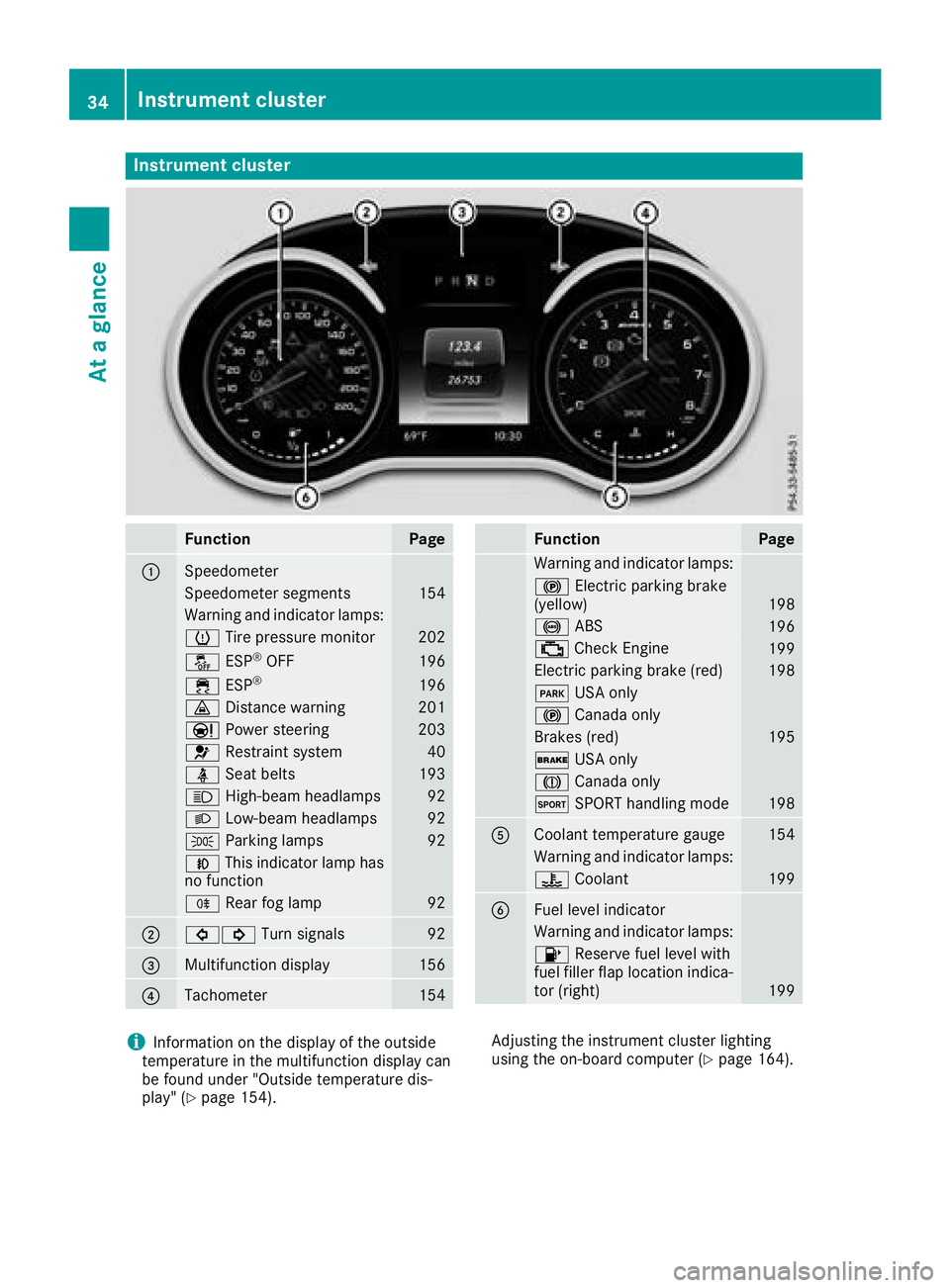
Instrument cluster
FunctionPage
:Speedometer
Speedometer segments154
Warning and indicator lamps:
h Tirepressur emonitor20 2
å ESP®OF F196
÷ ESP®19 6
· Distanc ewarning20 1
Ð Powersteering20 3
6 Restrain tsystem40
ü Seat belt s193
K High-beam headlamps92
LLow-beam headlamps92
TParking lamp s92
NThis indicator lamp has
no function
R Rear fog lamp92
;#! Turn signals92
=Multifunction display156
?Tachometer154
FunctionPag e
Warning and indicator lamps:
! Electric parking brak e
(yellow)19 8
! ABS196
; CheckEngin e199
Electric parking brak e(red)19 8
F USAonly
! Canad aonly
Brake s(red)19 5
$ USAonly
J Canad aonly
M SPORT handlin gmod e198
ACoolan ttemperature gauge15 4
Warning and indicator lamps:
? Coolan t199
BFue llevel indicator
Warning and indicator lamps:
8 Reserve fuel level wit h
fuel filler flap location indica-
to r(right )
199
iInformation on th edisplay of th eoutside
temperature in th emultifunction display can
be foun dunder "Outside temperature dis-
play" (
Ypage 154). Adjusting th
einstrumen tcluste rlighting
usin gth eon-board computer (
Ypage 164).
34Instrument cluster
At a glance