park assist MERCEDES-BENZ AMG GT COUPE 2018 Owner's Manual
[x] Cancel search | Manufacturer: MERCEDES-BENZ, Model Year: 2018, Model line: AMG GT COUPE, Model: MERCEDES-BENZ AMG GT COUPE 2018Pages: 294, PDF Size: 4.76 MB
Page 7 of 294
Anti-skid chainssee Snow chains
Anti-theft ala rmsystem
see ATA (Anti-Theft Alarm system)
Asht ray.............................................. .217
Assistance display (on-board com-
puter) ..................................................1 62
Assistance menu (on-board com-
puter) ..................................................1 63
Assistance system
see Driving systems
ASSYST PLUS
Displaying a service message ........2 38
Hiding a service message .............. 237
Resetting the service interval dis-
play ................................................ 238
Service message ............................ 237
Special service requirements ......... 238
ATA (Anti-Theft Alarm system)
Activating/deactivating ................... 63
Function ...........................................6 3
Switching off the alarm .................... 63
ATTENTION ASSIST
Activating/deactivating ................. 163
Display message ............................ 183
Function/notes ............................. 148
Authorized Mercedes-Benz Center
see Qualified specialist workshop
Authorized workshop
see Qualified specialist workshop
AUTO lights
Display message ............................ 180
see Lights
Automatic car wash (care) ............... 239
Automatic engine start (ECO start/
stop function) .................................... 109
Automatic engine switch-off (ECO
start/stop function) .......................... 108
Automatic headlamp mode ................ 91
Automatic transmission
Accelerator pedal position ............. 115
Automatic drive program ............... 117
Changing gear ............................... 115
Display message ............................ 188
Double-clutch function .................. 115
Drive program display .................... 114
Driving tips .................................... 115 Emergency running mode
.............. 120
Eng
aging neutral ............................ 113
Engaging park position automati-
cally ............................................... 113
Engaging reverse gear ................... 113
Engaging the park position ............ 113
Gearshift recommendation ............ 118
Gliding mode ................................. 115
Important safety notes .................. 112
Kickdown ....................................... 115
Manual drive program .................... 117
Manual mode ................................. 118
Oil temperature (on-board com-
puter) ............................................. 165
Overview ........................................ 112
Problem (malfunction) ................... 120
Pulling away ................................... 107
Rocking the vehicle free ................ 115
Shift override ................................. 119
Starting the engine ........................ 107
Steering wheel paddle shifters ...... 116
Transmission position display ........ 114
Transmission positions .................. 114
Automatic transmission emer-
gency mode ....................................... 120
B
Back button ....................................... 205
BAS (Brake Assist System) ................. 58
Basic settings
see Settings
Battery (SmartKey)
Checking .......................................... 68
Important safety notes .................... 67
Replacing ......................................... 68
Battery (vehicle)
Charging ........................................ 251
Display message ............................ 182
Important safety notes .................. 250
Jump starting ................................. 251
Belt
see Seat belts
Belt warning ......................................... 43
Blind Spot Assist
Activating/deactivating (on-
board computer) ............................ 163
Display message ............................ 184
Index5
Page 8 of 294
Notes/function .............................. 150
Blower
see Climate control
Bluetooth
®
Searching for a mobile phone ........ 211
see also Digital Operator's Man-
ual .................................................. 204
Brake Assist System
see BAS (Brake Assist System)
Brake assistance
see BAS (Brake Assist System)
Brake fluid
Display message ............................ 175
Notes .............................................2 86
Brake force distribution
see EBD (electronic brake force
distribution)
Brakes
ABS ..................................................5 7
AMG high-performance and
ceramic brakes .............................. 128
BAS .................................................. 58
Brake fluid (notes) ......................... 286
Braking assistance appropriate to
the situation .....................................6 0
Display message ............................ 170
EBD .................................................. 63
Hill start assist ............................... 107
Important safety notes .................. 127
Maintenance .................................. 128
Parking brake ................................ 124
Riding tips ...................................... 127
Warning lamp ................................. 195
Braking assistance appropriate to
the situation
Function/notes ................................ 60
Breakdown
see Flat tire
see Towing away
Breakdown assistance
Where will I find...? ........................ 245
Buttons on the steering wheel ......... 155
C
California
Important notice for retail cus-
tomers and lessees .......................... 25 Calling up a malfunction
see Display messages
Calling up the climate control bar
Multimedia system ........................ 208
Calling up the climate control
menu
Multimedia system ........................ 208
Car
see Vehicle
Care
Car wash ........................................ 239
Carpets .......................................... 244
Display ........................................... 243
Exhaust pipe .................................. 242
Exterior lights ................................ 242
Gear or selector lever .................... 243
General notes ................................ 238
Interior ........................................... 243
Matte finish ................................... 241
Paint .............................................. 240
Plastic trim .................................... 243
Power washer ................................ 240
Rear view camera .......................... 242
Roof lining ...................................... 244
Seat belt ........................................ 244
Seat cover ..................................... 244
Sensors ......................................... 242
Steering wheel ............................... 243
Trim pieces .................................... 243
Washing by hand ........................... 239
Wheels ........................................... 241
Windows ........................................ 241
Wiper blades .................................. 241
Cargo compartment cover
Important safety notes .................. 215
Cargo net ........................................... 215
CD
see also Digital Operator's Man-
ual .................................................. 204
CD player (on-board computer) ........ 160
Center console
Overview .......................................... 36
Central locking
Locking/unlocking (SmartKey) ........ 65
Changing the media source ............. 160
Charge retention
Socket ........................................... 125
6Index
Page 11 of 294
Driving abroadMercedes-Ben zService ................ .238
Driving on flooded roads .................. 129
Driving safety system
Active Brake Assist .......................... 58
Braking assistance appropriate to
the situation ..................................... 60
Driving safety systems
ABS (Anti-lock Braking System) ....... 57
ADAPTIVE BRAKE .............................6 3
BAS (Brake Assist System) .............. 58
Distance warning function ............... 59
EBD (electronic brake force distri-
bution) ............................................. 63
ESP
®(Electronic Stability Pro-
gram) ............................................... 61
Important safety information ........... 57
Overview .......................................... 57
Driving system
Distance Pilot DISTRONIC ............. 131
Parking assist PARKTRONIC .......... 142
Driving systems
AMG adaptive sport suspension
system ........................................... 142
ATTENTION ASSIST ........................ 148
Blind Spot Assist ............................ 150
Cruise control ................................ 129
Display message ............................ 183
HOLD function ............................... 139
Lane Keeping Assist ...................... 152
Lane Tracking package .................. 150
RACE START .................................. 140
Rear view camera .......................... 145
Driving tips
AMG high-performance and
ceramic brakes .............................. 128
Automatic transmission ................. 115
Brakes ........................................... 127
Break-in period .............................. 104
Distance Pilot DISTRONIC ............. 137
Downhill gradient ........................... 127
Drinking and driving ....................... 126
Driving in winter ............................. 129
Driving on flooded roads ................ 129
Driving on wet roads ...................... 129
Exhaust check ............................... 126
Fuel ................................................ 126
General .......................................... 126 Hydroplaning ................................. 129
Icy road surfaces ........................... 129
Important safety notes .................. 104
Limited braking efficiency on sal-
ted roads ....................................... 127
Snow chains .................................. 260
Sub
jecting b
rakes to a load ........... 127
The first 1000 miles (1500 km) ..... 104
Wet road surface ........................... 127
DVD video
Operating (on-board computer) ..... 161
see also Digital Operator's Man-
ual .................................................. 204
DYNAMIC SELECT controller ............ 111
E
E-SELECT lever................................... 112
EASY-ENTRY feature
Function/notes ................................ 85
EASY-EXIT feature
Function/notes ................................ 85
EBD (electronic brake force distri-
bution)
Display message ............................ 172
Function/notes ................................ 63
ECO start/stop function
Automatic engine switch-off .......... 108
Deactivating/activating ................. 109
General information ....................... 108
Important safety notes .................. 108
Introduction ................................... 108
Electronic brake force distribution
see EBD (electronic brake force
distribution)
Electronic Stability Program
see ESP
®(Electronic Stability Program)
Electronic Traction System
see ETS (Electronic Traction System)
Emergency
Automatic measures after an acci-
dent ................................................. 54
Emergency braking
see BAS (Brake Assist System)
Emergency release
Driver's door .................................... 72
Vehicle ............................................. 72
Index9
Page 14 of 294
I
Ignition keysee SmartKey
Ignition lock
see Key positions
Immobilizer .......................................... 63
Indicator lamps
see Warning and indicator lamps
Indicators
see Turn signals
Inspection
see ASSYST PLUS
Instrument cluster
Overview .......................................... 34
Warning and indicator lamps .......... .34
Instrument cluster lighting .............. 164
Interior lighting
Automatic control ............................ 95
Overview .......................................... 94
Reading lamp .................................. .94
Setting the brightness of the dis-
play/switch (on-board computer) .. 164
iPod
®
see also Digital Operator's Man-
ual .................................................. 204
J
Jack Using ............................................. 277
Jump starting (engine) ...................... 251
K
Key positions
SmartKey ....................................... 106
Start/Stop button .......................... 105
KEYLESS-GO
Convenience closing feature ............ 77
Deactivation ..................................... 66
Locking ............................................ 66
Start function ................................... 66
Unlocking ......................................... 66
KEYLESS-GO start function
Start/Stop button .......................... 105
Kickdown
Driving tips .................................... 115
Knee bag .............................................. 45
L
Lamps
see Warning and indicator lamps
Lane detection (automatic)
see Lane Keeping Assist
Lane Keeping Assist
Activating/deactivating (on-
board computer) ............................ 164
Display message ............................ 184
Function/information .................... 152
Lane Tracking package ..................... 150
Lap time (RACETIMER) ...................... 167
License plate lamp (display mes-
sage) ................................................... 180
Light sensor (display message) ....... 180
Lights
Automatic headlamp mode .............. 91
Fogged up headlamps ...................... 94
Hazard warning lamps ..................... 93
High beam flasher ............................ 92
High-beam headlamps ..................... 92
Light switch ..................................... 91
Low-beam headlamps ...................... 92
Parking lamps .................................. 92
Rear fog lamp .................................. 92
Setting exterior lighting ................... 91
Setting the brightness of the dis-
play/switch (on-board computer) .. 164
Standing lamps ................................ 92
Switching the daytime running
lamps on/off (on-board com-
puter) ............................................. 164
Turn signals ..................................... 92
see Interior lighting
Loading guidelines ............................ 213
Locking (doors)
Automatic ........................................ 72
Emergency locking ........................... 72
From inside (central locking but-
ton) .................................................. 71
see KEYLESS-GO
Locking centrally
see Central locking
Low-beam headlamps
Display message ............................ 180
Switching on/off .............................. 92
12Index
Page 17 of 294
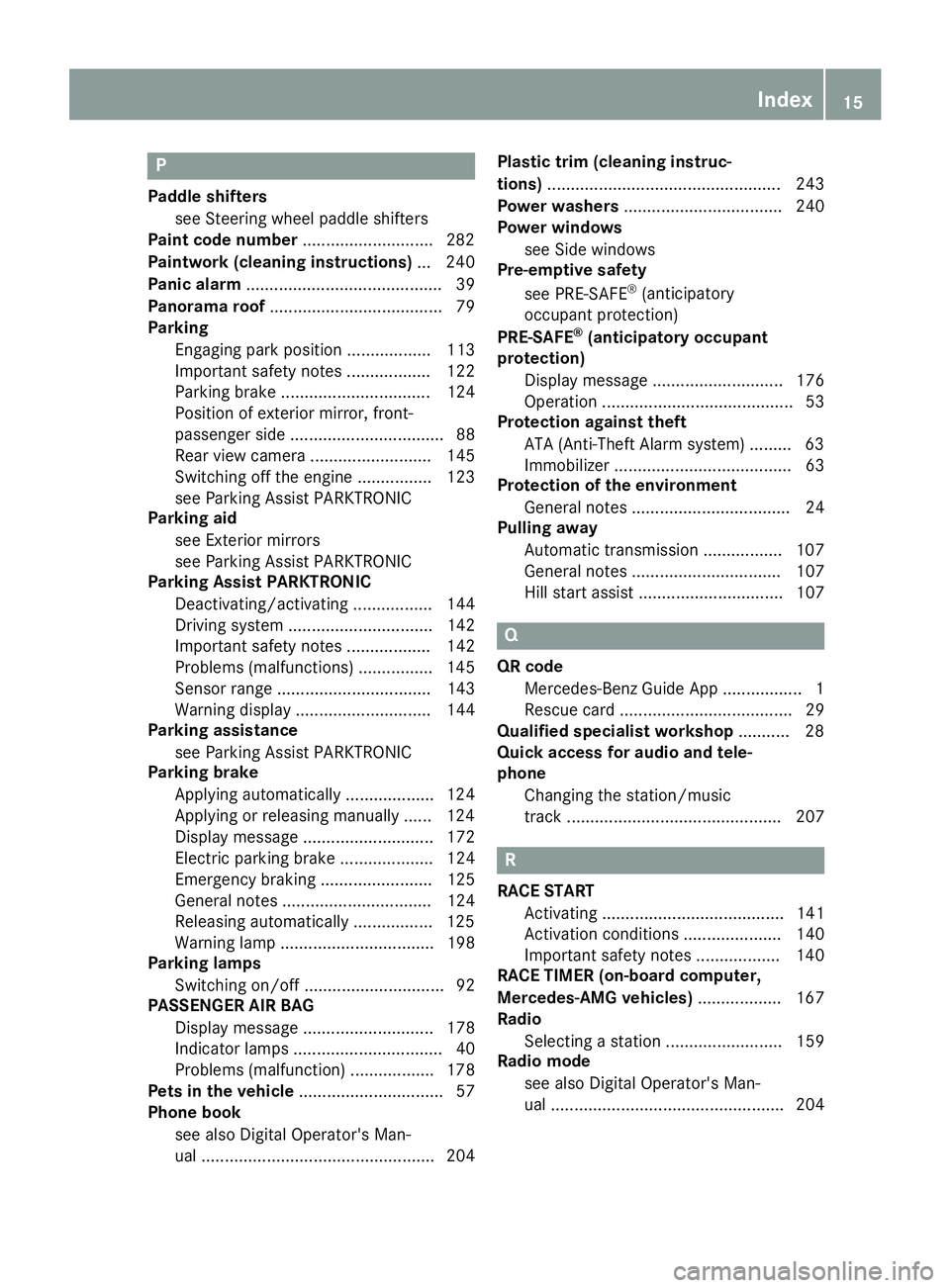
P
Paddle shifterssee Steering wheel paddle shifters
Paint code number ............................282
Paintwork (cleaning instructions) ... 240
Panic alarm .......................................... 39
Panorama roof ..................................... 79
Parking
Engaging park position .................. 113
Important safety notes .................. 122
Parking brake ................................ 124
Position of exterior mirror, front-
passenger side ................................. 88
Rear view camera .......................... 145
Switching off the engine ................ 123
see Parking Assist PARKTRONIC
Parking aid
see Exterior mirrors
see Parking Assist PARKTRONIC
Parking Assist PARKTRONIC
Deactivating/activating ................. 144
Driving system ............................... 142
Important safety notes .................. 142
Problems (malfunctions) ................ 145
Sensor range ................................. 143
Warning display ............................. 144
Parking assistance
see Parking Assist PARKTRONIC
Parking brake
Applying automatically ................... 124
Applying or releasing manually ...... 124
Display message ............................ 172
Electric parking brake .................... 124
Emergency braking ........................ 125
General notes ................................ 124
Releasing automatically ................. 125
Warning lamp ................................. 198
Parking lamps
Switching on/off .............................. 92
PASSENGER AIR BAG
Display message ............................ 178
Indicator lamps ................................ 40
Problems (malfunction) .................. 178
Pets in the vehicle ............................... 57
Phone book
see also Digital Operator's Man-
ual .................................................. 204 Plastic trim (cleaning instruc-
tions)
.................................................. 243
Power washers .................................. 240
Power windows
see Side windows
Pre-emptive safety
see PRE-SAFE
®(anticipatory
occupant protection)
PRE-SAFE
®(anticipatory occupant
protection)
Display message ............................ 176
Operation ......................................... 53
Protection against theft
ATA (Anti-Theft Alarm system) ......... 63
Immobilizer ...................................... 63
Protection of the environment
General notes .................................. 24
Pulling away
Automatic transmission ................. 107
General notes ................................ 107
Hill start assist ............................... 107
Q
QR codeMercedes-Benz Guide App ................. 1
Rescue card ..................................... 29
Qualified specialist workshop ........... 28
Quick access for audio and tele-
phone
Changing the station/music
track .............................................. 207
R
RACE STARTActivating ....................................... 141
Activation conditions ..................... 140
Important safety notes .................. 140
RACE TIMER (on-board computer,
Mercedes-AMG vehicles) .................. 167
Radio
Selecting a station ......................... 159
Radio mode
see also Digital Operator's Man-
ual .................................................. 204
Index15
Page 23 of 294
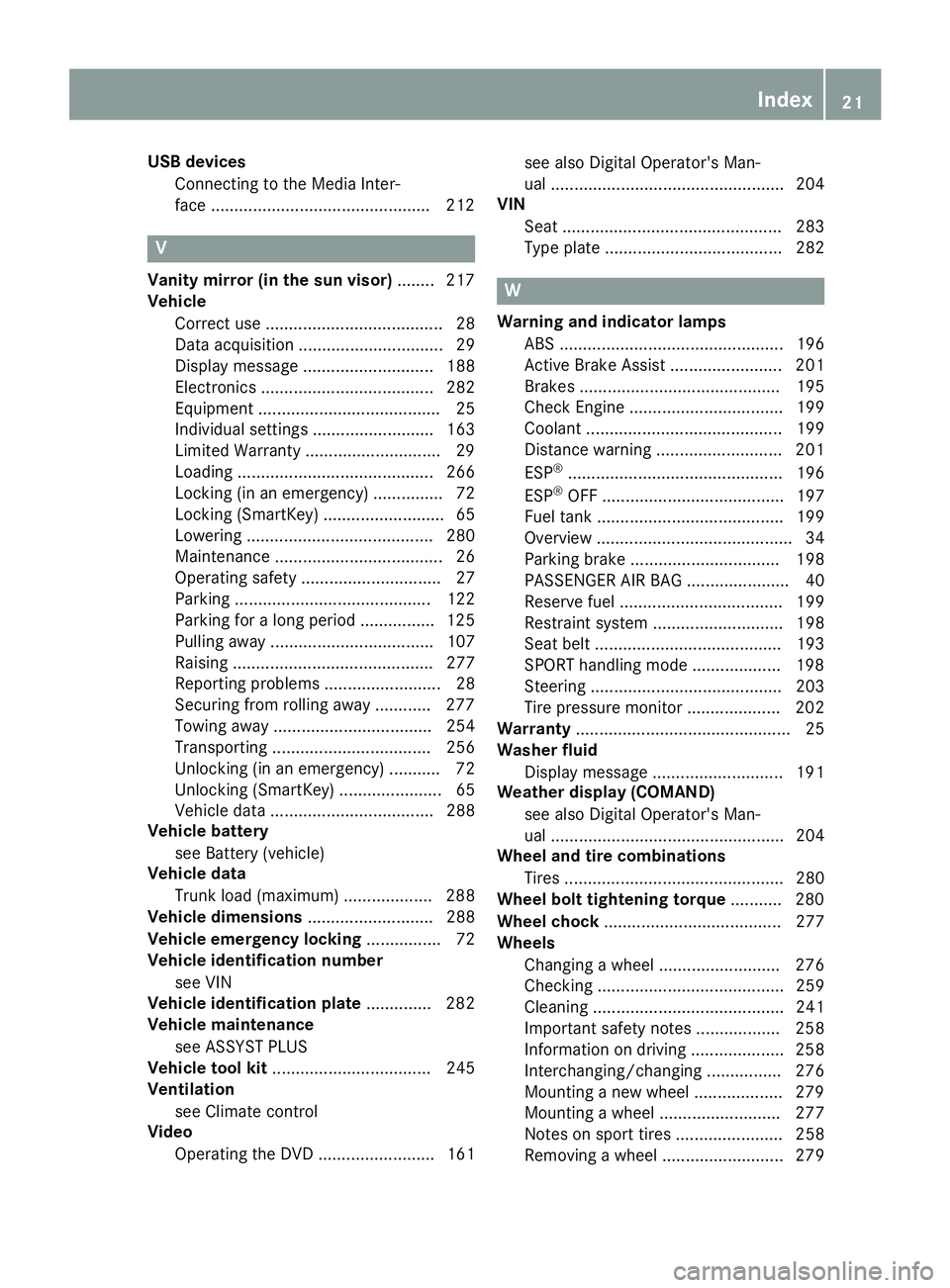
USB devicesConnecting to the Media Inter-
face .............................................. .212
V
Vanity mirror (in the sun visor) ........217
Vehicle
Correct use ...................................... 28
Data acquisition ............................... 29
Display message ............................ 188
Electronics ..................................... 282
Equipment ....................................... 25
Individual settings .......................... 163
Limited Warranty .............................2 9
Loading .......................................... 266
Locking (in an emergency) ............... 72
Locking (SmartKey) .......................... 65
Lowering ........................................ 280
Maintenance .................................... 26
Operating safety .............................. 27
Parking .......................................... 122
Parking for a long period ................ 125
Pulling away ................................... 107
Raising ........................................... 277
Reporting problems ......................... 28
Securing from rolling away ............ 277
Towing away .................................. 254
Transporting .................................. 256
Unlocking (in an emergency) ........... 72
Unlocking (SmartKey) ...................... 65
Vehicle data ................................... 288
Vehicle battery
see Battery (vehicle)
Vehicle data
Trunk load (maximum) ................... 288
Vehicle dimensions ........................... 288
Vehicle emergency locking ................ 72
Vehicle identification number
see VIN
Vehicle identification plate .............. 282
Vehicle maintenance
see ASSYST PLUS
Vehicle tool kit .................................. 245
Ventilation
see Climate control
Video
Operating the DVD ......................... 161 see also Digital Operator's Man-
ual .................................................. 204
VIN
Seat ............................................... 283
Type plate ...................................... 282W
Warning and indicator lampsABS ................................................ 196
Active Brake Assist ........................ 201
Brakes ........................................... 195
Check Engine ................................. 199
Coolant .......................................... 199
Distance warning ........................... 201
ESP
®.............................................. 196
ESP®OFF ....................................... 197
Fuel tank ........................................ 199
Overview .......................................... 34
Parking brake ................................ 198
PASSENGER AIR BAG ...................... 40
Reserve fuel ................................... 199
Restraint system ............................ 198
Seat belt ........................................ 193
SPORT handling mode ................... 198
Steering ......................................... 203
Tire pressure monitor .................... 202
Warranty .............................................. 25
Washer fluid
Display message ............................ 191
Weather display (COMAND)
see also Digital Operator's Man-
ual .................................................. 204
Wheel and tire combinations
Tires ............................................... 280
Wheel bolt tightening torque ........... 280
Wheel chock ...................................... 277
Wheels
Changing a wheel .......................... 276
Checking ........................................ 259
Cleaning ......................................... 241
Important safety notes .................. 258
Information on driving .................... 258
Interchanging/changing ................ 276
Mounting a new wheel ................... 279
Mounting a wheel .......................... 277
Notes on sport tires ....................... 258
Removing a wheel .......................... 279
Index21
Page 33 of 294
For this reason, please ask the service provider
for information about the type, extent and pur-
pose of the collection and use of personal data
when services are provided by third parties.
COMAND/mbrace
If the vehicle is equipped with COMAND or
mbrace, additional data about the vehicle's
operation, the use of the vehicle in certain sit-
uations, and the location of the vehicle may be
compiled through COMAND or the mbrace sys-
tem.
For additional information please refer to the
COMAND User Manual or the Digital Operator'sManual and/or the mbrace Terms and Condi-
tions.
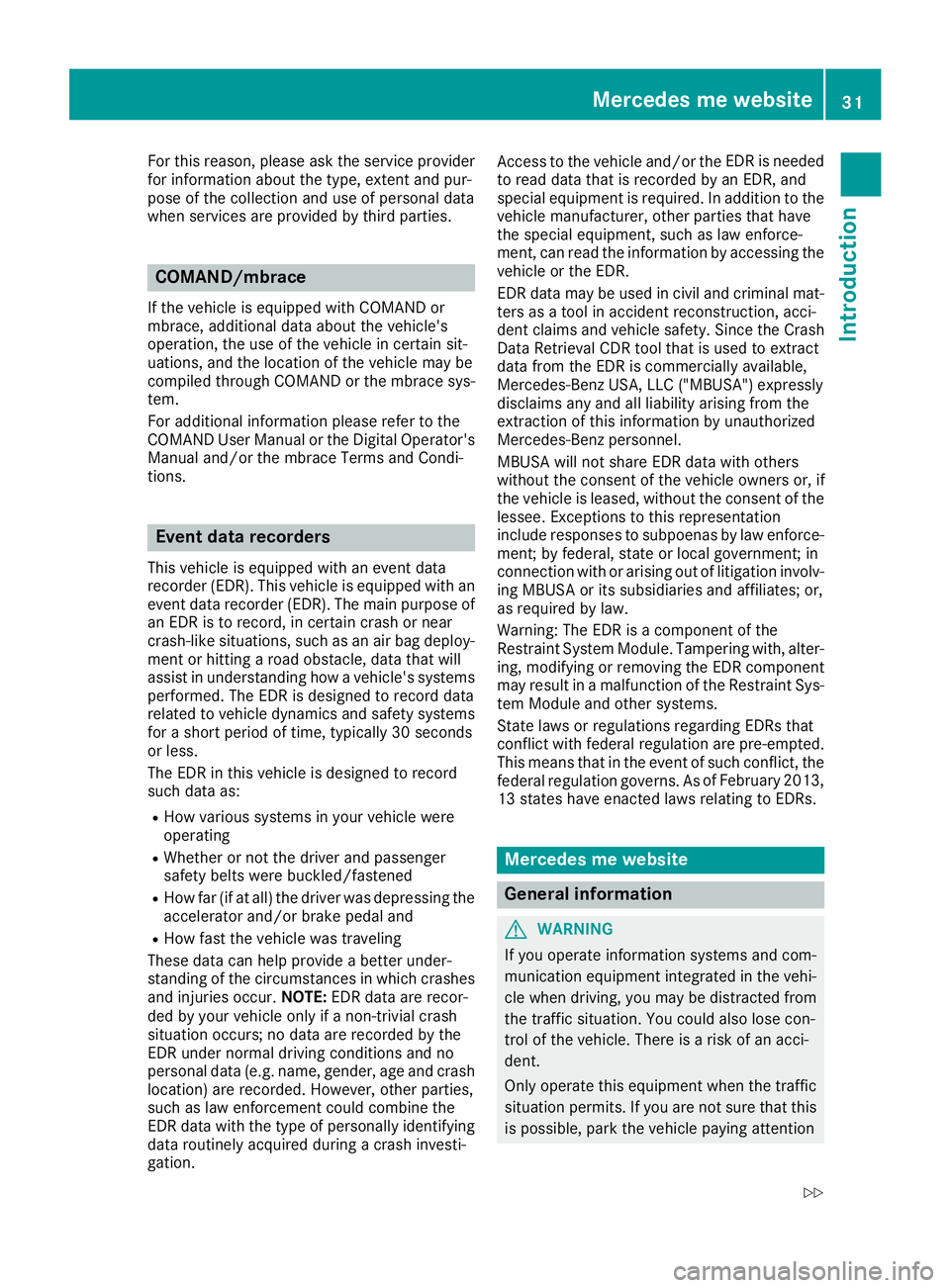
Event data recorders
This vehicle is equipped with an event data
recorder (EDR). This vehicle is equipped with an
event data recorder (EDR). The main purpose of
an EDR is to record, in certain crash or near
crash-like situations, such as an air bag deploy-
ment or hitting a road obstacle, data that will
assist in understanding how a vehicle's systems
performed. The EDR is designed to record data
related to vehicle dynamics and safety systems
for a short period of time, typically 30 seconds
or less.
The EDR in this vehicle is designed to record
such data as:
RHow various systems in your vehicle were
operating
RWhether or not the driver and passenger
safety belts were buckled/fastened
RHow far (if at all) the driver was depressing theaccelerator and/or brake pedal and
RHow fast the vehicle was traveling
These data can help provide a better under-
standing of the circumstances in which crashes and injuries occur. NOTE:EDR data are recor-
ded by your vehicle only if a non-trivial crash
situation occurs; no data are recorded by the
EDR under normal driving conditions and no
personal data (e.g. name, gender, age and crash
location) are recorded. However, other parties,
such as law enforcement could combine the
EDR data with the type of personally identifying
data routinely acquired during a crash investi-
gation. Access to the vehicle and/or the
EDR i
s needed
to read data that is recorded by an EDR, and
special equipment is required. In addition to the
vehicle manufacturer, other parties that have
the special equipment, such as law enforce-
ment, can read the information by accessing the
vehicle or the EDR.
EDR data may be used in civil and criminal mat- ters as a tool in accident reconstruction, acci-
dent claims and vehicle safety. Since the Crash
Data Retrieval CDR tool that is used to extract
data from the EDR is commercially available,
Mercedes-Benz USA, LLC ("MBUSA") expressly
disclaims any and all liability arising from the
extraction of this information by unauthorized
Mercedes-Benz personnel.
MBUSA will not share EDR data with others
without the consent of the vehicle owners or, if
the vehicle is leased, without the consent of the lessee. Exceptions to this representation
include responses to subpoenas by law enforce-
ment; by federal, state or local government; in
connection with or arising out of litigation involv-
ing MBUSA or its subsidiaries and affiliates; or,
as required by law.
Warning: The EDR is a component of the
Restraint System Module. Tampering with, alter-
ing, modifying or removing the EDR component
may result in a malfunction of the Restraint Sys-
tem Module and other systems.
State laws or regulations regarding EDRs that
conflict with federal regulation are pre-empted.
This means that in the event of such conflict, the
federal regulation governs. As of Fe
bruary 2013,
13 states have enacted laws relating to EDRs.
Mercedes me website
General information
GWARNING
If you operate information systems and com-
munication equipment integrated in the vehi-
cle when driving, you may be distracted from
the traffic situation. You could also lose con-
trol of the vehicle. There is a risk of an acci-
dent.
Only operate this equipment when the traffic
situation permits. If you are not sure that this
is possible, park the vehicle paying attention
Mercedes me website31
Introduction
Z
Page 39 of 294
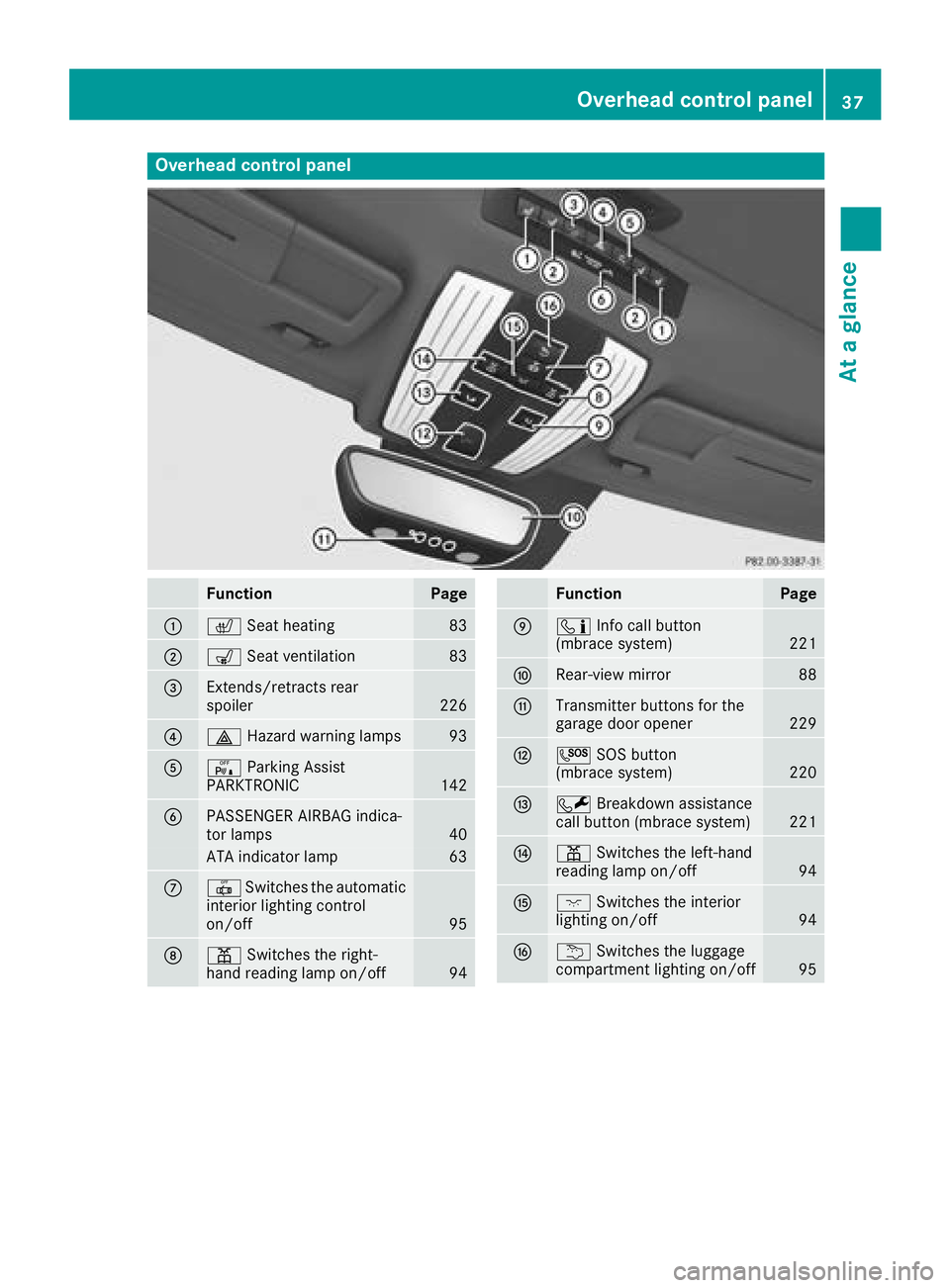
Overhead control panel
FunctionPage
:cSeat heating83
;sSeat ventilation83
=Extends/retracts rear
spoiler226
?£Hazard warning lamps93
AcParking Assist
PARKTRONIC142
BPASSENGER AIRBAG indica-
tor lamps40
ATA indicator lamp63
C| Switches the automatic
interior lighting control
on/off
95
Dp Switches the right-
hand reading lamp on/off94
FunctionPage
Eï Info call button
(mbrace system)221
FRear-view mirror88
GTransmitter buttons for the
garage door opener229
HG SOS button
(mbrace system)220
IF Breakdown assistance
call button (mbrace system)221
Jp Switches the left-hand
reading lamp on/off94
Kc Switches the interior
lighting on/off94
Lu Switches the luggage
compartment lighting on/off95
Overhead control panel37
At a glance
Page 60 of 294
play messages which may be shown in the
instrument cluster (Ypage 170).
Brakes
XIf ABS intervenes:continue to depress the
brake pedal vigorously until the braking sit-
uation is over.
XTo make a full brake application: depress
the brake pedal with full force.
If ABS intervenes when braking, you will feel a
pulsing in the brake pedal.
The pulsating brake pedal can be an indication
of hazardous road conditions, and functions as a reminder to take extra care while driving.
BAS (Brake Assist System)
General information
BAS operates in emergency braking situations.
If you depress the brake pedal quickly, BAS
automatically boosts the braking force, thus
shortening the stopping distance.
Important safety notes
iObserve the "Important safety notes" sec-
tion (Ypage 57).
GWARNING
If BAS is malfunctioning, the braking distance
in an emergency braking situation is
increased. There is a risk of an accident.
In an emergency braking situation, depress
the brake pedal with full force. ABS prevents
the wheels from locking.
Braking
XKeep the brake pedal firmly depressed until
the emergency braking situation is over.
ABS prevents the wheels from locking.
The brakes will function as usual once you
release the brake pedal. BAS is deactivated.
Active Brake Assist
General information
iObserve the "Important safety notes" sec-
tion (Ypage 57).
Active Brake Assist consists of a distance warn-
ing function with an autonomous braking func-
tion and situation-dependent braking assis-
tance.
Active Brake Assist can help you to minimize the
risk of a collision with the vehicle traveling in
front or reduce the effects of such a collision.
If Active Brake Assist detects that there is a risk
of collision, you will be warned visually and
acoustically. If you do not react to the visual and audible collision warning, autonomous braking
can be initiated in critical situations. If you apply
the brake yourself in a critical situation, Active
Brake Assist supports you with situation-
dependent braking assistance.
Important safety notes
In particular, the detection of obstacles can be
impaired if:
Rthere is dirt on the sensors or anything else
covering the sensors
Rthere is snow or heavy rain
Rthere is interference by other radar sources
Rthere are strong radar reflections, for exam-
ple in parking garages
Ra narrow vehicle is traveling in front, e.g. a
motorbike
Ra vehicle is traveling in front on a different line
Ryou are driving a new vehicle or servicing on
the Active Brake Assist system has just been
carried out
Observe the important safety notes in the
"Breaking-in notes" section (
Ypage 104).
Following damage to the front end of the vehicle,
have the configuration and operation of the
radar sensor checked at a qualified specialist
workshop. This also applies to collisions at slow
speeds where there is no visible damage to the
front of the vehicle.
Activating/deactivating
Active Brake Assist is automatically active after
switching on the ignition.
58Driving safety systems
Safety
Page 61 of 294
You can activate or deactivate Active Brake
Assist (Ypage 163) in the on-board computer.
When deactivated, the distance warning func-
tion and the autonomous braking function are
also deactivated.
If Active Brake Assist is deactivated, the æ
symbol appears in the assistance graphic dis-
play.
Distance warning function
General information
The distance warning function can help you to
minimize the risk of a front-end collision with a
vehicle ahead or reduce the effects of such a
collision. If the distance warning function
detects that there is a risk of a collision, you will
be warned visually and acoustically.
Important safety notes
iObserve the "Important safety notes" sec-
tion for driving safety systems (Ypage 57).
GWARNING
The distance warning function does not react:
Rto people or animals
Rto oncoming vehicles
Rto crossing traffic
Rwhen cornering
The distance warning function may not give
warnings in all critical situations. There is a
risk of an accident.
Always pay careful attention to the traffic sit-
uation and be ready to brake.
Always adapt your speed to suit the prevailing
road and traffic conditions.
GWARNING
The distance warning function cannot always
clearly identify objects and complex traffic
situations.
In such cases, the distance warning function
may:
Rgive an unnecessary warning
Rnot give a warning
There is a risk of an accident.
Always pay careful attention to the traffic sit- uation and do not rely solely on the distance
warning function.
Function
Starting at a speed of approximately 4 mph
(7 km/h), the distance warning function warns
you if you rapidly approach a vehicle in front. Anintermittent warning tone will then sound, and
the · distance warning lamp will light up in
the instrument cluster.
XBrake immediately in order to increase the
distance from the vehicle in front.
or
XTake evasive action provided it is safe to do
so.
Due to the nature of the system, particularly
complicated but non-critical driving conditions
may also cause the system to display a warning.
With the help of the radar sensor system, the
distance warning function can detect obstacles
that are in the path of your vehicle for an exten-
ded period of time.
Up to a speed of approximately 44 mph
(70 km/h), the distance warning function can
also react to stationary obstacles, such as stop-
ped or parked vehicles.
Autonomous braking function
If the driver does not react to the distance warn-
ing signal in a critical situation, Active Brake
Assist can assist the driver with the autonomous
braking function.
The autonomous braking function:
Rgives the driver more time to react to critical
driving situations
Rcan help the driver to avoid an accident or
Rreduces the effects of an accident
Vehicles without Distance Pilot DISTRONIC: the autonomous braking function is available in
the following speed ranges:
R4 - 65 mph (7 - 105 km/h) for moving objects
R4 - 31 mph (7 - 50 km/h) for stationary
objects
Driving safety systems59
Safety
Z