ignition MERCEDES-BENZ AMG GT COUPE 2018 Workshop Manual
[x] Cancel search | Manufacturer: MERCEDES-BENZ, Model Year: 2018, Model line: AMG GT COUPE, Model: MERCEDES-BENZ AMG GT COUPE 2018Pages: 465, PDF Size: 8.25 MB
Page 375 of 465
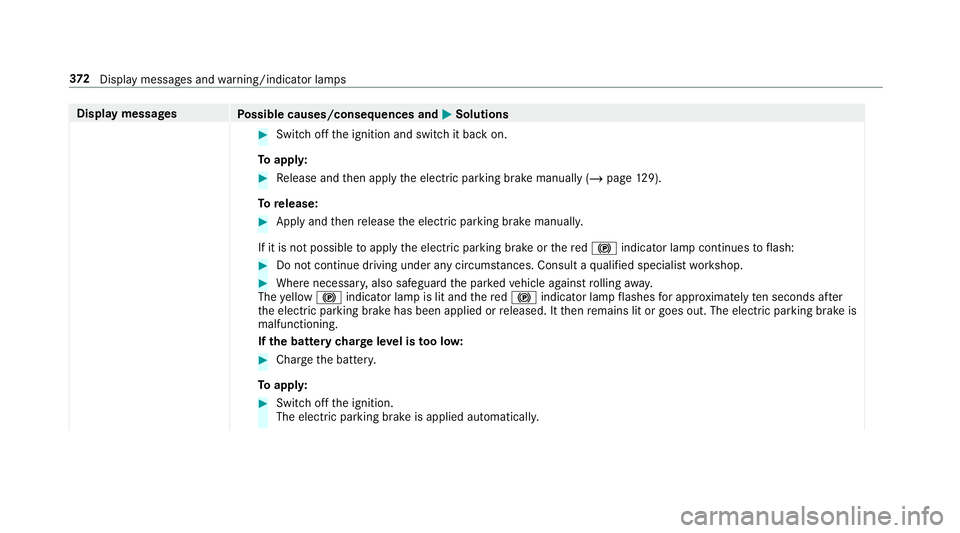
Display messages
Possible causes/consequences and M
MSolutions #
Switch off the ignition and switch it back on.
To appl y: #
Release and then apply the electric parking brake manually (/ page129).
To release: #
Apply and then release the electric parking brake manuall y.
If it is not possible toapply the electric parking brake or there d! indicator lamp continues toflash: #
Do not continue driving under any circum stances. Consult a qualified specialist workshop. #
Where necessar y,also safeguard the par kedve hicle against rolling away.
The yellow ! indicator lamp is lit and there d! indicator lamp flashes for appro ximately ten seconds af ter
th e electric parking brake has been applied or released. It then remains lit or goes out. The electric parking brake is
malfunctioning.
If th e bat tery charge leve l is too lo w: #
Char gethe batter y.
To appl y: #
Switch off the ignition.
The electric parking brake is applied automaticall y.372
Displaymessa ges and warning/indicator lamps
Page 376 of 465
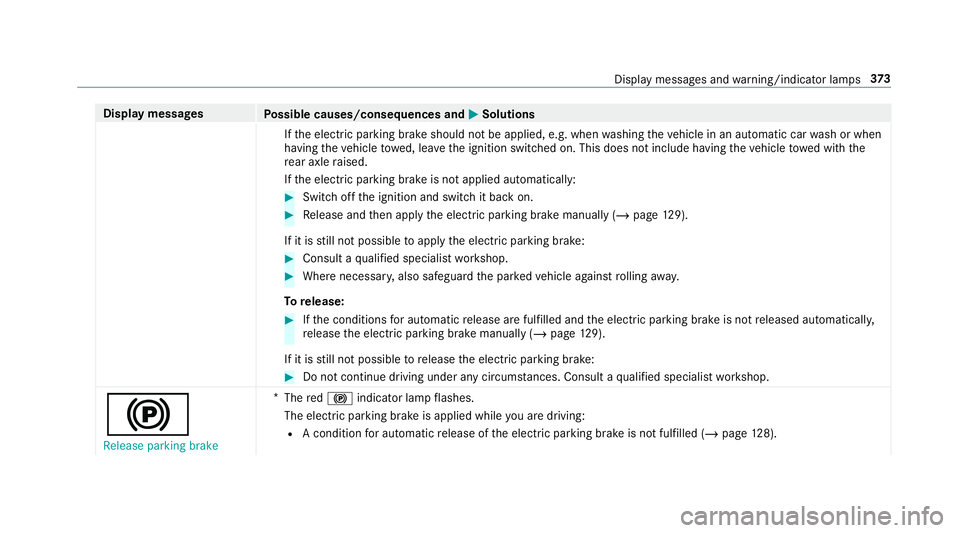
Display messages
Possible causes/consequences and M
MSolutions
If th e electric parking brake should not be applied, e.g. when washing theve hicle in an automatic car wash or when
having theve hicle towe d, lea vethe ignition switched on. This does not include having theve hicle towe d with the
re ar axle raised.
If th e electric parking brake is not applied automatically: #
Switch off the ignition and switch it back on. #
Release and then apply the electric parking brake manually (/ page129).
If it is still not possible toapply the electric parking brake: #
Consult a qualified specialist workshop. #
Where necessar y,also safeguard the par kedve hicle against rolling away.
To release: #
Ifth e conditions for auto matic release are fulfilled and the electric parking brake is not released automaticall y,
re lease the electric parking brake manually (/ page129).
If it is still not possible torelease the electric parking brake: #
Do not continue driving under any circums tances. Consult a qualified specialist workshop.
!
Release parking brake *
The red! indicator lamp flashes.
The electric parking brake is applied while you are driving:
R A condition for auto matic release of the electric parking brake is not fulfilled (/ page128). Displ
aymessa ges and warning/indicator lamps 373
Page 385 of 465
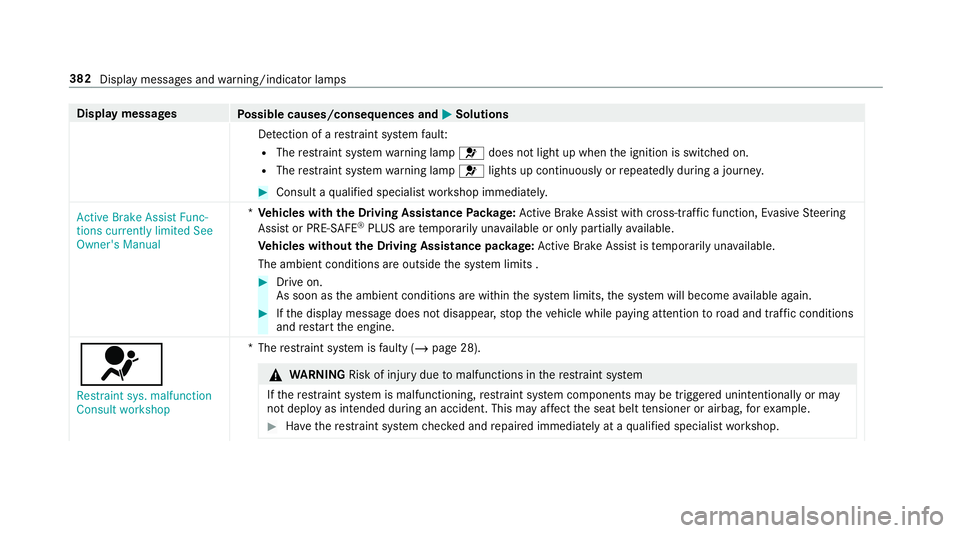
Display messages
Possible causes/consequences and M
MSolutions
De tection of a restra int sy stem fault:
R The restra int sy stem warning lamp 6does not light up when the ignition is switched on.
R The restra int sy stem warning lamp 6lights up continuously or repeatedly during a journe y. #
Consult a qualified specialist workshop immediatel y.
Active Brake Assist Func-
tions currently limited See
Owner's Manual *
Ve hicles with the Driving Assistance Package: Active Brake Assi stwith cross-traf fic function, Evasi veSteering
Assist or PRE‑SAFE ®
PLUS are temp orarily una vailable or only partially available.
Ve hicles without the Driving Assistance pa ckage: Active Brake Assi stistemp orarily una vailable.
The ambient conditions are outside the sy stem limits . #
Drive on.
As soon as the ambient conditions are within the sy stem limits, the sy stem will become available again. #
Ifth e display message does not disappear, stop theve hicle while paying attention toroad and traf fic conditions
and restart the engine.
6
Restraint sys. malfunction
Consult workshop *T
herestra int sy stem is faulty (/ page 28). &
WARNING Risk of inju rydue tomalfunctions in there stra int sy stem
If th ere stra int sy stem is malfunctioning, restra int sy stem components may be triggered unintentionally or may
not deploy as intended during an accident. This may af fect the seat belt tensioner or airbag, forex ample. #
Have there stra int sy stem checked and repaired immediately at a qualified specialist workshop. 382
Display messages and warning/indicator lamps
Page 386 of 465
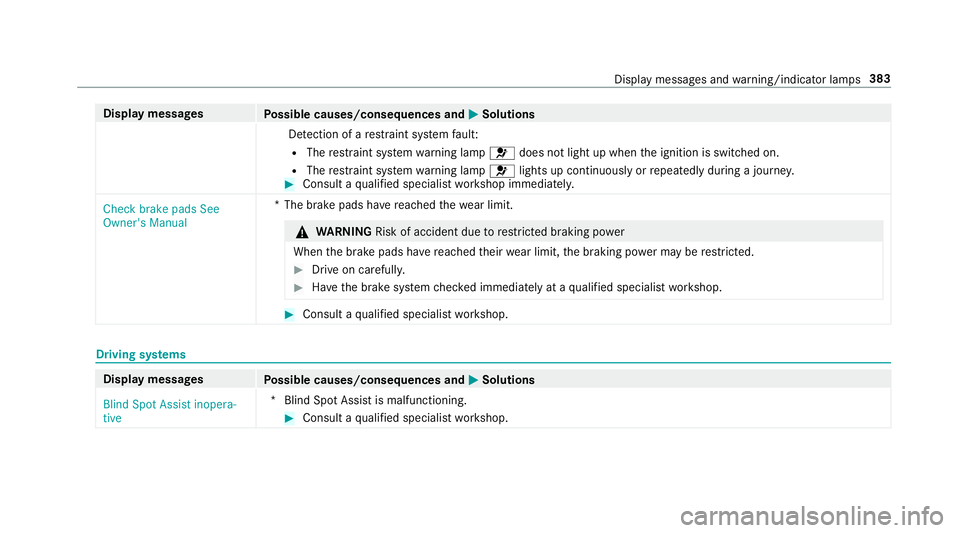
Display messages
Possible causes/consequences and M
MSolutions
De tection of a restra int sy stem fault:
R The restra int sy stem warning lamp 6does not light up when the ignition is switched on.
R The restra int sy stem warning lamp 6lights up continuously or repeatedly during a journe y. #
Consult a qualified specialist workshop immediatel y.
Check brake pads See
Owner's Manual *T
he brake pads ha vereached thewe ar limit. &
WARNING Risk of accident due torestricted braking po wer
When the brake pads ha vereached their wear limit, the braking po wer may be restricted. #
Drive on carefully. #
Have the brake sy stem checked immediately at a qualified specialist workshop. #
Consult a qualified specialist workshop. Driving sy
stems Display messages
Possible causes/consequences and M MSolutions
Blind Spot Assist inopera-
tive *B
lind Spot Assist is malfunctioning. #
Consult a qualified specialist workshop. Display messages and
warning/indicator lamps 383
Page 405 of 465
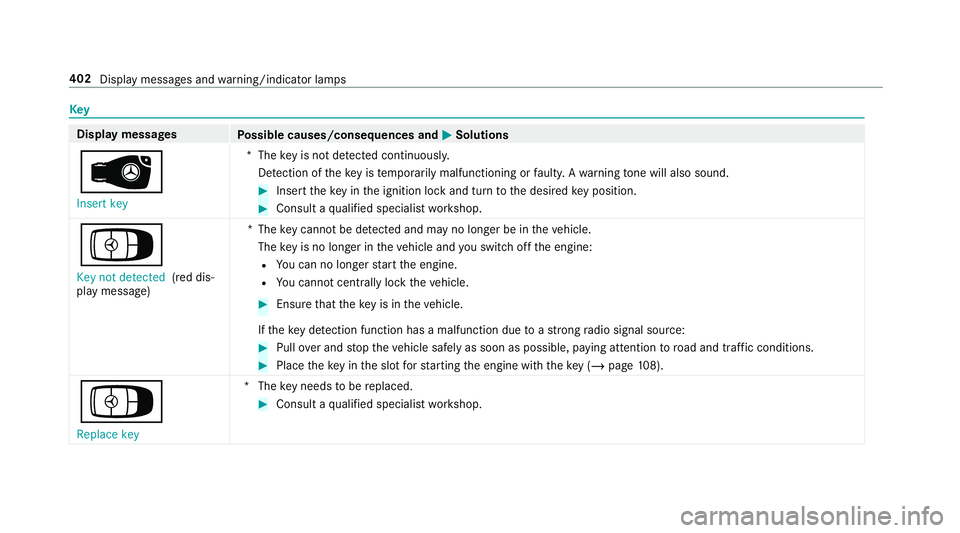
Key
Display messages
Possible causes/consequences and M
MSolutions
 Insert key *T
hekey is not de tected continuously.
De tection of theke y is temp orarily malfunctioning or faulty. A warning tone will also sound. #
Inse rttheke y in the ignition lock and turn tothe desired key position. #
Consult a qualified specialist workshop.
Á Key not detected (red dis‐
play message) *T
hekey cannot be de tected and may no longer be in theve hicle.
The key is no lon ger in theve hicle and you swit choff the engine:
R You can no lon gerst art the engine.
R You cannot centrally lock theve hicle. #
Ensure that theke y is in theve hicle.
If th eke y de tection function has a malfunction due toast ro ng radio signal source: #
Pull over and stop theve hicle safely as soon as possible, paying attention toroad and traf fic conditions. #
Place theke y in the slot forst arting the engine with theke y (/ page108).
Á
Replace key *T
hekey needs tobe replaced. #
Consult a qualified specialist workshop. 402
Display messages and warning/indicator lamps
Page 414 of 465
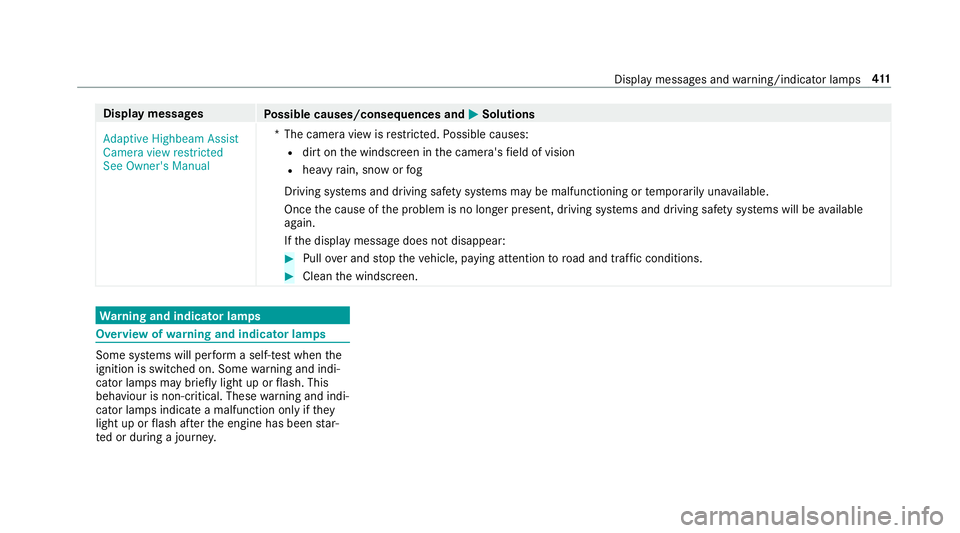
Display messages
Possible causes/consequences and M
MSolutions
Adaptive Highbeam Assist
Camera view restricted
See Owner's Manual *T
he camera view is restricted. Possible causes:
R dirt on the windscreen in the camera's field of vision
R heavy rain, snow or fog
Driving sy stems and driving saf ety sy stems may be malfunctioning or temp orarily una vailable.
Once the cause of the problem is no longer present, driving sy stems and driving saf ety sy stems will be available
again.
If th e display message does not disappear: #
Pull over and stop theve hicle, paying attention toroad and traf fic conditions. #
Clean the windscreen. Wa
rning and indicator lamps Overview of
warning and indicator lamps Some sy
stems will per form a self-test when the
ignition is switched on. Some warning and indi‐
cator lamps may brief lylight up or flash. This
behaviour is non-critical. These warning and indi‐
cator lamps indicate a malfunction only if they
light up or flash af terth e engine has been star‐
te d or during a journe y. Displ
aymessa ges and warning/indicator lamps 411
Page 440 of 465
dTr
ans. oil overheated Drive on
with care ............................................. 397
Tr ansmission Malfunction Stop ........... 395
!Tu rnon the ignition torelease
th e parking brake ................................ 370
h Tyre press. monitor cur rently
una vailable .......................................... 400
hTy repress. monitor inoperative
No wheel sensors ................................ 400
hTy repress. monitor inoperative ...400
Ty re(s) ove rheated ...............................4 01
h Warning tyre defect .....................398
hWheel sensor(s) missing ............. 400
Wi thout changing gear, consult work‐
shop ....................................................3 96
Dist ance control
see Active Dis tance Assi stDISTRONIC
Di stance recorder
see Trip dis tance
DI STRO NIC
see Active Dis tance Assi stDISTRONIC Door
Additional door lock .............................. 58
Locking (emer gency key) ...................... .62
Opening (from the inside) ......................58
Un locking (emer gency key) .................. .62
Un locking (from the inside) ...................58
Door cont rol panel .................................... .12
Double-clut chfunction ............................ 11 8
Drag Race
Setting ................................................ .210
Dr aw bar
see Tow- bar sy stem
Drinks holder see Cup holder
Drive position Enga ging ..............................................1 18
Drive prog ram display ............................. 11 5
Drive prog rams
see DYNA MIC SELECT
Driver's seat see Seat
Driving abroad Symmetrical dipped beam ..................... 93 Driving lights
see Automatic driving lights
Driving saf ety sy stem ............................ .130
ABS (Anti-lock Braking Sy stem) ........... 131
Ac tive Brake Assi st.............................. 13 5
Ad aptive brake lights .......................... .137
BA S (Brake Assi stSystem) .................. 13 2
EBD (Electronic Brake forc e Distribu‐
tion) ..................................................... 13 5
ESP ®
(Electronic Stability Prog ram) ..... 13 2
ESP ®
Crosswind Assi st........................ 13 5
Overview ..............................................1 31
Ra dar sensors ...................................... 131
Re sponsibility ...................................... 13 0
Driving sy stem
AMG RIDE CONTROL ........................... 151
Driving sy stem
see Active Dis tance Assi stDISTRONIC
see ATTENTION ASSIST
see Blind Spot Assist
see Cruise control
see Driving saf ety sy stem
see HOLD function
see Lane Keeping Assist Index
437
Page 444 of 465
H
Handbrake see Electric parking brake
Handling characteristics (unusual) ....... 338
HANDS-FREE ACCESS ................................ 64
Hazard warning lights .............................. .95
HD prog rammes
see CI+ module
Head restra int
Fr ont (adjusting mechanically) ............... 78
Headlamp flasher ...................................... 94
High beam Adaptive Highbeam Assist .................... .95
Switching on/off ................................... 94
High-pressure cleaner (care) ................. 309
Hill Start Assist ....................................... 14 6
HOLD function ......................................... 14 6
Fu nction/no tes ................................... 14 6
Switching on/off ................................. 147
Hotspot Setting up (Wi-Fi) ................................. 202 Vi
a business telephony ........................ 19 9 I
Identification pla te
Engine ................................................. 359
Ve hicle ................................................ 359
Ignition key
see Key
Immobiliser ................................................ 70
Implied warranty
Ve hicle .................................................. 23
In Car Of fice
Calling up ............................................ 252
Fe atures .............................................. 252
Marking a to-do entry as compl eted ....2 53
Noting an incoming call ....................... 253
Selecting functions .............................. 253
Switching auto maticstart on/off ........ 253
Indicator lamps see Warning/indicator lamps
Individual drive prog ram
Con figuring .......................................... 11 6
Selecting .............................................. 11 5Inspection
see AS SYST PLUS
Instrument clus ter
see Instrument display
Instrument display ..................................1 63
Fu nction/no tes ................................... 16 3
Instrument clus ter ................................... 8
Setting the additional value range ....... 16 6
Wa rning/indicator lamps .................... .411
Intelligent Light Sy stem
Ad aptive Highbeam Assist .................... .95
Interior lighting .......................................... 97
Ambient lighting .................................... 97
Re ading light .......................................... 97
Setting ................................................... 97
Switch-off del aytime ............................. 98
In te rior pr otection
Fu nction ................................................ 72
Priming/deactivating ............................. 73
Intermediate destination Calculating a route with intermediate
destinations ........................................ .218
Entering ............................................... 218
Modifying ............................................. 218 Index
441