boot MERCEDES-BENZ AMG GT COUPE 2018 Owners Manual
[x] Cancel search | Manufacturer: MERCEDES-BENZ, Model Year: 2018, Model line: AMG GT COUPE, Model: MERCEDES-BENZ AMG GT COUPE 2018Pages: 465, PDF Size: 8.25 MB
Page 68 of 465
When making
the kicking mo vement, make sure
th at your feet are firm ly on the ground, other‐
wise you could lose your balance, e.g. on ice.
Re quirements:
R The key is behind theve hicle.
R Stand at least 30 cm away from theve hicle
while per form ing the kicking mo vement.
R Do not come into contact with the bumper
while making the kicking mo vement.
R Do not car ryout the kicking mo vement too
slowl y.
R The kicking mo vement must be towa rdsthe
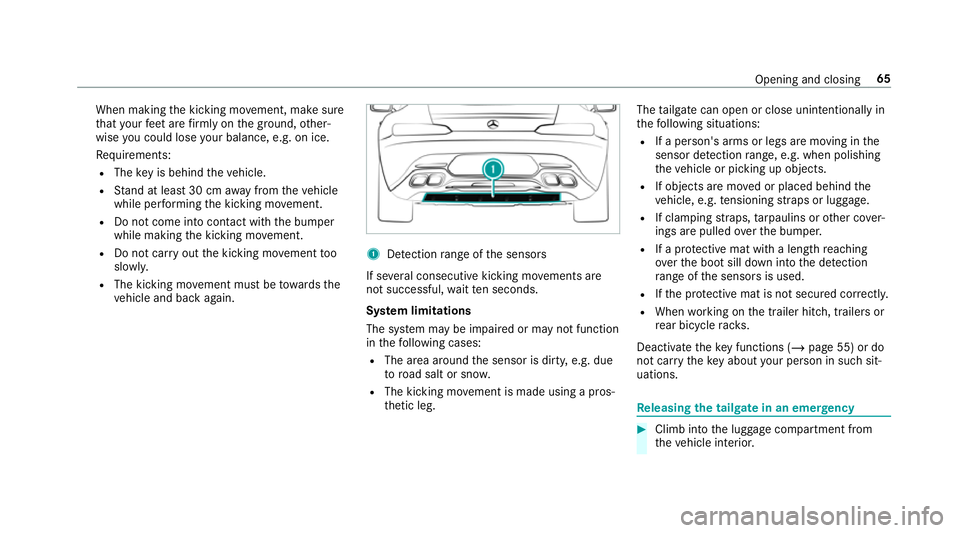
ve hicle and back again. 1
Detection range of the sensors
If se veral consecutive kicking mo vements are
not successful, waitte n seconds.
Sy stem limitations
The sy stem may be impaired or may not function
in thefo llowing cases:
R The area around the sensor is dirty, e.g. due
to road salt or sn ow.
R The kicking mo vement is made using a pros‐
th etic leg. The
tailgate can open or close unin tentional lyin
th efo llowing situations:
R If a person's arms or legs are moving in the
sensor de tection range, e.g. when polishing
th eve hicle or picking up objects.
R If objects are mo ved or placed behind the
ve hicle, e.g. tensioning stra ps or luggage.
R If clamping stra ps, tarp aulins or other co ver‐
ings are pulled overth e bumper.
R If a pr otective mat with a length reaching
ove rth e boot sill down into the de tection
ra nge of the sensors is used.
R Ifth e pr otective mat is not secured cor rectl y.
R When working on the trailer hitch, trailers or
re ar bicycle rack s.
Deactivate theke y functions ( /page 55) or do
not car rytheke y about your person in such sit‐
uations. Re
leasing the tailgate in an emer gency #
Climb into the luggage compartment from
th eve hicle interior. Opening and closing
65
Page 300 of 465
Selecting picture settings
Multimedia sy
stem:
4 Media 5
à Media sources 5
TV
5 Z Options #
Select Picture format. #
Select a picture form at.
Ad justing the brightness manually
If th eAutomatic pictureform at is swit ched off,
yo u can adjust the brightness yourself. #
Select Brightness. #
Adjust the brightness. HD prog
rammes Re
ceiving encryp ted HD prog rammes
* NO
TEDama getothe CI+ module and
Smart Card The CI+ module is designed
for use in the
home. The CI+ module can overheat and be
damaged bycontinuous exposure tohigh
outside temp eratures. #
Make sure that the CI+ module is not
subject tohigh temp eratures forex ten‐
ded pe riods of time.
If th e CI+ module is damaged, no
encryp tedch annels can be recei ved. The
TVtuner is at there ar right of the boot. #
Ifre qu ired (countr y-dependent), insert the
Smart Ca rdinto the CI+ module slot. #
Remo vethe pr otective cap from theTV tune r. #
Insert the CI+ module into theTV tuner sl ot. #
Replace the pr otective cap on theTV tune r.
When the CI+ module is inser ted cor rectly,
encryp ted HD programmes can be recei ved
according toCI+ standard.
If th e CI module is not compatible, an er ror
messa geappears.
Calling up the CI+ module menu
Multimedia sy stem:
4 Media 5
à Media sources 5
TV
5 Z Options #
Select CA module. #
Select a menu option.
% You can view the subscription number in the
CI+ menu. You need this to extend the sub‐
scription, forex ample.
If playback is malfunctioning, you can try to
re sol vethe problem with Restart CI+ mod-
ule.
Fu rther information (see the manufacturer's
operating instructions). Sound
To
ne settings Information about
the sound sy stem
The sound sy stem has a total output of 100 W
and is equipped with se ven speakers. It is availa‐
ble for all functions in thera dio and media
modes.
Calling up the sound menu
Multimedia sy stem:
4 Media 5
à Sound
The following functions are available:
R Equaliser Multimedia sy
stem 297
Page 433 of 465
Information .......................................... 283
Overview .............................................2 84
Sea rching for a track ........................... 286
Sear ching for and auth orisingthe
device .................................................. 285
Selecting a media pla yer ..................... 286
Boost pressure (on-board computer,
Pe rformance menu) ................................ 16 8
Boot lid see Tailgate
Brake Assist Sy stem
see BAS (Brake Assi stSystem)
Brake fluid
No tes ................................................... 364
Brake forc e distribution
EBD (Elect ronic Brake forc e Distribu‐
tion) ..................................................... 13 5
Brakes ABS (Anti-lock Braking Sy stem) ........... 131
Ac tive Brake Assi st.............................. 13 5
Ad aptive brake lights .......................... .137
AMG ceramic high-per form ance
composite brake sy stem ......................1 12
BA S (Brake Assi stSystem) .................. 13 2Driving tips ...........................................
11 0
EBD (Electronic Brake forc e Distribu‐
tion) ..................................................... 13 5
HOLD function .................................... .146
Limi ted braking ef fect (salt-trea ted
ro ads) .................................................. 11 0
New/replaced brakepads/brake
discs .................................................... 109
Ru nning-in no tes ..................................1 09
Braking assi stance
see BAS (Brake Assi stSystem)
Breakdown Overview of the help functions .............. 14
To w- starting ........................................ 335
To wing away ........................................ 332
Tr ansporting theve hicle ......................3 33
Wheel change ...................................... 350
Breakdown see Flat tyre
Breakdown assistance call see Mercedes me connect
Bu rm ester ®
high-end 3D sur round
sound sy stem
Ad justing the balance/fader ............... 300 Ad
justing the sound optimisation ........ 300
Ad justing treble, mid-range and bass
settings ............................................... 299
Au tomatic volume adjustment ............ .299
Calling up the sound menu .................. 299
Information .......................................... 299
Selecting the sound profile .................. 300
Burmes ter®
sur round sound sy stem .....2 98
Ad justing the balance/fader ............... 299
Ad justing the sound focus ................... 299
Ad justing treble, mid-range and bass
settings ............................................... 298
Au tomatic volume adjustment ............ .298
Calling up the sound menu .................. 298
Information .......................................... 298
Switching the sur round sound on/off
............................................................ .299
Business telephony
Setting up an Internet connection ...... .266
Buttons Steering wheel .....................................1 64430
Index