check oil MERCEDES-BENZ AMG GT R-ROADSTER 2020 Owners Manual
[x] Cancel search | Manufacturer: MERCEDES-BENZ, Model Year: 2020, Model line: AMG GT R-ROADSTER, Model: MERCEDES-BENZ AMG GT R-ROADSTER 2020Pages: 441, PDF Size: 7.76 MB
Page 117 of 441
Brake sy
stem Note
s onthe brake sy stem
The brake sy stem of your vehicle is designed for
heavy loads. Therefore, there may be noise when
braking. The loads in the entire brake sy stem
which occur when driving on a racetrack are sig‐
nificantly grea terth an those during normal oper‐
ation.
The increased brake forc es and temp eratures
when driving on a racetrack inhe rently lead to
inc reased wear of the brake sy stem.
Check the condition and geometry of the brake
co ver plate before using theve hicle on a race‐
trac k.
Obser vethe information on the cooling of com‐
ponents which are subject tostra in when oper‐
ated on a racetrack (/ page 113).
Braking with ABS
Re peated hard braking within the ABS control
ra nge causes higher temp eratures in the brake
sy stem than controlled braking shortly before
th e ABS control limit. Brakepad
wear
The inner and outer brakepads may also suf fer
"tapered wear". This could lead topoor pedal
fe el. Therefore, you must also check the condi‐
tion of the brakepads before and af ter use on a
ra cetrack as part of astandard check forwe ar.
Brake discs
Obse rveth e information on the cooling of com‐
ponents which are subject tostra in in racetrack
ope ration (/ page 113).
Depending on theve hicle's equipment, the AMG
ceramic high-per form ance composite braking
sy stem is fitted in your vehicle. The assessment
of we ar must therefore be car ried out using a
special measurement procedure. The brakes are
measured using the cur rent condition of the
ceramic composite material as a criteria for
assessing thewe ar ins tead of assessing the
re sidual thickness.
Depending on the type of brake disc, thefo llow‐
ing are combinations used tomeasu rethewe ar
of the brake discs:
R Carbon-ceramic brake disc -
Visual assessment of the brake disc for
mechanical dama ge
- Wear measurement using the indicator
fi eld me thod; alternatively using the Pro‐
ceq Carbo teq®
measu ring device (e.g. in
th e AMG Performance Center or at AMG
Tr ackda ys)
R Grey cast iron brake disc
- Visual check
- Crack test
- Wearthickness test
The ventilation holes on gr eycast iron friction
ri ngs of standard brake discs in particular could
become bloc kedby brake dust. Therefore, check
th eve ntilation holes be fore using theve hicle on
a ra cetrack and clean them if necessar y.If nec‐
essar y,also clean the drilled holes.
Brake fluid
Che ckthefo llowing properties of the brake fluid
before each use on a racetrack:
R Boiling point
R Fill le vel 11 4
Driving and pa rking
Page 120 of 441
Obser
vethe additional information on the func‐
tion of the active aerodynamics profile
(/ page 149).
St ationary rear wing
% Only vehicles with the AMG Aerodynamic
pac kage are fitted wi thast ationary rear
wing.
The vehicle is delivered exworks with theflat
wing position. Toimpr overear axle po wer out‐
put, there ar wing can be mo vedto the inclined
position forra cetrack mode.
Obser vethe information about adjusting there ar
wing and the permitted tightening torque
(/ page 149). Note
s on engine oil Check
the engine oil le vel before operating in
ra cetrack mode. DY
NA MIC SELECT switch Fu
nction of theDY NA MIC SELECT switch Use
theDY NA MIC SELECT switch tochange
between thefo llowing drive programs:
R o (Slippery): optimised pulling away and
driving characteristics in wint ryand slippe ry
ro ad conditions
R = (Individual): individual settings
R A (Comfort): comfortable and economi‐
cal driving style
R C (Sport): sporty driving style
R B (Sport Plus): particularly sporty driving
st yle
R I (RACE): driving like on a race track
The I (RACE) drive program may not be
used on normal roads. I (RACE) must on ly
be activated and used on dedicated race cir‐
cuits, not on public roads.
Mercedes-AMG recommends selecting the drive
prog ram A when in city traf fic or stop-and-go
traf fic. Depending on
the drive program selected, the
fo llowing vehicle characteristics will change:
R drive
- engine and transmission management
- Active Dis tance Assi stDISTRONIC
R AMG Dynamics
- thefo ur agility functions Basic, Advanced,
Pro and Ma ster are automatically selec‐
te d depending on the drive prog ram.
- thesteering, shift timing point and stabili‐
sation functions are adap tedto the selec‐
te d drive prog ram.
- when ESP ®
is activated, agility function
Pro is selected in drive program I
RACE. The Mas ter function is auto mati‐
cally selected when ESP ®
is deactivated.
R position of theex haust gasflaps
R Suspension
R steering
R availability of Glide mode
R The I(R ACE)drive program has thefo l‐
lowing properties: Driving and parking
117
Page 135 of 441
Some driving and driving safe
ty systems use
cameras and sensors tomonitor the area in
front of, behind or next totheve hicle.
Ke ep the areas around the sensors and cameras
free of dirt, ice or slush (/ page 299). The cam‐
eras and sensors must not be co vered, forex am‐
ple bybicycle rack s, overhanging loads, sticke rs,
fo il or foils toprotect against stone chipping.
Ad ditional licence plate brac kets can impair the
function of the ultrasonic sensors, in particular.
In theeve nt of damage or a severe impact in the
area of the sensors, ha vethe function of the
sensors checked at a qualified specialist work‐
shop. Ha vedamage or stone chipping in the area
of the cameras repaired at a qualified specialist
wo rkshop. If the sensors or cameras are dam‐
aged, some driving sy stems and driving saf ety
sy stems may no longer function proper ly.Overview of driving sy
stems and driving
saf ety sy stems R
ABS (Anti-lo ckBra king System)
(/ page 132)
R BAS (Bra keAssist System) (/ page132) R
ESP ®
(Electronic Stability Program)
(/ page 133)
R EBD ( Electronic Brakeforc eDistribution)
(/ page 135)
R Active Brake Assi st (/ page 135)
R Adaptive Brake Lights (/ page138)
R Cruise control (/ page 138)
R Limi ter (/ page139)
R Active Dis tance Assi stDISTRONIC
(/ page 141)
R Hill Start Assist (/ page144)
R HOLD function (/ page145)
R RACE START (/ page 146)
R AMG RIDE CONTROL (/ page150)
R Front and reve rsing camera (/ page154)
R ATTENTION ASSIST (/ page156)
R Traf fic Sign Assi st (/ page 157)
R Blind Spot Assi st (/ page 159)
R Lane Keeping Assist (/ page160) Fu
nction of ABS The Anti-lock Brake Sy
stem (ABS) regulates the
brake pressure in critical driving situations:
R During braking, e.g. at full brake application
or insuf ficient tyre traction, the wheels are
pr eve nted from lock ing.
R Vehicle steerability while braking is ensured.
If ABS inter venes when braking, you will feel a
pulsing in the brake pedal. The pulsating brake
pedal can be an indication of hazardous road
conditions and can ser veas a reminder totake
ex tra care while driving. Fu
nction of BAS The Brake Assist Sy
stem (BAS) supports your
eme rgency braking situation with additional
brake forc e.
If yo u depress the brake pedal quickl y,BA S is
acti vated:
R BAS au tomatically boosts the brake pres‐
sure.
R BAS can sho rten the braking dis tance. 13 2
Driving and pa rking
Page 204 of 441
%
The following values can be set for parame‐
te rs 1 and 2, forex ample:
R Speed
R longitudinal/lateral acceleration
R steering angle
R Engine speed
R engine oil/tyre temp erature
Based on the anal ysis yo u can check and opti‐
mise driving characteristics for any position on
th e tra ck.
Exporting trac ksorraces (USB) #
Select All tracks.
An ove rview of all stored trac ksand races
appea rs. #
Highlight desired trac ksorraces. #
Select ÜOptions. #
Select Export.
The selected trac ksorraces can be expor ted
to a USB storage device connected tothe
ve hicle. Editing trac
ksand recordings #
Select All tracks. #
Highlight the desired trac k. #
Select Üoptions. #
Select Rename orDelete.
or #
Select a trac k. #
Highlight the desired recording. #
Select Üoptions. #
Select Weather orDelete. Setting Drag
Race Multimedia sy
stem:
4 vehicle 5
TRACK PACE 5
Drag Race
Measuring acceleration #
Select Acceleration.
Measurement begins when theve hicle accel‐
erates. Measurement is incremental, in steps
of 50 km/h toa maximum of 300 km/h or
up tothe set maximum speed. Measurement can be
stopped early by
selecting Stoporby stopping theve hicle.
Quar ter-mile race #
Select Quarter Mile.
The time measurement runs until a mile has
been tr avelled or a pr eviously set dis tance
(e.g. quarter mile, third mile or half mile) has
been reached.
% The possible values for setting the end dis‐
ta nce are de term ined bythe sy stem and
cann otbe freely chosen.
Measurement can be stopped early byselecting
Stop orby stopping theve hicle.
Manual start for accele ration and quarter-
mile race #
Select Acceleration orQuarter Mile . #
Select Manual start .
Three red traf fic lights appear one af terthe
ot her. The reaction time measurement starts
when they change togreen at the same time.
The reaction time is displa yed as soon as you
drive off. If you drive off too ear ly,th e mes‐
sage Jump start will appear and acceleration Multimedia sy
stem 201
Page 293 of 441
R
frequent operation in mountainous terrain or
on poor road sur faces
R when the engine is of ten le ftidling for long
periods
R operation in particula rly dusty conditions
and/or if air-recirculation mode is frequently
used
In these or similar operating conditions, ha vethe
interior air filter, engine air cleaner, engine oil
and oil filter etc. changed more frequent ly. The
tyres must be checked more frequently if the
ve hicle is operated under increased loads. Fur‐
th er information can be obtained at a qualified
specialist workshop. Battery disconnection periods
The ASS
YST PLUS se rvice inter val display
can only calculate the service due da tewhen
th e bat tery is connected. #
Notedown the service due date displa yed on
th e instrument display before disconnecting
th e battery (/ page 289). Engine compartment
Opening/closing
the bonnet &
WARNING Risk of accident due todriv‐
ing with the bonn etunlo cked
The bonn etmay open and block your vie w. #
Neverre lease the bonn etwhen driving. #
Before every trip, ensure that the
engine bonn etis loc ked. &
WARNING Risk of accident and inju ry
when opening and closing the bonn et
The bonnet may suddenly drop into the end
position.
There is a risk of injury for an yone in the bon‐
net's range of mo vement. #
Open or close the bonn etonly when
th ere is nobody in the bonn et's range of
mo vement. &
WARNING Danger of burn s when open‐
ing the bonn et
If yo u open the engine bonn etwhen the
engine has overheated or during a fire inthe
engine compartment, you could come into
contact with hot gases or other escaping
operating fluids. #
Before opening the bonn et, allow the
engine tocool down. #
Intheeve nt of a fire inthe engine com‐
partment, keep the engine bonn et
closed and call thefire service. &
WARNING Risk of injury duetomoving
parts
Components in the engine compartment may
continue running or start up sudden ly,even if
th e ignition is switched off.
Make sure of thefo llowing before per form ing
ta sks in the engine compartmen t: #
Switch the ignition off. 290
Maintenance and care
Page 295 of 441
#
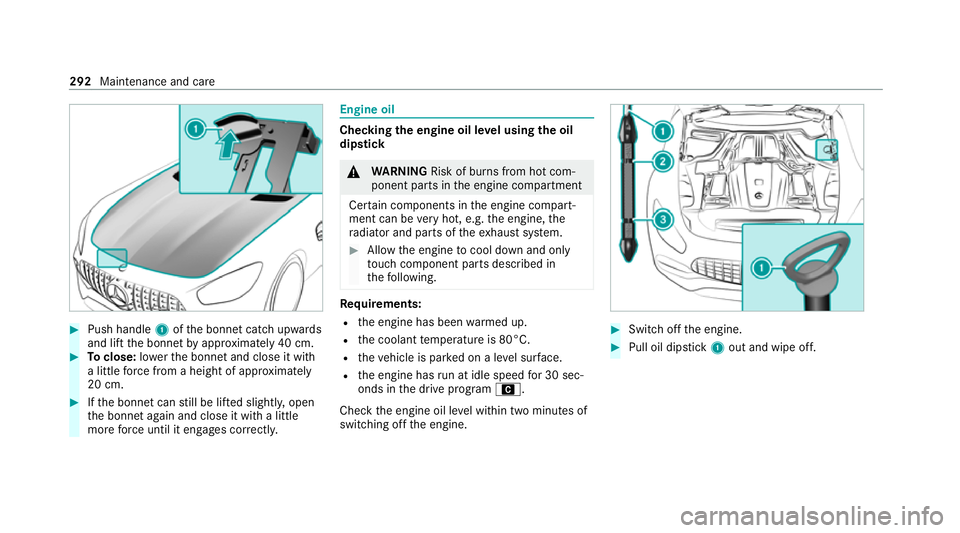
Push handle 1ofthe bonn etcatch up wards
and lift the bonn etby appr oximately 40 cm. #
Toclose: lowe rth e bonn etand close it with
a little forc e from a height of appr oximately
20 cm. #
Ifth e bonn etcan still be lif ted slightl y,open
th e bonn etagain and close it with a little
more forc e until it engages cor rectly. Engine oil
Che
cking the engine oil le vel using the oil
dip stick &
WARNING Risk of burn s from hot com‐
ponent parts in the engine compartment
Cer tain components in the engine compart‐
ment can be very hot, e.g. the engine, the
ra diator and parts of theex haust sy stem. #
Allow the engine tocool down and only
to uch co mponent parts described in
th efo llowing. Re
quirements:
R the engine has been warmed up.
R the coolant temp erature is 80°C.
R theve hicle is par ked on a le vel sur face.
R the engine has run at idle speed for 30 sec‐
onds in the drive program A.
Check the engine oil le vel within two minutes of
switching off the engine. #
Switch off the engine. #
Pull oil dipstick 1out and wipe off. 292
Maintenance and care
Page 297 of 441
#
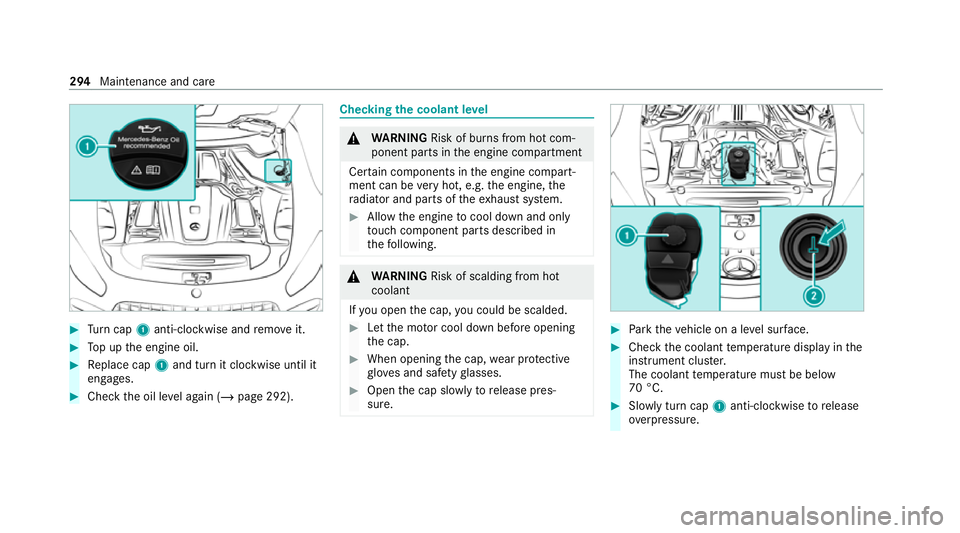
Turn cap 1anti-clockwise and remo veit. #
Top up the engine oil. #
Replace cap 1and turn it clockwise until it
engages. #
Check the oil le vel again (/ page 292). Checking
the coolant le vel &
WARNING Risk of burn s from hot com‐
ponent parts in the engine compartment
Cer tain components in the engine compart‐
ment can be very hot, e.g. the engine, the
ra diator and parts of theex haust sy stem. #
Allow the engine tocool down and only
to uch co mponent parts described in
th efo llowing. &
WARNING Risk of scalding from hot
coolant
If yo u open the cap, you could be scalded. #
Let the mo tor cool down before opening
th e cap. #
When opening the cap, wear pr otective
gl ove s and saf etygl asses. #
Open the cap slowly torelease pres‐
sure. #
Park theve hicle on a le vel sur face. #
Check the coolant temp erature display in the
instrument clus ter.
The coolant temp erature must be below
70 °C. #
Slowly turn cap 1anti-clockwise torelease
ove rpressure. 294
Maintenance and care
Page 367 of 441
Display messages
Possible causes/consequences and M MSolutions
Transmission Malfunction
Stop *
The transmission is malfunctioning. The transmission shifts toneutral iautomatically. #
Stop theve hicle immediately in accordance with the traf fic conditions. #
Depress the brake pedal. #
Enga gepark position j. #
Consult a qualified specialist workshop.
Stop vehicle Leave engine
running Wait Transmission
cooling *T
he transmission is overheating. Pulling away may be temp orarily impaired or not possible. #
Stop theve hicle immediately in accordance with the traf fic conditions. Do not continue driving. #
Lea vethe engine running. #
Wait until the display message disappears before pulling away.
d Transmission oil cooling
Malfunction *T
he transmission's coolant pump is faulty. The transmission may overheat. #
Select thePerformance menu inthe on-board computer and check the transmission oil temp erature . #
Avoid a high load with a dynamic driving style. #
If transmission oil temp eratures are below 120 °C, drive on tothe nearest qualified specialist workshop. 364
Display messages and warning/indicator lamps
Page 414 of 441
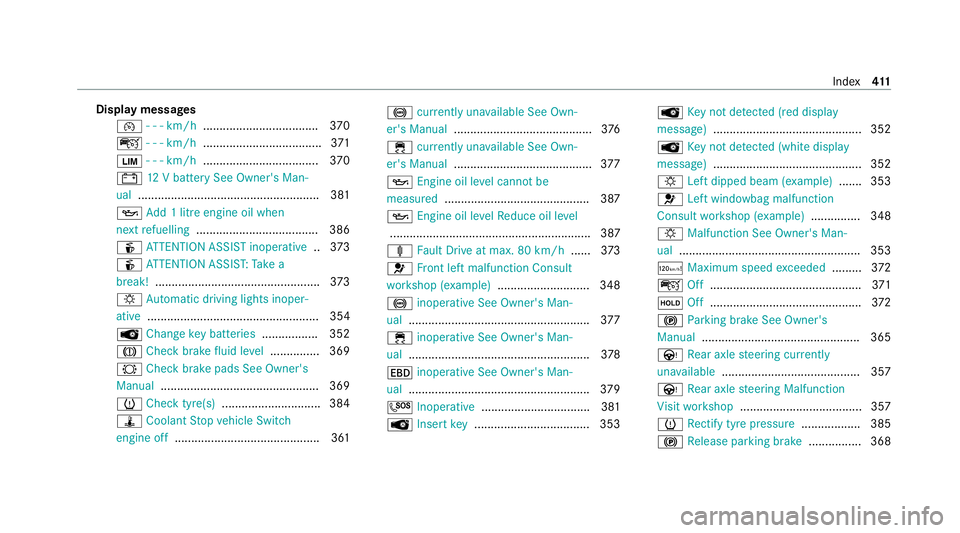
Display messages
¯ - - - km/h .................................. .370
ç - - - km/h ................................... .371
È - - - km/h ................................... 370
# 12V battery See Owner's Man‐
ual ....................................................... 381
5 Add 1 litre engine oil when
next refuelling .................................... .386
é ATTENTION ASSIST inoperative ..373
é ATTENTION ASSIS T:Take a
break! .................................................. 373
: Automatic driving lights inoper‐
ative .................................................... 354
 Change key bat teries ................. 352
J Check brake fluid le vel.............. .369
# Checkbrake pads See Owner's
Manual ................................................ 369
h Check tyre(s) .............................. 384
ÿ Coolant Stop vehicle Switch
engine off ............................................ 361 !
currently una vailable See Own‐
er's Manual .......................................... 376
÷ currently una vailable See Own‐
er's Manual .......................................... 377
5 Engine oil le vel cannot be
measured ............................................ 387
5 Engine oil le velRe duce oil le vel
............................................................. 387
ä Fault Drive at max. 80 km/h ......373
6 Front left malfunction Consult
wo rkshop (e xample)............................ 348
! inoperative See Owner's Man‐
ual ....................................................... 377
÷ inoperative See Owner's Man‐
ual ....................................................... 378
T inoperative See Owner's Man‐
ual ....................................................... 379
G Inoperative .................................3 81
 Insert key .................................. .353 Â
Key not de tected (red displ ay
messa ge).............................................3 52
 Key not de tected (white display
messa ge).............................................3 52
: Left dipped beam (e xamp le) .......3 53
6 Left wind owbag malfunction
Consult workshop (e xample).............. .348
: Malfunction See Owner's Man‐
ual ....................................................... 353
ð Maximum speed exceeded ......... 372
ç Off..............................................3 71
ë Off..............................................3 72
! Parking brake See Owner's
Manual ................................................ 365
Ù Rear axle steering cur rently
una vailable .......................................... 357
Ù Rear axle steering Malfunction
Vi sit workshop .....................................3 57
h Rectify tyre pressure .................. 385
! Release parking brake ................ 368 Index
411