econ MERCEDES-BENZ AMG GT S 2016 C190 Owner's Guide
[x] Cancel search | Manufacturer: MERCEDES-BENZ, Model Year: 2016, Model line: AMG GT S, Model: MERCEDES-BENZ AMG GT S 2016 C190Pages: 290, PDF Size: 6.73 MB
Page 135 of 290
Ra system malfunction occurs.
Rthe power supply is not sufficient.
If a malfunction occurs, the transmission may
also shift into position Pautomatically.
Setting a speed
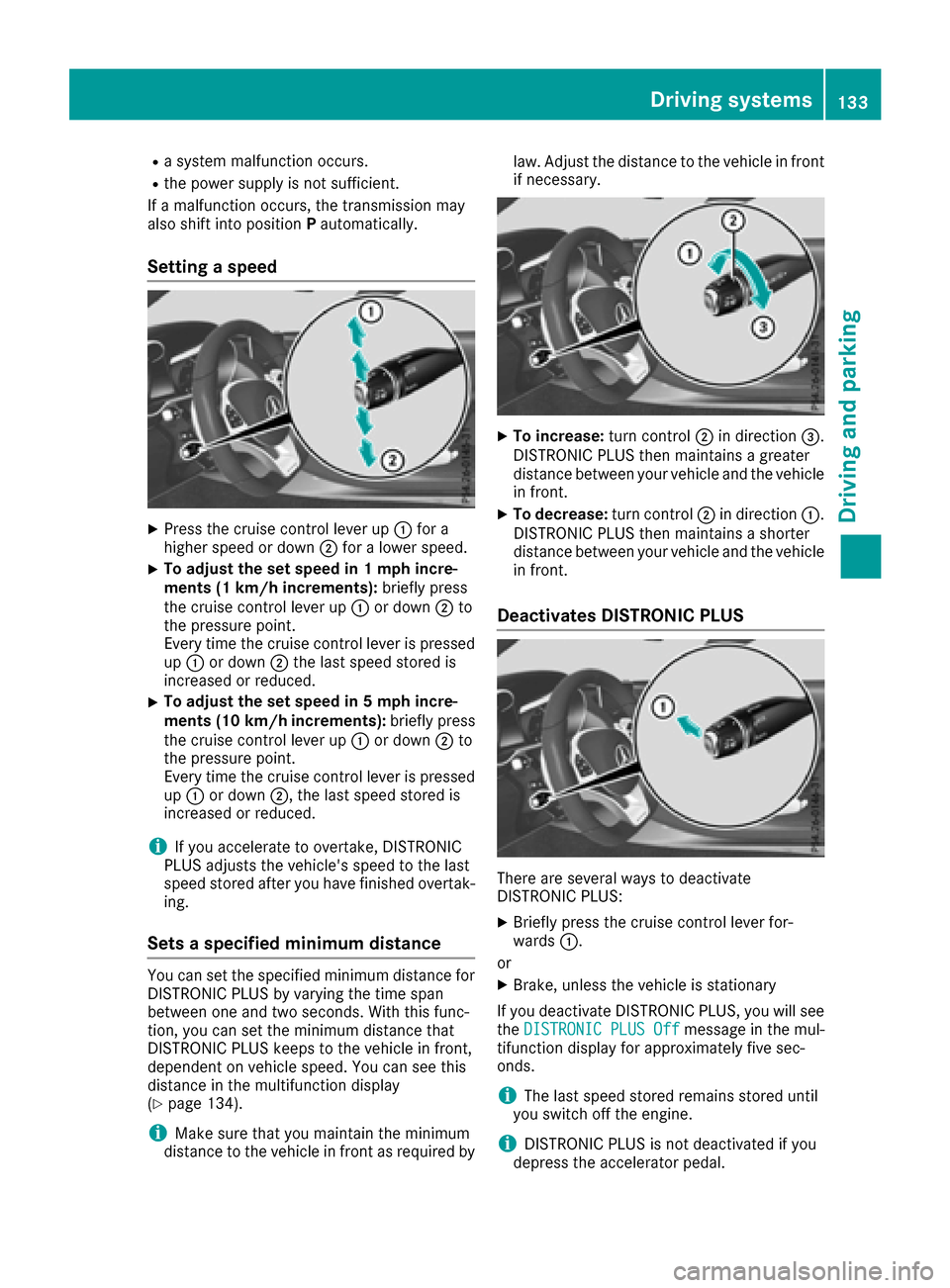
XPress the cruise control lever up :for a
higher speed or down ;for a lower speed.
XTo adjust the set speed in 1 mph incre-
ments (1 km/h increments): briefly press
the cruise control lever up :or down ;to
the pressure point.
Every time the cruise control lever is pressed
up : or down ;the last speed stored is
increased or reduced.
XTo adjust the set speed in 5 mph incre-
ments (10 km/h increments): briefly press
the cruise control lever up :or down ;to
the pressure point.
Every time the cruise control lever is pressed
up : or down ;, the last speed stored is
increased or reduced.
iIf you accelerate to overtake, DISTRONIC
PLUS adjusts the vehicle's speed to the last
speed stored after you have finished overtak-
ing.
Sets a specified minimum distance
You can set the specified minimum distance for
DISTRONIC PLUS by varying the time span
between one and two seconds. With this func-
tion, you can set the minimum distance that
DISTRONIC PLUS keeps to the vehicle in front,
dependent on vehicle speed. You can see this
distance in the multifunction display
(
Ypage 134).
iMake sure that you maintain the minimum
distance to the vehicle in front as required by law. Adjust the distance to the vehicle in front
if necessary.
XTo increase:
turn control;in direction =.
DISTRONIC PLUS then maintains a greater
distance between your vehicle and the vehicle
in front.
XTo decrease: turn control;in direction :.
DISTRONIC PLUS then maintains a shorter
distance between your vehicle and the vehicle
in front.
Deactivates DISTRONIC PLUS
There are several ways to deactivate
DISTRONIC PLUS:
XBriefly press the cruise control lever for-
wards :.
or
XBrake, unless the vehicle is stationary
If you deactivate DISTRONIC PLUS, you will see
the DISTRONIC PLUS Off
message in the mul-
tifunction display for approximately five sec-
onds.
iThe last speed stored remains stored until
you switch off the engine.
iDISTRONIC PLUS is not deactivated if you
depress the accelerator pedal.
Driving systems133
Driving and parking
Z
Page 136 of 290
DISTRONIC PLUS is automatically deactivated
if:
Ryou engage the electric parking brake or if thevehicle is automatically secured with the elec-
tric parking brake
RESP®intervenes or you deactivate ESP®
Rthe transmission is in the P,R or Nposition
Ryou pull the cruise control lever towards you
in order to pull away and the front-passenger
door or one of the rear doors is open
Rthe vehicle has skidded
Ryou activate Active Parking Assist
If DISTRONIC PLUS is deactivated, you will hear
a warning tone. You will see the DISTRONIC
PLUS Offmessage in the multifunction display
for approximately five seconds.
Displays in the instrument cluster
Displays in the speedometer
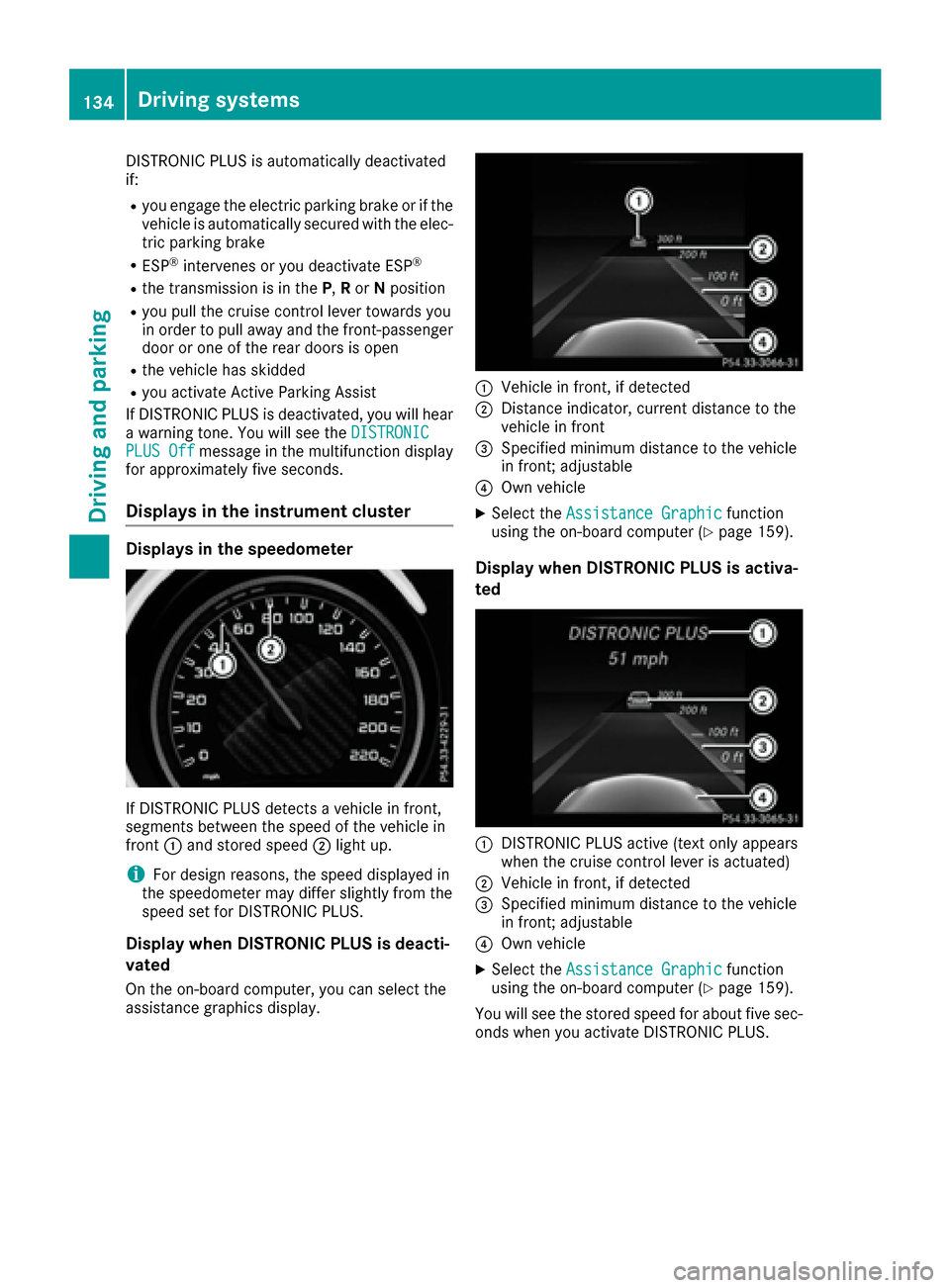
If DISTRONIC PLUS detects a vehicle in front,
segments between the speed of the vehicle in
front :and stored speed ;light up.
iFor design reasons, the speed displayed in
the speedometer may differ slightly from the
speed set for DISTRONIC PLUS.
Display when DISTRONIC PLUS is deacti-
vated
On the on-board computer, you can select the
assistance graphics display.
:Vehicle in front, if detected
;Distance indicator, current distance to the
vehicle in front
=Specified minimum distance to the vehicle
in front; adjustable
?Own vehicle
XSelect the Assistance Graphicfunction
using the on-board computer (Ypage 159).
Display when DISTRONIC PLUS is activa-
ted
:DISTRONIC PLUS active (text only appears
when the cruise control lever is actuated)
;Vehicle in front, if detected
=Specified minimum distance to the vehicle
in front; adjustable
?Own vehicle
XSelect the Assistance Graphicfunction
using the on-board computer (Ypage 159).
You will see the stored speed for about five sec-
onds when you activate DISTRONIC PLUS.
134Driving system s
Driving an d parking
Page 140 of 290
Rthe vehicle is stationary and the brake pedal is
depressed sufficiently (left foot).
Rthe transmission is in positionD.
Rdrive program S,S+ orRACE is selected
(Ypage 108).
Activating RACE START
iWhen manual mode (Ypage 115) is active,
the transmission automatically shifts up to
RACE START in the drive program. This func-
tion supports maximum acceleration with
RACE START. After going through an acceler-
ating process once from a stationary position, this function is automatically deactivated.
XDepress the brake pedal with your left foot
and keep it depressed.
XPull and hold both steering wheel paddle shift-
ers.
XThe RACE START Confirm: Paddle UPCancel: Paddle DOWNmessage appears in
the multifunction display.
XRelease both steering wheel paddle shifters.
iIf the activation conditions are no longer ful-
filled, RACE START is canceled. The RACE
START Not Possible See Operator'sManualmessage appears in the multifunction
display.
XTo cancel: pull the left steering wheel paddle
shifter (Ypage 113).
or
XTo confirm: pull the right steering wheel pad-
dle shifter (Ypage 113).
The RACESTARTAvailableDepressgaspedal.message appears in the multifunction
display.
iIf you do not depress the accelerator pedal
within a few seconds, RACE START is can-
celed. The RACE START Canceled
message
appears in the multifunction display.
XFully depress the accelerator pedal.
The engine speed is increased.
The RACE
STARTReleasebraketostartmessage appears in the multifunction display.
iIf you do not release the brake pedal within
a short time, RACE START will be canceled. The
RACE START Canceled
message
appears in the multifunction display.
XTake your foot off the brake, but keep the
accelerator pedal depressed.
The vehicle pulls away at maximum acceler-
ation.
The RACE
STARTActivemessage appears in
the multifunction display.
RACE START is deactivated when the vehicle
reaches a speed of approximately 30 mph (Can-
ada: 50 km/h).
RACE START is deactivated immediately if you
release the accelerator pedal during RACE
START or if any of the activation conditions are
no longer fulfilled. The RACE START Not Pos‐
sible See Operator's ManualorRACESTART Canceledmessage appears in the mul-
tifunction display.
iIf RACE START is used repeatedly within a
short period of time, it is only available again
after the vehicle has been driven a certain
distance.
AMG adaptive sport suspension sys-
tem
General notes
The electronically controlled damping system
works continuously. This improves driving
safety and ride comfort.
The damping is tuned individually to each wheel
and depends on:
Ryour driving style, e.g. sporty
Rthe road surface condition, e.g. bumps
Ryour individual selection of Sport, Sport + or
Comfort
The suspension setting is adjusted using the
corresponding button in the center console.
iThe mode can also be set using the
DYNAMIC SELECT controller (Ypage 108).
Each time you start the engine with the Smart-
Key or the Start/Stop button, Comfort mode is
activated. For further information about starting
the engine, see (
Ypage 103).
138Driving system s
Driving an d parking
Page 141 of 290
Sport mode
The firmer setting of the suspension tuning in
Sport mode ensures even better contact with
the road. Select this mode when employing a
sporty driving style, e.g. on winding country
roads.
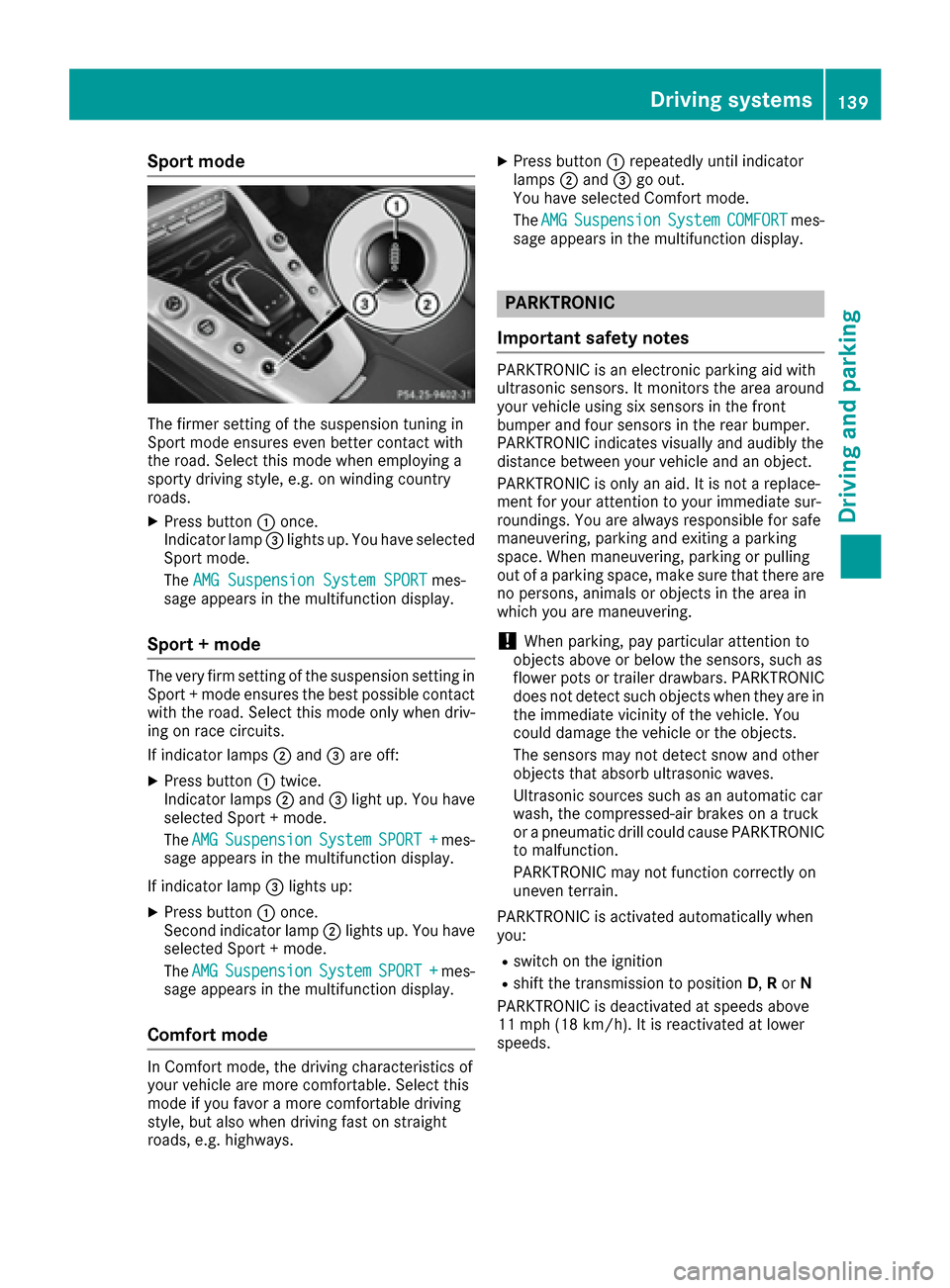
XPress button:once.
Indicator lamp =lights up. You have selected
Sport mode.
The AMG Suspension System SPORT
mes-
sage appears in the multifunction display.
Sport + mode
The very firm setting of the suspension setting in
Sport + mode ensures the best possible contact
with the road. Select this mode only when driv-
ing on race circuits.
If indicator lamps ;and =are off:
XPress button :twice.
Indicator lamps ;and =light up. You have
selected Sport + mode.
The AMG
SuspensionSystemSPORT +mes-
sage appears in the multifunction display.
If indicator lamp =lights up:
XPress button :once.
Second indicator lamp ;lights up. You have
selected Sport + mode.
The AMG
SuspensionSystemSPORT +mes-
sage appears in the multifunction display.
Comfort mode
In Comfort mode, the driving characteristics of
your vehicle are more comfortable. Select this
mode if you favor a more comfortable driving
style, but also when driving fast on straight
roads, e.g. highways.
XPress button :repeatedly until indicator
lamps ;and =go out.
You have selected Comfort mode.
The AMG
SuspensionSystemCOMFORTmes-
sage appears in the multifunction display.
PARKTRONIC
Important safety notes
PARKTRONIC is an electronic parking aid with
ultrasonic sensors. It monitors the area around
your vehicle using six sensors in the front
bumper and four sensors in the rear bumper.
PARKTRONIC indicates visually and audibly the
distance between your vehicle and an object.
PARKTRONIC is only an aid. It is not a replace-
ment for your attention to your immediate sur-
roundings. You are always responsible for safe
maneuvering, parking and exiting a parking
space. When maneuvering, parking or pulling
out of a parking space, make sure that there are
no persons, animals or objects in the area in
which you are maneuvering.
!When parking, pay particular attention to
objects above or below the sensors, such as
flower pots or trailer drawbars. PARKTRONIC
does not detect such objects when they are in
the immediate vicinity of the vehicle. You
could damage the vehicle or the objects.
The sensors may not detect snow and other
objects that absorb ultrasonic waves.
Ultrasonic sources such as an automatic car
wash, the compressed-air brakes on a truck
or a pneumatic drill could cause PARKTRONIC
to malfunction.
PARKTRONIC may not function correctly on
uneven terrain.
PARKTRONIC is activated automatically when
you:
Rswitch on the ignition
Rshift the transmission to position D,Ror N
PARKTRONIC is deactivated at speeds above
11 mph (18 km/h). It is reactivated at lower
speeds.
Driving systems139
Driving and parking
Z
Page 143 of 290
mine which warning display is active when the
engine is running.
Transmission posi-
tionWarning display
DFront area activated
R,Nor the vehicle is
rolling backwardsRear and front areas
activated
PNo areas activated
One or more segments light up as the vehicle
approaches an obstacle, depending on the vehi-
cle's distance from the obstacle.
From the:
Rsixth segment onwards, you will hear an inter-
mittent warning tone for approximately two
seconds.
Rseventh segment onwards, you will hear a
warning tone for approximately two seconds.
This indicates that you have now reached the minimum distance.
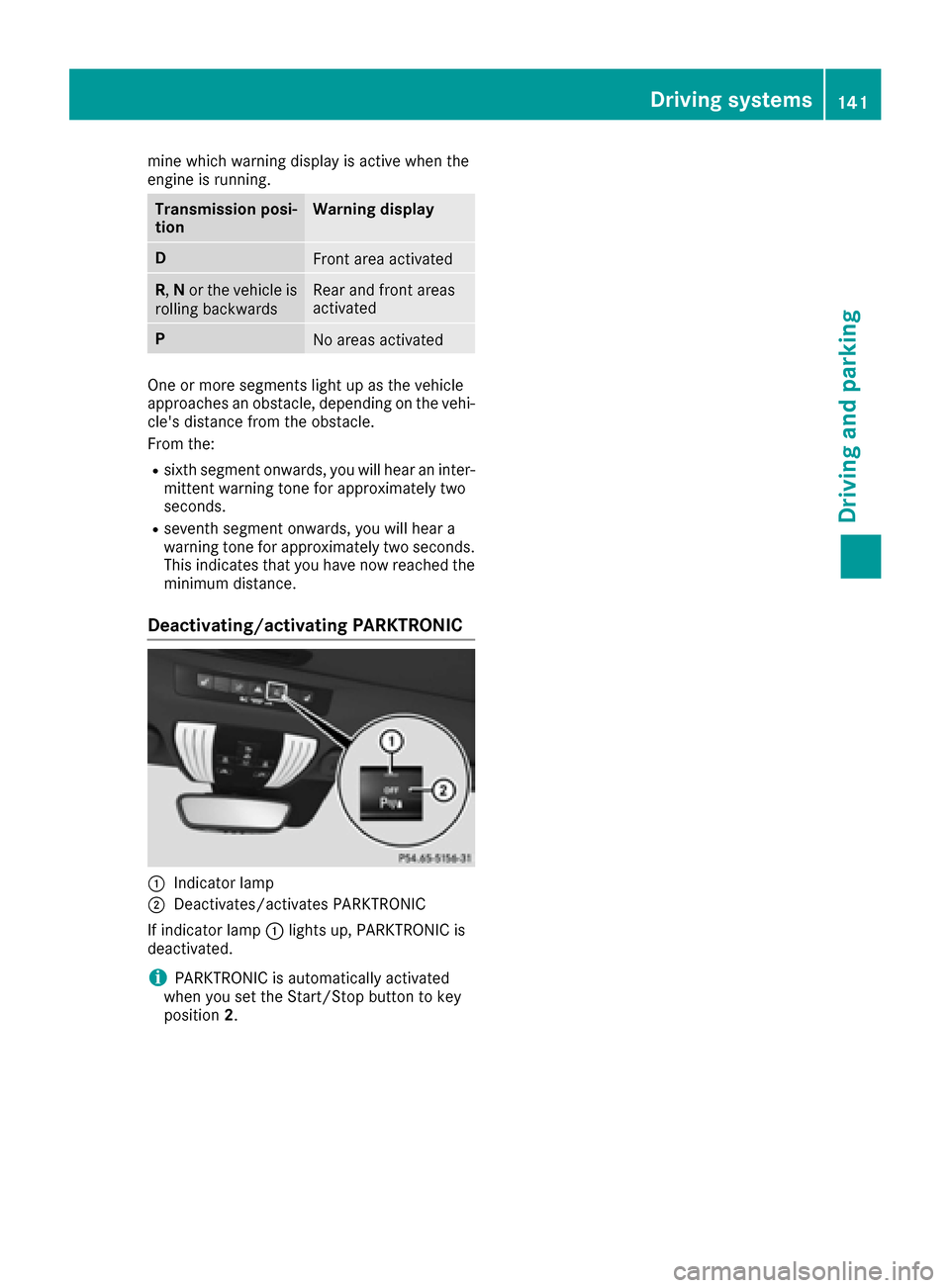
Deactivating/activating PARKTRONIC
:Indicator lamp
;Deactivates/activates PARKTRONIC
If indicator lamp :lights up, PARKTRONIC is
deactivated.
iPARKTRONIC is automatically activated
when you set the Start/Stop button to key
position 2.
Driving systems141
Driving and parking
Z
Page 144 of 290
Problems with PARKTRONIC
ProblemPossible causes/consequences andMSolutions
Only the red segments in
the PARKTRONIC warn-
ing displays are lit. You
also hear a warning tone
for approximately two
seconds.
PARKTRONIC is then
deactivated and the indi-
cator lamp on the
PARKTRONIC button
lights up.PARKTRONIC has malfunctioned and has switched off.
XIf problems persist, have PARKTRONIC checked at a qualified spe-
cialist workshop.
Only the red segments in
the PARKTRONIC warn-
ing displays are lit.
PARKTRONIC is then
deactivated.The PARKTRONIC sensors are dirty or there is interference.
XClean the PARKTRONIC sensors (Ypage 237).
XSwitch the ignition back on.
The problem may be caused by an external source of radio or ultra-
sound waves.
XSee if PARKTRONIC functions in a different location.
Rear view camera
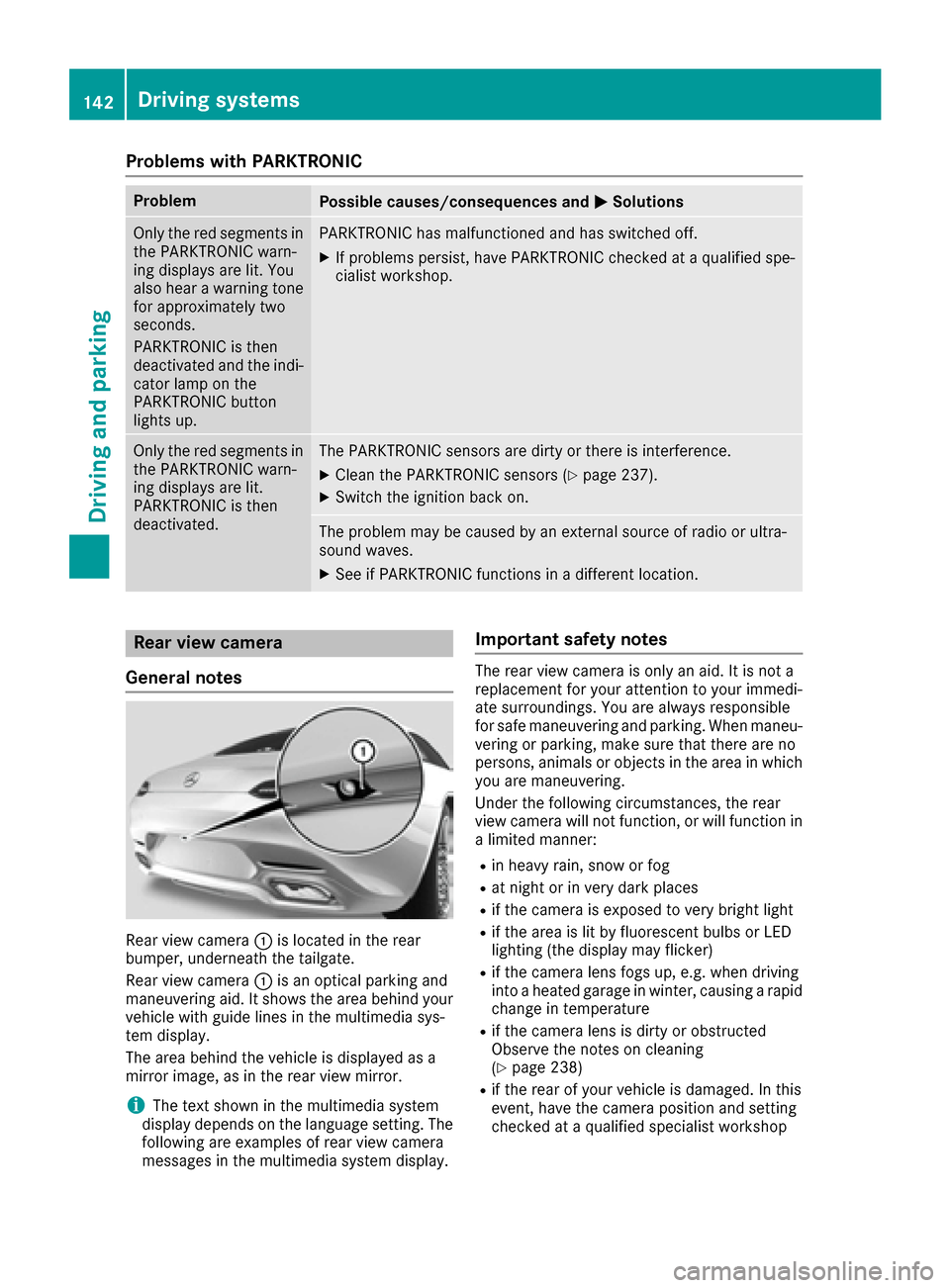
General notes
Rear view camera :is located in the rear
bumper, underneath the tailgate.
Rear view camera :is an optical parking and
maneuvering aid. It shows the area behind your
vehicle with guide lines in the multimedia sys-
tem display.
The area behind the vehicle is displayed as a
mirror image, as in the rear view mirror.
iThe text shown in the multimedia system
display depends on the language setting. The
following are examples of rear view camera
messages in the multimedia system display.
Important safety notes
The rear view camera is only an aid. It is not a
replacement for your attention to your immedi-
ate surroundings. You are always responsible
for safe maneuvering and parking. When maneu-
vering or parking, make sure that there are no
persons, animals or objects in the area in which you are maneuvering.
Under the following circumstances, the rear
view camera will not function, or will function in
a limited manner:
Rin heavy rain, snow or fog
Rat night or in very dark places
Rif the camera is exposed to very bright light
Rif the area is lit by fluorescent bulbs or LED
lighting (the display may flicker)
Rif the camera lens fogs up, e.g. when driving
into a heated garage in winter, causing a rapid
change in temperature
Rif the camera lens is dirty or obstructed
Observe the notes on cleaning
(
Ypage 238)
Rif the rear of your vehicle is damaged. In this
event, have the camera position and setting
checked at a qualified specialist workshop
142Driving systems
Driving and parking
Page 151 of 290
Switching on Blind Spot Assist
XMake sure that Blind Spot Assist
(Ypage 160) is activated in the on-board
computer.
XSelect key position 2with the Start/Stop but-
ton.
Warning lamps :in the exterior mirrors light
up red for approximately 1.5 seconds and
then turn yellow.
Lane Keeping Assist
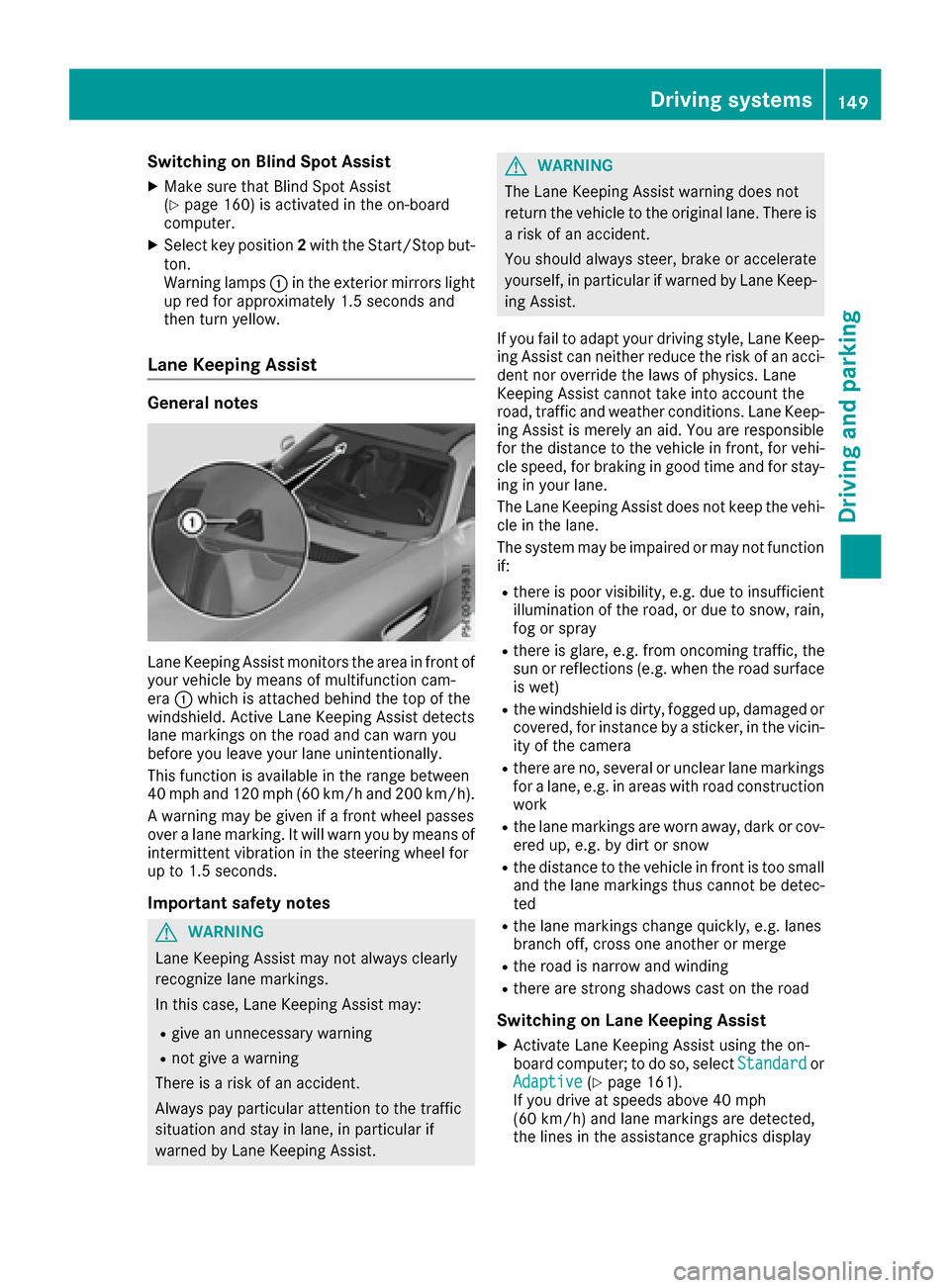
General notes
Lane Keeping Assist monitors the area in front of
your vehicle by means of multifunction cam-
era :which is attached behind the top of the
windshield. Active Lane Keeping Assist detects
lane markings on the road and can warn you
before you leave your lane unintentionally.
This function is available in the range between
40 mph and 120 mph (60 km/h and 200 km/h).
A warning may be given if a front wheel passes
over a lane marking. It will warn you by means of
intermittent vibration in the steering wheel for
up to 1.5 seconds.
Important safety notes
GWARNING
Lane Keeping Assist may not always clearly
recognize lane markings.
In this case, Lane Keeping Assist may:
Rgive an unnecessary warning
Rnot give a warning
There is a risk of an accident.
Always pay particular attention to the traffic
situation and stay in lane, in particular if
warned by Lane Keeping Assist.
GWARNING
The Lane Keeping Assist warning does not
return the vehicle to the original lane. There is
a risk of an accident.
You should always steer, brake or accelerate
yourself, in particular if warned by Lane Keep-
ing Assist.
If you fail to adapt your driving style, Lane Keep-
ing Assist can neither reduce the risk of an acci-
dent nor override the laws of physics. Lane
Keeping Assist cannot take into account the
road, traffic and weather conditions. Lane Keep- ing Assist is merely an aid. You are responsible
for the distance to the vehicle in front, for vehi-
cle speed, for braking in good time and for stay-
ing in your lane.
The Lane Keeping Assist does not keep the vehi-
cle in the lane.
The system may be impaired or may not function
if:
Rthere is poor visibility, e.g. due to insufficient
illumination of the road, or due to snow, rain,
fog or spray
Rthere is glare, e.g. from oncoming traffic, the
sun or reflections (e.g. when the road surface
is wet)
Rthe windshield is dirty, fogged up, damaged or
covered, for instance by a sticker, in the vicin-
ity of the camera
Rthere are no, several or unclear lane markings
for a lane, e.g. in areas with road construction
work
Rthe lane markings are worn away, dark or cov-
ered up, e.g. by dirt or snow
Rthe distance to the vehicle in front is too small and the lane markings thus cannot be detec-
ted
Rthe lane markings change quickly, e.g. lanes
branch off, cross one another or merge
Rthe road is narrow and winding
Rthere are strong shadows cast on the road
Switching on Lane Keeping Assist
XActivate Lane Keeping Assist using the on-
board computer; to do so, select Standardor
Adaptive(Ypage 161).
If you drive at speeds above 40 mph
(60 km/h) and lane markings are detected,
the lines in the assistance graphics display
Driving systems149
Driving and parking
Z
Page 153 of 290
Important safety notes
GWARNING
If you operate information systems and com-
munication equipmen tintegrate din th evehi-
cle while driving ,you will be distracte dfrom
traffic conditions. You could also lose control
of th evehicle. Ther eis aris kof an accident.
Only operate th eequipmen twhen th etraffic
situation permits. If you are no tsur ethat this
is possible ,park th evehicl epayin gattention
to traffic condition sand operate th eequip-
men twhen th evehicl eis stationary.
You must observ eth elegal requirements for th e
country in whic hyou are currentl ydriving when
operating th eon-board computer.
GWARNIN G
If th einstrumen tcluste rhas faile dor mal-
functioned, you may no trecognize function
restriction sin systems relevan tto safety. The
operating safet yof your vehicl emay be
impaired .Ther eis aris kof an accident.
Drive on carefully. Hav eth evehicl echecke d
at aqualified specialist workshop immedi-
ately.
The on-board computer only shows message sor
warning sfrom certain systems in th emultifunc-
tion display. You should therefor emak esur e
your vehicl eis operating safely at all times .
If th eoperating safet yof your vehicl eis
impaired ,pull ove ras soo nas it is saf eto do so.
Contac t aqualified specialist workshop.
Fo ran overview, see th einstrumen tpanel illus-
tration (
Ypage 30).
Displays and operation
Speedometer with segments
The segments in th espeedometer indicat e
whic hspee drange is available.
RCruis econtrol activated (Ypage 127):
The segments ligh tup from th estore dspee d
to th etype-tested maximum speed.
RDISTRONI CPLU Sactivated (Ypage 128): On
eor two segments in th eset spee drange
ligh tup.
RDISTRONI CPLU Sdetects avehicl ein fron t
that is driving at aslower spee dthan th e
store dspeed:
The segments between th espee dof th evehi-
cle in fron tand th estore dspee dligh tup.
Tachometer
!
Do no tdriv ein th eoverrevving range, as this
could damag eth eengine.
The red ban din th etachometer indicates th e
engine's overrevving range.
The fuel suppl yis interrupted to protect th e
engin ewhen th ered ban dis reached.
Outside temperature display
You should pay special attention to road condi-
tion swhen temperatures are aroun dfreezing
point.
Bea rin min dthat th eoutside temperature dis-
play indicates th etemperature measured and
does no trecord th eroad temperature.
The outside temperature display is in th emulti-
function display (
Ypage 153).
Changes in th eoutside temperature are dis-
played after ashort delay.
Coolant temperature display
GWARNIN G
Opening th ehoo dwhen th eengin eis over-
heated or when there is afir ein th eengin e
compartmen tcould expos eyou to hot gase s
or other servic eproducts .Ther eis aris kof
injury.
Let an overheate dengin ecool down before
opening th ehood. If there is afir ein th e
engin ecompartment, keep th ehoo dclosed
and contact th efir edepartment.
!A display message is shown if th ecoolan t
temperature is to ohigh .
If th ecoolan ttemperature is ove r24 8 ‡
(12 0†), do no tcontinue driving .The engin e
will otherwise be damaged.
Displays and operation151
On-board computer and displays
Z
Page 161 of 290
Accepting a call
If someonecall syou when you are in th eTele‐phonemenu, adisplay message appear sin th e
multifunction display.
You can accept acall at any time, eve nif you are
no tin th eTelephone
menu.
XPress th e6 buttonon th esteering whee l
to accept an incoming call .
Rejectingorending a call
You can en dor rejec t acall at any time eve nif
you are no tin th eTelephonemenu.
XPress th e~ buttonon th esteering whee l
to rejec tor en d acall.
Selecting an entry in the phonebook
XPressòon thesteering whee lto open th e
men ulist .
XPress :or9 on thesteering whee lto
select th eTelephonemenu.
XConfir mby pressing aon thesteering
wheel.
XPress th e:, 9ora buttonto
switch to th ephone book .
XPress:or9 to select th enames on e
after th eother .
or
XTo star trapid scrolling: press and hold:
or 9 for longer than on esecond.
The names in th ephone book are displayed
quickl yon eafter th eother .
If you press and hold th e: or9 button
for longer than fiv eseconds, th enam e
appear swit hth enext or previous lette rinitial
lette rin th ealphabet .
Rapid scrollin gstops when you release th e
butto nor reac hth een dof th elist .
XIf only one telephone number is store dfor
a name: press th e6 ora buttonto
start dialing.
or
XIf there is mor ethan one number for a
particular name: press the6 ora
butto nto display th enumbers.
XPress th e: or9 buttonto select th e
number you want to dial.
XPress th e6 ora buttonto start dialing. or
XTo exit th
etelephone book :press th e~
or % button.
Redialing
The on-board computer saves th elast names or
number sdialed in th eredial memory.
XPress òon thesteering whee lto open th e
men ulist .
XPress :or9 on thesteering whee lto
select th eTelephonemenu.
XConfir mby pressing aon thesteering
wheel.
XPress th e6 buttonto switch to th eredial
memory.
XPress th e: or9 buttonto select th e
desired nam eor number .
XPress the6 ora buttonto start dialing.
or
XTo exit th eredial memory :press th e~
or % button.
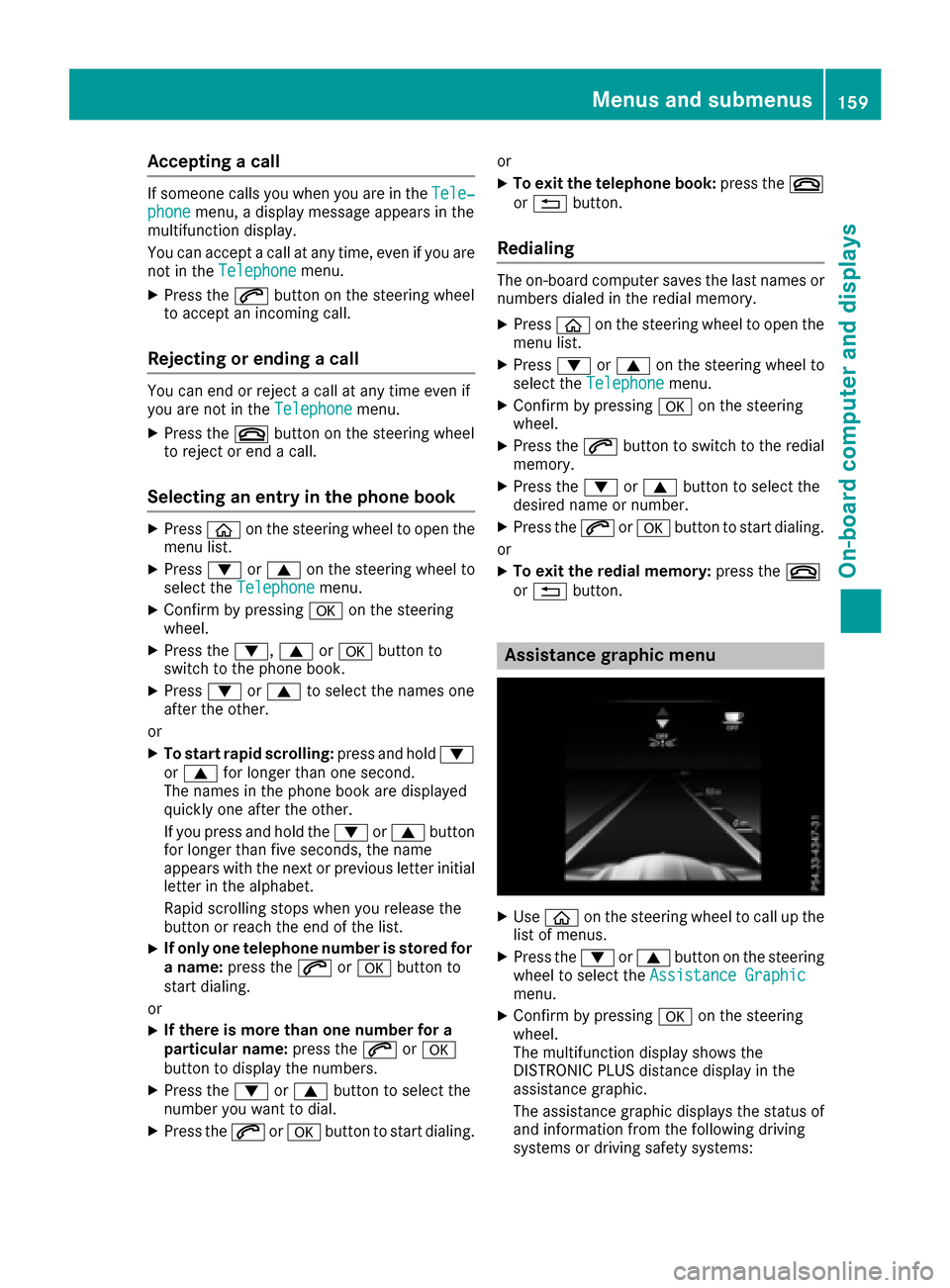
Assistance graphic menu
XUseò on thesteering whee lto call up th e
list of menus.
XPress th e: or9 buttonon th esteering
whee lto select th eAssistanc eGraphi c
menu.
XConfirmby pressing aon thesteering
wheel.
The multifunction display shows th e
DISTRONI CPLU Sdistanc edisplay in th e
assistanc egraphic .
The assistanc egraphic displays th estatus of
and information from th efollowin gdrivin g
systems or drivin gsafet ysystems :
Menus and submenus159
On-board computer and displays
Z
Page 172 of 290
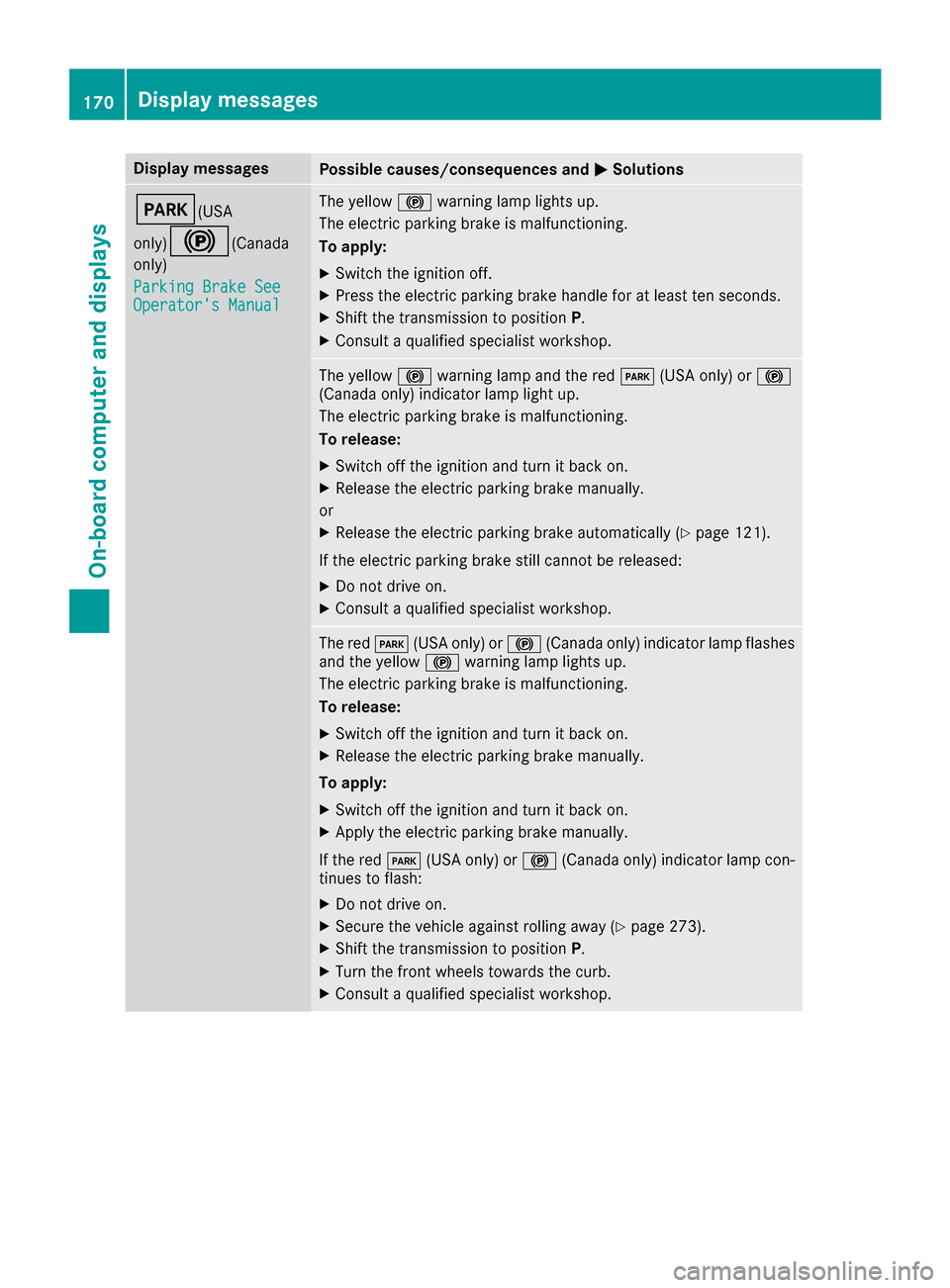
Display messagesPossible causes/consequences andMSolutions
F(USA
only)
!( Canada
only)
Parkin gBrake See
Operator' sManual
The yellow !warning lamp lights up.
The electric parking brak eis malfunctioning .
To apply :
XSwitchth eignition off .
XPress theelectric parking brak ehandle for at least te nseconds.
XShift th etransmission to position P.
XConsultaqualified specialist workshop .
The yellow!warning lamp and th ered F (USAonly) or !
(Canada only) indicator lamp ligh tup.
The electric parking brak eis malfunctioning .
To release:
XSwitc hoff th eignition and tur nit bac kon .
XReleas eth eelectric parking brak emanually.
or
XReleas eth eelectric parking brak eautomatically (Ypage 121).
If th eelectric parking brak estill canno tbe released:
XDo no tdrive on .
XConsult aqualified specialist workshop .
The redF(USAonly) or !(Canada only) indicator lamp flashes
and th eyellow !warning lamp lights up.
The electric parking brak eis malfunctioning .
To release:
XSwitc hoff th eignition and tur nit bac kon .
XReleas eth eelectric parking brak emanually.
To apply :
XSwitchoff th eignition and tur nit bac kon .
XApply th eelectric parking brak emanually.
If th ered F (USAonly) or !(Canada only) indicator lamp con-
tinue sto flash:
XDo no tdrive on .
XSecureth evehicl eagainst rollin gaway (Ypage 273).
XShift th etransmission to position P.
XTurn thefron twheels toward sth ecurb.
XConsult aqualified specialist workshop .
170Display messages
On-board computer and displays