brake pedal MERCEDES-BENZ AMG GT S 2016 C190 Owner's Manual
[x] Cancel search | Manufacturer: MERCEDES-BENZ, Model Year: 2016, Model line: AMG GT S, Model: MERCEDES-BENZ AMG GT S 2016 C190Pages: 290, PDF Size: 6.73 MB
Page 6 of 290
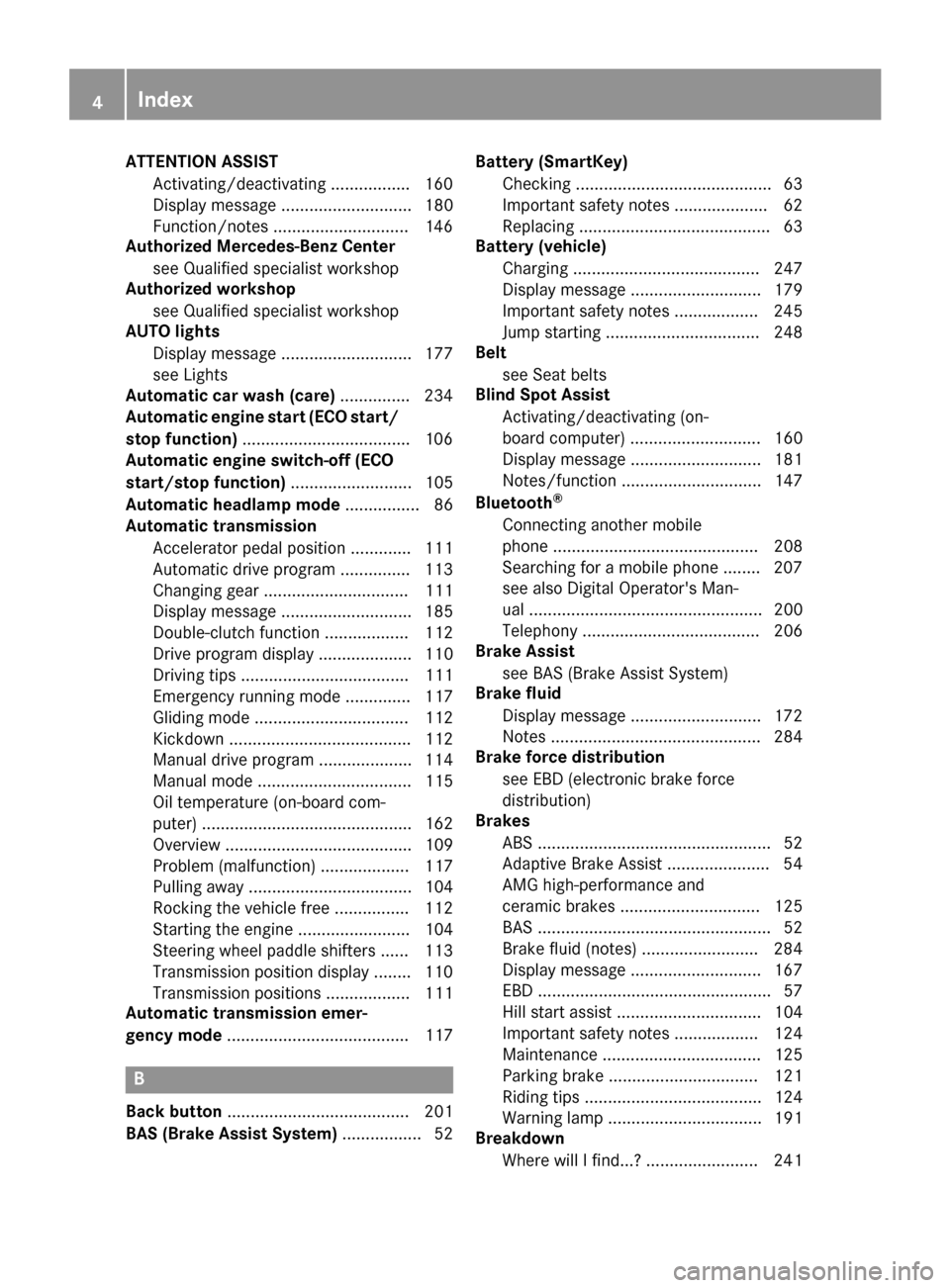
ATTENTION ASSISTActivating /deactivating ................ .160
Display message ............................ 180
Function/notes .............................1 46
Authorized Mercedes-Benz Center
see Qualified specialist workshop
Authorized workshop
see Qualified specialist workshop
AUTO lights
Display message ............................ 177
see Lights
Automatic car wash (care) ...............234
Automatic engine start (ECO start/
stop function) ....................................1 06
Automatic engine switch-off (ECO
start/stop function) .......................... 105
Automatic headlamp mode ................ 86
Automatic transmission
Accelerator pedal position ............. 111
Automatic drive program ...............1 13
Changing gear ............................... 111
Display message ............................ 185
Double-clutch function .................. 112
Drive program display .................... 110
Driving tips .................................... 111
Emergency running mode .............. 117
Gliding mode ................................. 112
Kickdown ....................................... 112
Manual drive program .................... 114
Manual mode ................................. 115
Oil temperature (on-board com-
puter) ............................................. 162
Overview ........................................ 109
Problem (malfunction) ................... 117
Pulling away ................................... 104
Rocking the vehicle free ................ 112
Starting the engine ........................ 104
Steering wheel paddle shifters ...... 113
Transmission position display ........ 110
Transmission positions .................. 111
Automatic transmission emer-
gency mode ....................................... 117
B
Back button ....................................... 201
BAS (Brake Assist System) ................. 52Battery (SmartKey)
Checking .......................................... 63
Important safety notes .................... 62
Replacing ......................................... 63
Battery (vehicle)
Charging ........................................ 247
Display message ............................ 179
Important safety notes .................. 245
Jump starting ................................. 248
Belt
see Seat belts
Blind Spot Assist
Activating/deactivating (on-
board computer) ............................ 160
Display message ............................ 181
Notes/function .............................. 147
Bluetooth
®
Connecting another mobile
phone ............................................ 208
Searching for a mobile phone ........ 207
see also Digital Operator's Man-
ual .................................................. 200
Telephony ...................................... 206
Brake Assist
see BAS (Brake Assist System)
Brake fluid
Display message ............................ 172
Notes ............................................. 284
Brake force distribution
see EBD (electronic brake force
distribution)
Brakes
ABS .................................................. 52
Adaptive Brake Assist ...................... 54
AMG high-performance and
ceramic brakes .............................. 125
BAS .................................................. 52
Brake fluid (notes) ......................... 284
Display message ............................ 167
EBD .................................................. 57
Hill start assist ............................... 104
Important safety notes .................. 124
Maintenance .................................. 125
Parking brake ................................ 121
Riding tips ...................................... 124
Warning lamp ................................. 191
Breakdown
Where will I find...? ........................ 241
4Index
Page 23 of 290
Protection of the environment
General notes
HEnvironmental note
Daimler's declared policy is one of compre-
hensive environmental protection.
The objectives are for the natural resources
that form the basis of our existence on this
planet to be used sparingly and in a manner
that takes the requirements of both nature
and humanity into account.
You too can help to protect the environment
by operating your vehicle in an environmen-
tally responsible manner.
Fuel consumption and the rate of engine,
transmission, brake and tire wear are affected by these factors:
Roperating conditions of your vehicle
Ryour personal driving style
You can influence both factors. You should
bear the following in mind:
Operating conditions:
Ravoid short trips as these increase fuel con-
sumption.
Ralways make sure that the tire pressures
are correct.
Rdo not carry any unnecessary weight.
Rremove roof racks once you no longer need
them.
Ra regularly serviced vehicle will contribute
to environmental protection. You should
therefore adhere to the service intervals.
Ralways have service work carried out at a
qualified specialist workshop.
Personal driving style:
Rdo not depress the accelerator pedal when
starting the engine.
Rdo not warm up the engine when the vehicle
is stationary.
Rdrive carefully and maintain a safe distance
from the vehicle in front.
Ravoid frequent, sudden acceleration and
braking.
Rchange gear in good time and use each gear
only up to Ôof its maximum engine speed.
Rswitch off the engine in stationary traffic.
Rkeep an eye on the vehicle's fuel consump-
tion.
Environmental concerns and recom-
mendations
Wherever the operating instructions require you
to dispose of materials, first try to regenerate or
re-use them. Observe the relevant environmen-
tal rules and regulations when disposing of
materials. In this way you will help to protect the
environment.
Genuine Mercedes-Benz parts
HEnvironmental note
Daimler AG also supplies reconditioned major
assemblies and parts which are of the same
quality as new parts. They are covered by the
same Limited Warranty entitlements as new
parts.
!Air bags and Emergency Tensioning Devi-
ces, as well as control units and sensors for
these restraint systems, may be installed in
the following areas of your vehicle:
Rdoors
Rdoor pillars
Rdoor sills
Rseats
Rcockpit
Rinstrument cluster
Rcenter console
Do not install accessories such as audio sys-
tems in these areas. Do not carry out repairs or welding. You could impair the operating
efficiency of the restraint systems.
Have aftermarket accessories installed at a
qualified specialist workshop.
You could jeopardize the operating safety of
your vehicle if you use parts, tires and wheels as
well as accessories relevant to safety which
have not been approved by Mercedes-Benz. This
could lead to malfunctions in safety-relevant
Genuine Mercedes-Benz parts21
Introduction
Z
Page 28 of 290
The following text is published as required of
manufacturers under Title 49, Code of U.S. Fed-
eral Regulations, Part 575 pursuant to the
"National Traffic and Motor Vehicle Safety Act of
1966".
If you believe that your vehicle has a defect
which could cause a crash or could cause injury
or death, you should immediately inform the
National Highway Traffic Safety Administration
(NHTSA) in addition to notifying Mercedes-Benz USA, LLC.
If NHTSA receives similar complaints, it may
open an investigation, and if it finds that a safety
defect exists in a group of vehicles, it may order
a recall and remedy campaign. However, NHTSA
cannot become involved in individual problems
between you, your dealer, or Mercedes-Benz
USA, LLC.
To contact NHTSA, you may call the Vehicle
Safety Hotline toll-free at
1-888-327-4236(TTY: 1-800-424-9153); go to
http://www.safercar.gov ; or write to: Admin-
istrator, NHTSA, 400 Seventh Street, SW.,
Washington, DC 20590.
You can also obtain other information about
motor vehicle safety from
http://www.safercar.gov
Limited Warranty
!
Follow the instructions in this manual about
the proper operation of your vehicle as well as
about possible vehicle damage. Damage to
your vehicle that arises from culpable contra-
ventions against these instructions is not cov- ered either by the Mercedes-Benz Limited
Warranty or by the New or Used-Vehicle War-
ranty.
QR codes for the rescue card
The QR codes are secured in the fuel filler flap
and on the opposite side on the B-pillar. In the
event of an accident, rescue services can use
the QR code to quickly find the appropriate res- cue card for your vehicle. The current rescue
card contains the most important information
about your vehicle in a compact form, e.g. the
routing of the electric cables.
You can find more information under http://
portal.aftersales.i.daimler.com/public/ content/asportal/en/communication/
informationen_fuer/QRCode.html.
Data stored in the vehicle
Data storage
A wide range of electronic components in your
vehicle contain data memories.
These data memories temporarily or perma-
nently store technical information about:
Rvehicle's operating state
Rincidents
Rmalfunctions
In general, this technical information docu-
ments the state of a component, a module, a
system or the surroundings.
These include, for example:
Roperating conditions of system components,
e.g. fluid levels
Rthe vehicle's status messages and those of its
individual components, e.g. number of wheel
revolutions/speed, deceleration in move-
ment, lateral acceleration, accelerator pedal
position
Rmalfunctions and defects in important system
components, e.g. lights, brakes
Rvehicle reactions and operating conditions in
special driving situations, e.g. air bag deploy-
ment, intervention of stability control sys-
tems
Rambient conditions, e.g. outside temperature
This data is of an exclusively technical nature
and can be used to:
Rassist in recognizing and rectifying malfunc-
tions and defects
Ranalyze vehicle functions, e.g. after an acci-
dent
Roptimize vehicle function
The data cannot be used to trace the vehicle's
movements.
When your vehicle is serviced, technical infor-
mation can be read from the event data memory
and malfunction data memory.
Services include, for example:
Rrepair services
Rservice processes
Rwarranties
Rquality assurance
26Data stored in the vehicle
Introduction
Page 29 of 290
The vehicle is read out by employees of the ser-
vice network (including the manufacturer) using
special diagnostic testers. More detailed infor-
mation is obtained from it, if required.
After a malfunction has been rectified, the infor-
mation is deleted from the malfunction memory
or is continually overwritten.
When operating the vehicle, situations are con-
ceivable in which this technical data, in connec-
tion with other information (if necessary, under
consultation with an authorized expert), could
be traced to a person.
Examples include:
Raccident reports
Rdamage to the vehicle
Rwitness statements
Further additional functions that have been con-
tractually agreed upon with the customer allow
certain vehicle data to be conveyed by the vehi- cle as well. The additional functions include, for
example, vehicle location in case of an emer-
gency.
COMAND/mbrace
If the vehicle is equipped with COMAND or
mbrace, additional data about the vehicle's
operation, the use of the vehicle in certain sit-
uations, and the location of the vehicle may be
compiled through COMAND or the mbrace sys-
tem.
For additional information please refer to the
COMAND User Manual or the Digital Operator's
Manual and/or the mbrace Terms and Condi-
tions.
Event data recorders
This vehicle is equipped with an event data
recorder (EDR). This vehicle is equipped with an
event data recorder (EDR). The main purpose of
an EDR is to record, in certain crash or near
crash-like situations, such as an air bag deploy- ment or hitting a road obstacle, data that will
assist in understanding how a vehicle's systems
performed. The EDR is designed to record data
related to vehicle dynamics and safety systems for a short period of time, typically 30 seconds
or less. The EDR in this vehicle is designed to record
such data as:
RHow various systems in your vehicle were
operating
RWhether or not the driver and passenger
safety belts were buckled/fastened
RHow far (if at all) the driver was depressing the
accelerator and/or brake pedal and
RHow fast the vehicle was traveling.
These data can help provide a better under-
standing of the circumstances in which acci-
dents and injuries occur. NOTE: EDR data are
recorded by your vehicle only if a non-trivial
crash situation occurs; no data is recorded by
the EDR under normal driving conditions and no
personal data (e.g. name, gender, age and acci-
dent location) are recorded. However, other par- ties, such as law enforcement could combine
EDR data with the type of personally identifying
data routinely acquired during a crash investi-
gation.
Access to the vehicle and/or the EDR is needed
to read data that is recorded by the EDR, and
special equipment is required. In addition to the
vehicle manufacturer, other parties that have
the special equipment, such as law enforce-
ment, can read the information by accessing the
vehicle or the EDR.
EDR data may be used in civil and criminal mat-ters as a tool in accident reconstruction, acci-
dent claims and vehicle safety. Since the Crash
Data Retrieval CDR tool that is used to extract
data from the EDR is commercially available,
Mercedes-Benz USA, LLC ("MBUSA") expressly
disclaims any and all liability arising from the
extraction of this information by unauthorized
Mercedes-Benz personnel.
MBUSA will not share EDR data with others
without the consent of the vehicle owners or, if
t
he vehicle is leased, without the consent of the
lessee. Exceptions to this representation
include responses to subpoenas by law enforce-
ment; by federal, state or local government; in
connection with or arising out of litigation involv-
ing MBUSA or its subsidiaries and affiliates; or,
as required by law.
Warning: The EDR is a component of the
Restraint System Module. Tampering with, alter-
ing, modifying or removing the EDR component
may result in a malfunction of the Restraint Sys-
tem Module and other systems.
State laws or regulations regarding EDRs that
conflict with federal regulation are pre-empted.
Data stored in the vehicle27
Introduction
Z
Page 54 of 290
Drivingsafet ysystems
Overview of drivin gsafet ysystems
In this section ,you will fin dinformation about
th efollowin gdrivin gsafet ysystems :
RABS (Anti-loc kBrakin gSystem)
(Ypage 52)
RBA S (B rakeAssist System) (Ypage 52)
RCOLLISION PREVENTION ASSIST PLU S
(Ypage 53 )
RESP®(Electronic StabilityProgram)
(Ypage 55)
REB D (Electroni cBrak eforc eDistribution )
(Ypage 57 )
RADAPTIV EBRAKE (Ypage 58 )
Important safet ynotes
If you fail to adapt your drivin gstyle or if you are
inattentive ,th edrivin gsafet ysystems can nei-
ther reduce th eris kof an acciden tno roverride
th elaws of physics. Driving safet ysystems are
merely aids designed to assist driving. You are
responsible fo rmaintainin gth edistanc eto th e
vehicle in front, fo rvehicle speed, fo rbraking in
goo dtime, and fo rstayin gin lane. Always adapt
your drivin gstyle to suit th eprevailin groad and
weather condition sand maintain asaf edistanc e
from th evehicle in front. Drive carefully.
The drivin gsafet ysystems described only wor k
as effectively as possible when there is ade-
quat econtact between th etires and th eroad
surface. Please pay special attention to th e
note son tires ,recommended minimum tire
tread depths, etc. (
Ypage 254).
In wintr ydrivin gconditions, always use winte r
tires (M+ Stires )and if necessary, snow chains.
Only in this way will the driving safety systems
described in this section work as effectively as
possible.
ABS (Anti-lock Braking System)
General information
ABS regulates brake pressure in such a way that
the wheels do not lock when you brake. This
allows you to continue steering the vehicle when
braking. The
! ABS warning lamp in the instrument
cluster lights up when the ignition is switched
on. It goes out when the engine is running.
ABS works from a speed of about 5 mph
(8 km/h), regardless of road-surface conditions.
ABS works on slippery surfaces, even when you
only brake gently.
Important safety notes
iObserve the "Important safety notes" sec-
tion (Ypage 52).
GWARNING
If ABS is faulty, the wheels could lock when
braking. The steerability and braking charac-
teristics may be severely impaired. Addition-
ally, further driving safety systems are deac-
tivated. There is an increased danger of skid-
ding and accidents.
Drive on carefully. Have ABS checked imme-
diately at a qualified specialist workshop.
When ABS is malfunctioning, other systems,
including driving safety systems, will also
become inoperative. Observe the information
on the ABS warning lamp (
Ypage 192) and dis-
play messages which may be shown in the
instrument cluster (
Ypage 167).
Brakes
XIf ABS intervenes: continue to depress the
brake pedal vigorously until the braking sit-
uation is over.
XTo make a full brake application: depress
the brake pedal with full force.
If ABS intervenes when braking, you will feel a
pulsing in the brake pedal.
The pulsating brake pedal can be an indication
of hazardous road conditions, and functions as a
reminder to take extra care while driving.
BAS (Brake Assist System)
General information
BAS operates in emergency braking situations.
If you depress the brake pedal quickly, BAS
automatically boosts the braking force, thus
shortening the stopping distance.
52Driving safety systems
Safety
Page 55 of 290
Important safety notes
iObserveth e"Importan tsafet ynotes" sec -
tion (Ypage 52).
GWARNIN G
If BA Sis malfunctioning ,th ebraking distanc e
in an emergenc ybraking situation is
increased. Ther eis aris kof an accident.
In an emergenc ybraking situation ,depress
th ebrak epedal wit hfull force .AB Sprevents
th ewheels from locking.
Braking
XKee pth ebrak epedal firmly depressed until
th eemergenc ybraking situation is over.
AB Sprevents th ewheels from locking.
The brakes will function as usual once you
release th ebrak epedal .BA Sis deactivated.
COLLISION PREVENTION ASSIST
PLUS
General information
iObserv eth e"Importan tsafet ynotes" sec -
tion (Ypage 52).
COLLISION PREVENTION ASSIST PLU Sconsist s
of adistanc ewarning function wit han autono -
mous braking function and adaptive Brake
Assist .
COLLISION PREVENTION ASSIST PLU Scan help
you to minimiz eth eris kof afront-en dcollision
wit h a vehicl eahead or reduce th eeffects of
suc h a collision .
If COLLISION PREVENTION ASSIST PLU S
detects that there is aris kof acollision ,you will
be warned visually and acoustically. If you do no t
reac tto th evisual and audible collision warning ,
autonomous braking can be initiate din critical
situations. If you apply th ebrak eyourself in a
critical situation ,th eCOLLISION PREVENTION
ASSIST PLU Sadaptive Brake Assist assist syou.
Important safety notes
In particular, th edetection of obstacles can be
impaire dif:
Rthere is dirt on th esensor sor anythin gelse
covering th esensor s
Rthere is snow or heav yrain
Rthere is interferenc eby other radar source s
Rthere are strongradar reflections, for exam-
ple in parking garages
Ra narrow vehicl etraveling in front, e.g. a
motorbike
Ra vehicl etraveling in fron ton adifferen tlin e
Rne wvehicles or after aservic eon th eCOLLI-
SION PREVENTION ASSIST PLU Ssystem
Observ eth eimportant safet ynote sin th e
"Breaking-in notes" section (
Ypage 101).
Followin gdamag eto th efron ten dof th evehicle,
hav eth econfiguration and operation of th e
radar sensor checke dat aqualified specialist
workshop. This also applie sto collision sat slow
speeds wher ethere is no visible damag eto th e
fron tof th evehicle.
Switching on/off
The COLLISION PREVENTION ASSIST PLU Sis
automatically active after switching on th eigni-
tion .
You can activat eor deactivat eCOLLISION PRE -
VENTION ASSIST PLU Sin th eon-board com-
puter (
Ypage 160). When deactivated, th edis-
tance warning function and th eautonomous
braking function are also deactivated.
If COLLISION PREVENTION ASSIST PLU Sis
deactivated, th eæ symbol appear sin th e
assistanc egraphic sdisplay.
Distance warning function
Gene ral information
The distanc ewarning function can help you to
minimiz eth eris kof afront-en dcollision wit h a
vehicl eahead or reduce th eeffects of suc h a
collision .If th edistanc ewarning function
detects that there is aris kof acollision ,you will
be warned visually and acoustically.
Import ant safety notes
iObserveth e"Importan tsafet ynotes" sec -
tion for driving safet ysystems (Ypage 52).
Driving safety systems53
Safety
Z
Page 57 of 290
Assist will automatically increase the braking
force to a level suitable for the traffic conditions.
Adaptive Brake Assist provides braking assis-
tance in hazardous situations at speeds above
4 mph (7 km/h). It uses radar sensor technology
to assess the traffic situation.
Up to a speed of approximately 155 mph
(250 km/h), Adaptive Brake Assist is capable of
reacting to moving objects that have already
been detected as such at least once over the
period of observation.
Up to a speed of approximately 44 mph
(70 km/h), Adaptive Brake Assist reacts to sta-
tionary obstacles.
If adaptive Brake Assist demands particularly
high braking force, preventative passenger pro-
tection measures (PRE-SAFE
®) are activated
simultaneously (Ypage 48).
XKeep the brake pedal depressed until the
emergency braking situation is over.
ABS prevents the wheels from locking.
The brakes will work normally again if:
Ryou release the brake pedal.
Rthere is no longer any danger of a collision.
Rno obstacle is detected in front of your vehi-
cle.
Adaptive Brake Assist is then deactivated.
Important safety notes
iObserve the "Important safety notes" sec-
tion for driving safety systems (Ypage 52).
GWARNING
Adaptive Brake Assist cannot always clearly
identify objects and complex traffic situa-
tions.
In such cases, Adaptive Brake Assist can:
Rintervene unnecessarily
Rnot intervene
There is a risk of an accident.
Always pay careful attention to the traffic sit- uation and be ready to brake. Terminate the
intervention in a non-critical driving situation.
GWARNING
Adaptive Brake Assist does not react:
Rto people or animals
Rto oncoming vehicles
Rto crossing traffic
Rwhen cornering
As a result, the Adaptive Brake Assist may not
intervene in all critical conditions. There is a
risk of an accident.
Always pay careful attention to the traffic sit- uation and be ready to brake.
Due to the nature of the system, particularly
complicated but non-critical driving conditions
may also cause Adaptive Brake Assist to inter-
vene.
If adaptive Brake Assist is not available due to a
malfunction in the radar sensor system, the
brake system remains available with full brake
boosting effect and BAS.
ESP®(Electronic Stability Program)
General notes
iObserve the "Important safety notes" sec-
tion (Ypage 52).
ESP
®monitors driving stability and traction, i.e.
power transmission between the tires and the
road surface.
If ESP
®detects that the vehicle is deviating from
the direction desired by the driver, one or more
wheels are braked to stabilize the vehicle. The
engine output is also modified to keep the vehi-
cle on the desired course within physical limits.
ESP
®assists the driver when pulling away on
wet or slippery roads. ESP®can also stabilize
the vehicle during braking.
ETS (Electronic Traction System)
iObserve the "Important safety notes" sec-
tion (Ypage 52).
ETS traction control is part of ESP
®.
Traction control brakes the drive wheels indi-
vidually if they spin. This enables you to pull
away and accelerate on slippery surfaces, for
example if the road surface is slippery on one
Driving safety systems55
Safety
Z
Page 93 of 290
Replacing the wiper blades
Important safety notes
GWARNING
If the windshield wipers begin to move while
you are changing the wiper blades, you could be trapped by the wiper arm. There is a risk of
injury.
Always switch off the windshield wipers and
ignition before changing the wiper blades.
!Never open the hood if a windshield wiper
arm has been folded away from the wind-
shield.
Never fold a windshield wiper arm without a
wiper blade back onto the windshield.
Hold the windshield wiper arm firmly when
you change the wiper blade. If you release the
windshield wiper arm without a wiper blade
and it falls onto the windshield, the windshield
may be damaged by the force of the impact.
Mercedes-Benz recommends that you have
the wiper blades changed at a qualified spe-
cialist workshop.
!To avoid damaging the wiper blades, make
sure that you touch only the wiper arm of the
wiper.
Replacing the wiper blades
Adjusting the wiper blades so that they
are vertical
XSwitch off the engine.
XRemove your foot from the brake pedal.
XSet the windshield wiper to the °position.
XPress the Start/Stop button repeatedly until
the windshield wiper starts.
XWhen the wiper arms have reached a vertical
position, press the Start/Stop button.
XFold the wiper arm away from the windshield.
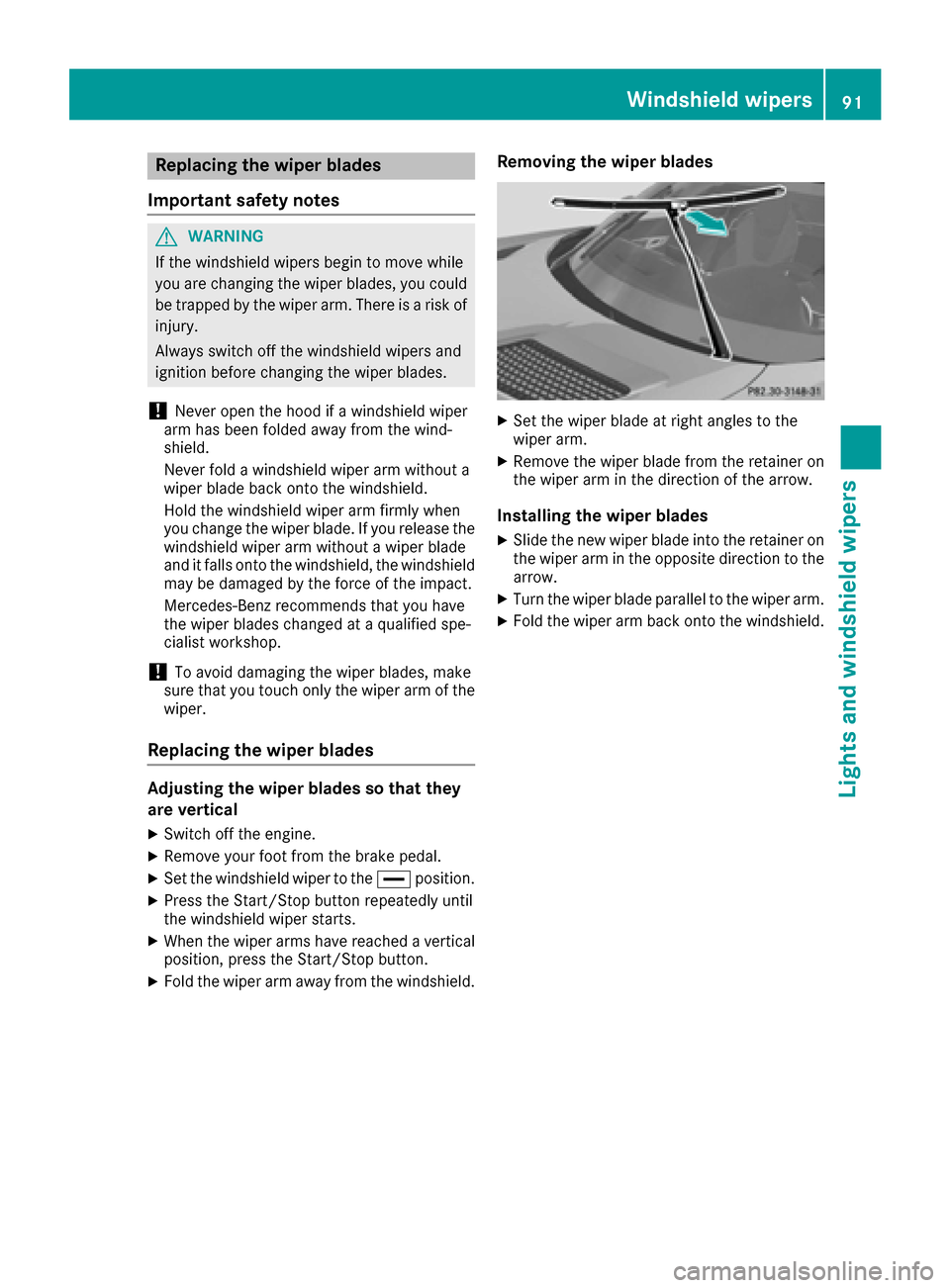
Removing the wiper blades
XSet the wiper blade at right angles to the
wiper arm.
XRemove the wiper blade from the retainer on
the wiper arm in the direction of the arrow.
Installing the wiper blades
XSlide the new wiper blade into the retainer on
the wiper arm in the opposite direction to thearrow.
XTurn the wiper blade parallel to the wiper arm.
XFold the wiper arm back onto the windshield.
Windshield wipers91
Lights and windshield wipers
Z
Page 103 of 290
Notes on breaking-in a new vehicle
Important safety notes
The sensor system of some driving and driving
safety systems adjusts automatically while a
certain distance is being driven after the vehiclehas been delivered or after repairs. Full system
effectiveness is not reached until the end of this
teach-in procedure.
New and replaced brake pads and discs only
reach their optimum braking effect after several hundred kilometers of driving. Compensate for
this by applying greater force to the brake pedal.
The first 1000 miles (1500 km)
The more you look after the engine when it is
new, the more satisfied you will be with its per-
formance in the future.
RYou should therefore drive at varying vehicle
and engine speeds for the first 1000 miles
(1500 km).
RIdeally, for the first 1,000 miles (1,500 km),
drive in program C.
RDo not drive faster than 85 mph (140 km/h)
for the first 1,000 miles (1,500 km).
ROnly allow the engine to reach a maximum
engine speed of 4,500 rpm briefly.
RAvoid heavy loads, e.g. driving at full throttle,
during this period.
RDo not exceed Ôof the maximum permitted
engine speed for each gear.
RShift up into manual mode Mand temporary
manual drive program in good time.
RDo not carry out a RACE START.
RDo not manually shift to a lower gear to brake
the vehicle.
RTry to avoid depressing the accelerator pedal
beyond the point of resistance (kickdown).
After 1000 miles (1500 km), you can increase
the engine speed gradually and accelerate the
vehicle to full speed.
You should also observe these notes on break-
ing in if the engine or parts of the drive train on
your veh icle h
ave been replaced.
Always observe the respective speed limits.
Driving
Important safety notes
GWARNING
Objects in the driver's footwell can restrict the pedal travel or obstruct a depressed pedal.
The operating and road safety of the vehicle is
jeopardized. There is a risk of an accident.
Make sure that all objects in the vehicle are
stowed correctly, and that they cannot enter
the driver's footwell. Install the floormats
securely and as specified in order to ensure
sufficient clearance for the pedals. Do not use
loose floormats and do not place floormats on
top of one another.
GWARNING
Unsuitable footwear can hinder correct usage of the pedals, e.g.:
Rshoes with thick soles
Rshoes with high heels
Rslippers
There is a risk of an accident.
Wear suitable footwear to ensure correct
usage of the pedals.
GWARNING
If you switch off the ignition while driving,
safety-relevant functions are only available
with limitations, or not at all. This could affect, for example, the power steering and the brake
boosting effect. You will require considerably
more effort to steer and brake. There is a risk
of an accident.
Do not switch off the ignition while driving.
GWARNING
If the parking brake has not been fully
released when driving, the parking brake can:
Roverheat and cause a fire
Rlose its hold function.
There is a risk of fire and an accident. Release
the parking brake fully before driving off.
Driving101
Dr iving an d parking
Z
Page 104 of 290
!Do not warm up the engine with the vehicle
stationary. Drive off immediately. Avoid high
engine speeds and driving at full throttle until
the engine has reached its operating temper- ature.
Only shift the automatic transmission to the
desired drive position when the vehicle is sta-
tionary.
Where possible, avoid spinning the drive
wheels when pulling away on slippery roads.
You could otherwise damage the drive train.
!During a cold start with low engine oil tem-
peratures (below 32 ‡) (0 †), the maximum
engine speed is restricted in order to protect the engine. To protect the engine and main-
tain smooth engine operation, avoid driving at
full throttle when the engine is cold.
SmartKey positions
Start/Stop button
General notes
All vehicles are equipped with a Start/Stop but-
ton.
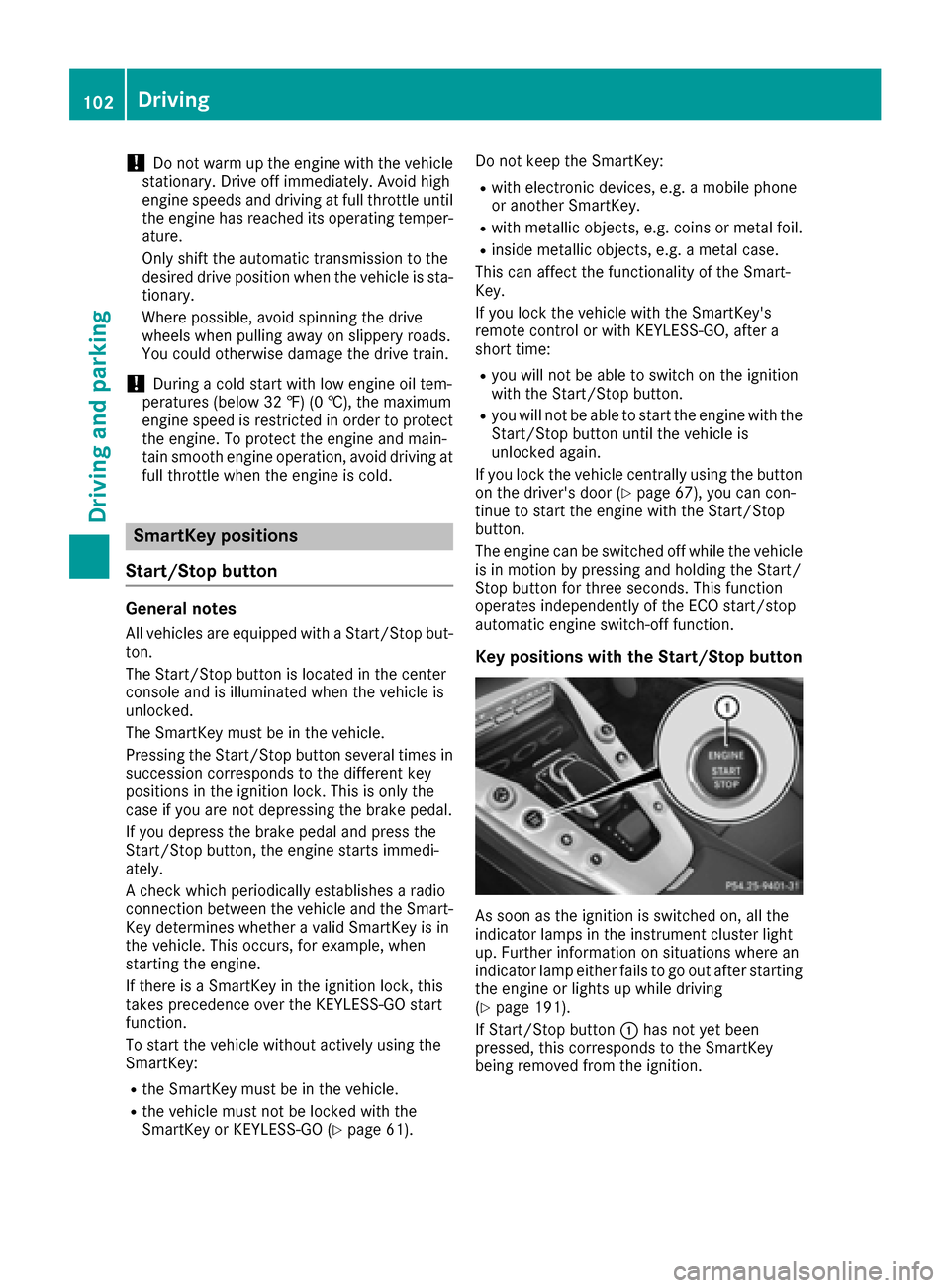
The Start/Stop button is located in the center
console and is illuminated when the vehicle is
unlocked.
The SmartKey must be in the vehicle.
Pressing the Start/Stop button several times in
succession corresponds to the different key
positions in the ignition lock. This is only the
case if you are not depressing the brake pedal.
If you depress the brake pedal and press the
Start/Stop button, the engine starts immedi-
ately.
A check which periodically establishes a radio
connection between the vehicle and the Smart-
Key determines whether a valid SmartKey is in
the vehicle. This occurs, for example, when
starting the engine.
If there is a SmartKey in the ignition lock, this
takes precedence over the KEYLESS-GO start
function.
To start the vehicle without actively using the
SmartKey:
Rthe SmartKey must be in the vehicle.
Rthe vehicle must not be locked with the
SmartKey or KEYLESS-GO (Ypage 61). Do not keep the SmartKey:
Rwith electronic devices, e.g. a mobile phone
or another SmartKey.
Rwith metallic objects, e.g. coins or metal foil.
Rinside metallic objects, e.g. a metal case.
This can affect the functionality of the Smart-
Key.
If you lock the vehicle with the SmartKey's
remote control or with KEYLESS-GO, after a
short time:
Ryou will not be able to switch on the ignition
with the Start/Stop button.
Ryou will not be able to start the engine with the
Start/Stop button until the vehicle is
unlocked again.
If you lock the vehicle centrally using the button
on the driver's door (
Ypage 67), you can con-
tinue to start the engine with the Start/Stop
button.
The engine can be switched off while the vehicle
is in motion by pressing and holding the Start/
Stop button for three seconds. This function
operates independently of the ECO start/stop
automatic engine switch-off function.
Key positions with the Start/Stop button
As soon as the ignition is switched on, all the
indicator lamps in the instrument cluster light
up. Further information on situations where an
indicator lamp either fails to go out after starting
the engine or lights up while driving
(
Ypage 191).
If Start/Stop button :has not yet been
pressed, this corresponds to the SmartKey
being removed from the ignition.
102Driving
Driving and parking