volume MERCEDES-BENZ AMG GT S 2016 C190 Owner's Manual
[x] Cancel search | Manufacturer: MERCEDES-BENZ, Model Year: 2016, Model line: AMG GT S, Model: MERCEDES-BENZ AMG GT S 2016 C190Pages: 290, PDF Size: 6.73 MB
Page 5 of 290
1, 2, 3 ...
12 V socketsee Sockets
A
ABS (Anti-lock Braking System)Display message ............................ 167
Function/notes ................................ 52
Warning lamp ................................ .192
Accident
Automatic measures after an acci-
dent ................................................. 49
Activating media mode
General notes ................................ 208
Activating/deactivating cooling
with air dehumidification ................... 95
ADAPTIVE BRAKE ................................. 58
Adaptive Brake Assist
Display message ............................ 167
Function/notes ................................ 54
Adaptive Damping System
Function/notes .............................1 38
Adaptive Highbeam Assist
Display message ............................ 177
Function/notes ................................ 88
Switching on/off .............................. 89
Additional speedometer ................... 162
Additives (engine oil) ........................ 284
Address book
see also Digital Operator's Man-
ual ..................................................2 00
Adjusting lumbar support .................. 77
Adjusting the volume
Multimedia system ........................ 201
Air bags
Deployment ..................................... 46
Display message ............................ 175
Front air bag (driver, front
passenger) ....................................... 41
Important safety notes .................... 40
Introduction ..................................... 40
Knee bag .......................................... 41
Occupant Classification System
(OCS) ............................................... 42
PASSENGER AIR BAG OFF indica-
tor lamp ...........................................3 6Side impact air bag .......................... 42
Window curtain air bag .................... 42
Air vents
Important safety notes .................... 99
Setting ............................................. 99
Setting the side air vents ............... 100
Air-conditioning system
see Climate control
Alarm
ATA (Anti-Theft Alarm system) ......... 58
Switching off (ATA) .......................... 58
Switching the function on/off
(ATA) ................................................ 58
Alarm system
see ATA (Anti-Theft Alarm system)
AMG
Adaptive sport suspension sys-
tem ................................................ 138
E-SELECT lever .............................. 109
Menu (on-board computer) ............ 162
Performance Seat ............................ 78
SPEEDSHIFT DCT 7-gear sport
transmission .................................. 109
AMG ceramic brakes ......................... 125
AMG high-performance and
ceramic brakes .................................. 125
AMG sports exhaust system ............ 106
Anti-lock braking system
see ABS (Anti-lock Braking System)
Anti-Theft Alarm system
see ATA (Anti-Theft Alarm system)
Ashtray ............................................... 213
Assistance display (on-board com-
puter) .................................................. 159
Assistance menu (on-board com-
puter) .................................................. 160
ASSYST PLUS
Displaying a service message ........ 233
Hiding a service message .............. 233
Resetting the service interval dis-
play ................................................ 233
Service message ............................ 232
Special service requirements ......... 233
ATA (Anti-Theft Alarm system)
Activating/deactivating ................... 58
Function ........................................... 58
Switching off the alarm .................... 58
Index3
Page 33 of 290
Multifunction steering wheel
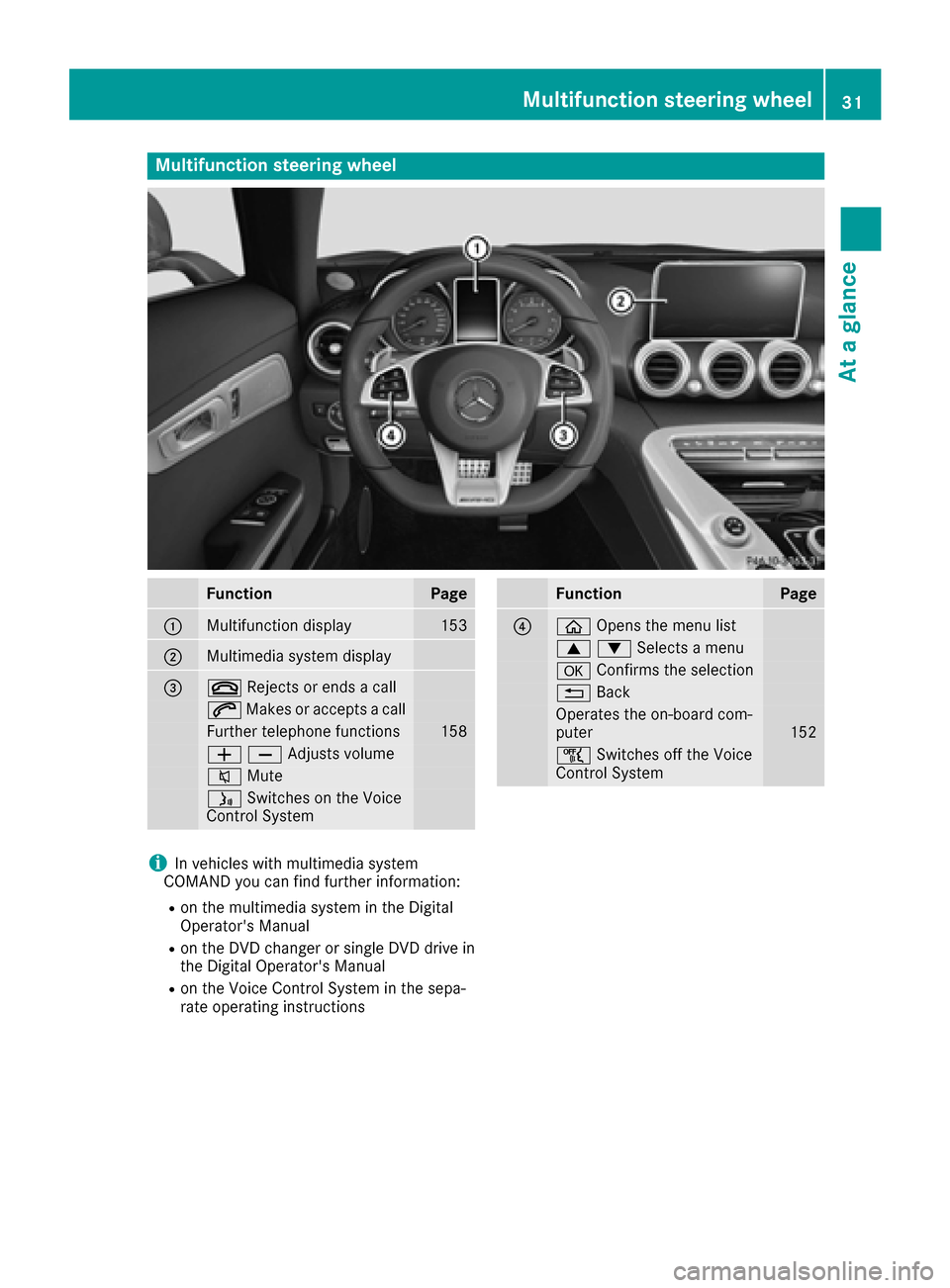
FunctionPage
:Multifunction display153
;Multimedia system display
=~Rejects or ends a call
6Makes or accepts a call
Further telephone functions158
WXAdjusts volume
8 Mute
óSwitches on the Voice
Control System
FunctionPage
?ò Opens the menu list
9:Selects a menu
aConfirms the selection
%Back
Operates the on-board com-
puter152
ñSwitches off the Voice
Control System
iIn vehicles with multimedia system
COMAND you can find further information:
Ron the multimedia system in the Digital
Operator's Manual
Ron the DVD changer or single DVD drive in
the Digital Operator's Manual
Ron the Voice Control System in the sepa-
rate operating instructions
Multifunction steering wheel31
At a glance
Page 108 of 290
All of the vehicle's systems remain active when
the engine is stopped automatically.
The HOLD function can also be activated if the
engine has been switched off automatically. It is
then not necessary to continue applying the
brakes during the automatic stop phase. When
you depress the accelerator pedal, the engine
starts automatically and the braking effect of
the HOLD function is deactivated.
Automatic engine start
The engine starts automatically if:
Ryou switch off the ECO start/stop function by
pressing the ECO button
Rswitch to drive programRACE,S+ orS
(Ypage 108)
Ryou switch to manual mode M(Ypage 112)
Rin transmission position D, the brake pedal is
released and the HOLD function is not active
Ryou depress the accelerator pedal
Ryou engage reverse gear R
Ryou move the transmission out of position P
Ryou unfasten your seat belt or open the driv-
er's door
Rthe vehicle starts to roll
Rthe brake system requires this
Rthe temperature in the vehicle interior devi-
ates from the set range
Rthe system detects moisture on the wind-
shield when the air-conditioning system is
switched on
Rthe battery's condition of charge is too low
Shifting the transmission to position Pdoes not
start the engine.
Deactivating or activating the ECO
start/stop function
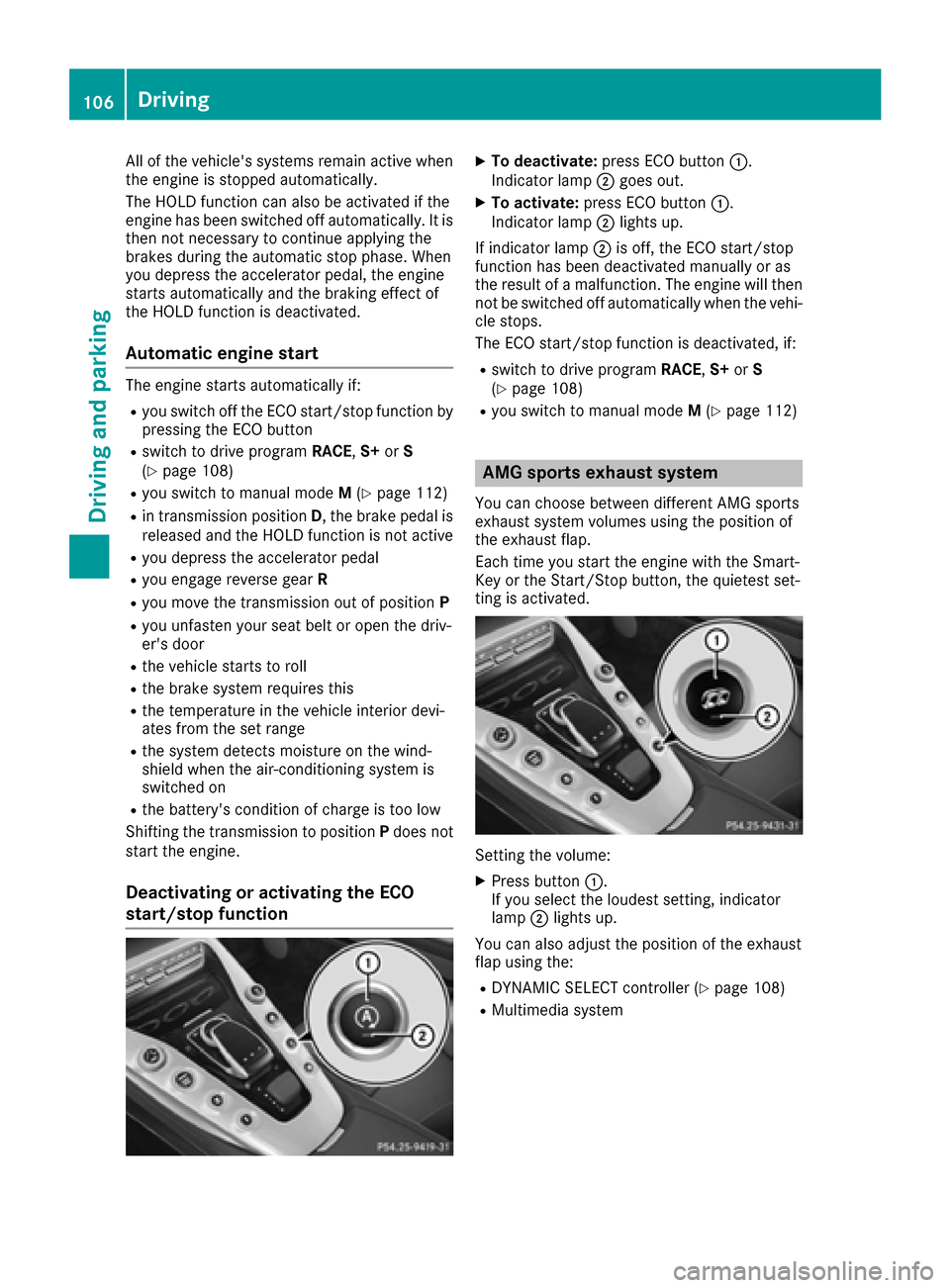
XTo deactivate: press ECO button :.
Indicator lamp ;goes out.
XTo activate: press ECO button :.
Indicator lamp ;lights up.
If indicator lamp ;is off, the ECO start/stop
function has been deactivated manually or as
the result of a malfunction. The engine will then
not be switched off automatically when the vehi- cle stops.
The ECO start/stop function is deactivated, if:
Rswitch to drive program RACE,S+ orS
(Ypage 108)
Ryou switch to manual mode M(Ypage 112)
AMG sports exhaust system
You can choose between different AMG sports
exhaust system volumes using the position of
the exhaust flap.
Each time you start the engine with the Smart-
Key or the Start/Stop button, the quietest set-
ting is activated.
Setting the volume:
XPress button :.
If you select the loudest setting, indicator
lamp ;lights up.
You can also adjust the position of the exhaust
flap using the:
RDYNAMIC SELECT controller (Ypage 108)
RMultimedia system
106Driving
Driving an d parking
Page 154 of 290
The coolant temperature display is in the lower
section of the tachometer (Ypage 30).
Under normal operating conditions and with the
specified coolant level, the coolant temperature
may rise to 248 ‡ (120 †).
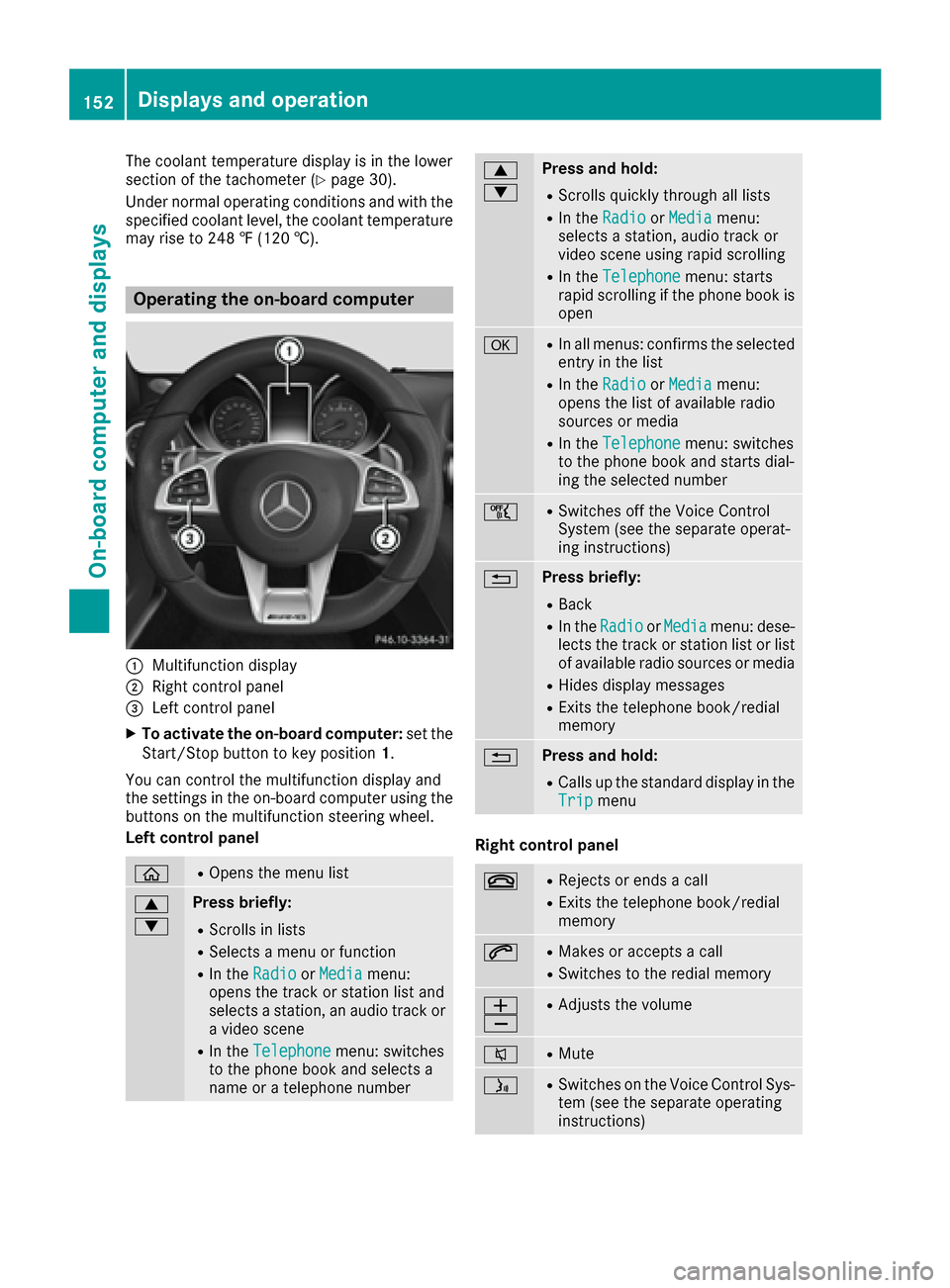
Operating the on-board computer
:Multifunction display
;Right control panel
=Left control panel
XTo activate the on-board computer: set the
Start/Stop button to key position 1.
You can control the multifunction display and
the settings in the on-board computer using the
buttons on the multifunction steering wheel.
Left control panel
òROpens the menu list
9
:Press briefly:
RScrolls in lists
RSelects a menu or function
RIn the RadioorMediamenu:
opens the track or station list and
selects a station, an audio track or
a video scene
RIn the Telephonemenu: switches
to the phone book and selects a
name or a telephone number
9
:Press and hold:
RScrolls quickly through all lists
RIn the RadioorMediamenu:
selects a station, audio track or
video scene using rapid scrolling
RIn the Telephonemenu: starts
rapid scrolling if the phone book is
open
aRIn all menus: confirms the selected
entry in the list
RIn the RadioorMediamenu:
opens the list of available radio
sources or media
RIn the Telephonemenu: switches
to the phone book and starts dial-
ing the selected number
ñRSwitches off the Voice Control
System (see the separate operat-
ing instructions)
%Press briefly:
RBack
RIn the RadioorMediamenu: dese-
lects the track or station list or list
of available radio sources or media
RHides display messages
RExits the telephone book/redial
memory
%Press and hold:
RCalls up the standard display in the
Tripmenu
Right control panel
~RRejects or ends a call
RExits the telephone book/redial
memory
6RMakes or accepts a call
RSwitches to the redial memory
W
XRAdjusts the volume
8RMute
óRSwitches on the Voice Control Sys-
tem (see the separate operating
instructions)
152Displays and operation
On-board computer and displays
Page 203 of 290
Operating system
Overview
General notes
!Do not use the space in front of the display
for storage. Objects placed here could dam-
age the display or impair its function. Avoid
any direct contact with the display surface.
Pressure on the display surface may result in
impairments to the display, which could be
irreversible.
Wearing polarized sunglasses may impair your
ability to read the display.
The display has an automatic temperature-con-
trolled switch-off feature. The brightness is
automatically reduced if the temperature is too
high. The display may temporarily switch off
completely.
Cleaning instructions
!Do not touch the display. The display has a
very sensitive high-gloss surface; there is a
risk of scratching. If you have to clean the
screen, however, use a mild cleaning agent
and a soft, lint-free cloth.
The display must be switched off and have
cooled down before you start cleaning. Do not
apply pressure to the display surface when
cleaning it, as this could cause irreversible dam-
age to the display.
Switching the multimedia system
on/off
XPress thecontrol knob on the center
console to the right of the controller.
Adjusting the volume
XTurn thecontrol knob on the center con-
sole to the right of the controller.
The volume is adjusted:
Rfor the currently selected media source
Rduring traffic or navigation announcements
Rin hands-free mode during a phone call
Switching the sound on or off
XPress the 8button on the multifunction
steering wheel.
If the audio output is switched off, the status
line will show the 8symbol. If you switch
the media source or set the volume, the sound
is automatically switched on.
iYou will hear navigation messages even
when the sound is muted (COMAND).
Functions
The multimedia system has the following func-
tions:
RRadio mode
RMedia mode with media search
RSound systems
RNavigation system
COMAND: navigation via the hard drive
RCommunication functions
RSIRIUS Weather (COMAND)
RVehicle functions with system settings
RFavorites functions
Controller
The controller in the center console lets you:
Rselect menu items on the display
Renter characters
Rselect a destination on the map
Rsave entries
The controller can be:
Rturned 3
Rslid left or right 1
Rslid forwards or back 4
Rslid diagonally2
Rpressed briefly or pressed and held 7
Back button
You can use the%button to exit a menu or to
call up the basic display of the current operating
mode.
Operating system201
Multimedia system
Z
Page 217 of 290
Socket in the cargo compartment
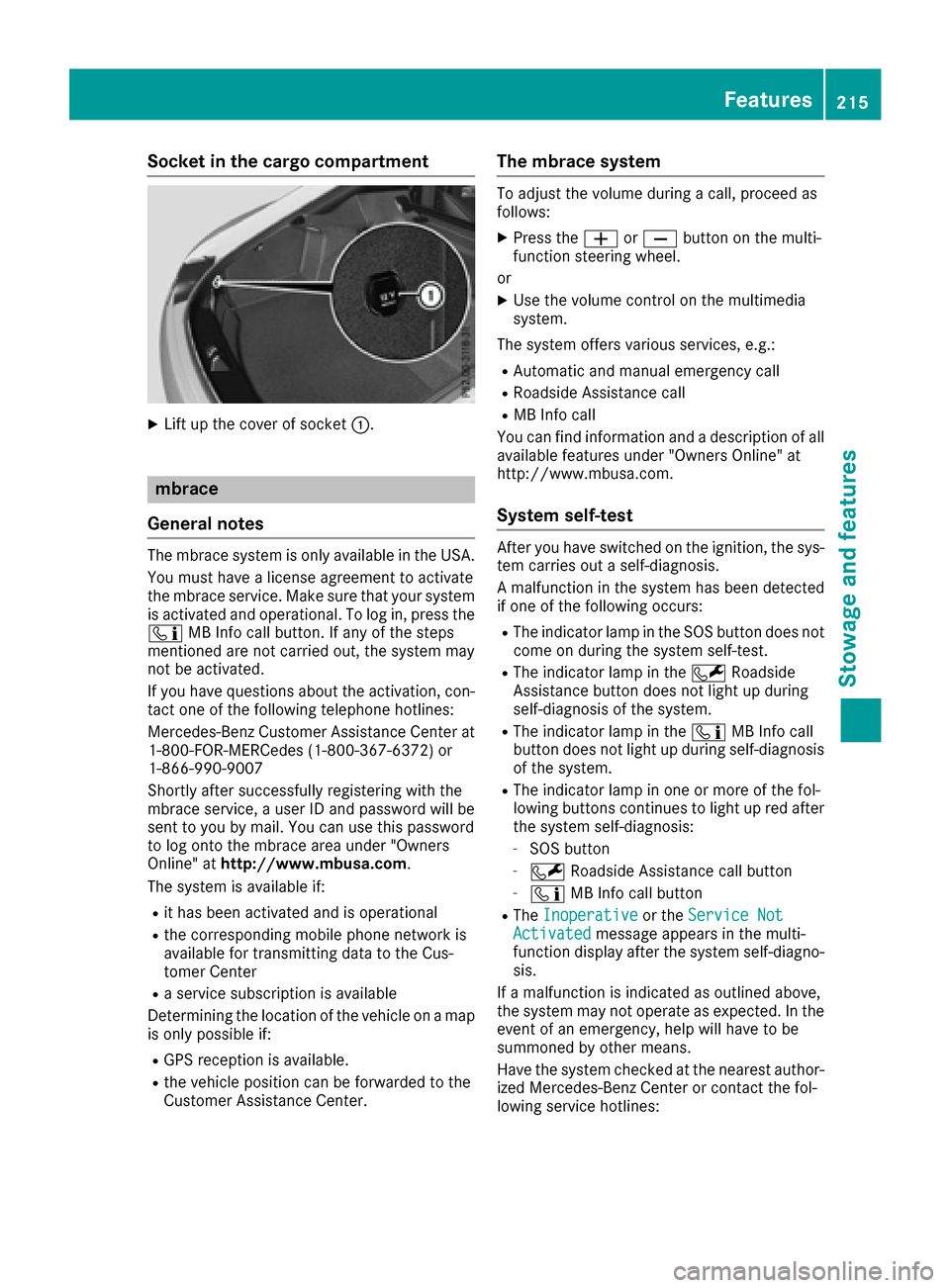
XLift up the cover of socket:.
mbrace
General notes
The mbrace system is only available in the USA.
You must have a license agreement to activate
the mbrace service. Make sure that your system
is activated and operational. To log in, press the
ï MB Info call button. If any of the steps
mentioned are not carried out, the system may
not be activated.
If you have questions about the activation, con-
tact one of the following telephone hotlines:
Mercedes-Benz Customer Assistance Center at
1-800-FOR-MERCedes (1-800-367-6372) or
1-866-990-9007
Shortly after successfully registering with the
mbrace service, a user ID and password will be
sent to you by mail. You can use this password
to log onto the mbrace area under "Owners
Online" at http://www.mbusa.com.
The system is available if:
Rit has been activated and is operational
Rthe corresponding mobile phone network is
available for transmitting data to the Cus-
tomer Center
Ra service subscription is available
Determining the location of the vehicle on a map
is only possible if:
RGPS reception is available.
Rthe vehicle position can be forwarded to the
Customer Assistance Center.
The mbrace system
To adjust the volume during a call, proceed as
follows:
XPress the WorX button on the multi-
function steering wheel.
or
XUse the volume control on the multimedia
system.
The system offers various services, e.g.:
RAutomatic and manual emergency call
RRoadside Assistance call
RMB Info call
You can find information and a description of all
available features under "Owners Online" at
http://www.mbusa.com.
System self-test
After you have switched on the ignition, the sys- tem carries out a self-diagnosis.
A malfunction in the system has been detected
if one of the following occurs:
RThe indicator lamp in the SOS button does notcome on during the system self-test.
RThe indicator lamp in the FRoadside
Assistance button does not light up during
self-diagnosis of the system.
RThe indicator lamp in the ïMB Info call
button does not light up during self-diagnosis
of the system.
RThe indicator lamp in one or more of the fol-
lowing buttons continues to light up red after
the system self-diagnosis:
-SOS button
-F Roadside Assistance call button
-ïMB Info call button
RTheInoperativeor the Service NotActivatedmessage appears in the multi-
function display after the system self-diagno-
sis.
If a malfunction is indicated as outlined above,
the system may not operate as expected. In the
event of an emergency, help will have to be
summoned by other means.
Have the system checked at the nearest author-
ized Mercedes-Benz Center or contact the fol-
lowing service hotlines:
Features215
Stowage and features
Z