door lock MERCEDES-BENZ B-CLASS 2012 User Guide
[x] Cancel search | Manufacturer: MERCEDES-BENZ, Model Year: 2012, Model line: B-CLASS, Model: MERCEDES-BENZ B-CLASS 2012Pages: 340, PDF Size: 3.09 MB
Page 59 of 340
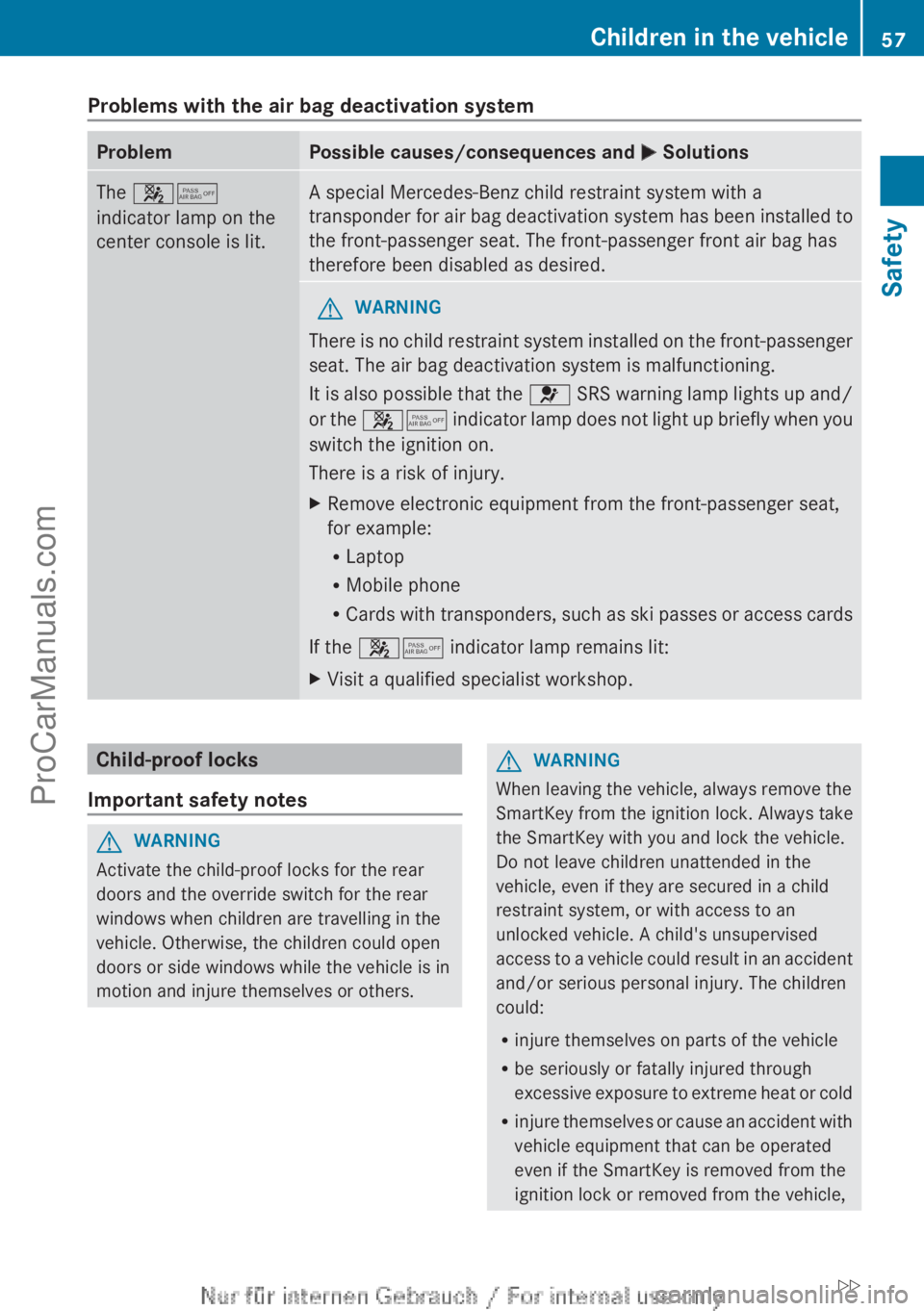
Problems with the air bag deactivation system
Problem Possible causes/consequences and
M SolutionsThe 45
indicator lamp on the
center console is lit. A special Mercedes-Benz child restraint system with a
transponder for
air
bag deactivation system has been installed to
the front-passenger seat. The front-passenger front air bag has
therefore been disabled as desired. G
WARNING
There is no child restraint system installed on the front-passenger
seat. The air bag deactivation system is malfunctioning.
It is also
possible that the 6 SRS warning lamp lights up and/
or the 45 indicator lamp does not light up briefly when you
switch the ignition on.
There is a risk of injury.
X Remove electronic equipment from the front-passenger seat,
for example:
R
Laptop
R Mobile phone
R Cards with transponders,
such as ski passes or access cards
If the 45 indicator lamp remains lit:
X Visit a qualified specialist workshop. Child-proof locks
Important safety notes G
WARNING
Activate the child-proof locks for the rear
doors and the override switch for the rear
windows when children are travelling in the
vehicle. Otherwise, the children could open
doors or side windows while the vehicle is in
motion and injure themselves or others. G
WARNING
When leaving the vehicle, always remove the
SmartKey from the ignition lock. Always take
the SmartKey with you and lock the vehicle.
Do not leave children unattended in the
vehicle, even if they are secured in a child
restraint system, or with access to an
unlocked vehicle. A child's unsupervised
access to a
vehicle could result in an accident
and/or serious personal injury. The children
could:
R injure themselves on parts of the vehicle
R be seriously or fatally injured through
excessive exposure to extreme heat or cold
R injure themselves or cause an accident with
vehicle equipment that can be operated
even if the SmartKey is removed from the
ignition lock or removed from the vehicle, Children in the vehicle
57
Safety
ZProCarManuals.com
Page 60 of 340
such as seat adjustment, steering wheel
adjustment, or the memory function
If children open
a door, they could injure other
persons or get out of the vehicle and injure
themselves or be injured by following traffic.
Do not expose the child restraint system to
direct sunlight. The child restraint system's
metal parts, for example, could become very
hot, and the child could be burned on these
parts.
Child-proof locks for the rear doors G
WARNING
Children could open a rear door from inside
the vehicle. This could result in serious
injuries or an accident. Therefore, when
children ride in
the rear always secure the rear
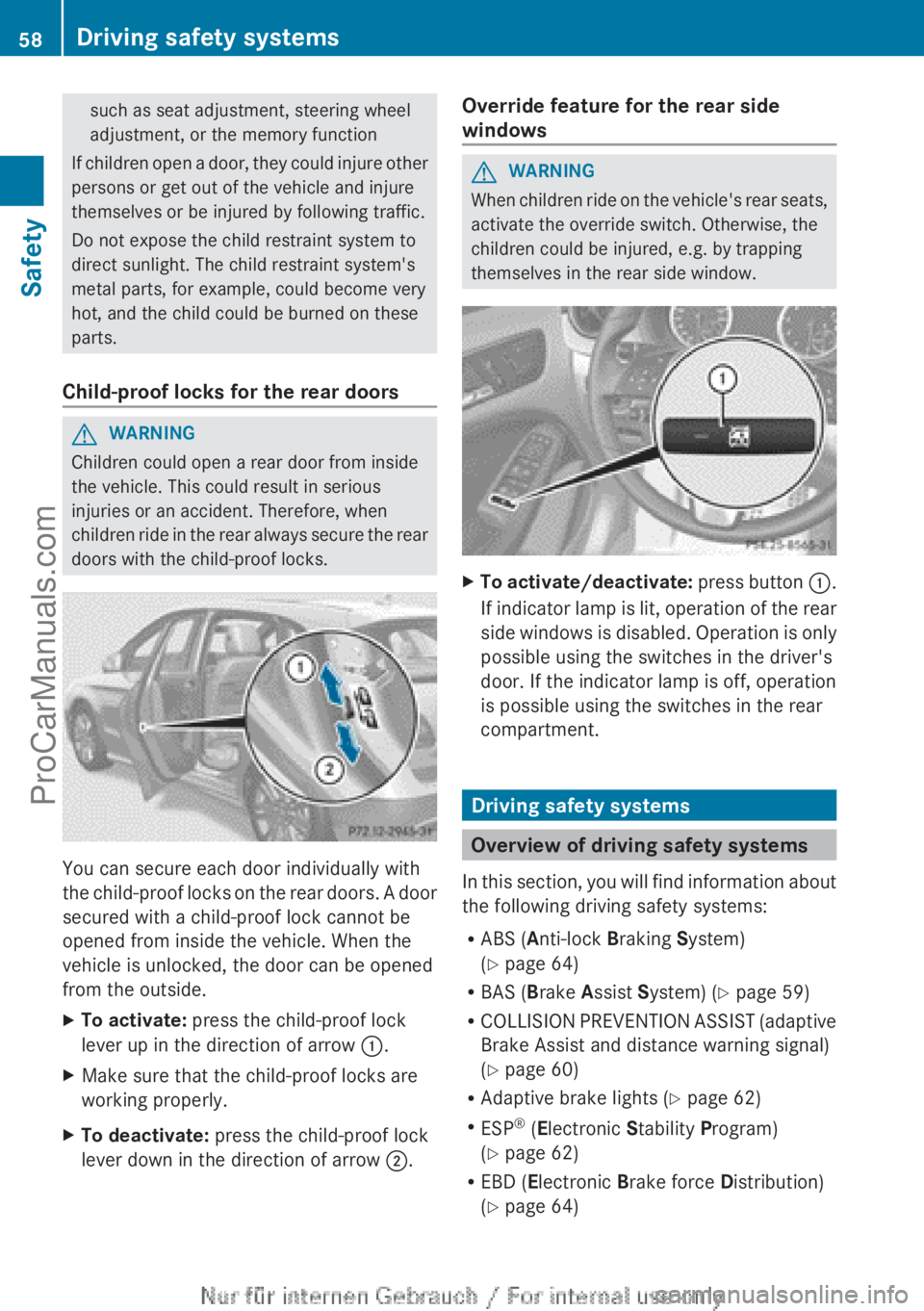
doors with the child-proof locks. You can secure each door individually with
the child-proof
locks
on the rear doors. A door
secured with a child-proof lock cannot be
opened from inside the vehicle. When the
vehicle is unlocked, the door can be opened
from the outside.
X To activate: press the child-proof lock
lever up in the direction of arrow :.
X Make sure that the child-proof locks are
working properly.
X To deactivate: press the child-proof lock
lever down in the direction of arrow ;. Override feature for the rear side
windows G
WARNING
When children ride on the vehicle's rear seats,
activate the override switch. Otherwise, the
children could be injured, e.g. by trapping
themselves in the rear side window. X
To activate/deactivate: press button :.
If
indicator lamp is lit, operation of the rear
side windows is disabled. Operation is only
possible using the switches in the driver's
door. If the indicator lamp is off, operation
is possible using the switches in the rear
compartment. Driving safety systems
Overview of driving safety systems
In this section,
you will find information about
the following driving safety systems:
R ABS ( Anti-lock Braking System)
(Y page 64)
R BAS ( Brake Assist System) ( Y page 59)
R COLLISION PREVENTION ASSIST (adaptive
Brake Assist and distance warning signal)
(Y page 60)
R Adaptive brake lights ( Y page 62)
R ESP ®
(Electronic Stability Program)
(Y page 62)
R EBD ( Electronic Brake force Distribution)
(Y page 64) 58
Driving safety systems
Safety
ProCarManuals.com
Page 67 of 340
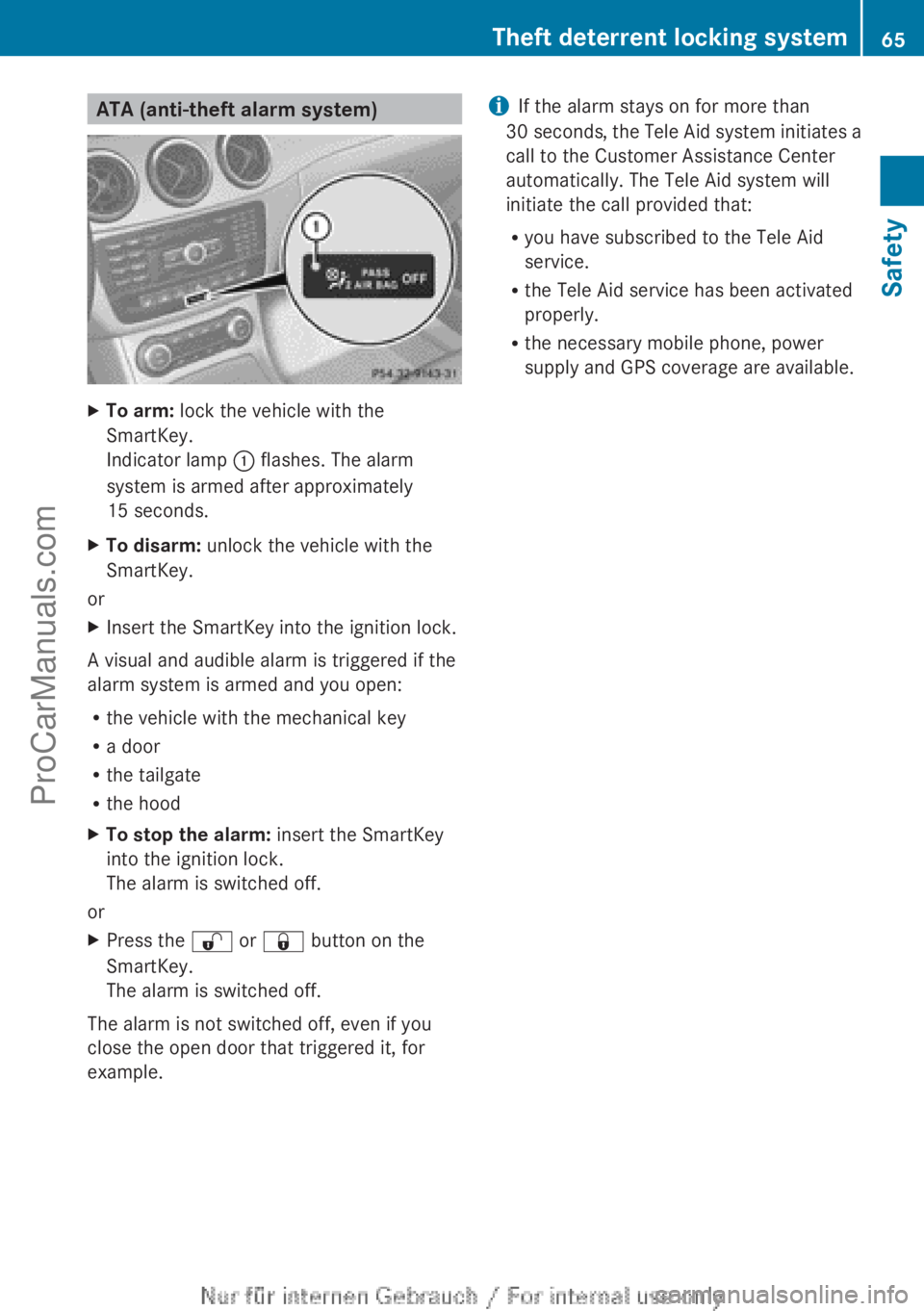
ATA (anti-theft alarm system)
X
To arm: lock the vehicle with the
SmartKey.
Indicator lamp : flashes. The alarm
system is armed after approximately
15 seconds.
X To disarm: unlock the vehicle with the
SmartKey.
or
X Insert the SmartKey into the ignition lock.
A visual and audible alarm is triggered if the
alarm system is armed and you open:
R the vehicle with the mechanical key
R a door
R the tailgate
R the hood
X To stop the alarm: insert the SmartKey
into the ignition lock.
The alarm is switched off.
or
X Press the % or & button on the
SmartKey.
The alarm is switched off.
The alarm is not switched off, even if you
close the open door that triggered it, for
example. i
If the alarm stays on for more than
30 seconds, the Tele
Aid system initiates a
call to the Customer Assistance Center
automatically. The Tele Aid system will
initiate the call provided that:
R you have subscribed to the Tele Aid
service.
R the Tele Aid service has been activated
properly.
R the necessary mobile phone, power
supply and GPS coverage are available. Theft deterrent locking system
65
Safety Z
ProCarManuals.com
Page 70 of 340
Useful information
i This Operator's Manual describes all
models and all standard and optional
equipment of your vehicle available at the
time of publication of the Operator's
Manual. Country-specific differences are
possible. Please note
that your vehicle may
not be equipped with all features
described. This also applies to safety-
related systems and functions.
i Read the information on qualified
specialist workshops: ( Y page 24).SmartKey
Important safety notes
G
WARNING
If children are left unsupervised in the vehicle,
they could:
R open the doors, thus endangering other
people or road users.
R get out and disrupt traffic.
R operate the vehicle's equipment.
Additionally, children could set the vehicle in
motion if, for example, they:
R release the parking brake.
R shift the automatic transmission out of
parking position P.
R starting the engine.
There is a risk of an accident and injury.
When leaving the vehicle, always take the
SmartKey with you
and lock the vehicle. Never
leave children or animals unattended in the
vehicle. Always keep the SmartKey out of
reach of children. G
WARNING
If persons, particularly children are subjected
to prolonged exposure to extreme heat or
cold, there is a risk of injury, possibly even
fatal. Never leave children unattended in the
vehicle. G
WARNING
If you attach heavy or large objects to the
SmartKey, the SmartKey could be
unintentionally turned in
the ignition lock. This
could cause the engine to be switched off.
There is a risk of an accident.
Do not attach any heavy or large objects to
the SmartKey. Remove any bulky key rings
before inserting the SmartKey into the
ignition lock.
! Keep the SmartKey away from strong
magnetic fields. Otherwise, the remote
control function could be affected.
Strong magnetic fields can occur in the
vicinity of powerful electrical installations.
Do not keep the SmartKey:
R with electronic devices, e.g. a mobile
phone or another SmartKey
R with metallic objects, e.g. coins or metal
foil
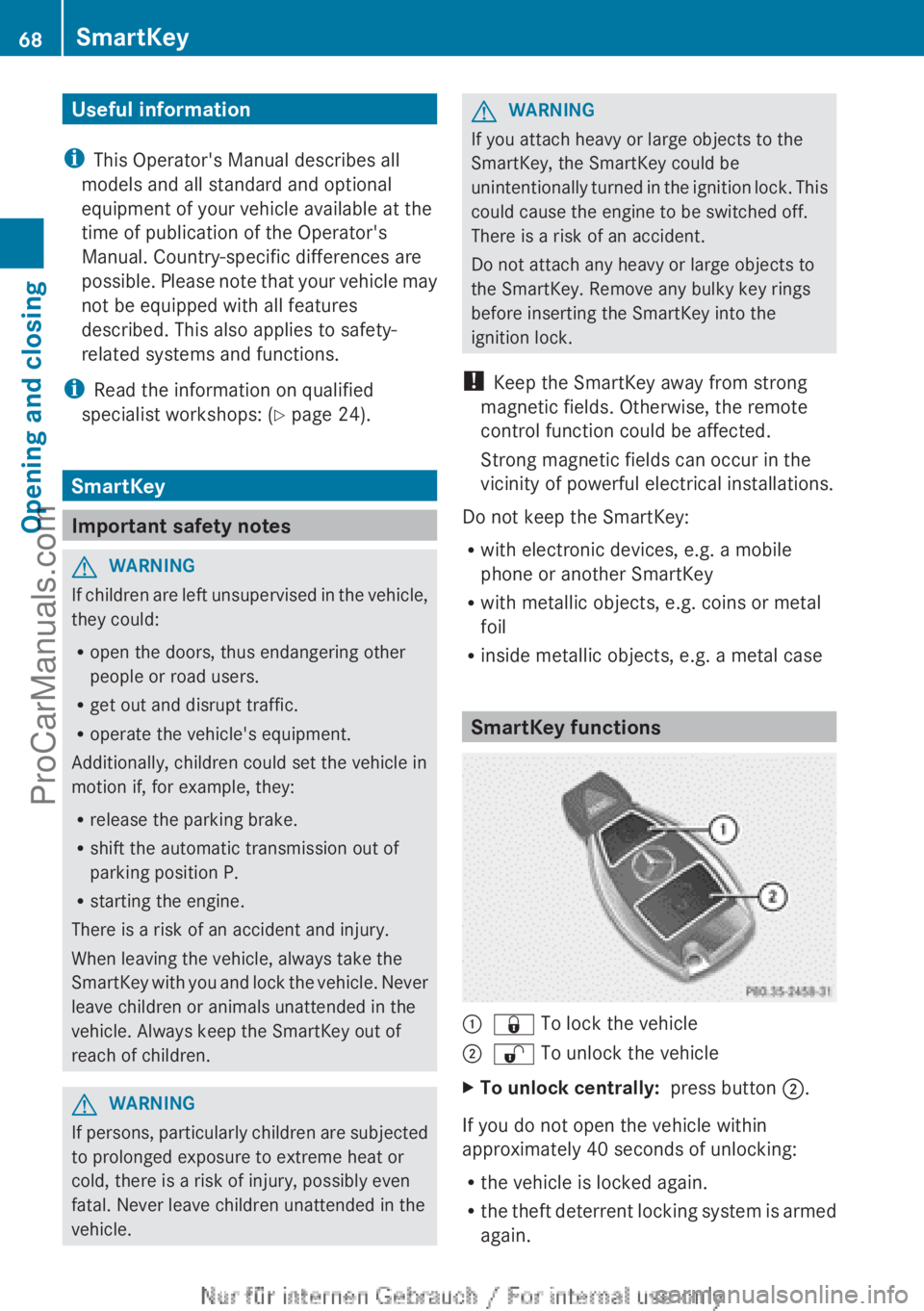
R inside metallic objects, e.g. a metal case SmartKey functions
:
& To lock the vehicle
; % To unlock the vehicle
X To unlock centrally: press button ;.
If you do not open the vehicle within
approximately 40 seconds of unlocking:
R the vehicle is locked again.
R the theft
deterrent locking system is armed
again. 68
SmartKey
Opening and closing
ProCarManuals.com
Page 71 of 340
X
To lock centrally: press button :.
The SmartKey centrally locks/unlocks:
R the doors
R the tailgate
R the fuel filler flap
The turn signals flash once when unlocking
and three times when locking.
i When it is
dark, the surround lighting also
comes on if it is activated in the on-board
computer (Y page 198).
i You can also set an audible signal to
confirm that the vehicle has been locked.
The audible signal can be activated and
deactivated using the on-board computer
(Y page 199). Changing the settings of the locking
system
You can change the settings of the locking
system. When you then unlock the vehicle
only the driver's door and the fuel filler flap
are unlocked. This is useful if you frequently
travel on your own.
X To change the setting: press and hold
down the % and & buttons
simultaneously for approximately six
seconds until the battery check lamp
(Y page 70) flashes twice.
i If the setting of the locking system is
changed within the signal range of the
vehicle, pressing the &
or % button:
R locks or
R unlocks the vehicle
The SmartKey now functions as follows:
X To unlock the driver's door: press the
% button once.
X To unlock centrally: press the %
button twice.
X To lock centrally: press the & button.
X To restore the factory settings: press
and hold down
the % and & buttons simultaneously for approximately six
seconds until the battery check lamp
flashes twice (
Y page 70). Mechanical key
General notes If the vehicle can no longer be unlocked with
the SmartKey, use the mechanical key.
If you use the mechanical key to unlock and
open the driver's door, the anti-theft alarm
system will be triggered (
Y page 65).
There are several ways to turn off the alarm:
X Press the
% or & button on the
SmartKey.
or
X Insert the SmartKey into the ignition lock.
If you unlock the vehicle using the mechanical
key, the fuel filler flap will not be unlocked
automatically.
X To unlock the fuel filler flap: insert the
SmartKey into the ignition lock.
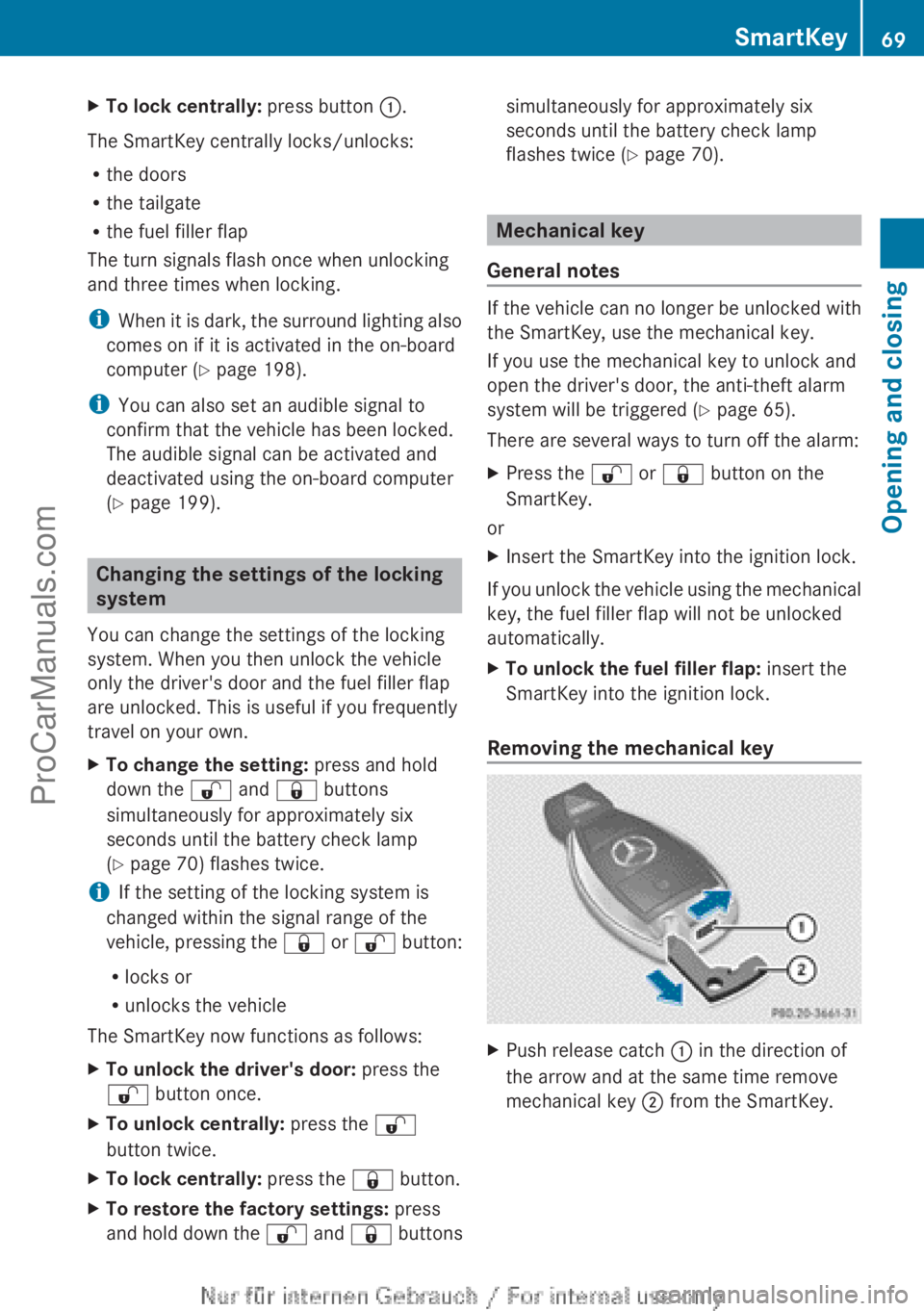
Removing the mechanical key X
Push release catch : in the direction of
the arrow and at the same time remove
mechanical key ; from the SmartKey. SmartKey
69
Opening and closing Z
ProCarManuals.com
Page 74 of 340
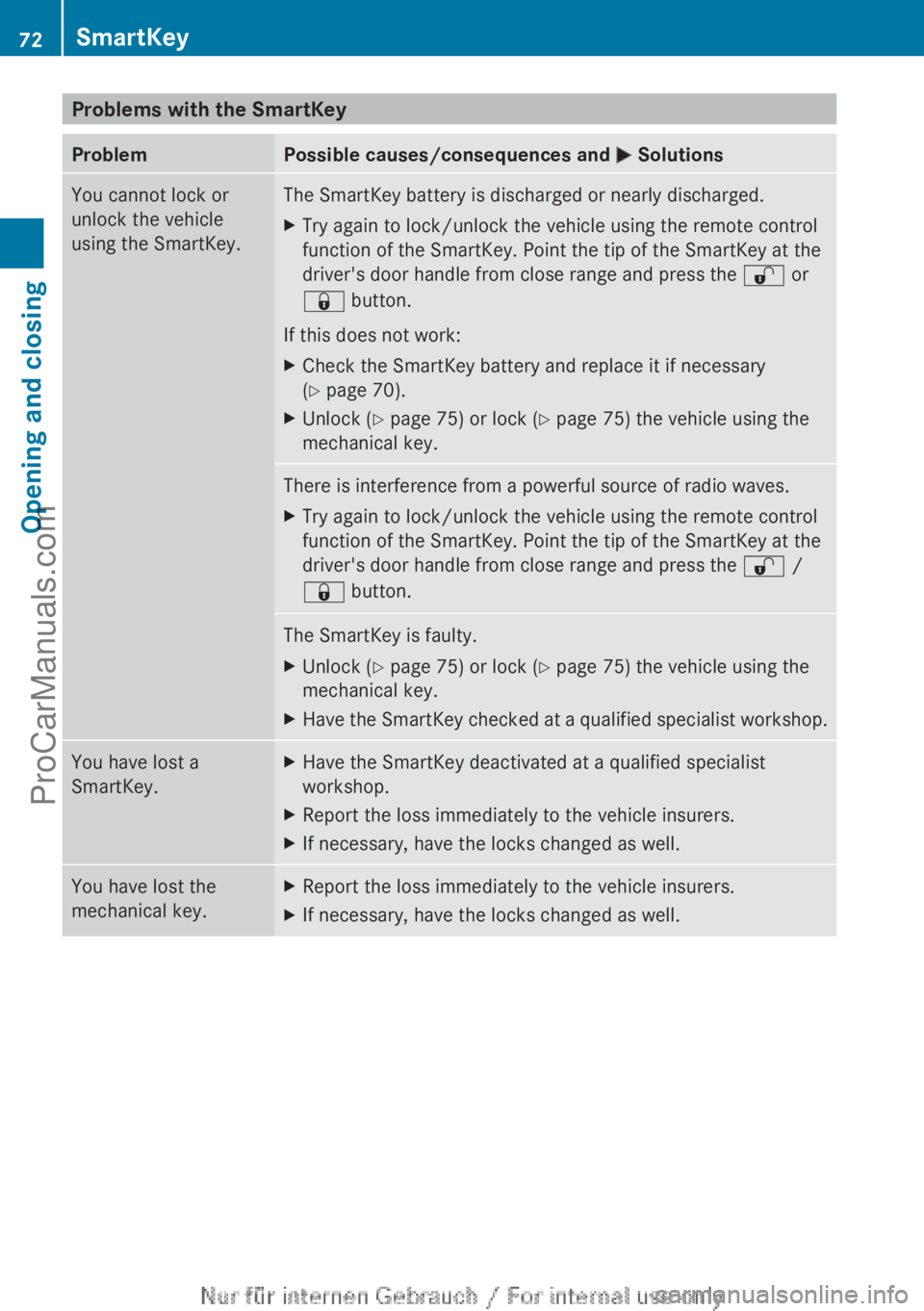
Problems with the SmartKey
Problem Possible causes/consequences and
M SolutionsYou cannot lock or
unlock the vehicle
using the SmartKey. The SmartKey battery is discharged or nearly discharged.
X
Try again to lock/unlock the vehicle using the remote control
function of the SmartKey. Point the tip of the SmartKey at the
driver's door handle from close range and press the % or
& button.
If this does not work:
X Check the SmartKey battery and replace it if necessary
(Y page 70).
X Unlock ( Y page 75) or lock ( Y page 75) the vehicle using the
mechanical key. There is interference from a powerful source of radio waves.
X
Try again to lock/unlock the vehicle using the remote control
function of the SmartKey. Point the tip of the SmartKey at the
driver's door handle from close range and press the % /
& button. The SmartKey is faulty.
X
Unlock ( Y page 75) or lock ( Y page 75) the vehicle using the
mechanical key.
X Have the SmartKey checked at a qualified specialist workshop. You have lost a
SmartKey. X
Have the SmartKey deactivated at a qualified specialist
workshop.
X Report the loss immediately to the vehicle insurers.
X If necessary, have the locks changed as well. You have lost the
mechanical key. X
Report the loss immediately to the vehicle insurers.
X If necessary, have the locks changed as well.72
SmartKeyOpening and closing
ProCarManuals.com
Page 75 of 340
Problem Possible causes/consequences and
M SolutionsThe engine cannot be
started using the
SmartKey. The on-board voltage is too low.
X
Switch off non-essential consumers, e.g. seat heating or interior
lighting, and try to start the engine again.
If this does not work:
X Check the starter battery and charge it if necessary
(Y page 285).
or
X Jump-start the vehicle (Y page 289).
or
X Consult a qualified specialist workshop. The engine cannot be
started using the
SmartKey. The steering lock is mechanically blocked.
X
Remove the SmartKey and reinsert it into the ignition lock. While
doing this, turn the steering wheel in both directions. Doors
Important safety notes
G
WARNING
If children are left unsupervised in the vehicle,
they could:
R open the doors, thus endangering other
people or road users.
R get out and disrupt traffic.
R operate the vehicle's equipment.
Additionally, children could set the vehicle in
motion if, for example, they:
R release the parking brake.
R shift the automatic transmission out of
parking position P.
R starting the engine.
There is a risk of an accident and injury.
When leaving the vehicle, always take the
SmartKey with you
and lock the vehicle. Never
leave children or animals unattended in the
vehicle. Always keep the SmartKey out of
reach of children. G
WARNING
If persons, particularly children are subjected
to prolonged exposure to extreme heat or
cold, there is a risk of injury, possibly even
fatal. Never leave children unattended in the
vehicle. Unlocking and opening doors from
the inside
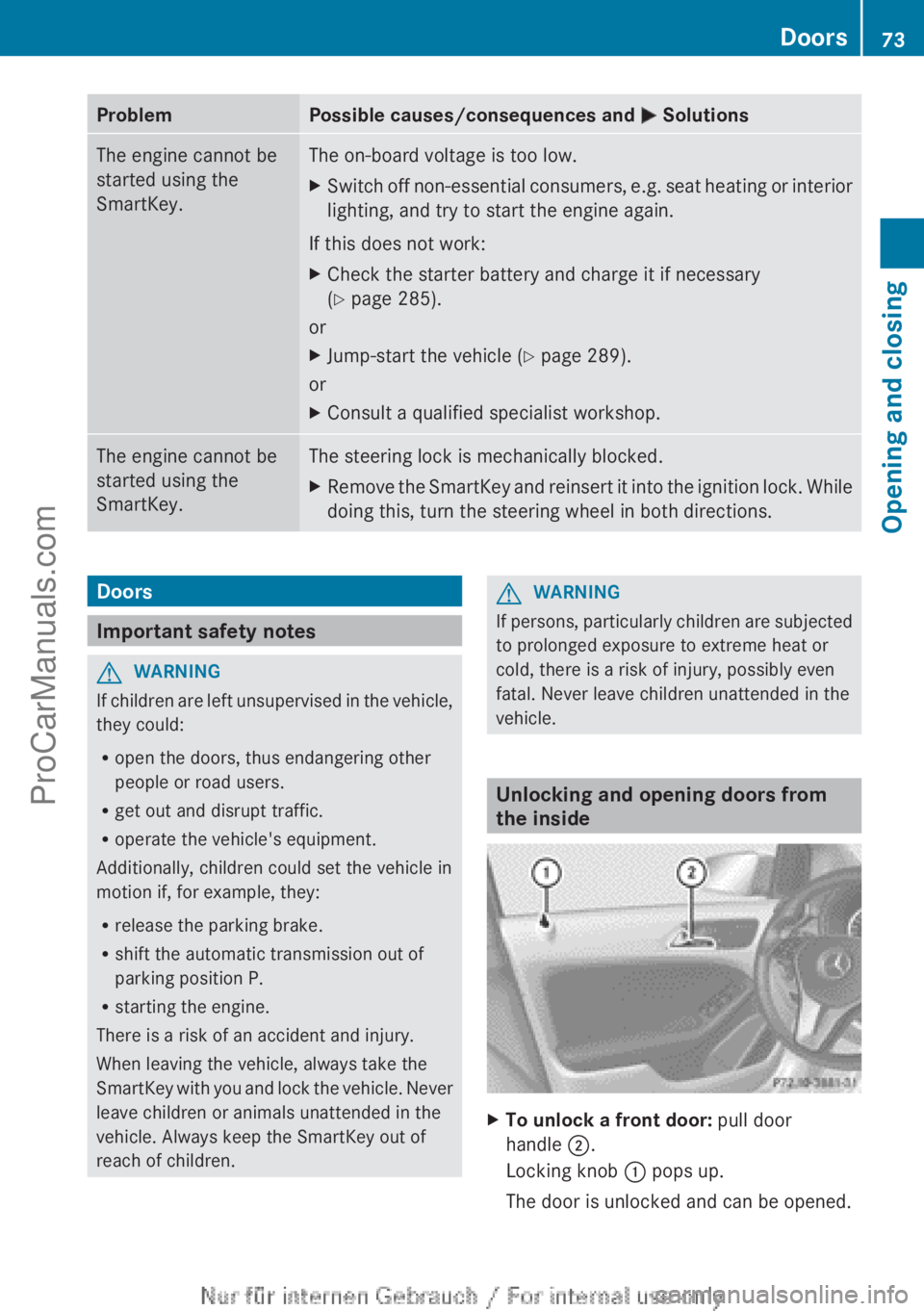
X
To unlock a front door: pull door
handle ;.
Locking knob : pops up.
The door is unlocked and can be opened. Doors
73
Opening and closing Z
ProCarManuals.com
Page 76 of 340
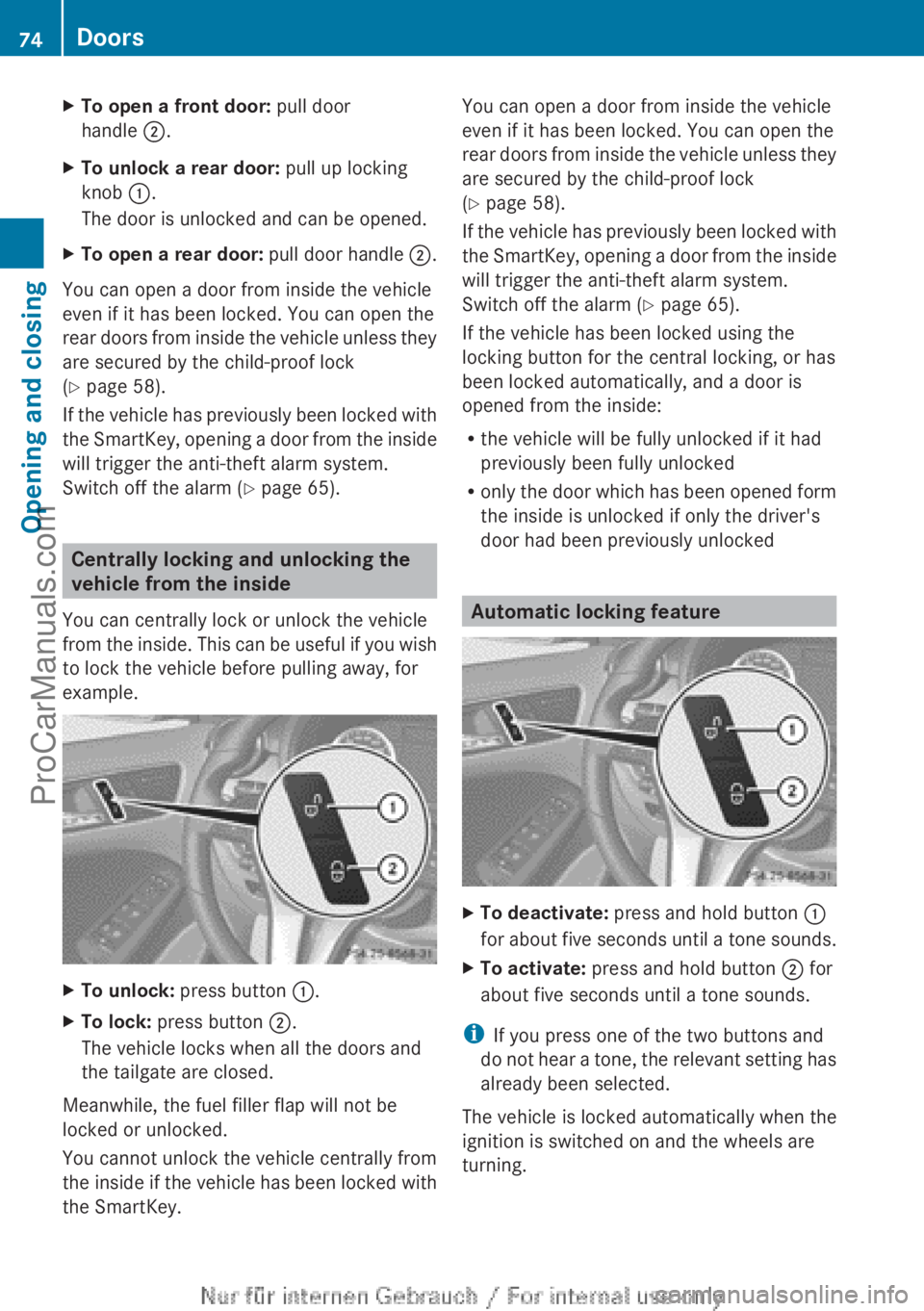
X
To open a front door: pull door
handle ;.
X To unlock a rear door: pull up locking
knob :.
The door is unlocked and can be opened.
X To open a rear door: pull door handle ;.
You can open a door from inside the vehicle
even if it has been locked. You can open the
rear doors from
inside the vehicle unless they
are secured by the child-proof lock
(Y page 58).
If the vehicle has previously been locked with
the SmartKey, opening a door from the inside
will trigger the anti-theft alarm system.
Switch off the alarm (Y page 65). Centrally locking and unlocking the
vehicle from the inside
You can centrally lock or unlock the vehicle
from the inside.
This can be useful if you wish
to lock the vehicle before pulling away, for
example. X
To unlock: press button :.
X To lock: press button ;.
The vehicle locks when all the doors and
the tailgate are closed.
Meanwhile, the fuel filler flap will not be
locked or unlocked.
You cannot unlock the vehicle centrally from
the inside if
the vehicle has been locked with
the SmartKey. You can open a door from inside the vehicle
even if it has been locked. You can open the
rear doors
from
inside the vehicle unless they
are secured by the child-proof lock
(Y page 58).
If the vehicle has previously been locked with
the SmartKey, opening a door from the inside
will trigger the anti-theft alarm system.
Switch off the alarm (Y page 65).
If the vehicle has been locked using the
locking button for the central locking, or has
been locked automatically, and a door is
opened from the inside:
R the vehicle will be fully unlocked if it had
previously been fully unlocked
R only the door which has been opened form
the inside is unlocked if only the driver's
door had been previously unlocked Automatic locking feature
X
To deactivate: press and hold button :
for about five
seconds until a tone sounds.
X To activate: press and hold button ; for
about five seconds until a tone sounds.
i If you press one of the two buttons and
do not
hear
a tone, the relevant setting has
already been selected.
The vehicle is locked automatically when the
ignition is switched on and the wheels are
turning. 74
Doors
Opening and closing
ProCarManuals.com
Page 77 of 340
You could therefore lock yourself out if:
R
the vehicle is being pushed.
R the vehicle is being towed.
R the vehicle is on a roller dynamometer.
You can also switch the automatic locking
function on and off using the on-board
computer (Y page 198). Unlocking the driver's door
(mechanical key)
If the vehicle
can no longer be unlocked with
the SmartKey, use the mechanical key.
If you use the mechanical key to unlock and
open the driver's door, the anti-theft alarm
system will be triggered ( Y page 65).
X Take the mechanical key out of the
SmartKey (Y page 69).
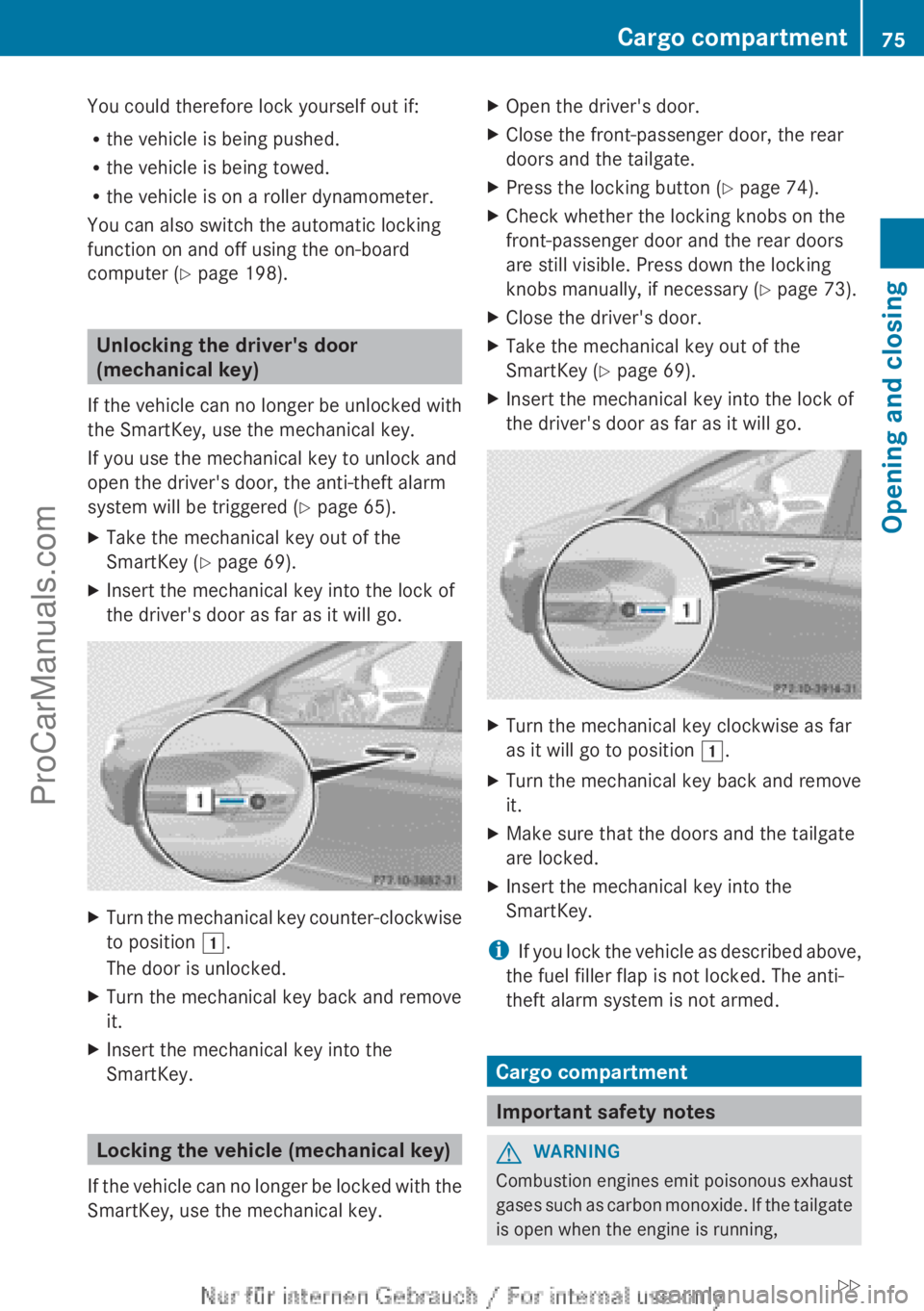
X Insert the mechanical key into the lock of
the driver's door as far as it will go. X
Turn the mechanical key counter-clockwise
to position 1.
The door is unlocked.
X Turn the mechanical key back and remove
it.
X Insert the mechanical key into the
SmartKey. Locking the vehicle (mechanical key)
If the vehicle
can no longer be locked with the
SmartKey, use the mechanical key. X
Open the driver's door.
X Close the front-passenger door, the rear
doors and the tailgate.
X Press the locking button (Y page 74).
X Check whether the locking knobs on the
front-passenger door and the rear doors
are still visible. Press down the locking
knobs manually, if necessary (Y page 73).
X Close the driver's door.
X Take the mechanical key out of the
SmartKey (
Y page 69).
X Insert the mechanical key into the lock of
the driver's door as far as it will go. X
Turn the mechanical key clockwise as far
as it will go to position 1.
X Turn the mechanical key back and remove
it.
X Make sure that the doors and the tailgate
are locked.
X Insert the mechanical key into the
SmartKey.
i If you lock
the vehicle as described above,
the fuel filler flap is not locked. The anti-
theft alarm system is not armed. Cargo compartment
Important safety notes
G
WARNING
Combustion engines emit poisonous exhaust
gases such as
carbon monoxide. If the tailgate
is open when the engine is running, Cargo compartment
75
Opening and closing
ZProCarManuals.com
Page 79 of 340
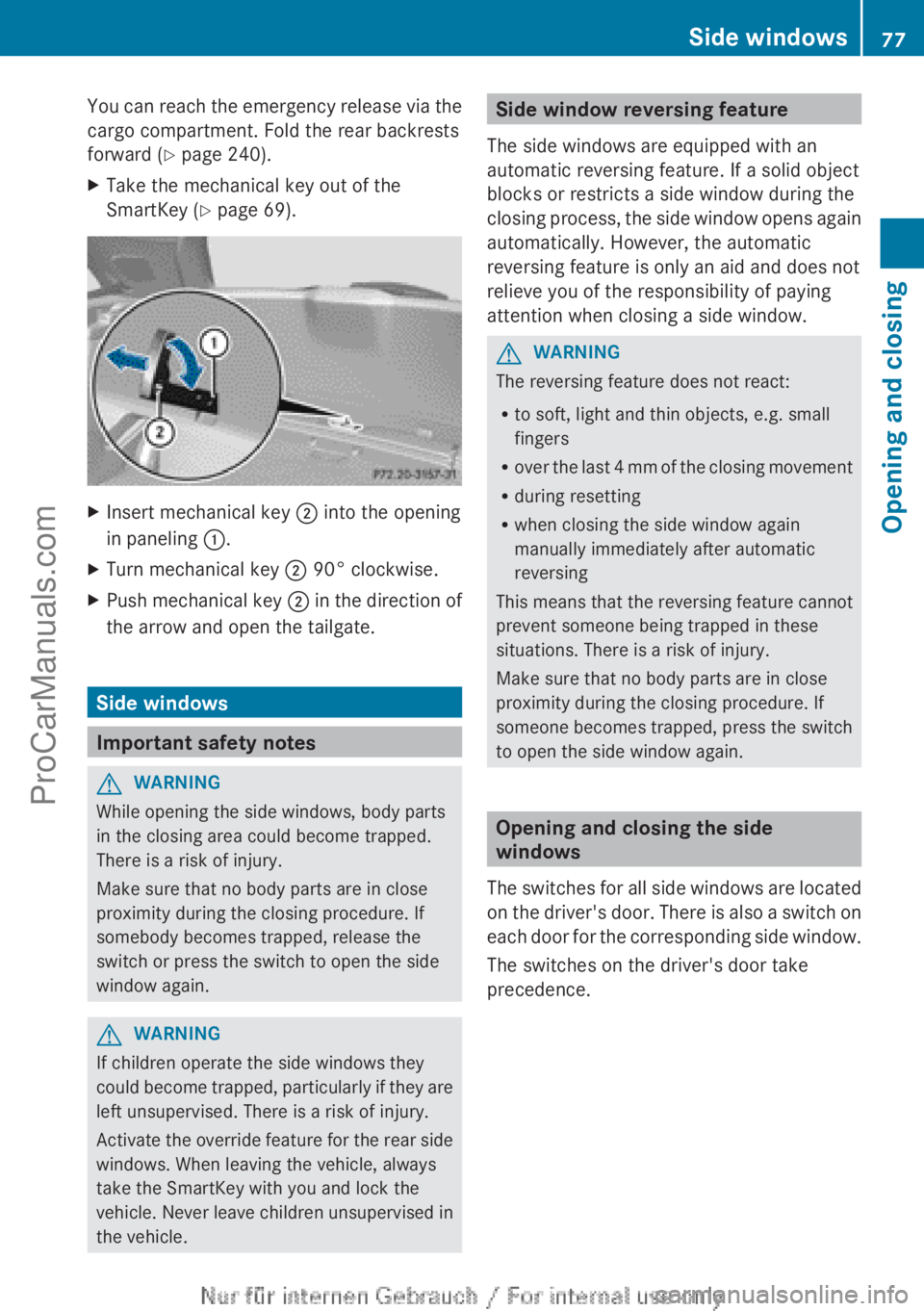
You can reach the emergency release via the
cargo compartment. Fold the rear backrests
forward (
Y page 240).
X Take the mechanical key out of the
SmartKey (Y page 69). X
Insert mechanical key ; into the opening
in paneling :.
X Turn mechanical key ; 90° clockwise.
X Push mechanical key ; in the
direction of
the arrow and open the tailgate. Side windows
Important safety notes
G
WARNING
While opening the side windows, body parts
in the closing area could become trapped.
There is a risk of injury.
Make sure that no body parts are in close
proximity during the closing procedure. If
somebody becomes trapped, release the
switch or press the switch to open the side
window again. G
WARNING
If children operate the side windows they
could become trapped,
particularly if they are
left unsupervised. There is a risk of injury.
Activate the override feature for the rear side
windows. When leaving the vehicle, always
take the SmartKey with you and lock the
vehicle. Never leave children unsupervised in
the vehicle. Side window reversing feature
The side windows are equipped with an
automatic reversing feature. If a solid object
blocks or restricts a side window during the
closing process, the
side window opens again
automatically. However, the automatic
reversing feature is only an aid and does not
relieve you of the responsibility of paying
attention when closing a side window. G
WARNING
The reversing feature does not react:
R to soft, light and thin objects, e.g. small
fingers
R over the last
4 mm of the closing movement
R during resetting
R when closing the side window again
manually immediately after automatic
reversing
This means that the reversing feature cannot
prevent someone being trapped in these
situations. There is a risk of injury.
Make sure that no body parts are in close
proximity during the closing procedure. If
someone becomes trapped, press the switch
to open the side window again. Opening and closing the side
windows
The switches for
all side windows are located
on the driver's door. There is also a switch on
each door for the corresponding side window.
The switches on the driver's door take
precedence. Side windows
77
Opening and closing Z
ProCarManuals.com