reset MERCEDES-BENZ B-CLASS 2012 User Guide
[x] Cancel search | Manufacturer: MERCEDES-BENZ, Model Year: 2012, Model line: B-CLASS, Model: MERCEDES-BENZ B-CLASS 2012Pages: 340, PDF Size: 3.09 MB
Page 84 of 340
Opening and closing
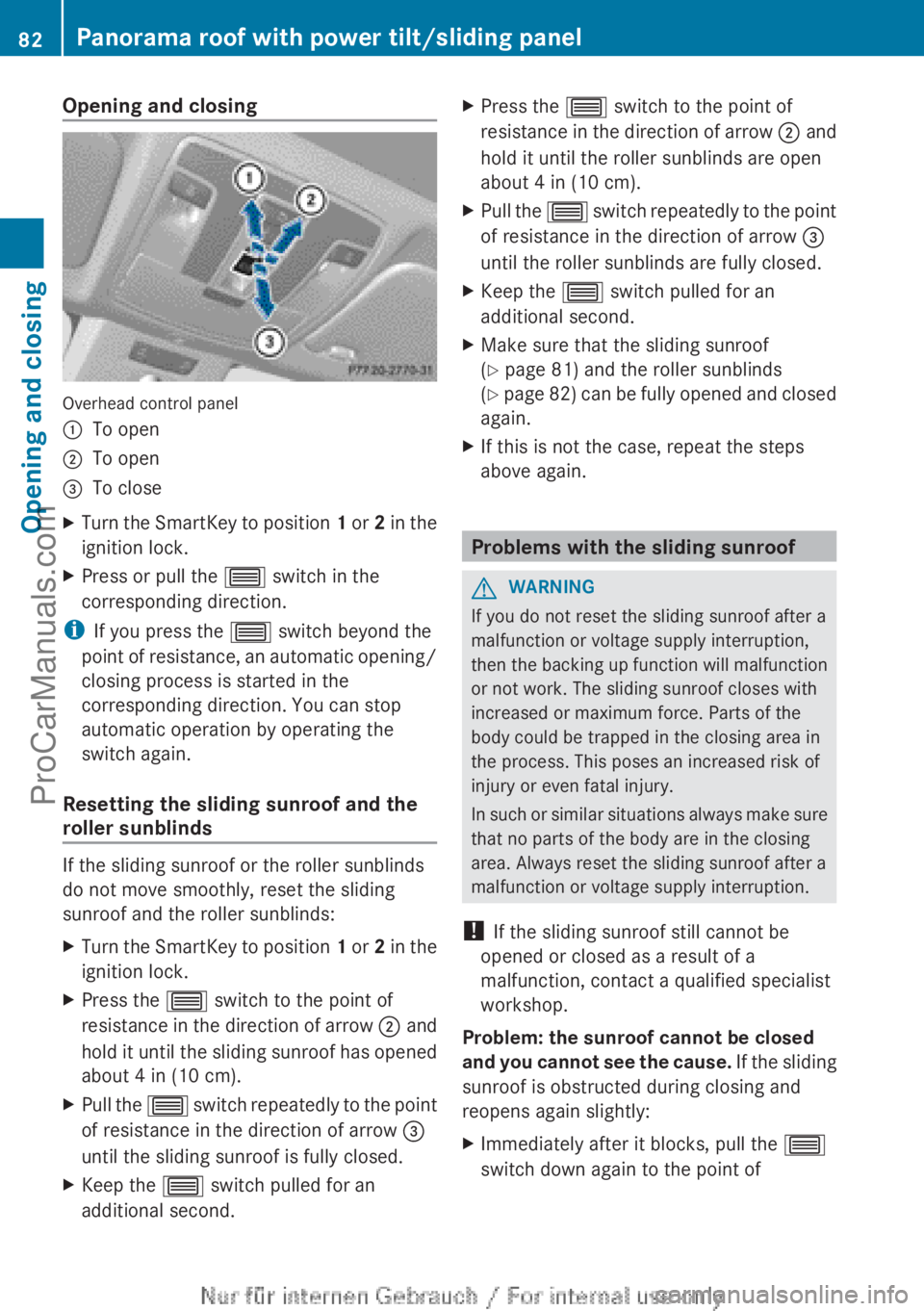
Overhead control panel
:
To open
; To open
= To close
X Turn the SmartKey to position 1 or
2 in the
ignition lock.
X Press or pull the 3 switch in the
corresponding direction.
i If you press the 3 switch beyond the
point of resistance,
an automatic opening/
closing process is started in the
corresponding direction. You can stop
automatic operation by operating the
switch again.
Resetting the sliding sunroof and the
roller sunblinds If the sliding sunroof or the roller sunblinds
do not move smoothly, reset the sliding
sunroof and the roller sunblinds:
X
Turn the SmartKey to position 1 or 2
in the
ignition lock.
X Press the 3 switch to the point of
resistance in the
direction of arrow ; and
hold it until the sliding sunroof has opened
about 4 in (10 cm).
X Pull the 3 switch
repeatedly
to the point
of resistance in the direction of arrow =
until the sliding sunroof is fully closed.
X Keep the 3 switch pulled for an
additional second. X
Press the 3 switch to the point of
resistance in the
direction of arrow ; and
hold it until the roller sunblinds are open
about 4 in (10 cm).
X Pull the 3 switch
repeatedly
to the point
of resistance in the direction of arrow =
until the roller sunblinds are fully closed.
X Keep the 3 switch pulled for an
additional second.
X Make sure that the sliding sunroof
(Y page 81) and the roller sunblinds
(Y page
82)
can be fully opened and closed
again.
X If this is not the case, repeat the steps
above again. Problems with the sliding sunroof
G
WARNING
If you do not reset the sliding sunroof after a
malfunction or voltage supply interruption,
then the backing
up function will malfunction
or not work. The sliding sunroof closes with
increased or maximum force. Parts of the
body could be trapped in the closing area in
the process. This poses an increased risk of
injury or even fatal injury.
In such or similar situations always make sure
that no parts of the body are in the closing
area. Always reset the sliding sunroof after a
malfunction or voltage supply interruption.
! If the sliding sunroof still cannot be
opened or closed as a result of a
malfunction, contact a qualified specialist
workshop.
Problem: the sunroof cannot be closed
and you cannot see the cause. If the sliding
sunroof is obstructed during closing and
reopens again slightly:
X Immediately after it blocks, pull the 3
switch down again to the point of 82
Panorama roof with power tilt/sliding panel
Opening and closing
ProCarManuals.com
Page 90 of 340
heating should also not be used to dry
the seats.
R clean the seat covers as recommended;
see the "Interior care" section.
R do not transport heavy loads on the
seats. Do not
place sharp objects on the
seat cushions, e.g. knives, nails or tools.
The seats should only be occupied by
passengers, if possible.
R when the seat heating is in operation, do
not cover the seats with insulating
materials, e.g. blankets, coats, bags,
seat covers, child seats or booster seats.
! Make sure that there are no objects in the
footwell or behind the seats when resetting
the seats. There is a risk that the seats
and/or the objects could be damaged.
i The head restraints in the front and rear
seats can be removed. 1
For more information, contact a qualified
specialist workshop.
i Further related subjects:
R Luggage compartment enlargement
(folding down the rear seats)
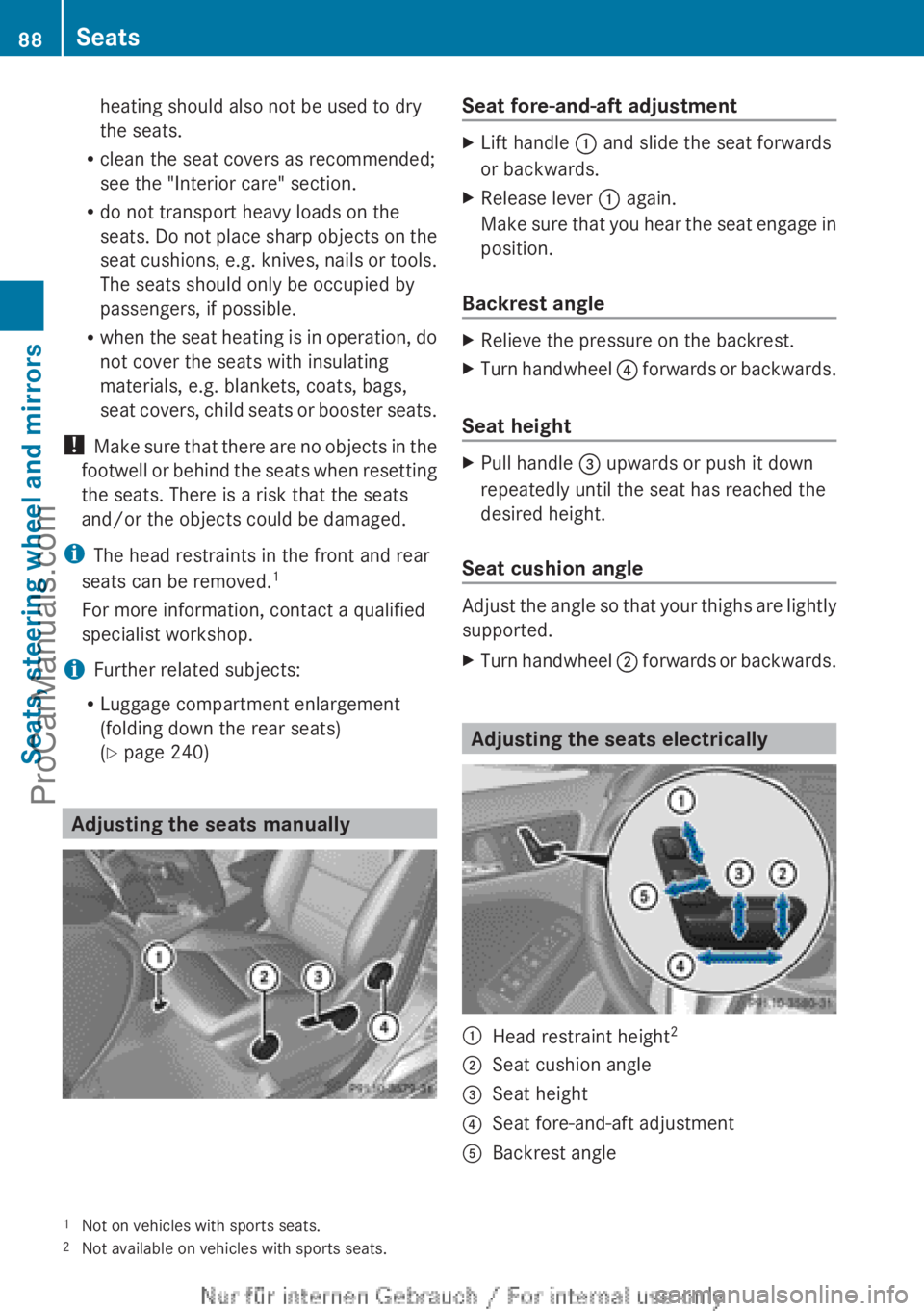
(Y page 240) Adjusting the seats manually Seat fore-and-aft adjustment
X
Lift handle : and slide the seat forwards
or backwards.
X Release lever : again.
Make sure
that
you hear the seat engage in
position.
Backrest angle X
Relieve the pressure on the backrest.
X Turn handwheel ? forwards or
backwards.
Seat height X
Pull handle = upwards or push it down
repeatedly until the seat has reached the
desired height.
Seat cushion angle Adjust the angle so that your thighs are lightly
supported.
X
Turn handwheel ; forwards or
backwards. Adjusting the seats electrically
:
Head restraint height 2
; Seat cushion angle
= Seat height
? Seat fore-and-aft adjustment
A Backrest angle
1 Not on vehicles with sports seats.
2 Not available on vehicles with sports seats.88
Seats
Seats, steering wheel and mirrors
ProCarManuals.com
Page 95 of 340
defroster is switched on and the outside
temperature is
low.
Mirror heating lasts up to
10 minutes.
i You can also heat up the exterior mirrors
manually by switching on the rear window
defroster.
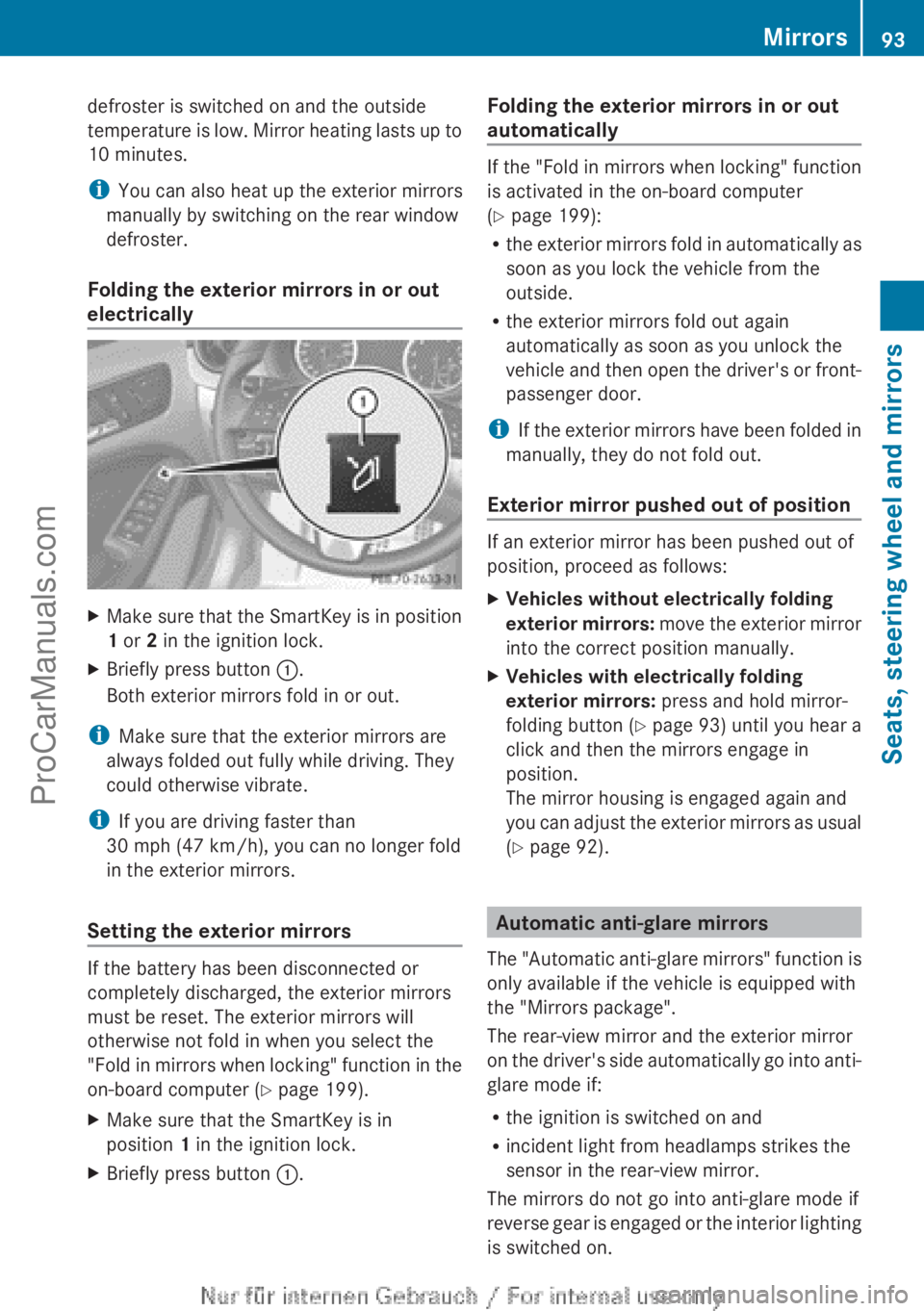
Folding the exterior mirrors in or out
electrically X
Make sure that the SmartKey is in position
1 or 2 in the ignition lock.
X Briefly press button :.
Both exterior mirrors fold in or out.
i Make sure that the exterior mirrors are
always folded out fully while driving. They
could otherwise vibrate.
i If you are driving faster than
30 mph (47 km/h ), you can no longer fold
in the exterior mirrors.
Setting the exterior mirrors If the battery has been disconnected or
completely discharged, the exterior mirrors
must be reset. The exterior mirrors will
otherwise not fold in when you select the
"Fold in
mirrors
when locking" function in the
on-board computer (Y page 199).
X Make sure that the SmartKey is in
position 1 in the ignition lock.
X Briefly press button :. Folding the exterior mirrors in or out
automatically If the "Fold in mirrors when locking" function
is activated in the on-board computer
(Y page 199):
R
the exterior mirrors
fold in automatically as
soon as you lock the vehicle from the
outside.
R the exterior mirrors fold out again
automatically as soon as you unlock the
vehicle and then open the driver's or front-
passenger door.
i If the exterior mirrors have been folded in
manually, they do not fold out.
Exterior mirror pushed out of position If an exterior mirror has been pushed out of
position, proceed as follows:
X
Vehicles without electrically folding
exterior mirrors:
move
the exterior mirror
into the correct position manually.
X Vehicles with electrically folding
exterior mirrors: press and hold mirror-
folding button ( Y page
93) until you hear a
click and then the mirrors engage in
position.
The mirror housing is engaged again and
you can adjust the exterior mirrors as usual
(Y page 92). Automatic anti-glare mirrors
The "Automatic anti-glare
mirrors" function is
only available if the vehicle is equipped with
the "Mirrors package".
The rear-view mirror and the exterior mirror
on the driver's side automatically go into anti-
glare mode if:
R the ignition is switched on and
R incident light from headlamps strikes the
sensor in the rear-view mirror.
The mirrors do not go into anti-glare mode if
reverse gear is engaged or the interior lighting
is switched on. Mirrors
93
Seats, steering wheel and mirrors Z
ProCarManuals.com
Page 96 of 340
Parking position for the exterior
mirror on the front-passenger side
General notes The "Parking position of the exterior mirror on
the front-passenger side" function is only
available if the vehicle is equipped with the
"Mirrors package".
Setting and
storing
the parking positionUsing reverse gear
You can position the front-passenger side
exterior mirror
in
such a way that you can see
the rear wheel on that side as soon as you
engage reverse gear. You can store this
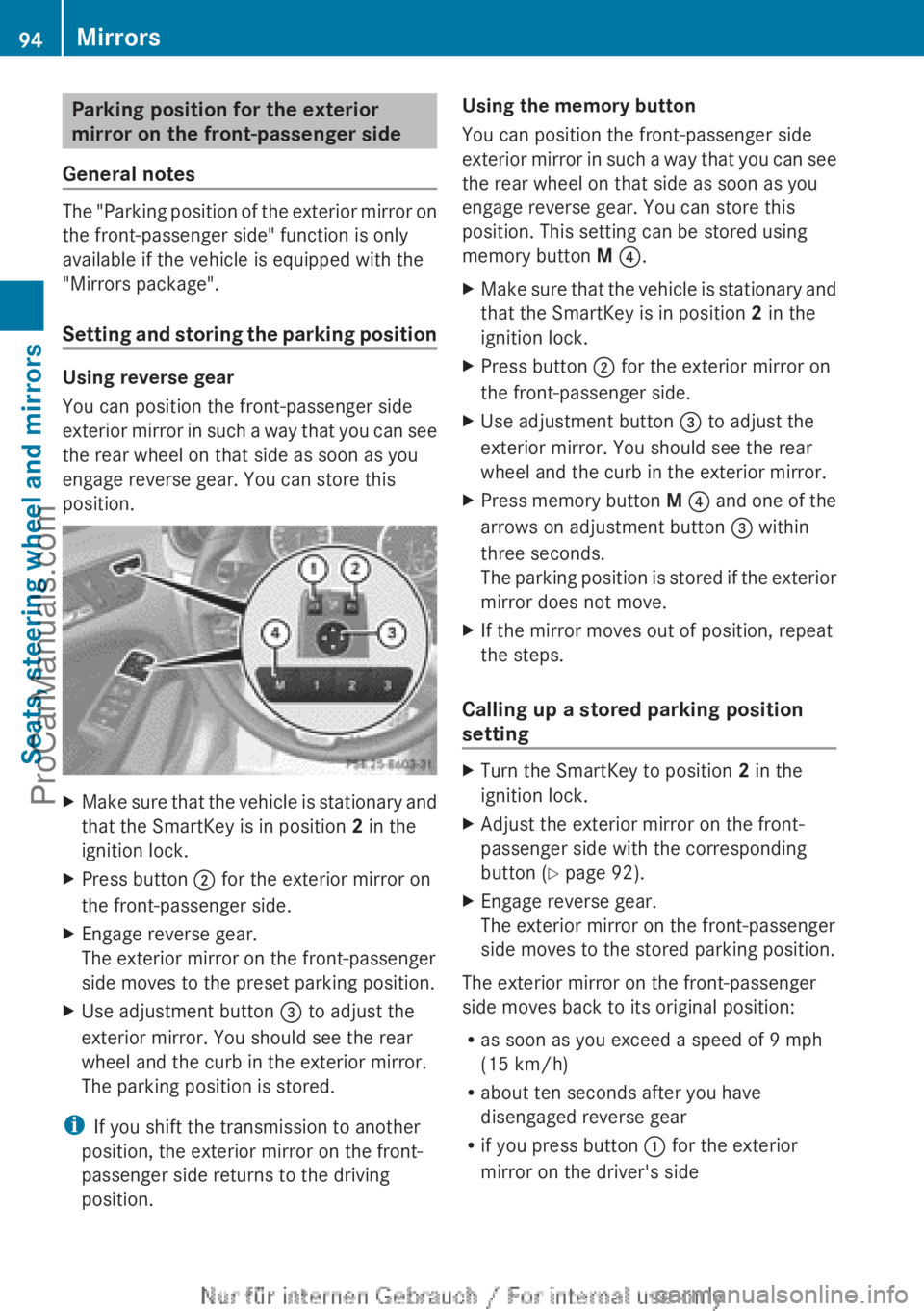
position. X
Make sure that the vehicle is stationary and
that the SmartKey is in position 2 in the
ignition lock.
X Press button ; for the exterior mirror on
the front-passenger side.
X Engage reverse gear.
The exterior mirror on the front-passenger
side moves to the preset parking position.
X Use adjustment button = to adjust the
exterior mirror. You should see the rear
wheel and the curb in the exterior mirror.
The parking position is stored.
i If you shift the transmission to another
position, the exterior mirror on the front-
passenger side returns to the driving
position. Using the memory button
You can position the front-passenger side
exterior mirror
in
such a way that you can see
the rear wheel on that side as soon as you
engage reverse gear. You can store this
position. This setting can be stored using
memory button M ?.
X Make sure that the vehicle is stationary and
that the SmartKey is in position 2 in the
ignition lock.
X Press button ; for the exterior mirror on
the front-passenger side.
X Use adjustment button = to adjust the
exterior mirror. You should see the rear
wheel and the curb in the exterior mirror.
X Press memory button M ? and
one
of the
arrows on adjustment button = within
three seconds.
The parking position is stored if the exterior
mirror does not move.
X If the mirror moves out of position, repeat
the steps.
Calling up a stored parking position
setting X
Turn the SmartKey to position 2 in the
ignition lock.
X Adjust the exterior mirror on the front-
passenger side with the corresponding
button ( Y page 92).
X Engage reverse gear.
The exterior mirror on the front-passenger
side moves to the stored parking position.
The exterior mirror on the front-passenger
side moves back to its original position:
R as soon as you exceed a speed of 9 mph
(15 km/h)
R about ten seconds after you have
disengaged reverse gear
R if you press button : for the exterior
mirror on the driver's side 94
Mirrors
Seats, steering wheel and mirrors
ProCarManuals.com
Page 97 of 340
Memory functions
Storing settings
G
WARNING
If you use the memory function on the driver's
side while driving, you could lose control of
the vehicle as a result of the adjustments
being made. There is a risk of an accident.
Only use the
memory function on the driver's
side when the vehicle is stationary. G
WARNING
When the memory function adjusts the seat,
you and other
vehicle occupants – particularly
children – could become trapped. There is a
risk of injury.
While the memory function is making
adjustments, make sure that no one has any
body parts in the sweep of the seat. If
somebody becomes trapped, immediately
release the memory function position button.
The adjustment process is stopped. G
WARNING
Children could become trapped if they
activate the memory function, particularly
when unattended. There is a risk of injury.
When leaving the vehicle, always take the
SmartKey with you
and lock the vehicle. Never
leave children unsupervised in the vehicle.
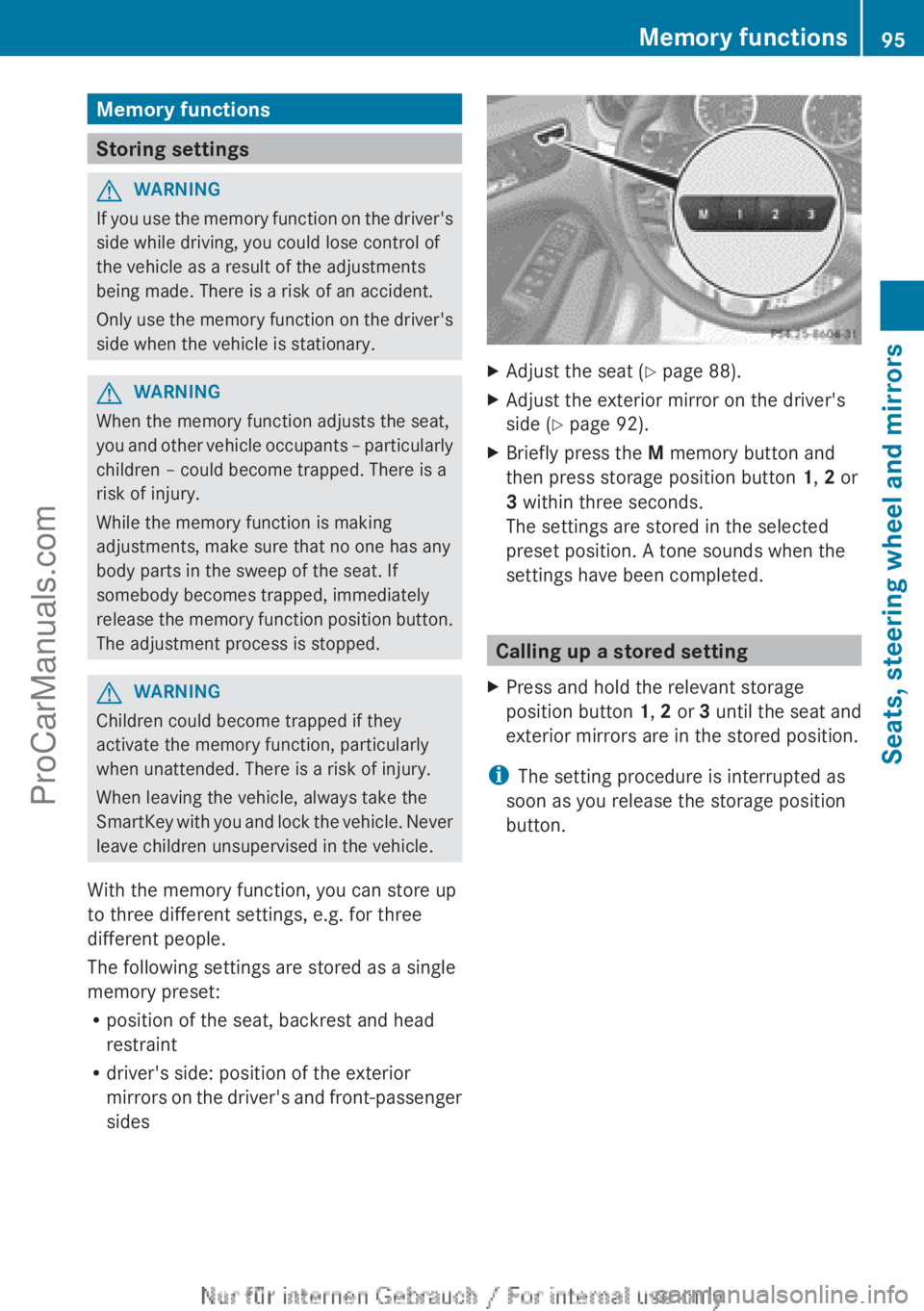
With the memory function, you can store up
to three different settings, e.g. for three
different people.
The following settings are stored as a single
memory preset:
R position of the seat, backrest and head
restraint
R driver's side: position of the exterior
mirrors on the driver's and front-passenger
sides X
Adjust the seat ( Y page 88).
X Adjust the exterior mirror on the driver's
side ( Y page 92).
X Briefly press the M memory button and
then press storage position button 1, 2 or
3 within three seconds.
The settings are stored in the selected
preset position. A tone sounds when the
settings have been completed. Calling up a stored setting
X Press and hold the relevant storage
position button 1, 2 or 3
until the
seat and
exterior mirrors are in the stored position.
i The setting procedure is interrupted as
soon as you release the storage position
button. Memory functions
95
Seats, steering wheel and mirrors Z
ProCarManuals.com
Page 103 of 340
The blue
K indicator lamp in the
instrument cluster lights
up when the high-
beam headlamps are switched on.
X To switch off the high-beam
headlamps: move the combination
switch
back to its normal position.
The blue K indicator lamp in the
instrument cluster goes out.
i Vehicles with Adaptive Highbeam Assist:
when Adaptive Highbeam Assist is active,
it controls activation of the high-beam
headlamps (Y page 102).
High-beam flasher X
To switch on: turn the SmartKey in the
ignition lock to position 1 or 2 or start the
engine.
X Pull the combination switch in the direction
of arrow =. Hazard warning lamps
The hazard warning lamps automatically
switch on if:
R
an air bag is deployed
R the vehicle decelerates rapidly from a
speed of
more
than 45mph (70 km/h) and
comes to a standstill
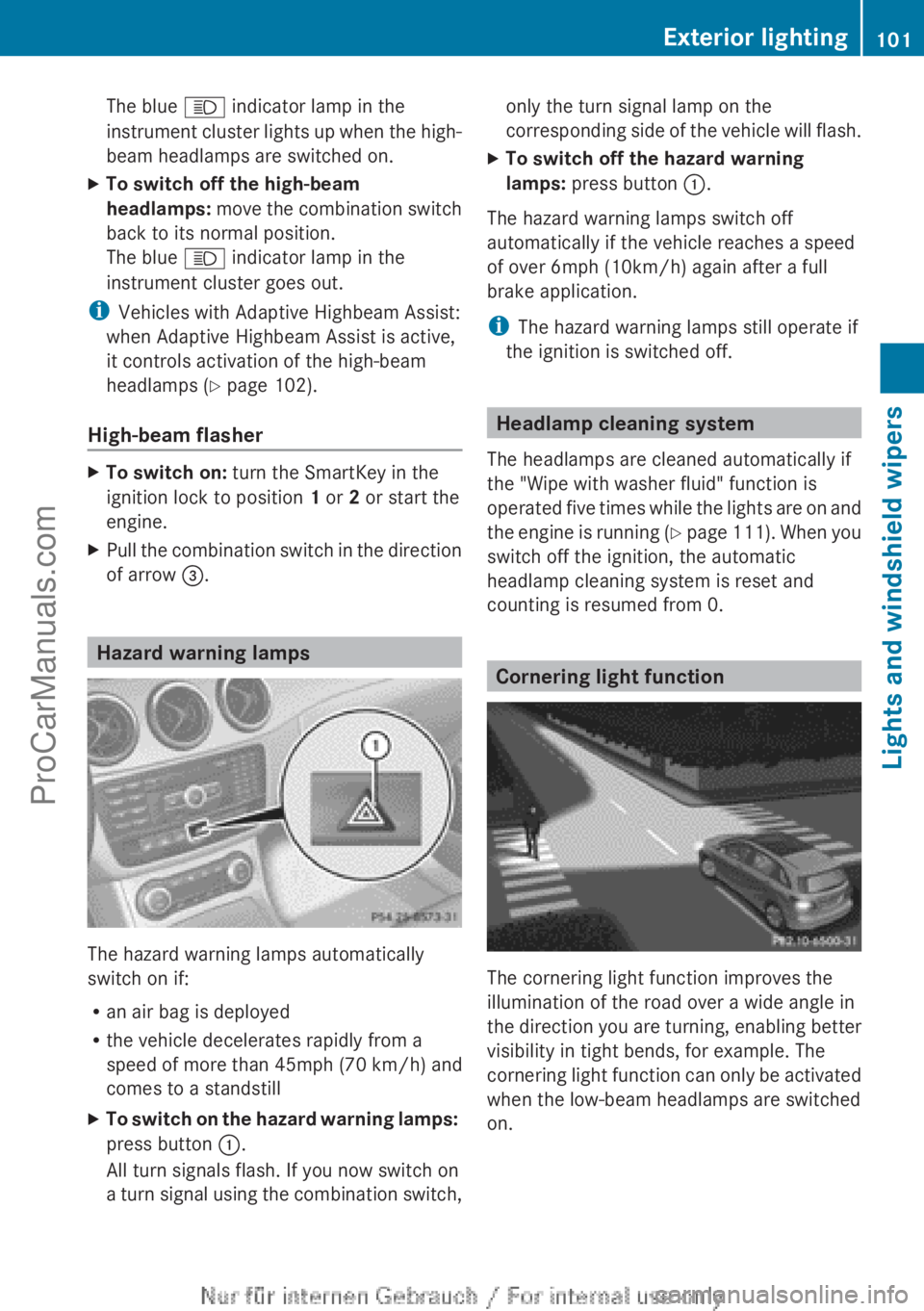
X To switch on the hazard warning lamps:
press button :.
All turn signals flash. If you now switch on
a turn signal
using the combination switch, only the turn signal lamp on the
corresponding side
of
the vehicle will flash.
X To switch off the hazard warning
lamps: press button :.
The hazard warning lamps switch off
automatically if the vehicle reaches a speed
of over 6mph (10km/h) again after a full
brake application.
i The hazard warning lamps still operate if
the ignition is switched off. Headlamp cleaning system
The headlamps are cleaned automatically if
the "Wipe with washer fluid" function is
operated five times
while the lights are on and
the engine is running (Y page 111). When you
switch off the ignition, the automatic
headlamp cleaning system is reset and
counting is resumed from 0. Cornering light function
The cornering light function improves the
illumination of the road over a wide angle in
the direction
you
are turning, enabling better
visibility in tight bends, for example. The
cornering light function can only be activated
when the low-beam headlamps are switched
on. Exterior lighting
101
Lights and windshield wipers Z
ProCarManuals.com
Page 156 of 340
i
On long journeys
at a constant speed, e.g.
on the highway, only the bar for Constant
will change.
i The ECO display summaries the driving
characteristics from the start of the journey
to its completion. For this reason, the bars
change dynamically at the beginning of the
journey. On longer journeys, there are
fewer changes. For more dynamic changes,
carry out a manual reset.
Further information on the ECO display
(Y page 190). Brakes
Important safety notes G
WARNING
If you shift down on a slippery road surface in
an attempt to increase the engine's braking
effect, the drive wheels could lose their grip.
There is an increased danger of skidding and
accidents.
Do not shift down for additional engine
braking on a slippery road surface.
Downhill gradients !
On long and steep gradients, you must
reduce the load
on the brakes by shifting to
a lower gear in good time. This allows you
to take advantage of the engine's braking
effect. For this, you need to have selected
manual drive program M. This helps you to
avoid overheating the brakes and wearing
them out excessively.
When you take advantage of the engine's
braking effect, a drive wheel may not turn
for some time, e.g. on a slippery road
surface. This could cause damage to the
drive train. This type of damage is not
covered by the Mercedes-Benz warranty.
i Briefly depressing the accelerator pedal
on downhill gradients while the manual
drive program M is temporarily activated:
the automatic transmission may switch to the last active automatic drive program
E
or S. The automatic
transmission may shift
to a higher gear. This can reduce the
engine's braking effect.
Heavy and light loads G
WARNING
If you rest your foot on the brake pedal while
driving, the braking
system can overheat. This
increases the stopping distance and can even
cause the braking system to fail. There is a
risk of an accident.
Never use the brake pedal as a footrest. Never
depress the brake pedal and the accelerator
pedal at the same time.
! Depressing the brake pedal constantly
results in excessive and premature wear to
the brake pads.
If the brakes have been subjected to a heavy
load, do not stop the vehicle immediately.
Drive on for a short while. This allows the
airflow to cool the brakes more quickly.
Wet roads If you have driven for a long time in heavy rain
without braking, there may be a delayed
reaction from
the
brakes when braking for the
first time. This may also occur after the
vehicle has been washed or driven through
deep water.
You have to depress the brake pedal more
firmly. Maintain a greater distance from the
vehicle in front.
After driving on a wet road or having the
vehicle washed, brake firmly while paying
attention to the traffic conditions. This will
warm up the brake discs, thereby drying them
more quickly and protecting them against
corrosion.
Limited braking performance on salt-
treated roads If you drive on salted roads, a layer of salt
residue may form on the brake discs and154
Driving tips
Driving and parking
ProCarManuals.com
Page 163 of 340
prevents the brakes from overheating and
wearing too quickly.
If a
slower-moving
vehicle is detected in front,
DISTRONIC PLUS brakes your vehicle. It
maintains the preset distance to the vehicle
in front.
If DISTRONIC PLUS detects that there is a risk
of a collision, you will be warned visually and
acoustically. DISTRONIC PLUS cannot
prevent a collision without your intervention.
An intermittent warning tone will then sound
and the distance warning lamp will light up in
the instrument cluster. Brake immediately in
order to increase the distance to the vehicle
in front or take evasive action provided it is
safe to do so.
For DISTRONIC PLUS to assist you when
driving, the radar sensor system must be:
R activated (Y page 199)
R operational
DISTRONIC PLUS is automatically
deactivated if:
R you are driving slower than 15 mph
(25 km/h) and there is no longer a vehicle
in front or
R the vehicle in front is no longer detected
If there is no vehicle in front, DISTRONIC
PLUS operates in the same way as cruise
control in the speed range between 20 mph
(30 km/h) and 120 mph (200 km/h). If a
vehicle is driving in front of you, it operates in
the speed range between 0 mph (0 km/h) and
120 mph (200 km/h).
Do not use DISTRONIC PLUS while driving on
roads with steep gradients.
As DISTRONIC PLUS transmits radar waves,
it can resemble the radar detectors of the
responsible authorities. You can refer to the
relevant chapter in the Operator's Manual if
questions are asked about this.
i This device complies with RSS-210 of
Industry Canada. Operation is subject to
the following two conditions:
1. This device may not cause harmful
interference, and 2. this device must accept any interference
received, including interference that may
cause undesired operation of the device.
Removal, tampering, or altering of the
device will void any warranties, and is not
permitted. Do not
tamper with, alter, or use
in any non-approved way.
Any unauthorized modification to this
device could void the user's authority to
operate the equipment.
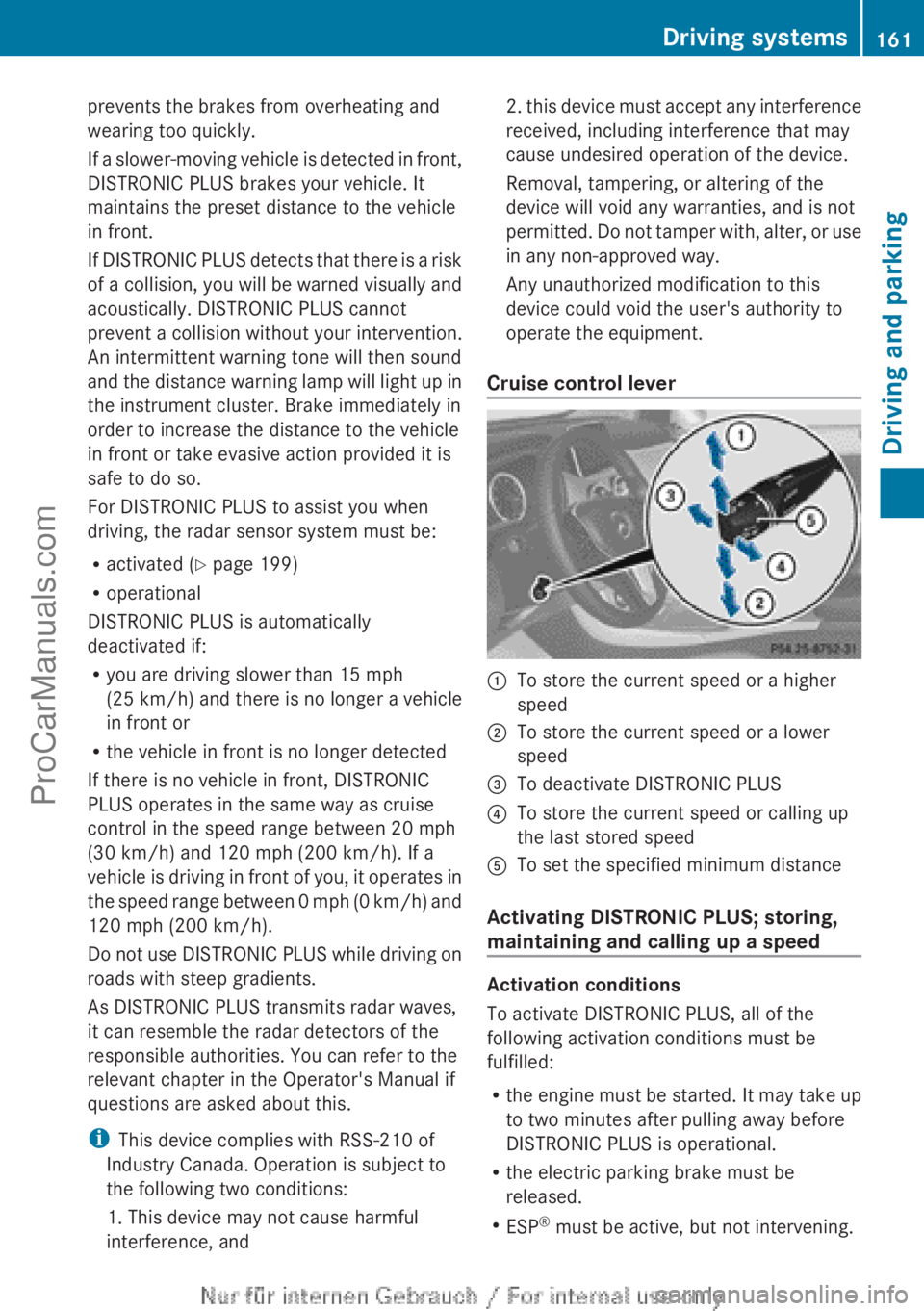
Cruise control lever :
To store the current speed or a higher
speed
; To store the current speed or a lower
speed
= To deactivate DISTRONIC PLUS
? To store the current speed or calling up
the last stored speed
A To set the specified minimum distance
Activating DISTRONIC PLUS; storing,
maintaining and calling up a speed Activation conditions
To activate DISTRONIC PLUS, all of the
following activation conditions must be
fulfilled:
R
the engine must
be started. It may take up
to two minutes after pulling away before
DISTRONIC PLUS is operational.
R the electric parking brake must be
released.
R ESP ®
must be active, but not intervening. Driving systems
161
Driving and parking Z
ProCarManuals.com
Page 183 of 340
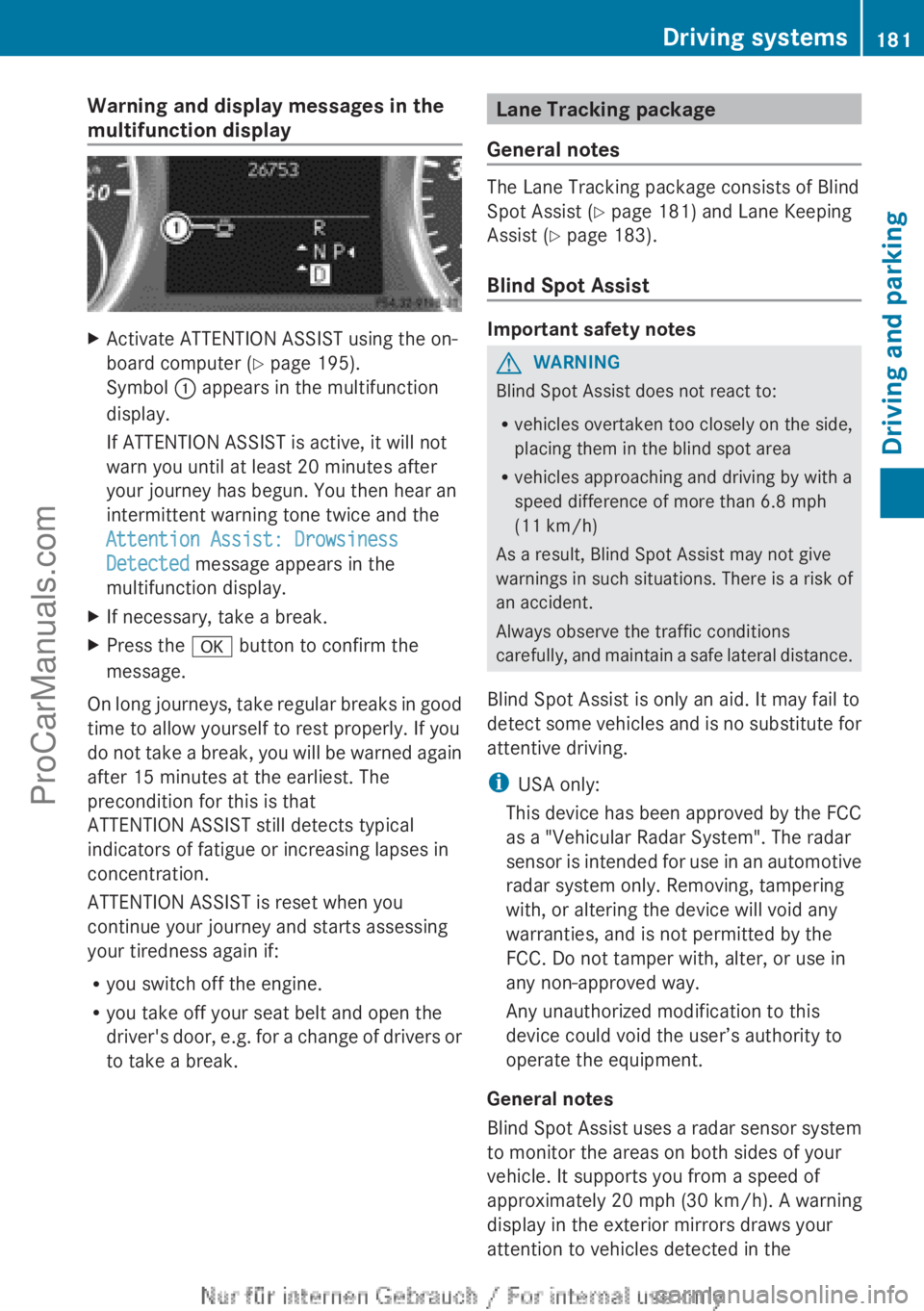
Warning and display messages in the
multifunction display
X
Activate ATTENTION ASSIST using the on-
board computer ( Y page 195).
Symbol : appears in the multifunction
display.
If ATTENTION ASSIST is active, it will not
warn you until at least 20 minutes after
your journey has begun. You then hear an
intermittent warning tone twice and the
Attention Assist: Drowsiness
Detected message appears in the
multifunction display.
X If necessary, take a break.
X Press the
a button to confirm the
message.
On long journeys, take regular breaks in good
time to allow yourself to rest properly. If you
do not take
a break, you will be warned again
after 15 minutes at the earliest. The
precondition for this is that
ATTENTION ASSIST still detects typical
indicators of fatigue or increasing lapses in
concentration.
ATTENTION ASSIST is reset when you
continue your journey and starts assessing
your tiredness again if:
R you switch off the engine.
R you take off your seat belt and open the
driver's door, e.g. for a change of drivers or
to take a break. Lane Tracking package
General notes The Lane Tracking package consists of Blind
Spot Assist (
Y
page 181) and Lane Keeping
Assist (Y page 183).
Blind Spot Assist Important safety notes
G
WARNING
Blind Spot Assist does not react to:
R vehicles overtaken too closely on the side,
placing them in the blind spot area
R vehicles approaching and driving by with a
speed difference of more than 6.8 mph
(11 km/h )
As a result, Blind Spot Assist may not give
warnings in
such situations. There is a risk of
an accident.
Always observe the traffic conditions
carefully, and maintain a safe lateral distance.
Blind Spot Assist is only an aid. It may fail to
detect some vehicles and is no substitute for
attentive driving.
i USA only:
This device has been approved by the FCC
as a "Vehicular Radar System". The radar
sensor is intended for use in an automotive
radar system only. Removing, tampering
with, or altering the device will void any
warranties, and is not permitted by the
FCC. Do not tamper with, alter, or use in
any non-approved way.
Any unauthorized modification to this
device could void the user’s authority to
operate the equipment.
General notes
Blind Spot Assist uses a radar sensor system
to monitor the areas on both sides of your
vehicle. It supports you from a speed of
approximately 20 mph (30 km/h). A warning
display in the exterior mirrors draws your
attention to vehicles detected in the Driving systems
181
Driving and parking Z
ProCarManuals.com
Page 191 of 340
A
Drive program (Y page 141)
B Transmission position ( Y page 141)
X To show menu bar ?: press the =
or ; button on the steering wheel.
Menu bar ? disappears after a few seconds.
Text field = shows the selected menu or
submenu as well as display messages.
i You can set the time using the audio
system or COMAND; see the separate
operating instructions.
The following messages may appear in the
multifunction display:
XjY Active Parking Assist (Y page 172)
CRUISE Cruise Control (Y page 157)
è Rear window wiper ( Y page 112)
_ Adaptive Highbeam Assist
(Y page 102)
À ATTENTION ASSIST (Y page 180)
à Lane Keeping Assist (Y page 183)
ë HOLD function ( Y page 167)
Ä Distance warning function
(Y page 233) Menus and submenus
Menu overview
Operating the on-board computer
(Y page 187).
Depending on the equipment installed in the
vehicle, you can call up the following menus:
R Trip menu (Y page 189)
R Navi menu (navigation instructions)
(Y page 191)
R Audio menu (Y page 192)
R Tel (telephone) menu ( Y page 193)
R DriveAssist (Assistance) menu
(Y page 194)
R Serv menu (Y page 196)
R Sett menu (Y page 196) The
Audio, Navi and
Tel
menus differ slightly
in vehicles with Audio 20 and in vehicles with
COMAND. The examples given in this
Operator's Manual apply to vehicles
equipped with COMAND. Trip menu
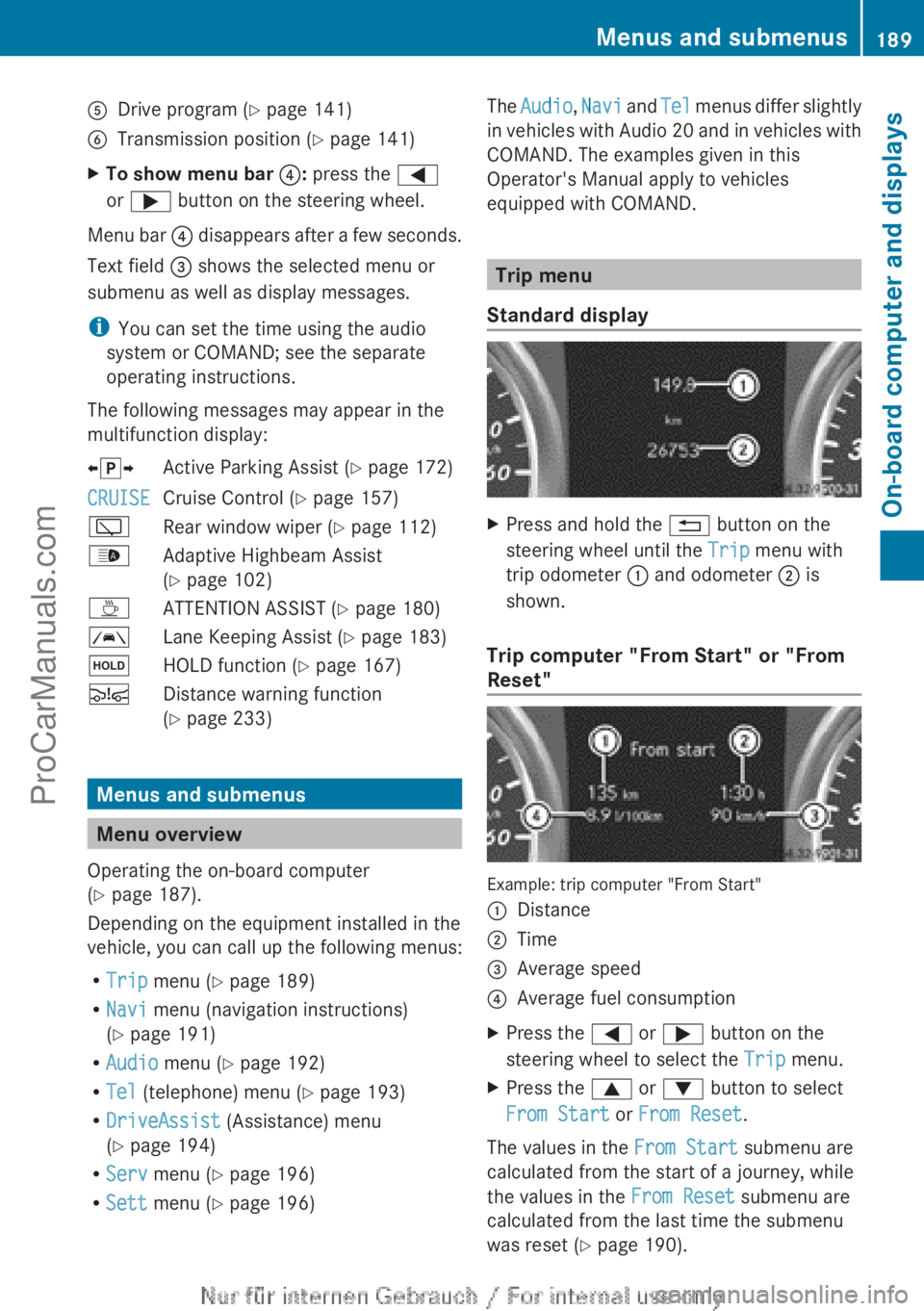
Standard display X
Press and hold the % button on the
steering wheel until the Trip menu with
trip odometer : and odometer ; is
shown.
Trip computer "From Start" or "From
Reset" Example: trip computer "From Start"
:
Distance
; Time
= Average speed
? Average fuel consumption
X Press the = or ; button on the
steering wheel to select the Trip menu.
X Press the 9 or : button to select
From Start or From Reset.
The values in the From Start submenu are
calculated from the start of a journey, while
the values in the From Reset submenu are
calculated from the last time the submenu
was reset ( Y page 190). Menus and submenus
189
On-board computer and displays Z
ProCarManuals.com