display MERCEDES-BENZ B-CLASS 2012 Workshop Manual
[x] Cancel search | Manufacturer: MERCEDES-BENZ, Model Year: 2012, Model line: B-CLASS, Model: MERCEDES-BENZ B-CLASS 2012Pages: 340, PDF Size: 3.09 MB
Page 161 of 340
or brake unexpectedly. There is a risk of an
accident.
Pay attention to the road and traffic
conditions before
calling
up the stored speed.
If you do not know the stored speed, store the
desired speed again.
X Briefly pull the cruise control lever towards
you ?.
X Remove your foot from the accelerator
pedal.
The first time cruise control is activated, it
stores the current speed or regulates the
speed of the vehicle to the previously
stored speed.
Setting a speed Keep in mind that it may take a brief moment
until
the
vehicle
has accelerated or braked to
the speed set.
X Press the cruise control lever up : for a
higher speed or
down ; for a lower speed.
X To adjust the set speed in 1 mph
increments (1
km/h
increments): briefly
press the cruise control lever up : or
down ; to the pressure point.
Every time the cruise control lever is
pressed up : or down ; the last speed
stored is increased or reduced.
X To adjust the set speed in 5 mph
increments (10 km/h increments):
briefly press the cruise control lever
up : or down ; to the pressure point.
Every time the cruise control lever is
pressed up : or down ; the last speed
stored is increased or reduced.
i Cruise control is not deactivated if you
depress the accelerator pedal. For
example, if you accelerate briefly to
overtake, cruise control adjusts the
vehicle's speed to the last speed stored
after you have finished overtaking. Deactivating cruise control There are several ways to deactivate cruise
control:
X
Briefly press the cruise control lever
forwards =.
or
X Brake.
Cruise control is automatically deactivated if:
R you engage the electric parking brake.
R you are driving at less than 20 mph
(30 km/h ).
R ESP ®
intervenes or you deactivate ESP ®
.
R you shift the transmission to position
N
while driving.
If cruise control is deactivated, you will hear
a warning tone. You will see the Cruise
Control Off message in the multifunction
display for approximately five seconds.
i When you switch off the engine, the last
speed stored is cleared. DISTRONIC PLUS
Important safety notes G
WARNING
DISTRONIC PLUS does not react to:
R people or animals
R stationary obstacles on the road, e.g.
stopped or parked vehicles
R oncoming and crossing traffic
As a result,
DISTRONIC PLUS may neither give
warnings nor intervene in such situations.
There is a risk of an accident.
Always pay careful attention to the traffic
situation and be ready to brake. G
WARNING
DISTRONIC PLUS cannot always clearly
identify other road users and complex traffic
situations. Driving systems
159
Driving and parking
ZProCarManuals.com
Page 164 of 340
R
the transmission must be in position D.
R the driver's door
must be closed when you
shift from P to D or your seat belt must be
fastened.
R the front-passenger door and rear doors
must be closed.
R the vehicle must not skid.
Activating
To activate while driving: when driving at
speeds below 14 mph (20 km/h), you can
only activate DISTRONIC PLUS if the vehicle
in front has been detected and is shown in the
multifunction display. If the vehicle in front is
no longer detected and displayed,
DISTRONIC PLUS switches off and a tone
sounds.
X Briefly pull the cruise control level towards
you ?, or press it up : or down ;.
DISTRONIC PLUS is selected.
X Press the cruise control lever repeatedly
up : or down ; until the desired speed
is set.
X Remove your foot from the accelerator
pedal.
Your vehicle adapts
its speed to that of the
vehicle in front, but only up to the desired
stored speed.
i If you do
not fully release the accelerator
pedal, the DISTRONIC PLUS Passive
message appears in the multifunction
display. The set distance to a slower-
moving vehicle in front will then not be
maintained. You will be driving at the speed
you determine by the position of the
accelerator pedal.
To activate when driving towards a
stationary vehicle: if the vehicle in front is
stationary, you can only activate DISTRONIC
PLUS if your vehicle is also stationary.
X Briefly pull the cruise control level towards
you ?, or press it up : or down ;.
DISTRONIC PLUS is selected.
i DISTRONIC PLUS
can
only be activated at
under 14 mph (20 km/h) if a vehicle in front has been detected. It is therefore helpful to
have the
DISTRONIC
PLUS distance display
activated in the multifunction display
(Y page 194).
X Press the cruise control lever repeatedly
up : or down ; until the desired speed
is set.
i You can
use
the cruise control lever to set
the stored speed and the control on the
cruise control lever to set the specified
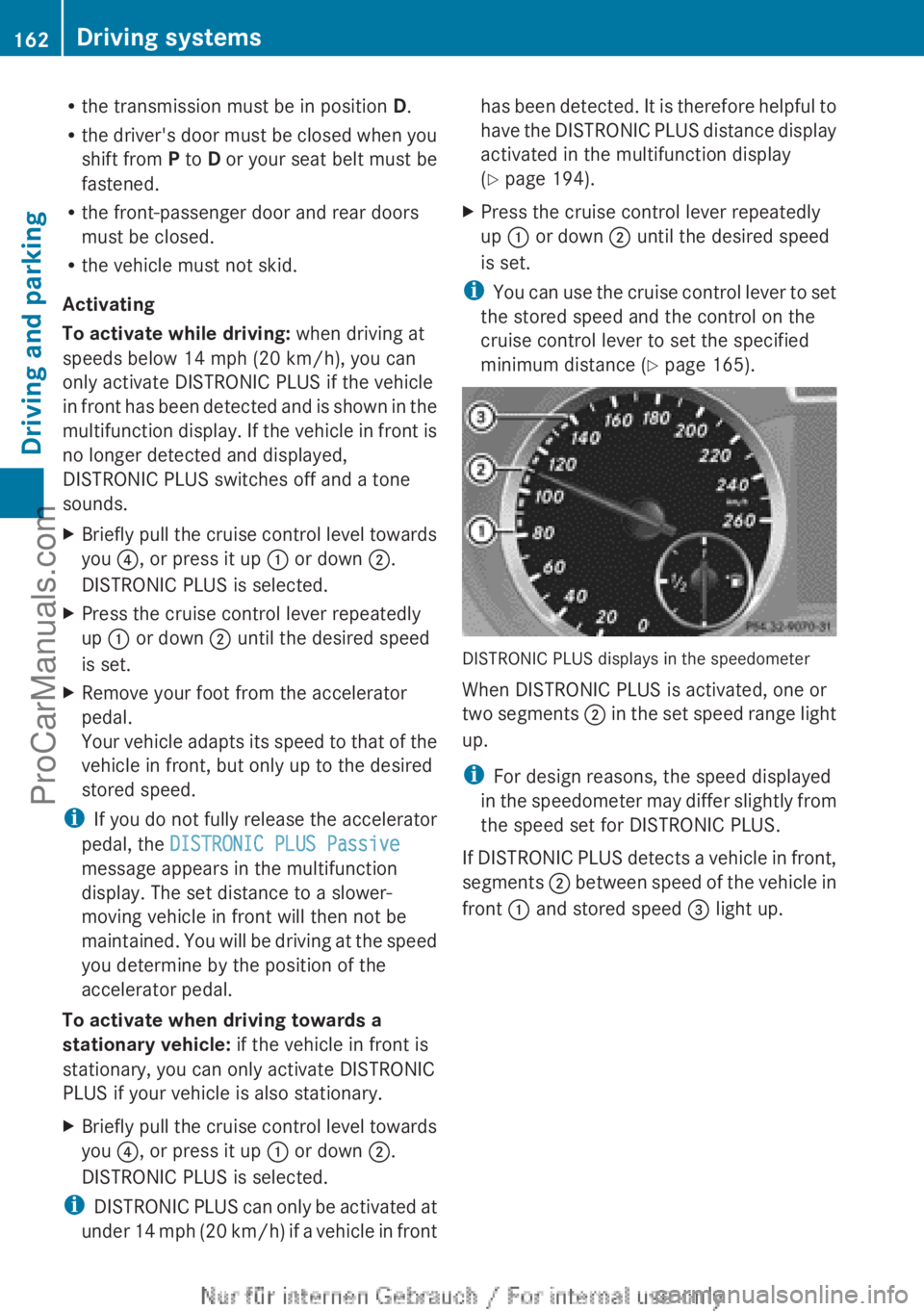
minimum distance (Y page 165). DISTRONIC PLUS displays in the speedometer
When DISTRONIC PLUS is activated, one or
two segments
;
in the set speed range light
up.
i For design reasons, the speed displayed
in the speedometer may differ slightly from
the speed set for DISTRONIC PLUS.
If DISTRONIC PLUS detects a vehicle in front,
segments ; between speed of the vehicle in
front : and stored speed = light up.162
Driving systems
Driving and parking
ProCarManuals.com
Page 165 of 340
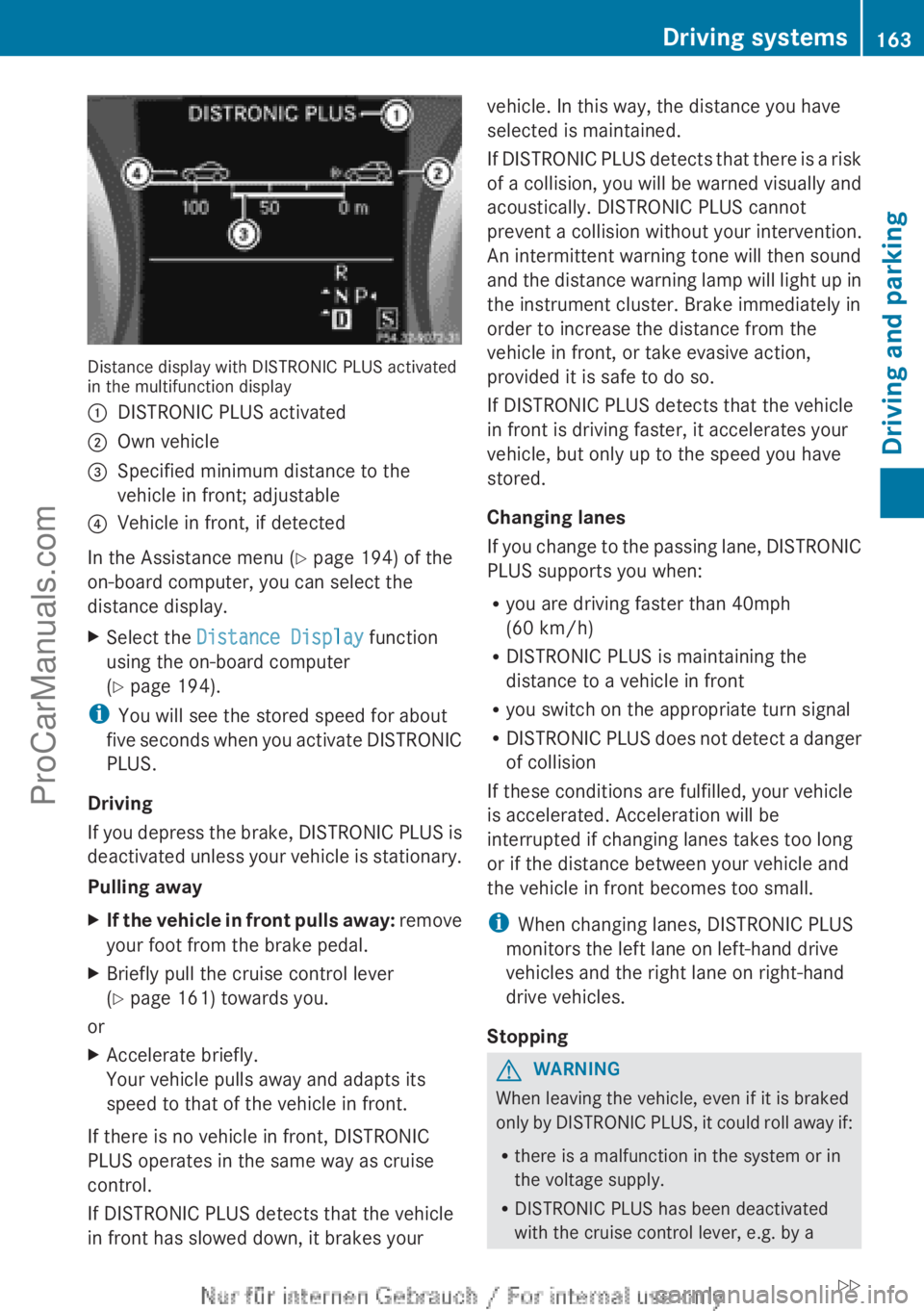
Distance display with DISTRONIC PLUS activated
in the multifunction display
:
DISTRONIC PLUS activated
; Own vehicle
= Specified minimum distance to the
vehicle in front; adjustable
? Vehicle in front, if detected
In the Assistance menu (Y page 194) of the
on-board computer, you can select the
distance display.
X Select the Distance Display function
using the on-board computer
(Y page 194).
i You will see the stored speed for about
five seconds
when
you activate DISTRONIC
PLUS.
Driving
If you depress the brake, DISTRONIC PLUS is
deactivated unless your vehicle is stationary.
Pulling away
X If the vehicle in front pulls away: remove
your foot from the brake pedal.
X Briefly pull the cruise control lever
(Y
page 161) towards you.
or
X Accelerate briefly.
Your vehicle pulls away and adapts its
speed to that of the vehicle in front.
If there is no vehicle in front, DISTRONIC
PLUS operates in the same way as cruise
control.
If DISTRONIC PLUS detects that the vehicle
in front has slowed down, it brakes your vehicle. In this way, the distance you have
selected is maintained.
If DISTRONIC
PLUS
detects that there is a risk
of a collision, you will be warned visually and
acoustically. DISTRONIC PLUS cannot
prevent a collision without your intervention.
An intermittent warning tone will then sound
and the distance warning lamp will light up in
the instrument cluster. Brake immediately in
order to increase the distance from the
vehicle in front, or take evasive action,
provided it is safe to do so.
If DISTRONIC PLUS detects that the vehicle
in front is driving faster, it accelerates your
vehicle, but only up to the speed you have
stored.
Changing lanes
If you change to the passing lane, DISTRONIC
PLUS supports you when:
R you are driving faster than 40mph
(60 km/h)
R DISTRONIC PLUS is maintaining the
distance to a vehicle in front
R you switch on the appropriate turn signal
R DISTRONIC PLUS does not detect a danger
of collision
If these conditions are fulfilled, your vehicle
is accelerated. Acceleration will be
interrupted if changing lanes takes too long
or if the distance between your vehicle and
the vehicle in front becomes too small.
i When changing lanes, DISTRONIC PLUS
monitors the left lane on left-hand drive
vehicles and the right lane on right-hand
drive vehicles.
Stopping G
WARNING
When leaving the vehicle, even if it is braked
only by DISTRONIC
PLUS, it could roll away if:
R there is a malfunction in the system or in
the voltage supply.
R DISTRONIC PLUS has been deactivated
with the cruise control lever, e.g. by a Driving systems
163
Driving and parking
ZProCarManuals.com
Page 167 of 340
X
Press the cruise control lever up : for a
higher speed or
down ; for a lower speed.
X To adjust the set speed in 1 mph
increments (1
km/h
increments): briefly
press the cruise control lever up : or
down ; to the pressure point.
Every time the cruise control lever is
pressed up : or down ; the last speed
stored is increased or reduced.
X To adjust the set speed in 5 mph
increments (10 km/h increments):
briefly press the cruise control lever
up : or down ; to the pressure point.
Every time the cruise control lever is
pressed up : or down ;, the last speed
stored is increased or reduced.
i DISTRONIC PLUS
is
not deactivated if you
depress the accelerator pedal. If you
accelerate to overtake, DISTRONIC PLUS
adjusts the vehicle's speed to the last
speed stored after you have finished
overtaking.
Setting the specified minimum distance You can set the specified minimum distance
for
DISTRONIC
PLUS
by varying the time span
between one and two seconds. With this
function, you can set the minimum distance
that DISTRONIC PLUS keeps to the vehicle in
front, dependent on vehicle speed. You can
see this distance in the multifunction display
(Y page 163).
i Make sure that you maintain the
minimum distance to the vehicle in front as
required by law. Adjust the distance to the
vehicle in front if necessary. X
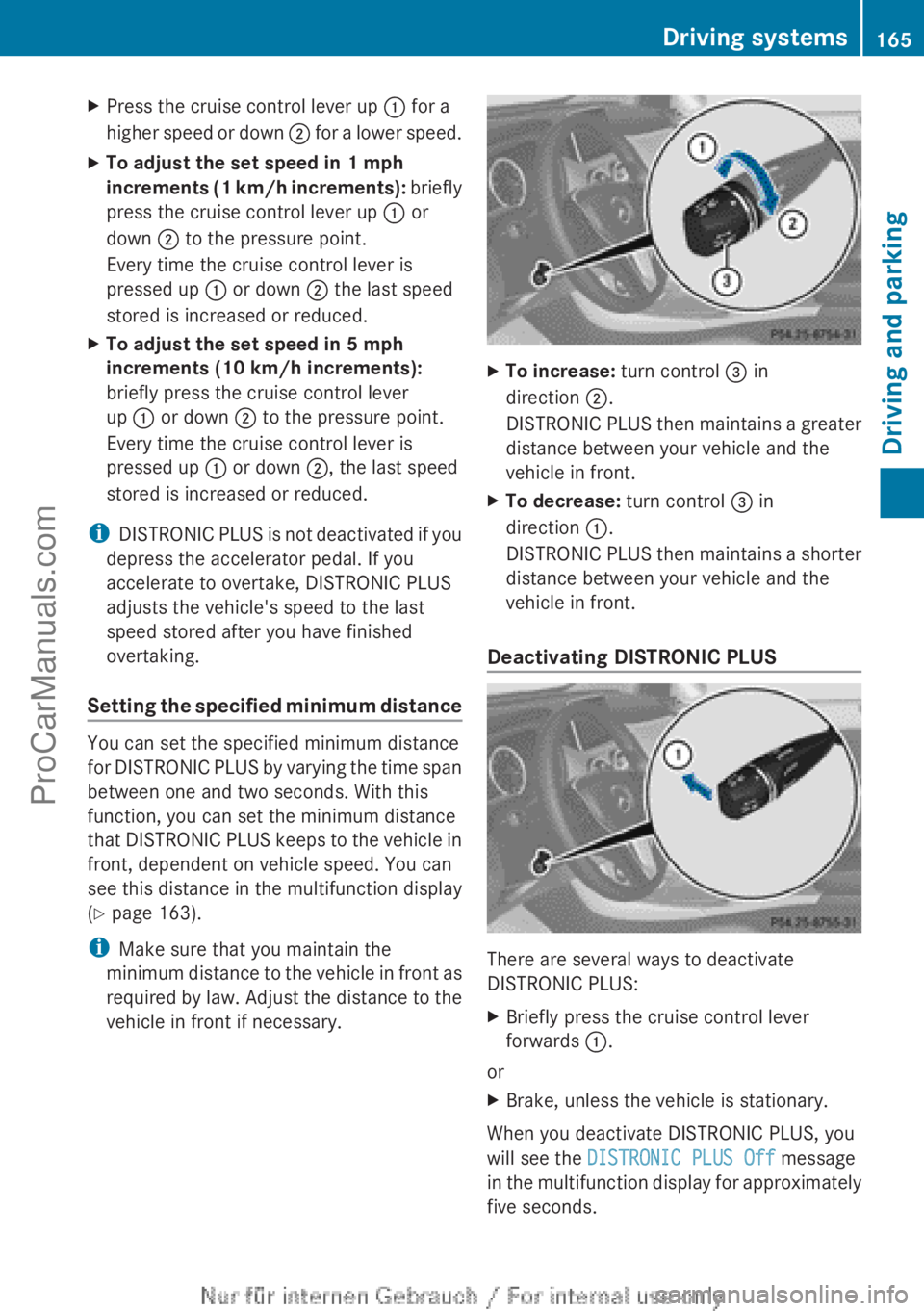
To increase: turn control = in
direction ;.
DISTRONIC PLUS
then
maintains a greater
distance between your vehicle and the
vehicle in front.
X To decrease: turn control = in
direction :.
DISTRONIC PLUS
then
maintains a shorter
distance between your vehicle and the
vehicle in front.
Deactivating DISTRONIC PLUS There are several ways to deactivate
DISTRONIC PLUS:
X
Briefly press the cruise control lever
forwards :.
or
X Brake, unless the vehicle is stationary.
When you deactivate DISTRONIC PLUS, you
will see the DISTRONIC PLUS Off message
in the multifunction
display for approximately
five seconds. Driving systems
165
Driving and parking Z
ProCarManuals.com
Page 168 of 340
i
The last speed
stored remains stored until
you switch off the engine.
DISTRONIC PLUS is automatically
deactivated if:
R you engage the electric parking brake or if
the vehicle is automatically secured with
the electric parking brake
R you are driving slower than 7 mph
(10km/h) and there is no vehicle in front,
or if the vehicle in front is no longer
detected
R ESP ®
intervenes or you deactivate ESP ®
R the transmission is in the P, R or N position
R you pull the cruise control lever towards
you in order to pull away and the front-
passenger door or one of the rear doors is
open
R the vehicle has skidded
If DISTRONIC PLUS is deactivated, you will
hear a warning tone. You will see the
DISTRONIC PLUS Off message in the
multifunction display for approximately five
seconds.
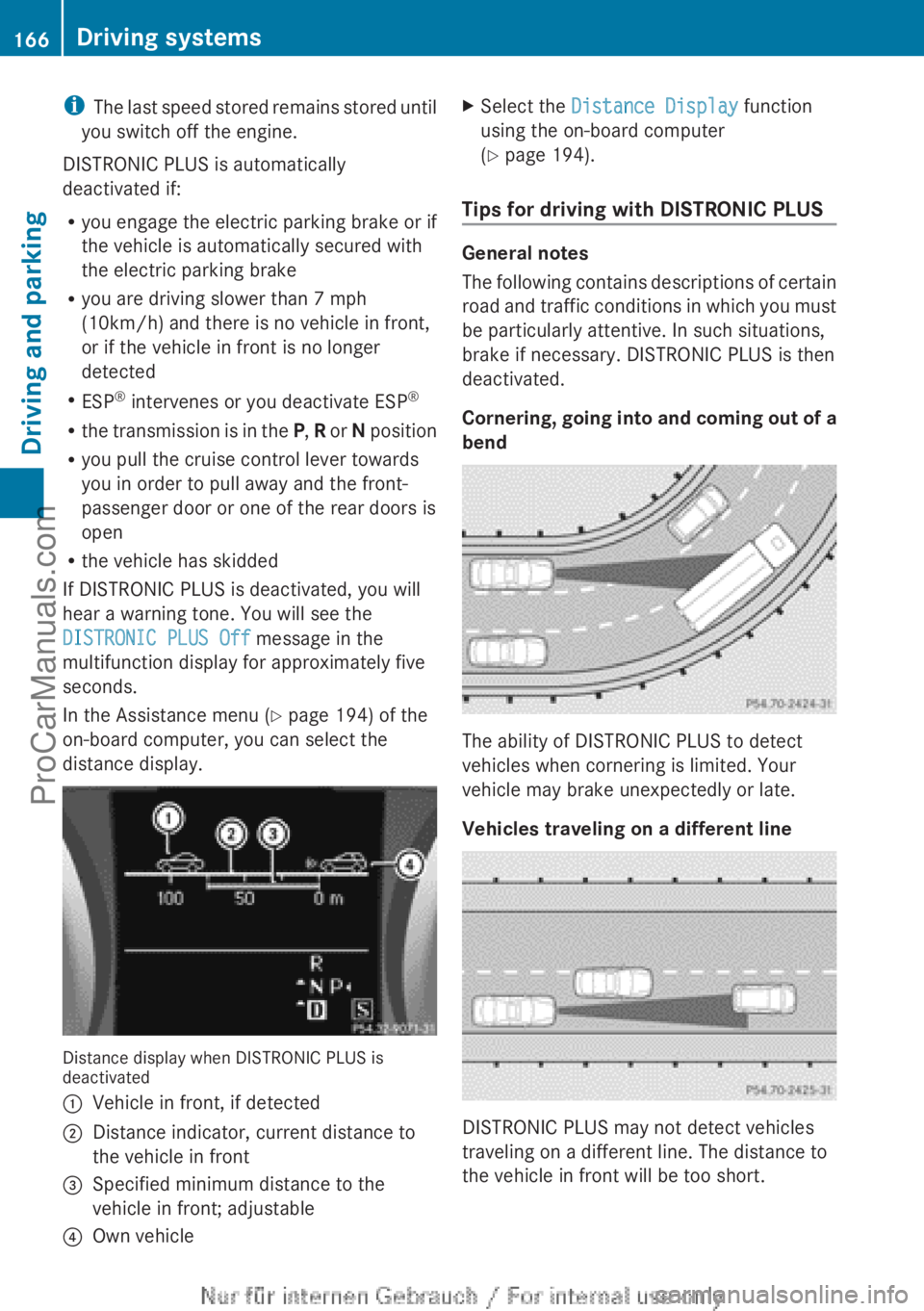
In the Assistance menu (Y page 194) of the
on-board computer, you can select the
distance display. Distance display when DISTRONIC PLUS is
deactivated
:
Vehicle in front, if detected
; Distance indicator, current distance to
the vehicle in front
= Specified minimum distance to the
vehicle in front; adjustable
? Own vehicle X
Select the Distance Display function
using the on-board computer
(Y page 194).
Tips for driving with DISTRONIC PLUS General notes
The following
contains
descriptions of certain
road and traffic conditions in which you must
be particularly attentive. In such situations,
brake if necessary. DISTRONIC PLUS is then
deactivated.
Cornering, going into and coming out of a
bend The ability of DISTRONIC PLUS to detect
vehicles when cornering is limited. Your
vehicle may brake unexpectedly or late.
Vehicles traveling on a different line
DISTRONIC PLUS may not detect vehicles
traveling on a different line. The distance to
the vehicle in front will be too short.166
Driving systems
Driving and parking
ProCarManuals.com
Page 170 of 340
!
If DISTRONIC PLUS
or the HOLD function
is activated, the vehicle brakes
automatically in certain situations. To
prevent damage to the vehicle, deactivate
DISTRONIC PLUS and the HOLD function in
the following or other similar situations:
R when towing the vehicle
R in the car wash
Deactivate the HOLD function (Y page 168).
General notes The HOLD function can assist the driver in the
following situations:
R
when pulling away, especially on steep
slopes
R when maneuvering on steep slopes
R when waiting in traffic
The vehicle is kept stationary without the
driver having to depress the brake pedal.
The braking effect
is canceled and the HOLD
function deactivated when you depress the
accelerator pedal to pull away.
Activation conditions You can activate the HOLD function if:
R
the vehicle is stationary
R the engine is running or if it has been
automatically switched off by the ECO
start/stop function
R the driver's
door
is closed or your seat belt
is fastened
R the electric parking brake is released
R the transmission position D, R or N is
engaged while driving a vehicle with an
automatic transmission
R DISTRONIC PLUS is deactivated Activating the HOLD function X
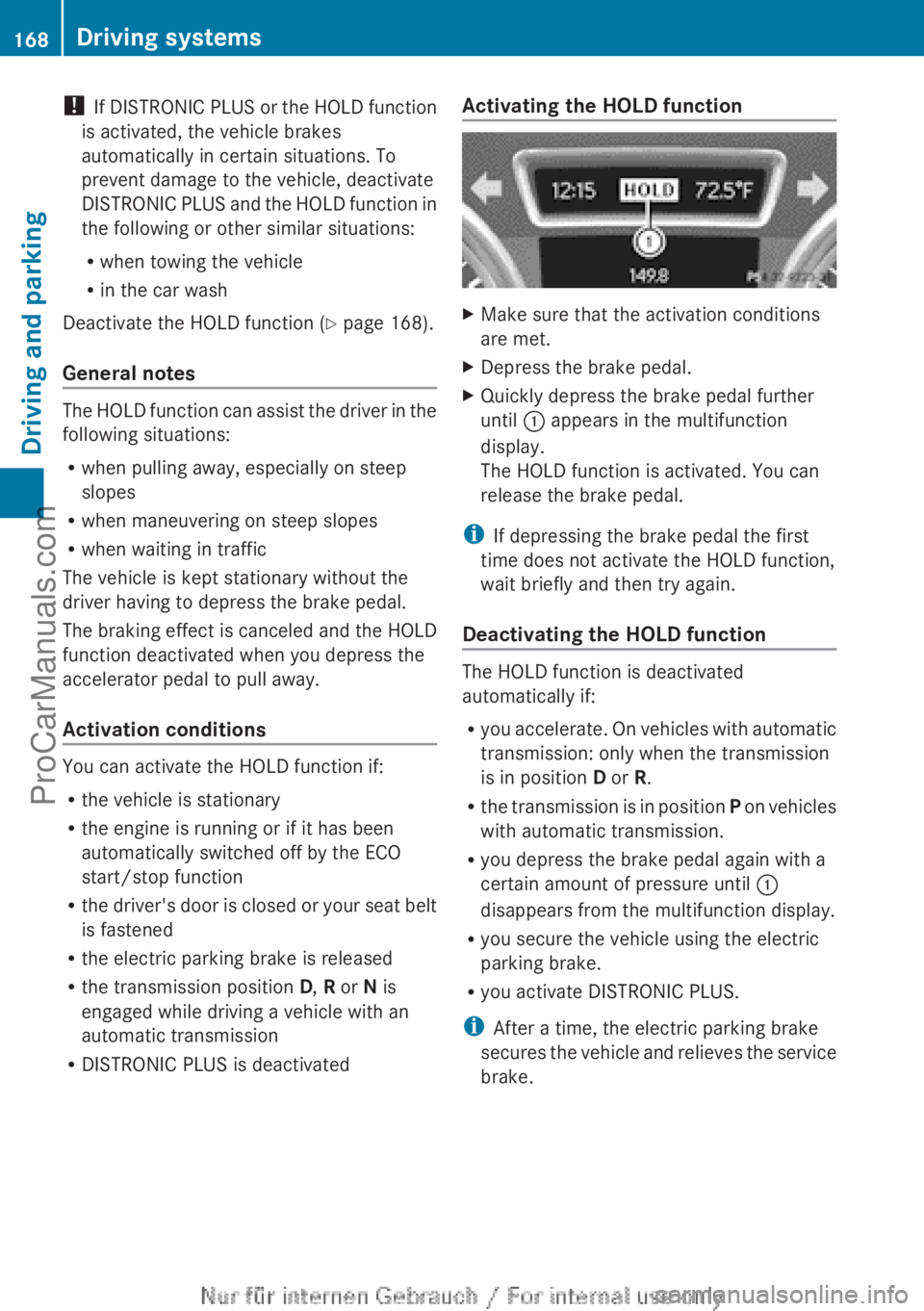
Make sure that the activation conditions
are met.
X Depress the brake pedal.
X Quickly depress the brake pedal further
until : appears in the multifunction
display.
The HOLD function is activated. You can
release the brake pedal.
i If depressing the brake pedal the first
time does not activate the HOLD function,
wait briefly and then try again.
Deactivating the HOLD function The HOLD function is deactivated
automatically if:
R
you accelerate. On
vehicles with automatic
transmission: only when the transmission
is in position D or R.
R the transmission is in position P on vehicles
with automatic transmission.
R you depress the brake pedal again with a
certain amount of pressure until :
disappears from the multifunction display.
R you secure the vehicle using the electric
parking brake.
R you activate DISTRONIC PLUS.
i After a time, the electric parking brake
secures the vehicle and relieves the service
brake. 168
Driving systems
Driving and parking
ProCarManuals.com
Page 172 of 340
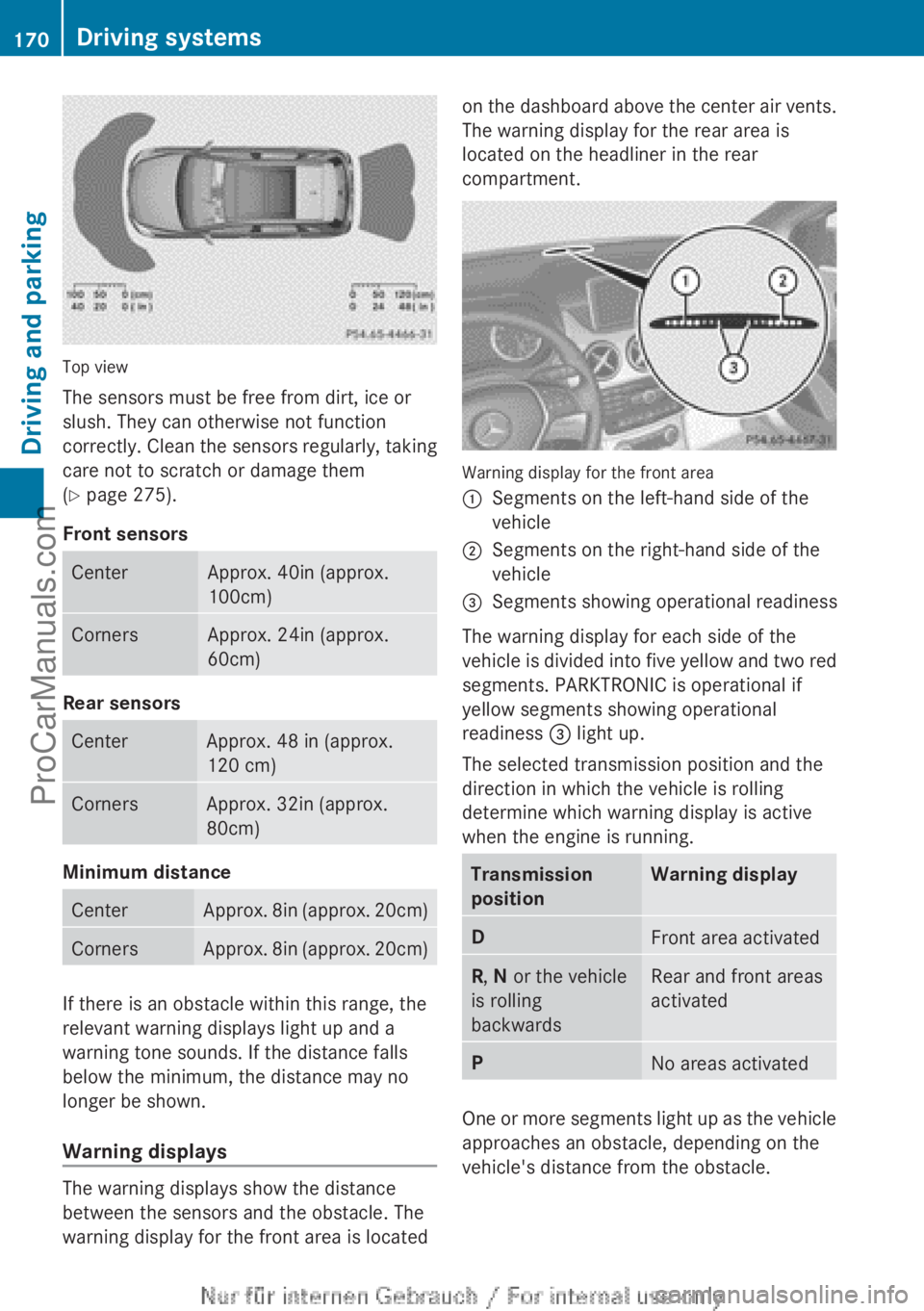
Top view
The sensors must be free from dirt, ice or
slush. They can otherwise not function
correctly. Clean
the
sensors regularly, taking
care not to scratch or damage them
(Y page 275).
Front sensors Center Approx. 40in (approx.
100cm)
Corners Approx. 24in (approx.
60cm)
Rear sensors
Center Approx. 48 in (approx.
120 cm)
Corners Approx. 32in (approx.
80cm)
Minimum distance
Center Approx. 8in (approx. 20cm)
Corners Approx. 8in (approx. 20cm)
If there is an obstacle within this range, the
relevant warning displays light up and a
warning tone sounds. If the distance falls
below the minimum, the distance may no
longer be shown.
Warning displays
The warning displays show the distance
between the sensors and the obstacle. The
warning display for the front area is located on the dashboard above the center air vents.
The warning display for the rear area is
located on the headliner in the rear
compartment.
Warning display for the front area
:
Segments on the left-hand side of the
vehicle
; Segments on the right-hand side of the
vehicle
= Segments showing operational readiness
The warning display for each side of the
vehicle is divided
into five yellow and two red
segments. PARKTRONIC is operational if
yellow segments showing operational
readiness = light up.
The selected transmission position and the
direction in which the vehicle is rolling
determine which warning display is active
when the engine is running. Transmission
position Warning display
D
Front area activated
R, N or the vehicle
is rolling
backwards Rear and front areas
activated
P
No areas activated
One or more segments light up as the vehicle
approaches an obstacle, depending on the
vehicle's distance from the obstacle.170
Driving systems
Driving and parking
ProCarManuals.com
Page 174 of 340
Problems with PARKTRONIC
Problem Possible causes/consequences and
M SolutionsOnly the red segments
in the PARKTRONIC
warning displays
are
lit.
You also hear a warning
tone for approximately
two seconds.
PARKTRONIC is
deactivated after
approximately
20 seconds, and the
indicator lamp in the
PARKTRONIC button
lights up. PARKTRONIC has malfunctioned and has switched off.
X
If problems persist, have PARKTRONIC checked at a qualified
specialist workshop. Only the red segments
in the PARKTRONIC
warning displays
are
lit.
PARKTRONIC is
deactivated after
approximately
20seconds. The PARKTRONIC sensors are dirty or there is interference.
X
Clean the PARKTRONIC sensors ( Y page 275).
X Switch the ignition back on. The problem may be caused by an external source of radio or
ultrasound waves.
X
See if PARKTRONIC functions in a different location. Active Parking Assist
Important safety notes Active Parking Assist is merely an aid. It is not
a replacement for your attention to your
immediate surroundings. You are always
responsible for safe maneuvering, parking
and exiting a parking space. When
maneuvering, parking or pulling out of a
parking space, make sure that there are no
persons, animals or objects in the area in
which you are maneuvering.
G
WARNING
The vehicle swings out when parking and in
doing so could cross into the opposite lane.
This could result in a collision with another
road user. There is a risk of an accident.
Pay attention to other road users when
parking. Stop the vehicle if necessary or cancel the Active Parking Assist parking
procedure.
! If unavoidable, you should drive over
obstacles such as curbs slowly and not at
a sharp angle.
Otherwise, you may damage
the wheels or tires.
Active Parking Assist may possibly indicate
parking spaces which are not suitable for
parking, for example:
R where parking or stopping is prohibited
R in front of driveways or entrances and exits
R on unsuitable surfaces
Parking tips:
R On narrow roads, drive as close to the
parking space as possible.
R Parking spaces that are littered, overgrown
or partially occupied by trailer drawbars
might be identified incorrectly or not at all.172
Driving systems
Driving and parking
ProCarManuals.com
Page 175 of 340
R
Snowfall or heavy
rain may lead to a parking
space being measured inaccurately.
R Pay attention to the PARKTRONIC
(Y page 170) warning messages during the
parking procedure.
R You can intervene in the steering procedure
to correct it at any time. Active Parking
Assist will then be canceled.
R When transporting a load which protrudes
from your vehicle, you should not use
Active Parking Assist.
R Never use Active Parking Assist when snow
chains are installed.
R Make sure that the tire pressures are
always correct. This has a direct influence
on the parking characteristics of the
vehicle.
General notes Active Parking Assist is an electronic parking
aid with ultrasound. Ultrasound is used to
measure the
road
on both sides of the vehicle.
A suitable parking space is indicated by the
parking symbol. Active steering intervention
can assist you during parking.
You may also use PARKTRONIC
(Y page 169). When PARKTRONIC is switched
off, Active Parking Assist is also unavailable.
Use Active Parking Assist for parking spaces:
R that are parallel to the direction of travel
R that are on straight roads, not bends
R that are on the same level as the road, e.g.
not on the pavement
Detecting parking spaces Objects located above the height range of
Active Parking Assist will not be detected
when the parking space is measured. These
are not taken into account when the parking
procedure is calculated, e.g. overhanging
loads,
tail
sections
or loading ramps of goods
vehicles. In some circumstances, Active
Parking Assist may therefore guide you into
the parking space too early. G
WARNING
If there are objects above the detection range,
Active Parking Assist may turn prematurely.
You may cause
a collision as a result. There is
a risk of an accident.
If there are objects above the detection range,
stop and deactivate Active Parking Assist.
Active Parking Assist is automatically
activated when driving forwards. The system
is operational at speeds of up to
approximately 22 mph (35 km/h). While in
operation, the system independently locates
and measures parking spaces on both sides
of the vehicle. When driving at speeds below
19 mph (30 km/h), you will see the parking
symbol as a status indicator in the instrument
cluster. By default, Active Parking Assist only
displays parking spaces on the front-
passenger side. Parking spaces on the
driver's side are displayed as soon as the turn
signal on the driver's side is activated. To park
on the driver's side, you must leave the
driver's side turn signal switched on. This
must remain switched on until you
acknowledge the use of Active Parking Assist
by pressing the a button on the
multifunction steering wheel.
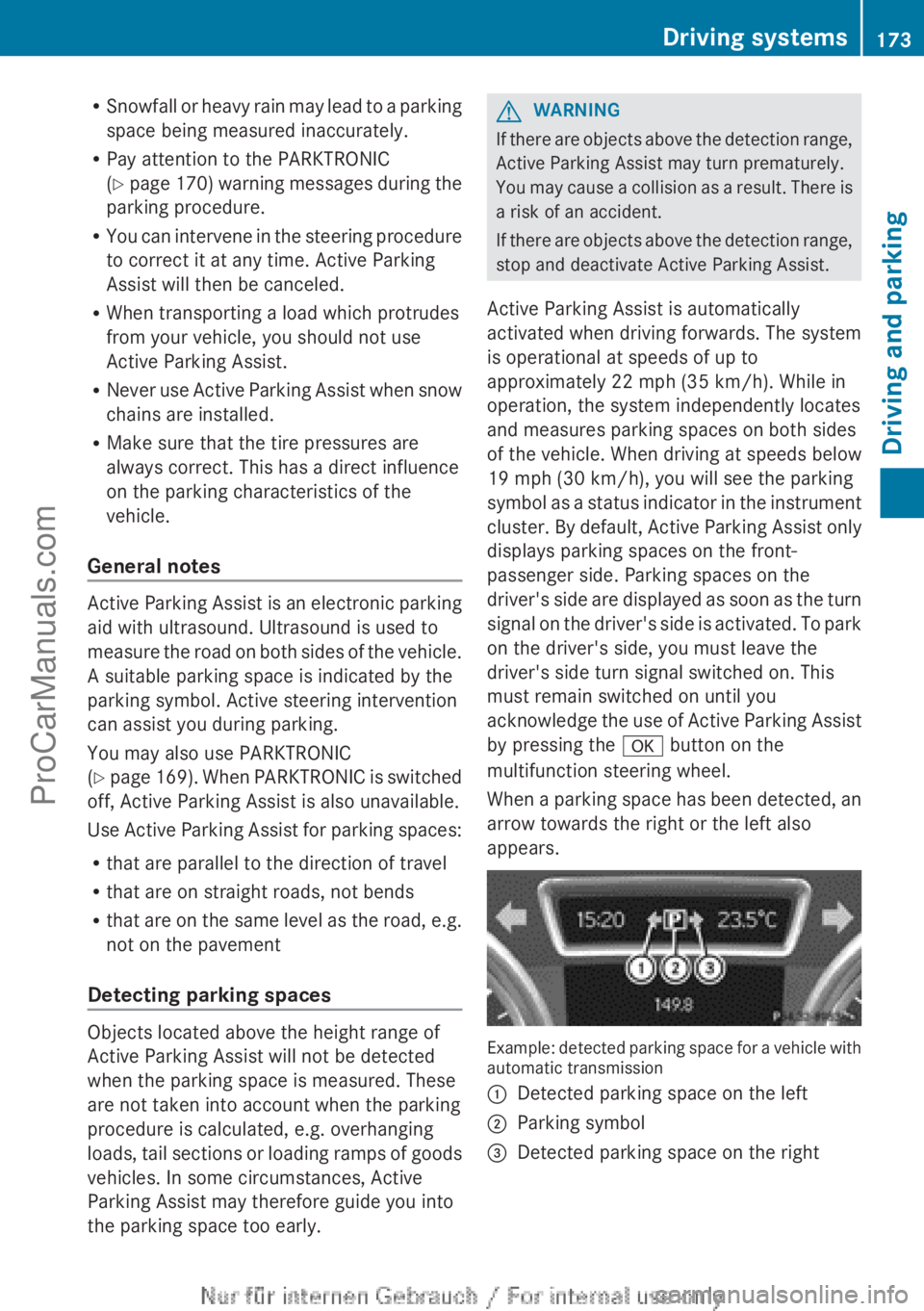
When a parking space has been detected, an
arrow towards the right or the left also
appears. Example: detected parking space for a vehicle with
automatic transmission
:
Detected parking space on the left
; Parking symbol
= Detected parking space on the right Driving systems
173
Driving and parking Z
ProCarManuals.com
Page 176 of 340
Active Parking Assist will only detect parking
spaces:
R
that are parallel to the direction of travel
R that are at least 59 in (1.5 m) wide
R that are at least 51 in (1.3 m) longer than
your vehicle
A parking space is displayed while you are
driving past it, and until you are
approximately 50 ft (15 m) away from it.
Parking G
WARNING
Active Parking Assist merely aids you by
intervening actively in the steering. If you do
not brake there is a risk of an accident.
Always apply the brakes yourself when
maneuvering and parking.
i When PARKTRONIC detects obstacles,
Active Parking Assist brakes automatically
during the parking process. You are
responsible for braking in good time.
Active Parking Assist does not support you
with parking spaces parallel to the direction
of travel if:
R the parking space is on a curb
R the parking space is apparently blocked,
for example by foliage or grass paving
blocks
R the range of movement is too small
R the parking space is bordered by an
obstacle which is not clearly defined such
as a tree or a trailer
X Stop the vehicle when the parking space
symbol shows the
desired parking space in
the instrument cluster.
X Shift the transmission to position R.
The Start Park Assist? Yes: OK No:
% message appears
in the multifunction
display. X
To cancel the procedure: press the
% button on the multifunction steering
wheel or pull away.
or
X To park using Active Parking Assist:
press the a
button on the multifunction
steering wheel.
The Park Assist Active Accelerate
and Brake Observe Surroundings
message appears in the multifunction
display.
X Let go of the multifunction steering wheel.
X Back up the vehicle, being ready to brake
at all times. Do not exceed a maximum
speed of approximately 5 mph (10 km/h )
when
backing up. Otherwise Active Parking
Assist will be canceled.
i In tight parking spaces, you will achieve
the best parking results by backing up as
far as possible. When doing so, also
observe the PARKTRONIC messages.
X Stop as soon as PARKTRONIC sounds the
continuous warning tone, if not before.
Maneuvering may be required in tight
parking spaces.
The Park Assist Active Select D
Observe Surroundings
message appears in
the multifunction display.
X Shift the transmission to position D while
the vehicle is stationary.
Active Parking Assist
immediately steers in
the other direction.
The Park Assist Active Accelerate
and Brake Observe Surroundings
message appears in the multifunction
display.
i You will achieve the best results by
waiting for the steering procedure to
complete before pulling away.
X Drive forwards and be ready to brake at all
times.
X Stop as soon as PARKTRONIC sounds the
continuous warning tone, if not before.174
Driving systems
Driving and parking
ProCarManuals.com