phone MERCEDES-BENZ B-Class 2016 W246 Comand Manual
[x] Cancel search | Manufacturer: MERCEDES-BENZ, Model Year: 2016, Model line: B-Class, Model: MERCEDES-BENZ B-Class 2016 W246Pages: 246, PDF Size: 6.73 MB
Page 174 of 246
XTo selectInformationin the radio menu
bar: turn and press the controller.
Information on the currently received pro-
gram is displayed.
If available, you will see:
Rthe track that is currently being played
Rthe artist of the track that is currently being
played
Rthe album name
Rthe channel abbreviation
Rthe logo of the station or Artist Experience®
Back to radio display:
XTo select Information: slide6and
press the controller.
or
XPress the %button.
Satellite radio
General notes
The satellite radio mode requires satellite
radio equipment and registration with a sat-
ellite radio provider.
Note that the categories and channels shown
in the illustrations depend on the program
content offered by the provider. The illustra-
tions and descriptions in these operating
instructions may therefore differ from the
channels and categories offered by the pro-
vider.
Satellite radio mode may be temporarily
unavailable or interrupted for a variety of rea-
sons. These include environmental or topo-
graphical conditions as well as other factors
beyond the control of Mercedes-Benz USA,
LLC. This means operation may not be possi-
ble in certain areas.
These include:
Rtunnels
Rparking garages
Rlocations inside or next to buildings
Rlocations in the vicinity of other structures SIRIUS XM Satellite Radio offers more than
140 digital-quality radio channels providing
100% commercial-free music, sports, news
and entertainment.
SIRIUS XM Satellite Radio employs a fleet of
high-performance satellites to broadcast
around the clock throughout the USA and
Canada.
The satellite radio program is available for a
monthly fee. Details are available from the
SIRIUS XM Service Center and at
http://www.siriusxm.com
(USA) or
http://www.siriusxm.ca (Canada).
Your new Mercedes-Benz vehicle comes with
SIRIUS XM Satellite Radio pre-installed at the factory. This service is free for a six-month
trial period. About a month before the trial
period ends, information will be provided on
how to extend this subscription. An acoustic
signal sounds and a message is shown,
describing how the subscription can be
extended.
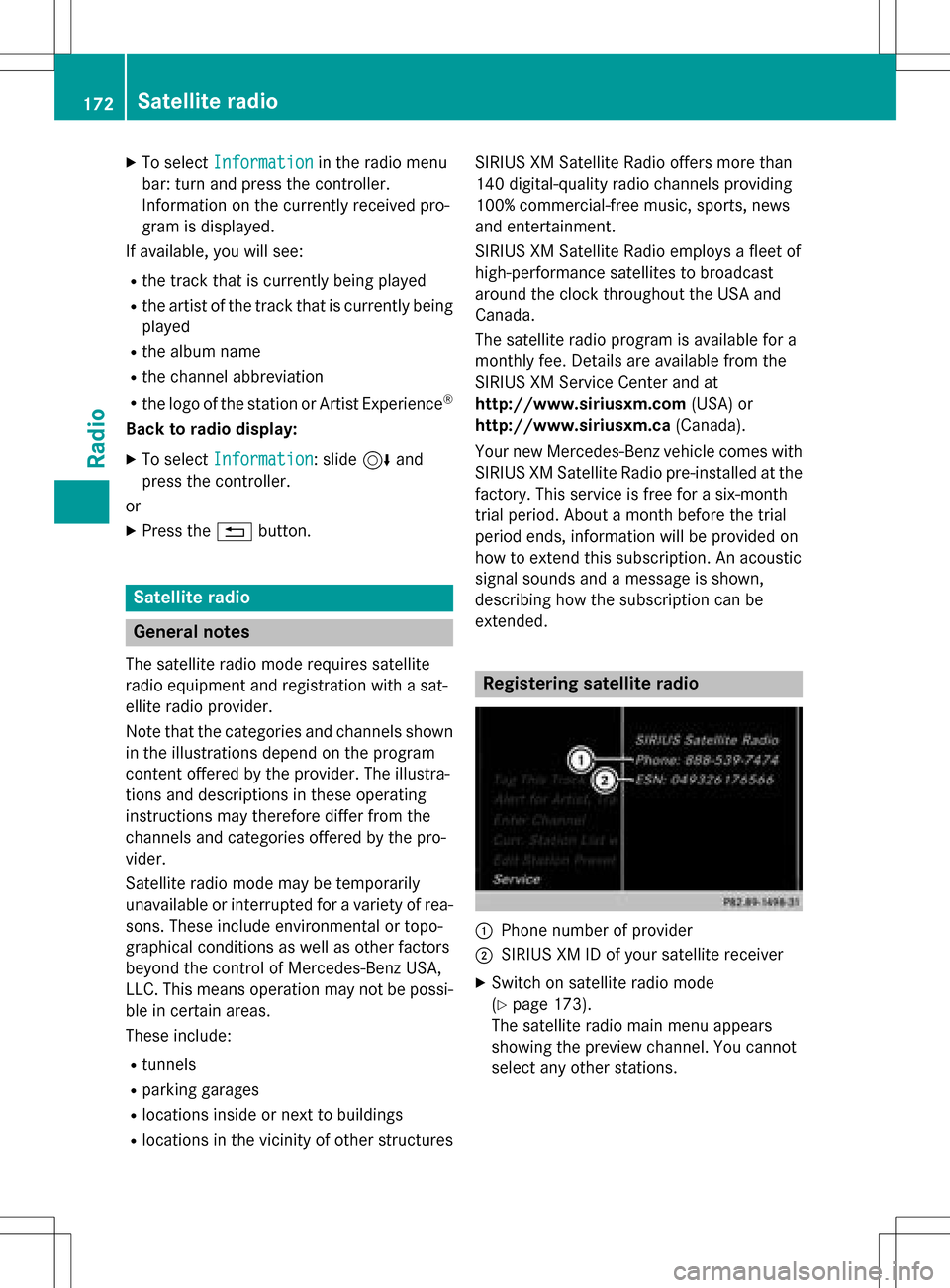
Registering satellite radio
:Phone number of provider
;SIRIUS XM ID of your satellite receiver
XSwitch on satellite radio mode
(
Ypage 173).
The satellite radio main menu appears
showing the preview channel. You cannot
select any other stations.
172Satellite radio
Radio
Page 175 of 246
XTo selectOptionsin the radio menu bar:
turn and press the controller.
XTo select Service: turn and press the con-
troller.
The service information screen appears.
Once the telephone connection has been
established:
XFollow the instructions of the service staff.
The activation process may take up to
ten minutes. If the activation is completed
successfully, the Updating Channels...
message appears in the display, followed
by the satellite radio main menu.
iYou can also have the satellite service
activated online. To do so, visit the SIRIUS
XM Radio website at
http://www.siriusxm.com (USA) or
http://www.siriusxm.ca (Canada).
iIf registration is not included when pur-
chasing the system, your credit card details
will be required to activate your account.
If the satellite receiver is not installed cor-
rectly, the Device Unavailable
message
will appear.
Switching to satellite radio
XTo show the main function bar: slide 5
the controller.
XTo select Radio: turn and press the con-
troller.
The radio display appears. You will hear the
last station played on the last waveband
selected.
XTo select Radioin radio mode: slide 5
and press the controller.
The menu with the available radio modes
appears.
XTo select Sat Radio: turn and press the
controller.
The No Service
message appears if there is
no signal.
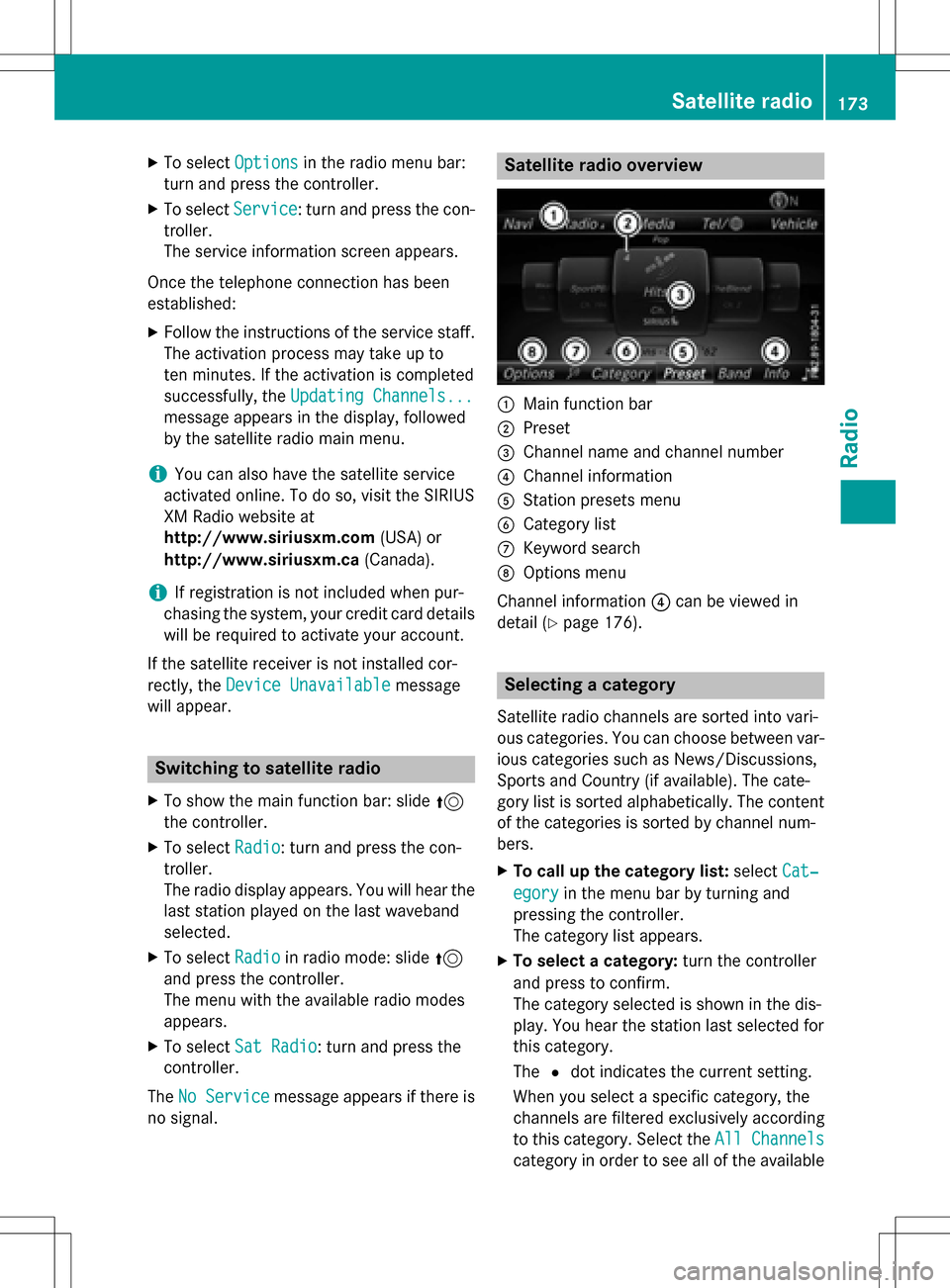
Satellite radio overview
:Main function bar
;Preset
=Channel name and channel number
?Channel information
AStation presets menu
BCategory list
CKeyword search
DOptions menu
Channel information ?can be viewed in
detail (
Ypage 176).
Selecting a category
Satellite radio channels are sorted into vari-
ous categories. You can choose between var-
ious categories such as News/Discussions,
Sports and Country (if available). The cate-
gory list is sorted alphabetically. The content
of the categories is sorted by channel num-
bers.
XTo call up the category list: selectCat‐
egoryin the menu bar by turning and
pressing the controller.
The category list appears.
XTo select a category: turn the controller
and press to confirm.
The category selected is shown in the dis-
play. You hear the station last selected for
this category.
The #dot indicates the current setting.
When you select a specific category, the
channels are filtered exclusively according
to this category. Select the All Channels
category in order to see all of the available
Satellite radio173
Radio
Page 179 of 246
XTo selectInfoin the radio menu bar: turn
and press the controller.
Information on the currently received pro-
gram is displayed.
If available, you will see:
Rthe channel logo
Rthe channel abbreviation
Rthe artist of the track that is currently being
played
Rthe track that is currently being played
RCategory
Rcomposer
XTo return to the radio display: select
Info
by sliding 6and pressing the con-
troller.
Displaying service information
The provider's customer service center is
available by phone at any time to answer any
general questions or questions on the ver-
sions available.
XTo select Optionsin the menu bar: turn
and press the controller.
XTo select Service: turn and press the con-
troller.
The SIRIUS XM ID of your satellite receiver and the telephone number of the provider
appear.
XTo return to the main display: press the
% button.
Channel list updates
During reception of a new channel list, the
Updating Channels...
message is shown.
The station last selected is switched to mute
until the update has been completed. Satel-
lite radio mode is not available during this
process.
Once the update has been completed, the
satellite radio basic menu appears. If the sta- tion previously selected is still available, it will
be played.
Sound settings
Information on sound settings (Ypage 208).
Satellite radio177
Radio
Page 190 of 246
mation, COMAND can use the Gracenote®
Media Database to identify unknown audio
tracks when in audio CD mode.
In addition the cover art for the main display
field, the album list and the "Select by cover"function from the Gracenote
®Media Data-
base are displayed for the music files and the
iPod
®. This occurs when the cover art is not
contained in the files but in the Gracenote®
Media Database.
Online prompt for metadata
A connection to the Gracenote®Data Server
is made automatically when an audio CD is
inserted. The missing data is loaded, saved in
COMAND and shown on the display. If the
search for metadata is unsuccessful, no data
can be displayed. If no phone is connected or
configured for data use, this function is
unavailable.
An Internet connection is required for this
(
Ypage 154).
Saving audio CDs
General notes
iStore your audio CDs in a safe place. An
malfunction in COMAND may result in the
loss of stored files. Mercedes-Benz is not
liable for any loss of data.
No individual music tracks can be stored or
deleted, only a maximum of 12 complete
audio CDs.
If 12 audio CDs are stored, the REC
option in
the Media menu bar is grayed out and has no
function. One audio CD must be deleted
before a new audio CD can be copied.
Copying an audio CD
XInsert an audio CD.
XIn media mode, slide 6the controller.
The media menu bar appears.
XTo start the copying process: selectREC
by turning and pressing the controller.
XTo select Start: press the controller.
The copying procedure starts and is shown
in the progress bar.
It may take some time for the copying proc-
ess to be completed, depending on the
amount of data.
If the copying process is successful, the
Music files copied.
message appears
XTo cancel copying: select Cancel.
The files copied up to the point of cancel-
lation are lost.
iDuring the copying process, you can
switch to another function (e.g. radio) or to
another media source (e.g. USB). The copy-
ing procedure continues in the back-
ground. It is however not possible to select
another CD in the CD changer.
Playing audio CDs
XIn Media mode, slide 6the controller.
The media menu bar appears.
XTo select Search: turn and press the con-
troller.
The category list appears.
XTo select Stored Audio CDsin the cate-
gory list: turn and press the controller.
A selection list for the copied audio CDs is
displayed.
XTo select the desired audio CD: turn and
press the controller.
The track list is displayed.
XTo select a track: turn the controller and
press to confirm.
The tracks on the stored audio CDs can also
be found and played using other media search functions (
Ypage 189).
Deleting stored audio CDs
If music is being played from the saved audio
CDs, the function for deleting audio CDs is
available.
188Audio/video mode
Media
Page 194 of 246
This device name is predetermined but can
usually be changed. To make a clear selec-
tion of the Bluetooth
®device possible, we
recommend that you customize the device
name.
iA2DP (Advanced AudioDistribution
Profile): Bluetooth®audio profile for audio
data transmission
AVRCP (Audio VideoRemote Control
Profile): Bluetooth
®audio profile for audio
data playback.
iThe Bluetooth®device must be visible for
authorization. After authorization,
COMAND even finds the Bluetooth
®device
when it is not visible.
General notes
Before using your Bluetooth®audio device
with COMAND for the first time, you will need
to authorize it.
When you authorize a new Bluetooth
®audio
device, it is connected automatically. Con-
nection involves first searching for a Blue-
tooth
®audio device and then authorizing it.
You can authorize up to fifteen Bluetooth
®
devices.
iIf you authorize a mobile phone that sup-
ports Bluetooth®audio, the A2DP and
AVRCP Bluetooth®audio profiles are con-
nected automatically.
The mobile phone is then entered:
Rin the Bluetooth®telephone list
(
Ypage 115)
Rin the Bluetooth®audio device list
(
Ypage 192)
Mercedes-Benz recommends authorizing a
mobile phone in Bluetooth
®telephony
(
Ypage 116).
iIf the mobile phone that is connected only
supports two Bluetooth®profiles at the
same time, COMAND functions may
behave as follows:
Rwhen connecting to the Internet, play-
back is stopped on the Bluetooth®audio
device.
Rwhen starting playback on the Blue-
tooth®audio device, the Internet con-
nection is ended.
Searching for and authorizing a Blue-
tooth®audio device
Switching to Bluetooth®audio mode
XPress the Õbutton.
XTo select Bluetooth Audioin the menu:
turn and press the controller.
A menu appears.
If you see the No Bluetooth Audio
Device Authorizedmessage, you will
need to authorize the Bluetooth®audio
device first.
XTo select Optionsin the Bluetooth audio
menu: slide 6and press the controller.
XTo select Bluetooth Audio Devices:
press the controller.
A new menu appears.
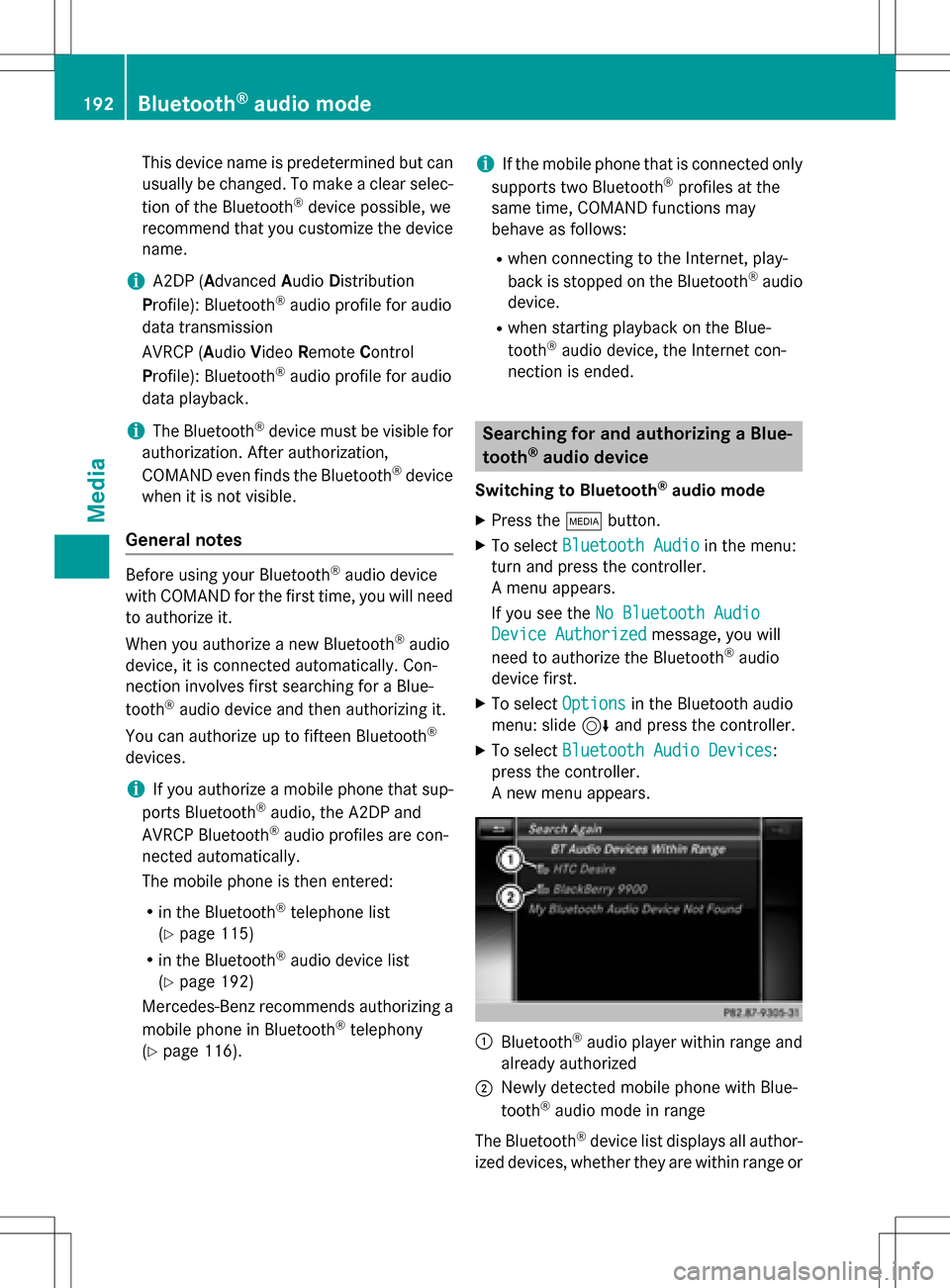
:Bluetooth®audio player within range and
already authorized
;Newly detected mobile phone with Blue-
tooth®audio mode in range
The Bluetooth
®device list displays all author-
ized devices, whether they are within range or
192Bluetooth®audio mode
Media
Page 195 of 246
not. After a device search, devices which are
within range but not authorized are also dis-
played.
Searching for Bluetooth
®audio
XTo selectSearch for Audio Devices:
press the controller.
The To connect your audio device,
make sure that: 1. The device is
switched on. 2. The Bluetooth
Audio function is activated and
the audio device is visible via
Bluetooth. (For details, see the
separate operating instructions
of your audio device or visit
www.mercedes-benz.com/connect.)
message appears.
XSelect Start Search.
COMAND searches for Bluetooth®audio
devices within range and adds them to the
Bluetooth
®device list.
The duration of the search depends on the
number of Bluetooth
®audio devices within
range and their characteristics.
iWith some Bluetooth®audio devices,
playback must first be started on the device
itself so that COMAND can play the audio
files. Bluetooth
®must also be given as a
media output location for the audio device
used.
Authorizing Bluetooth
®audio
XSelect a Bluetooth®audio device that has
not yet been authorized from the list: turn
and press the controller.
Authorization starts.
Depending on the Bluetooth
®audio device
used, you now have two options for con-
tinuing with authorization.
Option 1: entering the passkey
XYou can find information on this in the
"Authorizing (connecting) a mobile phone"
section (
Ypage 116).
After successful authorization, the Blue-
tooth
®audio device is connected and
starts playing. Option 2: Secure Simple Pairing
iThe Bluetooth®audio device must sup-
port Bluetooth®version 2.1 for connection
via Secure Simple Pairing. COMAND cre-
ates a six-digit code, which is displayed on
bo th d
evices that are to be connected
For some Bluetooth
®audio devices, the
pairing must be confirmed within 10 sec-
onds.
XIf the number code displayed on COMAND
and on the Bluetooth®audio device is the
same, select Yes
: press the controller.
If you select Yes
, authorization continues
and the Bluetooth®audio device is connec-
ted. Playback starts.
If you select No
, authorization is canceled.
External authorization
If COMAND does not find your Bluetooth®
audio device, this may be due to particular
security settings on your Bluetooth®audio
device. In this case, check whether your Blue-
tooth
®audio device can locate COMAND.
The Bluetooth
®device name for COMAND is
MB Bluetooth
.
XSwitch on Bluetooth®audio mode
(
Ypage 195).
XTo select Options: slide6and press the
controller.
XTo select Bluetooth Audio Devices:
press the controller.
XTo select Connect via Audio Device:
turn and press the controller.
A message appears.
Authorizing
XStart the authorization on your Bluetooth®
audio device (see the manufacturer's oper-
ating instructions).
After successful authorization, the Blue-
tooth
®audio device is connected and
starts playing.
Bluetooth®audio mode193
Media
Z
Page 196 of 246
With some Bluetooth®audio devices, play-
back must first be started on the device itself
so that COMAND can play the audio files.
Reconnecting a Bluetooth®audio
device
The Bluetooth®audio profiles are connected
automatically under the following circum-
stances:
Rone of the last two mobile phones to have
been connected has also been used as a
Bluetooth
®audio player (if this function is
supported by the mobile phone).
Rthe mobile phone is automatically connec-
ted. The Bluetooth®audio player is then
connected.
iFor an automatic connection with
COMAND, the telephone must be within
range.
For most Bluetooth
®audio devices, the
"automatic connection" must be activated
by checking a box. Depending on the
device used, this prompt often takes place
when authorizing (see the manufacturer's
operating instructions).
If the No Bluetooth Audio Device Con‐
nectedmessage appears, you have two
options to reconnect the Bluetooth®audio
device.
Option 1:
XTo select Connect Last Used Playerin
the basic display: press the controller.
If COMAND can locate the Bluetooth
®
audio device, it will be connected and will
start playing. Option 2:
XTo select
Options: slide6and press the
controller.
XTo select Bluetooth Audio Devices:
press the controller.
XTo select a Bluetooth®audio device: turn
and press the controller.
If the Bluetooth
®audio device has been
authorized, playback starts.
Bluetooth®audio device and simulta-
neous search for mobile phones
i
When searching for a mobile phone or a
new Bluetooth®audio device, the connec-
tion to an already activated Bluetooth®
audio device is separated (Ypage 115).
In the Bluetooth
®audio basic display, you will
see the No
BluetoothAudioDeviceCon‐
nectedmessage, and the Connect Device
menu item cannot be selected.
Displaying details
XTo select a Bluetooth®audio device from
the Bluetooth®device list: turn the control-
ler.
XTo select the symbol to the right of the
Bluetooth®audio device: slide 9the
controller.
XTo select Details: turn and press the con-
troller.
The following information concerning the
selected mobile phone is shown:
RBluetooth®name
RBluetooth®address
RAvailability status (shown after an
update)
RAuthorization status
XTo close the detailed display: press the
% button.
194Bluetooth®audio mode
Media
Page 197 of 246
De-authorizing (deregistering)aBlue-
toot h®audi odevice
XTo selec t aBluetoot h®audio devic efrom
th eBluetoot h®devicelist :turn th econtrol-
ler .
XTo selec tth esymbol to th eright of th e
Bluetoot h®audio device: slid e9 and
press th econtroller .
XTo selectDeauthorize:press th econtrol-
ler .
A prompt appears askin gwhether you
really wish to deauthoriz ethis device.
XTo selec tYesor No:turn and press th econ-
troller.
If you selec tYes
,th edevic ewill be delete d
from th eBluetoot h®devicelist .
If you selec tNo
th eprocess is canceled.
iBefore re-authorizin gth eBluetoot h®
audio device, you should also delete th e
devic enam eMB Bluetooth
from your
Bluetoot h®audio device's Bluetoot h®list
(se eth eBluetoot h®audio device's operat -
in g instructions).
Switchin gto Bluetoot h®audiomode
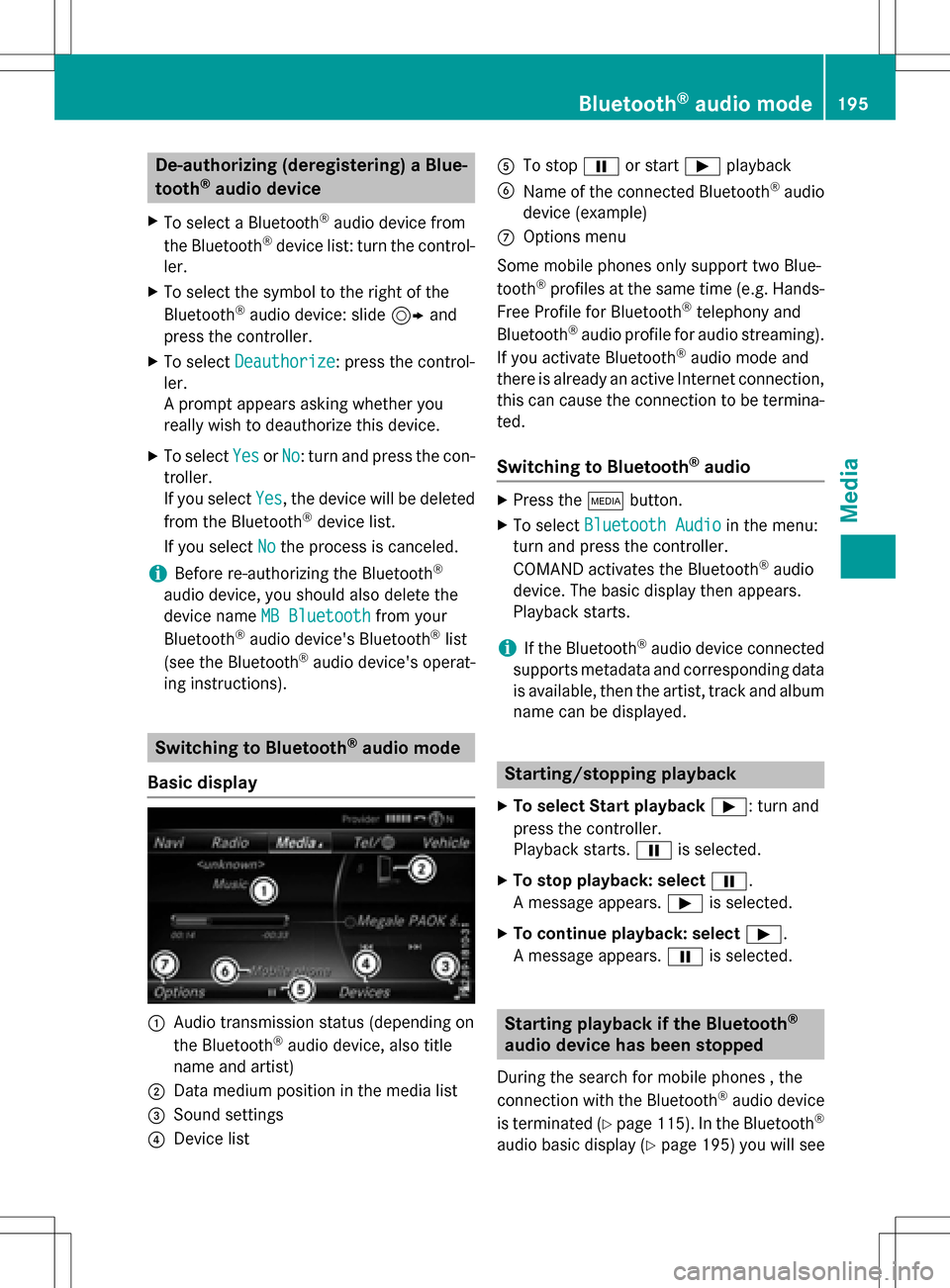
Basic display
:Audio transmissio nstatus (dependin gon
th eBluetoot h®audio device, also titl e
nam eand artist )
;Data medium position in th emedia list
=Sound setting s
?Devicelist
ATo stop Ëor start Ìplayback
BNameof th econnecte dBluetoot h®audio
devic e(example)
COption smen u
Some mobile phone sonly suppor ttw oBlue-
toot h
®profiles at th esam etime (e.g. Hands-
Free Profile fo rBluetoot h®telephon yand
Bluetoot h®audio profil efo raudio streaming).
If you activat eBluetoot h®audio mode and
there is already an active Internet connection ,
this can caus eth econnection to be termina-
ted.
Switchin gto Bluetoot h®audio
XPress th eÕ button.
XTo selec tBluetooth Audioin th emenu:
turn and press th econtroller .
COMAN Dactivates th eBluetoot h
®audio
device. The basi cdisplay then appears .
Playback starts.
iIf th eBluetoot h®audio devic econnecte d
supports metadat aand correspondin gdat a
is available ,then th eartist ,track and album
nam ecan be displayed .
Starting/stopping playback
XTo selectStar tplayback Ì:turn and
press th econtroller .
Playback starts. Ëis selected.
XTo stop playback: selec tË.
A message appears .Ì is selected.
XTo continu eplayback: selec tÌ.
A message appears .Ë is selected.
Starting playback if th eBluetoot h®
audiodevice ha sbeen stopped
Durin gth esearch fo rmobile phone s ,the
connection wit hth eBluetoot h®audio devic e
is terminated (
Ypage 115). In th eBluetoot h®
audio basi cdisplay (Ypage 195) you will see
Bluetooth®audio mode195
Media
Z
Page 198 of 246
theNoBluetoothAudioDeviceConnec‐
tedmessage and the Connect Last Used
Playermenu item cannot be selected.
When the search is finished, the Bluetooth
®
audio device can be reconnected.
XTo select Start playback Ì: slide6
and press the controller.
Playback resumes from the beginning.
XTo select Connect Last Used Player:
press the controller.
Depending on the Bluetooth
®audio device
used, playback starts immediately or you
must start playback manually.
In this case, you will see the Bluetooth
Audio Device Pausedmessage.
iIf there is an Internet connection and the
mobile phone that is connected only sup-
ports two Bluetooth
®profiles at the same
time, the Internet connection is interrup-
ted.
iThe connection to the Bluetooth®audio
device can also be interrupted if:
Rthe connected mobile phone only sup-
ports 2 Bluetooth®profiles at the same
time.
Ryou connect to the Internet using
COMAND (
Ypage 154).
Selecting a track
The function is not supported by all Blue-
tooth®audio devices.
Some mobile phones impair function with
regard to the following criteria:
Rthe number of tracks that can be selected
Rthe time period until the next or previous
track is played
XSwitch the multifunction steering wheel to
the media menu (see the vehicle Operator's
Manual).
XTo skip forwards or backwards to a
track: press the 9or: button on
the multifunction steering wheel.
XRapid scroll: press and hold the 9
or : button on the multifunction steer-
ing wheel until the desired track is reached.
If you press and hold the 9or:
buttons, the rapid scrolling speed increa-
ses after a short time.
Further ways to select tracks (
Ypage 187).
iIn rapid scroll, track names are not
shown, but instead only Track 1, Track 2
etc. The playback times for the tracks
played are not displayed. This is available
as an optional function starting with AVRCP
Version 1.3. There is also no music search
option available with Bluetooth
®Audio.
Selecting playback options
If the Bluetooth®audio device supports the
corresponding function, the following options
are available:
RNormal Track Sequence: the tracks are
played in the normal order (e.g. track 1, 2, 3
etc.).
Audio data playback is determined by the
order in which the tracks are written to the
data medium. Alphabetical order is the
most common. Once all the tracks in a
folder have been played, the tracks in the
next folder are played.
RRandomTrackList: the current track list
is played in random order (e.g. 3, 8, 5 etc.).
RRandom Medium: all tracks on the data
medium are played in random order (e.g.
track 3, 8, 5 etc.).
Playback options are optional functions
and are not, or only partially, supported by
Bluetooth
®audio devices.
196Bluetooth®audio mode
Media
Page 199 of 246
Selecting playback options
XTo selectOptions: turn and press the con-
troller.
XSelect Playback Mode.
A # dot indicates the current setting.
XSelect the desired option.
If you select Random
TrackList, you will
see a corresponding message in the display
or selection window.
Increasing the volume on COMAND
XTo select Options: slide6and press the
controller.
XTo select Volume: turn and press the con-
troller.
A menu appears. The #dot indicates the
current setting.
XSelect StandardorBoost.
Information on sound settings
(
Ypage 208).
Operation with the Media Interface
General notes
Media Interface is a universal interface for the
connection of mobile audio and video devi-
ces. Media Interface in COMAND has two
USB connections.
The USB connection sockets are located in
the stowage compartment under the armrest.
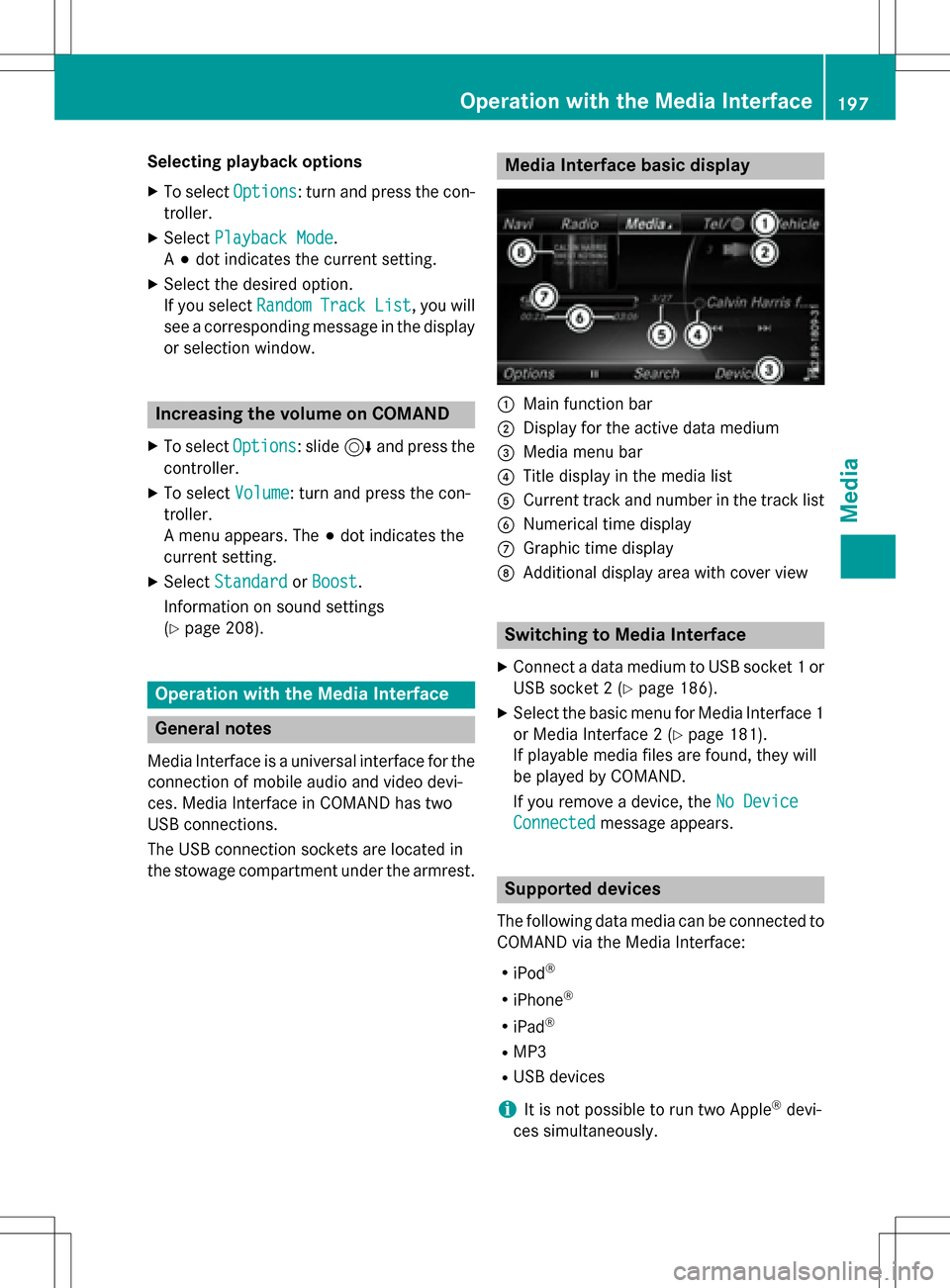
Media Interface basic display
:Main function bar
;Display for the active data medium
=Media menu bar
?Title display in the media list
ACurrent track and number in the track list
BNumerical time display
CGraphic time display
DAdditional display area with cover view
Switching to Media Interface
XConnect a data medium to USB socket 1 or
USB socket 2 (
Ypage 186).
XSelect the basic menu for Media Interface 1
or Media Interface 2 (
Ypage 181).
If playable media files are found, they will
be played by COMAND.
If you remove a device, the No Device
Connectedmessage appears.
Supported devices
The following data media can be connected to
COMAND via the Media Interface:
RiPod®
RiPhone®
RiPad®
RMP3
RUSB devices
iIt is not possible to run two Apple®devi-
ces simultaneously.
Operation with the Media Interface197
Media
Z