turn on MERCEDES-BENZ B-Class 2017 W246 Comand Manual
[x] Cancel search | Manufacturer: MERCEDES-BENZ, Model Year: 2017, Model line: B-Class, Model: MERCEDES-BENZ B-Class 2017 W246Pages: 202, PDF Size: 6.35 MB
Page 185 of 202
CD/DVD drive and AUX jacks
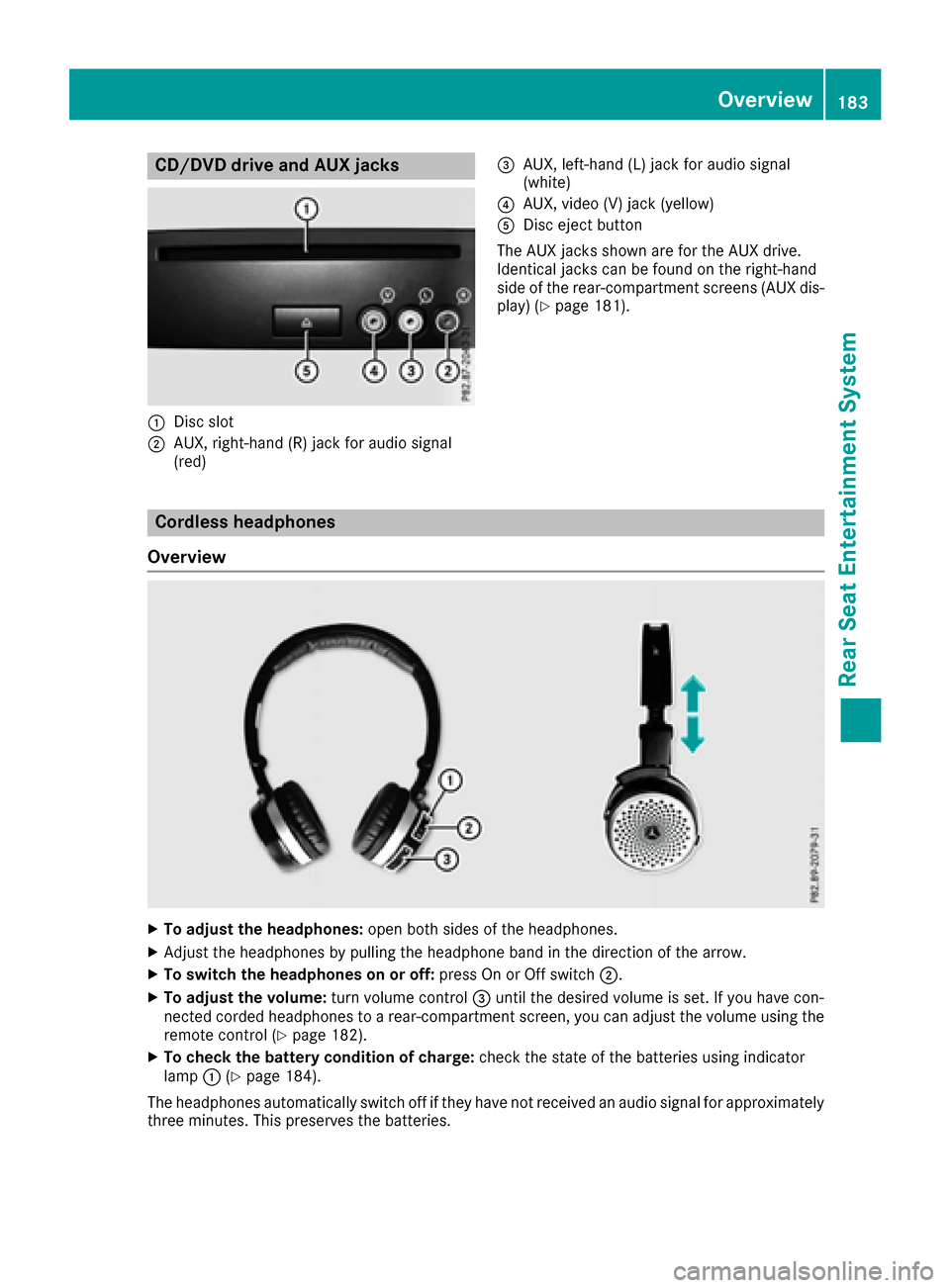
:Disc slot
;AUX, right-hand (R) jack for audio signal
(red)
=AUX, left-hand (L) jack for audio signal
(white)
?AUX, video (V) jack (yellow)
ADisc eject button
The AUX jacks shown are for the AUX drive.
Identical jacks can be found on the right-hand
side of the rear-compartment screens (AUX dis-
play) (
Ypage 181).
Cordless headphones
Overview
XTo adjust the headphones: open both sides of the headphones.
XAdjust the headphones by pulling the headphone band in the direction of the arrow.
XTo switch the headphones on or off: press On or Off switch;.
XTo adjust the volume: turn volume control=until the desired volume is set. If you have con-
nected corded headphones to a rear-compartment screen, you can adjust the volume using the
remote control (
Ypage 182).
XTo check the battery condition of charge: check the state of the batteries using indicator
lamp :(Ypage 184).
The headphones automatically switch off if they have not received an audio signal for approximately
three minutes. This preserves the batteries.
Overview183
Rear Seat Entertainment System
Z
Page 187 of 202
On the remote control
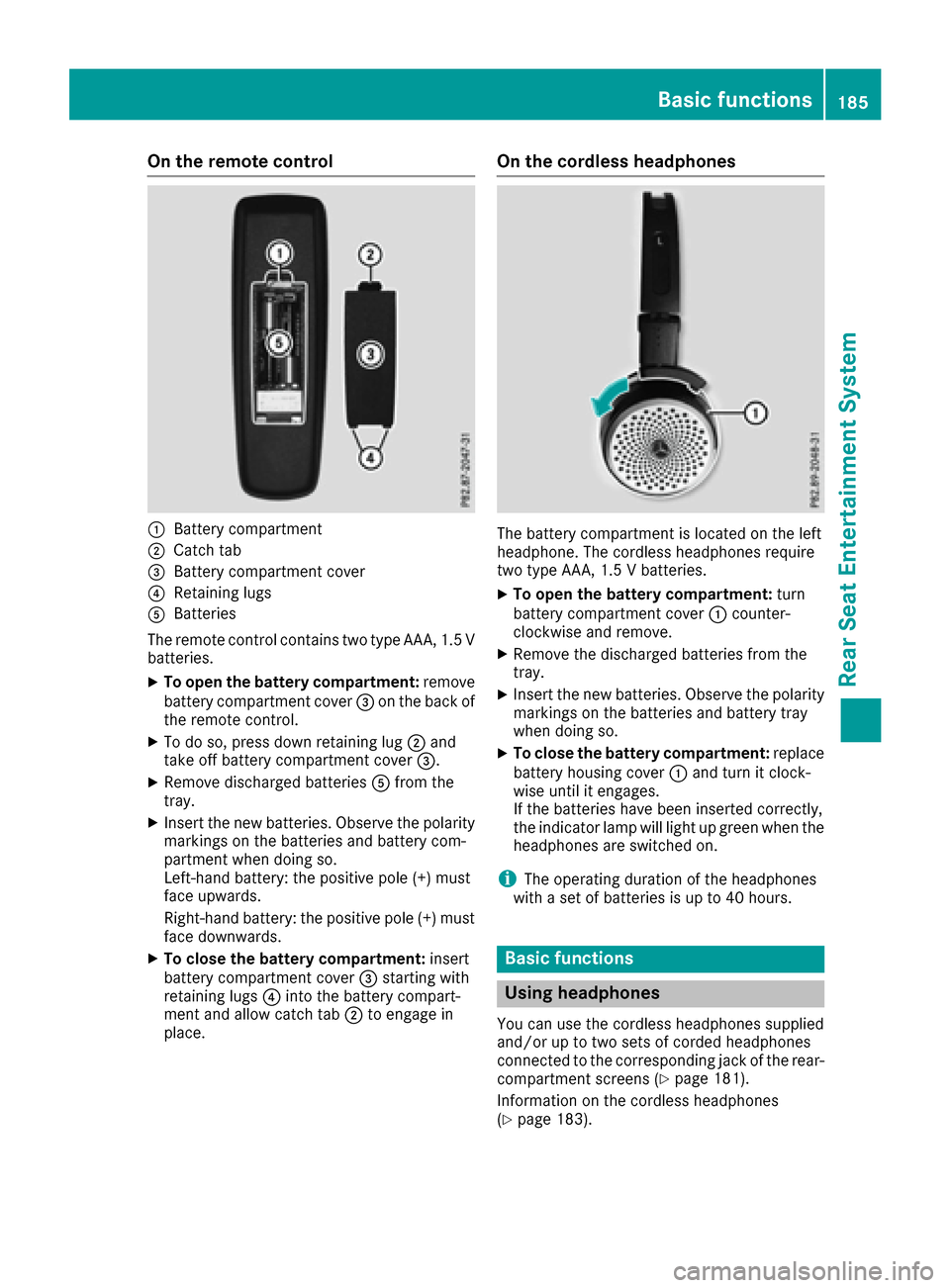
:Battery compartment
;Catch tab
=Battery compartment cover
?Retaining lugs
ABatteries
The remote control contains two type AAA, 1.5 V
batteries.
XTo open the battery compartment: remove
battery compartment cover =on the back of
the remote control.
XTo do so, press down retaining lug ;and
take off battery compartment cover =.
XRemove discharged batteriesAfrom the
tray.
XInsert the new batteries. Observe the polarity markings on the batteries and battery com-
partment when doing so.
Left-hand battery: the positive pole (+) must
face upwards.
Right-hand battery: the positive pole (+) must
face downwards.
XTo close the battery compartment: insert
battery compartment cover =starting with
retaining lugs ?into the battery compart-
ment and allow catch tab ;to engage in
place.
On the cordless headphones
The battery compartment is located on the left
headphone. The cordless headphones require
two type AAA, 1.5 V batteries.
XTo open the battery compartment: turn
battery compartment cover :counter-
clockwise and remove.
XRemove the discharged batteries from the
tray.
XInsert the new batteries. Observe the polarity markings on the batteries and battery tray
when doing so.
XTo close the battery compartment: replace
battery housing cover :and turn it clock-
wise until it engages.
If the batteries have been inserted correctly,
the indicator lamp will light up green when the
headphones are switched on.
iThe operating duration of the headphones
with a set of batteries is up to 40 hours.
Basic functions
Using headphones
You can use the cordless headphones supplied
and/or up to two sets of corded headphones
connected to the corresponding jack of the rear-
compartment screens (
Ypage 181).
Information on the cordless headphones
(
Ypage 183).
Basic functions185
Rear Seat Entertainment System
Z
Page 188 of 202
Using the main loudspeakers
This function is available in conjunction with the
multimedia system.
You can use the vehicle loudspeakers to listen to
a disc inserted in the rear-compartment drive.
To do so, disc mode (audio CD/audio DVD/
MP3) must be activated on at least one rear
screen.
The headphones' volume setting does not affect
the main loudspeakers.
XTo set on the multimedia system:press the
$ button, for example, to switch on an
audio mode.
XTo select Info6slide and press the con-
troller.
A menu appears.
XTurn the controller until Rear Seat Enter‐tainment System: Audiois brought to the
front.
XPress the controller.
Selecting sound settings
You can select sound settings in the following
operating modes:
RAudio CD/MP3
RVideo DVD
RRadio (active media source in COMAND)
RAUX
XSwitch on an operating mode (e.g. audio CD
mode) (Ypage 187).
XSelect TrebleorBassusing
the :=; buttons on the remote
control and press the 9button to confirm.
An adjustment scale appears.
XSelect a setting using the 9:buttons
and press the 9button to confirm.
Multiple users
Simultaneous use of the rear-compart-
ment disc drive
The two rear-compartment screens can be oper- ated almost entirely independently from one
another. However, a conflict may occur in some
menus if the two screens are used simultane-
ously. The following functions affect both screens:
Rchanging playback options
Rselecting a track (from a track list or folder)
Rusing the play, pause and stop functions
Rfast forward and rewind or scrolling
Rcalling up the DVD menu and navigating
within it
Rsetting the language, subtitles and camera
angle
Rcalling up interactive DVD content
The following functions affect only one screen:
Rchanging audio and video functions as well as picture settings
Rswitching between full screen and the menu
Switching between operating modes
When you exit an operating mode (e.g. audio CD
mode), the current setting is saved. If you call up
this operating mode again later, there are two
possibilities:
Rthe operating mode has been changed on the
other screen.
Rthe operating mode has not been changed.
In the first case, the operating mode appears as
it is on the other screen.
In the second case, the setting appears on the
screen as it was when you last exited the oper-
ating mode.
Picture settings
Overview
You can select the picture settings in video DVD
and AUX mode (Ypage 196).
Adjusting the brightness, contrast and
color
XSwitch to video DVD mode (Ypage 190).
XTo show the menu: press the9button on
the remote control.
186Basic functions
Rear Seat Entertainment System
Page 192 of 202
XTo pause playback:selectËusing
the :=; buttons on the remote
control and press the 9button to confirm.
The Ë display changes to Ì.
XTo continue playback: selectÌand
press the 9button to confirm.
The Ì display changes to Ë.
Stop function
This function is available in audio DVD mode.
XTo interrupt playback: selectÉusing
the :=; buttons on the remote
control and press the 9button to confirm.
The Ë display changes to Ì.
XTo continue playback: selectÌand
press the 9button to confirm.
Playback continues from the point where it
was interrupted.
XTo stop playback: while playback is inter-
rupted, select Éagain and press the 9
button to confirm.
Playback stops and returns to the beginning
of the DVD. Ìis highlighted.
XTo restart playback: selectÌand press
the 9button to confirm.
Playback starts from the beginning of the
DVD.
Setting the audio format
The content of an audio DVD can be divided into
up to 9 groups. The availability and type of group
depends on the respective DVD. A group can
contain music of different sound qualities
(stereo and multichannel formats, for example),
or bonus tracks.
XSelect DVD-Ausing the :=; but-
tons on the remote control and press 9to
confirm.
XSelect Groupusing the 9: buttons
and press the 9button to confirm.
The list of available audio formats appears.
The #dot indicates the format currently
selected.
XSelect an audio format using the 9:
buttons and press the 9button to confirm.
XTo exit the menu: press the=or;
button.
Playback options
XSelect CD,DVD-Aor MP3using
the :=; buttons on the remote
control and press the 9button to confirm.
A list appears. The #dot indicates the play-
back option currently selected.
XSelect Normal track sequence,Randomtracksor Random folderusing the
9: buttons and press the 9button to
confirm.
The option is switched on. For all options
except Normal track sequence
, you will
see a corresponding display in the selection
window.
iIf you switch the data carrier which you are
currently listening to, the Normal track
sequenceoption is activated automatically. If
an option is selected, it remains selected after
the Rear Seat Entertainment System is
switched on or off.
Switching track information on/off
(MP3 mode only)
If the function is switched on, folder and track
names are displayed.
If the function is switched off, disc and file
names are displayed.
XSelect MP3using the :=; buttons
on the remote control and press the 9button
to confirm.
XSelect Display track informationusing
the 9: buttons and press the 9but-
ton to confirm.
The function is switched on Oor off ª,
depending on the previous status.
Video DVD mode
Important safety notes
GWARNING
The CD/DVD drive is a class 1 laser product.
If you open the housing of the CD/DVD drive,
there is a risk of exposure to invisible laser
radiation. This laser radiation could damage
your retina. There is a risk of injury.
190Video DVD mode
Rear Seat Entertainment System
Page 194 of 202
Fast forwarding/rewinding
XPress and hold theE orF buttonon
th eremot econtrol until th edesired position
has been reached.
You see th econtrol menu.
Pause function
XTo show th emenu: press th e9 butto non
th eremot econtrol .
XTo pause playback: selectËand press
th e9 butto nto confirm .
The Ë display changes to Ì.
XTo continueplayback: selectÌand
press th e9 butto nto confirm .
The men uis hidden .
Stop function
XTo show th emenu: press th e9 butto non
th eremot econtrol .
XTo interrup tplayback: selectÉand
press th e9 butto nto confirm .
The Ë display changes to Ì.The vide o
imag eis hidden .
XTo continu eplayback: selectÌand
press th e9 butto nto confirm .
Playbac kcontinue sfrom th epoin twher eit
was interrupted. The men uis hidden .
XTo stop playback: while playbackis inter-
rupted, select Éagain and press th e9
butto nto confirm .
Playbac kstops and return sto th ebeginning
of th eDVD. Ì is highlighted.
XTo restart playback: selectÌand press
th e9 butto nto confirm .
Playbac kstart sfrom th ebeginning of th e
DVD.
Selecting a scene/chapter
Skipping forwards/backwards
XPress th e= or; buttonon th eremot e
control .
or
XPress th eE orF button.
The navigation men u (Ypage 191) appears
for approximately eigh tseconds.
Selecting a scene/chapter directly
The example sillustrat ehow to select scen eor
chapter 5.
XOptio n1: while th efilm is playing, press th e
h buttonon th eremot econtrol .
XPressabutton, suc has ¿.
XOptio n2: press th e9 butto non th eremot e
control .
XSelectDVD-Videoand press th e9 butto nto
confirm .
XSelectDVDFunctionsand press th e9 but -
to nto confirm .
XSelectScene Selectionand press th e9
butto nto confirm .
XSelectth e¿ digit usin gth e9 or:
butto nand press th e9 butto nto confirm .
In bot hcases, playbac kwill begi nfrom th e5t h
scen eor chapter after abrie fpause .
Selecting a film/track
XOption1: press th e9 butto non th eremot e
control .
XSelectDVD-Videoand press th e9 butto nto
confirm .
XSelectDVDFunctionsand press th e9 but -
to nto confirm .
XSelectTitle Selectionand press th e9
butto nto confirm .
XPress the9 butto nto select th elist .
XSelec t afilm or atitle.
XOptio n2: to select film 2, for example, press
th e· buttonon th eremot econtrol .
Afte r abrie fpause ,th esecon dfilm is played.
192Video DVD mode
Rear Seat Entertainment System
Page 196 of 202

XSelect a language using the9:but-
tons and press the 9button to confirm.
XTo exit the menu: press the=or;
button.
Subtitles and camera angle
These functions are not available on all DVDs.
The number of subtitle languages and camera
angles available depends on the content of the
DVD. It may also be possible to access the set-
tings from the DVD menu.
XTo show the menu: press the9button on
the remote control.
XSelect DVD-Videoand press the 9button on
the remote control to confirm.
XSelect DVDFunctionsand press the 9but-
ton to confirm.
XSelect SubtitlesorCamera Angleand
press the 9button to confirm.
In both cases, a menu appears after a few
seconds. The #dot indicates the current set-
ting.
XSelect a setting using the 9:buttons
and press the 9button to confirm.
XTo exit the menu: press the=or;
button.
Interactive content
DVDs can also contain interactive content (e.g.
a video game). In a video game, you may be able to influence events, for example, by selecting
and triggering actions. The type and number of
actions depend on the DVD.
XSelect an action using the
9;:= buttons on the remote
control and press the 9button to execute it.
A menu appears and the first entry, Select
, is
highlighted.
XPress the 9button.
Active COMAND media source mode
Overview
You can transfer a media source selected in the
multimedia system to the Rear Seat Entertain-
ment System. If you switch the media source in the multimedia system, this will not be transfer-
red to the Rear Seat Entertainment System.
You can transfer these media sources to the
Rear Seat Entertainment System:
RRadio
RCD or MP3 mode (CD, SD card, USB)
RMedia Interface
RVideo DVD mode
Follow the sequence described below when
playing a media source from the multimedia
system on the Rear Seat Entertainment System.
1. Switching on the function in the
multimedia system
XSwitch on the radio (Ypage 135).
XSwitch CD or MP3 mode on (CD, SD card,
USB) (Ypage 144).
XSwitch on the media interface (Ypage 159).
XSwitch to video DVD mode (Ypage 162).
2. Transferring the active media
source to the Rear Seat Entertain-
ment System
XTo select the Optionsmenu, turn and press
the controller.
XSelect Active Aud./Vid. Source forRearby pressing the controller.
The #dot indicates that the function is acti-
vated.
XTo switch off the function: selectRear
Off (Radio)orRear Off (Media).
The #dot indicates that the function is deac-
tivated.
194Active COMAND media source mode
Rear Seat Entertainment System