lock MERCEDES-BENZ B-Class 2017 W246 Owners Manual
[x] Cancel search | Manufacturer: MERCEDES-BENZ, Model Year: 2017, Model line: B-Class, Model: MERCEDES-BENZ B-Class 2017 W246Pages: 290, PDF Size: 19.81 MB
Page 191 of 290
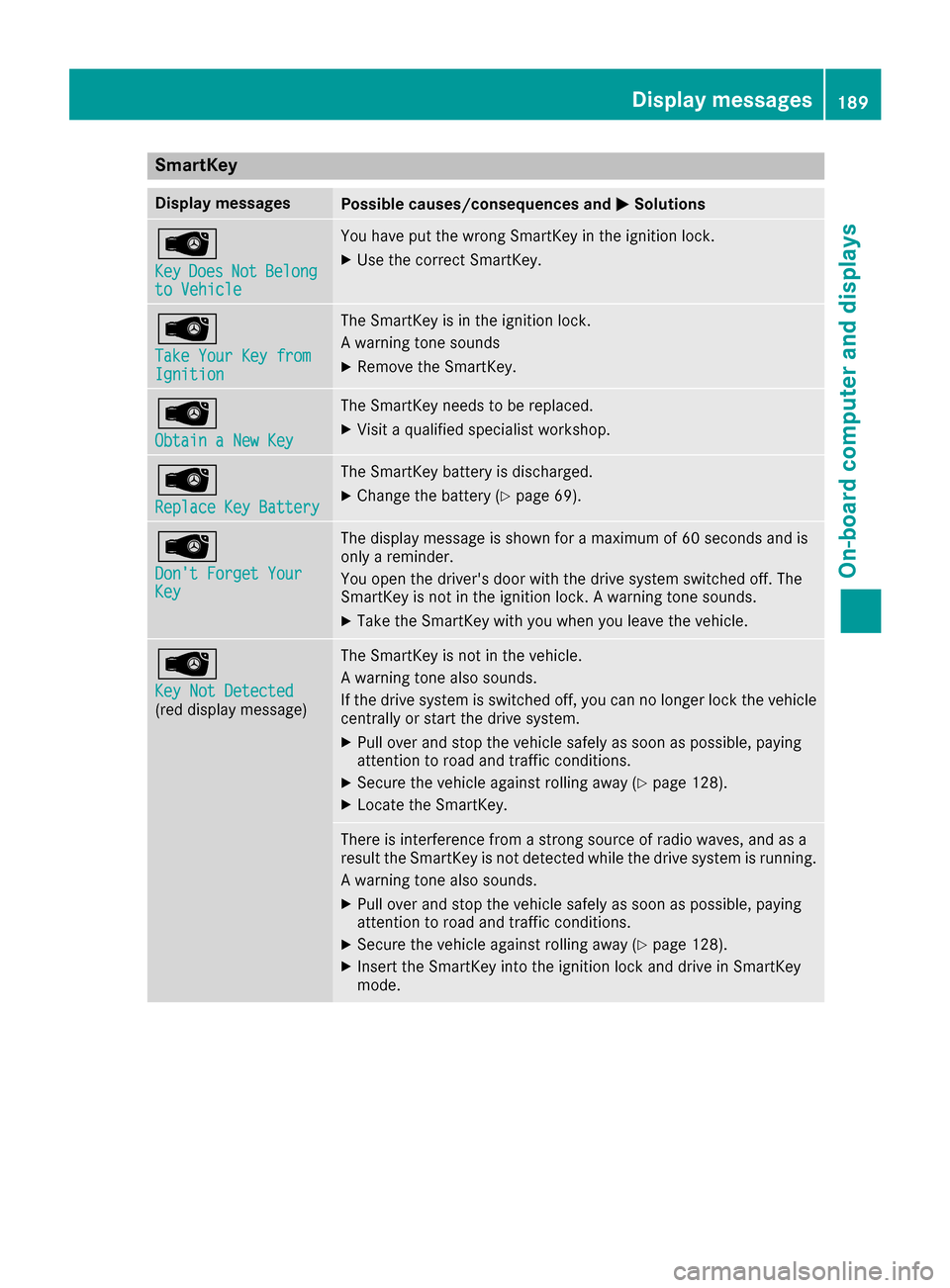
SmartKey
Display messages
Possible causes/consequences and
0050
0050Solutions 00AF
Key Key
Does
Does Not
NotBelong
Belong
to Vehicle
to Vehicle You have put the wrong SmartKey in the ignition lock.
X Use the correct SmartKey. 00AF
Take Your Key from Take Your Key from
Ignition Ignition The SmartKey is in the ignition lock.
A warning tone sounds
X
Remove the SmartKey. 00AF
Obtain a New Key Obtain a New Key The SmartKey needs to be replaced.
X Visit a qualified specialist workshop. 00AF
Replace Key Battery Replace Key Battery The SmartKey battery is discharged.
X Change the battery (Y page 69).00AF
Don't Forget Your Don't Forget Your
Key Key The display message is shown for a maximum of 60 seconds and is
only a reminder.
You open the driver's door with the drive system switched off. The
SmartKey is not in the ignition lock. A warning tone sounds.
X Take the SmartKey with you when you leave the vehicle. 00AF
Key Not Detected Key Not Detected
(red display message) The SmartKey is not in the vehicle.
A warning tone also sounds.
If the drive system is switched off, you can no longer lock the vehicle
centrally or start the drive system.
X Pull over and stop the vehicle safely as soon as possible, paying
attention to road and traffic conditions.
X Secure the vehicle against rolling away (Y page 128).
X Locate the SmartKey. There is interference from a strong source of radio waves, and as a
result the SmartKey is not detected while the drive system is running.
A warning tone also sounds.
X Pull over and stop the vehicle safely as soon as possible, paying
attention to road and traffic conditions.
X Secure the vehicle against rolling away (Y page 128).
X Insert the SmartKey into the ignition lock and drive in SmartKey
mode. Display messages
189On-board computer and displays Z
Page 192 of 290
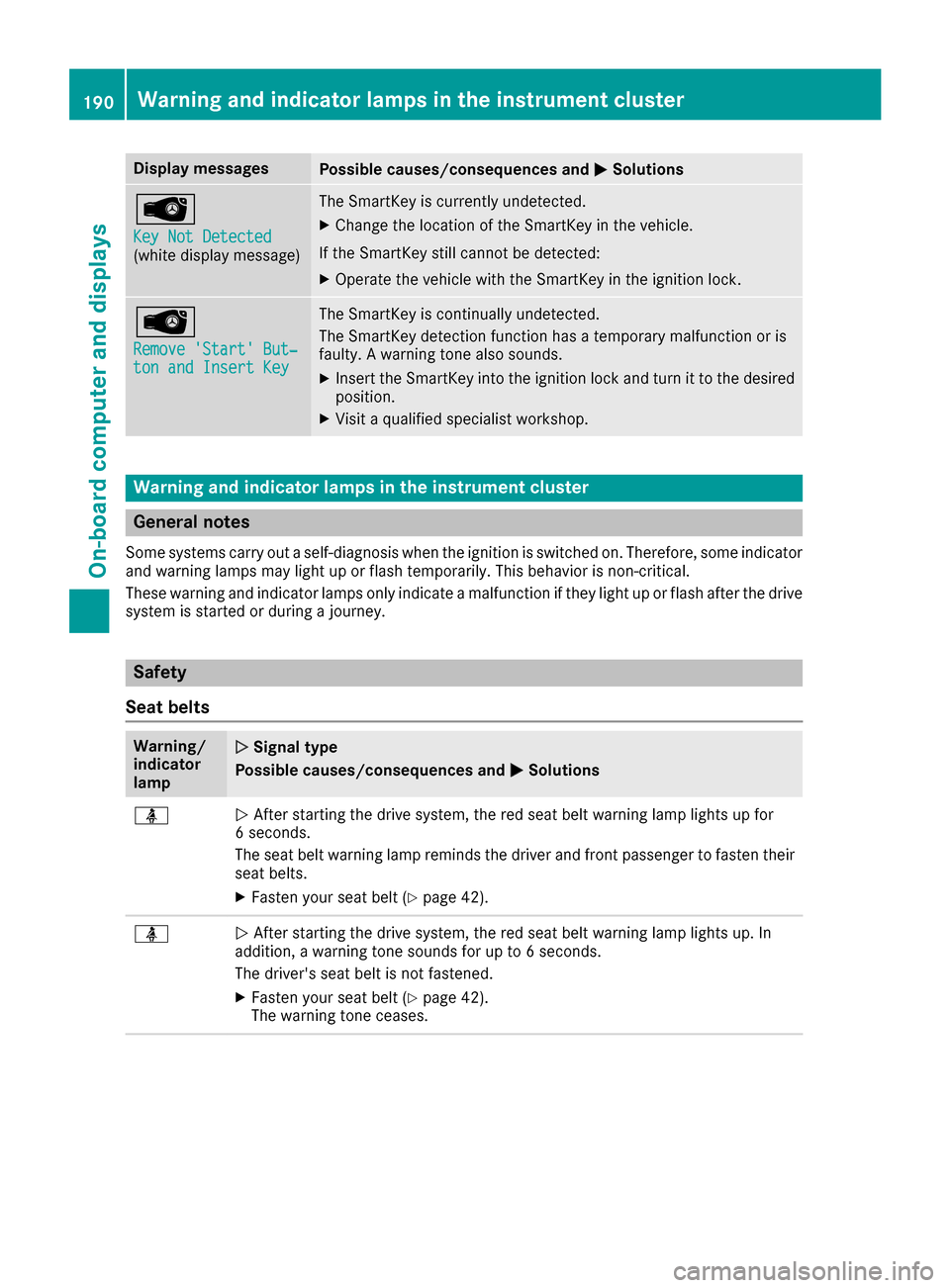
Display messages
Possible causes/consequences and
0050
0050Solutions 00AF
Key Not Detected Key Not Detected
(white display message) The SmartKey is currently undetected.
X Change the location of the SmartKey in the vehicle.
If the SmartKey still cannot be detected:
X Operate the vehicle with the SmartKey in the ignition lock. 00AF
Remove 'Start' But‐ Remove 'Start' But‐
ton and Insert Key ton and Insert Key The SmartKey is continually undetected.
The SmartKey detection function has a temporary malfunction or is
faulty. A warning tone also sounds.
X Insert the SmartKey into the ignition lock and turn it to the desired
position.
X Visit a qualified specialist workshop. Warning and indicator lamps in the instrument cluster
General notes
Some systems carry out a self-diagnosis when the ignition is switched on. Therefore, some indicator and warning lamps may light up or flash temporarily. This behavior is non-critical.
These warning and indicator lamps only indicate a malfunction if they light up or flash after the drive
system is started or during a journey. Safety
Seat belts Warning/
indicator
lamp
0051 0051
Signal type
Possible causes/consequences and 0050
0050Solutions 00E9
0051
After starting the drive system, the red seat belt warning lamp lights up for
6 seconds.
The seat belt warning lamp reminds the driver and front passenger to fasten their
seat belts.
X Fasten your seat belt (Y page 42).00E9
0051
After starting the drive system, the red seat belt warning lamp lights up. In
addition, a warning tone sounds for up to 6 seconds.
The driver's seat belt is not fastened.
X Fasten your seat belt (Y page 42).
The warning tone ceases. 190
Wa
rning and indi cator lamps in the instrument clusterOn-board computer and displays
Page 195 of 290
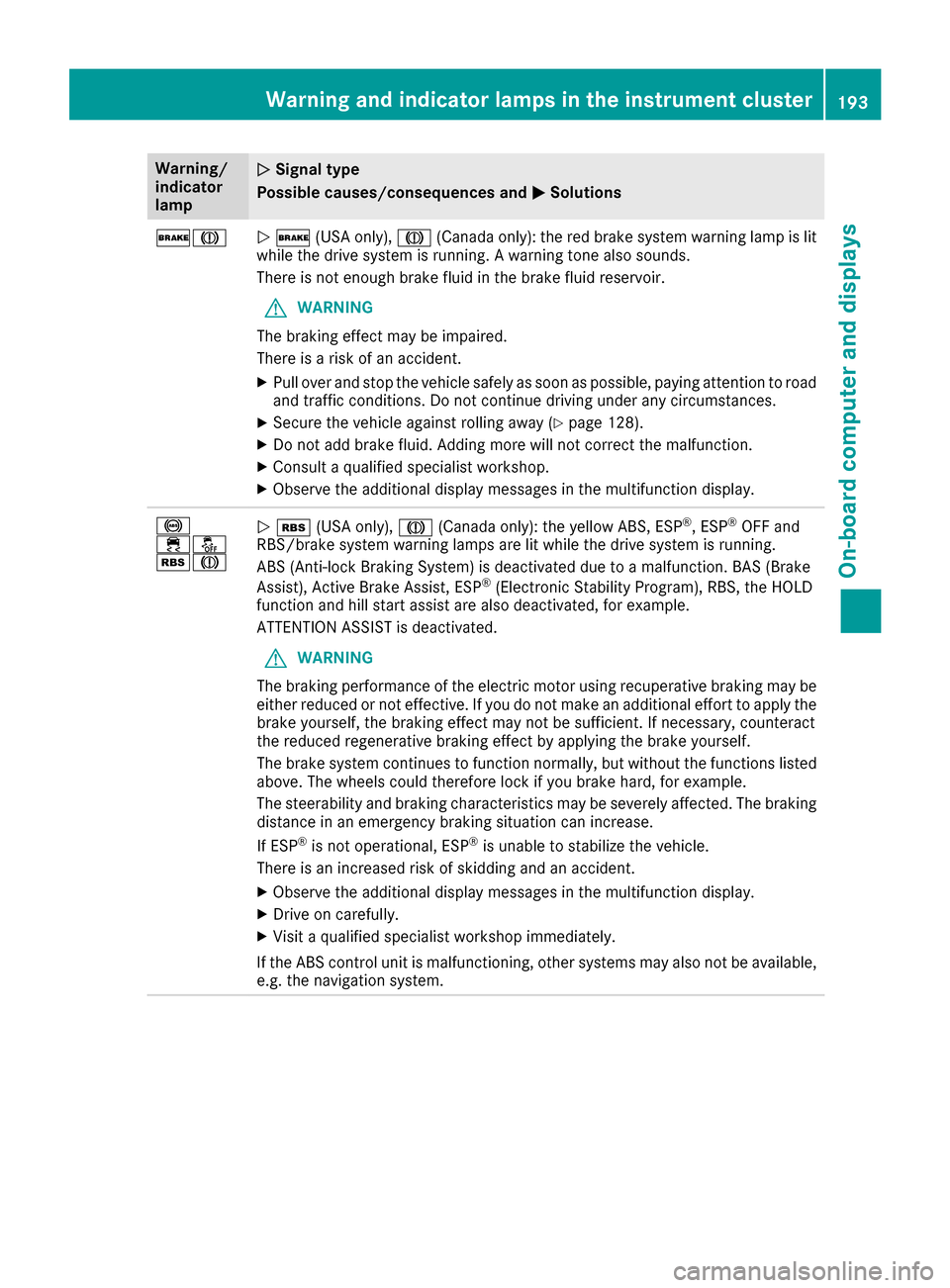
Warning/
indicator
lamp
0051 0051
Signal type
Possible causes/consequences and 0050
0050Solutions 0027004D
0051
0027 (USA only), 004D(Canada only): the red brake system warning lamp is lit
while the drive system is running. A warning tone also sounds.
There is not enough brake fluid in the brake fluid reservoir.
G WARNING
The braking effect may be impaired.
There is a risk of an accident.
X Pull over and stop the vehicle safely as soon as possible, paying attention to road
and traffic conditions. Do not continue driving under any circumstances.
X Secure the vehicle against rolling away (Y page 128).
X Do not add brake fluid. Adding more will not correct the malfunction.
X Consult a qualified specialist workshop.
X Observe the additional display messages in the multifunction display. 0025
00E500BB
00C6004D
0051
00C6 (USA only), 004D(Canada only): the yellow ABS, ESP ®
, ESP ®
OFF and
RBS/brake system warning lamps are lit while the drive system is running.
ABS (Anti-lock Braking System) is deactivated due to a malfunction. BAS (Brake
Assist), Active Brake Assist, ESP ®
(Electronic Stability Program), RBS, the HOLD
function and hill start assist are also deactivated, for example.
ATTENTION ASSIST is deactivated.
G WARNING
The braking performance of the electric motor using recuperative braking may be
either reduced or not effective. If you do not make an additional effort to apply the brake yourself, the braking effect may not be sufficient. If necessary, counteract
the reduced regenerative braking effect by applying the brake yourself.
The brake system continues to function normally, but without the functions listed
above. The wheels could therefore lock if you brake hard, for example.
The steerability and braking characteristics may be severely affected. The braking distance in an emergency braking situation can increase.
If ESP ®
is not operational, ESP ®
is unable to stabilize the vehicle.
There is an increased risk of skidding and an accident.
X Observe the additional display messages in the multifunction display.
X Drive on carefully.
X Visit a qualified specialist workshop immediately.
If the ABS control unit is malfunctioning, other systems may also not be available, e.g. the navigation system. Warning and indicator lamps in the instrument cluster
193On-board computer and displays Z
Page 196 of 290
Warning/
indicator
lamp
0051
0051 Signal type
Possible causes/consequences and 0050 0050Solutions 0025
00E500BB
00C6004D
0051
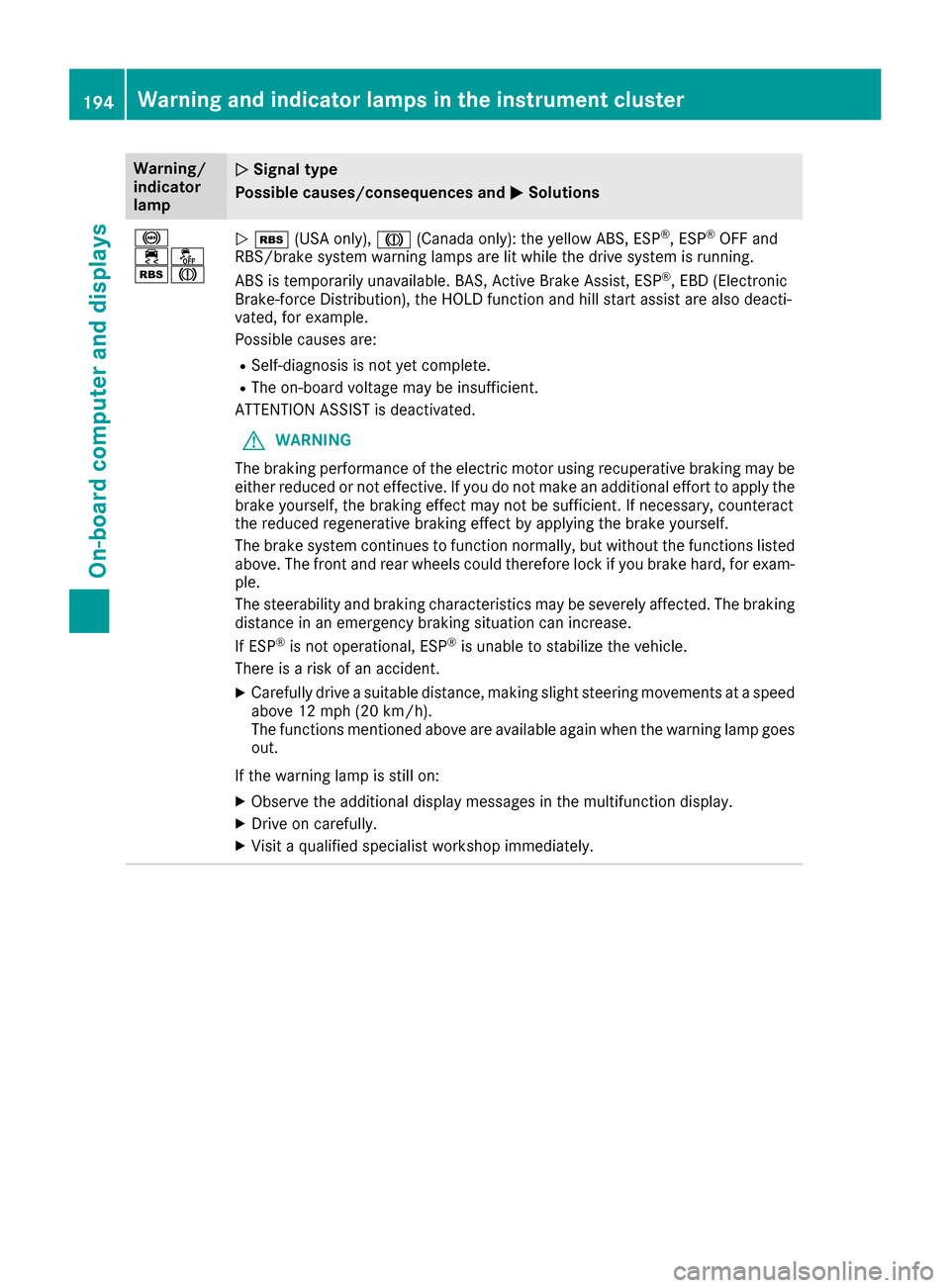
00C6 (USA only), 004D(Canada only): the yellow ABS, ESP ®
, ESP ®
OFF and
RBS/brake system warning lamps are lit while the drive system is running.
ABS is temporarily unavailable. BAS, Active Brake Assist, ESP ®
, EBD (Electronic
Brake-force Distribution), the HOLD function and hill start assist are also deacti-
vated, for example.
Possible causes are:
R Self-diagnosis is not yet complete.
R The on-board voltage may be insufficient.
ATTENTION ASSIST is deactivated.
G WARNING
The braking performance of the electric motor using recuperative braking may be
either reduced or not effective. If you do not make an additional effort to apply the brake yourself, the braking effect may not be sufficient. If necessary, counteract
the reduced regenerative braking effect by applying the brake yourself.
The brake system continues to function normally, but without the functions listed
above. The front and rear wheels could therefore lock if you brake hard, for exam- ple.
The steerability and braking characteristics may be severely affected. The braking
distance in an emergency braking situation can increase.
If ESP ®
is not operational, ESP ®
is unable to stabilize the vehicle.
There is a risk of an accident.
X Carefully drive a suitable distance, making slight steering movements at a speed
above 12 mph (20 km/h).
The functions mentioned above are available again when the warning lamp goes
out.
If the warning lamp is still on: X Observe the additional display messages in the multifunction display.
X Drive on carefully.
X Visit a qualified specialist workshop immediately. 194
Warning and indicator lamps in the instrument clusterOn-board computer and displays
Page 197 of 290
Warning/
indicator
lamp
0051 0051
Signal type
Possible causes/consequences and 0050
0050Solutions 0025
00E500BB
00C6004D
0051
00C6 (USA only), 004D(Canada only): the yellow ABS, ESP ®
, ESP ®
OFF and
RBS/brake system warning lamps are lit while the drive system is running.
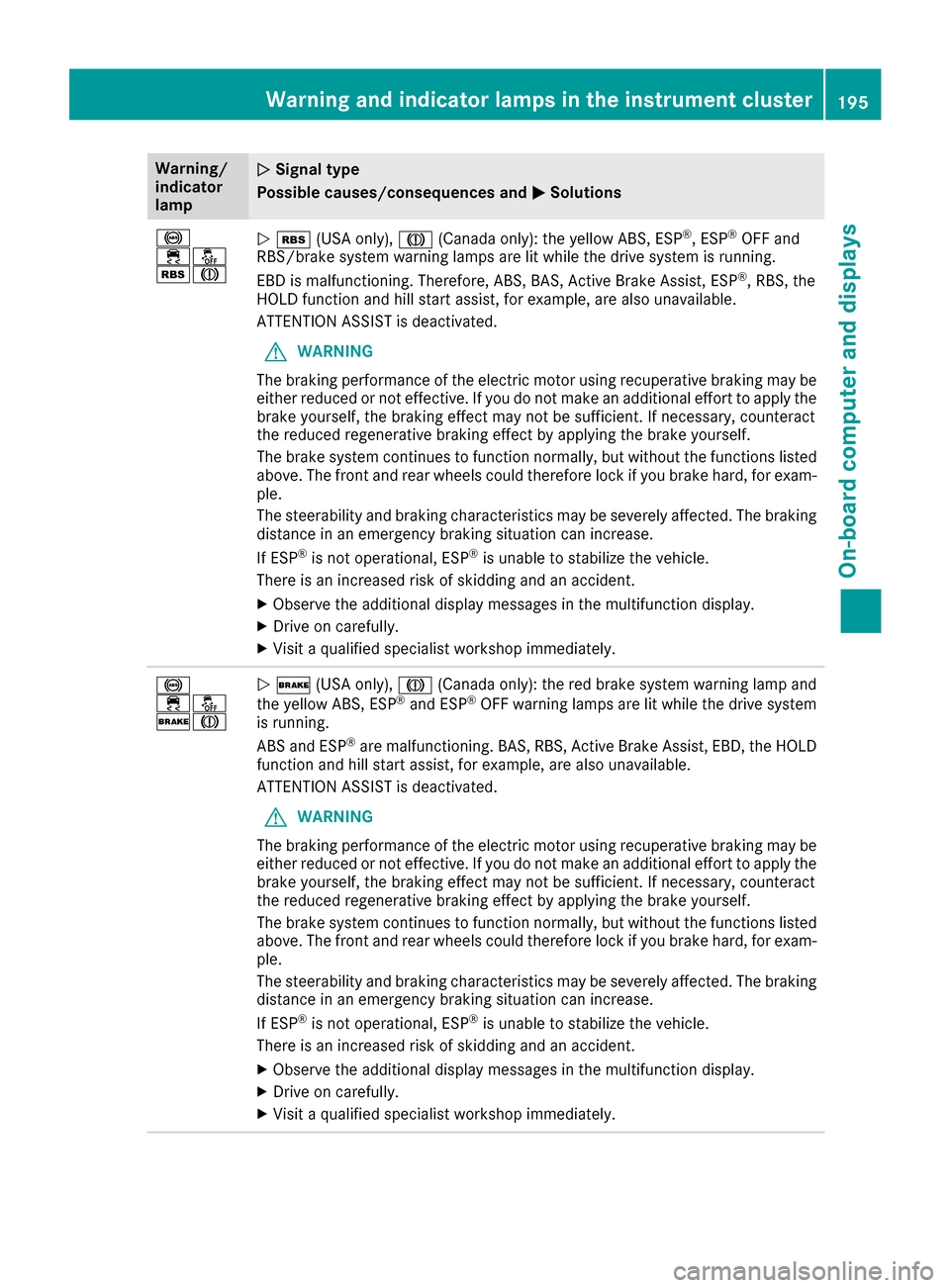
EBD is malfunctioning. Therefore, ABS, BAS, Active Brake Assist, ESP ®
, RBS, the
HOLD function and hill start assist, for example, are also unavailable.
ATTENTION ASSIST is deactivated.
G WARNING
The braking performance of the electric motor using recuperative braking may be
either reduced or not effective. If you do not make an additional effort to apply the brake yourself, the braking effect may not be sufficient. If necessary, counteract
the reduced regenerative braking effect by applying the brake yourself.
The brake system continues to function normally, but without the functions listed
above. The front and rear wheels could therefore lock if you brake hard, for exam- ple.
The steerability and braking characteristics may be severely affected. The braking
distance in an emergency braking situation can increase.
If ESP ®
is not operational, ESP ®
is unable to stabilize the vehicle.
There is an increased risk of skidding and an accident.
X Observe the additional display messages in the multifunction display.
X Drive on carefully.
X Visit a qualified specialist workshop immediately. 0025
00E500BB
0027004D
0051
0027 (USA only), 004D(Canada only): the red brake system warning lamp and
the yellow ABS, ESP ®
and ESP ®
OFF warning lamps are lit while the drive system
is running.
ABS and ESP ®
are malfunctioning. BAS, RBS, Active Brake Assist, EBD, the HOLD
function and hill start assist, for example, are also unavailable.
ATTENTION ASSIST is deactivated.
G WARNING
The braking performance of the electric motor using recuperative braking may be
either reduced or not effective. If you do not make an additional effort to apply the brake yourself, the braking effect may not be sufficient. If necessary, counteract
the reduced regenerative braking effect by applying the brake yourself.
The brake system continues to function normally, but without the functions listed
above. The front and rear wheels could therefore lock if you brake hard, for exam- ple.
The steerability and braking characteristics may be severely affected. The braking
distance in an emergency braking situation can increase.
If ESP ®
is not operational, ESP ®
is unable to stabilize the vehicle.
There is an increased risk of skidding and an accident.
X Observe the additional display messages in the multifunction display.
X Drive on carefully.
X Visit a qualified specialist workshop immediately. Warning and indicator lamps in the instrument cluster
195On-board computer and displays Z
Page 209 of 290
Loading guidelines
G
WARNING
If objects, luggage or loads are not secured or not secured sufficiently, they could slip, tip
over or be flung around and thereby hit vehicle
occupants. There is a risk of injury, particu-
larly in the event of sudden braking or a sud-
den change in direction.
Always store objects so that they cannot be
flung around. Secure objects, luggage or
loads against slipping or tipping before the
journey.
The handling characteristics of a laden vehicle
are dependent on the distribution of the load
within the vehicle.
Observe the following notes on loading and
transporting a load:
R Never exceed the maximum permissible
gross vehicle mass or the gross axle weight
rating for the vehicle (including occupants).
The values are specified on the vehicle iden-
tification plate on the B-pillar of the driver's
door.
R The cargo compartment is the preferred place
to carry objects.
R Position heavy loads as far forwards as pos-
sible and as low down in the cargo compart-
ment as possible.
R The load must not protrude above the upper
edge of the seat backrests.
R Always place the load against the rear or front
seat backrests. Make sure that the seat
backrests are securely locked into place.
R Always place the load behind unoccupied
seats if possible.
R Use the cargo tie-down rings and the parcel
nets to transport loads and luggage.
R Use cargo tie-down rings and fastening mate-
rials appropriate for the weight and size of the load.
R Hook in the cargo net when loading.
R The maximum load capacity of the stowage
well under the cargo compartment floor is
55 lbs (25 kg).
R Secure the lo ad with sufficiently strong and
wear-resistant tie-downs. Pad sharp edges for protection. !
Do not position the load on one part of the
folding cargo compartment floor only. The
maximum load capacity of the folding cargo
compartment floor is 220 lbs (100 kg). Dis-
tribute the weight evenly to avoid damaging
the cargo compartment floor. Place a solid
board under the load if necessary. Please
note that the load on the cargo compartment floor will be increased when the load is lashed
down. Stowage areas
Stowage spaces
Important safety notes G
WARNING
If you transport objects in the vehicle interior and these are not adequately secured, they
could slip or be flung around and thereby
strike vehicle occupants. In addition, cup
holders, open stowage spaces and mobile
phone brackets may not always be able to
hold the objects placed in them in the event of an accident. There is a risk of injury, particu-
larly in the event of sharp braking or sudden
changes of direction.
R Always stow objects in such a way that they
cannot be tossed about in these or similar
situations.
R Always make sure that objects do not pro-
trude out of the stowage spaces, luggage
nets or stowage nets.
R Ensure that closable stowage spaces are
shut before beginning your journey.
R Always stow and secure heavy, hard, poin-
ted, sharp-edged, fragile or large objects in
the cargo compartment.
Observe the loading guidelines (Y page 207). Stowage areas
207Stowage and features Z
Page 213 of 290
X
Slide locking mechanism 0087in the direction
of the arrow.
X Swing flap 0044fully to the side.
Flap 0044is held open by a magnet.
X To close: swing flap 0044in the cargo compart-
ment back until it engages.
X Fold armrest 0043up fully if necessary.
Observe the loading guidelines (Y page 207).Cargo compartment enlargement
Important safety notes G
WARNING
If the rear bench seat/rear seat and seat
backrest are not engaged they could fold for- wards, e.g. when braking suddenly or in the
event of an accident.
R The vehicle occupant would thereby be
pushed into the seat belt by the rear bench
seat/rear seat or by the seat backrest. The
seat belt can no longer offer the intended
level of protection and could even cause
injuries.
R Objects or loads in the trunk/cargo com-
partment cannot be restrained by the seat
backrest.
There is an increased risk of injury.
Before every trip, make sure that the seat
backrests and the rear bench seat/rear seat
are engaged.
! Before folding the backrest in the rear com-
partment forwards, make sure that the rear
compartment armrest and the cupholder are
folded in. They may otherwise be damaged.
Observe the loading guidelines (Y page 207).
The left-hand and right-hand rear seat backrests can be folded forwards separately to increase
the cargo compartment capacity. Folding the rear seat backrest forwards
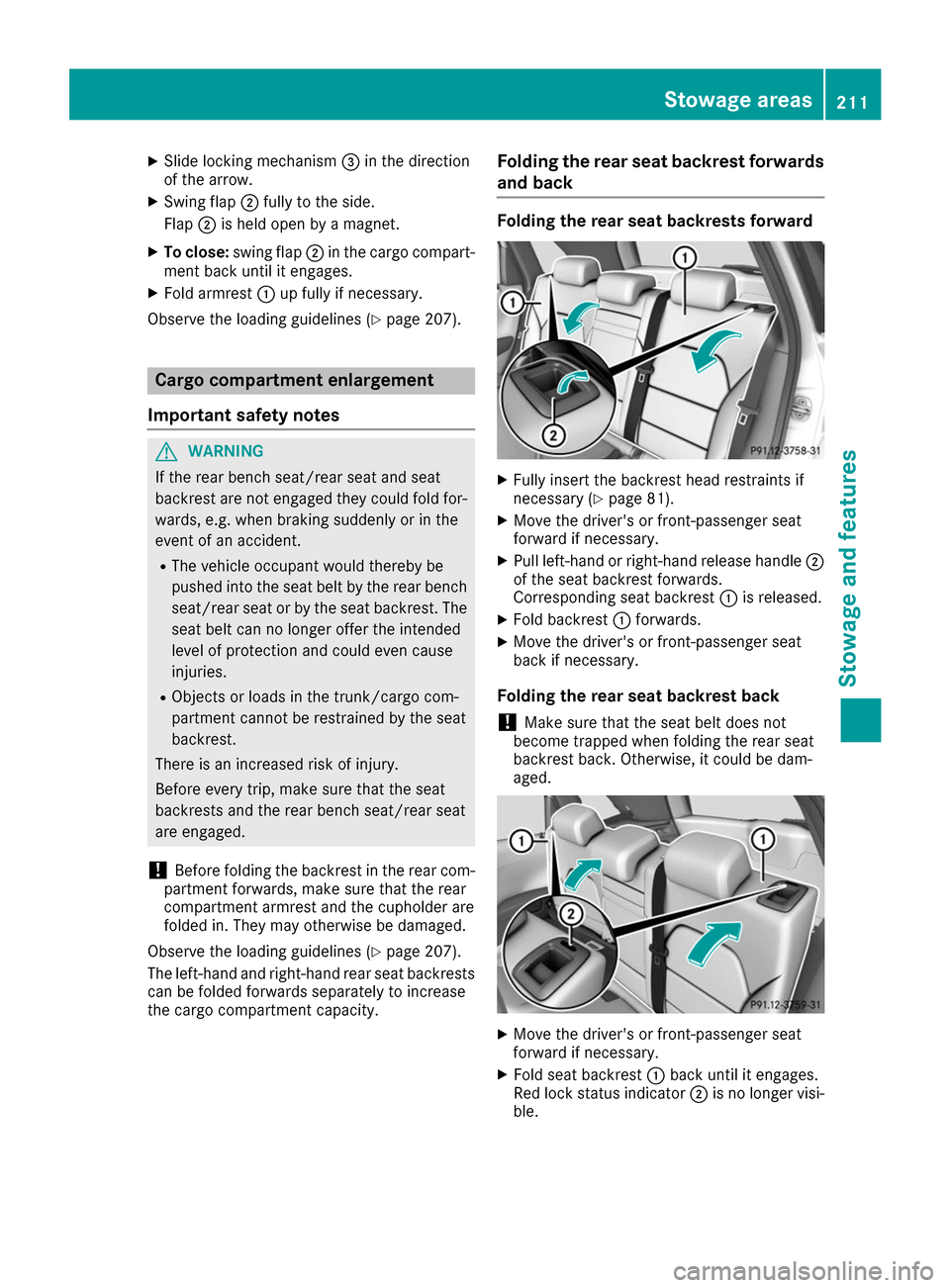
and back Folding the rear seat backrests forward
X
Fully insert the backrest head restraints if
necessary (Y page 81).
X Move the driver's or front-passenger seat
forward if necessary.
X Pull left-hand or right-hand release handle 0044
of the seat backrest forwards.
Corresponding seat backrest 0043is released.
X Fold backrest 0043forwards.
X Move the driver's or front-passenger seat
back if necessary.
Folding the rear seat backrest back
! Make sure that the seat belt does not
become trapped when folding the rear seat
backrest back. Otherwise, it could be dam-
aged. X
Move the driver's or front-passenger seat
forward if necessary.
X Fold seat backrest 0043back until it engages.
Red lock status indicator 0044is no longer visi-
ble. Stowage areas
211Stowage and features Z
Page 217 of 290
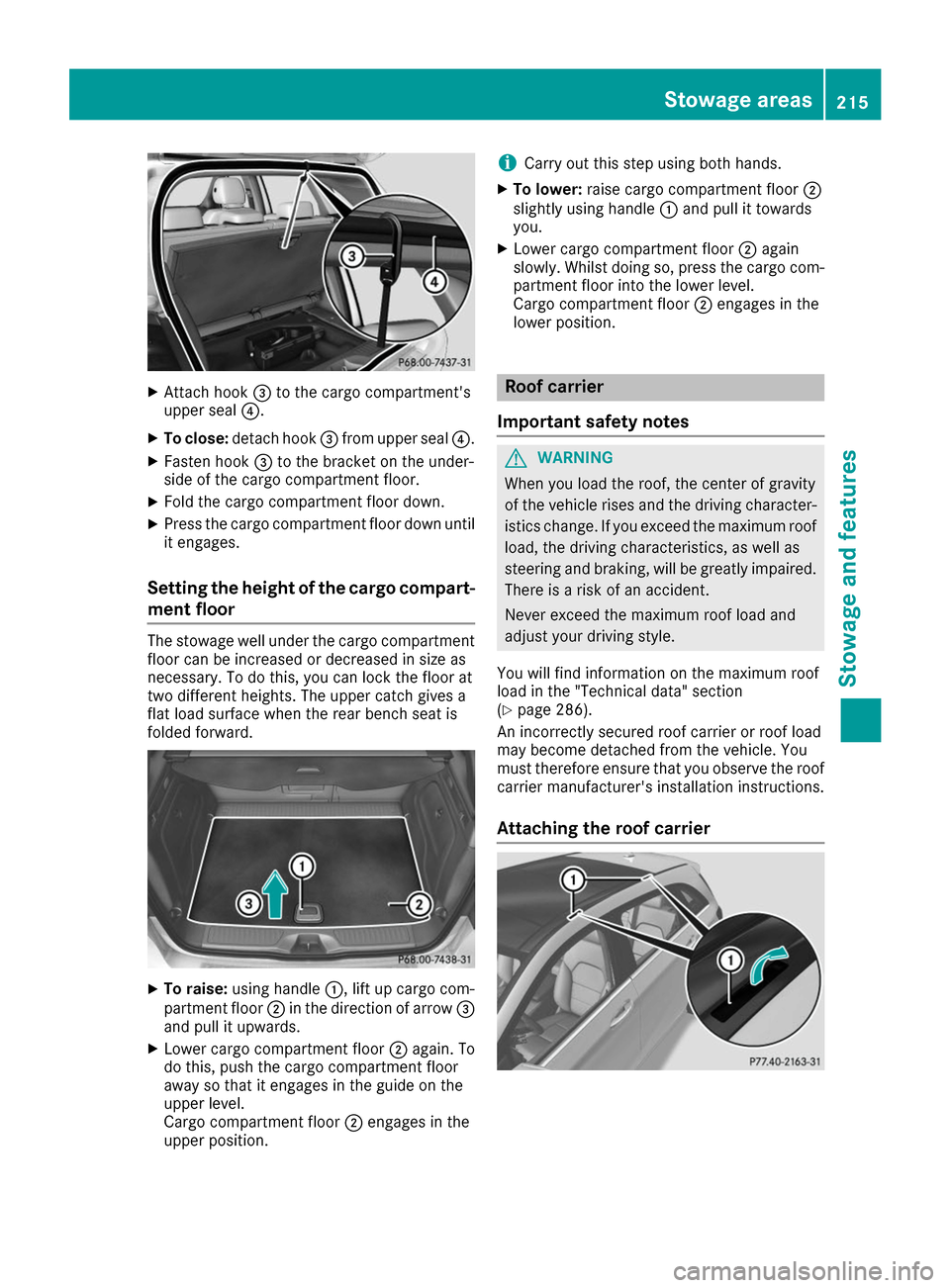
X
Attach hook 0087to the cargo compartment's
upper seal 0085.
X To close: detach hook 0087from upper seal 0085.
X Fasten hook 0087to the bracket on the under-
side of the cargo compartment floor.
X Fold the cargo compartment floor down.
X Press the cargo compartment floor down until
it engages.
Setting the height of the cargo compart- ment floor The stowage well under the cargo compartment
floor can be increased or decreased in size as
necessary. To do this, you can lock the floor at
two different heights. The upper catch gives a
flat load surface when the rear bench seat is
folded forward. X
To raise: using handle 0043, lift up cargo com-
partment floor 0044in the direction of arrow 0087
and pull it upwards.
X Lower cargo compartment floor 0044again. To
do this, push the cargo compartment floor
away so that it engages in the guide on the
upper level.
Cargo compartment floor 0044engages in the
upper position. i
Carry out this step using both hands.
X To lower: raise cargo compartment floor 0044
slightly using handle 0043and pull it towards
you.
X Lower cargo compartment floor 0044again
slowly. Whilst doing so, press the cargo com-
partment floor into the lower level.
Cargo compartment floor 0044engages in the
lower position. Roof carrier
Important safety notes G
WARNING
When you load the roof, the center of gravity
of the vehicle rises and the driving character- istics change. If you exceed the maximum roof
load, the driving characteristics, as well as
steering and braking, will be greatly impaired.There is a risk of an accident.
Never exceed the maximum roof load and
adjust your driving style.
You will find information on the maximum roof
load in the "Technical data" section
(Y page 286).
An incorrectly secured roof carrier or roof load
may become detached from the vehicle. You
must therefore ensure that you observe the roof
carrier manufacturer's installation instructions.
Attaching the roof carrier Stowage areas
215Stowage an d features Z
Page 220 of 290
X
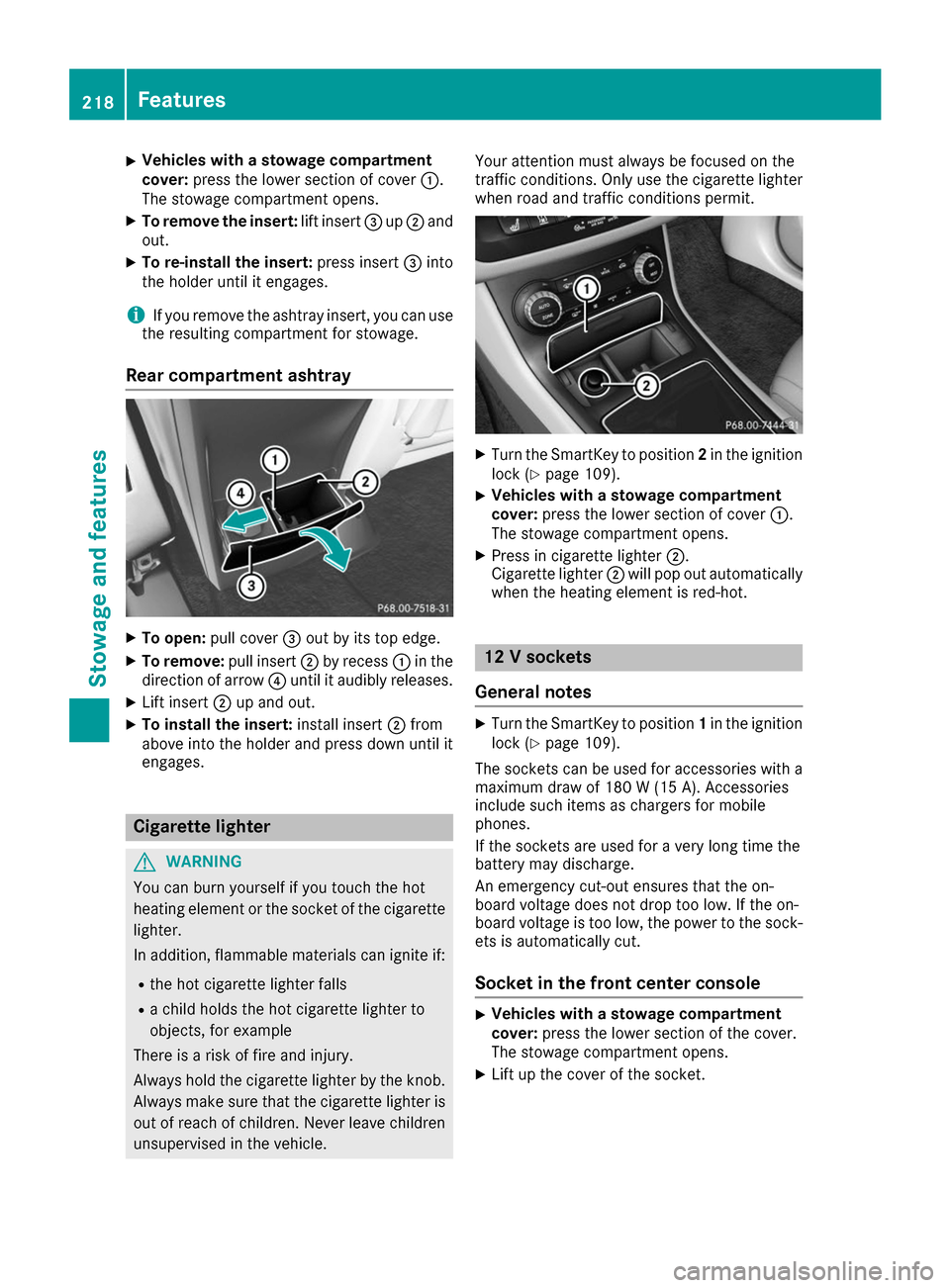
Vehicles with a stowage compartment
cover:
press the lower section of cover 0043.
The stowage compartment opens.
X To remove the insert: lift insert0087up0044 and
out.
X To re-install the insert: press insert0087into
the holder until it engages.
i If you remove the ashtray insert, you can use
the resulting compartment for stowage.
Rear compartment ashtray X
To open: pull cover 0087out by its top edge.
X To remove: pull insert0044by recess 0043in the
direction of arrow 0085until it audibly releases.
X Lift insert 0044up and out.
X To install the insert: install insert0044from
above into the holder and press down until it
engages. Cigarette lighter
G
WARNING
You can burn yourself if you touch the hot
heating element or the socket of the cigarette lighter.
In addition, flammable materials can ignite if:
R the hot cigarette lighter falls
R a child holds the hot cigarette lighter to
objects, for example
There is a risk of fire and injury.
Always hold the cigarette lighter by the knob.
Always make sure that the cigarette lighter is
out of reach of children. Never leave children unsupervised in the vehicle. Your attention must always be focused on the
traffic conditions. Only use the cigarette lighter when road and traffic conditions permit. X
Turn the SmartKey to position 2in the ignition
lock (Y page 109).
X Vehicles with a stowage compartment
cover: press the lower section of cover 0043.
The stowage compartment opens.
X Press in cigarette lighter 0044.
Cigarette lighter 0044will pop out automatically
when the heating element is red-hot. 12 V sockets
General notes X
Turn the SmartKey to position 1in the ignition
lock (Y page 109).
The sockets can be used for accessories with a maximum draw of 180 W (15 A). Accessories
include such items as chargers for mobile
phones.
If the sockets are used for a very long time the
battery may discharge.
An emergency cut-out ensures that the on-
board voltage does not drop too low. If the on-
board voltage is too low, the power to the sock-
ets is automatically cut.
Socket in the front center console X
Vehicles with a stowage compartment
cover:
press the lower section of the cover.
The stowage compartment opens.
X Lift up the cover of the socket. 218
FeaturesStowage and features
Page 225 of 290
The destination download function is available
if:
R the vehicle is equipped with a navigation sys-
tem.
R the relevant mobile phone network is availa-
ble and data transfer is possible.
Route Assistance This service is part of the mbrace PLUS Packageand cannot be purchased separately.
You can use the Route Assistance function even
if the vehicle is not equipped with a navigation
system.
Within the framework of this service, you receive a professional and reliable form of navigation
support without having to leave your vehicle.
The customer service representative finds a
suitable route depending on your vehicle's cur-
rent position and the desired destination. You
will then be guided live through the current route section.
Search & Send General notes
To use "Search & Send", your vehicle must be
equipped with mbrace and a navigation system. Additionally, an mbrace service subscription
must be completed.
"Search & Send" is a destination entry service. A
destination address found on Google Maps™
can be transferred via mbrace directly to your
vehicle's navigation system.
Specifying and sending the destination
address
X Go to the website http://maps.google.com
and enter a destination address into the entry
field.
X To send the destination address to the e-
mail address of your mbrace account:
click on the corresponding button on the web-
site.
Example:
If you select 'Send to vehicle' and then
'Mercedes-Benz', the destination address will be sent to your vehicle.
X When the "Send" dialog window appears: Enter the e-mail address you specified when
setting up your mbrace account into the cor-
responding field.
X Click "Send".
Information on specific commands such as
"Address entry" or "Send" can be found on the
website.
Calling up a transmitted destination
address
X Turn the SmartKey to position 2in the ignition
lock (Y page 109).
The transmitted destination address is loaded into the vehicle's navigation system.
A display message appears, asking whether
navigation should be started.
X SelectYes Yesby turning 3or sliding 1
the controller and confirm with 7.
The system calculates the route and subse-
quently starts the route guidance with the
address entered.
If you select No Nothe address can be stored in
the address book.
If you have sent more than one destination
address, each individual destination must be
confirmed separately.
Destination addresses are loaded in the same
order as the order in which they were sent.
If you own multiple Mercedes-Benz vehicles with
mbrace and activated mbrace accounts:
If multiple vehicles are registered under the
same e-mail address, the destination will be
sent to all the vehicles.
Vehicle remote opening You can use the vehicle remote opening if you
have unintentionally locked your vehicle and a
replacement SmartKey is not available.
The vehicle can be opened by the Mercedes-
Benz Customer Assistance Center.
The vehicle can be immediately opened
remotely within four days of the ignition being
turned off. After this time, the remote unlocking
may be delayed by 15 to 60 minutes. After
30 days, the vehicle can no longer be opened
remotely.
The vehicle remote unlocking feature is availa-
ble if the relevant mobile phone network is avail- able and a data connection is possible.
X Contact the following service hotlines: Features
223Stowage and features Z